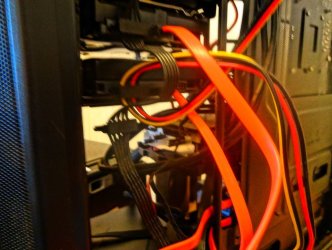
Solved Fractal Core 2500 Computer Case

I think that's all of them , theres also a sata cable adapter with a 4 pin plug on the other end . Which there is a photo of on the first page . Thank you very much for all your help .
 
Last edited:

My Computer

Computer type
PC/Desktop
Computer Manufacturer/Model Number
Custom build
OS
Microsoft Windows 10 Pro 64-bit 17134 Multiprocessor Free
CPU
Intel(R) Core(TM) i7-4790K CPU @ 4.00GHz
Motherboard
MSI Z97 PC Mate(MS-7850)
Memory
16.00 GB
Graphics Card(s)
Intel(R) HD Graphics 4600
Sound Card
(1) High Definition Audio Device (2) USB Audio Device
Screen Resolution
1920 x 1080 x 32 bits (4294967296 colors) @ 60 Hz
Hard Drives
ST10000VN0004-2GS11L
Antivirus
Kaspersky
Browser
Plusnet
Hello all , I think this the the Amazon .uk version of the adapter ThrashZone said I needed . its a bit dearer than I expected .
 

Attachments

  • 15pin to 6pin price.PNG
    15pin to 6pin price.PNG
    44.2 KB · Views: 1

My Computer

Computer type
PC/Desktop
Computer Manufacturer/Model Number
Custom build
OS
Microsoft Windows 10 Pro 64-bit 17134 Multiprocessor Free
CPU
Intel(R) Core(TM) i7-4790K CPU @ 4.00GHz
Motherboard
MSI Z97 PC Mate(MS-7850)
Memory
16.00 GB
Graphics Card(s)
Intel(R) HD Graphics 4600
Sound Card
(1) High Definition Audio Device (2) USB Audio Device
Screen Resolution
1920 x 1080 x 32 bits (4294967296 colors) @ 60 Hz
Hard Drives
ST10000VN0004-2GS11L
Antivirus
Kaspersky
Browser
Plusnet
You certainly don't need to pay that much - the cable that you have linked to can be had for circa £3 on eBay delivered. Looking at the cables you have posted pics of I think it is the first one that you need - can not tell for certain but it looks about right. I am guessing that your power supply is modular as well by looking at the cables so the next thing is to take the side off the case and see if that is case. Assuming that it is then you need to plug the end marked IB03 into the power supply and connect the other end to the fan controller and connect the fans to said controller.
 

My Computer

Computer type
PC/Desktop
Computer Manufacturer/Model Number
Custom Build
OS
Windows 7 64bit
CPU
Intel(R) Core(TM) i7-4770K CPU @ 3.50GHz
Motherboard
Gigabyte Technology Co., Ltd. Z87-DS3H
Memory
Corsair XMS3 16GB kit (2x8GB) DDR3 1333MHz Unbuffered CL9 DI
Graphics Card(s)
(1) Intel(R) HD Graphics 4600 (2) NVIDIA GeForce GT 640
Hard Drives
(1) Samsung SSD 840 EVO 250G SCSI Disk Device (2) Samsung SSD 850 EVO 250G SCSI Disk Device (3) WDC WD10EZEX-00KUWA0 SCSI Disk Device
Antivirus
MSE
Browser
Pale Moon
You certainly don't need to pay that much - the cable that you have linked to can be had for circa £3 on eBay delivered. Looking at the cables you have posted pics of I think it is the first one that you need - can not tell for certain but it looks about right. I am guessing that your power supply is modular as well by looking at the cables so the next thing is to take the side off the case and see if that is case. Assuming that it is then you need to plug the end marked IB03 into the power supply and connect the other end to the fan controller and connect the fans to said controller.

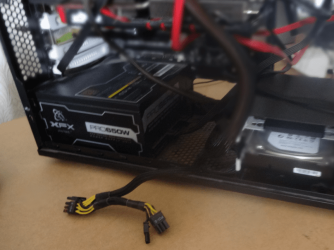
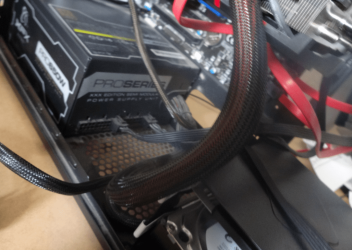
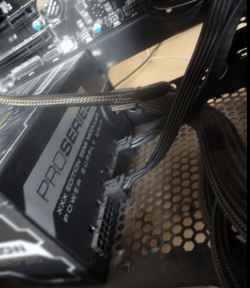
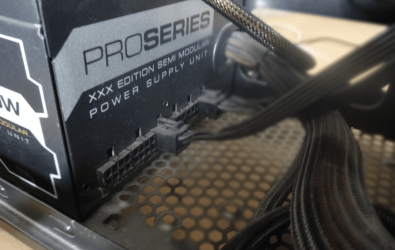
I was going to upload some pics of my computer power supply , but kept forgetting here we go .
 

My Computer

Computer type
PC/Desktop
Computer Manufacturer/Model Number
Custom build
OS
Microsoft Windows 10 Pro 64-bit 17134 Multiprocessor Free
CPU
Intel(R) Core(TM) i7-4790K CPU @ 4.00GHz
Motherboard
MSI Z97 PC Mate(MS-7850)
Memory
16.00 GB
Graphics Card(s)
Intel(R) HD Graphics 4600
Sound Card
(1) High Definition Audio Device (2) USB Audio Device
Screen Resolution
1920 x 1080 x 32 bits (4294967296 colors) @ 60 Hz
Hard Drives
ST10000VN0004-2GS11L
Antivirus
Kaspersky
Browser
Plusnet
I was going to upload some pics of my computer power supply , but kept forgetting here we go .
 

Attachments

  • desktop power 1.PNG
    desktop power 1.PNG
    203.7 KB · Views: 2
  • desktop power 2.PNG
    desktop power 2.PNG
    380.6 KB · Views: 2
  • desktop power 3.PNG
    desktop power 3.PNG
    187.8 KB · Views: 1
  • desktop power 4.PNG
    desktop power 4.PNG
    260.5 KB · Views: 1

My Computer

Computer type
PC/Desktop
Computer Manufacturer/Model Number
Custom build
OS
Microsoft Windows 10 Pro 64-bit 17134 Multiprocessor Free
CPU
Intel(R) Core(TM) i7-4790K CPU @ 4.00GHz
Motherboard
MSI Z97 PC Mate(MS-7850)
Memory
16.00 GB
Graphics Card(s)
Intel(R) HD Graphics 4600
Sound Card
(1) High Definition Audio Device (2) USB Audio Device
Screen Resolution
1920 x 1080 x 32 bits (4294967296 colors) @ 60 Hz
Hard Drives
ST10000VN0004-2GS11L
Antivirus
Kaspersky
Browser
Plusnet
in the first pic there is a double lead , both have 8 pins .Maybe they are for extra fans I don't know .
 
Last edited:

My Computer

Computer type
PC/Desktop
Computer Manufacturer/Model Number
Custom build
OS
Microsoft Windows 10 Pro 64-bit 17134 Multiprocessor Free
CPU
Intel(R) Core(TM) i7-4790K CPU @ 4.00GHz
Motherboard
MSI Z97 PC Mate(MS-7850)
Memory
16.00 GB
Graphics Card(s)
Intel(R) HD Graphics 4600
Sound Card
(1) High Definition Audio Device (2) USB Audio Device
Screen Resolution
1920 x 1080 x 32 bits (4294967296 colors) @ 60 Hz
Hard Drives
ST10000VN0004-2GS11L
Antivirus
Kaspersky
Browser
Plusnet
in this last pic I think him on the case review video mentioned something about fitting an SSD Drive . Bit late now though , its the first computer i've built so it probly won't be used now .
 

Attachments

  • ssd port.PNG
    ssd port.PNG
    219.5 KB · Views: 1

My Computer

Computer type
PC/Desktop
Computer Manufacturer/Model Number
Custom build
OS
Microsoft Windows 10 Pro 64-bit 17134 Multiprocessor Free
CPU
Intel(R) Core(TM) i7-4790K CPU @ 4.00GHz
Motherboard
MSI Z97 PC Mate(MS-7850)
Memory
16.00 GB
Graphics Card(s)
Intel(R) HD Graphics 4600
Sound Card
(1) High Definition Audio Device (2) USB Audio Device
Screen Resolution
1920 x 1080 x 32 bits (4294967296 colors) @ 60 Hz
Hard Drives
ST10000VN0004-2GS11L
Antivirus
Kaspersky
Browser
Plusnet
The cable in post #22 looks like it's for taking power from a Sata connector to a graphic card ie not suitable (some gfx cards need aux 12V power). As has been mentioned, there should be plenty of leads supplied with the psu (unless the OP has a massively complex system with many HDDs), so it's just a case of using a psu > sata lead to connect to the fan controller and hooking up the case fans.

The only complication that could arise is if the case fan connectors don't match the fan controller ie the fans have 4 pin molex. Most fans nowadays have connectors that plug into the mobo, so I'm guessing the fan controller has the same.

The easiest solution is to plug the case fans into the mobo - if there are enough sockets. The BIOS detects the cpu temp and adjusts the cpu fan rpm accordingly. Case fans plugged into the mobo would also be controlled in this fashion - speeding up and slowing down as required.

I use my pcs for 3D rendering, and they get quite hot. With a conventional setup, the cpu HSF just dumped the heat in the case, thus requiring several case fans for cooling. More fans means more dust pulled into the box - requiring frequent cleaning. Recently I swapped out my HSFs for water cooling, and the cpu heat is dumped outside the case. This meant I could turn off (or down) some of the case fans. My cases now no longer fill up with dust/fluff.

These are the water coolers I use
Cooler Master: Seidon 120V
 

My Computer

Computer type
PC/Desktop
Computer Manufacturer/Model Number
self build
OS
W10 Pro x64, W7 Pro x64 in VMware
CPU
i7 2600K @ 4.4GHz
Motherboard
MSI Z68A-GD80
Memory
8GB Mushkin @ 1600MHz
Graphics Card(s)
Nvidia GTX 750 Ti
Monitor(s) Displays
27" Benq + 27" LG
Screen Resolution
1080p
Hard Drives
500GB 850 Evo SSD + 3 * 2TB Seagate
PSU
EVGA 650 GS modular
Case
Antec 300
Cooling
Seidon 120V v2
Internet Speed
62/18 Mbps
Antivirus
Defender (W10) + MSE (W7)
Browser
Firefox
Hi,
Yes it's labeled PCI-E which is for a graphic's card not sata for the additional fan controller
You'd have to use sata or molex depending on which ones you have on the bundled wiring harness
I can't get a good picture of the plug labels on the power supply but they should have print on what they are for.
 

My Computer

Computer type
PC/Desktop
Computer Manufacturer/Model Number
Custom assembled by me :}
OS
Win-7-Pro64bit 7-H-Prem-64bit
CPU
i7-5930K 2nd i9-9940x both water blocked VRM's too
Motherboard
ASUS SABERTOOTH X99 2nd ASUS x299 Apex
Memory
Trident-z 3200C14 2nd Trident-z 3600C16
Graphics Card(s)
EVGA 1080ti ftw3 2nd Titan Xp both water blocked
Sound Card
Built-in Realtek
Monitor(s) Displays
1-AOC G2460PG 24"G-Sync 144Hz/ 2nd 1-ASUS VG248QE 24" 144Hz
Screen Resolution
1920 x 1080 144Hz
Hard Drives
2-Samsung M.2 Evo & Evo Plus
2-Samsung 850 EVO 500GB SSD's/ 3-2.5 W.D. Black 1tb-&3-1tb/3-3.5 WD Black 1tb hdd's
PSU
EVGA SuperNOVA 1000-P2 2nd 1200-P2
Case
2-Corsair Obsidian Series 450D Black ATX Mid Tower
Cooling
Custom water loops
Keyboard
Logitech G710+/ 2nd Logitech G910
Mouse
2-RedDragon M901 Perdition 16400 dpi Gaming mouse = wired
Internet Speed
Comcast Ping 19ms 89.31mbps download speed 6.12mbps upload
Antivirus
Malwarebytes Pro/ Superantispyware Pro
Browser
FireFox & Pale moon
Other Info
2nd ASUS X299 Apex/Intel i9-9940x with Custom water loop/7H-Prem-x64/Corsair 450D case/Ram Trident-z 3600C16 4x8gb / Samsung970Evo plus 500gb SSD/Dual ssd EZ swap evo/PSU EVGA SuperNova 1200w-P2 80+Platinum/GPU Titan Xp /8-ML-140 on push-pull on 2-280GTX rads
Hi,
Yes it's labeled PCI-E which is for a graphic's card not sata for the additional fan controller
You'd have to use sata or molex depending on which ones you have on the bundled wiring harness
I can't get a good picture of the plug labels on the power supply but they should have print on what they are for.

It says PCI-E on both plugs .
 

My Computer

Computer type
PC/Desktop
Computer Manufacturer/Model Number
Custom build
OS
Microsoft Windows 10 Pro 64-bit 17134 Multiprocessor Free
CPU
Intel(R) Core(TM) i7-4790K CPU @ 4.00GHz
Motherboard
MSI Z97 PC Mate(MS-7850)
Memory
16.00 GB
Graphics Card(s)
Intel(R) HD Graphics 4600
Sound Card
(1) High Definition Audio Device (2) USB Audio Device
Screen Resolution
1920 x 1080 x 32 bits (4294967296 colors) @ 60 Hz
Hard Drives
ST10000VN0004-2GS11L
Antivirus
Kaspersky
Browser
Plusnet
Hi,
Some graphic's cards have 2-6 pin or 2-8 pin connections to use :)
 

My Computer

Computer type
PC/Desktop
Computer Manufacturer/Model Number
Custom assembled by me :}
OS
Win-7-Pro64bit 7-H-Prem-64bit
CPU
i7-5930K 2nd i9-9940x both water blocked VRM's too
Motherboard
ASUS SABERTOOTH X99 2nd ASUS x299 Apex
Memory
Trident-z 3200C14 2nd Trident-z 3600C16
Graphics Card(s)
EVGA 1080ti ftw3 2nd Titan Xp both water blocked
Sound Card
Built-in Realtek
Monitor(s) Displays
1-AOC G2460PG 24"G-Sync 144Hz/ 2nd 1-ASUS VG248QE 24" 144Hz
Screen Resolution
1920 x 1080 144Hz
Hard Drives
2-Samsung M.2 Evo & Evo Plus
2-Samsung 850 EVO 500GB SSD's/ 3-2.5 W.D. Black 1tb-&3-1tb/3-3.5 WD Black 1tb hdd's
PSU
EVGA SuperNOVA 1000-P2 2nd 1200-P2
Case
2-Corsair Obsidian Series 450D Black ATX Mid Tower
Cooling
Custom water loops
Keyboard
Logitech G710+/ 2nd Logitech G910
Mouse
2-RedDragon M901 Perdition 16400 dpi Gaming mouse = wired
Internet Speed
Comcast Ping 19ms 89.31mbps download speed 6.12mbps upload
Antivirus
Malwarebytes Pro/ Superantispyware Pro
Browser
FireFox & Pale moon
Other Info
2nd ASUS X299 Apex/Intel i9-9940x with Custom water loop/7H-Prem-x64/Corsair 450D case/Ram Trident-z 3600C16 4x8gb / Samsung970Evo plus 500gb SSD/Dual ssd EZ swap evo/PSU EVGA SuperNova 1200w-P2 80+Platinum/GPU Titan Xp /8-ML-140 on push-pull on 2-280GTX rads
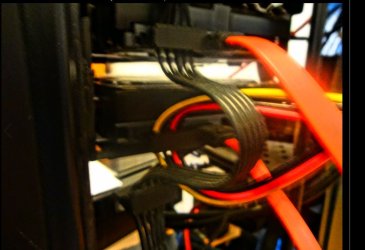
I think I might have sorted the problem , one of the power cables to the sata hard drives etc has a spare male sata plug . I put the female and 3 male sata splitter cable ( I posted a pic earlier ) into the spare and plugged a spare sata cable and the spare splitter cable into a spare harddrive I had nothing worked I couldn't restart etc . I had to shut the pc down by keeping the start button in , restarted . Nothing was showing as a new drive I mean , so I shut down and put windows 7 back in ( I'm on 10 now ) when I checked the harddrives I could copy stuff from 7 to here ( horrying ) , so it could work what do you think .
 

My Computer

Computer type
PC/Desktop
Computer Manufacturer/Model Number
Custom build
OS
Microsoft Windows 10 Pro 64-bit 17134 Multiprocessor Free
CPU
Intel(R) Core(TM) i7-4790K CPU @ 4.00GHz
Motherboard
MSI Z97 PC Mate(MS-7850)
Memory
16.00 GB
Graphics Card(s)
Intel(R) HD Graphics 4600
Sound Card
(1) High Definition Audio Device (2) USB Audio Device
Screen Resolution
1920 x 1080 x 32 bits (4294967296 colors) @ 60 Hz
Hard Drives
ST10000VN0004-2GS11L
Antivirus
Kaspersky
Browser
Plusnet
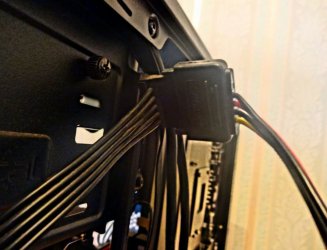
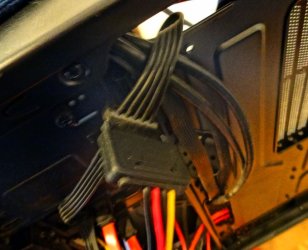
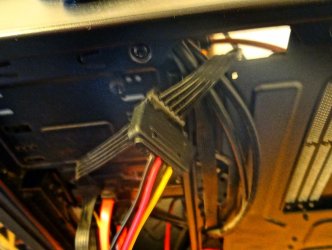
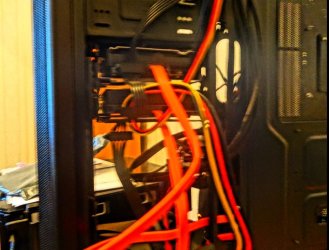
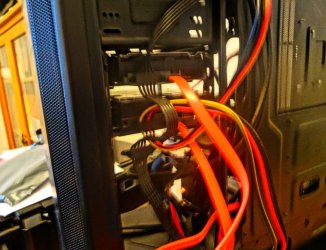
I've tried to take some pics , but the light ai'nt kind even with the light on .The pics are the power extention lead for the hardrives etc and the 1 female sata and 3 male splitter cable , you lot will understand what I mean .
 

Attachments

  • Power Splitter  5.JPG
    Power Splitter 5.JPG
    76.4 KB · Views: 1
  • Power Splitter  4.JPG
    Power Splitter 4.JPG
    91.6 KB · Views: 1
  • Power Splitter 3.JPG
    Power Splitter 3.JPG
    72.8 KB · Views: 1
  • Power Splitter 2.JPG
    Power Splitter 2.JPG
    75.5 KB · Views: 1
  • Power Splitter 1.JPG
    Power Splitter 1.JPG
    79.2 KB · Views: 1

My Computer

Computer type
PC/Desktop
Computer Manufacturer/Model Number
Custom build
OS
Microsoft Windows 10 Pro 64-bit 17134 Multiprocessor Free
CPU
Intel(R) Core(TM) i7-4790K CPU @ 4.00GHz
Motherboard
MSI Z97 PC Mate(MS-7850)
Memory
16.00 GB
Graphics Card(s)
Intel(R) HD Graphics 4600
Sound Card
(1) High Definition Audio Device (2) USB Audio Device
Screen Resolution
1920 x 1080 x 32 bits (4294967296 colors) @ 60 Hz
Hard Drives
ST10000VN0004-2GS11L
Antivirus
Kaspersky
Browser
Plusnet
And the others .
 

Attachments

  • Power Splitter  7.JPG
    Power Splitter 7.JPG
    98.1 KB · Views: 1
  • Power Splitter 8.JPG
    Power Splitter 8.JPG
    110.8 KB · Views: 1
  • Power Splitter  9.JPG
    Power Splitter 9.JPG
    96.8 KB · Views: 1

My Computer

Computer type
PC/Desktop
Computer Manufacturer/Model Number
Custom build
OS
Microsoft Windows 10 Pro 64-bit 17134 Multiprocessor Free
CPU
Intel(R) Core(TM) i7-4790K CPU @ 4.00GHz
Motherboard
MSI Z97 PC Mate(MS-7850)
Memory
16.00 GB
Graphics Card(s)
Intel(R) HD Graphics 4600
Sound Card
(1) High Definition Audio Device (2) USB Audio Device
Screen Resolution
1920 x 1080 x 32 bits (4294967296 colors) @ 60 Hz
Hard Drives
ST10000VN0004-2GS11L
Antivirus
Kaspersky
Browser
Plusnet
The Windows 7 drive with the folders and files is still showing . Only problem is I tried to connect a spare hard drive I have , and that's not showing . Would I need to format it , its never been used before . maybe its not working at all . I'm going to log off and try to load Windows 7 on a restart , if it works or not . It will be tomorrow before I'm back on here so bye for now .
 

My Computer

Computer type
PC/Desktop
Computer Manufacturer/Model Number
Custom build
OS
Microsoft Windows 10 Pro 64-bit 17134 Multiprocessor Free
CPU
Intel(R) Core(TM) i7-4790K CPU @ 4.00GHz
Motherboard
MSI Z97 PC Mate(MS-7850)
Memory
16.00 GB
Graphics Card(s)
Intel(R) HD Graphics 4600
Sound Card
(1) High Definition Audio Device (2) USB Audio Device
Screen Resolution
1920 x 1080 x 32 bits (4294967296 colors) @ 60 Hz
Hard Drives
ST10000VN0004-2GS11L
Antivirus
Kaspersky
Browser
Plusnet
Hi,
Yep you need one power/ sata to each hard drive and one data cable to each hdd and they should work.

How big is the empty hdd ?
 

My Computer

Computer type
PC/Desktop
Computer Manufacturer/Model Number
Custom assembled by me :}
OS
Win-7-Pro64bit 7-H-Prem-64bit
CPU
i7-5930K 2nd i9-9940x both water blocked VRM's too
Motherboard
ASUS SABERTOOTH X99 2nd ASUS x299 Apex
Memory
Trident-z 3200C14 2nd Trident-z 3600C16
Graphics Card(s)
EVGA 1080ti ftw3 2nd Titan Xp both water blocked
Sound Card
Built-in Realtek
Monitor(s) Displays
1-AOC G2460PG 24"G-Sync 144Hz/ 2nd 1-ASUS VG248QE 24" 144Hz
Screen Resolution
1920 x 1080 144Hz
Hard Drives
2-Samsung M.2 Evo & Evo Plus
2-Samsung 850 EVO 500GB SSD's/ 3-2.5 W.D. Black 1tb-&3-1tb/3-3.5 WD Black 1tb hdd's
PSU
EVGA SuperNOVA 1000-P2 2nd 1200-P2
Case
2-Corsair Obsidian Series 450D Black ATX Mid Tower
Cooling
Custom water loops
Keyboard
Logitech G710+/ 2nd Logitech G910
Mouse
2-RedDragon M901 Perdition 16400 dpi Gaming mouse = wired
Internet Speed
Comcast Ping 19ms 89.31mbps download speed 6.12mbps upload
Antivirus
Malwarebytes Pro/ Superantispyware Pro
Browser
FireFox & Pale moon
Other Info
2nd ASUS X299 Apex/Intel i9-9940x with Custom water loop/7H-Prem-x64/Corsair 450D case/Ram Trident-z 3600C16 4x8gb / Samsung970Evo plus 500gb SSD/Dual ssd EZ swap evo/PSU EVGA SuperNova 1200w-P2 80+Platinum/GPU Titan Xp /8-ML-140 on push-pull on 2-280GTX rads
re: connect a spare hard drive - you normally have to go into disk management before it's visible in 'Computer'

Control Panel > Administrative Tools > Computer Management > Disk Management

where you should see the new drive, and you can R-click to format, assign or change drive letter etc
 

My Computer

Computer type
PC/Desktop
Computer Manufacturer/Model Number
self build
OS
W10 Pro x64, W7 Pro x64 in VMware
CPU
i7 2600K @ 4.4GHz
Motherboard
MSI Z68A-GD80
Memory
8GB Mushkin @ 1600MHz
Graphics Card(s)
Nvidia GTX 750 Ti
Monitor(s) Displays
27" Benq + 27" LG
Screen Resolution
1080p
Hard Drives
500GB 850 Evo SSD + 3 * 2TB Seagate
PSU
EVGA 650 GS modular
Case
Antec 300
Cooling
Seidon 120V v2
Internet Speed
62/18 Mbps
Antivirus
Defender (W10) + MSE (W7)
Browser
Firefox
Hi,
Yep you need one power/ sata to each hard drive and one data cable to each hdd and they should work.

How big is the empty hdd ?

Its a Seagate 8GB . I was hoping to use it for storage .
 

My Computer

Computer type
PC/Desktop
Computer Manufacturer/Model Number
Custom build
OS
Microsoft Windows 10 Pro 64-bit 17134 Multiprocessor Free
CPU
Intel(R) Core(TM) i7-4790K CPU @ 4.00GHz
Motherboard
MSI Z97 PC Mate(MS-7850)
Memory
16.00 GB
Graphics Card(s)
Intel(R) HD Graphics 4600
Sound Card
(1) High Definition Audio Device (2) USB Audio Device
Screen Resolution
1920 x 1080 x 32 bits (4294967296 colors) @ 60 Hz
Hard Drives
ST10000VN0004-2GS11L
Antivirus
Kaspersky
Browser
Plusnet
When I logged off here last night , I restarted the computer and went into settings . All 3 Drives were listed and I started in Windows 7 no bother . When I go to My Computer only the 2 Drives are showing , but wasnotwas has posted how to fix that . Which will be later this afternoon . The SATA Serial ATA Power Splitter lead 1 Male to 3 Way Female Triple Output Cable , of which I have 2 ( I bought a spare as they were cheap and in case one was faulty ) . The Power cable extension lead where the SATA Serial ATA Power Splitter lead 1 Male to 3 Way Female Triple Output Cable is fitted has 3 spare male plugs ( The Power not the splitter ) . I'm going to have to arrange them so I can get the case door shut , when they are fitted . That will be later today though . Thanks to everyone for their help .
 

My Computer

Computer type
PC/Desktop
Computer Manufacturer/Model Number
Custom build
OS
Microsoft Windows 10 Pro 64-bit 17134 Multiprocessor Free
CPU
Intel(R) Core(TM) i7-4790K CPU @ 4.00GHz
Motherboard
MSI Z97 PC Mate(MS-7850)
Memory
16.00 GB
Graphics Card(s)
Intel(R) HD Graphics 4600
Sound Card
(1) High Definition Audio Device (2) USB Audio Device
Screen Resolution
1920 x 1080 x 32 bits (4294967296 colors) @ 60 Hz
Hard Drives
ST10000VN0004-2GS11L
Antivirus
Kaspersky
Browser
Plusnet
Hello all , I'm in Windows 10 . I disconnected Windows 7 so I could tell the separate Drives , went to Disk Management r/clicked the new drive gave it a letter tried new simple volume formatted it in MBR format now the 8GB Drive is showing New Volume (#) 2048.00 GB NTFS Healthy (Primary Partition ) the other half is showing 5404,04 GB Unallocated . Will I have to try and get 8GB in the same partition or will it be alright . Thank you .
 

My Computer

Computer type
PC/Desktop
Computer Manufacturer/Model Number
Custom build
OS
Microsoft Windows 10 Pro 64-bit 17134 Multiprocessor Free
CPU
Intel(R) Core(TM) i7-4790K CPU @ 4.00GHz
Motherboard
MSI Z97 PC Mate(MS-7850)
Memory
16.00 GB
Graphics Card(s)
Intel(R) HD Graphics 4600
Sound Card
(1) High Definition Audio Device (2) USB Audio Device
Screen Resolution
1920 x 1080 x 32 bits (4294967296 colors) @ 60 Hz
Hard Drives
ST10000VN0004-2GS11L
Antivirus
Kaspersky
Browser
Plusnet
Back
Top