I'm not understanding how a Clean Install can have so many errors of the System Files.
What did you use for your install media. Is it a Microsoft Windows 7 DVD?
I have went back to the Ranch and ask for others to take a look and give guidance.
My Computer
Computer type
PC/Desktop
Computer Manufacturer/Model Number
Home made Desktop
OS
Windows 10 Pro. 64/ version 1709 Windows 7 Pro/64
CPU
Intel i7-6800K @ 4.3
Motherboard
ASUS X-99 Deluxe II
Memory
Corsair Platinum 16 gig @2400
Graphics Card(s)
EVGA GTX 1070 OC
Monitor(s) Displays
Asus 27" LED LCD/VE278Q
Screen Resolution
1920-1080 or 1280-720 HDMI
Hard Drives
INTEL SSD 730-240 Gb Sata 3.0/
PSU
EVGA Platium 1200W
Case
Phanteks Luxe Tempered Glass 8 fans/ one radiator
Cooling
XSPC/ Water Cooled CPU
Keyboard
Das 4 Professional
Mouse
Logitech M705/MX Anywhere 2-S
Internet Speed
100 mbits
Antivirus
Microsoft Security Essentials/ Malwarebytes Premium 3.0/ SAS
Browser
I.E. 11 default/Firefox/ ISP Time Warner Cable/Spectrum
Other Info
LG BluRay Burner/
Sound system-KLipsch-THX/
Icy Dock ssd Hot Swap bays.
I used a Microsoft Windows 7 Ultimate DVD for my installation.
My Computer
Computer type
PC/Desktop
Computer Manufacturer/Model Number
Dell
OS
Microsoft Windows 7 Ultimate 64-bit 7600 Multiprocessor Free
CPU
Intel(R) Core(TM) i5 CPU 650 @ 3.20GHz
Motherboard
Dell Inc. 033FF6
Memory
8.00 GB
Graphics Card(s)
NVIDIA GeForce GTX 970
Sound Card
(1) High Definition Audio Device (2) NVIDIA High Definitio
Screen Resolution
1920 x 1080 x 32 bits (4294967296 colors) @ 60 Hz
Hard Drives
(1) Samsung SSD 850 EVO 250GB ATA Device (2) Generic- Compact Flash USB Device (3) Generic- MS/MS-Pro USB Device (4) Generic- SD/MMC USB Device (5) Generic- SM/xD Picture USB Device
I do know that some of Window 7 updated create a false reading in sfc so I waiting for a expert on such matter to take a look see.
Couple of other things.
I noticed that the Dell motherboard does not have Sata III. It only has Sata II.
That should not give you a 7 min + boot.
I have tried both on one of my systems and I couldn't tell the difference in every day computing. http://www.findlaptopdriver.com/specs-033ff6-dell/
While we are waiting you could check and see if the firmware for your new Liteon ssd (post #1) is up to date.
May I ask why you are not using the Samsung ssd in your system specs?
My Computer
Computer type
PC/Desktop
Computer Manufacturer/Model Number
Home made Desktop
OS
Windows 10 Pro. 64/ version 1709 Windows 7 Pro/64
CPU
Intel i7-6800K @ 4.3
Motherboard
ASUS X-99 Deluxe II
Memory
Corsair Platinum 16 gig @2400
Graphics Card(s)
EVGA GTX 1070 OC
Monitor(s) Displays
Asus 27" LED LCD/VE278Q
Screen Resolution
1920-1080 or 1280-720 HDMI
Hard Drives
INTEL SSD 730-240 Gb Sata 3.0/
PSU
EVGA Platium 1200W
Case
Phanteks Luxe Tempered Glass 8 fans/ one radiator
Cooling
XSPC/ Water Cooled CPU
Keyboard
Das 4 Professional
Mouse
Logitech M705/MX Anywhere 2-S
Internet Speed
100 mbits
Antivirus
Microsoft Security Essentials/ Malwarebytes Premium 3.0/ SAS
Browser
I.E. 11 default/Firefox/ ISP Time Warner Cable/Spectrum
Other Info
LG BluRay Burner/
Sound system-KLipsch-THX/
Icy Dock ssd Hot Swap bays.
The SFC problems are caused by a complex error that we've never satisfactorily resolved - basially there is a problem with one of the system hardlinks, and this cannot be cured using normal means
The only known solution is a repair install - or a clean install..
My Computer
Computer type
Laptop
Computer Manufacturer/Model Number
Asus K52F or Lenovo B51-80
OS
Win 7 x64 Home Premium (and x86 VirtualBox VM)/Win10
CPU
i3 370M/i7 6500U
Motherboard
Asus/Lenovo
Memory
8GB - finally :)/8GB
Graphics Card(s)
it's an i3, dude!/dual Intel&nVidia
Sound Card
onboard
Monitor(s) Displays
15.6" built-in
Screen Resolution
1366x768/1920x1080
Hard Drives
750GB Seagate internal
Sundry external drives attached to other computers on the local network
1TB SSD on the Lenovo
PSU
n/a
Internet Speed
as much as I can get - usually on a dongle/phone, so <1MB/s
My hopes are that upgrading to Windows 10 will help to resolve the issue, but I'm not holding my breath. I appreciate the help regardless.
My Computer
Computer type
PC/Desktop
Computer Manufacturer/Model Number
Dell
OS
Microsoft Windows 7 Ultimate 64-bit 7600 Multiprocessor Free
CPU
Intel(R) Core(TM) i5 CPU 650 @ 3.20GHz
Motherboard
Dell Inc. 033FF6
Memory
8.00 GB
Graphics Card(s)
NVIDIA GeForce GTX 970
Sound Card
(1) High Definition Audio Device (2) NVIDIA High Definitio
Screen Resolution
1920 x 1080 x 32 bits (4294967296 colors) @ 60 Hz
Hard Drives
(1) Samsung SSD 850 EVO 250GB ATA Device (2) Generic- Compact Flash USB Device (3) Generic- MS/MS-Pro USB Device (4) Generic- SD/MMC USB Device (5) Generic- SM/xD Picture USB Device
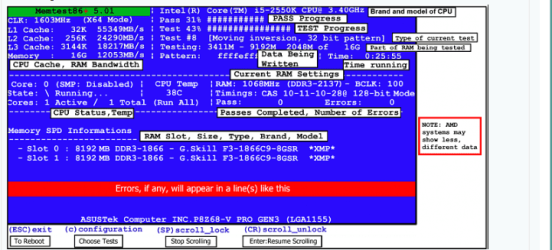
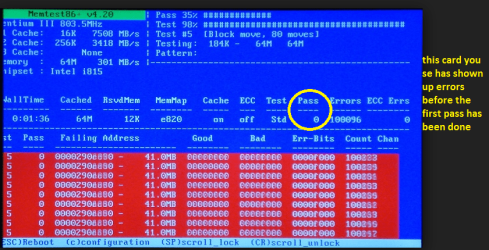
Now for my two cents worth there was no mention of chkdsk /f /r and or testing the drive or for that matter the RAM so at least I think a chkdsk with those switches should be run and a memtest too.
The memtest you will need to make a bootable disk / stick andset the BIOS to boot from the optical or USB and it will take a fair time torun- some leave it overnight. http://www.memtest.org/
But one thing is very important you must let the test run for at least 8 passes any less and thefindings are no good. Now if errors come up straight away then you can stop it- see my pics. Now if there are errors and you have more than one stick of RAMin then you will need to test each stick ie remove the sticks and replace stick1 in slot 1 and test no errors do the same in slot 2 with stick 1 no errorsthen repeat the process with stick 2 - that will show up the faulty stick - theother thing is it could be a faulty slot but most unusual.
It is a very lengthy and tedious process but worth it if youhave errors.
Attachments
MEMTEST OUTPUT SCREEN.PNG
54 KB
· Views: 0
MEM2.PNG
193.9 KB
· Views: 0
My Computer
Computer type
PC/Desktop
Computer Manufacturer/Model Number
Own build (new) Desk1 / Asus ROG Win 7 / Desk2 1st build
OS
Desk1 7 Home Prem / Desk2 10 Pro / Main lap Asus ROG 10 Pro 2 laptop Toshiba 7 Pro Asus P2520 7 & 10
One other Desktop (tester) and spare Toshba laptop both with SSD's
Running Kaspersky 2016 ISS on all machines config'd identically
Logitec audio stereo systems on each machine (x3)
Canon MG5250MFC
Router/modem TP-Link running WPA2SK