
- Local time
- 2:12 AM
- Messages
- 197
Hi there,
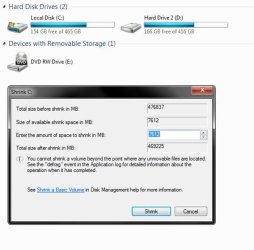
I was hoping somebody could help me here! I have two WD scorpio blue 500GB hard drives in my laptop and both have ~150GB free. I wanted to shrink the C drive (it doesn't have any other partitions, just the main one). So it has a capacity of 465GB and 154GB free. So, I'd like to shrink it, however, the windows disk manager will only let me shrink it a very small amount. I have a screen print attached that will hopefully aid my poor explanation!
Anyway, I hope someone can help, all the best,
Music Guy
I was hoping somebody could help me here! I have two WD scorpio blue 500GB hard drives in my laptop and both have ~150GB free. I wanted to shrink the C drive (it doesn't have any other partitions, just the main one). So it has a capacity of 465GB and 154GB free. So, I'd like to shrink it, however, the windows disk manager will only let me shrink it a very small amount. I have a screen print attached that will hopefully aid my poor explanation!
Anyway, I hope someone can help, all the best,
Music Guy
Attachments
My Computer
- Computer Manufacturer/Model Number
- Packard Bell
- OS
- Windows 7 Home Premium 64bit
- CPU
- AMD Turion(tm) Dual-Core Mobile M500
- Motherboard
- Packard Bell EasyNote LJ71
- Memory
- 4GB (2x2GB) DDR2
- Graphics Card(s)
- AMD M880G with ATI Mobility Radeon HD 4200
- Sound Card
- ATI High Definition Audio Device (Integrated)
- Monitor(s) Displays
- 1st: Built in 17.3" 16:9 2nd: Philips 17.1" 4:3
- Screen Resolution
- 1st: 1600x900 2nd: 1280x1024
- Hard Drives
- 2x WD blue scorpio 500GB
- PSU
- Laptop battery/power brick
- Case
- Laptop
- Cooling
- Custom built cooling stand
- Keyboard
- Integrated
- Mouse
- Touchpad & logitek wireless mouse M205
- Internet Speed
- 0.2mb/s download
- Other Info
- Wireless adapter:
Atheros AR5B39 Wireless Network Adapter
 !
!
