HDD kills Display

I don't think that is the HDD. Is the secure boot.

Please, update your BIOS.

Once updated, enter BIOS, go to BOOT Tab, Boot configuration and set it to OS=Other then hit F10 and SAVE settings.
Shut down and detach the SSD and attach the HDD.
See if boots.
 

My Computers My Computers

System One System Two

  • Computer type
    PC/Desktop
    Computer Manufacturer/Model Number
    custom build
    OS
    Windows 7 HP 64
    CPU
    i5 6600K - 800MHz to 4200MHz
    Motherboard
    GA-Z170-HD3P
    Memory
    4+4G GSkill DDR4 3000
    Graphics Card(s)
    IG - Intel 530
    Monitor(s) Displays
    Samsung 226BW
    Screen Resolution
    1680x1050
    Hard Drives
    (1) -1 SM951 – 128GB M.2 AHCI PCIe SSD drive for Windows 7 and Lubuntu
    (2) -1 WD SATA 3 - 1T for Data
    (3) -1 WD SATA 3 - 1T for backup
    PSU
    Thermaltake 450W TR2 gold
    Keyboard
    Old and good Chicony mechanical keyboard
    Mouse
    Logitech mX performance - 9 buttons (had to disable some)
    Internet Speed
    500Mb/s
    Browser
    Firefox 64
    Other Info
    TinyWall firewall
  • Computer type
    Laptop
    System Manufacturer/Model Number
    Asus Q550LF
    OS
    Windows 7 Pro
    CPU
    i7-4500U 800MHz to 3.0GHz
    Motherboard
    Asus Q550LF
    Memory
    (4+4)G DDR3 1600
    Graphics Card(s)
    IG intel 4400 + NVIDIA GeForce GT 745M
    Sound Card
    Realtek
    Monitor(s) Displays
    LG Display LP156WF4-SPH1
    Screen Resolution
    1920 x 1080
    Hard Drives
    BX500 120G SSD for Windows and programs +
    1T HDD for data
    Internet Speed
    500 Mb/s
    Browser
    Firefox
    Other Info
    TinyWall firewall
I don't think that is the HDD. Is the secure boot.

Please, update your BIOS.

Once updated, enter BIOS, go to BOOT Tab, Boot configuration and set it to OS=Other then hit F10 and SAVE settings.
Shut down and detach the SSD and attach the HDD.
See if boots.

It's updated, secure boot is enabled
Even changing to other OS it's still saying enabled, shall I proceed?

Question; does CMOS reset turn the BIOS back to original version? I performed a CMOS reset at one point.

I do remember on windows 7 I'm pretty sure I updated the BIOS to latest *the new version I have now*, could that be the reason for it? conflicting BIOS settings on HDD
 

My Computer My Computer

Computer type
PC/Desktop
Computer Manufacturer/Model Number
AuthenticAMD
OS
Microsoft Windows 7 Professional 64-bit
CPU
AMD Ryzen 5 1600 Six-Core Processor
Motherboard
PRIME B350-PLUS
Memory
16.00 GB
Graphics Card(s)
Radeon (TM) RX 480 Graphics
CMOS has two parts: One is on a EEPROM. This is the part you updated. The other part is on a RAM and stores the user configuration. If you do a reset, only the the user configuration is cleared and it loads the default settings. The main part (on the EEPROM) remains the same.

What are the options under boot configuration?
What are the options under secure boot?
In witch one you set OS=other?
 

My Computers My Computers

System One System Two

  • Computer type
    PC/Desktop
    Computer Manufacturer/Model Number
    custom build
    OS
    Windows 7 HP 64
    CPU
    i5 6600K - 800MHz to 4200MHz
    Motherboard
    GA-Z170-HD3P
    Memory
    4+4G GSkill DDR4 3000
    Graphics Card(s)
    IG - Intel 530
    Monitor(s) Displays
    Samsung 226BW
    Screen Resolution
    1680x1050
    Hard Drives
    (1) -1 SM951 – 128GB M.2 AHCI PCIe SSD drive for Windows 7 and Lubuntu
    (2) -1 WD SATA 3 - 1T for Data
    (3) -1 WD SATA 3 - 1T for backup
    PSU
    Thermaltake 450W TR2 gold
    Keyboard
    Old and good Chicony mechanical keyboard
    Mouse
    Logitech mX performance - 9 buttons (had to disable some)
    Internet Speed
    500Mb/s
    Browser
    Firefox 64
    Other Info
    TinyWall firewall
  • Computer type
    Laptop
    System Manufacturer/Model Number
    Asus Q550LF
    OS
    Windows 7 Pro
    CPU
    i7-4500U 800MHz to 3.0GHz
    Motherboard
    Asus Q550LF
    Memory
    (4+4)G DDR3 1600
    Graphics Card(s)
    IG intel 4400 + NVIDIA GeForce GT 745M
    Sound Card
    Realtek
    Monitor(s) Displays
    LG Display LP156WF4-SPH1
    Screen Resolution
    1920 x 1080
    Hard Drives
    BX500 120G SSD for Windows and programs +
    1T HDD for data
    Internet Speed
    500 Mb/s
    Browser
    Firefox
    Other Info
    TinyWall firewall
CMOS has two parts: One is on a EEPROM. This is the part you updated. The other part is on a RAM and stores the user configuration. If you do a reset, only the the user configuration is cleared and it loads the default settings. The main part (on the EEPROM) remains the same.

What are the options under boot configuration?
What are the options under secure boot?
In witch one you set OS=other?

fast boot (disabled)

boot configuration
CSM (Compatability support module)
Secure boot

*secure boot state enabled (greyed out)
Platform key (pk) state loaded (greyed out)
OS Type (windows uefi mode) > have tried Other OS still greyed out)

Keymanagement
install default
clear secure
save all boot variables

pk management 886 1 default
kek management 3573 3 default
db management 6322 10 default
dbx management 3724 77 default


Boot option prioities

Boot option 1
to
Boot option 5

Harddrive bbs priorities
CD/DVD rom drive bbs priorities
USB Device bbs priotiries

Boot override section

Windows boot manager (Samsung 970 evo plus 250gb)
Samsung ssd 970 evo plus (238475mb)
sata6g_2: ATAPI iHAS124 E
then my usb which I didn't write out
 

My Computer My Computer

Computer type
PC/Desktop
Computer Manufacturer/Model Number
AuthenticAMD
OS
Microsoft Windows 7 Professional 64-bit
CPU
AMD Ryzen 5 1600 Six-Core Processor
Motherboard
PRIME B350-PLUS
Memory
16.00 GB
Graphics Card(s)
Radeon (TM) RX 480 Graphics
If I understood, under Boot configuration you have:
- CSM (Compatability support module)
- Secure boot

Can you set - Secure boot to disable?

Try to set CSM to enable
 

My Computers My Computers

System One System Two

  • Computer type
    PC/Desktop
    Computer Manufacturer/Model Number
    custom build
    OS
    Windows 7 HP 64
    CPU
    i5 6600K - 800MHz to 4200MHz
    Motherboard
    GA-Z170-HD3P
    Memory
    4+4G GSkill DDR4 3000
    Graphics Card(s)
    IG - Intel 530
    Monitor(s) Displays
    Samsung 226BW
    Screen Resolution
    1680x1050
    Hard Drives
    (1) -1 SM951 – 128GB M.2 AHCI PCIe SSD drive for Windows 7 and Lubuntu
    (2) -1 WD SATA 3 - 1T for Data
    (3) -1 WD SATA 3 - 1T for backup
    PSU
    Thermaltake 450W TR2 gold
    Keyboard
    Old and good Chicony mechanical keyboard
    Mouse
    Logitech mX performance - 9 buttons (had to disable some)
    Internet Speed
    500Mb/s
    Browser
    Firefox 64
    Other Info
    TinyWall firewall
  • Computer type
    Laptop
    System Manufacturer/Model Number
    Asus Q550LF
    OS
    Windows 7 Pro
    CPU
    i7-4500U 800MHz to 3.0GHz
    Motherboard
    Asus Q550LF
    Memory
    (4+4)G DDR3 1600
    Graphics Card(s)
    IG intel 4400 + NVIDIA GeForce GT 745M
    Sound Card
    Realtek
    Monitor(s) Displays
    LG Display LP156WF4-SPH1
    Screen Resolution
    1920 x 1080
    Hard Drives
    BX500 120G SSD for Windows and programs +
    1T HDD for data
    Internet Speed
    500 Mb/s
    Browser
    Firefox
    Other Info
    TinyWall firewall
If I understood, under Boot configuration you have:
- CSM (Compatability support module)
- Secure boot

Can you set - Secure boot to disable?

Try to set CSM to enable

secure boost cannot be set to disable because the option is greyed out :(

I'll check csm and report back
 

My Computer My Computer

Computer type
PC/Desktop
Computer Manufacturer/Model Number
AuthenticAMD
OS
Microsoft Windows 7 Professional 64-bit
CPU
AMD Ryzen 5 1600 Six-Core Processor
Motherboard
PRIME B350-PLUS
Memory
16.00 GB
Graphics Card(s)
Radeon (TM) RX 480 Graphics
If I understood, under Boot configuration you have:
- CSM (Compatability support module)
- Secure boot

Can you set - Secure boot to disable?

Try to set CSM to enable

So I went into CSM - it's enabled

Launch CSM - Enabled
Boot device control - uefi & legacy oprom
Boot from network devices - legacy only
Boot from storage devices - legacy only
Boot from PCI-E/PCI expansion devices - legacy only
 

My Computer My Computer

Computer type
PC/Desktop
Computer Manufacturer/Model Number
AuthenticAMD
OS
Microsoft Windows 7 Professional 64-bit
CPU
AMD Ryzen 5 1600 Six-Core Processor
Motherboard
PRIME B350-PLUS
Memory
16.00 GB
Graphics Card(s)
Radeon (TM) RX 480 Graphics
So I went into CSM - it's enabled

Launch CSM - Enabled
Boot device control - uefi & legacy oprom
Boot from network devices - legacy only > - Ignore
Boot from storage devices - legacy only > UEFI driver fist
Boot from PCI-E/PCI expansion devices - legacy only > UEFI driver fist
Set as above.
Is Secure boot and Fast boot now disabled?

Detach the SSD and atach the HDD. Does it boot?
 

My Computers My Computers

System One System Two

  • Computer type
    PC/Desktop
    Computer Manufacturer/Model Number
    custom build
    OS
    Windows 7 HP 64
    CPU
    i5 6600K - 800MHz to 4200MHz
    Motherboard
    GA-Z170-HD3P
    Memory
    4+4G GSkill DDR4 3000
    Graphics Card(s)
    IG - Intel 530
    Monitor(s) Displays
    Samsung 226BW
    Screen Resolution
    1680x1050
    Hard Drives
    (1) -1 SM951 – 128GB M.2 AHCI PCIe SSD drive for Windows 7 and Lubuntu
    (2) -1 WD SATA 3 - 1T for Data
    (3) -1 WD SATA 3 - 1T for backup
    PSU
    Thermaltake 450W TR2 gold
    Keyboard
    Old and good Chicony mechanical keyboard
    Mouse
    Logitech mX performance - 9 buttons (had to disable some)
    Internet Speed
    500Mb/s
    Browser
    Firefox 64
    Other Info
    TinyWall firewall
  • Computer type
    Laptop
    System Manufacturer/Model Number
    Asus Q550LF
    OS
    Windows 7 Pro
    CPU
    i7-4500U 800MHz to 3.0GHz
    Motherboard
    Asus Q550LF
    Memory
    (4+4)G DDR3 1600
    Graphics Card(s)
    IG intel 4400 + NVIDIA GeForce GT 745M
    Sound Card
    Realtek
    Monitor(s) Displays
    LG Display LP156WF4-SPH1
    Screen Resolution
    1920 x 1080
    Hard Drives
    BX500 120G SSD for Windows and programs +
    1T HDD for data
    Internet Speed
    500 Mb/s
    Browser
    Firefox
    Other Info
    TinyWall firewall
secure boost cannot be set to disable because the option is greyed out :(
To correct the Secure Boot Is Grayed Out issue, here are two things to try

1) Within bios, set a bios supervisor password. Right now it probably does not have one. If you can find a place to set a password, do so, save, exit, re-enter bios using the password and hopefully secure boot will no longer be grayed out.

2) Find a place in bios called Key Management. Go into that section and select Clear Secure Boot Keys.
 

My Computer My Computer

Computer type
PC/Desktop
Computer Manufacturer/Model Number
diy
OS
Win7 pro x64
CPU
stock i7 7700k
Motherboard
Gigabyte Z270N-WIFI mini-ITX
Memory
Corsair Vengeance LPX 16GB (2x8GB) DDR4 @ 3200MHz
Graphics Card(s)
integrated Intel HD 630
Sound Card
onboard Realtek ALC1220
Monitor(s) Displays
two vertically mounted samsung 55" 4k un55mu8000
Screen Resolution
1920x1280
Hard Drives
256GB Samsung EVO 960 M.2 pci-e NVMe SSD
PSU
SilverStone Nightjar ST45NF 450Watt Fanless
Case
No case. Motherboard is mounted directly onto power supply
Cooling
Evercool low profile 815EP with Panaflow 12L fan at 7v
Keyboard
Ortek MCK-86 mini
Mouse
Belkin 5-button USB
Internet Speed
spectrum 400mbps
Set as above.
Is Secure boot and Fast boot now disabled?

Detach the SSD and atach the HDD. Does it boot?

To correct the Secure Boot Is Grayed Out issue, here are two things to try

1) Within bios, set a bios supervisor password. Right now it probably does not have one. If you can find a place to set a password, do so, save, exit, re-enter bios using the password and hopefully secure boot will no longer be grayed out.

2) Find a place in bios called Key Management. Go into that section and select Clear Secure Boot Keys.


I tried, still secured, I'm gonna call asus I think, see what they suggest

I set both types of password, set admin password first, nothing
set user password, nothing

I then went and done clear all keys, secure boot was disabled until I reset, it came right back with secure boot on again but PK key was unloaded
 

My Computer My Computer

Computer type
PC/Desktop
Computer Manufacturer/Model Number
AuthenticAMD
OS
Microsoft Windows 7 Professional 64-bit
CPU
AMD Ryzen 5 1600 Six-Core Processor
Motherboard
PRIME B350-PLUS
Memory
16.00 GB
Graphics Card(s)
Radeon (TM) RX 480 Graphics

My Computer My Computer

Computer type
PC/Desktop
Computer Manufacturer/Model Number
diy
OS
Win7 pro x64
CPU
stock i7 7700k
Motherboard
Gigabyte Z270N-WIFI mini-ITX
Memory
Corsair Vengeance LPX 16GB (2x8GB) DDR4 @ 3200MHz
Graphics Card(s)
integrated Intel HD 630
Sound Card
onboard Realtek ALC1220
Monitor(s) Displays
two vertically mounted samsung 55" 4k un55mu8000
Screen Resolution
1920x1280
Hard Drives
256GB Samsung EVO 960 M.2 pci-e NVMe SSD
PSU
SilverStone Nightjar ST45NF 450Watt Fanless
Case
No case. Motherboard is mounted directly onto power supply
Cooling
Evercool low profile 815EP with Panaflow 12L fan at 7v
Keyboard
Ortek MCK-86 mini
Mouse
Belkin 5-button USB
Internet Speed
spectrum 400mbps

My Computer My Computer

Computer type
PC/Desktop
Computer Manufacturer/Model Number
AuthenticAMD
OS
Microsoft Windows 7 Professional 64-bit
CPU
AMD Ryzen 5 1600 Six-Core Processor
Motherboard
PRIME B350-PLUS
Memory
16.00 GB
Graphics Card(s)
Radeon (TM) RX 480 Graphics
So I went into CSM - it's enabled

Launch CSM - Enabled
Boot device control - uefi & legacy oprom
Boot from network devices - legacy only
Boot from storage devices - legacy only
Boot from PCI-E/PCI expansion devices - legacy only
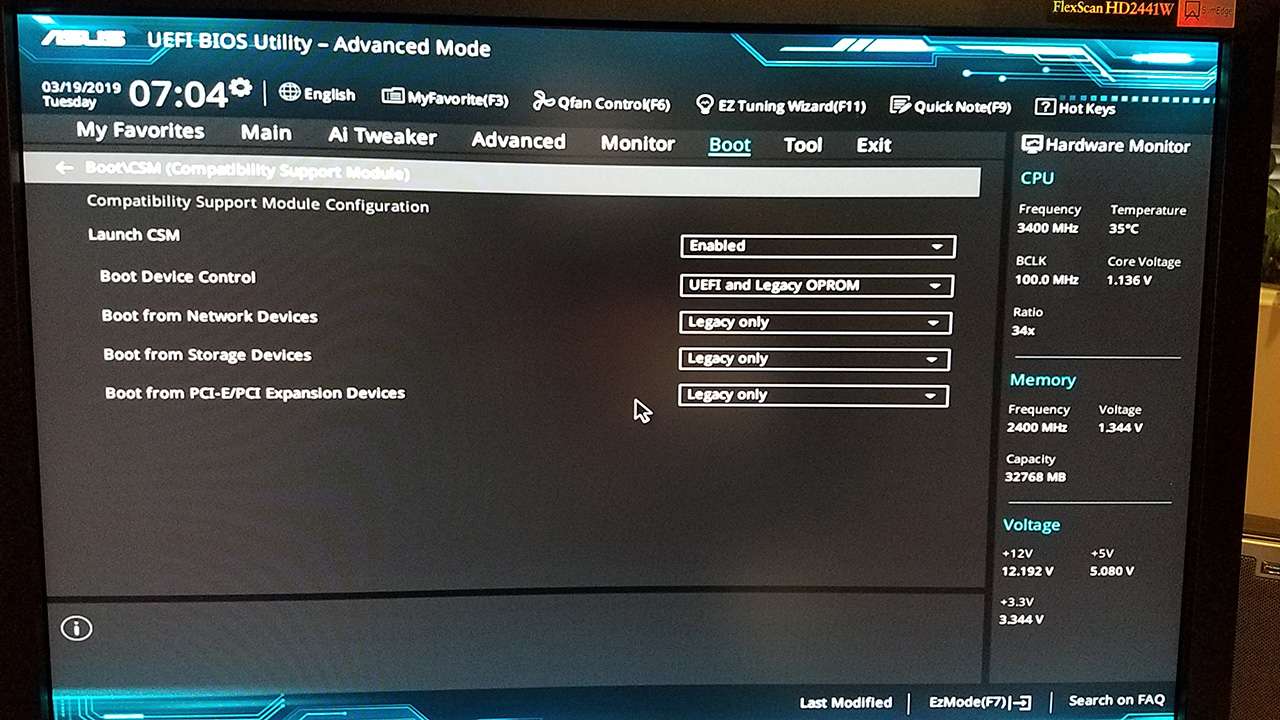
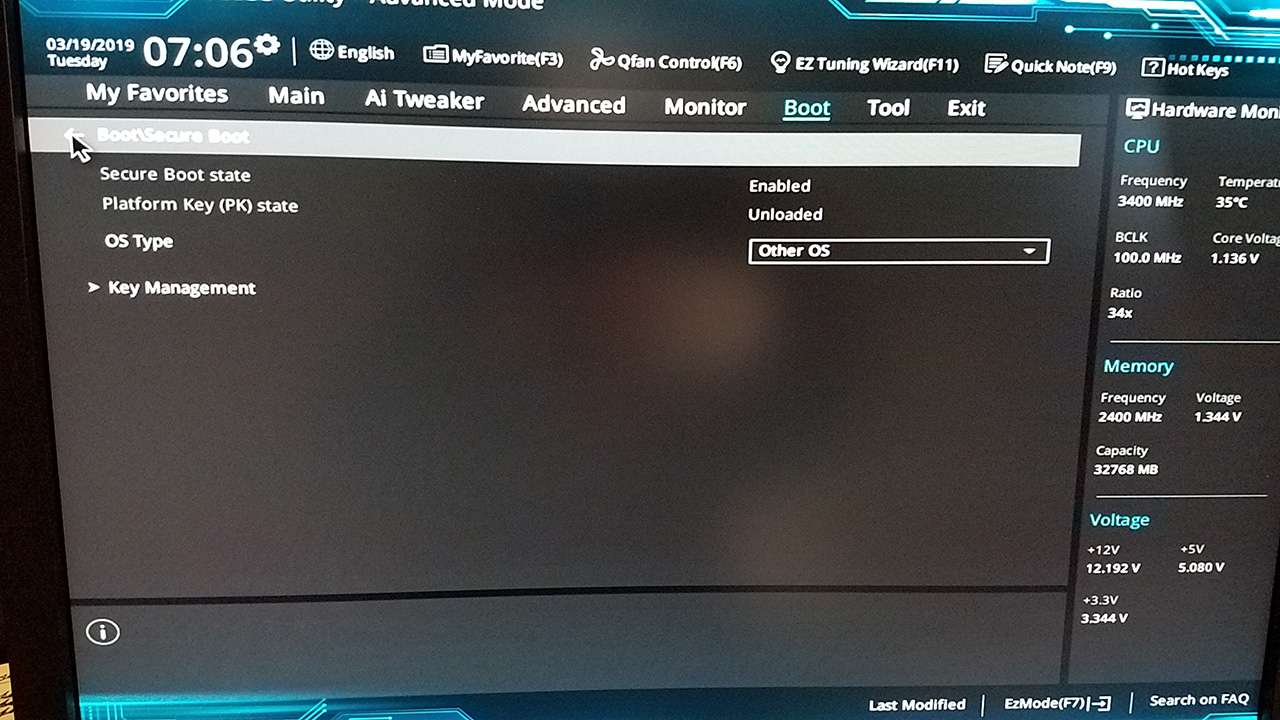
Here are screenshots of my own CSM and Secure Boot BIOS settings for my homebuilt machine which uses a Skylake ASUS Z170-Deluxe motherboard. I only run Win7. That's what I installed on the machine two years ago, and that's all that's ever been on it. Intel i7-6700 CPU.

Clearly these BIOS settings are 100% compatible with Win7. And I don't recall changing any of these settings.

m9BNdg.jpg


iOISOG.jpg


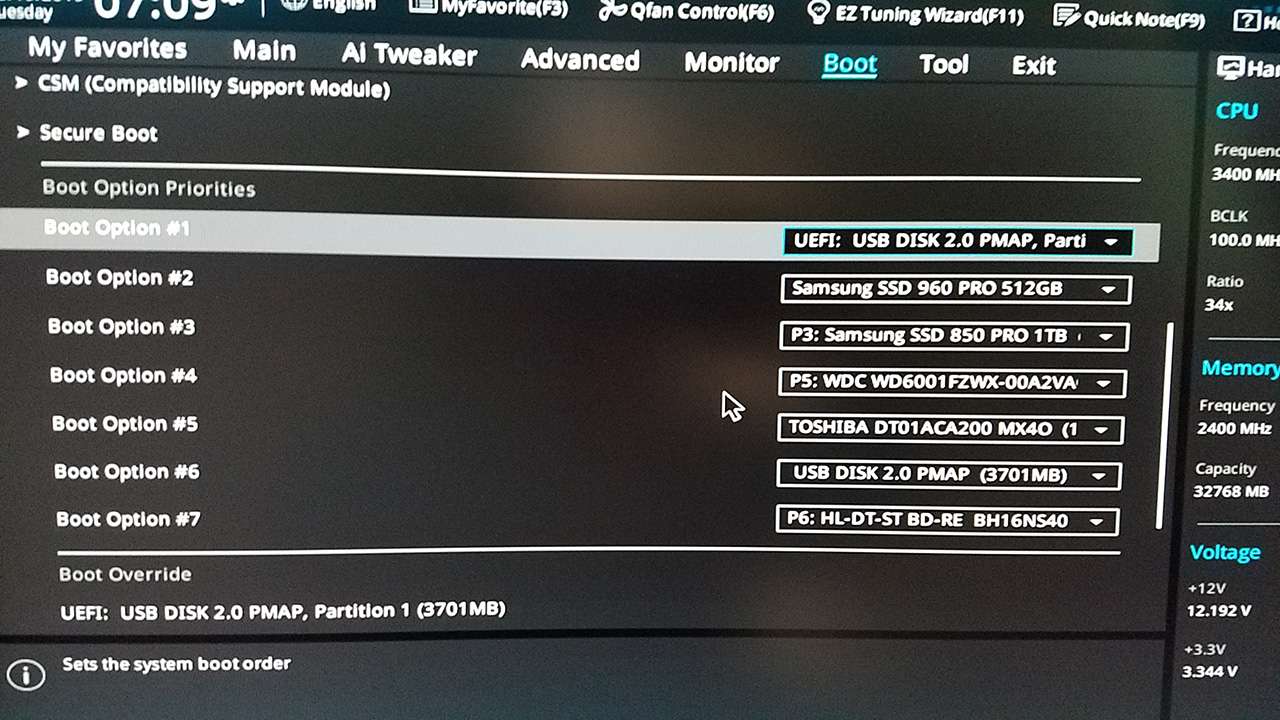
With these primary settings, I then customized the boot-sequence to allow me to boot from USB flash drive first, if inserted. If no bootable USB drive is present, the machine next looks at my M.2 Samsung 960 Pro NVMe SSD, where my Win7 system was installed.

j4sgwa.jpg
 

My Computer My Computer

Computer type
PC/Desktop
Computer Manufacturer/Model Number
Home-built, two systems (1) and (2)
OS
Windows 7 Pro x64 (1), Win7 Pro X64 (2)
CPU
i5-3350p 3.1Ghz/6MB-cache (1); E8400 3.0Ghz/6MB-cache (2)
Motherboard
ASUS P8Z77-V Pro (1); ASUS P5Q3 (2)
Memory
8GB PC3-12800 DDR3 (1); 4GB PC3-10600 DDR3 (2)
Graphics Card(s)
ATI HD7750 (1), (see TV cards); ATI R7 250 (2)
Sound Card
Realtek ALC892 HD Audio (1); Realtek ALC1200 HD Audio (2)
Monitor(s) Displays
Eizo HD2441W LCD, Eizo S2433W (1); Eizo 24" S2433W (2)
Screen Resolution
1920x1200, 1920x1200 (1); 1920x1200 (2)
Hard Drives
(1) 1TB SATA-II (7200RPM), 2x2TB SATA-III (7200RPM), 250GB SATA-III (10000RPM) for OS; 2x2TB external USB 3.0

(2) 320GB SATA-II (7200RPM), 750GB SATA-II (7200RPM), 150GB SATA-II (10000RPM) for OS; 2TB external USB 3.0
PSU
Nesteq ECS-6001 600W (1); Nesteq ECS-5001 500W (2)
Case
Acousti-Case 360 (1) and (2)
Cooling
Noctua NH-U12P SE2 for CPU, 2x120mm case fans (1) and (2)
Keyboard
IBM PS/2 (1) and (2)
Mouse
Logitech MX Revolution wireless (1); Microsoft wired (2)
Internet Speed
100mbps down / 10mbps up
Antivirus
Microsoft Security Essentials; Malwarebyte Anti-Malware Pro
Browser
Firefox
Other Info
Ceton InfiniTV 4-tuner cablecard-enabled TV card as well as Hauppauge HVR-2250 OTA/ATSC 2-tuner TV card in (1), running under Win7 WMC
My Gigabayte Z170 is more simple.
If you select OS=other, there is no CSM, No secure boot option.

When you select OS=Windows 8/10 then a CSM submenu shows up.
 

Attachments

  • 20190403_111336[1].jpg
    20190403_111336[1].jpg
    301 KB · Views: 1

My Computers My Computers

System One System Two

  • Computer type
    PC/Desktop
    Computer Manufacturer/Model Number
    custom build
    OS
    Windows 7 HP 64
    CPU
    i5 6600K - 800MHz to 4200MHz
    Motherboard
    GA-Z170-HD3P
    Memory
    4+4G GSkill DDR4 3000
    Graphics Card(s)
    IG - Intel 530
    Monitor(s) Displays
    Samsung 226BW
    Screen Resolution
    1680x1050
    Hard Drives
    (1) -1 SM951 – 128GB M.2 AHCI PCIe SSD drive for Windows 7 and Lubuntu
    (2) -1 WD SATA 3 - 1T for Data
    (3) -1 WD SATA 3 - 1T for backup
    PSU
    Thermaltake 450W TR2 gold
    Keyboard
    Old and good Chicony mechanical keyboard
    Mouse
    Logitech mX performance - 9 buttons (had to disable some)
    Internet Speed
    500Mb/s
    Browser
    Firefox 64
    Other Info
    TinyWall firewall
  • Computer type
    Laptop
    System Manufacturer/Model Number
    Asus Q550LF
    OS
    Windows 7 Pro
    CPU
    i7-4500U 800MHz to 3.0GHz
    Motherboard
    Asus Q550LF
    Memory
    (4+4)G DDR3 1600
    Graphics Card(s)
    IG intel 4400 + NVIDIA GeForce GT 745M
    Sound Card
    Realtek
    Monitor(s) Displays
    LG Display LP156WF4-SPH1
    Screen Resolution
    1920 x 1080
    Hard Drives
    BX500 120G SSD for Windows and programs +
    1T HDD for data
    Internet Speed
    500 Mb/s
    Browser
    Firefox
    Other Info
    TinyWall firewall
Okay dude, can you guide me onto how to install windows 7 ?
my W7 iso > when I load my USB I get an error telling me to change some things in Rufus
When I load partition 1 of my USB it loads the windows 7 install page which is great, of course the mouse and keyboard die straight away.. with it being Ryzen

I wanna do a custom install and just overwrite windows 10 I have just now on my SSD
My PS/2 to USB connector failed me, so gonna order a PS/2 keyboard and hope for the best.. Anything I can do to get mouse and keyboard working okay?

At this point I don't even care about my HDD. I just want windows 7 on the SSD instead of windows 10


Here are screenshots of my own CSM and Secure Boot BIOS settings for my homebuilt machine which uses a Skylake ASUS Z170-Deluxe motherboard. I only run Win7. That's what I installed on the machine two years ago, and that's all that's ever been on it. Intel i7-6700 CPU.

Clearly these BIOS settings are 100% compatible with Win7. And I don't recall changing any of these settings.

m9BNdg.jpg


iOISOG.jpg


With these primary settings, I then customized the boot-sequence to allow me to boot from USB flash drive first, if inserted. If no bootable USB drive is present, the machine next looks at my M.2 Samsung 960 Pro NVMe SSD, where my Win7 system was installed.

j4sgwa.jpg
 

My Computer My Computer

Computer type
PC/Desktop
Computer Manufacturer/Model Number
AuthenticAMD
OS
Microsoft Windows 7 Professional 64-bit
CPU
AMD Ryzen 5 1600 Six-Core Processor
Motherboard
PRIME B350-PLUS
Memory
16.00 GB
Graphics Card(s)
Radeon (TM) RX 480 Graphics
The easiest and most reliable way to create usable bootable USB media to install Win7 with the required USB 3.0 driver (and optionally also the required NVMe drivers) present is to use the Gigabyte USB Installation utility program, developed several years ago to support their own users who'd bought Gigabyte motherboards based on the Intel 100 Series chipset.

The Gigabyte utility is available from the Gigabyte download site, scrolling down on the page and expanding the "Utilities" category. It is described as: Windows USB Installation Tool, (Note) Support Intel 100/200/X299 series motherboards. OS: Windows 7 64bit,Windows 7 32bit.

The direct link to the utility on that page is here.

You simply run the utility, specify the source Win7 installer (either CD/DVD or mounted ISO file), specify the output device (e.g. 8GB or larger USB flash drive), and check USB 3.0 driver and optionally NVMe driver. You should uncheck the third "packages" box, which will for some reason automatically click on if you check the NVME second box. The utility will slipstream the missing requested drivers along with the original Win7 media into a new bootable USB flash drive that you can then use to install Win7 to a Skylake or newer machine.


IMPORTANT NOTE: after you download the ZIP file, before unzipping it you must turn off the BLOCKED security flag that is present. Unless you first remove the security flag before unzipping, the result of unzipping will be to prevent the expanded files from being accessible when you actually run the Gigabyte utility (which also is one of the files imbedded in the ZIP file), and it will end abnormally with an error message about "unable to add drivers...".

To solve the problem right-click on the ZIP file, select Properties, and you will see the Security item at the bottom of the General tab. Push the UNBLOCK button, then APPLY/OK, and now you are free to unzip this ZIP file. All of the expanded files will now be perfectly readable by the Gigabyte utility, and the process of adding USB 3.0 (and optionally NVMe) drivers to the original Win7 CD/DVD or ISO installer media to create new output bootable USB flash drive will run to normal completion.
 
Last edited:

My Computer My Computer

Computer type
PC/Desktop
Computer Manufacturer/Model Number
Home-built, two systems (1) and (2)
OS
Windows 7 Pro x64 (1), Win7 Pro X64 (2)
CPU
i5-3350p 3.1Ghz/6MB-cache (1); E8400 3.0Ghz/6MB-cache (2)
Motherboard
ASUS P8Z77-V Pro (1); ASUS P5Q3 (2)
Memory
8GB PC3-12800 DDR3 (1); 4GB PC3-10600 DDR3 (2)
Graphics Card(s)
ATI HD7750 (1), (see TV cards); ATI R7 250 (2)
Sound Card
Realtek ALC892 HD Audio (1); Realtek ALC1200 HD Audio (2)
Monitor(s) Displays
Eizo HD2441W LCD, Eizo S2433W (1); Eizo 24" S2433W (2)
Screen Resolution
1920x1200, 1920x1200 (1); 1920x1200 (2)
Hard Drives
(1) 1TB SATA-II (7200RPM), 2x2TB SATA-III (7200RPM), 250GB SATA-III (10000RPM) for OS; 2x2TB external USB 3.0

(2) 320GB SATA-II (7200RPM), 750GB SATA-II (7200RPM), 150GB SATA-II (10000RPM) for OS; 2TB external USB 3.0
PSU
Nesteq ECS-6001 600W (1); Nesteq ECS-5001 500W (2)
Case
Acousti-Case 360 (1) and (2)
Cooling
Noctua NH-U12P SE2 for CPU, 2x120mm case fans (1) and (2)
Keyboard
IBM PS/2 (1) and (2)
Mouse
Logitech MX Revolution wireless (1); Microsoft wired (2)
Internet Speed
100mbps down / 10mbps up
Antivirus
Microsoft Security Essentials; Malwarebyte Anti-Malware Pro
Browser
Firefox
Other Info
Ceton InfiniTV 4-tuner cablecard-enabled TV card as well as Hauppauge HVR-2250 OTA/ATSC 2-tuner TV card in (1), running under Win7 WMC
The easiest and most reliable way to create usable bootable USB media to install Win7 with the required USB 3.0 driver (and optionally also the required NVMe drivers) present is to use the Gigabyte USB Installation utility program, developed several years ago to support their own users who'd bought Gigabyte motherboards based on the Intel 100 Series chipset.

The Gigabyte utility is available from the Gigabyte download site, scrolling down on the page and expanding the "Utilities" category. It is described as: Windows USB Installation Tool, (Note) Support Intel 100/200/X299 series motherboards. OS: Windows 7 64bit,Windows 7 32bit.

The direct link to the utility on that page is here.

You simply run the utility, specify the source Win7 installer (either CD/DVD or mounted ISO file), specify the output device (e.g. 8GB or larger USB flash drive), and check USB 3.0 driver and optionally NVMe driver. You should uncheck the third "packages" box, which will for some reason automatically click on if you check the NVME second box. The utility will slipstream the missing requested drivers along with the original Win7 media into a new bootable USB flash drive that you can then use to install Win7 to a Skylake or newer machine.


IMPORTANT NOTE: after you download the ZIP file, before unzipping it you must turn off the BLOCKED security flag that is present. Unless you first remove the security flag before unzipping, the result of unzipping will be to prevent the expanded files from being accessible when you actually run the Gigabyte utility (which also is one of the files imbedded in the ZIP file), and it will end abnormally with an error message about "unable to add drivers...".

To solve the problem right-click on the ZIP file, select Properties, and you will see the Security item at the bottom of the General tab. Push the UNBLOCK button, then APPLY/OK, and now you are free to unzip this ZIP file. All of the expanded files will now be perfectly readable by the Gigabyte utility, and the process of adding USB 3.0 (and optionally NVMe) drivers to the original Win7 CD/DVD or ISO installer media to create new output bootable USB flash drive will run to normal completion.

Thank you I'ma try this <3.
 

My Computer My Computer

Computer type
PC/Desktop
Computer Manufacturer/Model Number
AuthenticAMD
OS
Microsoft Windows 7 Professional 64-bit
CPU
AMD Ryzen 5 1600 Six-Core Processor
Motherboard
PRIME B350-PLUS
Memory
16.00 GB
Graphics Card(s)
Radeon (TM) RX 480 Graphics
I have the Ryzen USB drivers and I'm preparing a guide for you. Be patient.
 

My Computers My Computers

System One System Two

  • Computer type
    PC/Desktop
    Computer Manufacturer/Model Number
    custom build
    OS
    Windows 7 HP 64
    CPU
    i5 6600K - 800MHz to 4200MHz
    Motherboard
    GA-Z170-HD3P
    Memory
    4+4G GSkill DDR4 3000
    Graphics Card(s)
    IG - Intel 530
    Monitor(s) Displays
    Samsung 226BW
    Screen Resolution
    1680x1050
    Hard Drives
    (1) -1 SM951 – 128GB M.2 AHCI PCIe SSD drive for Windows 7 and Lubuntu
    (2) -1 WD SATA 3 - 1T for Data
    (3) -1 WD SATA 3 - 1T for backup
    PSU
    Thermaltake 450W TR2 gold
    Keyboard
    Old and good Chicony mechanical keyboard
    Mouse
    Logitech mX performance - 9 buttons (had to disable some)
    Internet Speed
    500Mb/s
    Browser
    Firefox 64
    Other Info
    TinyWall firewall
  • Computer type
    Laptop
    System Manufacturer/Model Number
    Asus Q550LF
    OS
    Windows 7 Pro
    CPU
    i7-4500U 800MHz to 3.0GHz
    Motherboard
    Asus Q550LF
    Memory
    (4+4)G DDR3 1600
    Graphics Card(s)
    IG intel 4400 + NVIDIA GeForce GT 745M
    Sound Card
    Realtek
    Monitor(s) Displays
    LG Display LP156WF4-SPH1
    Screen Resolution
    1920 x 1080
    Hard Drives
    BX500 120G SSD for Windows and programs +
    1T HDD for data
    Internet Speed
    500 Mb/s
    Browser
    Firefox
    Other Info
    TinyWall firewall
I have the Ryzen USB drivers and I'm preparing a guide for you. Be patient.

I did all the above, I added USB support with that windows image tool to my USB with the ISO. Still keyboard and mouse are dying upon install page

My secure boot is now DISABLED!
No idea how, I restarted > checked into secure boot > it's disabled.. even after restarts its not securing itself automatically!! lol.

Used override to load usb just to check, window files loads fine etc
 

My Computer My Computer

Computer type
PC/Desktop
Computer Manufacturer/Model Number
AuthenticAMD
OS
Microsoft Windows 7 Professional 64-bit
CPU
AMD Ryzen 5 1600 Six-Core Processor
Motherboard
PRIME B350-PLUS
Memory
16.00 GB
Graphics Card(s)
Radeon (TM) RX 480 Graphics
Where did you get the USB drivers to add to the Win 7 installation disk?
 

My Computers My Computers

System One System Two

  • Computer type
    PC/Desktop
    Computer Manufacturer/Model Number
    custom build
    OS
    Windows 7 HP 64
    CPU
    i5 6600K - 800MHz to 4200MHz
    Motherboard
    GA-Z170-HD3P
    Memory
    4+4G GSkill DDR4 3000
    Graphics Card(s)
    IG - Intel 530
    Monitor(s) Displays
    Samsung 226BW
    Screen Resolution
    1680x1050
    Hard Drives
    (1) -1 SM951 – 128GB M.2 AHCI PCIe SSD drive for Windows 7 and Lubuntu
    (2) -1 WD SATA 3 - 1T for Data
    (3) -1 WD SATA 3 - 1T for backup
    PSU
    Thermaltake 450W TR2 gold
    Keyboard
    Old and good Chicony mechanical keyboard
    Mouse
    Logitech mX performance - 9 buttons (had to disable some)
    Internet Speed
    500Mb/s
    Browser
    Firefox 64
    Other Info
    TinyWall firewall
  • Computer type
    Laptop
    System Manufacturer/Model Number
    Asus Q550LF
    OS
    Windows 7 Pro
    CPU
    i7-4500U 800MHz to 3.0GHz
    Motherboard
    Asus Q550LF
    Memory
    (4+4)G DDR3 1600
    Graphics Card(s)
    IG intel 4400 + NVIDIA GeForce GT 745M
    Sound Card
    Realtek
    Monitor(s) Displays
    LG Display LP156WF4-SPH1
    Screen Resolution
    1920 x 1080
    Hard Drives
    BX500 120G SSD for Windows and programs +
    1T HDD for data
    Internet Speed
    500 Mb/s
    Browser
    Firefox
    Other Info
    TinyWall firewall
Back
Top