[Help] 32 or 64bit ?

Cesarcsrf

New member
Local time
12:24 AM
Messages
18
Hey guys i just installed Windows Ultimate 7 7100 32bit, and i saw that only 3GB of my ram are used.. so should i install 64bit ?

i'm using a laptop, here are the specs, thanks for any help
 

Attachments

  • test.jpg
    test.jpg
    89.3 KB · Views: 97
  • test1.jpg
    test1.jpg
    72.5 KB · Views: 84

My Computer

OS
Windows 7 Ultimate 7100
If you are planning to got o x64 when the RTM comes out, I would just install x64 now. That way you will not have many changes when you have to install it in October-September and possibly have issues.

If however you plan to stay wit 32 bit (which is fine)....just stay with what you have now. The 1GB of RAM will not be recognized but it's not a big deal depending on what kinds of programs you are running.

So it can get complicated but it's really pretty simple. Your choice.
 

My Computer

Computer Manufacturer/Model Number
Keeps changing - (Custom)
OS
Windows 7 Professional x64
CPU
Intel Core i7 860
Motherboard
Gigabyte GA-P55-UD4P
Memory
4GB DDR3 Mushkin 1600Mhz @ 7-8-7-20
Graphics Card(s)
MSI GTS250 1GB DDR3 Twin Frozr
Sound Card
Onboard realtek
Monitor(s) Displays
Samsung SyncMaster 24" P2450 + Samsung 20" 2033
Screen Resolution
1920 X 1080 and 1600 X 900 (#2 system 1440 X 900)
Hard Drives
Patriot Inferno 120GB SSD + 3 WD Blue 640GB drives
PSU
Corsair 750 HX Modular
Case
Lancool PC-K62
Cooling
Cooler Master TX3 CPU cooler and 4-140mm and 1-120mm case
Keyboard
Gigabyte USB keyboard
Mouse
Microsoft wireless laser mouse 5000
Internet Speed
7 Mb down 1.5 up
Other Info
System #2: AMD Phenom II X6 1055T (Freezer 7 Pro cooler) - Gigabyte 880GMA-UD2H - WD 500GB Black - 9500GT (1GB) 500W OCZ modular PSU - Antec 200 case. System #3 (LapTop) Core 2 Duo T6670 - 320GB 7200RPM HD - 4GB DDR3 RAM.
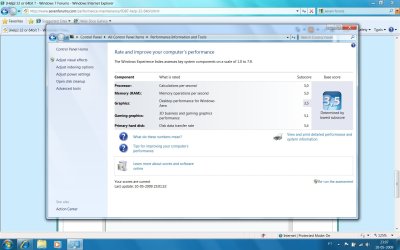
like in games it will make a difference ? and watching HD videos ?

can i update this version of Windows for 62 without losing any data at all ?
 

My Computer

OS
Windows 7 Ultimate 7100
No, you cannot upgrade from 32 bit to 64 bit without doing a "clean install" That's why I suggested you switch now if you plan to switch to 64 bit later.

It sounds like it's going to bother you. I would get the 64 bit DVD and do a clean install now. That way you can get used to it, use all of your RAM and do another clean install to the RTM when it comes out later this year.

I hope this has helped you. You can also read a number of threads on 32 vs 64 bit on this forum. There is some very good information here. Just search for 64 vs 32 bit and two or three will come up if you want to know more.

I would just switch now and be done with it so you can use your hardware to the fullest.

Hope this helped. Have a great day.
 

My Computer

Computer Manufacturer/Model Number
Keeps changing - (Custom)
OS
Windows 7 Professional x64
CPU
Intel Core i7 860
Motherboard
Gigabyte GA-P55-UD4P
Memory
4GB DDR3 Mushkin 1600Mhz @ 7-8-7-20
Graphics Card(s)
MSI GTS250 1GB DDR3 Twin Frozr
Sound Card
Onboard realtek
Monitor(s) Displays
Samsung SyncMaster 24" P2450 + Samsung 20" 2033
Screen Resolution
1920 X 1080 and 1600 X 900 (#2 system 1440 X 900)
Hard Drives
Patriot Inferno 120GB SSD + 3 WD Blue 640GB drives
PSU
Corsair 750 HX Modular
Case
Lancool PC-K62
Cooling
Cooler Master TX3 CPU cooler and 4-140mm and 1-120mm case
Keyboard
Gigabyte USB keyboard
Mouse
Microsoft wireless laser mouse 5000
Internet Speed
7 Mb down 1.5 up
Other Info
System #2: AMD Phenom II X6 1055T (Freezer 7 Pro cooler) - Gigabyte 880GMA-UD2H - WD 500GB Black - 9500GT (1GB) 500W OCZ modular PSU - Antec 200 case. System #3 (LapTop) Core 2 Duo T6670 - 320GB 7200RPM HD - 4GB DDR3 RAM.
No, you cannot upgrade from 32 bit to 64 bit without doing a "clean install" That's why I suggested you switch now if you plan to switch to 64 bit later.

It sounds like it's going to bother you. I would get the 64 bit DVD and do a clean install now. That way you can get used to it, use all of your RAM and do another clean install to the RTM when it comes out later this year.

I hope this has helped you. You can also read a number of threads on 32 vs 64 bit on this forum. There is some very good information here. Just search for 64 vs 32 bit and two or three will come up if you want to know more.

I would just switch now and be done with it so you can use your hardware to the fullest.

Hope this helped. Have a great day.


100% agree, install and you will forget what 32 was like :D
 

My Computer

Computer Manufacturer/Model Number
Made by Mastercard
OS
Windows 7 RTM x64
CPU
Core 2 Quad, @3.8 on aircooling
Motherboard
XFX 750i Nforce
Memory
8 Gig Geil Black Dragon
Graphics Card(s)
Nvidia 8800GTX 512 x 2 in SLI
Sound Card
Razor Barracuda
Monitor(s) Displays
2 X 24 Inch Hannsg
Screen Resolution
1600x1050
Hard Drives
1X64 Gig Kingston SSD Drive
2X 320 sata
2X250 ide
1X 320 External. and lets not forget the 8 gig thumbdrive :)
and a partridge in a pear tree
PSU
600 Watt Coolermaster Elite Silent Pro
Case
Coolermaster Storm
Cooling
Coolermaster V8
Keyboard
Razor Lycosa
Mouse
Razor Mamba, sweet as candy
Internet Speed
Virgin 50MB.
Other Info
Zalman Guardian System Fan Controls
Aerocool Modern V system monitor.
And a nice bunch of stickers on the front!! All that money for something that glows blue. But thats why we do it kids. all for the bling!!

100mbit Seedbox, loving that!
Razor Destructor Gaming Mat, Razor Moray Headphones.

To much spare money perhaps? Nah, my mrs has shoes. I have a very expensive way of her shopping for
i read all some threads here and it seems like i won't be losing anything for installing the 64bits edition... i will give it a try , thanks guys
 

My Computer

OS
Windows 7 Ultimate 7100
i read all some threads here and it seems like i won't be losing anything for installing the 64bits edition... i will give it a try , thanks guys
.
I'd be interested to know what you think after you've tried it. From what I've read x64 doesn't seem to have a clear advantage on a 4 gig system. Yes, the 64 bit OS utilizes all of the last gig, but it also needs more ram so you may only be breaking even in terms of what's actually available to applications. It's also debatable whether there's any improvement in performance given the limitations of 32 bit applications.
 

My Computer

Computer type
PC/Desktop
OS
Windows 7 x64
CPU
Intel Core2 Extreme Q6850 3.00GHz
Motherboard
EVGA 132-CK-NF79
Memory
8 GB
Graphics Card(s)
Radeon R7 260X
Sound Card
Xonar DS
Hard Drives
Hitachi Deskstar 1 tb
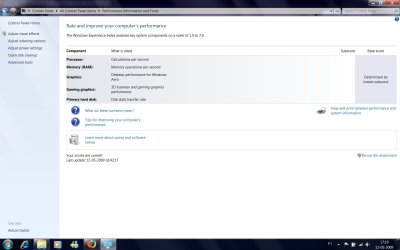
well so far so good i tested and processor,ram and Graphics went up 1 point check it out
 

Attachments

  • test.jpg
    test.jpg
    140.1 KB · Views: 86

My Computer

OS
Windows 7 Ultimate 7100
I have tried Vista x86 and x64 with 4 gB of RAM and haven't found any significant differences in performance. There's also an article here that tends to confirm this: Vista Workshop: More RAM, More Speed : Windows Vista With 8 GB - Review Tom's Hardware

If you're a gamer, then you'll want the best performance that you can get. In that case you'll have to start with looking at your video card. There are 2 reasons for this:
- it's affecting your performance score in the screenshots above.
- the video card is the biggest reason that you can't see all 4 gB of RAM. This is because it reserves address space below the 4gB limit for it's own use (so the RAM can't use it).

So it's basically a slow video card that's also preventing you from using a portion of your RAM. But, if the video card is using shared video memory (a part of your RAM), then it's possible that that part of your RAM is being used in the reserved address space for the video card. What this means is that any performance increase caused by switching to x64 could be less than expected.

Finally, if this is a laptop, then I'd wonder about the availability of larger RAM modules for it.
 

My Computer

Computer Manufacturer/Model Number
Home built (x64), Lenovo x61s Tablet, Samsung Netbook
OS
Win7 x64 + x86
CPU
Intel i7 920, other Intel chips, and the Atom in the netbook
Motherboard
Asus P6T Deluxe
Memory
12 gB; 4 gB Lenovo; 1 gB Samsung netbook
Graphics Card(s)
ATI 4870
Sound Card
Yes, I have one of these
Monitor(s) Displays
32" Sharp Aquos TV
Screen Resolution
800x600 - I have vision issues
Hard Drives
4 - 150 gB Velociraptors in RAID 5
Promise controller
PSU
1000 watt (can't recall the brand)
Case
Antec 300
Cooling
Big honking cooler that was rated highly at Toms Hardware
Keyboard
Microsoft Natural
Mouse
Logitech Trackman
Internet Speed
Cable
Other Info
GeekSquad UPS
CyberPower UPS
DLink DNS-323 NAS (2 tB)
Netgear wireless router as an access point
Netgear wired router FSV-318
Home network consists of
4 desktop computers (2 Vista, 2 Win7)
1 netbook (Win7)
4 laptop computers (XP, 2-Vista, Win7)
Wii and XBox 360
offtopic: wow your rating is 3.8?! that just shut down my idea of getting a laptop, my desktops lowest rating is 5.9 and thats my data transfer
 

My Computer

Computer Manufacturer/Model Number
Custom Build
OS
Windows Vista Home Basic x32 OEM
CPU
Intel Core 2 Quad Q8400 Yorkfield 2.66GHz LGA 775
Motherboard
ECS P45T-AD3 Motherboard - Intel P43, Socket 775, ATX
Memory
(2 x2GB)4GB Crucial
Graphics Card(s)
Radeon HD 3850 512MB 256-bit GDDR3
Sound Card
Realtek HD Audio
Monitor(s) Displays
Acer 21.5" HDMI
Screen Resolution
1920 x 1080
Hard Drives
500GBx1
PSU
Rosewill RP600V2-S-SL-S 600W ATX12V
Case
NZXT Tempest ATX Mid-Tower Case
Cooling
Fan
Keyboard
Zboard
Internet Speed
300mps wireless card
Other Info
will be upgrading to vista home premium x64 OEM, another 500GB HDD, liquid cooling, and another 4GB of RAM
So it's basically a slow video card that's also preventing you from using a portion of your RAM. But, if the video card is using shared video memory (a part of your RAM), then it's possible that that part of your RAM is being used in the reserved address space for the video card. What this means is that any performance increase caused by switching to x64 could be less than expected.

Finally, if this is a laptop, then I'd wonder about the availability of larger RAM modules for it.
.
Interesting observation. For a laptop that is using "motherboard graphics" it's likely there is no dedicated video ram as there is in a desktop PC with a separate video card. So, using a 64 bit OS is not going to change the amount of ram available to the system. It would be necessary to also add ram, if possible.
 

My Computer

Computer type
PC/Desktop
OS
Windows 7 x64
CPU
Intel Core2 Extreme Q6850 3.00GHz
Motherboard
EVGA 132-CK-NF79
Memory
8 GB
Graphics Card(s)
Radeon R7 260X
Sound Card
Xonar DS
Hard Drives
Hitachi Deskstar 1 tb
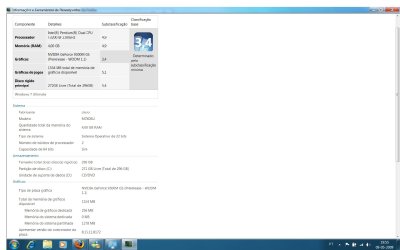
well first of all thanks for the help guys my video card is a NVIDIA® GeForce® 9300M GS which i believe is dedicated memory..


about the ram i dunno if i can upgrade it, one thing is on my laptop specs it says Memory 6GB (4GB RAM + 2GB Memory Boost) the 2Gb boost i think is by connect a usb drive pen to your system and use Ready Boost , which i started doing.. although now i can't see my WEI, i tried taking out the drive pen and run again but it does not show nothing
 

Attachments

  • Untitled.jpg
    Untitled.jpg
    88.8 KB · Views: 9

My Computer

OS
Windows 7 Ultimate 7100
I'm not familiar with the specific card, but I recently purchased an Asus laptop with a discrete graphics card (and it's own memory).

What's the make and model of your laptop?

It appears that you probably have 256 mB of discrete video memory, and some that is shared (from the first screenshot). This further complicates my theory about the reserved address spaces and the shared video memory. Basically, there'll be 256 mB of the reserved address space that the discrete video memory will address - and the shared video memory would likely occupy other portions of the reserved address space (but this is just a theory on my part - and I'll have to test it with a system with an onboard video card when I get a chance).

I would suggest sticking with the 32 bit version of Windows unless you can get a deal on RAM for the laptop. If you're able to stuff more than 4 gB into it (and the laptop mobo can handle it) then you should upgrade to the 64 bit version.
 

My Computer

Computer Manufacturer/Model Number
Home built (x64), Lenovo x61s Tablet, Samsung Netbook
OS
Win7 x64 + x86
CPU
Intel i7 920, other Intel chips, and the Atom in the netbook
Motherboard
Asus P6T Deluxe
Memory
12 gB; 4 gB Lenovo; 1 gB Samsung netbook
Graphics Card(s)
ATI 4870
Sound Card
Yes, I have one of these
Monitor(s) Displays
32" Sharp Aquos TV
Screen Resolution
800x600 - I have vision issues
Hard Drives
4 - 150 gB Velociraptors in RAID 5
Promise controller
PSU
1000 watt (can't recall the brand)
Case
Antec 300
Cooling
Big honking cooler that was rated highly at Toms Hardware
Keyboard
Microsoft Natural
Mouse
Logitech Trackman
Internet Speed
Cable
Other Info
GeekSquad UPS
CyberPower UPS
DLink DNS-323 NAS (2 tB)
Netgear wireless router as an access point
Netgear wired router FSV-318
Home network consists of
4 desktop computers (2 Vista, 2 Win7)
1 netbook (Win7)
4 laptop computers (XP, 2-Vista, Win7)
Wii and XBox 360
The graphics card has dedicated memory apart of the RAM. So, you have at least 4 GB. ("at least" because I don't know what's all about "memory boost" yet :confused:). If you have more than 3 GB. of RAM, you need an x64 edition of Windows. If you intall a 32 bits edition, you will be wasting a couple of megabytes there.

See you around! ^_^
 

My Computer

Computer type
PC/Desktop
Computer Manufacturer/Model Number
@Home: Built by me / @Work: Banghó Extrema
OS
@Home/Work: Windows 8.1 Enterprise x64
CPU
@Home: Core [email protected] GHz / @Work: Core [email protected] GHz
Motherboard
@Home: Gigabyte GA-Z87-D3HP / @Work: ASRock H61M-VG3
Memory
@Home: 8 GB. DDR3-1333 CL9 / @Work: 12 GB. DDR3-1333 CL9
Graphics Card(s)
@Home: MSI N560GTX-Ti Twin Frozr II / @Work: Intel HD 2500
Sound Card
@Home/Work: Realtek HD Audio
Monitor(s) Displays
@Home: Samsung T260 LCD via DVI-D / @Work: Acer AL1714 (VGA)
Screen Resolution
@Home: 1920x1200x32@60h / @Work: 1280x1024x32@60h
Hard Drives
@Home: 4 disks that results in ~4.3 TB. of usable space.
@Work: Western Digital WD10EARS (1 TB.)
PSU
@Home: Topower 650W / @Work: Shark Net 600W
Case
@Home: Euro Case Generic / @Work: Banghó Extrema
Keyboard
@Home: Genius (Spa) / @Work: Noga Net (Spa)
Mouse
@Home: HP Laser 2.4G Xa965 / @Work: Genius Optical generic
Internet Speed
@Home/Work: Fibertel 7Mbps/512kbps
Antivirus
@Home/Work: Windows Defender+Spybot 2+AdwCleaner
Browser
@Home/Work: Google Chrome (Dev)+Mozilla Firefox (Aurora)
Other Info
@Home:
Microsoft Xbox 360 wireless gamepad+USB receiver.
Microsoft Xbox 360 wired gamepad.
Logitech C910 Full HD webcam.
Generic 5.1 analog Home Theater.

@Work:
2-Way electronic keyboard/mouse/monitor switch.
Back
Top