
Help Accelerate SSD

live2ride184

New member
Local time
1:44 PM
Messages
24
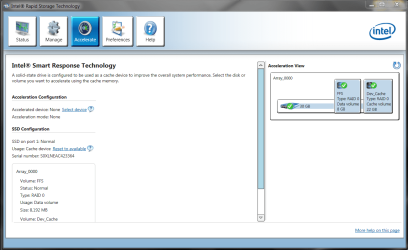
I have a 1TB HD and a 32gig SSD and when I open Intel Rapid Storage Technology under Acceleration Configuration I click on "Select a Device" and the SSD isnt in the list. Can someone please help? It seems like my boot times have slowed a bit and I want to make sure my SSD is configured correctly to make Windows boot faster. Thanks for any help in advance
 

Attachments
  • Capture.PNG
    Capture.PNG
    58.7 KB · Views: 45

My Computer My Computer

OS
Windows 7 Home Premium 64bit
bump Please someone help me why cant I accelerate my SSD?
 

My Computer My Computer

OS
Windows 7 Home Premium 64bit
I would try on the Intel forums. I don't know of anyone here using that setup with an SSD.> Intel® Customer Support

They should have info available how to set it up. There should be a manual that came with it.
The Intel Communities forum tab at the above link may have this issue posted by someone else or you may need to make a new post/thread.

Sorry I can't be more help.
I don't want to make things worse with the wrong information.
 

My Computer My Computer

Computer Manufacturer/Model Number
Hopalong/ Godzilla
OS
Windows7 Pro 64bit SP-1; Windows XP Pro 32bit
CPU
Intel Core i7-870 Lynnfield 2.93GHz LGA 1156 95W Quad-Core
Motherboard
ASUS P7P55D-E PRO
Memory
8GB@1400MHz Crucial Ballistix DDR3-1600 4x2GB
Graphics Card(s)
ASUS ENGTX460 DirectCU/2DI/1GD5 1GB 256-bit GDDR5
Sound Card
VIA Onboard
Monitor(s) Displays
Asus VS248H-P 24"; Samsung SyncMaster 941BW 19"ws
Screen Resolution
1920x1080; 1440x900
Hard Drives
Samsung 830 120GB SSD
Intel 320 120GB SSD
Western Digital Caviar Black WD7501AALS 750GB 7200 RPM SATA 3.0Gb/s
Western Digital Caviar Black WD6401AALS 640GB 7200 RPM SATA 3.0Gb/s
PSU
COOLER MASTER Silent Pro RS850-AMBAJ3-US 850W Modular
Case
COOLER MASTER HAF 932 RC-932-KKN5-GP Black
Cooling
Scythe "Mugen-2 Rev.B" (2 ScytheKaze-Jyuni PWM fans)
Keyboard
Logitech K-320
Mouse
Kensington
Antivirus
Avast Inernet Suite
Browser
IE 9 ; Chrome
One possibility is the chipset

I am currently accelerating my hard drive with an Intel SSD with no issues. One thing to verify is if the chipset supports the feature. Mine is a Z68, which was the first one that supported the acceleration.

The reason I'm saying that is that the SSD is not showing up at all. If the SSD shows up in the BIOS then is should show up in the Intel utility.

Hope this helps.
 

My Computer My Computer

OS
Windows 7 64 bit
Back
Top