Help on UAC softwares

eviliony

New member
Okay i have this weird problem... its about an application from OnOne...

The problem with this application is i got an error message -108 upon opening the program..

here is the solution... I receive error message “Unknown error -108″ (Windows only) – onOne Software

The solution works well... but the problem is i have to turn off my UAC .. (move the slide to the lowest) ... currently im using the second bar from bottom...

so my question is... i cannot run the application if the slider is not on the lowest.. is there anyway i can make the application as an exemption... like assuming the UAC is a firewall and the Onone application is exempted...

and secondly if theres no way i can put it exempted.. is it okay for the slide to be at the bottom... i have kaspersky internest security as my protection as well as my firewall...

please give some suggestions.... as for now i have to move the slide to the lowest for me to run the software
 

My Computer

OS
Windows 7 Ultimate x64

My Computer

Computer type
PC/Desktop
Computer Manufacturer/Model Number
Lenovo IdeaCenter 450
OS
Windows 10 Pro X64
CPU
Intel Quad Core i7-4770 @ 3.4Ghz
Memory
16.0GB PC3-12800 DDR3 SDRAM 1600 MHz
Graphics Card(s)
Intel Integrated HD Graphics
Sound Card
Realtek HD Audio
Monitor(s) Displays
HP 22" LCD
Screen Resolution
1680 x 1050
Hard Drives
250GB Samsung EVO SATA-3 SSD
2TB Seagate ST2000DM001 SATA-2
1.5TB Seagate ST3150041AS SATA
Keyboard
Dell USB
Mouse
Lenovo USB
Internet Speed
Cable via Road Runner 3MB Upload, 30MB Download
Antivirus
Windows Defender, MBAM Pro, MBAE
Browser
Seamonkey
Other Info
UEFI/GPT
PLDS DVD-RW DH16AERSH
i tried and its not working because its a plugin program i think... its okay.. i just turned off my UAC...

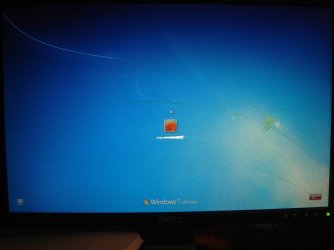
i already undo everything and delete the shortcut and now my problem is after i restart my computer... i was greeted by this (attached pic) ..

how to remove that? there is only one account in this computer and i didnt use any password..
 

Attachments

  • DSC06380.JPG
    DSC06380.JPG
    275.8 KB · Views: 13

My Computer

OS
Windows 7 Ultimate x64
err *bump* i need immediate answers on solving this... i followed your advice, it didnt work so i undo it following the suggested method on the bottom and it lead me to this.. please help remove/disable this.. i already tried "netplwiz" and its not working...
 

My Computer

OS
Windows 7 Ultimate x64

My Computer

Computer type
PC/Desktop
Computer Manufacturer/Model Number
Self built custom
OS
64-bit Windows 11 Pro for Workstations
CPU
Intel i7-8700K OC'd to 5 GHz
Motherboard
ASUS ROG Maximus XI Formula Z390
Memory
64 GB (4x16GB) G.SKILL TridentZ RGB DDR4 3600 MHz
Graphics Card(s)
ASUS ROG-STRIX-GTX1080TI-O11G-GAMING
Sound Card
Integrated
Monitor(s) Displays
2 x Samsung Odyssey G7 27"
Screen Resolution
2560x1440
Hard Drives
1TB Samsung 990 PRO M.2,
4TB Samsung 990 PRO PRO M.2,
TerraMaster F8 SSD Plus NAS
PSU
Seasonic Prime Titanium 850W
Case
Thermaltake Core P3
Cooling
Corsair Hydro H115i
Keyboard
Logitech wireless K800
Mouse
Logitech MX Master 4
Internet Speed
2 Gb/s Download and 100 Mb/s Upload
Antivirus
Malwarebyte Anti-Malware Premium
Browser
Google Chrome
Other Info
Logitech Z625 speaker system,
Logitech BRIO 4K Pro webcam,
HP Color LaserJet Pro MFP M477fdn,
APC SMART-UPS RT 1000 XL - SURT1000XLI,
Galaxy S23 Plus phone
hello brink i tried that... i got it as well from google, i untick and restart yet its still there...
 

My Computer

OS
Windows 7 Ultimate x64
If you are the Admin and only user logged to Admin, you won't have too much trouble if you do disable UAC. Can't stand it personally.
 

My Computer

Computer Manufacturer/Model Number
DIY
OS
Windows 7 home premium x64
CPU
AMD FX-4100 AM3+ 3.6GHz 12MB Black Edition
Motherboard
Asus M5A97 Pro
Memory
Crsair vengeance 12Gb DDR3 1600MHz CL9
Graphics Card(s)
Asus GTX 560 1GB
Sound Card
Realtek onboard
Monitor(s) Displays
Hanns G 1680x1050 native
Hard Drives
OCZ 128Gb Petrol ssd
2x500 Gb Samsung
PSU
OCZ StealthXstream II 500W
Internet Speed
8Mb or better
Can you log in with safe mode? Hit F8 when your manufacturers splash screen appears at the start of boot
 

My Computer

Computer Manufacturer/Model Number
Dell XPS 15 L502x
OS
Windows 7 Home Premium 64bit (O.E.M)
CPU
Intel Core i7 2630QM @2.00GHz
Memory
6GB DDR3
Graphics Card(s)
Intel Intergrated Graphics 3000, nVidia GT525M (1GB)
Screen Resolution
1366x768
Hard Drives
750GB Seagate 7200rpm
Keyboard
Backlit Dell XPS 15 L502x Keyboard
Mouse
Microsoft Wireless Mobile Mouse 4000
Internet Speed
2.5 Mb/s down, 0.36 up
Cyclic: i already disable UAC.. my only problem is the welcome screen that appears after implementing the method suggested... following another advice but its still persists...

Tekno: i can log in with safe mode.. what should i do there?
 

My Computer

OS
Windows 7 Ultimate x64
hello brink i tried that... i got it as well from google, i untick and restart yet its still there...

In that case, go ahead and create a password for the user account, then set the user account to be logged on to automatically using the new password. :)
 

My Computer

Computer type
PC/Desktop
Computer Manufacturer/Model Number
Self built custom
OS
64-bit Windows 11 Pro for Workstations
CPU
Intel i7-8700K OC'd to 5 GHz
Motherboard
ASUS ROG Maximus XI Formula Z390
Memory
64 GB (4x16GB) G.SKILL TridentZ RGB DDR4 3600 MHz
Graphics Card(s)
ASUS ROG-STRIX-GTX1080TI-O11G-GAMING
Sound Card
Integrated
Monitor(s) Displays
2 x Samsung Odyssey G7 27"
Screen Resolution
2560x1440
Hard Drives
1TB Samsung 990 PRO M.2,
4TB Samsung 990 PRO PRO M.2,
TerraMaster F8 SSD Plus NAS
PSU
Seasonic Prime Titanium 850W
Case
Thermaltake Core P3
Cooling
Corsair Hydro H115i
Keyboard
Logitech wireless K800
Mouse
Logitech MX Master 4
Internet Speed
2 Gb/s Download and 100 Mb/s Upload
Antivirus
Malwarebyte Anti-Malware Premium
Browser
Google Chrome
Other Info
Logitech Z625 speaker system,
Logitech BRIO 4K Pro webcam,
HP Color LaserJet Pro MFP M477fdn,
APC SMART-UPS RT 1000 XL - SURT1000XLI,
Galaxy S23 Plus phone
i can log in with safe mode.. what should i do there?

Try brinks method first then if it doesn't work,
Can you do a system restore from safe mode? If that doesn't work try scanning your pc with malwarebytes anti-malware in case it's picked up a virus somehow.

Stephen
 

My Computer

Computer Manufacturer/Model Number
Dell XPS 15 L502x
OS
Windows 7 Home Premium 64bit (O.E.M)
CPU
Intel Core i7 2630QM @2.00GHz
Memory
6GB DDR3
Graphics Card(s)
Intel Intergrated Graphics 3000, nVidia GT525M (1GB)
Screen Resolution
1366x768
Hard Drives
750GB Seagate 7200rpm
Keyboard
Backlit Dell XPS 15 L502x Keyboard
Mouse
Microsoft Wireless Mobile Mouse 4000
Internet Speed
2.5 Mb/s down, 0.36 up
IS there anyway to edit the registry via regedit like win xp? To remove the welcome screen? Oww the password if we cant regedit mybe i will give it a shot..its annoying i followed evrytng how come the welcome screen appears *sigh*
 

My Computer

OS
Windows 7 Ultimate x64
Tekno: as for the system restore..my last system restore was during an installation of the software..if i choose that i might lose the software.. And others that i cant recall
 

My Computer

OS
Windows 7 Ultimate x64
Try our previous advice to try and remove the password. In safe mode go to control panel and remove or change the password. Leave the old password blank as you don't have one
 

My Computer

Computer Manufacturer/Model Number
Dell XPS 15 L502x
OS
Windows 7 Home Premium 64bit (O.E.M)
CPU
Intel Core i7 2630QM @2.00GHz
Memory
6GB DDR3
Graphics Card(s)
Intel Intergrated Graphics 3000, nVidia GT525M (1GB)
Screen Resolution
1366x768
Hard Drives
750GB Seagate 7200rpm
Keyboard
Backlit Dell XPS 15 L502x Keyboard
Mouse
Microsoft Wireless Mobile Mouse 4000
Internet Speed
2.5 Mb/s down, 0.36 up

My Computer

Computer type
PC/Desktop
Computer Manufacturer/Model Number
Self built custom
OS
64-bit Windows 11 Pro for Workstations
CPU
Intel i7-8700K OC'd to 5 GHz
Motherboard
ASUS ROG Maximus XI Formula Z390
Memory
64 GB (4x16GB) G.SKILL TridentZ RGB DDR4 3600 MHz
Graphics Card(s)
ASUS ROG-STRIX-GTX1080TI-O11G-GAMING
Sound Card
Integrated
Monitor(s) Displays
2 x Samsung Odyssey G7 27"
Screen Resolution
2560x1440
Hard Drives
1TB Samsung 990 PRO M.2,
4TB Samsung 990 PRO PRO M.2,
TerraMaster F8 SSD Plus NAS
PSU
Seasonic Prime Titanium 850W
Case
Thermaltake Core P3
Cooling
Corsair Hydro H115i
Keyboard
Logitech wireless K800
Mouse
Logitech MX Master 4
Internet Speed
2 Gb/s Download and 100 Mb/s Upload
Antivirus
Malwarebyte Anti-Malware Premium
Browser
Google Chrome
Other Info
Logitech Z625 speaker system,
Logitech BRIO 4K Pro webcam,
HP Color LaserJet Pro MFP M477fdn,
APC SMART-UPS RT 1000 XL - SURT1000XLI,
Galaxy S23 Plus phone
You may loose the software if you system restore but surly that's a price to pay to be able to use your pc properly again
 

My Computer

Computer Manufacturer/Model Number
Dell XPS 15 L502x
OS
Windows 7 Home Premium 64bit (O.E.M)
CPU
Intel Core i7 2630QM @2.00GHz
Memory
6GB DDR3
Graphics Card(s)
Intel Intergrated Graphics 3000, nVidia GT525M (1GB)
Screen Resolution
1366x768
Hard Drives
750GB Seagate 7200rpm
Keyboard
Backlit Dell XPS 15 L502x Keyboard
Mouse
Microsoft Wireless Mobile Mouse 4000
Internet Speed
2.5 Mb/s down, 0.36 up

My Computer

Computer Manufacturer/Model Number
Dell XPS 15 L502x
OS
Windows 7 Home Premium 64bit (O.E.M)
CPU
Intel Core i7 2630QM @2.00GHz
Memory
6GB DDR3
Graphics Card(s)
Intel Intergrated Graphics 3000, nVidia GT525M (1GB)
Screen Resolution
1366x768
Hard Drives
750GB Seagate 7200rpm
Keyboard
Backlit Dell XPS 15 L502x Keyboard
Mouse
Microsoft Wireless Mobile Mouse 4000
Internet Speed
2.5 Mb/s down, 0.36 up
Read brinks first post
 

My Computer

Computer Manufacturer/Model Number
Dell XPS 15 L502x
OS
Windows 7 Home Premium 64bit (O.E.M)
CPU
Intel Core i7 2630QM @2.00GHz
Memory
6GB DDR3
Graphics Card(s)
Intel Intergrated Graphics 3000, nVidia GT525M (1GB)
Screen Resolution
1366x768
Hard Drives
750GB Seagate 7200rpm
Keyboard
Backlit Dell XPS 15 L502x Keyboard
Mouse
Microsoft Wireless Mobile Mouse 4000
Internet Speed
2.5 Mb/s down, 0.36 up
Can you please confirm something for me, can you log in at all or just in safe mode. Thanks
 

My Computer

Computer Manufacturer/Model Number
Dell XPS 15 L502x
OS
Windows 7 Home Premium 64bit (O.E.M)
CPU
Intel Core i7 2630QM @2.00GHz
Memory
6GB DDR3
Graphics Card(s)
Intel Intergrated Graphics 3000, nVidia GT525M (1GB)
Screen Resolution
1366x768
Hard Drives
750GB Seagate 7200rpm
Keyboard
Backlit Dell XPS 15 L502x Keyboard
Mouse
Microsoft Wireless Mobile Mouse 4000
Internet Speed
2.5 Mb/s down, 0.36 up
Back
Top