Help, programs won't launch properly

spidie2000

New member
Local time
2:17 PM
Messages
5
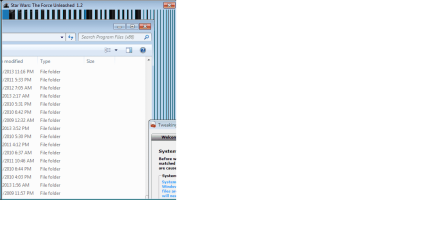
When running certain programs a window opens but it just shows a picture of what was behind the window when it opened. So far Googletalk and the Settings program for the Force Unleashed do this. Tried Reinstalling the programs, SFC has not fixed the issue. Tried windows repair install but need 34 Gig free on C drive which isn't going to happen on my SSD. I'd rather not reformat. Here is a screenshot of what is happening if it helps.
 

My Computer

Computer type
PC/Desktop
Computer Manufacturer/Model Number
Custom Build
OS
Microsoft Windows 7 Ultimate 64-bit 7601 Multiprocessor Free Service Pack 1
CPU
Intel(R) Core(TM) i7 CPU 950 @ 3.07GHz
Motherboard
Gigabyte Technology Co., Ltd. X58-USB3
Memory
18.00 GB
Graphics Card(s)
(1) NVIDIA GeForce GTX 560 Ti (2) LogMeIn Mirror Driver
Sound Card
(1) WsAudio_DeviceS(5) (2) NVIDIA High Definition Audio
Hard Drives
(1) FM-25S2S-80GBP2 ATA Device (2) SAMSUNG HD103SJ ATA Device
Antivirus
Symantec Corporate
Browser
Firefox
windows issue.png
 

My Computer

Computer type
PC/Desktop
Computer Manufacturer/Model Number
Custom Build
OS
Microsoft Windows 7 Ultimate 64-bit 7601 Multiprocessor Free Service Pack 1
CPU
Intel(R) Core(TM) i7 CPU 950 @ 3.07GHz
Motherboard
Gigabyte Technology Co., Ltd. X58-USB3
Memory
18.00 GB
Graphics Card(s)
(1) NVIDIA GeForce GTX 560 Ti (2) LogMeIn Mirror Driver
Sound Card
(1) WsAudio_DeviceS(5) (2) NVIDIA High Definition Audio
Hard Drives
(1) FM-25S2S-80GBP2 ATA Device (2) SAMSUNG HD103SJ ATA Device
Antivirus
Symantec Corporate
Browser
Firefox
I would try scanning with malwarebytes anti-malware. It's free. By default it won't take any action unless you authorize it. The free version scans just fine.
 

My Computer

Computer Manufacturer/Model Number
HP Media Center
OS
Windows 7 32 bit
CPU
AMD 5200+ dual core
Memory
2 GB
Graphics Card(s)
NVidia GeForce 6150SE 128 MB
Monitor(s) Displays
CRT
Screen Resolution
1280x1024
Hard Drives
500 GB Sata internal :

SIIG USB 3.0 docking stations w/WD Caviar Black 6 Gb/s drives
Keyboard
PS/2
Mouse
PS/2 Wheel Mouse
Other Info
SIIG USB 3.0 PCIexpress card.
When running certain programs a window opens but it just shows a picture of what was behind the window when it opened. So far Googletalk and the Settings program for the Force Unleashed do this. Tried Reinstalling the programs, SFC has not fixed the issue. Tried windows repair install but need 34 Gig free on C drive which isn't going to happen on my SSD. I'd rather not reformat. Here is a screenshot of what is happening if it helps.
Read this View attachment How to Install.pdf
 

My Computer

Computer Manufacturer/Model Number
Look in my Signature.
OS
Win7 H.Prem. 32bit+SP1
I would try scanning with malwarebytes anti-malware. It's free. By default it won't take any action unless you authorize it. The free version scans just fine.

I already use MaM, I scan regularly, I will try installing as administrator
 

My Computer

Computer type
PC/Desktop
Computer Manufacturer/Model Number
Custom Build
OS
Microsoft Windows 7 Ultimate 64-bit 7601 Multiprocessor Free Service Pack 1
CPU
Intel(R) Core(TM) i7 CPU 950 @ 3.07GHz
Motherboard
Gigabyte Technology Co., Ltd. X58-USB3
Memory
18.00 GB
Graphics Card(s)
(1) NVIDIA GeForce GTX 560 Ti (2) LogMeIn Mirror Driver
Sound Card
(1) WsAudio_DeviceS(5) (2) NVIDIA High Definition Audio
Hard Drives
(1) FM-25S2S-80GBP2 ATA Device (2) SAMSUNG HD103SJ ATA Device
Antivirus
Symantec Corporate
Browser
Firefox
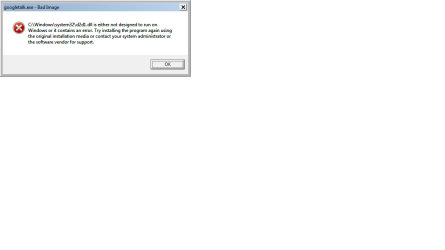
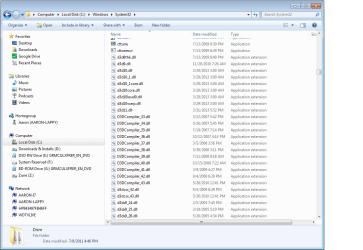
OK, I reinstalled as admin and unblocked the exe file. When I launch Gtalk I get a Windows\System32\d2d1.dll is either not designed to run on windows or contains an error message. Google talk opens fine but if I try to start a chat session with someone I get the clear window. When I go to my system 32 folder I don't even see a d2d1.dll file
gtalk1.png
gtalk 2.png
gtalk 3.png
gtalk4.png
 

My Computer

Computer type
PC/Desktop
Computer Manufacturer/Model Number
Custom Build
OS
Microsoft Windows 7 Ultimate 64-bit 7601 Multiprocessor Free Service Pack 1
CPU
Intel(R) Core(TM) i7 CPU 950 @ 3.07GHz
Motherboard
Gigabyte Technology Co., Ltd. X58-USB3
Memory
18.00 GB
Graphics Card(s)
(1) NVIDIA GeForce GTX 560 Ti (2) LogMeIn Mirror Driver
Sound Card
(1) WsAudio_DeviceS(5) (2) NVIDIA High Definition Audio
Hard Drives
(1) FM-25S2S-80GBP2 ATA Device (2) SAMSUNG HD103SJ ATA Device
Antivirus
Symantec Corporate
Browser
Firefox
Are you running an AV that's on all the time as in "shield mode?" Try turning everything off if so and see what happens.
 

My Computer

Computer Manufacturer/Model Number
HP Media Center
OS
Windows 7 32 bit
CPU
AMD 5200+ dual core
Memory
2 GB
Graphics Card(s)
NVidia GeForce 6150SE 128 MB
Monitor(s) Displays
CRT
Screen Resolution
1280x1024
Hard Drives
500 GB Sata internal :

SIIG USB 3.0 docking stations w/WD Caviar Black 6 Gb/s drives
Keyboard
PS/2
Mouse
PS/2 Wheel Mouse
Other Info
SIIG USB 3.0 PCIexpress card.
I gave up and reformatted, working fine now. Thanks
 

My Computer

Computer type
PC/Desktop
Computer Manufacturer/Model Number
Custom Build
OS
Microsoft Windows 7 Ultimate 64-bit 7601 Multiprocessor Free Service Pack 1
CPU
Intel(R) Core(TM) i7 CPU 950 @ 3.07GHz
Motherboard
Gigabyte Technology Co., Ltd. X58-USB3
Memory
18.00 GB
Graphics Card(s)
(1) NVIDIA GeForce GTX 560 Ti (2) LogMeIn Mirror Driver
Sound Card
(1) WsAudio_DeviceS(5) (2) NVIDIA High Definition Audio
Hard Drives
(1) FM-25S2S-80GBP2 ATA Device (2) SAMSUNG HD103SJ ATA Device
Antivirus
Symantec Corporate
Browser
Firefox
Back
Top