
Help Windows 7 SSD 101mb unallocated ?

Hello.


Glad to see you're not having issues and thanks for the update.
 

My Computer My Computer

At a glance

W 7 64-bit UltimateIntel Q9550 Yorkfield8GB Dominator 8500C5DATI : XFX 5870
Computer Manufacturer/Model Number
* BFK Customs *
OS
W 7 64-bit Ultimate
CPU
Intel Q9550 Yorkfield
Motherboard
ASUS P5Q Pro
Memory
8GB Dominator 8500C5D
Graphics Card(s)
ATI : XFX 5870
Sound Card
Realtek HD Audio 7-1
Monitor(s) Displays
1x 47" LCD HDMI & 3x 26" LCD HDMI
Screen Resolution
1920x1080P & 1920x1200
Hard Drives
1x 80GB Intel X25-M G2 SSD : 1x 500GB & 1x 640GB WD Caviar Black(s)
PSU
Corsair 620HX
Case
Cooler Master RC-690
Cooling
Tuniq Tower 120, 2x 140mm and 3x 120mm case fans
Keyboard
Microsoft 500
Mouse
Razer Diamondback 3G
Internet Speed
14 Mb/s
Other Info
1x Koutech 3Gb/s SATA HDD Hot Swap Rack
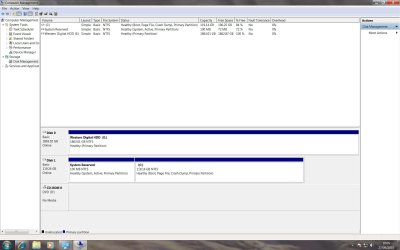
Please post a new screenshot of Disk Management

Ok here's the New Screenshot see how the System Reserved is "Active" know is this ok or should I active the C ssd drive ? I mean the system reserved is part of it same drive???
 

Attachments

  • Disk Management Shot.jpg
    Disk Management Shot.jpg
    126 KB · Views: 77

My Computer My Computer

At a glance

Windows 7 Ultimate 64 Biti7 950Kingston HyperX 1600MHz DDR3
OS
Windows 7 Ultimate 64 Bit
CPU
i7 950
Motherboard
Asus P6X58D-E
Memory
Kingston HyperX 1600MHz DDR3
Hard Drives
128GB SSD Crucial C300
2TB Western Digital WD2001FASS Caviar Black
PSU
Corsair TX850
Case
Cool Master Haf 922
Cooling
Thermalright Venomous X
Hello again.


Leave it just as it is, that's the way Windows 7 is designed to do it. ;)
 

My Computer My Computer

At a glance

W 7 64-bit UltimateIntel Q9550 Yorkfield8GB Dominator 8500C5DATI : XFX 5870
Computer Manufacturer/Model Number
* BFK Customs *
OS
W 7 64-bit Ultimate
CPU
Intel Q9550 Yorkfield
Motherboard
ASUS P5Q Pro
Memory
8GB Dominator 8500C5D
Graphics Card(s)
ATI : XFX 5870
Sound Card
Realtek HD Audio 7-1
Monitor(s) Displays
1x 47" LCD HDMI & 3x 26" LCD HDMI
Screen Resolution
1920x1080P & 1920x1200
Hard Drives
1x 80GB Intel X25-M G2 SSD : 1x 500GB & 1x 640GB WD Caviar Black(s)
PSU
Corsair 620HX
Case
Cooler Master RC-690
Cooling
Tuniq Tower 120, 2x 140mm and 3x 120mm case fans
Keyboard
Microsoft 500
Mouse
Razer Diamondback 3G
Internet Speed
14 Mb/s
Other Info
1x Koutech 3Gb/s SATA HDD Hot Swap Rack
As Barefoot says, it is exactly correct. You want the 100mb System Reserved partition to be active because the System Active flags planted there mean that Windows 7 is booting off of that partition as intended.

One helpful benefit of the 100mb System Reserved is that you now have the "Repair My Computer" console available by tapping F8 at bootup, instead of just on the DVD or Repair CD - in case Win7 fails to start.

System Recovery Options - Windows 7 Forums.URL
 
Back
Top