
Hello TJ;Yes. Is this a recommendation or just a question? I did a DOD 3 sweep format of the drive prior to attempting another installation (which took 4 or 5 hours).Does the Seagate Diagnostic Disc have a section on it that lets you write all ZERO's to the HD to wipe it clean before a new format ?
I am currently running the "advanced test" which is about 25 percent complete. Looks like this test will take about 2 hours.
What are your thoughts? I was thinking about running down to best buy and spending 60 bucks for a new drive to see if I could install.
A new hard drive, perhaps a different brand, might be quicker ... if it works ... and a backup hard drive is always a good idea.
I have one question, it may seem a simple stupid question, but has the bios clock (the time, GMT) been set to reflect the actual time, accurately, in your locale?
Also, I reviewed the manual for the Biostar TA790GXE 128M V5
and would like to make some suggestions ... no promises though

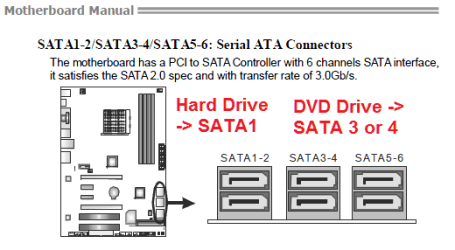
You have 6 SATA2 plugs. I would suggest you connect the hard drive to SATA1
and the DVD to another plug, 3 - 6
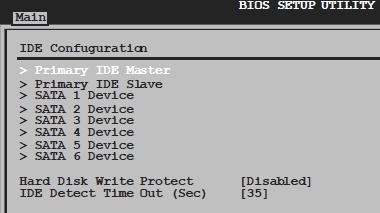
Next, until the install is finished, set the CD / DVD to primary in boot order
with the hard drive second. Also it might be helpful temporarily to disable the quick boot.

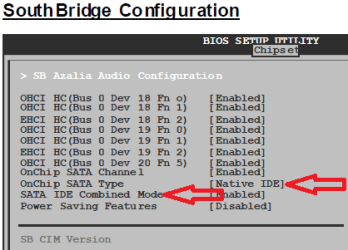
Finally, for the SATA Type, I would suggest either the Native or AHCI.
As you are having difficulty, perhaps Native? Also, as you are not using any IDE
devices, you can disable the Combined Mode (until you have one to connect?).

You should not need to create any partitions or format your new hard drive. Windows 7 has its own format utility it uses during the install. It is very easy later
to shrink your new Windows partition and make a second for other uses. If you need to,
a low level format, writing with all 0s, and install 7 on a blank hard drive.
Hope some this helps!
Cheers!
Robert
My Computer
- OS
- ...


