Help with install & build

Does the Seagate Diagnostic Disc have a section on it that lets you write all ZERO's to the HD to wipe it clean before a new format ?
Yes. Is this a recommendation or just a question? I did a DOD 3 sweep format of the drive prior to attempting another installation (which took 4 or 5 hours).

I am currently running the "advanced test" which is about 25 percent complete. Looks like this test will take about 2 hours.

What are your thoughts? I was thinking about running down to best buy and spending 60 bucks for a new drive to see if I could install.
Hello TJ;

A new hard drive, perhaps a different brand, might be quicker ... if it works ... and a backup hard drive is always a good idea.

I have one question, it may seem a simple stupid question, but has the bios clock (the time, GMT) been set to reflect the actual time, accurately, in your locale?

Also, I reviewed the manual for the Biostar TA790GXE 128M V5
and would like to make some suggestions ... no promises though ;)

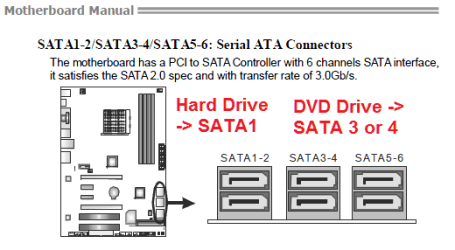
You have 6 SATA2 plugs. I would suggest you connect the hard drive to SATA1
and the DVD to another plug, 3 - 6
TJ1376_02.png TJ1376_01.png

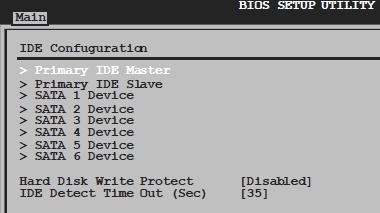
Next, until the install is finished, set the CD / DVD to primary in boot order
with the hard drive second. Also it might be helpful temporarily to disable the quick boot.
TJ1376_03.png

Finally, for the SATA Type, I would suggest either the Native or AHCI.
As you are having difficulty, perhaps Native? Also, as you are not using any IDE
devices, you can disable the Combined Mode (until you have one to connect?).
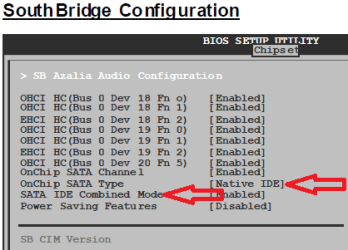
TJ1376_04.png TJ1376_05.png

You should not need to create any partitions or format your new hard drive. Windows 7 has its own format utility it uses during the install. It is very easy later
to shrink your new Windows partition and make a second for other uses. If you need to,
a low level format, writing with all 0s, and install 7 on a blank hard drive.

Hope some this helps!

Cheers!
Robert
 

My Computer

OS
...
New drive is in.. This time a Western Digital Caviar Green drive 500gig.

Install failed again, but this time I got an error indicating there was a problem with the windows 7 dvd and the dvd should be returned for a replacement. Ill get the error code if it fails again. I ran the repair utility and found this error:

Boot manager is missing or corrupt.
Repair action: Fail repair
Result: Failed. Error code = 0x 15
Time taken = 0ms

I am going to reformat the drive, move the DVD from SATA2 to SATA3 and verify that IDE is off (almost positive it is)
 

My Computer

OS
Win 7 x64
New drive is in.. This time a Western Digital Caviar Green drive 500gig.

Install failed again, but this time I got an error indicating there was a problem with the windows 7 dvd and the dvd should be returned for a replacement. Ill get the error code if it fails again. I ran the repair utility and found this error:

Boot manager is missing or corrupt.
Repair action: Fail repair
Result: Failed. Error code = 0x 15
Time taken = 0ms

I am going to reformat the drive, move the DVD from SATA2 to SATA3 and verify that IDE is off (almost positive it is)

Bios clock is correct.
Well ... at least that is something different?
 

My Computer

OS
...
Yeah.. I just used partition wizard to wipe the drive and build the partitions.

Winows 7 installed successfully.

Reboot the machine and get:

Windows Boot Manager
Windows failed to start. A recent hardware or software change might be the cause. To fix (insert your disc, blah blah blah)

File: \Windows\System32\config\system
Status: 0xc00000e9
Info: Windows failed to load because the system registry file is missing, or corrupt.
 

My Computer

OS
Win 7 x64
Yeah.. I just used partition wizard to wipe the drive and build the partitions.

Winows 7 installed successfully.

Reboot the machine and get:

Windows Boot Manager
Windows failed to start. A recent hardware or software change might be the cause. To fix (insert your disc, blah blah blah)

File: \Windows\System32\config\system
Status: 0xc00000e9
Info: Windows failed to load because the system registry file is missing, or corrupt.
Looks like it may be time to get a replacement 7 install DVD?

If you have access to the Windows 7 RC (Beta), you can still install it, get the code key from Microsoft, then install an upgrade version of the Retail 7. But even that opportunity will end soon ...
 

My Computer

OS
...
Looking at the diagnostics this time, the boot manager diagnosis test passed (Completed Successfully)

Root Cause found:
Failure while setup is in progress.

I am literally at my wits end with this. Why is this so hard?

Any suggesstions?
 

My Computer

OS
Win 7 x64
Yeah.. I just used partition wizard to wipe the drive and build the partitions.

Winows 7 installed successfully.

Reboot the machine and get:

Windows Boot Manager
Windows failed to start. A recent hardware or software change might be the cause. To fix (insert your disc, blah blah blah)

File: \Windows\System32\config\system
Status: 0xc00000e9
Info: Windows failed to load because the system registry file is missing, or corrupt.
Looks like it may be time to get a replacement 7 install DVD?

If you have access to the Windows 7 RC (Beta), you can still install it, get the code key from Microsoft, then install an upgrade version of the Retail 7. But even that opportunity will end soon ...

I do not have access to the Windows 7 RC.. I also do not have access to a DVD burner or a USB drive large enough to fit the info. DVD needs to be the way I go. I wonder if Newegg will RMA it since its an open pacakage now.
 

My Computer

OS
Win 7 x64
Yeah.. I just used partition wizard to wipe the drive and build the partitions.

Winows 7 installed successfully.

Reboot the machine and get:

Windows Boot Manager
Windows failed to start. A recent hardware or software change might be the cause. To fix (insert your disc, blah blah blah)

File: \Windows\System32\config\system
Status: 0xc00000e9
Info: Windows failed to load because the system registry file is missing, or corrupt.
Looks like it may be time to get a replacement 7 install DVD?

If you have access to the Windows 7 RC (Beta), you can still install it, get the code key from Microsoft, then install an upgrade version of the Retail 7. But even that opportunity will end soon ...

I do not have access to the Windows 7 RC.. I also do not have access to a DVD burner or a USB drive large enough to fit the info. DVD needs to be the way I go. I wonder if Newegg will RMA it since its an open pacakage now.
NewEgg has a very good reputation. If you have pictures of the error codes and the one that said to "replace the DVD" that should be sufficient cause to replace the disk?

It only takes a 4GB usb drive to hold the DVD. I picked one up on sale at WalMart for $8 USD, and I see them on sale for $14 USD?
 

My Computer

OS
...
Ok. I have the machine setup to replace the hdd with 0's (going to take a few hours), then I will try the install again. The 2nd install didnt fail today with the drive read error, so who knows, maybe 3rd time is a charm? I will post again when I obtain either the USB drive and a clean download of the install or when I get a new DVD.

Thanks again for everyones help!
 

My Computer

OS
Win 7 x64
Ok. I have the machine setup to replace the hdd with 0's (going to take a few hours), then I will try the install again. The 2nd install didnt fail today with the drive read error, so who knows, maybe 3rd time is a charm? I will post again when I obtain either the USB drive and a clean download of the install or when I get a new DVD.

Thanks again for everyones help!
You are most welcome! I have installed 7 several times and have not had these kinds of difficulties, so it isn't always like this!

http://www.sevenforums.com/tutorials/2432-usb-windows-7-installation-key-drive-create.html

Cheers!
Robert
 

My Computer

OS
...
Try copying your DVD using ImgBurn. This has worked before.

Other than replacing DVD, USB flash stick install would be your next step.
 
So someone at work suggested I remove the USB mouse I use during boot up. I did this and now I get a new error when starting Windows 7 (the install works successfully, the reboot after the install does not work)

File: \Windows\system32\ntoskrnl.exe
Status: 0xc00000e9
Info: Windows failed to load because the kernel is missing, or corrupt.

Think this furthers a bad DVD?
 

My Computer

OS
Win 7 x64
See if it detects an installation to repair when you boot DVD Repair console. Then click through to Recovery tools, open a Command Prompt, type:

bootrec.exe /fixboot
bootrec.exe /fixmbr
exit

Now return to run Startup Repair repeatedly to see if it will start.

Do you have video outputted via a tv tuner card or projector, etc? This sometimes happens after install completes, during driver loading phase when monitor changes to alternate output preset.
 
I have now got an enterprise version of Windows 7 ISO file (from microsoft website, 10 day trial), which I have loaded onto a USB device and used the USB tool in the sticky to transfer that ISO file to the usb stick. I have made the necessary changes in the BIOS to boot via USB (tip to others, make sure you force your bios to read the USB as a FDD), and on boot, I get "A disk read error occured"

I am now totally out of options.

Does any have any suggestions? Could the motherboard be bad?

I have tried to install a friends Windows 7 32 bit home version, my own Windows 7 Pro 64 bit, and now the enterprise version of Win 7 64 bit, all to no avail.

Any help out there?
 

My Computer

OS
Win 7 x64
See if it detects an installation to repair when you boot DVD Repair console. Then click through to Recovery tools, open a Command Prompt, type:

bootrec.exe /fixboot
bootrec.exe /fixmbr
exit

Now return to run Startup Repair repeatedly to see if it will start.

Do you have video outputted via a tv tuner card or projector, etc? This sometimes happens after install completes, during driver loading phase when monitor changes to alternate output preset.

So I tried this with Win 7 home 32 bit, as it was the only version where installation repair would recognize the OS installed.

The bootrec commands worked fine, and said they were successful.

Running startup repair then only tells me that no problems were found and the OS booted successfully, even though I get the same ntoskrnl.exe error
 

My Computer

OS
Win 7 x64
So I got the usb stick to work (reset BIOS/CMOS), restarted machine and it booted right into the Win 7 install.

Install performed successfully and then rebooted...

Straight into:
File: \Windows\system32\config\system
Status: 0xc00000e9
Info: Windows failed to load because the system registry file is missing or corrupt

This is now three DIFFERENT versions of windows on three DIFFERENT discs (well, 2 DVD's, 1 USB)

What is wrong with my machine?????
 

My Computer

OS
Win 7 x64
Can you remove the HD from the problem machine and install Win7 using another computer with same number of cores?

I use this method when troubleshooting is taking more time than I can afford. It has worked about a dozen times for me, never failing to start up and swap out all of the drivers - requesting several restarts. It then passes chkdsk, System File Checker, HD diag scan, etc.

However it has failed a few times for others, so be aware of that possibility - as I know you are by now. :confused:

I am truly sorry for the trouble you are having. You have tried everything imaginable, researched more deeply than anyone ever does, and have more skills than most who inquire here.

We won't give up if you don't.

Let's go over basics one more time, since this thread is epic:

Remove all but 2gb of memory. Test memory. Swap sticks.

Update BIOS to latest version. Reset CMOS: Clear CMOS - 3 Ways to Clear the CMOS - Reset BIOS

Try all SATA controller settings, starting with ACHI, then IDE. Check connections and cables.

Try USB flash stick install. If MS tool fails, try another method: http://www.sevenforums.com/tutorials/2432-usb-windows-7-installation-key-drive-create.html or http://www.youtube.com/watch?v=srOoGhm-jcI Flash stick will often appear under HD's. Use one-time (F11,F10,F12) Boot Menu.

Edit: I see you got flash stick to boot. This does seem to clear the installers. It would need to be mobo, BIOS setting or HD. Now is the time to update BIOS if necc. or clear CMOS, adjust all BIOS settings to test.

Try installing to HD in another machine.
 
Last edited:
I have just read this thread over again, and there is one thing that has not been mentioned.

First, though, I support Greg's suggestion of installing from another machine.

Now the problem sounds like a hardware issue. So far, you have tested both hard drive and RAM.

How about the CPU, motherboard, and PSU? If you are overclocking, stop.

It is not very easy to test the motherboard, but if possible, try running Prime95 on your CPU.
 

My Computer

Computer Manufacturer/Model Number
Custom
OS
Windows 7 Professional x64
CPU
Intel i7 2600K OC'd @ 4620 MHz
Motherboard
Asus P8Z68-V Pro
Memory
16GB GSkill Sniper 2133 Mhz (4x4GB)
Graphics Card(s)
EVGA GeForce GTX 480 SuperClocked+
Sound Card
Realtek High Definition Audio
Monitor(s) Displays
2x Acer S273HLbmii 27"
Screen Resolution
2 x 1920x1080
Hard Drives
64GB Crucial M4 SSD

Storage: Hitachi 1TB 5400RPM, Samsung 1.5TB 5400RPM
PSU
Corsair HW Series 750w (modular)
Case
Cooler Master HAF 932 Advanced Blue Edition
Cooling
CM Hyper 212+ CPU cooler, 3x 230mm + 1x 140mm case fans
Keyboard
Logitech MK320 (wireless)
Mouse
Logitech MK320 (wireless)
Internet Speed
30 Mb/s : 2 Mb/s
How about the CPU, motherboard, and PSU? If you are overclocking, stop.

Yeah, you are right! I would also test those pieces of hardware if they are working correctly. I've read in the past some BSOD issues from other users. After many RAM testing and clean installs, BSOD were still present and after replacing the PSU (Power Supply Unit), the errors went away. So, something, during the install corrupts the kernel files for some reasons. I would follow Jonthan's advice.

Also, I would try installing Windows Seven on another machine. It could be a friends', it could be a computer at work, as long as it matches the number of cores you have.

As for myself, althought that I just read the whole thread, I'm clueless. Some hardware isn't working correctly; that is for sure...
 

My Computer

Computer type
PC/Desktop
Computer Manufacturer/Model Number
Custom build
OS
Windows 10 Professional 64-bit
CPU
Ryzen 9 5900X
Motherboard
Gigabyte X570 Aorus Master
Memory
G.Skill 3600Mhz CL16 16GB × 4
Graphics Card(s)
EVGA GeForce RTX 3070 Ti FTW3 Ultra Gaming
Sound Card
On-board
Monitor(s) Displays
Dell Alienware AW3418DW
Screen Resolution
3440x1440
Hard Drives
1×Sabrent Rocket 4 Plus 2TB nvme SSD (System, internal)
2x4TB Western Digital Blue (Internal)
1x4TB HDST 7200RPM (Internal)
PSU
Seasonic Focus Plus 850W Platinum
Case
Corsair 680X
Cooling
Stock fans + 3× Corsair QL120, Corsair H100i Platinum
Keyboard
Logitech K350
Mouse
Logitech M510
Internet Speed
120Mbits dl - 20Mbits up
Antivirus
ESET NOD32 Antivirus
Browser
Firefox (latest version)
Other Info
Headphones : Audio-Technica ATH-M50x
Scanner : Canon Canoscan LiDE 220 + Plustek OptiBook 4800
Back
Top