Solved Hibernation only locks computer; pagefile problem?

Slammer

Destroyer of Tyranny
Power User
Local time
4:22 AM
Messages
118
Location
New Mexico, USA!
I have a fairly unique computer setup, so let me start by explaining it. I own a Dell Inspiron 1545 running Windows 7 Ultimate 64 bit. That has 4GB RAM, a 64-bit processor, and a 320GB hard drive. Any other relevant specs should be filled out in my system specs. The unique part of it is that I'm booting and running Window directly off my 2TB external USB drive, after setting it up using this program if it matters. I did this mainly because my 320GB internal HD was too small and I wanted an easy space upgrade, and I just though it would be cool :)

So my problem: whenever I try to get my computer to hibernate, the screen goes black for a moment like it should, and then it jumps right to the lock screen. In other words, trying to hibernate only locks my computer. This happens no matter how I try to get it to hibernate, whether directly through the start menu or using a gadget. I know my computer supports it because it works just fine when I run the Windows Vista Home Premium x64 that is still installed on my internal drive, and I'm pretty sure this fact also rules out the possibility of a problem with my BIOS.

I did some searching on Google and found that this can sometimes be a problem with dual booting, because it causes an issue with the page file. I assume that the page file is somewhat responsible for hibernation, which reminded me of another important quirk in my computer:

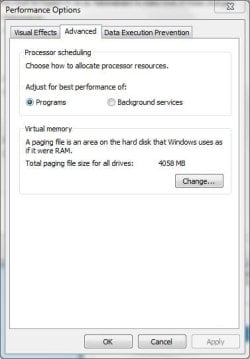
Every time I boot up Windows 7, I get this error message:
Capture.JPG

It then takes me to this window:
Capture2.JPG

At which point I just hit OK and my computer works without an issue, besides this hibernation problem.

Figuring it must a page file issue, I went into Disk Management and checked the flags on both my internal drive (that can still boot Vista Home Premium) and the external drive that W7 is running on. My internal drive with Vista has the Page File flag on it, but my Windows 7 drive does not. So for starters, I'd like to know how to set or activate the page file on that drive, and if that doesn't solve my problem, I'd like more help getting hibernate to work. Thanks!
 

My Computer

Computer Manufacturer/Model Number
Dell Inspiron 1545
OS
MS Windows 7 Ultimate 64-bit SP1
CPU
Intel Mobile Core 2 Duo T6400 @ 2.00GHz, Penryn 45nm
Motherboard
Dell Inc. 0G848F (Microprocessor)
Memory
4.00 GB Dual-Channel DDR2 @ 399MHz (6-6-6-18)
Graphics Card(s)
Mobile Intel(R) 4 Series Express Chipset Family (Integrated)
Sound Card
IDT High Definition Audio CODEC
Monitor(s) Displays
Generic PnP Monitor (DPMS) (1366x768@60Hz)
Screen Resolution
1366x768 (16:9)
Hard Drives
2TB External, with ~1TB partition booting OS
PSU
Laptop
Case
Laptop
Cooling
Laptop vent
Keyboard
Laptop
Mouse
Touchpad, and Logitech wireless USB mouse.
Internet Speed
~150 kb/s
Other Info
I'm running Windows COMPLETELY off a 2TB portable hard drive (since my 300GB internal drive just isn't big enough). It works exactly the same as it would normally, only it has to be constantly connected to my USB port. Obviously. I'll show you how to do it, if you ask! It's pretty cool.

Specs via Speccy
Anyone?
 

My Computer

Computer Manufacturer/Model Number
Dell Inspiron 1545
OS
MS Windows 7 Ultimate 64-bit SP1
CPU
Intel Mobile Core 2 Duo T6400 @ 2.00GHz, Penryn 45nm
Motherboard
Dell Inc. 0G848F (Microprocessor)
Memory
4.00 GB Dual-Channel DDR2 @ 399MHz (6-6-6-18)
Graphics Card(s)
Mobile Intel(R) 4 Series Express Chipset Family (Integrated)
Sound Card
IDT High Definition Audio CODEC
Monitor(s) Displays
Generic PnP Monitor (DPMS) (1366x768@60Hz)
Screen Resolution
1366x768 (16:9)
Hard Drives
2TB External, with ~1TB partition booting OS
PSU
Laptop
Case
Laptop
Cooling
Laptop vent
Keyboard
Laptop
Mouse
Touchpad, and Logitech wireless USB mouse.
Internet Speed
~150 kb/s
Other Info
I'm running Windows COMPLETELY off a 2TB portable hard drive (since my 300GB internal drive just isn't big enough). It works exactly the same as it would normally, only it has to be constantly connected to my USB port. Obviously. I'll show you how to do it, if you ask! It's pretty cool.

Specs via Speccy
Bump, I guess.
 

My Computer

Computer Manufacturer/Model Number
Dell Inspiron 1545
OS
MS Windows 7 Ultimate 64-bit SP1
CPU
Intel Mobile Core 2 Duo T6400 @ 2.00GHz, Penryn 45nm
Motherboard
Dell Inc. 0G848F (Microprocessor)
Memory
4.00 GB Dual-Channel DDR2 @ 399MHz (6-6-6-18)
Graphics Card(s)
Mobile Intel(R) 4 Series Express Chipset Family (Integrated)
Sound Card
IDT High Definition Audio CODEC
Monitor(s) Displays
Generic PnP Monitor (DPMS) (1366x768@60Hz)
Screen Resolution
1366x768 (16:9)
Hard Drives
2TB External, with ~1TB partition booting OS
PSU
Laptop
Case
Laptop
Cooling
Laptop vent
Keyboard
Laptop
Mouse
Touchpad, and Logitech wireless USB mouse.
Internet Speed
~150 kb/s
Other Info
I'm running Windows COMPLETELY off a 2TB portable hard drive (since my 300GB internal drive just isn't big enough). It works exactly the same as it would normally, only it has to be constantly connected to my USB port. Obviously. I'll show you how to do it, if you ask! It's pretty cool.

Specs via Speccy
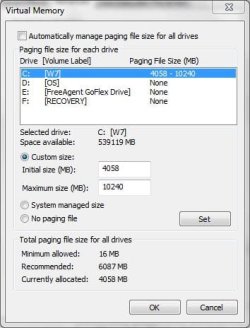
Set a paging file for your W7 hard drive:

Start-Control Panel-System&Security-System-Advanced System Settings (on the left)-Settings (in the Performance panel)-Advanced (tab @ the top)-Virtual Memory-Change.

Allow W7 to manage it and reboot.
 

My Computer

Computer Manufacturer/Model Number
8 home-builds from the 80's into 2004
OS
W7 Home Premium 32bit
No change. Still gives me the error on startup, still won't let me hibernate.
 

My Computer

Computer Manufacturer/Model Number
Dell Inspiron 1545
OS
MS Windows 7 Ultimate 64-bit SP1
CPU
Intel Mobile Core 2 Duo T6400 @ 2.00GHz, Penryn 45nm
Motherboard
Dell Inc. 0G848F (Microprocessor)
Memory
4.00 GB Dual-Channel DDR2 @ 399MHz (6-6-6-18)
Graphics Card(s)
Mobile Intel(R) 4 Series Express Chipset Family (Integrated)
Sound Card
IDT High Definition Audio CODEC
Monitor(s) Displays
Generic PnP Monitor (DPMS) (1366x768@60Hz)
Screen Resolution
1366x768 (16:9)
Hard Drives
2TB External, with ~1TB partition booting OS
PSU
Laptop
Case
Laptop
Cooling
Laptop vent
Keyboard
Laptop
Mouse
Touchpad, and Logitech wireless USB mouse.
Internet Speed
~150 kb/s
Other Info
I'm running Windows COMPLETELY off a 2TB portable hard drive (since my 300GB internal drive just isn't big enough). It works exactly the same as it would normally, only it has to be constantly connected to my USB port. Obviously. I'll show you how to do it, if you ask! It's pretty cool.

Specs via Speccy
Hi Adam,

I doubt I'll be able to help you with this, but I'll reply to your PM.

It might be helpful if you post a screenshot of this screen:

virtual-memory-228x300.jpg


Use this tutorial to get to there:

Move your Windows 7 Pagefile to a New Location | Worldstart's Tech Tips Newsletter

Tom
 

My Computer

Computer type
PC/Desktop
Computer Manufacturer/Model Number
Build #1
OS
Windows 8.1 Pro x64
CPU
Intel i7 3770K @4.5GHz
Motherboard
ASUS P8Z77-V PRO
Memory
Corsair Vengeance 2x4GB DDR3 1600MHz Low Profile (White)
Graphics Card(s)
Gigabyte Radeon HD 7850 (2GB GDDR5)
Sound Card
Integrated on motherboard
Monitor(s) Displays
23" LG LCD/LED IPS
Screen Resolution
1920*1080
Hard Drives
Samsung EVO 128GB SSD
Seagate Barracuda 2GB 7200rpm
2x Seagate FreeAgent [500gb]
PSU
Corsair TX650W V2 (80+ Bronze)
Case
NZXT Phantom 410 White
Cooling
Corsair H100 Water Cooler
Keyboard
Microsoft Desktop 2000 Wireless Keyboard
Mouse
Microsoft Desktop 2000 Wireless Mouse
Internet Speed
95 Mb/s Download 70 Mb/s Upload
Antivirus
MSE + MBAM Pro
Browser
Firefox
Thanks for the reply;

Here's the shot-
Capture.JPG

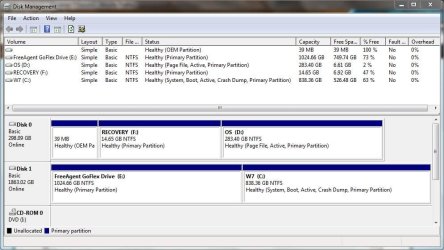
Just as an explanation, C is the partition of my external drive that is running Win7 Ultimate; D is my normal internal laptop drive with Vista Home Premium; E is the partition on my external drive that I use for data storage; and F is the recovery partition on my internal drive for Vista, that came pre-installed with my laptop.

I've custom set my pagefile (or tried to, at least) to such a high amount because I can afford to burn up space for "extra" RAM, and I imagine it will be somewhat helpful for editing videos if I can ever get it to work. Although at this point I'd be happy to shrink it back to normal size if it'd make hibernation work again.

Also, here's the screenshot of my Disk Management Screen-
Capture2.JPG

You can see here that D (my internal Vista drive) has the page file flag set, but C (my Win7 drive) does not, no matter what I change the settings to in that virtual memory window.

Just a few other misc. details:

I do have Write-caching enabled on the Win7 drive, so in theory it should support a page file, at least by my understanding.

Also, I will note that when I boot into Vista, it has Vista on the C drive and my two HD partitions (the Win7 and data storage one) on other drive letters. This is normal behavior since the OS's operate independently, and were both installed to occupy the C drive. I only mention it in case someone wants me to do something from the Vista installation, so they know that whichever OS I'm using will be on C.
 

My Computer

Computer Manufacturer/Model Number
Dell Inspiron 1545
OS
MS Windows 7 Ultimate 64-bit SP1
CPU
Intel Mobile Core 2 Duo T6400 @ 2.00GHz, Penryn 45nm
Motherboard
Dell Inc. 0G848F (Microprocessor)
Memory
4.00 GB Dual-Channel DDR2 @ 399MHz (6-6-6-18)
Graphics Card(s)
Mobile Intel(R) 4 Series Express Chipset Family (Integrated)
Sound Card
IDT High Definition Audio CODEC
Monitor(s) Displays
Generic PnP Monitor (DPMS) (1366x768@60Hz)
Screen Resolution
1366x768 (16:9)
Hard Drives
2TB External, with ~1TB partition booting OS
PSU
Laptop
Case
Laptop
Cooling
Laptop vent
Keyboard
Laptop
Mouse
Touchpad, and Logitech wireless USB mouse.
Internet Speed
~150 kb/s
Other Info
I'm running Windows COMPLETELY off a 2TB portable hard drive (since my 300GB internal drive just isn't big enough). It works exactly the same as it would normally, only it has to be constantly connected to my USB port. Obviously. I'll show you how to do it, if you ask! It's pretty cool.

Specs via Speccy
Win7 is not meant to be installed to USB drive. I'm amazed it works at all or isn't slow as molasses. That you only have the hibernation problem is surprising.

Install it to an internal HD or SSD and you should see the problem go away and get much better performance.
 
I know it isn't, but it works better this way than Vista does on my normal hard drive (and Vista runs at a more or less normal speed). And this way it's on a bigger 1TB partition, instead of my little 320GB internal drive, so I don't plan to change it. I just want to try to enable the pagefile on it and see if that fixes my hibernation problem. Even if it doesn't, I'll continue to use it this way because it gives me equal or better performance and is on a MUCH bigger disk.

I won't be surprised if it's impossible to get hibernation to work with this setup, but I think it's worth a try.

Just as a note about installing Windows on a USB drive: from what I've read, the only reason you can't normally is because Microsoft's installer for the OS is configured not to let it. That program link is a program that basically just makes the boot environment think your USB drive is a normal drive, so everything installs like it should. It will more than likely have issues if you try to boot it on different computers, but as long as I'm only using it on my laptop, this hibernation/pagefile issue is the only problem you're really likely to encounter. It also helps that my external drive is an actual spinning hard drive with a USB 3.0 connection (which works fine with my legacy USB 2.0 laptop ports) and not a flash drive. I imaging a flash drive would have major problems running it.

So there's my spiel about it :) I'd say just pretend it's having these problems on a normal installation and see if any of the normal solutions for a problem like this will work. I don't really expect specialized help for this problem if it's directly related to my unique setup, so normal suggestions are welcome. Thanks!
 

My Computer

Computer Manufacturer/Model Number
Dell Inspiron 1545
OS
MS Windows 7 Ultimate 64-bit SP1
CPU
Intel Mobile Core 2 Duo T6400 @ 2.00GHz, Penryn 45nm
Motherboard
Dell Inc. 0G848F (Microprocessor)
Memory
4.00 GB Dual-Channel DDR2 @ 399MHz (6-6-6-18)
Graphics Card(s)
Mobile Intel(R) 4 Series Express Chipset Family (Integrated)
Sound Card
IDT High Definition Audio CODEC
Monitor(s) Displays
Generic PnP Monitor (DPMS) (1366x768@60Hz)
Screen Resolution
1366x768 (16:9)
Hard Drives
2TB External, with ~1TB partition booting OS
PSU
Laptop
Case
Laptop
Cooling
Laptop vent
Keyboard
Laptop
Mouse
Touchpad, and Logitech wireless USB mouse.
Internet Speed
~150 kb/s
Other Info
I'm running Windows COMPLETELY off a 2TB portable hard drive (since my 300GB internal drive just isn't big enough). It works exactly the same as it would normally, only it has to be constantly connected to my USB port. Obviously. I'll show you how to do it, if you ask! It's pretty cool.

Specs via Speccy
What happens when you set it to System Managed as suggested previously?

Try placing it on one of the other partitions as well. But first turn it off by ticking No Paging File and reboot to delete it.
 
What happens when you set it to System Managed as suggested previously?
No change; still no hibernation, still getting that error on startup.

Am I correct in assuming that if I just go into the Virtual Memory screen and "set" a page file on one of the drives, Windows will use that drive for the page file? Or is it more complicated than that?

I'll try those two things tomorrow when I have some more time. Thanks again.
 

My Computer

Computer Manufacturer/Model Number
Dell Inspiron 1545
OS
MS Windows 7 Ultimate 64-bit SP1
CPU
Intel Mobile Core 2 Duo T6400 @ 2.00GHz, Penryn 45nm
Motherboard
Dell Inc. 0G848F (Microprocessor)
Memory
4.00 GB Dual-Channel DDR2 @ 399MHz (6-6-6-18)
Graphics Card(s)
Mobile Intel(R) 4 Series Express Chipset Family (Integrated)
Sound Card
IDT High Definition Audio CODEC
Monitor(s) Displays
Generic PnP Monitor (DPMS) (1366x768@60Hz)
Screen Resolution
1366x768 (16:9)
Hard Drives
2TB External, with ~1TB partition booting OS
PSU
Laptop
Case
Laptop
Cooling
Laptop vent
Keyboard
Laptop
Mouse
Touchpad, and Logitech wireless USB mouse.
Internet Speed
~150 kb/s
Other Info
I'm running Windows COMPLETELY off a 2TB portable hard drive (since my 300GB internal drive just isn't big enough). It works exactly the same as it would normally, only it has to be constantly connected to my USB port. Obviously. I'll show you how to do it, if you ask! It's pretty cool.

Specs via Speccy
This tutorial covers changing the page file location in both Vista and Win7: http://www.vistax64.com/tutorials/132201-virtual-memory-paging-file-change.html

I'd bet the USB controller won't let the paging file get past it. I've never heard of it being placed on an external HD, for example.

MS works very hard at keeping it's OS's off of USB drives, else users can carry them around in their pocket. Activation would be sketchy at best.
 
AFAIK pagefile is not allowed to be set on a usb drive, call it an external disk or a flash drive.
 

My Computer

Computer type
PC/Desktop
OS
Microsoft Windows 10 Professional / Windows 7 Professional
CPU
Intel i5-3570
Motherboard
Lenovo Mahobay
Memory
16GB DDR3
Graphics Card(s)
AMD Radeon HD 7850 2GB
Sound Card
(1) Realtek HD Audio (2) AMD HD Audio
Monitor(s) Displays
LG LS192WS
Screen Resolution
1440 x 900 @ 32bit color
Hard Drives
(1) SUV300S37A/120G (2) ST3500413AS SATA Disk Device AHCI mode enabled.
PSU
Corsair HX620
Case
Thermaltake V4 Black Edition
Cooling
Cooler Master Hyper 212 + Artic Silver 5 on CPU/GPU
Keyboard
Dell SK-8115
Mouse
Razer Copperhead with MAPED mat (awesome!)
Internet Speed
100 Mbps up/down
Browser
Chrome
I'd bet the USB controller won't let the paging file get past it. I've never heard of it being placed on an external HD, for example.
AFAIK pagefile is not allowed to be set on a usb drive, call it an external disk or a flash drive.

Ok I figured it was something like that causing the problem. Also, that tutorial also says it won't work over USB, so that's probably the source of my issues! Glad to know that. It should help me find a solution if one is available somewhere. I actually thought people put page files on external USB drives all the time, so that explains why I couldn't figure this out earlier :)

I'll try setting the page file to use my internal drive and see of that works. If not, I found this interesting thread: Page file in USB hard disk - reboot.pro I've only skimmed through it, and didn't catch a lot of what was said, but it looks to me like that might be a solution for getting the page file to work over USB, if it doesn't work when I put it on my internal drive. I do understand that following that thread could potentially cause more problems for me, so I know what the consequences might be if I attempt it. I'll have to decide if the risks will be worth it if it comes to that.
 

My Computer

Computer Manufacturer/Model Number
Dell Inspiron 1545
OS
MS Windows 7 Ultimate 64-bit SP1
CPU
Intel Mobile Core 2 Duo T6400 @ 2.00GHz, Penryn 45nm
Motherboard
Dell Inc. 0G848F (Microprocessor)
Memory
4.00 GB Dual-Channel DDR2 @ 399MHz (6-6-6-18)
Graphics Card(s)
Mobile Intel(R) 4 Series Express Chipset Family (Integrated)
Sound Card
IDT High Definition Audio CODEC
Monitor(s) Displays
Generic PnP Monitor (DPMS) (1366x768@60Hz)
Screen Resolution
1366x768 (16:9)
Hard Drives
2TB External, with ~1TB partition booting OS
PSU
Laptop
Case
Laptop
Cooling
Laptop vent
Keyboard
Laptop
Mouse
Touchpad, and Logitech wireless USB mouse.
Internet Speed
~150 kb/s
Other Info
I'm running Windows COMPLETELY off a 2TB portable hard drive (since my 300GB internal drive just isn't big enough). It works exactly the same as it would normally, only it has to be constantly connected to my USB port. Obviously. I'll show you how to do it, if you ask! It's pretty cool.

Specs via Speccy
In other news, I did a little more research and it looks like hibernation uses its own file (hiberfil.sys in the C:\ directory), not the page file. Which means that the page file probably has very little to do with my hibernation problem. I have confirmed that there is a hiberfil.sys file in the root of my USB drive, so at least it's there. I'm going to try the suggestions for the page file anyway, but since it doesn't seem to affect hibernation, I'm not really worried about the page file anymore. But if anyone has any ideas for getting hibernation to work, it would be very welcome! I'll start doing some more research with this new information too, and post back any results I get.

Also, thanks to everyone who has helped me up to this point. I know that I have a pretty unheard-of and unconventional problem.
 

My Computer

Computer Manufacturer/Model Number
Dell Inspiron 1545
OS
MS Windows 7 Ultimate 64-bit SP1
CPU
Intel Mobile Core 2 Duo T6400 @ 2.00GHz, Penryn 45nm
Motherboard
Dell Inc. 0G848F (Microprocessor)
Memory
4.00 GB Dual-Channel DDR2 @ 399MHz (6-6-6-18)
Graphics Card(s)
Mobile Intel(R) 4 Series Express Chipset Family (Integrated)
Sound Card
IDT High Definition Audio CODEC
Monitor(s) Displays
Generic PnP Monitor (DPMS) (1366x768@60Hz)
Screen Resolution
1366x768 (16:9)
Hard Drives
2TB External, with ~1TB partition booting OS
PSU
Laptop
Case
Laptop
Cooling
Laptop vent
Keyboard
Laptop
Mouse
Touchpad, and Logitech wireless USB mouse.
Internet Speed
~150 kb/s
Other Info
I'm running Windows COMPLETELY off a 2TB portable hard drive (since my 300GB internal drive just isn't big enough). It works exactly the same as it would normally, only it has to be constantly connected to my USB port. Obviously. I'll show you how to do it, if you ask! It's pretty cool.

Specs via Speccy
Just a quick update: I changed the page file to reside on my internal drive and that seems to work! So thanks to both of you for that info about it not being able to be on a USB drive.

As for the hibernation issue, I opened Disk Cleanup in the hopes that I could delete the hibernation files and then re-enable them. But there is no option to delete those files, which leads me to believe that they haven't been created. I've tried running powercfg -h /on in command prompt, and nothing happens. There still isn't any options to delete the hibernation files. Any other ideas to how I could reset hibernation or otherwise turn it on?
 

My Computer

Computer Manufacturer/Model Number
Dell Inspiron 1545
OS
MS Windows 7 Ultimate 64-bit SP1
CPU
Intel Mobile Core 2 Duo T6400 @ 2.00GHz, Penryn 45nm
Motherboard
Dell Inc. 0G848F (Microprocessor)
Memory
4.00 GB Dual-Channel DDR2 @ 399MHz (6-6-6-18)
Graphics Card(s)
Mobile Intel(R) 4 Series Express Chipset Family (Integrated)
Sound Card
IDT High Definition Audio CODEC
Monitor(s) Displays
Generic PnP Monitor (DPMS) (1366x768@60Hz)
Screen Resolution
1366x768 (16:9)
Hard Drives
2TB External, with ~1TB partition booting OS
PSU
Laptop
Case
Laptop
Cooling
Laptop vent
Keyboard
Laptop
Mouse
Touchpad, and Logitech wireless USB mouse.
Internet Speed
~150 kb/s
Other Info
I'm running Windows COMPLETELY off a 2TB portable hard drive (since my 300GB internal drive just isn't big enough). It works exactly the same as it would normally, only it has to be constantly connected to my USB port. Obviously. I'll show you how to do it, if you ask! It's pretty cool.

Specs via Speccy
Oh boy this takes a while:D. to speed you along: powercfg.exe -energy in a windows 7 cmd.exe with admin rights - fixs as many problems as you can. if sleep works but hybrid sleep and hibernate don't
Do you have a boot manager?
Is it booting the right partition - ie. do you ever see or can you see the recovery screen if you push f8 on booting?
I used grub (linux boot manager) and had problems with hibernation until I booted from the weany peany partition that windows 7 likes to install its boot manager in ? may be the oem partition on your system - it would also need the boot flag set on that partition - good luck:cool:
 

My Computer

OS
windows 7 x64 home premium
Oh boy this takes a while:D. to speed you along: powercfg.exe -energy in a windows 7 cmd.exe with admin rights - fixs as many problems as you can. if sleep works but hybrid sleep and hibernate don't
Do you have a boot manager?
Is it booting the right partition - ie. do you ever see or can you see the recovery screen if you push f8 on booting?
I used grub (linux boot manager) and had problems with hibernation until I booted from the weany peany partition that windows 7 likes to install its boot manager in ? may be the oem partition on your system - it would also need the boot flag set on that partition - good luck:cool:

Hi dnadoc and welcome to the forums :party:

Thanks for taking the time to share your solution with us, I'm sure others experiencing this issue will really appreciate your efforts. This thread is about 4 months old now, so just be warned that you might not get a reply.

Tom
 

My Computer

Computer type
PC/Desktop
Computer Manufacturer/Model Number
Build #1
OS
Windows 8.1 Pro x64
CPU
Intel i7 3770K @4.5GHz
Motherboard
ASUS P8Z77-V PRO
Memory
Corsair Vengeance 2x4GB DDR3 1600MHz Low Profile (White)
Graphics Card(s)
Gigabyte Radeon HD 7850 (2GB GDDR5)
Sound Card
Integrated on motherboard
Monitor(s) Displays
23" LG LCD/LED IPS
Screen Resolution
1920*1080
Hard Drives
Samsung EVO 128GB SSD
Seagate Barracuda 2GB 7200rpm
2x Seagate FreeAgent [500gb]
PSU
Corsair TX650W V2 (80+ Bronze)
Case
NZXT Phantom 410 White
Cooling
Corsair H100 Water Cooler
Keyboard
Microsoft Desktop 2000 Wireless Keyboard
Mouse
Microsoft Desktop 2000 Wireless Mouse
Internet Speed
95 Mb/s Download 70 Mb/s Upload
Antivirus
MSE + MBAM Pro
Browser
Firefox
Hey guys. I discovered that I can just put my computer into sleep mode, and then unplug everything, move it, plug it all back in, and it'll come back up where it was. So that's basically all I wanted to happen to begin with, so I don't really need hibernation functionality anymore. Thanks to everyone for trying to help me :) I'll mark it as solved.
 

My Computer

Computer Manufacturer/Model Number
Dell Inspiron 1545
OS
MS Windows 7 Ultimate 64-bit SP1
CPU
Intel Mobile Core 2 Duo T6400 @ 2.00GHz, Penryn 45nm
Motherboard
Dell Inc. 0G848F (Microprocessor)
Memory
4.00 GB Dual-Channel DDR2 @ 399MHz (6-6-6-18)
Graphics Card(s)
Mobile Intel(R) 4 Series Express Chipset Family (Integrated)
Sound Card
IDT High Definition Audio CODEC
Monitor(s) Displays
Generic PnP Monitor (DPMS) (1366x768@60Hz)
Screen Resolution
1366x768 (16:9)
Hard Drives
2TB External, with ~1TB partition booting OS
PSU
Laptop
Case
Laptop
Cooling
Laptop vent
Keyboard
Laptop
Mouse
Touchpad, and Logitech wireless USB mouse.
Internet Speed
~150 kb/s
Other Info
I'm running Windows COMPLETELY off a 2TB portable hard drive (since my 300GB internal drive just isn't big enough). It works exactly the same as it would normally, only it has to be constantly connected to my USB port. Obviously. I'll show you how to do it, if you ask! It's pretty cool.

Specs via Speccy
Back
Top