

I have a fairly unique computer setup, so let me start by explaining it. I own a Dell Inspiron 1545 running Windows 7 Ultimate 64 bit. That has 4GB RAM, a 64-bit processor, and a 320GB hard drive. Any other relevant specs should be filled out in my system specs. The unique part of it is that I'm booting and running Window directly off my 2TB external USB drive, after setting it up using this program if it matters. I did this mainly because my 320GB internal HD was too small and I wanted an easy space upgrade, and I just though it would be cool 
So my problem: whenever I try to get my computer to hibernate, the screen goes black for a moment like it should, and then it jumps right to the lock screen. In other words, trying to hibernate only locks my computer. This happens no matter how I try to get it to hibernate, whether directly through the start menu or using a gadget. I know my computer supports it because it works just fine when I run the Windows Vista Home Premium x64 that is still installed on my internal drive, and I'm pretty sure this fact also rules out the possibility of a problem with my BIOS.
I did some searching on Google and found that this can sometimes be a problem with dual booting, because it causes an issue with the page file. I assume that the page file is somewhat responsible for hibernation, which reminded me of another important quirk in my computer:
Every time I boot up Windows 7, I get this error message:

It then takes me to this window:
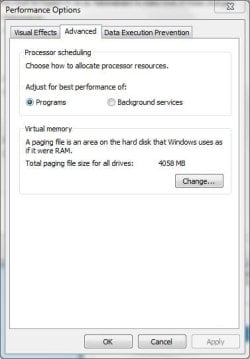
At which point I just hit OK and my computer works without an issue, besides this hibernation problem.
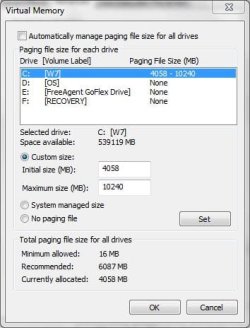
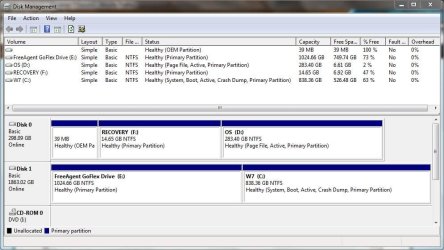
Figuring it must a page file issue, I went into Disk Management and checked the flags on both my internal drive (that can still boot Vista Home Premium) and the external drive that W7 is running on. My internal drive with Vista has the Page File flag on it, but my Windows 7 drive does not. So for starters, I'd like to know how to set or activate the page file on that drive, and if that doesn't solve my problem, I'd like more help getting hibernate to work. Thanks!
So my problem: whenever I try to get my computer to hibernate, the screen goes black for a moment like it should, and then it jumps right to the lock screen. In other words, trying to hibernate only locks my computer. This happens no matter how I try to get it to hibernate, whether directly through the start menu or using a gadget. I know my computer supports it because it works just fine when I run the Windows Vista Home Premium x64 that is still installed on my internal drive, and I'm pretty sure this fact also rules out the possibility of a problem with my BIOS.
I did some searching on Google and found that this can sometimes be a problem with dual booting, because it causes an issue with the page file. I assume that the page file is somewhat responsible for hibernation, which reminded me of another important quirk in my computer:
Every time I boot up Windows 7, I get this error message:
It then takes me to this window:
At which point I just hit OK and my computer works without an issue, besides this hibernation problem.
Figuring it must a page file issue, I went into Disk Management and checked the flags on both my internal drive (that can still boot Vista Home Premium) and the external drive that W7 is running on. My internal drive with Vista has the Page File flag on it, but my Windows 7 drive does not. So for starters, I'd like to know how to set or activate the page file on that drive, and if that doesn't solve my problem, I'd like more help getting hibernate to work. Thanks!
My Computer
At a glance
MS Windows 7 Ultimate 64-bit SP1Intel Mobile Core 2 Duo T6400 @ 2.00GHz, Penr...4.00 GB Dual-Channel DDR2 @ 399MHz (6-6-6-18)Mobile Intel(R) 4 Series Express Chipset Fami...
- Computer Manufacturer/Model Number
- Dell Inspiron 1545
- OS
- MS Windows 7 Ultimate 64-bit SP1
- CPU
- Intel Mobile Core 2 Duo T6400 @ 2.00GHz, Penryn 45nm
- Motherboard
- Dell Inc. 0G848F (Microprocessor)
- Memory
- 4.00 GB Dual-Channel DDR2 @ 399MHz (6-6-6-18)
- Graphics Card(s)
- Mobile Intel(R) 4 Series Express Chipset Family (Integrated)
- Sound Card
- IDT High Definition Audio CODEC
- Monitor(s) Displays
- Generic PnP Monitor (DPMS) (1366x768@60Hz)
- Screen Resolution
- 1366x768 (16:9)
- Hard Drives
- 2TB External, with ~1TB partition booting OS
- PSU
- Laptop
- Case
- Laptop
- Cooling
- Laptop vent
- Keyboard
- Laptop
- Mouse
- Touchpad, and Logitech wireless USB mouse.
- Internet Speed
- ~150 kb/s
- Other Info
- I'm running Windows COMPLETELY off a 2TB portable hard drive (since my 300GB internal drive just isn't big enough). It works exactly the same as it would normally, only it has to be constantly connected to my USB port. Obviously. I'll show you how to do it, if you ask! It's pretty cool.
Specs via Speccy



 . to speed you along: powercfg.exe -energy in a windows 7 cmd.exe with admin rights - fixs as many problems as you can. if sleep works but hybrid sleep and hibernate don't


