how do I access bios on a compaq cq4010f?

macgig

New member
Member
VIP
Local time
4:23 PM
Messages
246
thanks. :D
 

My Computer My Computer

Computer type
PC/Desktop
OS
Win 7 Pro, Mac OS Sierra
Internet Speed
fast. ;)
Antivirus
panda free
Browser
firefox mostly, safari, anything but IE. IE sucks!
Other Info
Mac user 27+, but I like windows 7. Very Mac like. My A+ cert is from 2008 and I don't work on computers every day, so i'm getting rusty. This forum is a BIG help.
Does F10 not work ?
 

My Computer My Computer

Computer Manufacturer/Model Number
W530-3630QM1
OS
windows 7 home 64bit
CPU
INTEL-CORE I7
Memory
16GB
Hard Drives
750GB
Browser
Chrome
yeah it works. forgot what f key it was.

thanks. trying to turn off the smart status, but I see no option in bios to turn it off
 

My Computer My Computer

Computer type
PC/Desktop
OS
Win 7 Pro, Mac OS Sierra
Internet Speed
fast. ;)
Antivirus
panda free
Browser
firefox mostly, safari, anything but IE. IE sucks!
Other Info
Mac user 27+, but I like windows 7. Very Mac like. My A+ cert is from 2008 and I don't work on computers every day, so i'm getting rusty. This forum is a BIG help.
No manual eh?

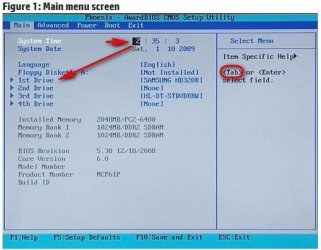
Did you use the tab or arrow keys to navigate to the 1st drive listed on the Main BIOS page? If you can, move the highlighted "2", to highlight the drive and then press enter and it should show the sub-menu.

bios.JPG


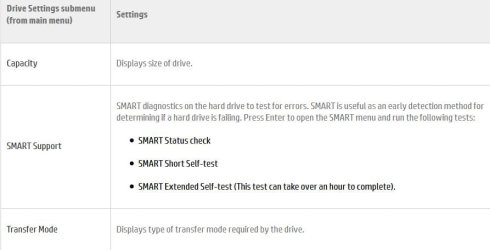
Again, use the tab or arrow keys to navigate to your selection and press enter. Though, it doesn't show a setting to turn off SMART maybe yours will.

bios1.JPG


Source: HP and Compaq Desktop PCs - BIOS Settings for the Narra5 Motherboard | HP® Support
 

My Computer My Computer

Computer type
PC/Desktop
Computer Manufacturer/Model Number
Gateway DX4831-01e (Mid-Tower Desktop)
OS
Originally Win 7 Hm Prem x64 Ver 6.1.7600 Build 7601-SP1 | Upgraded to Windows 10 December 14, 2019
CPU
Intel i3 530 2.93GHz, 2933MHz 2 Cores 4 Logical Processors
Motherboard
Gateway H57M01 133 megahertz
Memory
6GB of 1,333MHz DDR3 SDRAM
Graphics Card(s)
32MB Intel Graphics Media Accelerator HD IGChip
Sound Card
Realtek High Definition Audio
Monitor(s) Displays
Gateway HX2000 20inch TFT active matrix TN
Screen Resolution
1600 x 900 x 59 hertz
Hard Drives
WDC WD10EADS-00M2B0 [HDD] (1000.20 GB) -- drive 0,
HL-DT-ST DVDRAM GH41N [CD-ROM dr]
Four card readers, and Four USB 2.0
PSU
300watts.
Case
Mid-Tower Desktop
Cooling
Stock from Gateway
Keyboard
Natural Ergonomic Keyboard 4000, see Other Info
Mouse
Orig. Gateway wore out now using Insignia USB wired optical
Internet Speed
Vz FIOS 10ms png 57.64Mbps down 65.53Mbps up Speedtest.org
Antivirus
Zamana Anti-logger with Anti-malware, MSE, Windows Firewall,
Browser
IE11.0.9600.19399-Upd ver11.0.135, Firefox 68.0.1 x64
Other Info
System Specs by Belarc.

BIOS: American Megatrends Inc. P01-A0 11/17/2009

Replaced the MS 'Natural' Standard PS/2 Enhanced 101-102 Keyboard with a new Natural Ergonomic Keyboard 4000 on August 1st 2014.

Canon Pixma MG3222 Printer.

Updated to IE11 on 12102015 | Fios Quantum Router g1100

Additional AV: SpywareBlaster, manual Mbam, SAS
got a free pc, windows 7 home premium... its so slow. only 2 gigs ram so that is partly the problem... I boot into safe mode, and it says installing driver... seems to be installing driver for the keyboard and mouse which worked yesterday. guess its installing the driver at every boot? seems odd to me. ... then the help and support window opens. takes forever to close it. takes forever to do anything. I suspect it has viruses but so far I've been unable to install virus software..

if I right click on anything on the desktop it takes a really long time before the menu comes up... closing menus takes forever. yesterday doing diagnostics test, got some error about the HD being bad... forget the error code now. pressing the start menu sometimes takes forever to open or close. everytime I try something I get the spinning cursor...

I see a recovery partition. think I will just do a restore from that and start from scratch.

 

My Computer My Computer

Computer type
PC/Desktop
OS
Win 7 Pro, Mac OS Sierra
Internet Speed
fast. ;)
Antivirus
panda free
Browser
firefox mostly, safari, anything but IE. IE sucks!
Other Info
Mac user 27+, but I like windows 7. Very Mac like. My A+ cert is from 2008 and I don't work on computers every day, so i'm getting rusty. This forum is a BIG help.
Back
Top