Solved How do i expand my c drive??????

ok, one more doubt: how do i create the system recovery disc? the link you mentioned showed a technique to create it using the OS's Control Panel or using recdisc.exe from Start menu. since i have access to neither right now, how do i create a recovery disc.(i tried the previous option of using the Rebuild MBR function of PW, but that didn't work). Thanks!
 

My Computer My Computer

At a glance

Windows 7 Ultimate~240 GBATI Radeon
Computer Manufacturer/Model Number
TOSHIBA Satellite Pro L510
OS
Windows 7 Ultimate
Memory
~240 GB
Graphics Card(s)
ATI Radeon
The Repair CD download has been taken down from Digital Life due to copyright issues. If you can't find it elsewhere on the web you'll need to find a Win7 computer of your same bit-version to make one in Backup Center. System Repair Disc - Create
 
ok, thanks a lot! i'll update the thread as soon as possible with the news.
 

My Computer My Computer

At a glance

Windows 7 Ultimate~240 GBATI Radeon
Computer Manufacturer/Model Number
TOSHIBA Satellite Pro L510
OS
Windows 7 Ultimate
Memory
~240 GB
Graphics Card(s)
ATI Radeon
ok, so now i've used PW to mark the C drive partition as active. now when i start my laptop, the screen says " BOOTMGR.EXE MISSING. PRESS CTRL+ALT+DEL TO RESTART". i guess this means that windows is booting, but it just requires bootmgr.exe to do so completely. what should i do now???
 

My Computer My Computer

At a glance

Windows 7 Ultimate~240 GBATI Radeon
Computer Manufacturer/Model Number
TOSHIBA Satellite Pro L510
OS
Windows 7 Ultimate
Memory
~240 GB
Graphics Card(s)
ATI Radeon
Why would you convert your HD to Dynamic? This is used to span the same partition across multiple HD's.

Had you asked us we could have taken a look at your Disk Management screenshot and easily helped you adjust your disk configuration to extend the partition. Now you may have deleted something which is needed by your computer to function correctly if it is a factory install.

Before making any further random changes post back a screenshot of your maximized Disk Mgmt drive map with listings showing all columns, using the Snipping Tool in Start Menu and explain exactly what you did.

In light of gregrocker's comment, it would seem your only option now is a re-install to factory settings.

Good advice was given 3 weeks ago.
 

My Computer My Computer

At a glance

ME/XP/Vista/Win7
OS
ME/XP/Vista/Win7
Why would you convert your HD to Dynamic? This is used to span the same partition across multiple HD's.

Had you asked us we could have taken a look at your Disk Management screenshot and easily helped you adjust your disk configuration to extend the partition. Now you may have deleted something which is needed by your computer to function correctly if it is a factory install.

Before making any further random changes post back a screenshot of your maximized Disk Mgmt drive map with listings showing all columns, using the Snipping Tool in Start Menu and explain exactly what you did.

In light of gregrocker's comment, it would seem your only option now is a re-install to factory settings.

Good advice was given 3 weeks ago.

i know, but wasn't it too late even then? but i agree it was totally my mistake to convert from basic to dynamic that day.
 

My Computer My Computer

At a glance

Windows 7 Ultimate~240 GBATI Radeon
Computer Manufacturer/Model Number
TOSHIBA Satellite Pro L510
OS
Windows 7 Ultimate
Memory
~240 GB
Graphics Card(s)
ATI Radeon
I gave you the steps three weeks ago. Follow them exactly:

If Win7 will not start now, download and burn to CD free Partition Wizard version 4.2 which still has free conversion from Dynamic to Basic Disk: pw422.zip ISO - Windows Live. This is now a paid feature in later versions and the home edition.

Boot PW CD, click on the Win7 HD to highlight it, from Disk tab select Convert from Dynamic to Basic, Apply.

If Win7 doesn't start, boot back into PW CD to make sure Win7 or its 100mb System Reserved boot partition (preferred) are marked Active, then highlight HD again, from Disk tab choose Rebuild MBR., OK, Apply.

If Win7 still doesn't start boot the Win7 DVD or Repair CD, accept any offered Repair. If that doesn't start it, boot back in to System Recovery Options to run Startup Repair repeatedly until Win7 starts. Post back a camera snap if possible of the drive map with listings, or type them out for us. System Repair Disc - Create

If all fails, You can copy out your files using this method: Copy & Paste - in Windows Recovery Console. Then try running Factory Recovery, run your Recovery disks, or boot Win7 DVD to clean reinstall: Reinstalling Windows 7
 
Why would you convert your HD to Dynamic? This is used to span the same partition across multiple HD's.

Had you asked us we could have taken a look at your Disk Management screenshot and easily helped you adjust your disk configuration to extend the partition. Now you may have deleted something which is needed by your computer to function correctly if it is a factory install.

Before making any further random changes post back a screenshot of your maximized Disk Mgmt drive map with listings showing all columns, using the Snipping Tool in Start Menu and explain exactly what you did.

In light of gregrocker's comment, it would seem your only option now is a re-install to factory settings.

Good advice was given 3 weeks ago.
see, it is good advice, but i did the mistake of reformatting. thats why its all jumbled up now. anyway, thanks.

ok guys, i've downloaded recdisc.exe and burned it to a CD. will update soon. once again, thanking all of u for the continuous support!!!:)
 

My Computer My Computer

At a glance

Windows 7 Ultimate~240 GBATI Radeon
Computer Manufacturer/Model Number
TOSHIBA Satellite Pro L510
OS
Windows 7 Ultimate
Memory
~240 GB
Graphics Card(s)
ATI Radeon
SUCCESS!!!!!!!!!!!!!!
hey guys, thanking all of you for your total dedication and support in helping a newbie like me with my problem!!!!!!!!!!!!!!!!!!!
my laptop works as before now. this is how i have benefited:

1)you helped me recover my comp without having anyone else tinker with it(as i had them reformat it earlier.that proved costly in terms of info loss as well as a bit of $).
2)i have received a great deal of info.
3)i can now help my friends too if they have such problems.
4)though my main problem was different(to expand my C: ), i learned to fix another problem(fixing booting after HD conversion) as well.

once again, THANKS A LOT!!!!!!!:party::party::party::party::party:

finally, pls pls pls help me just expand my c drive, and everything in the garden will be lovely................:D
 

My Computer My Computer

At a glance

Windows 7 Ultimate~240 GBATI Radeon
Computer Manufacturer/Model Number
TOSHIBA Satellite Pro L510
OS
Windows 7 Ultimate
Memory
~240 GB
Graphics Card(s)
ATI Radeon
We'll need to see a Disk Mgmt screenshot. Maximize window, use Snipping Tool from Start Menu to make a rectangular snip including all listings and drive map. tell us how much you want to expand C and in which direction.
 
finally, pls pls pls help me just expand my c drive, and everything in the garden will be lovely................:D


Lets start fresh ...

Before we make any specific recommendations will you please post a snip/screen-shot of the entire disk management drive map with a full description as to which drive/partition is which, so we can see what you have going on as there may be a fairly simple way to resolve the situation.

In the Windows start menu right click computer and click manage, in the left pane of the "Computer Management" window that opens click disk management and post a maximized snip of that.


My Computer My Computer

At a glance

W 7 64-bit UltimateIntel Q9550 Yorkfield8GB Dominator 8500C5DATI : XFX 5870
Computer Manufacturer/Model Number
* BFK Customs *
OS
W 7 64-bit Ultimate
CPU
Intel Q9550 Yorkfield
Motherboard
ASUS P5Q Pro
Memory
8GB Dominator 8500C5D
Graphics Card(s)
ATI : XFX 5870
Sound Card
Realtek HD Audio 7-1
Monitor(s) Displays
1x 47" LCD HDMI & 3x 26" LCD HDMI
Screen Resolution
1920x1080P & 1920x1200
Hard Drives
1x 80GB Intel X25-M G2 SSD : 1x 500GB & 1x 640GB WD Caviar Black(s)
PSU
Corsair 620HX
Case
Cooler Master RC-690
Cooling
Tuniq Tower 120, 2x 140mm and 3x 120mm case fans
Keyboard
Microsoft 500
Mouse
Razer Diamondback 3G
Internet Speed
14 Mb/s
Other Info
1x Koutech 3Gb/s SATA HDD Hot Swap Rack
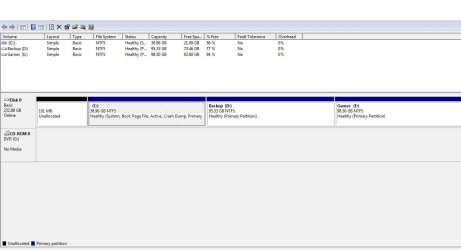
ok, here it is:

Capture.JPG

i remind u that when i right click the C: partition, the extend volume option is disabled.
pls click on the image for an enlarged version.
 

My Computer My Computer

At a glance

Windows 7 Ultimate~240 GBATI Radeon
Computer Manufacturer/Model Number
TOSHIBA Satellite Pro L510
OS
Windows 7 Ultimate
Memory
~240 GB
Graphics Card(s)
ATI Radeon
What is on the D Backup partition, the Factory Recovery image? Does it still run? Have you made the Recovery Disks? How to use the Toshiba HDD Recovery Utility

Even though D is 77% empty it may have greyed out Extend in Disk Mgmt because it contains the Factory Recovery Image. If you've made the disks and don't care about having Recovery remain on the HD, you can always delete it using Diskpart or free Partition Wizard bootable CD then extend C into D's space.

If you don't' use the Games on E you could also delete that to regain its space, assuming it's a factory-preinstalled Games partition and not your own Games storage.

If you have any questions, please post them back. If you want us to take a look at what's on D and E, unhide Hidden Files in Control Panel>Folder Options>View then post back a screenshot of the file contents.
 
Dude, you only have less than 39GB in C: to start with.

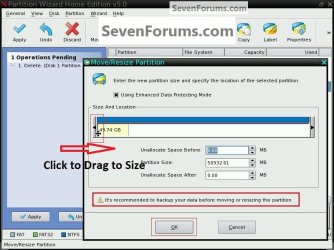
You would have to Move/Resize the left side of the D: partition using the free Partition Wizard software so you would have unallocated space to the right of C: then you could use Windows 7 disk management to extend C: into the created unallocated space.

You can't resize C: because there is no unallocated space to the right of the C: partition.


Have a look at this snip to see how to use the PW program to do what you need.


click to enlarge
PW_drag.jpg
 

My Computer My Computer

At a glance

W 7 64-bit UltimateIntel Q9550 Yorkfield8GB Dominator 8500C5DATI : XFX 5870
Computer Manufacturer/Model Number
* BFK Customs *
OS
W 7 64-bit Ultimate
CPU
Intel Q9550 Yorkfield
Motherboard
ASUS P5Q Pro
Memory
8GB Dominator 8500C5D
Graphics Card(s)
ATI : XFX 5870
Sound Card
Realtek HD Audio 7-1
Monitor(s) Displays
1x 47" LCD HDMI & 3x 26" LCD HDMI
Screen Resolution
1920x1080P & 1920x1200
Hard Drives
1x 80GB Intel X25-M G2 SSD : 1x 500GB & 1x 640GB WD Caviar Black(s)
PSU
Corsair 620HX
Case
Cooler Master RC-690
Cooling
Tuniq Tower 120, 2x 140mm and 3x 120mm case fans
Keyboard
Microsoft 500
Mouse
Razer Diamondback 3G
Internet Speed
14 Mb/s
Other Info
1x Koutech 3Gb/s SATA HDD Hot Swap Rack
You can only extend your C drive if you first remove the D drive or reduce its size from the left, which Windows Disk Management won't do.

You need something like Partition Wizard.
 

My Computer My Computer

At a glance

Windows 7 Ultimate SP1 64-BitIntel Core i7 870 @ 2.93GHz8Gb Dual-Channel DDR3 @ 664MHznVidia GeForce GTX 460 1024MB dedicated RAM
Computer Manufacturer/Model Number
HP Pavilion Elite 495UK
OS
Windows 7 Ultimate SP1 64-Bit
CPU
Intel Core i7 870 @ 2.93GHz
Motherboard
MSI 2A9C (CPU1)
Memory
8Gb Dual-Channel DDR3 @ 664MHz
Graphics Card(s)
nVidia GeForce GTX 460 1024MB dedicated RAM
Sound Card
Realtek HD Audio
Monitor(s) Displays
HP2310i
Screen Resolution
1920 x 1080
Hard Drives
1x1954GB Hitachi HDS22020ALA 330 (RAID), 1x1954GB Hitachi External for backup and storage
PSU
460W
Case
HP Elite
Cooling
Air cooled
Keyboard
Logitech K750 solar-powered keyboard
Mouse
Logitech Wireless M180 mouse
Internet Speed
2Mb
Other Info
Pure Avanti Flow Internet Radio with iPod Dock, 64Gb iPod, HP USB Speakers, Sony MDR-V500 Headphones, Sony Vaio F-Series Laptop
What is on the D Backup partition, the Factory Recovery image? Does it still run? Have you made the Recovery Disks? How to use the Toshiba HDD Recovery Utility

Even though D is 77% empty it may have greyed out Extend in Disk Mgmt because it contains the Factory Recovery Image. If you've made the disks and don't care about having Recovery remain on the HD, you can always delete it using Diskpart or free Partition Wizard bootable CD then extend C into D's space.

If you don't' use the Games on E you could also delete that to regain its space, assuming it's a factory-preinstalled Games partition and not your own Games storage.

If you have any questions, please post them back. If you want us to take a look at what's on D and E, unhide Hidden Files in Control Panel>Folder Options>View then post back a screenshot of the file contents.

what do u exactly mean by factory recovery image? is it an app(ie can i find it in the D: drive)? i'm ready to reduce both D: and E: drives by ~20GB each, to create the an unallocated volume.

@Bare Foot Kid, @seavixen32: what do u guys mean by left and right? i didn't get u. pls help.
 

My Computer My Computer

At a glance

Windows 7 Ultimate~240 GBATI Radeon
Computer Manufacturer/Model Number
TOSHIBA Satellite Pro L510
OS
Windows 7 Ultimate
Memory
~240 GB
Graphics Card(s)
ATI Radeon
@barefootkid and @seavixen: ok i think i got what you meant by left and right. check the pic. as you said, i can extend only the D:, to the right of which there is the unallocated volume.
Capture.JPG

pls help as to how i shift it to the left.
 

My Computer My Computer

At a glance

Windows 7 Ultimate~240 GBATI Radeon
Computer Manufacturer/Model Number
TOSHIBA Satellite Pro L510
OS
Windows 7 Ultimate
Memory
~240 GB
Graphics Card(s)
ATI Radeon
Have a look at Step One ONLY of this tutorial to see exactly how to shrink/move/resize the LEFT side of the D: partition to create unallocated space so C: can be extended into that space.


.
 
Last edited:

My Computer My Computer

At a glance

W 7 64-bit UltimateIntel Q9550 Yorkfield8GB Dominator 8500C5DATI : XFX 5870
Computer Manufacturer/Model Number
* BFK Customs *
OS
W 7 64-bit Ultimate
CPU
Intel Q9550 Yorkfield
Motherboard
ASUS P5Q Pro
Memory
8GB Dominator 8500C5D
Graphics Card(s)
ATI : XFX 5870
Sound Card
Realtek HD Audio 7-1
Monitor(s) Displays
1x 47" LCD HDMI & 3x 26" LCD HDMI
Screen Resolution
1920x1080P & 1920x1200
Hard Drives
1x 80GB Intel X25-M G2 SSD : 1x 500GB & 1x 640GB WD Caviar Black(s)
PSU
Corsair 620HX
Case
Cooler Master RC-690
Cooling
Tuniq Tower 120, 2x 140mm and 3x 120mm case fans
Keyboard
Microsoft 500
Mouse
Razer Diamondback 3G
Internet Speed
14 Mb/s
Other Info
1x Koutech 3Gb/s SATA HDD Hot Swap Rack
ok i got it. should i backup my data, just in case?
 

My Computer My Computer

At a glance

Windows 7 Ultimate~240 GBATI Radeon
Computer Manufacturer/Model Number
TOSHIBA Satellite Pro L510
OS
Windows 7 Ultimate
Memory
~240 GB
Graphics Card(s)
ATI Radeon
Back
Top