
How do I extend my HD partition using redunded 27gb partition

graham35

New member
Local time
2:28 AM
Messages
6
Hi, some help required please, I have trawled the forums but cannot find anything that clearly answer my problem - so here goes

I have a new Acer Revo RL70 nettop, which I am using mainly for XBMC for my movies and music and some web surfing etc.

It came with a version of linux installed, with the hard drive partitioned as follows

27gb for Linux (operating system) there was also a 2gb partition within that which I think was the recovery partition for Linux

The remainder of the drive (750gb) was another partition
I believe thats how the hard drive was configured by Acer, but I did not do a check on that before I installed windows 7 onto it.

I installed windows 7 ultimate onto the drive, which boots perfectly and runs well, it shows a 100mb recovery in the main partition (C drive) as normal with windows.

After running my RL70 for a few weeks and loading it with my films etc, I checked the hard drive structure and noticed the 27gb partition, and thought that would be better use for my films etc. I did think that installing windows 7 would have cleared the partition as it gave me the option to install into that partition, which I chose not to do.
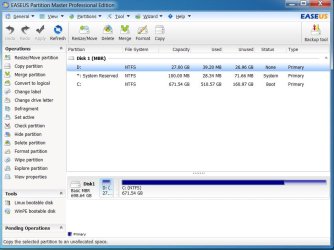
HD Partitions RL70.jpg
So now when I try to remove or merge or extend the partition (see screen shot) it will not allow me to do it.

Can anyone here please help.

Many thanks Graham
 

My Computer My Computer

At a glance

Windows 74200 AMD Athlon2GbNvidia 8500 GT
Computer Manufacturer/Model Number
Asus
OS
Windows 7
CPU
4200 AMD Athlon
Memory
2Gb
Graphics Card(s)
Nvidia 8500 GT
Monitor(s) Displays
Samsung Syncmaster 901
Hello Graham, welcome to Seven Forums!


To help us help you better, please post a maximized snip of Windows 7 disk management, though the use of Linux does hide certain partitions from view so we'll do what we can.
 

My Computer My Computer

At a glance

W 7 64-bit UltimateIntel Q9550 Yorkfield8GB Dominator 8500C5DATI : XFX 5870
Computer Manufacturer/Model Number
* BFK Customs *
OS
W 7 64-bit Ultimate
CPU
Intel Q9550 Yorkfield
Motherboard
ASUS P5Q Pro
Memory
8GB Dominator 8500C5D
Graphics Card(s)
ATI : XFX 5870
Sound Card
Realtek HD Audio 7-1
Monitor(s) Displays
1x 47" LCD HDMI & 3x 26" LCD HDMI
Screen Resolution
1920x1080P & 1920x1200
Hard Drives
1x 80GB Intel X25-M G2 SSD : 1x 500GB & 1x 640GB WD Caviar Black(s)
PSU
Corsair 620HX
Case
Cooler Master RC-690
Cooling
Tuniq Tower 120, 2x 140mm and 3x 120mm case fans
Keyboard
Microsoft 500
Mouse
Razer Diamondback 3G
Internet Speed
14 Mb/s
Other Info
1x Koutech 3Gb/s SATA HDD Hot Swap Rack
Hi Bare foot kid
Thanks for your quick reply

Here is the screen shot you ask for below
29-08-2012 18-12-01.jpg

Thanks for your help, I may be off line for a bit but I will be back as soon as I can today

Cheers

PS... I am now using windows 7, The screen shot shows everything I believe
 

My Computer My Computer

At a glance

Windows 74200 AMD Athlon2GbNvidia 8500 GT
Computer Manufacturer/Model Number
Asus
OS
Windows 7
CPU
4200 AMD Athlon
Memory
2Gb
Graphics Card(s)
Nvidia 8500 GT
Monitor(s) Displays
Samsung Syncmaster 901

My Computer My Computer

At a glance

W 7 64-bit UltimateIntel Q9550 Yorkfield8GB Dominator 8500C5DATI : XFX 5870
Computer Manufacturer/Model Number
* BFK Customs *
OS
W 7 64-bit Ultimate
CPU
Intel Q9550 Yorkfield
Motherboard
ASUS P5Q Pro
Memory
8GB Dominator 8500C5D
Graphics Card(s)
ATI : XFX 5870
Sound Card
Realtek HD Audio 7-1
Monitor(s) Displays
1x 47" LCD HDMI & 3x 26" LCD HDMI
Screen Resolution
1920x1080P & 1920x1200
Hard Drives
1x 80GB Intel X25-M G2 SSD : 1x 500GB & 1x 640GB WD Caviar Black(s)
PSU
Corsair 620HX
Case
Cooler Master RC-690
Cooling
Tuniq Tower 120, 2x 140mm and 3x 120mm case fans
Keyboard
Microsoft 500
Mouse
Razer Diamondback 3G
Internet Speed
14 Mb/s
Other Info
1x Koutech 3Gb/s SATA HDD Hot Swap Rack
The Linux partition is empty, I deleted the contents of that partition = 27gb (26.96gb) 100% free space, as confirmed by my screen shot in my second post.

I will look at the link you provided to see if I can sort it out, but I do tend to get a bit lost by some of the "how too" help pages - its an age thing lol
 

My Computer My Computer

At a glance

Windows 74200 AMD Athlon2GbNvidia 8500 GT
Computer Manufacturer/Model Number
Asus
OS
Windows 7
CPU
4200 AMD Athlon
Memory
2Gb
Graphics Card(s)
Nvidia 8500 GT
Monitor(s) Displays
Samsung Syncmaster 901
It's not too hard mate, just take your time and do it a single step at a time then move to the next step; if you need further help just post it up. ;)
 

My Computer My Computer

At a glance

W 7 64-bit UltimateIntel Q9550 Yorkfield8GB Dominator 8500C5DATI : XFX 5870
Computer Manufacturer/Model Number
* BFK Customs *
OS
W 7 64-bit Ultimate
CPU
Intel Q9550 Yorkfield
Motherboard
ASUS P5Q Pro
Memory
8GB Dominator 8500C5D
Graphics Card(s)
ATI : XFX 5870
Sound Card
Realtek HD Audio 7-1
Monitor(s) Displays
1x 47" LCD HDMI & 3x 26" LCD HDMI
Screen Resolution
1920x1080P & 1920x1200
Hard Drives
1x 80GB Intel X25-M G2 SSD : 1x 500GB & 1x 640GB WD Caviar Black(s)
PSU
Corsair 620HX
Case
Cooler Master RC-690
Cooling
Tuniq Tower 120, 2x 140mm and 3x 120mm case fans
Keyboard
Microsoft 500
Mouse
Razer Diamondback 3G
Internet Speed
14 Mb/s
Other Info
1x Koutech 3Gb/s SATA HDD Hot Swap Rack
If D is empty, the typical method would be to delete it and then use Partition Wizard bootable disk to reassign that 27 GB to C.

You can likely delete D with Windows Disk Management, but would need Partition Wizard to reassign the space---so you may as well use PW for both tasks.
 

My Computer My Computer

At a glance

Windows 7 Home Premium SP1, 64-bitIntel Skylake i5-6600K, not overclocked8 GB HyperX DDR4-2666 (2 x 4 GB)none; graphics are integrated on CPU
Computer type
PC/Desktop
Computer Manufacturer/Model Number
Ignatz Special; 4 speed manual gearbox; factory air conditioning; one of one
OS
Windows 7 Home Premium SP1, 64-bit
CPU
Intel Skylake i5-6600K, not overclocked
Motherboard
AsRock Z170M Extreme 4, micro ATX
Memory
8 GB HyperX DDR4-2666 (2 x 4 GB)
Graphics Card(s)
none; graphics are integrated on CPU
Sound Card
onboard: Realtek ALC1150; external: USB Behringer UF0-202
Monitor(s) Displays
Dell S2340M 23 inch IPS
Screen Resolution
1600 x 900
Hard Drives
System: Crucial MX100 series SSD, 128 GB;
Data: Samsung Spinpoint 103SJ, 1 TB;
Backup: WD Caviar Green WD30EZRX-00D8PB0, 3 TB
PSU
Rosewill SilentNight 500 watt fanless, semi-modular
Case
Antec Solo II
Cooling
Noctua NH-U12S; Noctua F12 intake, Noctua S12A exhaust
Keyboard
Microsoft 200 6JH-00001 USB
Mouse
Dell or Microsoft optical wired; USB
Antivirus
Microsoft Security Essentials and Malwarebytes Premium
Browser
Pale Moon
Other Info
All fans PWM; speeds at idle: CPU circa 500 rpm; intake circa 600 rpm; exhaust circa 600 rpm; CPU temps 27 idle and 47 C load in a warm room (27 C/81 F) when running Intel Extreme Tuning Utility stress test.
If D is empty, the typical method would be to delete it and then use Partition Wizard bootable disk to reassign that 27 GB to C.

You can likely delete D with Windows Disk Management, but would need Partition Wizard to reassign the space.


That's exactly what the tutorial I linked him does mate.
 

My Computer My Computer

At a glance

W 7 64-bit UltimateIntel Q9550 Yorkfield8GB Dominator 8500C5DATI : XFX 5870
Computer Manufacturer/Model Number
* BFK Customs *
OS
W 7 64-bit Ultimate
CPU
Intel Q9550 Yorkfield
Motherboard
ASUS P5Q Pro
Memory
8GB Dominator 8500C5D
Graphics Card(s)
ATI : XFX 5870
Sound Card
Realtek HD Audio 7-1
Monitor(s) Displays
1x 47" LCD HDMI & 3x 26" LCD HDMI
Screen Resolution
1920x1080P & 1920x1200
Hard Drives
1x 80GB Intel X25-M G2 SSD : 1x 500GB & 1x 640GB WD Caviar Black(s)
PSU
Corsair 620HX
Case
Cooler Master RC-690
Cooling
Tuniq Tower 120, 2x 140mm and 3x 120mm case fans
Keyboard
Microsoft 500
Mouse
Razer Diamondback 3G
Internet Speed
14 Mb/s
Other Info
1x Koutech 3Gb/s SATA HDD Hot Swap Rack
I notice the small partition (system reserved 100mb) center one on my screen shot is listed as active, not the main C: drive section, so would I still have to mark the C: partition as active before doing anything else.
 

My Computer My Computer

At a glance

Windows 74200 AMD Athlon2GbNvidia 8500 GT
Computer Manufacturer/Model Number
Asus
OS
Windows 7
CPU
4200 AMD Athlon
Memory
2Gb
Graphics Card(s)
Nvidia 8500 GT
Monitor(s) Displays
Samsung Syncmaster 901
I notice the small partition (system reserved 100mb) center one on my screen shot is listed as active, not the main C: drive section, so would I still have to mark the C: partition as active before doing anything else.

No. System Reserved should be active.
 

My Computer My Computer

At a glance

Windows 7 Home Premium SP1, 64-bitIntel Skylake i5-6600K, not overclocked8 GB HyperX DDR4-2666 (2 x 4 GB)none; graphics are integrated on CPU
Computer type
PC/Desktop
Computer Manufacturer/Model Number
Ignatz Special; 4 speed manual gearbox; factory air conditioning; one of one
OS
Windows 7 Home Premium SP1, 64-bit
CPU
Intel Skylake i5-6600K, not overclocked
Motherboard
AsRock Z170M Extreme 4, micro ATX
Memory
8 GB HyperX DDR4-2666 (2 x 4 GB)
Graphics Card(s)
none; graphics are integrated on CPU
Sound Card
onboard: Realtek ALC1150; external: USB Behringer UF0-202
Monitor(s) Displays
Dell S2340M 23 inch IPS
Screen Resolution
1600 x 900
Hard Drives
System: Crucial MX100 series SSD, 128 GB;
Data: Samsung Spinpoint 103SJ, 1 TB;
Backup: WD Caviar Green WD30EZRX-00D8PB0, 3 TB
PSU
Rosewill SilentNight 500 watt fanless, semi-modular
Case
Antec Solo II
Cooling
Noctua NH-U12S; Noctua F12 intake, Noctua S12A exhaust
Keyboard
Microsoft 200 6JH-00001 USB
Mouse
Dell or Microsoft optical wired; USB
Antivirus
Microsoft Security Essentials and Malwarebytes Premium
Browser
Pale Moon
Other Info
All fans PWM; speeds at idle: CPU circa 500 rpm; intake circa 600 rpm; exhaust circa 600 rpm; CPU temps 27 idle and 47 C load in a warm room (27 C/81 F) when running Intel Extreme Tuning Utility stress test.
Cheers guys, thanks for your help, right now this all seems a little difficult for me, so I am going to have another look at it tomorrow, often I find things go better after sleeping on it.

I guess I should have loaded windows 7 into the 27gb partition and then merged the 27gb into the C: section, the partitions would have been in the right order - merging left into right.

If it gets too difficult I will have to consider how important my spare 27gb is to me.

Cheers for today
 

My Computer My Computer

At a glance

Windows 74200 AMD Athlon2GbNvidia 8500 GT
Computer Manufacturer/Model Number
Asus
OS
Windows 7
CPU
4200 AMD Athlon
Memory
2Gb
Graphics Card(s)
Nvidia 8500 GT
Monitor(s) Displays
Samsung Syncmaster 901
You will have to move the System Reserved to the left first then move the left side of the Windows partition.

If it were me I would mark the Windows 7 partition active and do the 3 separate startup repairs to create the Windows partition as the System partition, then you could recover that space into the C: partition also.
 

My Computer My Computer

At a glance

W 7 64-bit UltimateIntel Q9550 Yorkfield8GB Dominator 8500C5DATI : XFX 5870
Computer Manufacturer/Model Number
* BFK Customs *
OS
W 7 64-bit Ultimate
CPU
Intel Q9550 Yorkfield
Motherboard
ASUS P5Q Pro
Memory
8GB Dominator 8500C5D
Graphics Card(s)
ATI : XFX 5870
Sound Card
Realtek HD Audio 7-1
Monitor(s) Displays
1x 47" LCD HDMI & 3x 26" LCD HDMI
Screen Resolution
1920x1080P & 1920x1200
Hard Drives
1x 80GB Intel X25-M G2 SSD : 1x 500GB & 1x 640GB WD Caviar Black(s)
PSU
Corsair 620HX
Case
Cooler Master RC-690
Cooling
Tuniq Tower 120, 2x 140mm and 3x 120mm case fans
Keyboard
Microsoft 500
Mouse
Razer Diamondback 3G
Internet Speed
14 Mb/s
Other Info
1x Koutech 3Gb/s SATA HDD Hot Swap Rack
Whenever I've had that problem, I just used Easeus Partition Manager. The free edition works perfectly. It will put the drive behind the others (to the right) and merge it as well. You hit apply, restart, it does its thing, and then you're good to go.
 

My Computer My Computer

At a glance

MS Windows 7 Professional 64-bit SP1Intel(R) Core(TM) i5-2400 CPU @ 3.10GHzG.SKILL Ares 8GB (2x4GB)EVGA nVidia GeForce GTX 760 Superclocked
Computer type
PC/Desktop
Computer Manufacturer/Model Number
Custom Built
OS
MS Windows 7 Professional 64-bit SP1
CPU
Intel(R) Core(TM) i5-2400 CPU @ 3.10GHz
Motherboard
Asus P8Z77-V LK
Memory
G.SKILL Ares 8GB (2x4GB)
Graphics Card(s)
EVGA nVidia GeForce GTX 760 Superclocked
Sound Card
Realtek High Definition Audio
Monitor(s) Displays
ASUS VN247 24" 1ms
Screen Resolution
1920x1080
Hard Drives
Mushkin Chronos 120GB SSD (OS), 1TB Seagate HDD (Data)
PSU
XFX Pro Series 850w P1-850B-BEFX
Case
Corsair Obsidian 750D
Cooling
Corsair H100i (cpu) and case fans
Keyboard
Corsair Vengeance K70
Mouse
Corsair Vengeance M60
Internet Speed
1.14 MB/s (9.6 mbps)
Browser
Google Chrome
I would copy the bootmgr from the 100MB system partition to C. It will activate C automatically. Then you can get rid of the 100MB partition.
 

My Computer My Computer

At a glance

Vista, Windows7, Mint Mate, Zorin, Windows 8from 1.6GHz Duo to i7
Computer Manufacturer/Model Number
HP, Dell, Gateway, Toshiba - 4 laptops and 2 desktops
OS
Vista, Windows7, Mint Mate, Zorin, Windows 8
CPU
from 1.6GHz Duo to i7
Monitor(s) Displays
2x HP w2207
Hard Drives
5x HDD, 7x SSD, 12x Externals
Keyboard
with trackball - no mices
Mouse
Trackball mice
Internet Speed
DSL 6000
Whenever I've had that problem, I just used Easeus Partition Manager. The free edition works perfectly. It will put the drive behind the others (to the right) and merge it as well. You hit apply, restart, it does its thing, and then you're good to go.

And I meant that for the 27gb partition. I always leave the 100mb system partition.
 

My Computer My Computer

At a glance

MS Windows 7 Professional 64-bit SP1Intel(R) Core(TM) i5-2400 CPU @ 3.10GHzG.SKILL Ares 8GB (2x4GB)EVGA nVidia GeForce GTX 760 Superclocked
Computer type
PC/Desktop
Computer Manufacturer/Model Number
Custom Built
OS
MS Windows 7 Professional 64-bit SP1
CPU
Intel(R) Core(TM) i5-2400 CPU @ 3.10GHz
Motherboard
Asus P8Z77-V LK
Memory
G.SKILL Ares 8GB (2x4GB)
Graphics Card(s)
EVGA nVidia GeForce GTX 760 Superclocked
Sound Card
Realtek High Definition Audio
Monitor(s) Displays
ASUS VN247 24" 1ms
Screen Resolution
1920x1080
Hard Drives
Mushkin Chronos 120GB SSD (OS), 1TB Seagate HDD (Data)
PSU
XFX Pro Series 850w P1-850B-BEFX
Case
Corsair Obsidian 750D
Cooling
Corsair H100i (cpu) and case fans
Keyboard
Corsair Vengeance K70
Mouse
Corsair Vengeance M60
Internet Speed
1.14 MB/s (9.6 mbps)
Browser
Google Chrome
Thanks for your help guys, I have managed to do it and extended C: into that space, I now have a 699 GB usable space on my 750 GB - which by my reckoning is about right following the 10% rule of thumb.

Cheers for you advice...
 

My Computer My Computer

At a glance

Windows 74200 AMD Athlon2GbNvidia 8500 GT
Computer Manufacturer/Model Number
Asus
OS
Windows 7
CPU
4200 AMD Athlon
Memory
2Gb
Graphics Card(s)
Nvidia 8500 GT
Monitor(s) Displays
Samsung Syncmaster 901
It is a 7% rule - decimal to binary.
 

My Computer My Computer

At a glance

Vista, Windows7, Mint Mate, Zorin, Windows 8from 1.6GHz Duo to i7
Computer Manufacturer/Model Number
HP, Dell, Gateway, Toshiba - 4 laptops and 2 desktops
OS
Vista, Windows7, Mint Mate, Zorin, Windows 8
CPU
from 1.6GHz Duo to i7
Monitor(s) Displays
2x HP w2207
Hard Drives
5x HDD, 7x SSD, 12x Externals
Keyboard
with trackball - no mices
Mouse
Trackball mice
Internet Speed
DSL 6000
Back
Top