
How do I fix my Windows Firewall?

So I downloaded chrome from your link...I don't know if its chrome or what but my system is running so slow now it's unreal. If I click on a desktop icon it literally takes about 2-3 min before I even see it load on my screen. I ran my ccleaner to see if that would help and it didn't as well as when I ran SAS...I don't know what's wrong with it now but it's super slow.:(
 

My Computer My Computer

Computer type
PC/Desktop
Computer Manufacturer/Model Number
Toshiba HP
OS
Windows7 Home Premium 32-bit SP-1
CPU
Intel(R) Celeron(R) CPU 900 @ 2.20GHz
Motherboard
TOSHIBA NBWAA
Memory
2.00 GB USABLE 1.87 GB
Graphics Card(s)
(1) Mobile Intel(R) 4 Series Express Chipset Family (2) Mo
Sound Card
Realtek High Definition Audio
Hard Drives
TOSHIBA MK2555GSX
Antivirus
Panda Free Antivirus
Browser
I'm a new FireFox Browser user~
Other Info
Do Not Mess With Your Computer~
Unless You Know What You're Doing~
Unlike Me~I Had No Clue At All~I Thought I Did~
Do Not Mess With Your Computer~
That is very odd, chrome should have nothing to do with your pc speed. What do you have running at startup?
 

My Computer My Computer

Computer type
PC/Desktop
Computer Manufacturer/Model Number
Custom Built
OS
Windows 10 Pro
CPU
AMD Ryzen 5 2400G Processor with Radeon RX Vega 11 Graphics
Motherboard
ASRock X470 Master SLI/AC AM4 AMD Promontory X470 SATA 6Gb/s
Memory
G.SKILL Ripjaws V Series 16GB (2 x 8GB) 288-Pin DDR4 SDRAM D
Graphics Card(s)
2047MB NVIDIA GeForce GTX 1060 6GB (EVGA)
Sound Card
Motherboard Built in
Monitor(s) Displays
Acer R240HY bidx 23.8-Inch IPS HDMI DVI VGA (1920 x 1080) Wi
Screen Resolution
1920 x 1080
Hard Drives
1TB Sandisk SSD PLUS (Main drive)
500 GB Seagate 7200 RPM (Games)
500 GB Western Digital 7200 RPM (Virtual Machines)
PSU
CORSAIR TX Series TX650M 650W 80+ Gold Modular Power Supply
Case
CORSAIR CARBIDE SPEC-02 Mid-Tower Gaming Case, Red LED Fan
Cooling
220mm, two 120mm, and four 60mm fans
Keyboard
Wired Dell keyboard
Mouse
Wireless Logitech mouse
Internet Speed
250mb down, 30mb up
Antivirus
Panda Cloud Antivirus
Browser
Chrome-ish x64
Other Info
Your awesome for reading this.
That is very odd, chrome should have nothing to do with your pc speed. What do you have running at startup?

Ya it's extremely slow now. How do I find out or where do I go to see what's running on startup?:o
 

My Computer My Computer

Computer type
PC/Desktop
Computer Manufacturer/Model Number
Toshiba HP
OS
Windows7 Home Premium 32-bit SP-1
CPU
Intel(R) Celeron(R) CPU 900 @ 2.20GHz
Motherboard
TOSHIBA NBWAA
Memory
2.00 GB USABLE 1.87 GB
Graphics Card(s)
(1) Mobile Intel(R) 4 Series Express Chipset Family (2) Mo
Sound Card
Realtek High Definition Audio
Hard Drives
TOSHIBA MK2555GSX
Antivirus
Panda Free Antivirus
Browser
I'm a new FireFox Browser user~
Other Info
Do Not Mess With Your Computer~
Unless You Know What You're Doing~
Unlike Me~I Had No Clue At All~I Thought I Did~
Do Not Mess With Your Computer~
Do you have ccleaner installed? If so, open it, click tools then startup. Under the windows tab it lists everything that starts up with your pc. You can even click save to file in the bottom right and upload the log here.

If you do not have ccleaner installed,

use msconfig.

Click :orb: type "msconfig" Choose it in the results. Under the startup tab, take a screenshot of what is in there and upload it here. Hint: If it is over 10 items, that is way to many.
 

My Computer My Computer

Computer type
PC/Desktop
Computer Manufacturer/Model Number
Custom Built
OS
Windows 10 Pro
CPU
AMD Ryzen 5 2400G Processor with Radeon RX Vega 11 Graphics
Motherboard
ASRock X470 Master SLI/AC AM4 AMD Promontory X470 SATA 6Gb/s
Memory
G.SKILL Ripjaws V Series 16GB (2 x 8GB) 288-Pin DDR4 SDRAM D
Graphics Card(s)
2047MB NVIDIA GeForce GTX 1060 6GB (EVGA)
Sound Card
Motherboard Built in
Monitor(s) Displays
Acer R240HY bidx 23.8-Inch IPS HDMI DVI VGA (1920 x 1080) Wi
Screen Resolution
1920 x 1080
Hard Drives
1TB Sandisk SSD PLUS (Main drive)
500 GB Seagate 7200 RPM (Games)
500 GB Western Digital 7200 RPM (Virtual Machines)
PSU
CORSAIR TX Series TX650M 650W 80+ Gold Modular Power Supply
Case
CORSAIR CARBIDE SPEC-02 Mid-Tower Gaming Case, Red LED Fan
Cooling
220mm, two 120mm, and four 60mm fans
Keyboard
Wired Dell keyboard
Mouse
Wireless Logitech mouse
Internet Speed
250mb down, 30mb up
Antivirus
Panda Cloud Antivirus
Browser
Chrome-ish x64
Other Info
Your awesome for reading this.
Do you have ccleaner installed? If so, open it, click tools then startup. Under the windows tab it lists everything that starts up with your pc. You can even click save to file in the bottom right and upload the log here.

If you do not have ccleaner installed,

use msconfig.

Click :orb: type "msconfig" Choose it in the results. Under the startup tab, take a screenshot of what is in there and upload it here. Hint: If it is over 10 items, that is way to many.


Agreed to many things running in the background will slow the pc down. I use CCleaner every two weeks it's a very good program. Also if I might add might not be a bad idea to defrag your system too a fragmented system will cause your hard drive to work harder to open programs and cause some lag in your system as well. But I would follow whatever Andrew say's ;)
 

My Computer My Computer

Computer type
Laptop
Computer Manufacturer/Model Number
HP Pavillion DV6 WW146AC
OS
Opensuse 42.2 (Windows 7 Pro through Virtual box)
CPU
Intel Core i5 - M460 @ 2.53 GHz
Motherboard
Hp factory board
Memory
6 GB
Graphics Card(s)
Intel HD Graphics Card
Sound Card
IDT High Def sound card
Hard Drives
Toshiba 600 GB as well as Samsung 600 GB SSD
Keyboard
HP Backlit Keyboard
Mouse
USB Standard Mouse
Internet Speed
60 Mbps download 5 Mbps upload
Antivirus
None
Browser
IE 11 Metro and Firefox v48.0
Other Info
Custom Built Windows Server 2008 R2 used for storage server, DHCP server, Primary DNS server. Novell Suse Server running 2 custom built desktop that have Novell Netware installed.
andrew129260 where did all the other posts go? I feel like I'm going crazy here...your last post was telling me to go to my ccleaner startup and save it to load here for you...and you also mentioned msconfig...I did both ways and haven't heard from you and now I don't see a lot of our posts. What is going on here?
 

My Computer My Computer

Computer type
PC/Desktop
Computer Manufacturer/Model Number
Toshiba HP
OS
Windows7 Home Premium 32-bit SP-1
CPU
Intel(R) Celeron(R) CPU 900 @ 2.20GHz
Motherboard
TOSHIBA NBWAA
Memory
2.00 GB USABLE 1.87 GB
Graphics Card(s)
(1) Mobile Intel(R) 4 Series Express Chipset Family (2) Mo
Sound Card
Realtek High Definition Audio
Hard Drives
TOSHIBA MK2555GSX
Antivirus
Panda Free Antivirus
Browser
I'm a new FireFox Browser user~
Other Info
Do Not Mess With Your Computer~
Unless You Know What You're Doing~
Unlike Me~I Had No Clue At All~I Thought I Did~
Do Not Mess With Your Computer~
andrew129260 where did all the other posts go? I feel like I'm going crazy here...your last post was telling me to go to my ccleaner startup and save it to load here for you...and you also mentioned msconfig...I did both ways and haven't heard from you and now I don't see a lot of our posts. What is going on here?

huh? My posts are still here........Not sure what you mean.

Post the log of your startup with ccleaner, or use snipping tool or screenshot for msconfig please and we can take a look :)
 

My Computer My Computer

Computer type
PC/Desktop
Computer Manufacturer/Model Number
Custom Built
OS
Windows 10 Pro
CPU
AMD Ryzen 5 2400G Processor with Radeon RX Vega 11 Graphics
Motherboard
ASRock X470 Master SLI/AC AM4 AMD Promontory X470 SATA 6Gb/s
Memory
G.SKILL Ripjaws V Series 16GB (2 x 8GB) 288-Pin DDR4 SDRAM D
Graphics Card(s)
2047MB NVIDIA GeForce GTX 1060 6GB (EVGA)
Sound Card
Motherboard Built in
Monitor(s) Displays
Acer R240HY bidx 23.8-Inch IPS HDMI DVI VGA (1920 x 1080) Wi
Screen Resolution
1920 x 1080
Hard Drives
1TB Sandisk SSD PLUS (Main drive)
500 GB Seagate 7200 RPM (Games)
500 GB Western Digital 7200 RPM (Virtual Machines)
PSU
CORSAIR TX Series TX650M 650W 80+ Gold Modular Power Supply
Case
CORSAIR CARBIDE SPEC-02 Mid-Tower Gaming Case, Red LED Fan
Cooling
220mm, two 120mm, and four 60mm fans
Keyboard
Wired Dell keyboard
Mouse
Wireless Logitech mouse
Internet Speed
250mb down, 30mb up
Antivirus
Panda Cloud Antivirus
Browser
Chrome-ish x64
Other Info
Your awesome for reading this.
huh? My posts are still here........Not sure what you mean.

OMG you don't notice this? This is the 1st page now...where my original post the very 1st one is the last post now...it's going backwards...did something change?

Post the log of your startup with ccleaner, or use snipping tool or screenshot for msconfig please and we can take a look :)

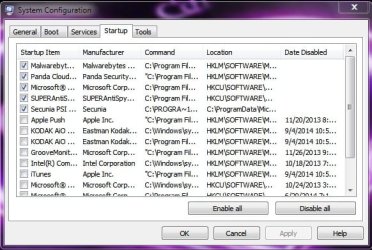
Here's my logs...I actually had a hard time uninstalling Chrome...don't know why but I did. I had to go into my C:\ drive and program files to delete all of Chrome from there. UGH:devil:

I will say that even after uninstalling and getting rid of it all...it's still slow to load:sleepy:
 

Attachments

  • startup.txt
    startup.txt
    3 KB · Views: 1
  • startup.jpg
    startup.jpg
    53.4 KB · Views: 7

My Computer My Computer

Computer type
PC/Desktop
Computer Manufacturer/Model Number
Toshiba HP
OS
Windows7 Home Premium 32-bit SP-1
CPU
Intel(R) Celeron(R) CPU 900 @ 2.20GHz
Motherboard
TOSHIBA NBWAA
Memory
2.00 GB USABLE 1.87 GB
Graphics Card(s)
(1) Mobile Intel(R) 4 Series Express Chipset Family (2) Mo
Sound Card
Realtek High Definition Audio
Hard Drives
TOSHIBA MK2555GSX
Antivirus
Panda Free Antivirus
Browser
I'm a new FireFox Browser user~
Other Info
Do Not Mess With Your Computer~
Unless You Know What You're Doing~
Unlike Me~I Had No Clue At All~I Thought I Did~
Do Not Mess With Your Computer~
This thread is on page 11.....still not sure what you are talking about. All your posts and mine are still there...

And you did not uninstall chrome properly. Did you not use control panel uninstall a program to remove it like you should remove every program? Deleting all the files under c\program files does not uninstall it. I suggest reinstalling chrome, then if you do not care for it, restart the pc and then go under control panel- uninstall a program to make sure you properly uninstall it this time.

You have itunes installed, that does not surprise me. Remove itunes from startup-preferably uninstall it. Windows media player does a much better job and is not a resource hog.

Dropbox is unnecessary to have installed. Even more unnecessary to have it startup with your pc. Simply going to the website and signing in allows you to do everything the program does.

Superantispyware free is not necessary upon bootup. Open it, then go into system tools-preferences-and uncheck the first box where it says start superantispyware with windows. The free version is not necessary to start with windows as it does not have active protection.

Do you have the paid pro version of malwarebytes?
 

My Computer My Computer

Computer type
PC/Desktop
Computer Manufacturer/Model Number
Custom Built
OS
Windows 10 Pro
CPU
AMD Ryzen 5 2400G Processor with Radeon RX Vega 11 Graphics
Motherboard
ASRock X470 Master SLI/AC AM4 AMD Promontory X470 SATA 6Gb/s
Memory
G.SKILL Ripjaws V Series 16GB (2 x 8GB) 288-Pin DDR4 SDRAM D
Graphics Card(s)
2047MB NVIDIA GeForce GTX 1060 6GB (EVGA)
Sound Card
Motherboard Built in
Monitor(s) Displays
Acer R240HY bidx 23.8-Inch IPS HDMI DVI VGA (1920 x 1080) Wi
Screen Resolution
1920 x 1080
Hard Drives
1TB Sandisk SSD PLUS (Main drive)
500 GB Seagate 7200 RPM (Games)
500 GB Western Digital 7200 RPM (Virtual Machines)
PSU
CORSAIR TX Series TX650M 650W 80+ Gold Modular Power Supply
Case
CORSAIR CARBIDE SPEC-02 Mid-Tower Gaming Case, Red LED Fan
Cooling
220mm, two 120mm, and four 60mm fans
Keyboard
Wired Dell keyboard
Mouse
Wireless Logitech mouse
Internet Speed
250mb down, 30mb up
Antivirus
Panda Cloud Antivirus
Browser
Chrome-ish x64
Other Info
Your awesome for reading this.
This thread is on page 11.....still not sure what you are talking about. All your posts and mine are still there
Maybe yours is but I'm attaching a file showing you mine says page 1:confused:

And you did not uninstall chrome properly. Did you not use control panel uninstall a program to remove it like you should remove every program? Deleting all the files under c\program files does not uninstall it. I suggest reinstalling chrome, then if you do not care for it, restart the pc and then go under control panel- uninstall a program to make sure you properly uninstall it this time.
I did that...reinstalled it and uninstalled it from CP but there were still items in the C:\ Program Files...so I just deleted them...I think it was just the folders with it all?

You have itunes installed, that does not surprise me. Remove itunes from startup-preferably uninstall it. Windows media player does a much better job and is not a resource hog.
I need iTunes for my iPhone;)

Dropbox is unnecessary to have installed. Even more unnecessary to have it startup with your pc. Simply going to the website and signing in allows you to do everything the program does.

Superantispyware free is not necessary upon bootup. Open it, then go into system tools-preferences-and uncheck the first box where it says start superantispyware with windows. The free version is not necessary to start with windows as it does not have active protection
Removed these and everything else in there that was not necessary.

Do you have the paid pro version of malwarebytes?
I have the paid version of Malwarebytes Anti-Exploit Premium
 

Attachments

  • 7forums4.jpg
    7forums4.jpg
    85.6 KB · Views: 0

My Computer My Computer

Computer type
PC/Desktop
Computer Manufacturer/Model Number
Toshiba HP
OS
Windows7 Home Premium 32-bit SP-1
CPU
Intel(R) Celeron(R) CPU 900 @ 2.20GHz
Motherboard
TOSHIBA NBWAA
Memory
2.00 GB USABLE 1.87 GB
Graphics Card(s)
(1) Mobile Intel(R) 4 Series Express Chipset Family (2) Mo
Sound Card
Realtek High Definition Audio
Hard Drives
TOSHIBA MK2555GSX
Antivirus
Panda Free Antivirus
Browser
I'm a new FireFox Browser user~
Other Info
Do Not Mess With Your Computer~
Unless You Know What You're Doing~
Unlike Me~I Had No Clue At All~I Thought I Did~
Do Not Mess With Your Computer~
AH ok.

Weird about the forum screenshot. I have never seen that before. Maybe because it is showing first unread? Maybe a setting? IDK.

You actually do not need itunes for your iphone. Iphone has itunes installed as an app on the phone, and it can update itself. Iphone does not need itunes to update your phone anymore. Itunes is no longer needed on your pc at all.

Good there. Anything better now?


Have you tried the obvious maintenance for windows?

Such as defrag? Disk cleanup? and adjusting visual settings?
 

My Computer My Computer

Computer type
PC/Desktop
Computer Manufacturer/Model Number
Custom Built
OS
Windows 10 Pro
CPU
AMD Ryzen 5 2400G Processor with Radeon RX Vega 11 Graphics
Motherboard
ASRock X470 Master SLI/AC AM4 AMD Promontory X470 SATA 6Gb/s
Memory
G.SKILL Ripjaws V Series 16GB (2 x 8GB) 288-Pin DDR4 SDRAM D
Graphics Card(s)
2047MB NVIDIA GeForce GTX 1060 6GB (EVGA)
Sound Card
Motherboard Built in
Monitor(s) Displays
Acer R240HY bidx 23.8-Inch IPS HDMI DVI VGA (1920 x 1080) Wi
Screen Resolution
1920 x 1080
Hard Drives
1TB Sandisk SSD PLUS (Main drive)
500 GB Seagate 7200 RPM (Games)
500 GB Western Digital 7200 RPM (Virtual Machines)
PSU
CORSAIR TX Series TX650M 650W 80+ Gold Modular Power Supply
Case
CORSAIR CARBIDE SPEC-02 Mid-Tower Gaming Case, Red LED Fan
Cooling
220mm, two 120mm, and four 60mm fans
Keyboard
Wired Dell keyboard
Mouse
Wireless Logitech mouse
Internet Speed
250mb down, 30mb up
Antivirus
Panda Cloud Antivirus
Browser
Chrome-ish x64
Other Info
Your awesome for reading this.
AH ok.
Weird about the forum screenshot. I have never seen that before. Maybe because it is showing first unread? Maybe a setting? IDK.
I fixed it...phew:rolleyes:that was driving me crazy!!


Good there. Anything better now?
Have you tried the obvious maintenance for windows?
Such as defrag? Disk cleanup? and adjusting visual settings?
Yes I've done all that and it helped some but it still takes roughly 45 sec-1 min for it to load to my Firefox. I'm also having alot of issues with my mouse not wanting to work all the time. I've changed the batteries in it literally twice in 1 day:mad:. I did a test of my own to see if it was the mouse itself...I switched the mouse I was using with the mouse upstairs and that mouse seemed to work fine for a while and then it was doing the same thing as the other mouse was doing...but the mouse that I put upstairs was working fine up there on that PC. I have my laptop sitting on a laptop table with a cooling fan and extra ports...that's where I plug in the mouse thingymajig...there's a total of 4 extra ports so I plug it in to any of them...and sometimes throughout the day out of the blue the mouse thingymajig goes blank and the light goes out so my mouse won't work...this happens often and I actually returned another laptop table because of this same problem...I have no idea why it does this but I end up pulling my plug that's in my USB port to the table for a quick sec and plug it back in and it works again...sometimes not for long and sometimes for longer periods. So not sure if that has anything to do with it? I don't have anything else running we took care of all that...it's just not fast like it used to be:(
 

My Computer My Computer

Computer type
PC/Desktop
Computer Manufacturer/Model Number
Toshiba HP
OS
Windows7 Home Premium 32-bit SP-1
CPU
Intel(R) Celeron(R) CPU 900 @ 2.20GHz
Motherboard
TOSHIBA NBWAA
Memory
2.00 GB USABLE 1.87 GB
Graphics Card(s)
(1) Mobile Intel(R) 4 Series Express Chipset Family (2) Mo
Sound Card
Realtek High Definition Audio
Hard Drives
TOSHIBA MK2555GSX
Antivirus
Panda Free Antivirus
Browser
I'm a new FireFox Browser user~
Other Info
Do Not Mess With Your Computer~
Unless You Know What You're Doing~
Unlike Me~I Had No Clue At All~I Thought I Did~
Do Not Mess With Your Computer~
I don't understand why your pc suddenly slowed down to a halt....

What about it is slow, the startup of the pc or loading everything?
 

My Computer My Computer

Computer type
PC/Desktop
Computer Manufacturer/Model Number
Custom Built
OS
Windows 10 Pro
CPU
AMD Ryzen 5 2400G Processor with Radeon RX Vega 11 Graphics
Motherboard
ASRock X470 Master SLI/AC AM4 AMD Promontory X470 SATA 6Gb/s
Memory
G.SKILL Ripjaws V Series 16GB (2 x 8GB) 288-Pin DDR4 SDRAM D
Graphics Card(s)
2047MB NVIDIA GeForce GTX 1060 6GB (EVGA)
Sound Card
Motherboard Built in
Monitor(s) Displays
Acer R240HY bidx 23.8-Inch IPS HDMI DVI VGA (1920 x 1080) Wi
Screen Resolution
1920 x 1080
Hard Drives
1TB Sandisk SSD PLUS (Main drive)
500 GB Seagate 7200 RPM (Games)
500 GB Western Digital 7200 RPM (Virtual Machines)
PSU
CORSAIR TX Series TX650M 650W 80+ Gold Modular Power Supply
Case
CORSAIR CARBIDE SPEC-02 Mid-Tower Gaming Case, Red LED Fan
Cooling
220mm, two 120mm, and four 60mm fans
Keyboard
Wired Dell keyboard
Mouse
Wireless Logitech mouse
Internet Speed
250mb down, 30mb up
Antivirus
Panda Cloud Antivirus
Browser
Chrome-ish x64
Other Info
Your awesome for reading this.
I don't understand why your pc suddenly slowed down to a halt....

What about it is slow, the startup of the pc or loading everything?

Hi andrew...

Sorry I haven't been here in 2 weeks...but I was on vaca...far away from any type of internet service of any kind and enjoying the sun & beach and those fruity drinks I love so much:D Wish I would have stayed there honestly instead of coming back to this mess now.

Ok...let's take it back just a bit...I took your advice and bought a Lynksys N300 WiFi Range Extender. I had a problem installing it to where it asked me for the pw and I typed in the pw for our router not knowing that I had to type in admin...but it didn't matter because it wouldn't connect anyways. I keep telling everyone (hubby & daughter) that I believe that the router is set up wrong...whether the cables from the modem and from our vonage little box are set up wrong is probably the reason why I always get the same message when I run a diagnostic test on my network. It always tells me that there may be a problem with the network. And I'm guessing the "network" is the router upstairs...or maybe it could be the (I don't know what to call it) Realtek thingy...I saved both logs and read them with the event viewer and not really knowing what I was looking for I did find a few times where it said that there was a problem with the network. But hubby swears the cables are all in the right way...I pulled them all out once and tried putting them where I thought they needed to go and I didn't get any internet at all...and the way he puts them we get internet and the vonage works. So I don't know how to fix that...

Now I think I have bigger problems...as I was just looking at some of the items when I was doing something...if something strange stood out to me I googled the name of it to see what it was etc...some of the items were empty folders from uninstalled items etc...BUT...I came across a name of something that had the word "com" in front of it...weird I thought...so I copy/pasted it in google and all the things that came up about this was telling me that it was a virus...a Trojan of some sort...and reading thru one of the posts it really scared me. Now I know how you feel about Adobe products and you had me get rid of it all but I actually need the flash player for my games...the reader to read files because my other programs weren't reading them...so now I'm in complete freak out mode and don't know what to do. :cry:
 

My Computer My Computer

Computer type
PC/Desktop
Computer Manufacturer/Model Number
Toshiba HP
OS
Windows7 Home Premium 32-bit SP-1
CPU
Intel(R) Celeron(R) CPU 900 @ 2.20GHz
Motherboard
TOSHIBA NBWAA
Memory
2.00 GB USABLE 1.87 GB
Graphics Card(s)
(1) Mobile Intel(R) 4 Series Express Chipset Family (2) Mo
Sound Card
Realtek High Definition Audio
Hard Drives
TOSHIBA MK2555GSX
Antivirus
Panda Free Antivirus
Browser
I'm a new FireFox Browser user~
Other Info
Do Not Mess With Your Computer~
Unless You Know What You're Doing~
Unlike Me~I Had No Clue At All~I Thought I Did~
Do Not Mess With Your Computer~
No problem :) getting away can be a good thing.

1st step:

Calm down :)

Lets take things one at a time....

First things first: You can always try calling linksys for support and help on getting your products worked out if things are not working.

You can call the company that made the router or search google for your router make which will tell you how to reset the router (which will reset the password) and how to reset it back up with a new password. (Most even have online manuals that show pics step by step.)

You can also always return the repeater or extender and buy a brand new router and replace your old one. Something with good range so you do not need a repeater or extender.

Is anything wrong with the network? Can everything access the internet okay? Or you simply just cannot get the repeater to work?

com could be/mean anything. Where did you find it? Screenshots and a lot more information are needed here. I am pretty certain you are clean so no need to fret.

What web browser are you using now?

Chrome? Internet explorer? Firefox? Please let me know. I also want to know if the speed issue with the browser is still going on.

Chrome would not have slowed down your pc.....something else must have....so is it still slow?

Every little bit of info helps.

And please do not take this wrong, but please make complete sentences, it is easier to read :)
 

My Computer My Computer

Computer type
PC/Desktop
Computer Manufacturer/Model Number
Custom Built
OS
Windows 10 Pro
CPU
AMD Ryzen 5 2400G Processor with Radeon RX Vega 11 Graphics
Motherboard
ASRock X470 Master SLI/AC AM4 AMD Promontory X470 SATA 6Gb/s
Memory
G.SKILL Ripjaws V Series 16GB (2 x 8GB) 288-Pin DDR4 SDRAM D
Graphics Card(s)
2047MB NVIDIA GeForce GTX 1060 6GB (EVGA)
Sound Card
Motherboard Built in
Monitor(s) Displays
Acer R240HY bidx 23.8-Inch IPS HDMI DVI VGA (1920 x 1080) Wi
Screen Resolution
1920 x 1080
Hard Drives
1TB Sandisk SSD PLUS (Main drive)
500 GB Seagate 7200 RPM (Games)
500 GB Western Digital 7200 RPM (Virtual Machines)
PSU
CORSAIR TX Series TX650M 650W 80+ Gold Modular Power Supply
Case
CORSAIR CARBIDE SPEC-02 Mid-Tower Gaming Case, Red LED Fan
Cooling
220mm, two 120mm, and four 60mm fans
Keyboard
Wired Dell keyboard
Mouse
Wireless Logitech mouse
Internet Speed
250mb down, 30mb up
Antivirus
Panda Cloud Antivirus
Browser
Chrome-ish x64
Other Info
Your awesome for reading this.
First things first: You can always try calling linksys for support and help on getting your products worked out if things are not working.

You can call the company that made the router or search google for your router make which will tell you how to reset the router (which will reset the password) and how to reset it back up with a new password. (Most even have online manuals that show pics step by step.)

You can also always return the repeater or extender and buy a brand new router and replace your old one. Something with good range so you do not need a repeater or extender.

Sorry it took me so long...but I sorta tackled a project that should have been done a long time ago and its been bothering forever...where my PC is upstairs is on a computer type desk that's a corner type...and in that corner are where all the cords/cables/plugs end up going and the monitor (which I hate because it's the old version type...my flat screen took a dump on me and I haven't done anything with it) but the monitor also sits in that corner but obviously up on the desk area...it was just a mess with all the cords and cables being bunched up together and entwined with each other I literally was killing myself trying to clean it all up. Which cable went to what etc. and if there was an excessive amount of that cable I neatly put it together with a twist tie...I actually found some cable and other wire stuff that didn't belong to anything it was just there in the midst of that mess...but once I finally got that area (which was extremely difficult to work in it was so small) I put back all the plugs cords and cables where they respectfully belonged (I took pics on my phone so I wouldn't mess anything up lol) So after 2 days of working on all of that yesterday I finally had the day to myself and called Linksys...because my router is a Linksys E2500 (I bought that last yr so it's not old) and the Range Extender is also from Linksys...Thankfully I got someone that understood what I was trying to explain to them and the first thing we did was to make sure the cables were all connected correctly...which they were...then we went into my Linksys acct. and they were looking for specific numbers I can't remember what they were...but we ended up changing the name because you can't have the same name...change the numbers to what they should have been and they were all the same too...which their not supposed to be. So once we finished fixing all of that stuff we just made sure I was able to get internet on that PC...which I did...then they helped me install the Range Extender and get it to work with the router...so that's all set now. I did ask them about the diagnostic result thing I keep getting when I open my networks/sharing and run the diagnostics...I ran it for them and was really hoping I didn't get that message anymore but I did and I read it to them and all they said was not to worry about it.


com could be/mean anything. Where did you find it? Screenshots and a lot more information are needed here. I am pretty certain you are clean so no need to fret.
I can't find it anymore...I think it had something to do with one of the Adobe products. I got rid of everything but the Flash. I ran my Panda just the other day and it put 3 items in quarantine...Of course I automatically freak out thinking I have a virus or something...but then I remembered when I uninstalled and got rid of all the Adobe crap but the Flash I looked again in my Panda and there wasn't anything in quarantine now...so I ran it again just to be sure and it was clean...I ran my SuperSpyware and that was clean...and then I ran my Malwarebytes...not so clean...it put stuff in quarantine...so I'm nervous now.[/QUOTE]

I've been trying to download the item you put in your list...I think it's called "Should I remove it?"...this program would not download for me at all...no matter where I clicked in that link nothing was happening...not sure if there is a problem there or what but it wasn't working for me...and I wish it would.

What web browser are you using now?

Chrome? Internet explorer? Firefox? Please let me know. I also want to know if the speed issue with the browser is still going on.

Chrome would not have slowed down your pc.....something else must have....so is it still slow?
I use Firefox...nothing but Firefox...no Pale Moon anymore just Firefox. I believe the issue with speed is still happening...after I boot my laptop up and I let everything settle like...I click on my Firefox icon and it'll literally take a good 45 sec maybe more for it to load. And if I open another tab that address takes another 30 secs if not more. Not sure if that's normal but I'm pretty sure my laptop was faster than this now.


And please do not take this wrong, but please make complete sentences, it is easier to read :)
None taken...my brain works differently with MS so I'm used to it. I just hoped I put enough info out there for you. I'm always afraid because I get into too much detail or story or whatever lol:rolleyes:

But that's where I'm at right now. Hope this info helps you a bit

Thanks a bunch;)
 

My Computer My Computer

Computer type
PC/Desktop
Computer Manufacturer/Model Number
Toshiba HP
OS
Windows7 Home Premium 32-bit SP-1
CPU
Intel(R) Celeron(R) CPU 900 @ 2.20GHz
Motherboard
TOSHIBA NBWAA
Memory
2.00 GB USABLE 1.87 GB
Graphics Card(s)
(1) Mobile Intel(R) 4 Series Express Chipset Family (2) Mo
Sound Card
Realtek High Definition Audio
Hard Drives
TOSHIBA MK2555GSX
Antivirus
Panda Free Antivirus
Browser
I'm a new FireFox Browser user~
Other Info
Do Not Mess With Your Computer~
Unless You Know What You're Doing~
Unlike Me~I Had No Clue At All~I Thought I Did~
Do Not Mess With Your Computer~
No problem...good job calling linksys :) I knew they would help you out.

It is very concerning though that already you report malwarebytes and panda finding things again.

Odd that you cannot install should I remove it.....

Did you get unchecky and open dns figured out? Or did you not do this? Unchecky is a very simple install. open dns could just be setup on the computer.

Is there anyway you can attach the latest malwarebytes log to this thread? I want to see what it was that was detected. open malwarebytes-history-application logs and checkmark the last scan log that has items found, then click view and export it somewhere. Then upload it here using the paperclip.

Thank you :)
 

My Computer My Computer

Computer type
PC/Desktop
Computer Manufacturer/Model Number
Custom Built
OS
Windows 10 Pro
CPU
AMD Ryzen 5 2400G Processor with Radeon RX Vega 11 Graphics
Motherboard
ASRock X470 Master SLI/AC AM4 AMD Promontory X470 SATA 6Gb/s
Memory
G.SKILL Ripjaws V Series 16GB (2 x 8GB) 288-Pin DDR4 SDRAM D
Graphics Card(s)
2047MB NVIDIA GeForce GTX 1060 6GB (EVGA)
Sound Card
Motherboard Built in
Monitor(s) Displays
Acer R240HY bidx 23.8-Inch IPS HDMI DVI VGA (1920 x 1080) Wi
Screen Resolution
1920 x 1080
Hard Drives
1TB Sandisk SSD PLUS (Main drive)
500 GB Seagate 7200 RPM (Games)
500 GB Western Digital 7200 RPM (Virtual Machines)
PSU
CORSAIR TX Series TX650M 650W 80+ Gold Modular Power Supply
Case
CORSAIR CARBIDE SPEC-02 Mid-Tower Gaming Case, Red LED Fan
Cooling
220mm, two 120mm, and four 60mm fans
Keyboard
Wired Dell keyboard
Mouse
Wireless Logitech mouse
Internet Speed
250mb down, 30mb up
Antivirus
Panda Cloud Antivirus
Browser
Chrome-ish x64
Other Info
Your awesome for reading this.
It is very concerning though that already you report malwarebytes and panda finding things again.

Your telling me...my jaw fell to the ground I was in shock:(

Odd that you cannot install should I remove it.....
It had a floating window for download which I tried clicking...I tried clicking the download in the upper right corner and every where it said download...I even went to cnet and tried there download and got a bad page...very weird indeed...

Did you get unchecky and open dns figured out? Or did you not do this? Unchecky is a very simple install. open dns could just be setup on the computer.
I have the unchecky...I was looking at the dns yesterday matter of fact...trying to figure it out and looking for that blue thingy you mentioned in the bottom corner...I didn't see it anywhere...but I'll try that again. It was the Should I Remove It? that I really wanted but can't get it to work for me:(

Is there anyway you can attach the latest malwarebytes log to this thread? I want to see what it was that was detected. open malwarebytes-history-application logs and checkmark the last scan log that has items found, then click view and export it somewhere. Then upload it here using the paperclip.
I knew you would be wanting that so I already went ahead and saved it for you;)

I'll be gone most of the day so I'll check back when I get home later today. Thanks a bunch:)
 

Attachments

My Computer My Computer

Computer type
PC/Desktop
Computer Manufacturer/Model Number
Toshiba HP
OS
Windows7 Home Premium 32-bit SP-1
CPU
Intel(R) Celeron(R) CPU 900 @ 2.20GHz
Motherboard
TOSHIBA NBWAA
Memory
2.00 GB USABLE 1.87 GB
Graphics Card(s)
(1) Mobile Intel(R) 4 Series Express Chipset Family (2) Mo
Sound Card
Realtek High Definition Audio
Hard Drives
TOSHIBA MK2555GSX
Antivirus
Panda Free Antivirus
Browser
I'm a new FireFox Browser user~
Other Info
Do Not Mess With Your Computer~
Unless You Know What You're Doing~
Unlike Me~I Had No Clue At All~I Thought I Did~
Do Not Mess With Your Computer~
Ok, the things malwarebytes found were just pups, so nothing serious. Your talking about how you clicked every download link, make sure you were not clicking on the ads.

If you click my opendns link on my post above, it will take you to the setup page on how to do it for your pc :)

Click directly here to download should I remove it:

Thank you for downloading Should I Remove It from CNET Download.com

Then lets run this again:

1.) Download AdwCleaner by Xplode and save to your Desktop.

  • Double click on AdwCleaner.exe to run the tool

  • Vista/Windows 7/8 users right-click and select Run As Administrator.
  • Click on the Scan button.
  • AdwCleaner will begin...be patient as the scan may take some time to complete.
  • After the scan has finished, click on the Report button...a logfile (AdwCleaner[R#].txt) will open in Notepad for review (where the largest value of # represents the most recent report).
  • The contents of the log file may be confusing. Unless you see a program name that you know should not be removed, don't worry about it. If you see an entry you want to keep, let me know about it.
  • Upload the contents of that logfile in your next reply using the paper clip on the reply box.
  • A copy of all logfiles are saved in the C:\AdwCleaner folder which was created when running the tool.

2.) Using AdwCleaner v3: Scan & Clean:

Double click on AdwCleaner.exe to run the tool again.
Click on the Scan button.
AdwCleaner will begin to scan your computer like it did before.
After the scan has finished...

This time click on the Clean button.
Press OK when asked to close all programs and follow the onscreen prompts.
Press OK again to allow AdwCleaner to restart the computer and complete the removal process.
After rebooting, a logfile report (AdwCleaner[S#].txt) will open automatically (where the largest value of # represents the most recent report).
Upload the contents of that logfile in your next reply using the paper clip on the reply box.

Junkware Removal tool:


3.) Please download Junkware Removal Tool to your desktop.


  • Shutdown your antivirus to avoid any conflicts.
  • Right click over JRT.exe and select Run as administrator on Windows Vista or Windows 7, double-click on XP.
  • The tool will open and start scanning your system.
  • Please be patient as this can take a while to complete.
  • On completion, a log (JRT.txt) is saved to your desktop and will automatically open.
  • Upload the contents of that logfile in your next reply using the paper clip on the reply box.
  • When completed make sure to re-enable your antivirus
 

My Computer My Computer

Computer type
PC/Desktop
Computer Manufacturer/Model Number
Custom Built
OS
Windows 10 Pro
CPU
AMD Ryzen 5 2400G Processor with Radeon RX Vega 11 Graphics
Motherboard
ASRock X470 Master SLI/AC AM4 AMD Promontory X470 SATA 6Gb/s
Memory
G.SKILL Ripjaws V Series 16GB (2 x 8GB) 288-Pin DDR4 SDRAM D
Graphics Card(s)
2047MB NVIDIA GeForce GTX 1060 6GB (EVGA)
Sound Card
Motherboard Built in
Monitor(s) Displays
Acer R240HY bidx 23.8-Inch IPS HDMI DVI VGA (1920 x 1080) Wi
Screen Resolution
1920 x 1080
Hard Drives
1TB Sandisk SSD PLUS (Main drive)
500 GB Seagate 7200 RPM (Games)
500 GB Western Digital 7200 RPM (Virtual Machines)
PSU
CORSAIR TX Series TX650M 650W 80+ Gold Modular Power Supply
Case
CORSAIR CARBIDE SPEC-02 Mid-Tower Gaming Case, Red LED Fan
Cooling
220mm, two 120mm, and four 60mm fans
Keyboard
Wired Dell keyboard
Mouse
Wireless Logitech mouse
Internet Speed
250mb down, 30mb up
Antivirus
Panda Cloud Antivirus
Browser
Chrome-ish x64
Other Info
Your awesome for reading this.
Back
Top