

- Local time
- 11:10 PM
- Messages
- 78
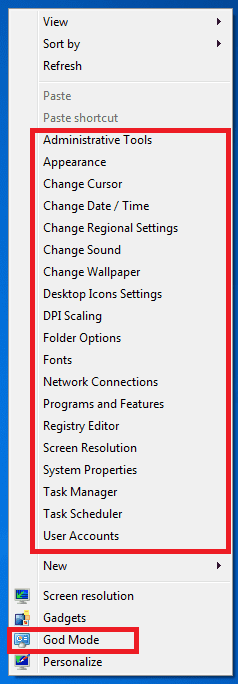
I've been playing with RT Seven Lite to reduce the size of the Windows 7 install on my Dell Mini 9, which has a 16GB HD. One of the ISO files was good, apart from the fact that I got a weird list of Control Panel items on the context menu, see attached. It may be related to God Mode, but I can't find the God folder.
Any idea how to get rid of this?
Any idea how to get rid of this?
Attachments
My Computer
At a glance
Windows 7 Professional x64Intel Core i5-2500K @ 3.3GHz8GBZotac ZONE GeForce GT 240 1GB [ZT-20404-20L]
- Computer Manufacturer/Model Number
- Homebrew
- OS
- Windows 7 Professional x64
- CPU
- Intel Core i5-2500K @ 3.3GHz
- Motherboard
- Fatal1ty P67 Professional
- Memory
- 8GB
- Graphics Card(s)
- Zotac ZONE GeForce GT 240 1GB [ZT-20404-20L]
- Sound Card
- On board
- Monitor(s) Displays
- 2x Samsung SyncMaster 203B
- Screen Resolution
- 1400 x 1050
- Case
- CoolerMaster Elite
- Cooling
- Zalman
- Keyboard
- Microsoft Natural Wireless Ergonomic 7000
- Mouse
- Microsoft Natural Wireless Laser 7000

