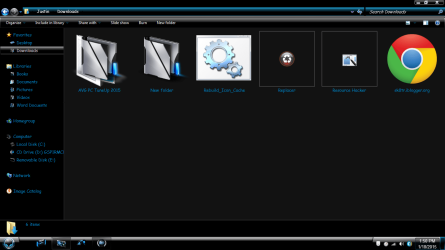
ok, so ive set a new icon for default folders, ex: when i make a new folder, it has my custom icon, however, whenever i put files into any new folder that i create, it reverts back to the yellow one. the only solution that works is enabling always show icons, never thumbnails, however, that is not the option i want. before i reinstalled windows, it was working the way i wanted (where my default icon is one of mine, not system, and i was still able to see thumbnails bc i didnt need the always show icons option enabled). anyways, now when i make a new folder it does have my icon, but whenever i add something to that folder, it reverts back. i want it to stay the custom icon i set, and still be able to see the thumbnails inside of it. it was this way before but i cant remember how to fix it. helpp please 
My Computer
At a glance
windows 7 home premium x64AMD A8-5600K 3.6GHz Quad-Core ProcessorG.Skill Ripjaws X Series 8GB (1 x 8GB) DDR3-1...Nvidia Geforce Gtx 750 ti
- Computer type
- PC/Desktop
- Computer Manufacturer/Model Number
- Custom Build
- OS
- windows 7 home premium x64
- CPU
- AMD A8-5600K 3.6GHz Quad-Core Processor
- Motherboard
- Asus A88X-PRO ATX FM2+ Motherboard
- Memory
- G.Skill Ripjaws X Series 8GB (1 x 8GB) DDR3-1600 Memory
- Graphics Card(s)
- Nvidia Geforce Gtx 750 ti
- Screen Resolution
- 1366x768
- Hard Drives
- Western Digital Caviar Blue 1TB 3.5" 7200RPM Internal Hard Drive
- PSU
- EVGA 500W 80+ Bronze Certified ATX Power Supply
- Case
- Deepcool TESSERACT BF ATX Mid Tower Case
- Mouse
- Etekcity 1600 dpi
- Internet Speed
- 100Mbps down/ 10Mbs up
- Antivirus
- Kaspersky Internet Security 2015
- Browser
- Google Chrome