Solved how do i keep the default folder icon from changing

boyer90

New member
Local time
6:46 PM
Messages
33
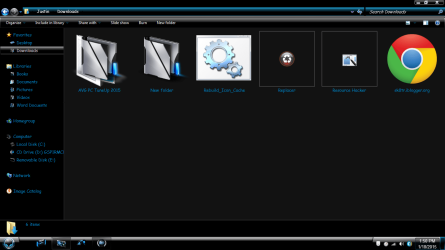
ok, so ive set a new icon for default folders, ex: when i make a new folder, it has my custom icon, however, whenever i put files into any new folder that i create, it reverts back to the yellow one. the only solution that works is enabling always show icons, never thumbnails, however, that is not the option i want. before i reinstalled windows, it was working the way i wanted (where my default icon is one of mine, not system, and i was still able to see thumbnails bc i didnt need the always show icons option enabled). anyways, now when i make a new folder it does have my icon, but whenever i add something to that folder, it reverts back. i want it to stay the custom icon i set, and still be able to see the thumbnails inside of it. it was this way before but i cant remember how to fix it. helpp please :)
 

My Computer

Computer type
PC/Desktop
Computer Manufacturer/Model Number
Custom Build
OS
windows 7 home premium x64
CPU
AMD A8-5600K 3.6GHz Quad-Core Processor
Motherboard
Asus A88X-PRO ATX FM2+ Motherboard
Memory
G.Skill Ripjaws X Series 8GB (1 x 8GB) DDR3-1600 Memory
Graphics Card(s)
Nvidia Geforce Gtx 750 ti
Screen Resolution
1366x768
Hard Drives
Western Digital Caviar Blue 1TB 3.5" 7200RPM Internal Hard Drive
PSU
EVGA 500W 80+ Bronze Certified ATX Power Supply
Case
Deepcool TESSERACT BF ATX Mid Tower Case
Mouse
Etekcity 1600 dpi
Internet Speed
100Mbps down/ 10Mbs up
Antivirus
Kaspersky Internet Security 2015
Browser
Google Chrome

My Computer

Computer type
PC/Desktop
Computer Manufacturer/Model Number
Self built custom
OS
64-bit Windows 11 Pro for Workstations
CPU
Intel i7-8700K OC'd to 5 GHz
Motherboard
ASUS ROG Maximus XI Formula Z390
Memory
64 GB (4x16GB) G.SKILL TridentZ RGB DDR4 3600 MHz
Graphics Card(s)
ASUS ROG-STRIX-GTX1080TI-O11G-GAMING
Sound Card
Integrated
Monitor(s) Displays
2 x Samsung Odyssey G7 27"
Screen Resolution
2560x1440
Hard Drives
1TB Samsung 990 PRO M.2,
4TB Samsung 990 PRO PRO M.2,
TerraMaster F8 SSD Plus NAS
PSU
Seasonic Prime Titanium 850W
Case
Thermaltake Core P3
Cooling
Corsair Hydro H115i
Keyboard
Logitech wireless K800
Mouse
Logitech MX Master 4
Internet Speed
2 Gb/s Download and 100 Mb/s Upload
Antivirus
Malwarebyte Anti-Malware Premium
Browser
Google Chrome
Other Info
Logitech Z625 speaker system,
Logitech BRIO 4K Pro webcam,
HP Color LaserJet Pro MFP M477fdn,
APC SMART-UPS RT 1000 XL - SURT1000XLI,
Galaxy S23 Plus phone
yea, i saw that, and i do already have a custom one set, and when i make an empty new folder, it does show the new custom icon, however, whenever i add any type of file to the newly created folder, the folder then reverts back to the yellow one, and i dont understand why that is or how to stop it. as i previously stated, before i reinstalled windows, i had a custom icon set for the default folder icon and i never had an issue with it reverting to the yellow folder. i want my thumbnails to show, but i want my new default folder to show as well and not revert to the yellow one. i had it before.. am i missing something? thank you for the quick reply, really helps to not have to wait. lol
 

My Computer

Computer type
PC/Desktop
Computer Manufacturer/Model Number
Custom Build
OS
windows 7 home premium x64
CPU
AMD A8-5600K 3.6GHz Quad-Core Processor
Motherboard
Asus A88X-PRO ATX FM2+ Motherboard
Memory
G.Skill Ripjaws X Series 8GB (1 x 8GB) DDR3-1600 Memory
Graphics Card(s)
Nvidia Geforce Gtx 750 ti
Screen Resolution
1366x768
Hard Drives
Western Digital Caviar Blue 1TB 3.5" 7200RPM Internal Hard Drive
PSU
EVGA 500W 80+ Bronze Certified ATX Power Supply
Case
Deepcool TESSERACT BF ATX Mid Tower Case
Mouse
Etekcity 1600 dpi
Internet Speed
100Mbps down/ 10Mbs up
Antivirus
Kaspersky Internet Security 2015
Browser
Google Chrome
It sounds like you may have missed changing one of the icons in the tutorial.
 

My Computer

Computer type
PC/Desktop
Computer Manufacturer/Model Number
Self built custom
OS
64-bit Windows 11 Pro for Workstations
CPU
Intel i7-8700K OC'd to 5 GHz
Motherboard
ASUS ROG Maximus XI Formula Z390
Memory
64 GB (4x16GB) G.SKILL TridentZ RGB DDR4 3600 MHz
Graphics Card(s)
ASUS ROG-STRIX-GTX1080TI-O11G-GAMING
Sound Card
Integrated
Monitor(s) Displays
2 x Samsung Odyssey G7 27"
Screen Resolution
2560x1440
Hard Drives
1TB Samsung 990 PRO M.2,
4TB Samsung 990 PRO PRO M.2,
TerraMaster F8 SSD Plus NAS
PSU
Seasonic Prime Titanium 850W
Case
Thermaltake Core P3
Cooling
Corsair Hydro H115i
Keyboard
Logitech wireless K800
Mouse
Logitech MX Master 4
Internet Speed
2 Gb/s Download and 100 Mb/s Upload
Antivirus
Malwarebyte Anti-Malware Premium
Browser
Google Chrome
Other Info
Logitech Z625 speaker system,
Logitech BRIO 4K Pro webcam,
HP Color LaserJet Pro MFP M477fdn,
APC SMART-UPS RT 1000 XL - SURT1000XLI,
Galaxy S23 Plus phone
ok, well the new icon shows up but i still dont think it worked right, ill upload a screen shot. the new folder has nothing in it and it looks fine, but the pc tuneup one looks like that, is it suppose to look like that when i have thumbnails enabled, or is there a way to fix that?
 

Attachments

  • folder.png
    folder.png
    183.9 KB · Views: 8

My Computer

Computer type
PC/Desktop
Computer Manufacturer/Model Number
Custom Build
OS
windows 7 home premium x64
CPU
AMD A8-5600K 3.6GHz Quad-Core Processor
Motherboard
Asus A88X-PRO ATX FM2+ Motherboard
Memory
G.Skill Ripjaws X Series 8GB (1 x 8GB) DDR3-1600 Memory
Graphics Card(s)
Nvidia Geforce Gtx 750 ti
Screen Resolution
1366x768
Hard Drives
Western Digital Caviar Blue 1TB 3.5" 7200RPM Internal Hard Drive
PSU
EVGA 500W 80+ Bronze Certified ATX Power Supply
Case
Deepcool TESSERACT BF ATX Mid Tower Case
Mouse
Etekcity 1600 dpi
Internet Speed
100Mbps down/ 10Mbs up
Antivirus
Kaspersky Internet Security 2015
Browser
Google Chrome
Did you change all 12 icons in the tutorial?
 

My Computer

Computer type
PC/Desktop
Computer Manufacturer/Model Number
Self built custom
OS
64-bit Windows 11 Pro for Workstations
CPU
Intel i7-8700K OC'd to 5 GHz
Motherboard
ASUS ROG Maximus XI Formula Z390
Memory
64 GB (4x16GB) G.SKILL TridentZ RGB DDR4 3600 MHz
Graphics Card(s)
ASUS ROG-STRIX-GTX1080TI-O11G-GAMING
Sound Card
Integrated
Monitor(s) Displays
2 x Samsung Odyssey G7 27"
Screen Resolution
2560x1440
Hard Drives
1TB Samsung 990 PRO M.2,
4TB Samsung 990 PRO PRO M.2,
TerraMaster F8 SSD Plus NAS
PSU
Seasonic Prime Titanium 850W
Case
Thermaltake Core P3
Cooling
Corsair Hydro H115i
Keyboard
Logitech wireless K800
Mouse
Logitech MX Master 4
Internet Speed
2 Gb/s Download and 100 Mb/s Upload
Antivirus
Malwarebyte Anti-Malware Premium
Browser
Google Chrome
Other Info
Logitech Z625 speaker system,
Logitech BRIO 4K Pro webcam,
HP Color LaserJet Pro MFP M477fdn,
APC SMART-UPS RT 1000 XL - SURT1000XLI,
Galaxy S23 Plus phone
12? where does that come from? lol i thought it was the ones in 3,4,5,6?
 

My Computer

Computer type
PC/Desktop
Computer Manufacturer/Model Number
Custom Build
OS
windows 7 home premium x64
CPU
AMD A8-5600K 3.6GHz Quad-Core Processor
Motherboard
Asus A88X-PRO ATX FM2+ Motherboard
Memory
G.Skill Ripjaws X Series 8GB (1 x 8GB) DDR3-1600 Memory
Graphics Card(s)
Nvidia Geforce Gtx 750 ti
Screen Resolution
1366x768
Hard Drives
Western Digital Caviar Blue 1TB 3.5" 7200RPM Internal Hard Drive
PSU
EVGA 500W 80+ Bronze Certified ATX Power Supply
Case
Deepcool TESSERACT BF ATX Mid Tower Case
Mouse
Etekcity 1600 dpi
Internet Speed
100Mbps down/ 10Mbs up
Antivirus
Kaspersky Internet Security 2015
Browser
Google Chrome
It's for the different sizes for them.
 

My Computer

Computer type
PC/Desktop
Computer Manufacturer/Model Number
Self built custom
OS
64-bit Windows 11 Pro for Workstations
CPU
Intel i7-8700K OC'd to 5 GHz
Motherboard
ASUS ROG Maximus XI Formula Z390
Memory
64 GB (4x16GB) G.SKILL TridentZ RGB DDR4 3600 MHz
Graphics Card(s)
ASUS ROG-STRIX-GTX1080TI-O11G-GAMING
Sound Card
Integrated
Monitor(s) Displays
2 x Samsung Odyssey G7 27"
Screen Resolution
2560x1440
Hard Drives
1TB Samsung 990 PRO M.2,
4TB Samsung 990 PRO PRO M.2,
TerraMaster F8 SSD Plus NAS
PSU
Seasonic Prime Titanium 850W
Case
Thermaltake Core P3
Cooling
Corsair Hydro H115i
Keyboard
Logitech wireless K800
Mouse
Logitech MX Master 4
Internet Speed
2 Gb/s Download and 100 Mb/s Upload
Antivirus
Malwarebyte Anti-Malware Premium
Browser
Google Chrome
Other Info
Logitech Z625 speaker system,
Logitech BRIO 4K Pro webcam,
HP Color LaserJet Pro MFP M477fdn,
APC SMART-UPS RT 1000 XL - SURT1000XLI,
Galaxy S23 Plus phone
i followed the tuturiol step by step and did what it said, and i even use an icon layout the i came across on a forum here. i replaced 3 and 4 with the emply folder, 5 with the back icon, and 6 with the front. then 162 with the icon with things in it. save as imageres.dll to desktop, copy and pasted in both folders (im on 64bit) deleted thumb cache and rebuilt icon db. restarted and nothing changed at all. any ideas?
 

My Computer

Computer type
PC/Desktop
Computer Manufacturer/Model Number
Custom Build
OS
windows 7 home premium x64
CPU
AMD A8-5600K 3.6GHz Quad-Core Processor
Motherboard
Asus A88X-PRO ATX FM2+ Motherboard
Memory
G.Skill Ripjaws X Series 8GB (1 x 8GB) DDR3-1600 Memory
Graphics Card(s)
Nvidia Geforce Gtx 750 ti
Screen Resolution
1366x768
Hard Drives
Western Digital Caviar Blue 1TB 3.5" 7200RPM Internal Hard Drive
PSU
EVGA 500W 80+ Bronze Certified ATX Power Supply
Case
Deepcool TESSERACT BF ATX Mid Tower Case
Mouse
Etekcity 1600 dpi
Internet Speed
100Mbps down/ 10Mbs up
Antivirus
Kaspersky Internet Security 2015
Browser
Google Chrome
do i have to have an icon of each size that it shows it the tutriol or will a single 256x256 icon for each icon i have to replace work?
 

My Computer

Computer type
PC/Desktop
Computer Manufacturer/Model Number
Custom Build
OS
windows 7 home premium x64
CPU
AMD A8-5600K 3.6GHz Quad-Core Processor
Motherboard
Asus A88X-PRO ATX FM2+ Motherboard
Memory
G.Skill Ripjaws X Series 8GB (1 x 8GB) DDR3-1600 Memory
Graphics Card(s)
Nvidia Geforce Gtx 750 ti
Screen Resolution
1366x768
Hard Drives
Western Digital Caviar Blue 1TB 3.5" 7200RPM Internal Hard Drive
PSU
EVGA 500W 80+ Bronze Certified ATX Power Supply
Case
Deepcool TESSERACT BF ATX Mid Tower Case
Mouse
Etekcity 1600 dpi
Internet Speed
100Mbps down/ 10Mbs up
Antivirus
Kaspersky Internet Security 2015
Browser
Google Chrome

My Computer

Computer type
PC/Desktop
Computer Manufacturer/Model Number
Self built custom
OS
64-bit Windows 11 Pro for Workstations
CPU
Intel i7-8700K OC'd to 5 GHz
Motherboard
ASUS ROG Maximus XI Formula Z390
Memory
64 GB (4x16GB) G.SKILL TridentZ RGB DDR4 3600 MHz
Graphics Card(s)
ASUS ROG-STRIX-GTX1080TI-O11G-GAMING
Sound Card
Integrated
Monitor(s) Displays
2 x Samsung Odyssey G7 27"
Screen Resolution
2560x1440
Hard Drives
1TB Samsung 990 PRO M.2,
4TB Samsung 990 PRO PRO M.2,
TerraMaster F8 SSD Plus NAS
PSU
Seasonic Prime Titanium 850W
Case
Thermaltake Core P3
Cooling
Corsair Hydro H115i
Keyboard
Logitech wireless K800
Mouse
Logitech MX Master 4
Internet Speed
2 Gb/s Download and 100 Mb/s Upload
Antivirus
Malwarebyte Anti-Malware Premium
Browser
Google Chrome
Other Info
Logitech Z625 speaker system,
Logitech BRIO 4K Pro webcam,
HP Color LaserJet Pro MFP M477fdn,
APC SMART-UPS RT 1000 XL - SURT1000XLI,
Galaxy S23 Plus phone
so it does have to be packed with the differnt sizes so if its not, then i wont see any change at all?
 

My Computer

Computer type
PC/Desktop
Computer Manufacturer/Model Number
Custom Build
OS
windows 7 home premium x64
CPU
AMD A8-5600K 3.6GHz Quad-Core Processor
Motherboard
Asus A88X-PRO ATX FM2+ Motherboard
Memory
G.Skill Ripjaws X Series 8GB (1 x 8GB) DDR3-1600 Memory
Graphics Card(s)
Nvidia Geforce Gtx 750 ti
Screen Resolution
1366x768
Hard Drives
Western Digital Caviar Blue 1TB 3.5" 7200RPM Internal Hard Drive
PSU
EVGA 500W 80+ Bronze Certified ATX Power Supply
Case
Deepcool TESSERACT BF ATX Mid Tower Case
Mouse
Etekcity 1600 dpi
Internet Speed
100Mbps down/ 10Mbs up
Antivirus
Kaspersky Internet Security 2015
Browser
Google Chrome
so just to be sure, i have to do that for each view of the icon i need before i start using the resource hacker, then use the icons that are packed with the different sizes?
 

My Computer

Computer type
PC/Desktop
Computer Manufacturer/Model Number
Custom Build
OS
windows 7 home premium x64
CPU
AMD A8-5600K 3.6GHz Quad-Core Processor
Motherboard
Asus A88X-PRO ATX FM2+ Motherboard
Memory
G.Skill Ripjaws X Series 8GB (1 x 8GB) DDR3-1600 Memory
Graphics Card(s)
Nvidia Geforce Gtx 750 ti
Screen Resolution
1366x768
Hard Drives
Western Digital Caviar Blue 1TB 3.5" 7200RPM Internal Hard Drive
PSU
EVGA 500W 80+ Bronze Certified ATX Power Supply
Case
Deepcool TESSERACT BF ATX Mid Tower Case
Mouse
Etekcity 1600 dpi
Internet Speed
100Mbps down/ 10Mbs up
Antivirus
Kaspersky Internet Security 2015
Browser
Google Chrome
Correct.
 

My Computer

Computer type
PC/Desktop
Computer Manufacturer/Model Number
Self built custom
OS
64-bit Windows 11 Pro for Workstations
CPU
Intel i7-8700K OC'd to 5 GHz
Motherboard
ASUS ROG Maximus XI Formula Z390
Memory
64 GB (4x16GB) G.SKILL TridentZ RGB DDR4 3600 MHz
Graphics Card(s)
ASUS ROG-STRIX-GTX1080TI-O11G-GAMING
Sound Card
Integrated
Monitor(s) Displays
2 x Samsung Odyssey G7 27"
Screen Resolution
2560x1440
Hard Drives
1TB Samsung 990 PRO M.2,
4TB Samsung 990 PRO PRO M.2,
TerraMaster F8 SSD Plus NAS
PSU
Seasonic Prime Titanium 850W
Case
Thermaltake Core P3
Cooling
Corsair Hydro H115i
Keyboard
Logitech wireless K800
Mouse
Logitech MX Master 4
Internet Speed
2 Gb/s Download and 100 Mb/s Upload
Antivirus
Malwarebyte Anti-Malware Premium
Browser
Google Chrome
Other Info
Logitech Z625 speaker system,
Logitech BRIO 4K Pro webcam,
HP Color LaserJet Pro MFP M477fdn,
APC SMART-UPS RT 1000 XL - SURT1000XLI,
Galaxy S23 Plus phone
ok. i did that. made the new icons and used those. but when i used system file replacer, the original imageres.dll was still there, how do i get my new one to stay so it changes my icon
 

My Computer

Computer type
PC/Desktop
Computer Manufacturer/Model Number
Custom Build
OS
windows 7 home premium x64
CPU
AMD A8-5600K 3.6GHz Quad-Core Processor
Motherboard
Asus A88X-PRO ATX FM2+ Motherboard
Memory
G.Skill Ripjaws X Series 8GB (1 x 8GB) DDR3-1600 Memory
Graphics Card(s)
Nvidia Geforce Gtx 750 ti
Screen Resolution
1366x768
Hard Drives
Western Digital Caviar Blue 1TB 3.5" 7200RPM Internal Hard Drive
PSU
EVGA 500W 80+ Bronze Certified ATX Power Supply
Case
Deepcool TESSERACT BF ATX Mid Tower Case
Mouse
Etekcity 1600 dpi
Internet Speed
100Mbps down/ 10Mbs up
Antivirus
Kaspersky Internet Security 2015
Browser
Google Chrome

My Computer

Computer type
PC/Desktop
Computer Manufacturer/Model Number
Self built custom
OS
64-bit Windows 11 Pro for Workstations
CPU
Intel i7-8700K OC'd to 5 GHz
Motherboard
ASUS ROG Maximus XI Formula Z390
Memory
64 GB (4x16GB) G.SKILL TridentZ RGB DDR4 3600 MHz
Graphics Card(s)
ASUS ROG-STRIX-GTX1080TI-O11G-GAMING
Sound Card
Integrated
Monitor(s) Displays
2 x Samsung Odyssey G7 27"
Screen Resolution
2560x1440
Hard Drives
1TB Samsung 990 PRO M.2,
4TB Samsung 990 PRO PRO M.2,
TerraMaster F8 SSD Plus NAS
PSU
Seasonic Prime Titanium 850W
Case
Thermaltake Core P3
Cooling
Corsair Hydro H115i
Keyboard
Logitech wireless K800
Mouse
Logitech MX Master 4
Internet Speed
2 Gb/s Download and 100 Mb/s Upload
Antivirus
Malwarebyte Anti-Malware Premium
Browser
Google Chrome
Other Info
Logitech Z625 speaker system,
Logitech BRIO 4K Pro webcam,
HP Color LaserJet Pro MFP M477fdn,
APC SMART-UPS RT 1000 XL - SURT1000XLI,
Galaxy S23 Plus phone
yea i got it finally. what i had to do was rename the origianll dll and then paste my new one, and as for the folder icon, i did make sure that the four different icons had all the different sizes, i just use my total image converter to do that. lol thanks for all the help, i will def be using this site if i have any more question, oh and btw, do you know where i can find more custom icon sets that have the empty, front,back, and filled icons? just incase i decide to change it up again? lol:D
 

My Computer

Computer type
PC/Desktop
Computer Manufacturer/Model Number
Custom Build
OS
windows 7 home premium x64
CPU
AMD A8-5600K 3.6GHz Quad-Core Processor
Motherboard
Asus A88X-PRO ATX FM2+ Motherboard
Memory
G.Skill Ripjaws X Series 8GB (1 x 8GB) DDR3-1600 Memory
Graphics Card(s)
Nvidia Geforce Gtx 750 ti
Screen Resolution
1366x768
Hard Drives
Western Digital Caviar Blue 1TB 3.5" 7200RPM Internal Hard Drive
PSU
EVGA 500W 80+ Bronze Certified ATX Power Supply
Case
Deepcool TESSERACT BF ATX Mid Tower Case
Mouse
Etekcity 1600 dpi
Internet Speed
100Mbps down/ 10Mbs up
Antivirus
Kaspersky Internet Security 2015
Browser
Google Chrome
Great news. :party:

You could Google "folder icon sets", and have a ton to choose from.
 

My Computer

Computer type
PC/Desktop
Computer Manufacturer/Model Number
Self built custom
OS
64-bit Windows 11 Pro for Workstations
CPU
Intel i7-8700K OC'd to 5 GHz
Motherboard
ASUS ROG Maximus XI Formula Z390
Memory
64 GB (4x16GB) G.SKILL TridentZ RGB DDR4 3600 MHz
Graphics Card(s)
ASUS ROG-STRIX-GTX1080TI-O11G-GAMING
Sound Card
Integrated
Monitor(s) Displays
2 x Samsung Odyssey G7 27"
Screen Resolution
2560x1440
Hard Drives
1TB Samsung 990 PRO M.2,
4TB Samsung 990 PRO PRO M.2,
TerraMaster F8 SSD Plus NAS
PSU
Seasonic Prime Titanium 850W
Case
Thermaltake Core P3
Cooling
Corsair Hydro H115i
Keyboard
Logitech wireless K800
Mouse
Logitech MX Master 4
Internet Speed
2 Gb/s Download and 100 Mb/s Upload
Antivirus
Malwarebyte Anti-Malware Premium
Browser
Google Chrome
Other Info
Logitech Z625 speaker system,
Logitech BRIO 4K Pro webcam,
HP Color LaserJet Pro MFP M477fdn,
APC SMART-UPS RT 1000 XL - SURT1000XLI,
Galaxy S23 Plus phone
Back
Top