
Solved How do I reset Windows Update components?

Hi,
That is where the second session of fun starts :)
Personally I would Exclude all Recommended updates from being mixed up with the important updates and only install the important updates in the first round.

See if you can get that far :)
 

My Computer

Computer type
PC/Desktop
Computer Manufacturer/Model Number
Custom assembled by me :}
OS
Win-7-Pro64bit 7-H-Prem-64bit
CPU
i7-5930K 2nd i9-9940x both water blocked VRM's too
Motherboard
ASUS SABERTOOTH X99 2nd ASUS x299 Apex
Memory
Trident-z 3200C14 2nd Trident-z 3600C16
Graphics Card(s)
EVGA 1080ti ftw3 2nd Titan Xp both water blocked
Sound Card
Built-in Realtek
Monitor(s) Displays
1-AOC G2460PG 24"G-Sync 144Hz/ 2nd 1-ASUS VG248QE 24" 144Hz
Screen Resolution
1920 x 1080 144Hz
Hard Drives
2-Samsung M.2 Evo & Evo Plus
2-Samsung 850 EVO 500GB SSD's/ 3-2.5 W.D. Black 1tb-&3-1tb/3-3.5 WD Black 1tb hdd's
PSU
EVGA SuperNOVA 1000-P2 2nd 1200-P2
Case
2-Corsair Obsidian Series 450D Black ATX Mid Tower
Cooling
Custom water loops
Keyboard
Logitech G710+/ 2nd Logitech G910
Mouse
2-RedDragon M901 Perdition 16400 dpi Gaming mouse = wired
Internet Speed
Comcast Ping 19ms 89.31mbps download speed 6.12mbps upload
Antivirus
Malwarebytes Pro/ Superantispyware Pro
Browser
FireFox & Pale moon
Other Info
2nd ASUS X299 Apex/Intel i9-9940x with Custom water loop/7H-Prem-x64/Corsair 450D case/Ram Trident-z 3600C16 4x8gb / Samsung970Evo plus 500gb SSD/Dual ssd EZ swap evo/PSU EVGA SuperNova 1200w-P2 80+Platinum/GPU Titan Xp /8-ML-140 on push-pull on 2-280GTX rads

My Computer

Computer type
Laptop
Computer Manufacturer/Model Number
ASUS
OS
Microsoft Windows 7 Home Premium 64-bit 7601 Multiprocessor Free Service Pack 1
CPU
AMD C-60 APU with Radeon(tm) HD Graphics
Motherboard
ASUSTeK COMPUTER INC. X501U
Memory
4.00 GB
Graphics Card(s)
AMD Radeon HD 6290 Graphics
Sound Card
(1) AMD High Definition Audio Device (2) Realtek High Defi
Screen Resolution
1366 x 768 x 32 bits (4294967296 colors) @ 60 Hz
Hard Drives
Hitachi HTS545050A7E380 SATA Disk Device
Antivirus
Comodo CIS & FW, SecureAplus App Whitelisting, Threatfire
Browser
Cyberfox 64bit, Opera 64bit, Airfox
Other Info
Spy-The-Spy, HitmanPro.Alert, Norton Connect Safe, MJRegWatcher, BitDefender TrafficLight, Voodoo Shield, Zemana AntiMalware
Hi,
That is where the second session of fun starts :)
Personally I would Exclude all Recommended updates from being mixed up with the important updates and only install the important updates in the first round.

See if you can get that far :)
thats no good 'we need to make a list of all updates that have in the past caused concern and as of now so that my report to microsoft is solid
there are far too many updates for me to go through them one by one. only a list that we all can agree on that are bad is the way forward
 

My Computer

Computer Manufacturer/Model Number
acer 7720
OS
windows 7
CPU
2.66
Motherboard
intel
Memory
6GB
Graphics Card(s)
ATI
Sound Card
REALTEK
Monitor(s) Displays
SAMSUNG
Screen Resolution
1680 x 1050
Hard Drives
WD X 3 TB
PSU
1200
Case
ACER
Cooling
FAN
Keyboard
LOGITECH
Mouse
LOGITECH
Internet Speed
8MB
Hi,
Funny that is on the top of my updates Avoid list :)
KB2952664
KB2999226
KB3035583
KB3075249
KB3013531
KB3021917
KB3068708
KB3080149
KB3123862
KB3150513
KB3173040

Here's mine :)
 

My Computer

Computer type
PC/Desktop
Computer Manufacturer/Model Number
Custom assembled by me :}
OS
Win-7-Pro64bit 7-H-Prem-64bit
CPU
i7-5930K 2nd i9-9940x both water blocked VRM's too
Motherboard
ASUS SABERTOOTH X99 2nd ASUS x299 Apex
Memory
Trident-z 3200C14 2nd Trident-z 3600C16
Graphics Card(s)
EVGA 1080ti ftw3 2nd Titan Xp both water blocked
Sound Card
Built-in Realtek
Monitor(s) Displays
1-AOC G2460PG 24"G-Sync 144Hz/ 2nd 1-ASUS VG248QE 24" 144Hz
Screen Resolution
1920 x 1080 144Hz
Hard Drives
2-Samsung M.2 Evo & Evo Plus
2-Samsung 850 EVO 500GB SSD's/ 3-2.5 W.D. Black 1tb-&3-1tb/3-3.5 WD Black 1tb hdd's
PSU
EVGA SuperNOVA 1000-P2 2nd 1200-P2
Case
2-Corsair Obsidian Series 450D Black ATX Mid Tower
Cooling
Custom water loops
Keyboard
Logitech G710+/ 2nd Logitech G910
Mouse
2-RedDragon M901 Perdition 16400 dpi Gaming mouse = wired
Internet Speed
Comcast Ping 19ms 89.31mbps download speed 6.12mbps upload
Antivirus
Malwarebytes Pro/ Superantispyware Pro
Browser
FireFox & Pale moon
Other Info
2nd ASUS X299 Apex/Intel i9-9940x with Custom water loop/7H-Prem-x64/Corsair 450D case/Ram Trident-z 3600C16 4x8gb / Samsung970Evo plus 500gb SSD/Dual ssd EZ swap evo/PSU EVGA SuperNova 1200w-P2 80+Platinum/GPU Titan Xp /8-ML-140 on push-pull on 2-280GTX rads
Personally I don't see any "bad" updates to avoid installing except the telemetry ones and that's just personal preference.

Here's my list but some of them may not be for Windows 7

Code:
wusa /uninstall /kb:2505438 /quiet /norestart
wusa /uninstall /kb:2670838 /quiet /norestart
wusa /uninstall /kb:2882822 /quiet /norestart
wusa /uninstall /kb:2902907 /quiet /norestart
wusa /uninstall /kb:2952664 /quiet /norestart
wusa /uninstall /kb:2976978 /quiet /norestart
wusa /uninstall /kb:2977759 /quiet /norestart
wusa /uninstall /kb:2990214 /quiet /norestart
wusa /uninstall /kb:3012973 /quiet /norestart
wusa /uninstall /kb:3015249 /quiet /norestart
wusa /uninstall /kb:3021917 /quiet /norestart
wusa /uninstall /kb:3022345 /quiet /norestart
wusa /uninstall /kb:3035583 /quiet /norestart
wusa /uninstall /kb:3044374 /quiet /norestart
wusa /uninstall /kb:3050267 /quiet /norestart
wusa /uninstall /kb:3064683 /quiet /norestart
wusa /uninstall /kb:3065987 /quiet /norestart
wusa /uninstall /kb:3065988 /quiet /norestart
wusa /uninstall /kb:3068708 /quiet /norestart
wusa /uninstall /kb:3072318 /quiet /norestart
wusa /uninstall /kb:3074677 /quiet /norestart
wusa /uninstall /kb:3075249 /quiet /norestart
wusa /uninstall /kb:3075851 /quiet /norestart
wusa /uninstall /kb:3075853 /quiet /norestart
wusa /uninstall /kb:3078667 /quiet /norestart
wusa /uninstall /kb:3080149 /quiet /norestart
wusa /uninstall /kb:3081437 /quiet /norestart
wusa /uninstall /kb:3081454 /quiet /norestart
wusa /uninstall /kb:3083324 /quiet /norestart
wusa /uninstall /kb:3083325 /quiet /norestart
wusa /uninstall /kb:3083710 /quiet /norestart
wusa /uninstall /kb:3083711 /quiet /norestart
wusa /uninstall /kb:3086255 /quiet /norestart
 

My Computer

Computer type
Laptop
Computer Manufacturer/Model Number
ASUS
OS
Microsoft Windows 7 Home Premium 64-bit 7601 Multiprocessor Free Service Pack 1
CPU
AMD C-60 APU with Radeon(tm) HD Graphics
Motherboard
ASUSTeK COMPUTER INC. X501U
Memory
4.00 GB
Graphics Card(s)
AMD Radeon HD 6290 Graphics
Sound Card
(1) AMD High Definition Audio Device (2) Realtek High Defi
Screen Resolution
1366 x 768 x 32 bits (4294967296 colors) @ 60 Hz
Hard Drives
Hitachi HTS545050A7E380 SATA Disk Device
Antivirus
Comodo CIS & FW, SecureAplus App Whitelisting, Threatfire
Browser
Cyberfox 64bit, Opera 64bit, Airfox
Other Info
Spy-The-Spy, HitmanPro.Alert, Norton Connect Safe, MJRegWatcher, BitDefender TrafficLight, Voodoo Shield, Zemana AntiMalware
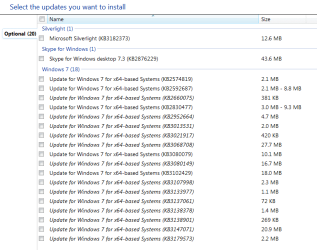
On a 7 home premium older install I show 329 328 updates installed with 19 optional/ recommended updates I have not installed

On a 7 pro 64 bit I show 320 319 installed a newer install and the same 19 20 not installed
9-17-16 not installed updates.PNG
 
Last edited:

My Computer

Computer type
PC/Desktop
Computer Manufacturer/Model Number
Custom assembled by me :}
OS
Win-7-Pro64bit 7-H-Prem-64bit
CPU
i7-5930K 2nd i9-9940x both water blocked VRM's too
Motherboard
ASUS SABERTOOTH X99 2nd ASUS x299 Apex
Memory
Trident-z 3200C14 2nd Trident-z 3600C16
Graphics Card(s)
EVGA 1080ti ftw3 2nd Titan Xp both water blocked
Sound Card
Built-in Realtek
Monitor(s) Displays
1-AOC G2460PG 24"G-Sync 144Hz/ 2nd 1-ASUS VG248QE 24" 144Hz
Screen Resolution
1920 x 1080 144Hz
Hard Drives
2-Samsung M.2 Evo & Evo Plus
2-Samsung 850 EVO 500GB SSD's/ 3-2.5 W.D. Black 1tb-&3-1tb/3-3.5 WD Black 1tb hdd's
PSU
EVGA SuperNOVA 1000-P2 2nd 1200-P2
Case
2-Corsair Obsidian Series 450D Black ATX Mid Tower
Cooling
Custom water loops
Keyboard
Logitech G710+/ 2nd Logitech G910
Mouse
2-RedDragon M901 Perdition 16400 dpi Gaming mouse = wired
Internet Speed
Comcast Ping 19ms 89.31mbps download speed 6.12mbps upload
Antivirus
Malwarebytes Pro/ Superantispyware Pro
Browser
FireFox & Pale moon
Other Info
2nd ASUS X299 Apex/Intel i9-9940x with Custom water loop/7H-Prem-x64/Corsair 450D case/Ram Trident-z 3600C16 4x8gb / Samsung970Evo plus 500gb SSD/Dual ssd EZ swap evo/PSU EVGA SuperNova 1200w-P2 80+Platinum/GPU Titan Xp /8-ML-140 on push-pull on 2-280GTX rads
Thanks everyone i believe we are now making some progress
For the record that update 902 has installed itself without any prompt and with my updates in the off that's never good

any advice on this update before we go forward ? do you all have it installed yourself ?
 

My Computer

Computer Manufacturer/Model Number
acer 7720
OS
windows 7
CPU
2.66
Motherboard
intel
Memory
6GB
Graphics Card(s)
ATI
Sound Card
REALTEK
Monitor(s) Displays
SAMSUNG
Screen Resolution
1680 x 1050
Hard Drives
WD X 3 TB
PSU
1200
Case
ACER
Cooling
FAN
Keyboard
LOGITECH
Mouse
LOGITECH
Internet Speed
8MB

My Computer

Computer type
PC/Desktop
Computer Manufacturer/Model Number
Custom assembled by me :}
OS
Win-7-Pro64bit 7-H-Prem-64bit
CPU
i7-5930K 2nd i9-9940x both water blocked VRM's too
Motherboard
ASUS SABERTOOTH X99 2nd ASUS x299 Apex
Memory
Trident-z 3200C14 2nd Trident-z 3600C16
Graphics Card(s)
EVGA 1080ti ftw3 2nd Titan Xp both water blocked
Sound Card
Built-in Realtek
Monitor(s) Displays
1-AOC G2460PG 24"G-Sync 144Hz/ 2nd 1-ASUS VG248QE 24" 144Hz
Screen Resolution
1920 x 1080 144Hz
Hard Drives
2-Samsung M.2 Evo & Evo Plus
2-Samsung 850 EVO 500GB SSD's/ 3-2.5 W.D. Black 1tb-&3-1tb/3-3.5 WD Black 1tb hdd's
PSU
EVGA SuperNOVA 1000-P2 2nd 1200-P2
Case
2-Corsair Obsidian Series 450D Black ATX Mid Tower
Cooling
Custom water loops
Keyboard
Logitech G710+/ 2nd Logitech G910
Mouse
2-RedDragon M901 Perdition 16400 dpi Gaming mouse = wired
Internet Speed
Comcast Ping 19ms 89.31mbps download speed 6.12mbps upload
Antivirus
Malwarebytes Pro/ Superantispyware Pro
Browser
FireFox & Pale moon
Other Info
2nd ASUS X299 Apex/Intel i9-9940x with Custom water loop/7H-Prem-x64/Corsair 450D case/Ram Trident-z 3600C16 4x8gb / Samsung970Evo plus 500gb SSD/Dual ssd EZ swap evo/PSU EVGA SuperNova 1200w-P2 80+Platinum/GPU Titan Xp /8-ML-140 on push-pull on 2-280GTX rads
My Computer

Computer Manufacturer/Model Number
acer 7720
OS
windows 7
CPU
2.66
Motherboard
intel
Memory
6GB
Graphics Card(s)
ATI
Sound Card
REALTEK
Monitor(s) Displays
SAMSUNG
Screen Resolution
1680 x 1050
Hard Drives
WD X 3 TB
PSU
1200
Case
ACER
Cooling
FAN
Keyboard
LOGITECH
Mouse
LOGITECH
Internet Speed
8MB
KB976902 - as far as I know it's SP1 so if your Windows 7 ISO included SP1 then it would show up as installed.
 

My Computer

Computer type
Laptop
Computer Manufacturer/Model Number
ASUS
OS
Microsoft Windows 7 Home Premium 64-bit 7601 Multiprocessor Free Service Pack 1
CPU
AMD C-60 APU with Radeon(tm) HD Graphics
Motherboard
ASUSTeK COMPUTER INC. X501U
Memory
4.00 GB
Graphics Card(s)
AMD Radeon HD 6290 Graphics
Sound Card
(1) AMD High Definition Audio Device (2) Realtek High Defi
Screen Resolution
1366 x 768 x 32 bits (4294967296 colors) @ 60 Hz
Hard Drives
Hitachi HTS545050A7E380 SATA Disk Device
Antivirus
Comodo CIS & FW, SecureAplus App Whitelisting, Threatfire
Browser
Cyberfox 64bit, Opera 64bit, Airfox
Other Info
Spy-The-Spy, HitmanPro.Alert, Norton Connect Safe, MJRegWatcher, BitDefender TrafficLight, Voodoo Shield, Zemana AntiMalware
Oops yea Callender must of meant wouldn't show we all have installation media with sp1 included :)

Yep Callender is always correct :)
 

My Computer

Computer type
PC/Desktop
Computer Manufacturer/Model Number
Custom assembled by me :}
OS
Win-7-Pro64bit 7-H-Prem-64bit
CPU
i7-5930K 2nd i9-9940x both water blocked VRM's too
Motherboard
ASUS SABERTOOTH X99 2nd ASUS x299 Apex
Memory
Trident-z 3200C14 2nd Trident-z 3600C16
Graphics Card(s)
EVGA 1080ti ftw3 2nd Titan Xp both water blocked
Sound Card
Built-in Realtek
Monitor(s) Displays
1-AOC G2460PG 24"G-Sync 144Hz/ 2nd 1-ASUS VG248QE 24" 144Hz
Screen Resolution
1920 x 1080 144Hz
Hard Drives
2-Samsung M.2 Evo & Evo Plus
2-Samsung 850 EVO 500GB SSD's/ 3-2.5 W.D. Black 1tb-&3-1tb/3-3.5 WD Black 1tb hdd's
PSU
EVGA SuperNOVA 1000-P2 2nd 1200-P2
Case
2-Corsair Obsidian Series 450D Black ATX Mid Tower
Cooling
Custom water loops
Keyboard
Logitech G710+/ 2nd Logitech G910
Mouse
2-RedDragon M901 Perdition 16400 dpi Gaming mouse = wired
Internet Speed
Comcast Ping 19ms 89.31mbps download speed 6.12mbps upload
Antivirus
Malwarebytes Pro/ Superantispyware Pro
Browser
FireFox & Pale moon
Other Info
2nd ASUS X299 Apex/Intel i9-9940x with Custom water loop/7H-Prem-x64/Corsair 450D case/Ram Trident-z 3600C16 4x8gb / Samsung970Evo plus 500gb SSD/Dual ssd EZ swap evo/PSU EVGA SuperNova 1200w-P2 80+Platinum/GPU Titan Xp /8-ML-140 on push-pull on 2-280GTX rads
https://support.microsoft.com/en-us/kb/2533552

My Laptop,
Difference is I installed the August update rollup KB3179573 and I guess some others too.

Code:
KB3182373*silverlight
KB2876229*Skype desktop
[B]KB2574819[/B]*This update is required only if you intend to use Remote Desktop
KB2592687*Remote Desktop Protocol (RDP) 8.0
KB2830477*RemoteApp and Desktop Connections
kb2952664*Compatibility update 10 upgrading
kb3013531*.mkv files to Windows Phone
KB3021917*performance improvements 10 upgrading
KB3068708*customer experience and diagnostic telemetry
KB3080079*Update to add RDS support for TLS 1.1 and TLS 1.2
KB3080149*customer experience and diagnostic telemetry
KB3133977*BitLocker can't encrypt drives
KB3137061*Windows Azure VMs don't recover
KB3138901*RDP proxy
KB3147071*connection to oracle fails
After looking at my laptop and comparing I missed not installing KB2574819 on my Acer and asus desktops but just uninstalled them Remote desktop is not needed so that makes it 20 optional updates not 19 :o
 
Last edited:

My Computer

Computer type
PC/Desktop
Computer Manufacturer/Model Number
Custom assembled by me :}
OS
Win-7-Pro64bit 7-H-Prem-64bit
CPU
i7-5930K 2nd i9-9940x both water blocked VRM's too
Motherboard
ASUS SABERTOOTH X99 2nd ASUS x299 Apex
Memory
Trident-z 3200C14 2nd Trident-z 3600C16
Graphics Card(s)
EVGA 1080ti ftw3 2nd Titan Xp both water blocked
Sound Card
Built-in Realtek
Monitor(s) Displays
1-AOC G2460PG 24"G-Sync 144Hz/ 2nd 1-ASUS VG248QE 24" 144Hz
Screen Resolution
1920 x 1080 144Hz
Hard Drives
2-Samsung M.2 Evo & Evo Plus
2-Samsung 850 EVO 500GB SSD's/ 3-2.5 W.D. Black 1tb-&3-1tb/3-3.5 WD Black 1tb hdd's
PSU
EVGA SuperNOVA 1000-P2 2nd 1200-P2
Case
2-Corsair Obsidian Series 450D Black ATX Mid Tower
Cooling
Custom water loops
Keyboard
Logitech G710+/ 2nd Logitech G910
Mouse
2-RedDragon M901 Perdition 16400 dpi Gaming mouse = wired
Internet Speed
Comcast Ping 19ms 89.31mbps download speed 6.12mbps upload
Antivirus
Malwarebytes Pro/ Superantispyware Pro
Browser
FireFox & Pale moon
Other Info
2nd ASUS X299 Apex/Intel i9-9940x with Custom water loop/7H-Prem-x64/Corsair 450D case/Ram Trident-z 3600C16 4x8gb / Samsung970Evo plus 500gb SSD/Dual ssd EZ swap evo/PSU EVGA SuperNova 1200w-P2 80+Platinum/GPU Titan Xp /8-ML-140 on push-pull on 2-280GTX rads
i'm pleased to say that i have all of the updates now installed and my system is working correctly

i also can confirm that the KB articles as out lined here MUST be implemented first on a clean install of windows 7 and as outlined in this article

Following a clean install, Windows Update remains at "Checking For - Microsoft Community

on my phone meeting tomorrow with the Microsoft tec team i will bring all of these faults across all of the forums i belong to for their attention

on further investigation i am still no clearer on the update that caused this worldwide malfunction on the may updates

The time time taken for the scanning of updates should never take more then 15 minutes irrespective of the operating system
 

My Computer

Computer Manufacturer/Model Number
acer 7720
OS
windows 7
CPU
2.66
Motherboard
intel
Memory
6GB
Graphics Card(s)
ATI
Sound Card
REALTEK
Monitor(s) Displays
SAMSUNG
Screen Resolution
1680 x 1050
Hard Drives
WD X 3 TB
PSU
1200
Case
ACER
Cooling
FAN
Keyboard
LOGITECH
Mouse
LOGITECH
Internet Speed
8MB
Hi,
For the record Volume Z has been pretty relentless about reading and updating through
Search for Windows Updates takes forever? - A possible solution
All one has to do is read the thread to see where the history of reported new updates were posted by :)

But as you stated on page one "workarounds" weren't really what you were looking for :)

Ken's original process was all his research and worked for 5 months from January to May or longer.
 

My Computer

Computer type
PC/Desktop
Computer Manufacturer/Model Number
Custom assembled by me :}
OS
Win-7-Pro64bit 7-H-Prem-64bit
CPU
i7-5930K 2nd i9-9940x both water blocked VRM's too
Motherboard
ASUS SABERTOOTH X99 2nd ASUS x299 Apex
Memory
Trident-z 3200C14 2nd Trident-z 3600C16
Graphics Card(s)
EVGA 1080ti ftw3 2nd Titan Xp both water blocked
Sound Card
Built-in Realtek
Monitor(s) Displays
1-AOC G2460PG 24"G-Sync 144Hz/ 2nd 1-ASUS VG248QE 24" 144Hz
Screen Resolution
1920 x 1080 144Hz
Hard Drives
2-Samsung M.2 Evo & Evo Plus
2-Samsung 850 EVO 500GB SSD's/ 3-2.5 W.D. Black 1tb-&3-1tb/3-3.5 WD Black 1tb hdd's
PSU
EVGA SuperNOVA 1000-P2 2nd 1200-P2
Case
2-Corsair Obsidian Series 450D Black ATX Mid Tower
Cooling
Custom water loops
Keyboard
Logitech G710+/ 2nd Logitech G910
Mouse
2-RedDragon M901 Perdition 16400 dpi Gaming mouse = wired
Internet Speed
Comcast Ping 19ms 89.31mbps download speed 6.12mbps upload
Antivirus
Malwarebytes Pro/ Superantispyware Pro
Browser
FireFox & Pale moon
Other Info
2nd ASUS X299 Apex/Intel i9-9940x with Custom water loop/7H-Prem-x64/Corsair 450D case/Ram Trident-z 3600C16 4x8gb / Samsung970Evo plus 500gb SSD/Dual ssd EZ swap evo/PSU EVGA SuperNova 1200w-P2 80+Platinum/GPU Titan Xp /8-ML-140 on push-pull on 2-280GTX rads
Well if you wanted newspaper coverage this is gonna go like a bomb.
Re-install your OS if you want Updates!

Roy
 

My Computer

Computer type
PC/Desktop
Computer Manufacturer/Model Number
medionl/Aspire 6930G/acer x55a
OS
W7 home premium 32bit/W7HP 64bit/w10 tp insider ring
CPU
E5300 dual core
Motherboard
medion MS7366
Memory
3gb
Graphics Card(s)
Nvidia Geforce 7100 Nforce 630i
Monitor(s) Displays
avixc
Internet Speed
n (isp resticted to 72)
Antivirus
mse/pands
Browser
palemoon
Other Info
Belkin Fd7050 n USB using Railink RT2870 drivers, more upto date
I think having looked long and hard at this i will go for a common sense approach tomorrow in my phone call to Microsoft and do my best for a service pack 3 for vista and a service pack 2 for windows 7 to be made available for download

i cant see any other way or a solid workaround that will bring about a final solution for the worldwide consumer. patching and workarounds are never the answer and never could be as the vast majority of people worldwide have their setting on automatic updates' and if this is not taking place in a reliable fashion then only a yearly service pack would suffice in keeping the Microsoft customers secure' as that overall is the most important consideration
 

My Computer

Computer Manufacturer/Model Number
acer 7720
OS
windows 7
CPU
2.66
Motherboard
intel
Memory
6GB
Graphics Card(s)
ATI
Sound Card
REALTEK
Monitor(s) Displays
SAMSUNG
Screen Resolution
1680 x 1050
Hard Drives
WD X 3 TB
PSU
1200
Case
ACER
Cooling
FAN
Keyboard
LOGITECH
Mouse
LOGITECH
Internet Speed
8MB
@ NICK ADSL UK

You and I and I think most consumers would agree that keep users of Microsoft system secure is of great importance. I just don't believe that is Microsoft objective.
Their objective is getting Windows 7 and 8 users to move to W-10.
If making Windows 7 and 8 miserable to update and cause problems when it is updated will help get people to W-10, so be it.

Microsoft didn't all at once forget how to make test updates for a year and now want to fix such problems.
In my opinion it had to be a company policy straight from the Board Room.
Board Room policy (IMO) was simple; do what ever you have to do to get a billion Windows 7 and 8 users to W-10.
Just be careful so Microsoft isn't in every court room on the globe. Mistakes with updates was one of their chosen methods.

If Microsoft would of used tried and true method: Build it and they will come.
Just make a operating system those billion users want and or need and we will buy it.
This method has worked for Microsoft for decades. When Microsoft builds a poor system we don't buy it.
When Microsoft builds a great system like Windows 7, we buy it. Can't get much simpler than that.
This new concern of Microsoft about the problems with updates is a flash in the pan with a little smoke screen.

NICK ADSL UK; I commend you for trying to help with this problem and I will give what help I can.
Hopefully with your help and the willingness of Microsoft this problem will truly get solved.

Fingers crossed.

Layback Bear
Without a tin foil hat.
 

My Computer

Computer type
PC/Desktop
Computer Manufacturer/Model Number
Home made Desktop
OS
Windows 10 Pro. 64/ version 1709 Windows 7 Pro/64
CPU
Intel i7-6800K @ 4.3
Motherboard
ASUS X-99 Deluxe II
Memory
Corsair Platinum 16 gig @2400
Graphics Card(s)
EVGA GTX 1070 OC
Monitor(s) Displays
Asus 27" LED LCD/VE278Q
Screen Resolution
1920-1080 or 1280-720 HDMI
Hard Drives
INTEL SSD 730-240 Gb Sata 3.0/
PSU
EVGA Platium 1200W
Case
Phanteks Luxe Tempered Glass 8 fans/ one radiator
Cooling
XSPC/ Water Cooled CPU
Keyboard
Das 4 Professional
Mouse
Logitech M705/MX Anywhere 2-S
Internet Speed
100 mbits
Antivirus
Microsoft Security Essentials/ Malwarebytes Premium 3.0/ SAS
Browser
I.E. 11 default/Firefox/ ISP Time Warner Cable/Spectrum
Other Info
LG BluRay Burner/
Sound system-KLipsch-THX/
Icy Dock ssd Hot Swap bays.
@ NICK ADSL UK

You and I and I think most consumers would agree that keep users of Microsoft system secure is of great importance. I just don't believe that is Microsoft objective.
Their objective is getting Windows 7 and 8 users to move to W-10.
If making Windows 7 and 8 miserable to update and cause problems when it is updated will help get people to W-10, so be it.

Microsoft didn't all at once forget how to make test updates for a year and now want to fix such problems.
In my opinion it had to be a company policy straight from the Board Room.
Board Room policy (IMO) was simple; do what ever you have to do to get a billion Windows 7 and 8 users to W-10.
Just be careful so Microsoft isn't in every court room on the globe. Mistakes with updates was one of their chosen methods.

If Microsoft would of used tried and true method: Build it and they will come.
Just make a operating system those billion users want and or need and we will buy it.
This method has worked for Microsoft for decades. When Microsoft builds a poor system we don't buy it.
When Microsoft builds a great system like Windows 7, we buy it. Can't get much simpler than that.
This new concern of Microsoft about the problems with updates is a flash in the pan with a little smoke screen.

NICK ADSL UK; I commend you for trying to help with this problem and I will give what help I can.
Hopefully with your help and the willingness of Microsoft this problem will truly get solved.

Fingers crossed.

Layback Bear
Without a tin foil hat.
thanks :D
we can only do our best at the end of the day
 

My Computer

Computer Manufacturer/Model Number
acer 7720
OS
windows 7
CPU
2.66
Motherboard
intel
Memory
6GB
Graphics Card(s)
ATI
Sound Card
REALTEK
Monitor(s) Displays
SAMSUNG
Screen Resolution
1680 x 1050
Hard Drives
WD X 3 TB
PSU
1200
Case
ACER
Cooling
FAN
Keyboard
LOGITECH
Mouse
LOGITECH
Internet Speed
8MB
Hi,
They already do have a unofficial sp2 KB3125574 problem is they don't push it through the updates system it has to be downloaded from the MS catalog :/

They also failed to incorporate KB3020369 in it either and you have to have KB3020369 installed to be able to install KB3125574 but both will get a person updated through April of 2016 :)

Then all that is left is the newest update client inside KB3172605

https://blogs.technet.microsoft.com...17/simplifying-updates-for-windows-7-and-8-1/
 

My Computer

Computer type
PC/Desktop
Computer Manufacturer/Model Number
Custom assembled by me :}
OS
Win-7-Pro64bit 7-H-Prem-64bit
CPU
i7-5930K 2nd i9-9940x both water blocked VRM's too
Motherboard
ASUS SABERTOOTH X99 2nd ASUS x299 Apex
Memory
Trident-z 3200C14 2nd Trident-z 3600C16
Graphics Card(s)
EVGA 1080ti ftw3 2nd Titan Xp both water blocked
Sound Card
Built-in Realtek
Monitor(s) Displays
1-AOC G2460PG 24"G-Sync 144Hz/ 2nd 1-ASUS VG248QE 24" 144Hz
Screen Resolution
1920 x 1080 144Hz
Hard Drives
2-Samsung M.2 Evo & Evo Plus
2-Samsung 850 EVO 500GB SSD's/ 3-2.5 W.D. Black 1tb-&3-1tb/3-3.5 WD Black 1tb hdd's
PSU
EVGA SuperNOVA 1000-P2 2nd 1200-P2
Case
2-Corsair Obsidian Series 450D Black ATX Mid Tower
Cooling
Custom water loops
Keyboard
Logitech G710+/ 2nd Logitech G910
Mouse
2-RedDragon M901 Perdition 16400 dpi Gaming mouse = wired
Internet Speed
Comcast Ping 19ms 89.31mbps download speed 6.12mbps upload
Antivirus
Malwarebytes Pro/ Superantispyware Pro
Browser
FireFox & Pale moon
Other Info
2nd ASUS X299 Apex/Intel i9-9940x with Custom water loop/7H-Prem-x64/Corsair 450D case/Ram Trident-z 3600C16 4x8gb / Samsung970Evo plus 500gb SSD/Dual ssd EZ swap evo/PSU EVGA SuperNova 1200w-P2 80+Platinum/GPU Titan Xp /8-ML-140 on push-pull on 2-280GTX rads
Having now spoken to the senior Microsoft team i can tell you that all of these issues have been replicated and the fixes are as follows

windows vista with service pack 2
Windows6.0-KB3185911-x64 (1) only needs to be installed for the June to September automatic updates to function correctly

windows 7 with service pack 1
Apply KB3020369 and then KB3172605 in that order. further reading here
Following a clean install, Windows Update remains at "Checking For - Microsoft Community


There are other updates procedures floating around across many forums with regards the updates not either working or installing 'and it has been very difficult to find what update caused this malfunction to come about

The best bet is to always install ALL updates that Microsoft give you irrespective on what they are unless instructed not to do so by someone who is qualified ' as it is only for the experts that are able to pick and choose and if your not an expert the chances are things will go wrong at some point. Always remember the golden rule if in doubt (ASK DON'T GUESS)

if your reading this for the first time then your in luck as there are many experts here and in all the many forums i belong to so you will never be stuck with a problem ever again as your'll only ever be a post away from the correct answer

also here for more important reading with regards updating the windows operating systems
Search for Windows Updates takes forever? - A possible solution
 
Last edited:

My Computer

Computer Manufacturer/Model Number
acer 7720
OS
windows 7
CPU
2.66
Motherboard
intel
Memory
6GB
Graphics Card(s)
ATI
Sound Card
REALTEK
Monitor(s) Displays
SAMSUNG
Screen Resolution
1680 x 1050
Hard Drives
WD X 3 TB
PSU
1200
Case
ACER
Cooling
FAN
Keyboard
LOGITECH
Mouse
LOGITECH
Internet Speed
8MB
Back
Top