Solved How do I reset Windows Update components?

Hi,
As you said on page one it is a work around :)
 

My Computer

Computer type
PC/Desktop
Computer Manufacturer/Model Number
Custom assembled by me :}
OS
Win-7-Pro64bit 7-H-Prem-64bit
CPU
i7-5930K 2nd i9-9940x both water blocked VRM's too
Motherboard
ASUS SABERTOOTH X99 2nd ASUS x299 Apex
Memory
Trident-z 3200C14 2nd Trident-z 3600C16
Graphics Card(s)
EVGA 1080ti ftw3 2nd Titan Xp both water blocked
Sound Card
Built-in Realtek
Monitor(s) Displays
1-AOC G2460PG 24"G-Sync 144Hz/ 2nd 1-ASUS VG248QE 24" 144Hz
Screen Resolution
1920 x 1080 144Hz
Hard Drives
2-Samsung M.2 Evo & Evo Plus
2-Samsung 850 EVO 500GB SSD's/ 3-2.5 W.D. Black 1tb-&3-1tb/3-3.5 WD Black 1tb hdd's
PSU
EVGA SuperNOVA 1000-P2 2nd 1200-P2
Case
2-Corsair Obsidian Series 450D Black ATX Mid Tower
Cooling
Custom water loops
Keyboard
Logitech G710+/ 2nd Logitech G910
Mouse
2-RedDragon M901 Perdition 16400 dpi Gaming mouse = wired
Internet Speed
Comcast Ping 19ms 89.31mbps download speed 6.12mbps upload
Antivirus
Malwarebytes Pro/ Superantispyware Pro
Browser
FireFox & Pale moon
Other Info
2nd ASUS X299 Apex/Intel i9-9940x with Custom water loop/7H-Prem-x64/Corsair 450D case/Ram Trident-z 3600C16 4x8gb / Samsung970Evo plus 500gb SSD/Dual ssd EZ swap evo/PSU EVGA SuperNova 1200w-P2 80+Platinum/GPU Titan Xp /8-ML-140 on push-pull on 2-280GTX rads
Hi,
As you said on page one it is a work around :)

It is indeed a workaround but it's very simple to undertake to those that are looking for the fix.

thanks to everyone here for the time spent in this thread in trying to get a solid solution and closure :D
 

My Computer

Computer Manufacturer/Model Number
acer 7720
OS
windows 7
CPU
2.66
Motherboard
intel
Memory
6GB
Graphics Card(s)
ATI
Sound Card
REALTEK
Monitor(s) Displays
SAMSUNG
Screen Resolution
1680 x 1050
Hard Drives
WD X 3 TB
PSU
1200
Case
ACER
Cooling
FAN
Keyboard
LOGITECH
Mouse
LOGITECH
Internet Speed
8MB
Hi,
KB3020369 & KB3172605 are really only for older existing installs with updating problems.

A clean install would be best using these three KB3020369 & KB3125574 & KB3172605 instead to be updated through April 2016 and having the newest update client to bring them the rest of the remaining updates to date.
 

My Computer

Computer type
PC/Desktop
Computer Manufacturer/Model Number
Custom assembled by me :}
OS
Win-7-Pro64bit 7-H-Prem-64bit
CPU
i7-5930K 2nd i9-9940x both water blocked VRM's too
Motherboard
ASUS SABERTOOTH X99 2nd ASUS x299 Apex
Memory
Trident-z 3200C14 2nd Trident-z 3600C16
Graphics Card(s)
EVGA 1080ti ftw3 2nd Titan Xp both water blocked
Sound Card
Built-in Realtek
Monitor(s) Displays
1-AOC G2460PG 24"G-Sync 144Hz/ 2nd 1-ASUS VG248QE 24" 144Hz
Screen Resolution
1920 x 1080 144Hz
Hard Drives
2-Samsung M.2 Evo & Evo Plus
2-Samsung 850 EVO 500GB SSD's/ 3-2.5 W.D. Black 1tb-&3-1tb/3-3.5 WD Black 1tb hdd's
PSU
EVGA SuperNOVA 1000-P2 2nd 1200-P2
Case
2-Corsair Obsidian Series 450D Black ATX Mid Tower
Cooling
Custom water loops
Keyboard
Logitech G710+/ 2nd Logitech G910
Mouse
2-RedDragon M901 Perdition 16400 dpi Gaming mouse = wired
Internet Speed
Comcast Ping 19ms 89.31mbps download speed 6.12mbps upload
Antivirus
Malwarebytes Pro/ Superantispyware Pro
Browser
FireFox & Pale moon
Other Info
2nd ASUS X299 Apex/Intel i9-9940x with Custom water loop/7H-Prem-x64/Corsair 450D case/Ram Trident-z 3600C16 4x8gb / Samsung970Evo plus 500gb SSD/Dual ssd EZ swap evo/PSU EVGA SuperNova 1200w-P2 80+Platinum/GPU Titan Xp /8-ML-140 on push-pull on 2-280GTX rads
From post #60 by NICK ADSL UK
The best bet is to always install ALL updates that Microsoft give you irrespective on what they are unless instructed not to do so by someone who is qualified ' as it is only for the experts that are able to pick and choose and if your not an expert the chances are things will go wrong at some point. Always remember the golden rule if in doubt (ASK DON'T GUESS)

Many did the (The best bet is to always install ALL updates that Microsoft) when we could trust Microsoft and their updates. When (GWX) came out and screwed up Windows 7 updates trying to peddle W-10 is when Windows 7 update trust took a dump and was flushed. That trust I had will be hard to regain. I'm thinking others may also feel as I do.

I'm one of those that tried W-10 and found that I didn't like it or had a need for it.
When Microsoft fixes W-10, I will buy it, install it on it's own SSD and dual boot.
Once again simple when I choose to do so.
W-10 also has it update/upgrade nightmares.
 

My Computer

Computer type
PC/Desktop
Computer Manufacturer/Model Number
Home made Desktop
OS
Windows 10 Pro. 64/ version 1709 Windows 7 Pro/64
CPU
Intel i7-6800K @ 4.3
Motherboard
ASUS X-99 Deluxe II
Memory
Corsair Platinum 16 gig @2400
Graphics Card(s)
EVGA GTX 1070 OC
Monitor(s) Displays
Asus 27" LED LCD/VE278Q
Screen Resolution
1920-1080 or 1280-720 HDMI
Hard Drives
INTEL SSD 730-240 Gb Sata 3.0/
PSU
EVGA Platium 1200W
Case
Phanteks Luxe Tempered Glass 8 fans/ one radiator
Cooling
XSPC/ Water Cooled CPU
Keyboard
Das 4 Professional
Mouse
Logitech M705/MX Anywhere 2-S
Internet Speed
100 mbits
Antivirus
Microsoft Security Essentials/ Malwarebytes Premium 3.0/ SAS
Browser
I.E. 11 default/Firefox/ ISP Time Warner Cable/Spectrum
Other Info
LG BluRay Burner/
Sound system-KLipsch-THX/
Icy Dock ssd Hot Swap bays.
From post #60 by NICK ADSL UK
The best bet is to always install ALL updates that Microsoft give you irrespective on what they are unless instructed not to do so by someone who is qualified ' as it is only for the experts that are able to pick and choose and if your not an expert the chances are things will go wrong at some point. Always remember the golden rule if in doubt (ASK DON'T GUESS)

Many did the (The best bet is to always install ALL updates that Microsoft) when we could trust Microsoft and their updates. When (GWX) came out and screwed up Windows 7 updates trying to peddle W-10 is when Windows 7 update trust took a dump and was flushed. That trust I had will be hard to regain. I'm thinking others may also feel as I do.

I'm one of those that tried W-10 and found that I didn't like it or had a need for it.
When Microsoft fixes W-10, I will buy it, install it on it's own SSD and dual boot.
Once again simple when I choose to do so.
W-10 also has it update/upgrade nightmares.

I have been a mvp for the past 11 years at Microsoft and in all that time iv'e never felt anything untowards with regards how they treat the public

Sure things could be better 'but with so many ways to exploit today's technology things will often go wrong

in all the years they have treated me as a valued insider able to bring about faults before they get out of hand 'but in reality with so much change as of late things will often need to be addressed in forums such as this

if you do not wont to upgrade to windows 10 from windows 7 then never 10 is my preferred option as it's the most simplest to understand and can be found here

https://www.grc.com/never10.htm
 

My Computer

Computer Manufacturer/Model Number
acer 7720
OS
windows 7
CPU
2.66
Motherboard
intel
Memory
6GB
Graphics Card(s)
ATI
Sound Card
REALTEK
Monitor(s) Displays
SAMSUNG
Screen Resolution
1680 x 1050
Hard Drives
WD X 3 TB
PSU
1200
Case
ACER
Cooling
FAN
Keyboard
LOGITECH
Mouse
LOGITECH
Internet Speed
8MB
Hi,
Well as your first posts showed how well auto updating goes and you were not alone having issues with updating win-7
I'll assume you were auto updating as the recommended update settings will default too like Mom and Pop would be set at :)

Still not sure why you would be happy with the work around Mom and Pop would still not be helped in their current situation stuck in stalled updating state.

So your original pursuit of how Microsoft can fix the dysfunctional update system as soon as win-7 connects to the internet searching for updates is not fixed at all
You sadly have settled :(
But still not acknowledging KB3125574 as a better way to get updates up through April of 2016 :(

https://blogs.technet.microsoft.com...17/simplifying-updates-for-windows-7-and-8-1/

Which has been discussed at length on SevenForums by Brink which gave us all a heads up ;)
http://www.sevenforums.com/news/396236-simplifying-updates-windows-7-8-1-a.html
 

My Computer

Computer type
PC/Desktop
Computer Manufacturer/Model Number
Custom assembled by me :}
OS
Win-7-Pro64bit 7-H-Prem-64bit
CPU
i7-5930K 2nd i9-9940x both water blocked VRM's too
Motherboard
ASUS SABERTOOTH X99 2nd ASUS x299 Apex
Memory
Trident-z 3200C14 2nd Trident-z 3600C16
Graphics Card(s)
EVGA 1080ti ftw3 2nd Titan Xp both water blocked
Sound Card
Built-in Realtek
Monitor(s) Displays
1-AOC G2460PG 24"G-Sync 144Hz/ 2nd 1-ASUS VG248QE 24" 144Hz
Screen Resolution
1920 x 1080 144Hz
Hard Drives
2-Samsung M.2 Evo & Evo Plus
2-Samsung 850 EVO 500GB SSD's/ 3-2.5 W.D. Black 1tb-&3-1tb/3-3.5 WD Black 1tb hdd's
PSU
EVGA SuperNOVA 1000-P2 2nd 1200-P2
Case
2-Corsair Obsidian Series 450D Black ATX Mid Tower
Cooling
Custom water loops
Keyboard
Logitech G710+/ 2nd Logitech G910
Mouse
2-RedDragon M901 Perdition 16400 dpi Gaming mouse = wired
Internet Speed
Comcast Ping 19ms 89.31mbps download speed 6.12mbps upload
Antivirus
Malwarebytes Pro/ Superantispyware Pro
Browser
FireFox & Pale moon
Other Info
2nd ASUS X299 Apex/Intel i9-9940x with Custom water loop/7H-Prem-x64/Corsair 450D case/Ram Trident-z 3600C16 4x8gb / Samsung970Evo plus 500gb SSD/Dual ssd EZ swap evo/PSU EVGA SuperNova 1200w-P2 80+Platinum/GPU Titan Xp /8-ML-140 on push-pull on 2-280GTX rads
Hi,
Well as your first posts showed how well auto updating goes and you were not alone having issues with updating win-7
I'll assume you were auto updating as the recommended update settings will default too like Mom and Pop would be set at :)

Still not sure why you would be happy with the work around Mom and Pop would still not be helped in their current situation stuck in stalled updating state.

So your original pursuit of how Microsoft can fix the dysfunctional update system as soon as win-7 connects to the internet searching for updates is not fixed at all
You sadly have settled :(
But still not acknowledging KB3125574 as a better way to get updates up through April of 2016 :(

https://blogs.technet.microsoft.com...17/simplifying-updates-for-windows-7-and-8-1/

Which has been discussed at length on SevenForums by Brink which gave us all a heads up ;)
http://www.sevenforums.com/news/396236-simplifying-updates-windows-7-8-1-a.html

Well i will still be working on a long term solution with Microsoft support as the vast majority of people like my wife ;) are still without any updates and will continue to be without them until told that they've stopped working

These things take time to pursue finalized fixes' The art now is how to get the public worldwide to get to know there automatic updates are not working and on what steps they will need to undertake to get them restarted again

This will of course take time as we will never be sure how many people worldwide are affected and by judging the estate where i live all have been affected so i will be busy over the coming weeks in getting the message out that they will need to undertake as the above :)
 

My Computer

Computer Manufacturer/Model Number
acer 7720
OS
windows 7
CPU
2.66
Motherboard
intel
Memory
6GB
Graphics Card(s)
ATI
Sound Card
REALTEK
Monitor(s) Displays
SAMSUNG
Screen Resolution
1680 x 1050
Hard Drives
WD X 3 TB
PSU
1200
Case
ACER
Cooling
FAN
Keyboard
LOGITECH
Mouse
LOGITECH
Internet Speed
8MB
I used Never10, but before it came out I kept stopping updates and regedit to keep the trash out of my computers.
I have removed Never10 and have installed KB3172605 on the system in my specs.
Checked Windows update and received and install all updates. Including the update to clean up GWX.
Ran sfc /scannow and found no problems.
So far things are working properly on this computer; but my other computer (Home Premium/64) has been searching for hours for updates. I will probably have to do a Repair Install to get Windows 7 updates working properly. Not a lot of joy.
I download KB3172605 on my (H.P.) PC and at the present time it is searching for updates.

My backups and Clones don't go back a year when GWX came out so their will be no help there.
 

My Computer

Computer type
PC/Desktop
Computer Manufacturer/Model Number
Home made Desktop
OS
Windows 10 Pro. 64/ version 1709 Windows 7 Pro/64
CPU
Intel i7-6800K @ 4.3
Motherboard
ASUS X-99 Deluxe II
Memory
Corsair Platinum 16 gig @2400
Graphics Card(s)
EVGA GTX 1070 OC
Monitor(s) Displays
Asus 27" LED LCD/VE278Q
Screen Resolution
1920-1080 or 1280-720 HDMI
Hard Drives
INTEL SSD 730-240 Gb Sata 3.0/
PSU
EVGA Platium 1200W
Case
Phanteks Luxe Tempered Glass 8 fans/ one radiator
Cooling
XSPC/ Water Cooled CPU
Keyboard
Das 4 Professional
Mouse
Logitech M705/MX Anywhere 2-S
Internet Speed
100 mbits
Antivirus
Microsoft Security Essentials/ Malwarebytes Premium 3.0/ SAS
Browser
I.E. 11 default/Firefox/ ISP Time Warner Cable/Spectrum
Other Info
LG BluRay Burner/
Sound system-KLipsch-THX/
Icy Dock ssd Hot Swap bays.

My Computer

Computer type
PC/Desktop
Computer Manufacturer/Model Number
Custom assembled by me :}
OS
Win-7-Pro64bit 7-H-Prem-64bit
CPU
i7-5930K 2nd i9-9940x both water blocked VRM's too
Motherboard
ASUS SABERTOOTH X99 2nd ASUS x299 Apex
Memory
Trident-z 3200C14 2nd Trident-z 3600C16
Graphics Card(s)
EVGA 1080ti ftw3 2nd Titan Xp both water blocked
Sound Card
Built-in Realtek
Monitor(s) Displays
1-AOC G2460PG 24"G-Sync 144Hz/ 2nd 1-ASUS VG248QE 24" 144Hz
Screen Resolution
1920 x 1080 144Hz
Hard Drives
2-Samsung M.2 Evo & Evo Plus
2-Samsung 850 EVO 500GB SSD's/ 3-2.5 W.D. Black 1tb-&3-1tb/3-3.5 WD Black 1tb hdd's
PSU
EVGA SuperNOVA 1000-P2 2nd 1200-P2
Case
2-Corsair Obsidian Series 450D Black ATX Mid Tower
Cooling
Custom water loops
Keyboard
Logitech G710+/ 2nd Logitech G910
Mouse
2-RedDragon M901 Perdition 16400 dpi Gaming mouse = wired
Internet Speed
Comcast Ping 19ms 89.31mbps download speed 6.12mbps upload
Antivirus
Malwarebytes Pro/ Superantispyware Pro
Browser
FireFox & Pale moon
Other Info
2nd ASUS X299 Apex/Intel i9-9940x with Custom water loop/7H-Prem-x64/Corsair 450D case/Ram Trident-z 3600C16 4x8gb / Samsung970Evo plus 500gb SSD/Dual ssd EZ swap evo/PSU EVGA SuperNova 1200w-P2 80+Platinum/GPU Titan Xp /8-ML-140 on push-pull on 2-280GTX rads
Thanks for the offer Mike.
 

My Computer

Computer type
PC/Desktop
Computer Manufacturer/Model Number
Home made Desktop
OS
Windows 10 Pro. 64/ version 1709 Windows 7 Pro/64
CPU
Intel i7-6800K @ 4.3
Motherboard
ASUS X-99 Deluxe II
Memory
Corsair Platinum 16 gig @2400
Graphics Card(s)
EVGA GTX 1070 OC
Monitor(s) Displays
Asus 27" LED LCD/VE278Q
Screen Resolution
1920-1080 or 1280-720 HDMI
Hard Drives
INTEL SSD 730-240 Gb Sata 3.0/
PSU
EVGA Platium 1200W
Case
Phanteks Luxe Tempered Glass 8 fans/ one radiator
Cooling
XSPC/ Water Cooled CPU
Keyboard
Das 4 Professional
Mouse
Logitech M705/MX Anywhere 2-S
Internet Speed
100 mbits
Antivirus
Microsoft Security Essentials/ Malwarebytes Premium 3.0/ SAS
Browser
I.E. 11 default/Firefox/ ISP Time Warner Cable/Spectrum
Other Info
LG BluRay Burner/
Sound system-KLipsch-THX/
Icy Dock ssd Hot Swap bays.
Hi,
KB3172605 was reissued Tuesday so if it breaks anything we won't know until next patch Tuesday :)

Just had to roll back my system due to no internet connection. "DNS Server not found"

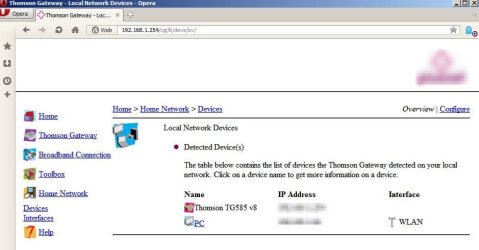
Actually the roll back didn't help. Further investigation revwaled that someone hijacked my router. I found an unknown device (Game Server) added here so I deleted it.

Thomson Gateway - Local Network Devices.jpg

Anyway bottom line is that I'm downloading and installing missing updates. One of those is the re-released KB2172605 with the latest Windows Update agent/ client.

Here's the files that were downloaded:


My Computer

Computer type
Laptop
Computer Manufacturer/Model Number
ASUS
OS
Microsoft Windows 7 Home Premium 64-bit 7601 Multiprocessor Free Service Pack 1
CPU
AMD C-60 APU with Radeon(tm) HD Graphics
Motherboard
ASUSTeK COMPUTER INC. X501U
Memory
4.00 GB
Graphics Card(s)
AMD Radeon HD 6290 Graphics
Sound Card
(1) AMD High Definition Audio Device (2) Realtek High Defi
Screen Resolution
1366 x 768 x 32 bits (4294967296 colors) @ 60 Hz
Hard Drives
Hitachi HTS545050A7E380 SATA Disk Device
Antivirus
Comodo CIS & FW, SecureAplus App Whitelisting, Threatfire
Browser
Cyberfox 64bit, Opera 64bit, Airfox
Other Info
Spy-The-Spy, HitmanPro.Alert, Norton Connect Safe, MJRegWatcher, BitDefender TrafficLight, Voodoo Shield, Zemana AntiMalware
Hi,
Wow how does that happen
So does it mean abc123 is not a good password :)
 

My Computer

Computer type
PC/Desktop
Computer Manufacturer/Model Number
Custom assembled by me :}
OS
Win-7-Pro64bit 7-H-Prem-64bit
CPU
i7-5930K 2nd i9-9940x both water blocked VRM's too
Motherboard
ASUS SABERTOOTH X99 2nd ASUS x299 Apex
Memory
Trident-z 3200C14 2nd Trident-z 3600C16
Graphics Card(s)
EVGA 1080ti ftw3 2nd Titan Xp both water blocked
Sound Card
Built-in Realtek
Monitor(s) Displays
1-AOC G2460PG 24"G-Sync 144Hz/ 2nd 1-ASUS VG248QE 24" 144Hz
Screen Resolution
1920 x 1080 144Hz
Hard Drives
2-Samsung M.2 Evo & Evo Plus
2-Samsung 850 EVO 500GB SSD's/ 3-2.5 W.D. Black 1tb-&3-1tb/3-3.5 WD Black 1tb hdd's
PSU
EVGA SuperNOVA 1000-P2 2nd 1200-P2
Case
2-Corsair Obsidian Series 450D Black ATX Mid Tower
Cooling
Custom water loops
Keyboard
Logitech G710+/ 2nd Logitech G910
Mouse
2-RedDragon M901 Perdition 16400 dpi Gaming mouse = wired
Internet Speed
Comcast Ping 19ms 89.31mbps download speed 6.12mbps upload
Antivirus
Malwarebytes Pro/ Superantispyware Pro
Browser
FireFox & Pale moon
Other Info
2nd ASUS X299 Apex/Intel i9-9940x with Custom water loop/7H-Prem-x64/Corsair 450D case/Ram Trident-z 3600C16 4x8gb / Samsung970Evo plus 500gb SSD/Dual ssd EZ swap evo/PSU EVGA SuperNova 1200w-P2 80+Platinum/GPU Titan Xp /8-ML-140 on push-pull on 2-280GTX rads
Hi,
Wow how does that happen
So does it mean abc123 is not a good password :)

Actually I have no idea how it happened. My router password is complex and not the default password plus there's a setting for only allowing new devices "on registration" but still this mysterious device managed to appear. I only noticed when logging into the router to check settings. I'll keep an eye on it and see if the problem returns.
 

My Computer

Computer type
Laptop
Computer Manufacturer/Model Number
ASUS
OS
Microsoft Windows 7 Home Premium 64-bit 7601 Multiprocessor Free Service Pack 1
CPU
AMD C-60 APU with Radeon(tm) HD Graphics
Motherboard
ASUSTeK COMPUTER INC. X501U
Memory
4.00 GB
Graphics Card(s)
AMD Radeon HD 6290 Graphics
Sound Card
(1) AMD High Definition Audio Device (2) Realtek High Defi
Screen Resolution
1366 x 768 x 32 bits (4294967296 colors) @ 60 Hz
Hard Drives
Hitachi HTS545050A7E380 SATA Disk Device
Antivirus
Comodo CIS & FW, SecureAplus App Whitelisting, Threatfire
Browser
Cyberfox 64bit, Opera 64bit, Airfox
Other Info
Spy-The-Spy, HitmanPro.Alert, Norton Connect Safe, MJRegWatcher, BitDefender TrafficLight, Voodoo Shield, Zemana AntiMalware
Back
Top