Solved How to install Windows 7 on Skylake Dell XPS 8910

The product key and xml file in the Dell skylake media will be for Pro, so you will need an Ultimate key to activate later.

2 quick questions:

1. Can you upload a version of 17514 with the x64 version Dism located at the link provided in the thread from this file http://www.sevenforums.com/attachme...7-skylake-dell-xps-8910-a-dism7v3-x86-x64.zip which has the additional options? Right now it is difficult since have to have 17514 on one usb then the dism program on another usb then wipe that and load the win os on that usb. Running out of usb drives :P If possible thank you would save so much time here when troubleshooting this since takes a long time to load that dism x64 on to 17514.

2. After changing the edition from pro to Ultimate during the Windows 7 install process after clicking install now it says invalid product key without giving me a chance to enter my product key? Where could I enter my product key for windows 7 Ultimate, it never gave me a chance.

**The error message says "The product key does not match any of the Windows images available for installation. Enter a different product key". If it is a different key do I need my Windows 7 Ultimate key, or a dell OEM windows 7 ultimate product key? There is no box or anything to enter the key though it seems?
 
Last edited:

My Computer My Computer

At a glance

Windows 7 Ultimate x64
Computer type
PC/Desktop
OS
Windows 7 Ultimate x64
It should not matter which key you enter, It just has to be a Windows Ultimate key.

You should not have to enter a key during an install, you should be able to skip it, and you`ll have 30 days to enter it.

Seems as though you are having a lot of trouble with this, doesn`t this computer have a dvd drive ?

And does it not have any usb 2.0 ports ?
 

My Computer My Computer

At a glance

Windows 10 Pro x64Intel Core i7 6700KGSkill TridentZ RGB 16GB 3600 16-16-16-36EVGA GTX 980 Ti SC x2
Computer type
PC/Desktop
Computer Manufacturer/Model Number
Skylake Special #666
OS
Windows 10 Pro x64
CPU
Intel Core i7 6700K
Motherboard
Asus Sabertooth Z170 Mark 1
Memory
GSkill TridentZ RGB 16GB 3600 16-16-16-36
Graphics Card(s)
EVGA GTX 980 Ti SC x2
Sound Card
Realtek High Definition
Monitor(s) Displays
AOC G2460PG
Screen Resolution
1920 x 1080 144Hz
Hard Drives
Samsung 860 Pro 256GB, Seagate Barracuda 4TB x2
PSU
EVGA 1000 P2, EVGA White Custom Braided Cables
Case
Corsair Vengeance C70 Gunmetal Black
Cooling
Corsair H100i v2, Corsair ML120 x2, Thermal Grizzly Kryonaut
Keyboard
Logitech G910 Orion Spectrum
Mouse
Logitech G700s
Internet Speed
Verizon Fios Quantum Gateway 75/75
Antivirus
Windows Defender, Malwarebytes Free 3.8.3
Browser
Chrome
Other Info
Corsair SP120 x4, LG Blu-ray Drive, Durabrand HT-395 100 Watt Dolby Digital Amp, Corsair H2100 Wireless 7.1 Headset
It should not matter which key you enter, It just has to be a Windows Ultimate key.

You should not have to enter a key during an install, you should be able to skip it, and you`ll have 30 days to enter it.

Seems as though you are having a lot of trouble with this, doesn`t this computer have a dvd drive ?

And does it not have any usb 2.0 ports ?

I do not know why it is asking me for a key during install, it is strange, I see no prompt or way to enter a key during install. This happened after using Dism to change the edition from Windows 7 pro Dell OEM to windows 7 ultimate. This is a dell OEM windows 7 pro ISO that is prepatched to work with skylake processors and NVME drivers for ssd installation. Using Dism I changed the edition of the install.wim from windows 7 pro to windows 7 ultimate. The pro version worked fine, but it seems when changing the edition to Ultimate is when the error occurs.

This is the only skylake working ISO I have found, and found it randomly and by accident. Sadly it is Win 7 pro Dell OEM, I do not know if Win 7 ultimate dell OEM exists with usb 3 drivers and NVME but it might exist, I just havent found it. :(
Windows 7 recovery image download available with USB 3.1 and NVMe driver support | Dell US

The computer a dell XPS 8910 has 2 usb 2.0 ports in the back and a dvd drive. I can post a picture of the error at install stating the key does not match soon if that helps? XPS 8910 Desktop - Intel i7 Quad Core Processor | Dell Philippines
 
Last edited:

My Computer My Computer

At a glance

Windows 7 Ultimate x64
Computer type
PC/Desktop
OS
Windows 7 Ultimate x64
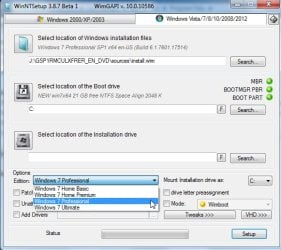
Why not just apply the upgraded Ultimate image and create boot menu, using WinNTsetup. It is under start menu program files\Install.

It is image 3 you need to apply - it is probably still called Professional at this stage.

winntsetup2.jpg
 
Last edited:

My Computers My Computers

  • At a glance

    7 X64i5 84002x8gb 3200mhz
    Computer type
    PC/Desktop
    OS
    7 X64
    CPU
    i5 8400
    Motherboard
    gigabyte b365m ds3h
    Memory
    2x8gb 3200mhz
    Hard Drives
    various
    PSU
    pure power 11 400w cm
    Case
    Coolermaster
    Cooling
    cryorig m9i
  • At a glance

    7x64g54008gb ddr4 2400
    Computer type
    PC/Desktop
    OS
    7x64
    CPU
    g5400
    Motherboard
    ga b365m ds3h
    Memory
    8gb ddr4 2400
    PSU
    xfx pro 450w
Will test this method after download of windows 10.... Ugh was creating the recovery drive for Windows 10 and got the error about it failing. While checking the sdd I noticed something odd, a bunch of extra recovery partitions, when opening control panel to try a different recovery method it says "Backup and restore" Windows 7, it says create system image next to it. What image would that create? Windows 7 or Windows 10? Does that mean this computer has windows 7 on the ssd by default as an OEM installation and if so how to access it to get the product key or what version it is?

When I ran an app to get the product key it showed only keys for Explorer and Windows 10 Pro, do I need to be in the session for windows 7 to get that product key because it must be there right?

IMG_0916.jpg

IMG_0917.jpg

IMG_0918.jpg
 

My Computer My Computer

At a glance

Windows 7 Ultimate x64
Computer type
PC/Desktop
OS
Windows 7 Ultimate x64
Last edited:

My Computer My Computer

At a glance

Windows 7 Ultimate x64
Computer type
PC/Desktop
OS
Windows 7 Ultimate x64
Why not just apply the upgraded Ultimate image and create boot menu, using WinNTsetup. It is under start menu program files\Install.

This method did not seem to work, it did apply the update to the OS, but upon reboot the system just hangs at the black install screen saying "Setup is starting services".

Would it be possible to take the Dell OEM windows 7 pro iso that works with skylake and upload with the windows 7 ultimate oem that I could download and test?

In this video there is a pre pop up that occurs showing windows 7 ultimate can be selected Fix windows cannot be installed to this disk the selected disk is of the gpt partition style - YouTube
Is this in every copy of windows or some how unlockable for the dell oem iso that works on skylake with usb 3.0 and NVME?
 
Last edited:

My Computer My Computer

At a glance

Windows 7 Ultimate x64
Computer type
PC/Desktop
OS
Windows 7 Ultimate x64
Why aren`t you just using a dvd ?

You would have been done hours ago, what is all this other software you are trying to use.

Let us know if you need to download a Windows Pro or Ultimate 64 bit iso file and which language and we will gladly post the direct Microsoft download link.

After you download the iso file you burn to dvd, then you can install Windows 7 Pro.

Why aren`t you just sticking with Windows 10 ??? There`s nothing wrong with it.

And if your mouse and keyboard are plugged into the black usb 2.0 ports, there should be no reason they don`t work through the entire install process.

Where did you get your Windows 7 Ultimate key from ? Did you buy Windows 7 Ultimate at some time ?
 

My Computer My Computer

At a glance

Windows 10 Pro x64Intel Core i7 6700KGSkill TridentZ RGB 16GB 3600 16-16-16-36EVGA GTX 980 Ti SC x2
Computer type
PC/Desktop
Computer Manufacturer/Model Number
Skylake Special #666
OS
Windows 10 Pro x64
CPU
Intel Core i7 6700K
Motherboard
Asus Sabertooth Z170 Mark 1
Memory
GSkill TridentZ RGB 16GB 3600 16-16-16-36
Graphics Card(s)
EVGA GTX 980 Ti SC x2
Sound Card
Realtek High Definition
Monitor(s) Displays
AOC G2460PG
Screen Resolution
1920 x 1080 144Hz
Hard Drives
Samsung 860 Pro 256GB, Seagate Barracuda 4TB x2
PSU
EVGA 1000 P2, EVGA White Custom Braided Cables
Case
Corsair Vengeance C70 Gunmetal Black
Cooling
Corsair H100i v2, Corsair ML120 x2, Thermal Grizzly Kryonaut
Keyboard
Logitech G910 Orion Spectrum
Mouse
Logitech G700s
Internet Speed
Verizon Fios Quantum Gateway 75/75
Antivirus
Windows Defender, Malwarebytes Free 3.8.3
Browser
Chrome
Other Info
Corsair SP120 x4, LG Blu-ray Drive, Durabrand HT-395 100 Watt Dolby Digital Amp, Corsair H2100 Wireless 7.1 Headset
Let us know if you need to download a Windows Pro or Ultimate 64 bit iso file and which language and we will gladly post the direct Microsoft download link.

And if your mouse and keyboard are plugged into the black usb 2.0 ports, there should be no reason they don`t work through the entire install process.

Where did you get your Windows 7 Ultimate key from ? Did you buy Windows 7 Ultimate at some time ?

No disagreement as to why the USB 2.0 ports are not working but it appears they do not when using a Windows 7 disk. This may be a Dell only problem which is why they made their own Windows 7 iso's with usb 3.1 and NVME support. Have found Dell Windows 7 Pro USB 3.1 iso's on the dell site. So far have not found official Dell OEM Windows 7 Ult 64 USB 3.1 USB with NVME iso sadly, would you know of where that one is? The Windows 7 Pro does install fine on this XPS 8910 machine.

Windows 7 Ultimate keys came from extracted keys on my older laptop and desktop which had windows 7 ult which should work? or whatever if not I'll figure it out or rebuy it.... whatever it takes. Main goal now is getting it installed first to see weather the drivers work or not and if not like you said just using Windows 10.
 

My Computer My Computer

At a glance

Windows 7 Ultimate x64
Computer type
PC/Desktop
OS
Windows 7 Ultimate x64
If Pro works, why not stick with that?

Is it activated?
 

My Computers My Computers

  • At a glance

    7 X64i5 84002x8gb 3200mhz
    Computer type
    PC/Desktop
    OS
    7 X64
    CPU
    i5 8400
    Motherboard
    gigabyte b365m ds3h
    Memory
    2x8gb 3200mhz
    Hard Drives
    various
    PSU
    pure power 11 400w cm
    Case
    Coolermaster
    Cooling
    cryorig m9i
  • At a glance

    7x64g54008gb ddr4 2400
    Computer type
    PC/Desktop
    OS
    7x64
    CPU
    g5400
    Motherboard
    ga b365m ds3h
    Memory
    8gb ddr4 2400
    PSU
    xfx pro 450w
He has downgrade rights, and the Dell iso comes with a key for that purpose. If it is activated, that is what he is entitled to.

I don't think they do an Ult version of the Dell recovery media. If he wants to use Ultimte, he will have to :

1. get a product key

2. Either add the necesary drivers and updates to Ultimate install.wim, boot.wim, and winre.wim.

OR see if changing the Edition now on the installed Pro will work ( it should do , but will still need an Ult key ).

Here are the required updates and drivers:

Windows6.1-KB2990941-v3-x64. (for nvme)
Windows6.1-KB3087873-v2-x64. ( for nvme)
kb2732500-v2 ( system restore - probably optional)
iaStorAC.inf
iusb3hcs.inf ( DriverVer=09/25/2015,4.0.2.42 )
iusb3hub.inf
iusb3xhc.inf
nusb3hub.inf
nusb3xhc.inf


You are technically allowed to use keys from other machines, only a Retail key can be used on any PC, but that`s still only 1 PC at any given time.
 

My Computers My Computers

  • At a glance

    7 X64i5 84002x8gb 3200mhz
    Computer type
    PC/Desktop
    OS
    7 X64
    CPU
    i5 8400
    Motherboard
    gigabyte b365m ds3h
    Memory
    2x8gb 3200mhz
    Hard Drives
    various
    PSU
    pure power 11 400w cm
    Case
    Coolermaster
    Cooling
    cryorig m9i
  • At a glance

    7x64g54008gb ddr4 2400
    Computer type
    PC/Desktop
    OS
    7x64
    CPU
    g5400
    Motherboard
    ga b365m ds3h
    Memory
    8gb ddr4 2400
    PSU
    xfx pro 450w
Please re read my post, I messed up there when I said that, so I fixed it :)

He can not use the key from any other PC unless it is Retail. And of course only 1 PC at any given time.

Ya, I don`t understand why he`s not happy with W10 Pro, or downgrading it to W7 Pro, there`s no reason to install Ultimate.

He should be on the phone with Dell, they should give him full support with his new Dell PC. :)
 

My Computer My Computer

At a glance

Windows 10 Pro x64Intel Core i7 6700KGSkill TridentZ RGB 16GB 3600 16-16-16-36EVGA GTX 980 Ti SC x2
Computer type
PC/Desktop
Computer Manufacturer/Model Number
Skylake Special #666
OS
Windows 10 Pro x64
CPU
Intel Core i7 6700K
Motherboard
Asus Sabertooth Z170 Mark 1
Memory
GSkill TridentZ RGB 16GB 3600 16-16-16-36
Graphics Card(s)
EVGA GTX 980 Ti SC x2
Sound Card
Realtek High Definition
Monitor(s) Displays
AOC G2460PG
Screen Resolution
1920 x 1080 144Hz
Hard Drives
Samsung 860 Pro 256GB, Seagate Barracuda 4TB x2
PSU
EVGA 1000 P2, EVGA White Custom Braided Cables
Case
Corsair Vengeance C70 Gunmetal Black
Cooling
Corsair H100i v2, Corsair ML120 x2, Thermal Grizzly Kryonaut
Keyboard
Logitech G910 Orion Spectrum
Mouse
Logitech G700s
Internet Speed
Verizon Fios Quantum Gateway 75/75
Antivirus
Windows Defender, Malwarebytes Free 3.8.3
Browser
Chrome
Other Info
Corsair SP120 x4, LG Blu-ray Drive, Durabrand HT-395 100 Watt Dolby Digital Amp, Corsair H2100 Wireless 7.1 Headset
You are correct Dell says this model has downgrade rights from Windows 10 pro, to Windows 7 pro. The computer right now seems to have 3 recovery partitions and one that is used as Windows 10, suspect the others are Windows 7 pro from the pictures above but unsure how to get to them, or if that is possible?

Not worried about getting a key for Windows 7 ultimate pretty sure I can just buy it thought the OS at activation should the other keys not work one of which was stamped on the back of the machine with some kind of microsoft sticker. Before purchasing it, have to see if it works and it installs or else it would be just burning money hence this thread to get it installed, getting a key should be the easy part I hope, even with the big push from MS to windows 10 I hope there is still a way to get Win7 keys.

Note: When installed a Dell OEM Windows 7 pro as a test to an HDD on the machine it did not auto activate. Are they supposed to auto activate? Or is there some "official" way I missed of downgrading it? Read somewhere about the keys being in the UEFI, not sure what that means though.
 

My Computer My Computer

At a glance

Windows 7 Ultimate x64
Computer type
PC/Desktop
OS
Windows 7 Ultimate x64
You will not find a Windows Ultimate key anywhere, and if it was legitimate you would pay an outrageous price, there is no reason to buy Ultimate.

As I said, you should be on the phone with Dell and they should help you downgrade the PC to Windows 7 Pro.
 

My Computer My Computer

At a glance

Windows 10 Pro x64Intel Core i7 6700KGSkill TridentZ RGB 16GB 3600 16-16-16-36EVGA GTX 980 Ti SC x2
Computer type
PC/Desktop
Computer Manufacturer/Model Number
Skylake Special #666
OS
Windows 10 Pro x64
CPU
Intel Core i7 6700K
Motherboard
Asus Sabertooth Z170 Mark 1
Memory
GSkill TridentZ RGB 16GB 3600 16-16-16-36
Graphics Card(s)
EVGA GTX 980 Ti SC x2
Sound Card
Realtek High Definition
Monitor(s) Displays
AOC G2460PG
Screen Resolution
1920 x 1080 144Hz
Hard Drives
Samsung 860 Pro 256GB, Seagate Barracuda 4TB x2
PSU
EVGA 1000 P2, EVGA White Custom Braided Cables
Case
Corsair Vengeance C70 Gunmetal Black
Cooling
Corsair H100i v2, Corsair ML120 x2, Thermal Grizzly Kryonaut
Keyboard
Logitech G910 Orion Spectrum
Mouse
Logitech G700s
Internet Speed
Verizon Fios Quantum Gateway 75/75
Antivirus
Windows Defender, Malwarebytes Free 3.8.3
Browser
Chrome
Other Info
Corsair SP120 x4, LG Blu-ray Drive, Durabrand HT-395 100 Watt Dolby Digital Amp, Corsair H2100 Wireless 7.1 Headset
Note: When installed a Dell OEM Windows 7 pro as a test to an HDD on the machine it did not auto activate. Are they supposed to auto activate? Or is there some "official" way I missed of downgrading it? Read somewhere about the keys being in the UEFI, not sure what that means though.

There is the rub.

The Dell recovery isos contain the product key and xml file which require slic table in bios.

Seems there is no slic on your machine.

Best Option:

You will need a key that activates online. Dell may provide one if you hassle them - you are entitled to downgrade, so there must be a way to get that key - it will be for Pro.


Note:

If you really want Ult, you will need an Ult key. You should be able to use one from another machine in this scenario, tho you may need to call MS. Do you have an Ult key on another machine?
 

My Computers My Computers

  • At a glance

    7 X64i5 84002x8gb 3200mhz
    Computer type
    PC/Desktop
    OS
    7 X64
    CPU
    i5 8400
    Motherboard
    gigabyte b365m ds3h
    Memory
    2x8gb 3200mhz
    Hard Drives
    various
    PSU
    pure power 11 400w cm
    Case
    Coolermaster
    Cooling
    cryorig m9i
  • At a glance

    7x64g54008gb ddr4 2400
    Computer type
    PC/Desktop
    OS
    7x64
    CPU
    g5400
    Motherboard
    ga b365m ds3h
    Memory
    8gb ddr4 2400
    PSU
    xfx pro 450w
Note: When installed a Dell OEM Windows 7 pro as a test to an HDD on the machine it did not auto activate. Are they supposed to auto activate? Or is there some "official" way I missed of downgrading it? Read somewhere about the keys being in the UEFI, not sure what that means though.

Best Option:

You will need a key that activates online. Dell may provide one if you hassle them - you are entoled to downgrade, so there must be a way to get that key - it will be for Pro.

Note:

If you really want Ult, you will need an Ult key. You can use one from another machine in this scenario, tho you may need to call MS if it doesn't activate by itself. Do you have an Ult key on another machine?

Have a bunch of machines currently used and unused from Dell to Alienware in storage all windows 7 ultimate, their not out of date yet entirely. This is the first and only machine I have with Windows 10. Just happen to upgrade machines pretty quick hence the immediate purchase of a dell XPS 8910 fresh off the product line. Or I just buy a key, keys are available to buy which makes that a non issue. This skylake issue is the one thing preventing me from purchasing a new alienware since they would face the same issue :(

The issue is getting it installed period to test if it works satisfactorily with the components of the 8910. Contacting dell tech about the issue may prove fruitless since I am unsure if any skylake machine made by dell had Windows 7 ultimate. It seems Dell tech at least online have no solution I can find in any knowledgebase article regarding Ultimate but there are articles about win7pro on skylake and a Dell win7 Pro iso created using all the correct drivers for my system which is good. So far I have not had much luck finding the same thing from Dell with Win7 Ultimate, it may be out there but I havent found it yet due to maybe using the wrong search terms? I think there are still some options worth testing here or trying to get Windows 7 ultimate to work? Would like to explore those options until exhausted, it may be a waste of time to some, but for me I see it as more of a challenge like a puzzle to figure out.

Keep in mind, buying a key is easy, it does not make anything magically work, I really wish it was that easy because I would have done that first. A key does not make the USB 3.1 magically get recognized or force intel to see the NVME drive or the USB 2.0 ports, its just a key, it is not a working iso, and microsoft as far as I can tell has no working iso for windows ultimate with usb 3.1 and NVME drivers to allow it to be installed, maybe there is one but I have not found an official or unofficial link as of yet sadly. Maybe this is due to the move at Microsoft towards providing better existing support for Windows 10 users which would make sense to cut back on support for past OS's like Windows 7? (The whole USB issue with 2.0 ports not being seen seems to be a skylake only issue due to the type of host controller I think or something like that, not an expert there. If it did work though then the win 7 pro disk would work as you suggested but sadly doesnt :( only the win 7 pro iso from dell with the special drivers works.)

*Ideally would like to install windows 7 ultimate, the problem is during the install process it stops saying the machine has the wrong product key without giving me an option to enter a product key so again a key wouldnt help here. The Pro iso does install so far so maybe there is a way to work with that or access the windows windows 7 OS currently on the computer? Would getting to the windows 7 os the computer came installed with be possible? Pictures above show something is there just not sure how to access it.

 
Last edited:

My Computer My Computer

At a glance

Windows 7 Ultimate x64
Computer type
PC/Desktop
OS
Windows 7 Ultimate x64
If you have regular Ultimate install media, you can integrate the updates and drivers into boot.wim ( image 2 ) and Install.wim ( image 4).

Should then be able to install normally, adding key later.
 

My Computers My Computers

  • At a glance

    7 X64i5 84002x8gb 3200mhz
    Computer type
    PC/Desktop
    OS
    7 X64
    CPU
    i5 8400
    Motherboard
    gigabyte b365m ds3h
    Memory
    2x8gb 3200mhz
    Hard Drives
    various
    PSU
    pure power 11 400w cm
    Case
    Coolermaster
    Cooling
    cryorig m9i
  • At a glance

    7x64g54008gb ddr4 2400
    Computer type
    PC/Desktop
    OS
    7x64
    CPU
    g5400
    Motherboard
    ga b365m ds3h
    Memory
    8gb ddr4 2400
    PSU
    xfx pro 450w

My Computers My Computers

  • At a glance

    7 X64i5 84002x8gb 3200mhz
    Computer type
    PC/Desktop
    OS
    7 X64
    CPU
    i5 8400
    Motherboard
    gigabyte b365m ds3h
    Memory
    2x8gb 3200mhz
    Hard Drives
    various
    PSU
    pure power 11 400w cm
    Case
    Coolermaster
    Cooling
    cryorig m9i
  • At a glance

    7x64g54008gb ddr4 2400
    Computer type
    PC/Desktop
    OS
    7x64
    CPU
    g5400
    Motherboard
    ga b365m ds3h
    Memory
    8gb ddr4 2400
    PSU
    xfx pro 450w
If you have regular Ultimate install media, you can integrate the updates and drivers into boot.wim ( image 2 ) and Install.wim ( image 4).

Should then be able to install normally, adding key later.

Will try this today, thanks for the suggestion. Not seeing image 2 or image 4, are they missing or earlier in the thread? Thanks for the drivers adding them should not be to bad I think.

*Tomorrow I call Dell Tech support worried they might have me wipe the drive since I need to make windows 10 recovery media and keep getting an error since there are 2 os's present. Is it possible to access the windows 7 that appears to have come preinstalled on the computer? Tried the normal windows 10 downgrade screen but the option is not there. Would like to try that before dell just tells me to delete them so I can make win10 recovery media which I fear they might do :P

*I did download the win10 pro media creation tool, so I guess at least I have something for recovery media to reset it. They did tell me the OS is stored in the motherboard but I dont know what that means or if that is even possible?
 

My Computer My Computer

At a glance

Windows 7 Ultimate x64
Computer type
PC/Desktop
OS
Windows 7 Ultimate x64
Let us know if you need to download a Windows Pro or Ultimate 64 bit iso file and which language and we will gladly post the direct Microsoft download link.

Does or did Microsoft ever make a Windows 7 ultimate ISO with the usb drivers and NVME drivers for install? Or maybe dell? If have a link would very much appreciate. Been looking but only thing official found so far is Dell Windows 7 pro iso with the drivers which does work.
 

My Computer My Computer

At a glance

Windows 7 Ultimate x64
Computer type
PC/Desktop
OS
Windows 7 Ultimate x64
Back
Top