Solved How to install Windows 7 on Skylake Dell XPS 8910

I think Dell meant the win10 product key is stored in the motherboard firmware.

AFAIK, there isn't any Dell win 7 Ultimate install media for Skylake.

That is why you need to make your own.

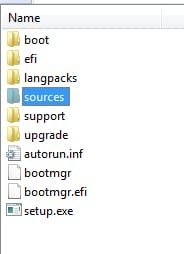
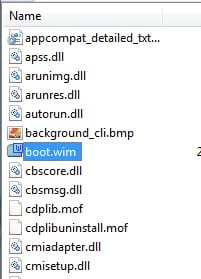
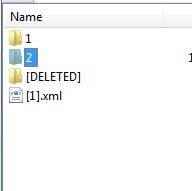
Start with win7 ultimate media. Extract the iso onto your drive. In the sources folder is boot.wim. It contains 2 images.

Use Dism7 tool I posted earlier.

Mount boot.wim image 2, then install the updates and drivers I posted. Commit and unmount the image.

Mount Install.wim image 4. Install the updates and drivers. Commit and unmount the image.
 

My Computers My Computers

  • At a glance

    7 X64i5 84002x8gb 3200mhz
    Computer type
    PC/Desktop
    OS
    7 X64
    CPU
    i5 8400
    Motherboard
    gigabyte b365m ds3h
    Memory
    2x8gb 3200mhz
    Hard Drives
    various
    PSU
    pure power 11 400w cm
    Case
    Coolermaster
    Cooling
    cryorig m9i
  • At a glance

    7x64g54008gb ddr4 2400
    Computer type
    PC/Desktop
    OS
    7x64
    CPU
    g5400
    Motherboard
    ga b365m ds3h
    Memory
    8gb ddr4 2400
    PSU
    xfx pro 450w
Microsoft make a Windows 7 iso with usb 3.0 drivers ? :roflmao::roflmao: Do you actually think Microsoft gives a dam about Windows 7 after all they did to push Windows 10 ????

Only the board makers have programs to integrate usb 3.0 drivers, such as Asus`s EZ Installer.

But if you would just install from a dvd you don`t need it.
 

My Computer My Computer

At a glance

Windows 10 Pro x64Intel Core i7 6700KGSkill TridentZ RGB 16GB 3600 16-16-16-36EVGA GTX 980 Ti SC x2
Computer type
PC/Desktop
Computer Manufacturer/Model Number
Skylake Special #666
OS
Windows 10 Pro x64
CPU
Intel Core i7 6700K
Motherboard
Asus Sabertooth Z170 Mark 1
Memory
GSkill TridentZ RGB 16GB 3600 16-16-16-36
Graphics Card(s)
EVGA GTX 980 Ti SC x2
Sound Card
Realtek High Definition
Monitor(s) Displays
AOC G2460PG
Screen Resolution
1920 x 1080 144Hz
Hard Drives
Samsung 860 Pro 256GB, Seagate Barracuda 4TB x2
PSU
EVGA 1000 P2, EVGA White Custom Braided Cables
Case
Corsair Vengeance C70 Gunmetal Black
Cooling
Corsair H100i v2, Corsair ML120 x2, Thermal Grizzly Kryonaut
Keyboard
Logitech G910 Orion Spectrum
Mouse
Logitech G700s
Internet Speed
Verizon Fios Quantum Gateway 75/75
Antivirus
Windows Defender, Malwarebytes Free 3.8.3
Browser
Chrome
Other Info
Corsair SP120 x4, LG Blu-ray Drive, Durabrand HT-395 100 Watt Dolby Digital Amp, Corsair H2100 Wireless 7.1 Headset
Let us know if you need to download a Windows Pro or Ultimate 64 bit iso file and which language and we will gladly post the direct Microsoft download link.

Does or did Microsoft ever make a Windows 7 ultimate ISO with the usb drivers and NVME drivers for install? Or maybe dell? If have a link would very much appreciate. Been looking but only thing official found so far is Dell Windows 7 pro iso with the drivers which does work.

So why are you so hung up on installing Ultimate ?

You don`t have a legitimate key, so why bother :banghead:
 

My Computer My Computer

At a glance

Windows 10 Pro x64Intel Core i7 6700KGSkill TridentZ RGB 16GB 3600 16-16-16-36EVGA GTX 980 Ti SC x2
Computer type
PC/Desktop
Computer Manufacturer/Model Number
Skylake Special #666
OS
Windows 10 Pro x64
CPU
Intel Core i7 6700K
Motherboard
Asus Sabertooth Z170 Mark 1
Memory
GSkill TridentZ RGB 16GB 3600 16-16-16-36
Graphics Card(s)
EVGA GTX 980 Ti SC x2
Sound Card
Realtek High Definition
Monitor(s) Displays
AOC G2460PG
Screen Resolution
1920 x 1080 144Hz
Hard Drives
Samsung 860 Pro 256GB, Seagate Barracuda 4TB x2
PSU
EVGA 1000 P2, EVGA White Custom Braided Cables
Case
Corsair Vengeance C70 Gunmetal Black
Cooling
Corsair H100i v2, Corsair ML120 x2, Thermal Grizzly Kryonaut
Keyboard
Logitech G910 Orion Spectrum
Mouse
Logitech G700s
Internet Speed
Verizon Fios Quantum Gateway 75/75
Antivirus
Windows Defender, Malwarebytes Free 3.8.3
Browser
Chrome
Other Info
Corsair SP120 x4, LG Blu-ray Drive, Durabrand HT-395 100 Watt Dolby Digital Amp, Corsair H2100 Wireless 7.1 Headset
Anybody can install usb3.0/3.1 drivers with dism . I do it all the time.

Just a matter of finding the right version. Dell skylake machines use the drivers I posted .

They also include MS nvme driver, which is in the updates I posted. Not sure it works for all nvme devices, but it is used on at least some Dell machines.

In addititon, these may also be useful:

View attachment NVMe.zip

View attachment usb.zip

View attachment 392958
 
Last edited:

My Computers My Computers

  • At a glance

    7 X64i5 84002x8gb 3200mhz
    Computer type
    PC/Desktop
    OS
    7 X64
    CPU
    i5 8400
    Motherboard
    gigabyte b365m ds3h
    Memory
    2x8gb 3200mhz
    Hard Drives
    various
    PSU
    pure power 11 400w cm
    Case
    Coolermaster
    Cooling
    cryorig m9i
  • At a glance

    7x64g54008gb ddr4 2400
    Computer type
    PC/Desktop
    OS
    7x64
    CPU
    g5400
    Motherboard
    ga b365m ds3h
    Memory
    8gb ddr4 2400
    PSU
    xfx pro 450w
Anybody can install usb3.0/3.1 drivers with dism . I do it all the time.

Just a matter of finding the right version. Dell skylake machines use the drivers I posted .

They also include MS nvme driver, which is in the updates I posted. Not sure it works for all nvme devices, but it is used on at least some Dell machines.

Testing now on the HDD, the windows 7 ult install from USB was working then got hit with a weird bug. It did the restart thing then all the sudden the mouse wasnt responding the cursor wouldnt move, then after awhile it said Windows "Couldnt update the computers hardware". Trying some other ways then might try the xcopy method since it appears to work up until reboot for some reason. This is on top of that other win7pro install so might clean it then xcopy it over and try from there to try to minimize any other conflicts. will update.
 

My Computer My Computer

At a glance

Windows 7 Ultimate x64
Computer type
PC/Desktop
OS
Windows 7 Ultimate x64
Anybody can install usb3.0/3.1 drivers with dism . I do it all the time.

Just a matter of finding the right version. Dell skylake machines use the drivers I posted .

They also include MS nvme driver, which is in the updates I posted. Not sure it works for all nvme devices, but it is used on at least some Dell machines.

Testing now on the HDD, the windows 7 ult install from USB was working then got hit with a weird bug. It did the restart thing then all the sudden the mouse wasnt responding the cursor wouldnt move, then after awhile it said Windows "Couldnt update the computers hardware". Trying some other ways then might try the xcopy method since it appears to work up until reboot for some reason. This is on top of that other win7pro install so might clean it then xcopy it over and try from there to try to minimize any other conflicts. will update.


Microsoft make a Windows 7 iso with usb 3.0 drivers ? :roflmao::roflmao: Do you actually think Microsoft gives a dam about Windows 7 after all they did to push Windows 10 ????

It really does look great and seems to be very user friendly, all that support their dumping into it seems to be paying off from listening to the MS community maybe? Thing is Im caught in the inbetween stage of skylake not being mainstream yet meaning some of my drivers for stuff work and others dont work in win 10 which sucks... In a year they all should I hope.

But if you would just install from a dvd you don`t need it.

No user anywhere has gotten those dvd's to work with their mouse through USB on skylake sadly due to some new form of USB controller intel is using or whatever the tech jargon is but yea it doesnt work at least on certain dell's, maybe its a mobo issue? The discs are not useless for everyone though as you said. They can work under a specific circumstance on skylake systems during install. The problem is that the mouse freezes or keyboard, well the easy way around that is to use a ps/2 port if the computer has one, if not like the 8910 doesnt then were stuck where we are now... :(
 

My Computer My Computer

At a glance

Windows 7 Ultimate x64
Computer type
PC/Desktop
OS
Windows 7 Ultimate x64
Not sure what you mean by "those dvd`s" I had no problems installing 7 on my Asus Z170 using a dvd.
 

My Computer My Computer

At a glance

Windows 10 Pro x64Intel Core i7 6700KGSkill TridentZ RGB 16GB 3600 16-16-16-36EVGA GTX 980 Ti SC x2
Computer type
PC/Desktop
Computer Manufacturer/Model Number
Skylake Special #666
OS
Windows 10 Pro x64
CPU
Intel Core i7 6700K
Motherboard
Asus Sabertooth Z170 Mark 1
Memory
GSkill TridentZ RGB 16GB 3600 16-16-16-36
Graphics Card(s)
EVGA GTX 980 Ti SC x2
Sound Card
Realtek High Definition
Monitor(s) Displays
AOC G2460PG
Screen Resolution
1920 x 1080 144Hz
Hard Drives
Samsung 860 Pro 256GB, Seagate Barracuda 4TB x2
PSU
EVGA 1000 P2, EVGA White Custom Braided Cables
Case
Corsair Vengeance C70 Gunmetal Black
Cooling
Corsair H100i v2, Corsair ML120 x2, Thermal Grizzly Kryonaut
Keyboard
Logitech G910 Orion Spectrum
Mouse
Logitech G700s
Internet Speed
Verizon Fios Quantum Gateway 75/75
Antivirus
Windows Defender, Malwarebytes Free 3.8.3
Browser
Chrome
Other Info
Corsair SP120 x4, LG Blu-ray Drive, Durabrand HT-395 100 Watt Dolby Digital Amp, Corsair H2100 Wireless 7.1 Headset
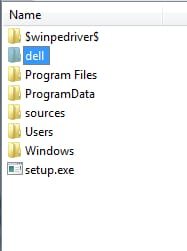
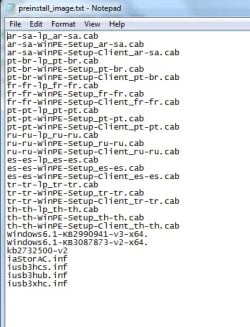
You can see what was added to the Dell iso boot.wim image 2 using 7-zip.

1.jpg

2.jpg

3.jpg

4.jpg

5.jpg

6.jpg

7.jpg
 

My Computers My Computers

  • At a glance

    7 X64i5 84002x8gb 3200mhz
    Computer type
    PC/Desktop
    OS
    7 X64
    CPU
    i5 8400
    Motherboard
    gigabyte b365m ds3h
    Memory
    2x8gb 3200mhz
    Hard Drives
    various
    PSU
    pure power 11 400w cm
    Case
    Coolermaster
    Cooling
    cryorig m9i
  • At a glance

    7x64g54008gb ddr4 2400
    Computer type
    PC/Desktop
    OS
    7x64
    CPU
    g5400
    Motherboard
    ga b365m ds3h
    Memory
    8gb ddr4 2400
    PSU
    xfx pro 450w
Start with win7 ultimate media. Extract the iso onto your drive. In the sources folder is boot.wim. It contains 2 images.

Use Dism7 tool I posted earlier.

Mount boot.wim image 2, then install the updates and drivers I posted. Commit and unmount the image.

Mount Install.wim image 4. Install the updates and drivers. Commit and unmount the image.

Thanks for helping with the install to the HDD. Following these steps using your files I can confirm successful installation and activation of Windows 7 ultimate 64 on Skylake on the HDD. Next step maybe tonight or tomorrow after properly backing up the win 10 image on the ssd will be to attempt installation on the ssd.

*Using Dell OEM Windows 7 Ultimate on USB
*Mounted boot.wim image 2
*Used button "ADD DRVR FOL" to add all the drivers I placed in one folder 28 total.
*Then I use the button "UNMOUNT-COM'... waited and it completed.

*Using Dell OEM WIndows 7 Ultimate on USB
*Mounted install.wim image 4
*Used button "ADD DRVR FOL" to add all the drivers I placed in one folder 28 total.
*Then I use the button "UNMOUNT-COM'... waited and it completed.
 
Last edited:

My Computer My Computer

At a glance

Windows 7 Ultimate x64
Computer type
PC/Desktop
OS
Windows 7 Ultimate x64
*Only error encountered is with a driver installation for the "Intel Serial IO driver" upon installation shows the error, "This platform is not supported". Do I need this driver?
*Installed a driver for windows 7 from here: Download Proc IO: Intel Processor IO Controller Driver for Windows 7
(Weirdly it asked me to connect my hardware after installation, so not sure if that is what I wanted or not.)
*Checking device manager there are no "!" present.
*All other 8910 drivers installed successfully.
 
Last edited:

My Computer My Computer

At a glance

Windows 7 Ultimate x64
Computer type
PC/Desktop
OS
Windows 7 Ultimate x64
Thanks for helping with the install to the HDD. Following these steps using your files I can confirm successful installation and activation of Windows 7 ultimate 64 on Skylake on the HDD

Great. :D

Did you include the updates I posted, or just the drivers?

Using Dell OEM Windows 7 Ultimate on USB

What is the exact name of the Dell Ultimate iso you used?
 

My Computers My Computers

  • At a glance

    7 X64i5 84002x8gb 3200mhz
    Computer type
    PC/Desktop
    OS
    7 X64
    CPU
    i5 8400
    Motherboard
    gigabyte b365m ds3h
    Memory
    2x8gb 3200mhz
    Hard Drives
    various
    PSU
    pure power 11 400w cm
    Case
    Coolermaster
    Cooling
    cryorig m9i
  • At a glance

    7x64g54008gb ddr4 2400
    Computer type
    PC/Desktop
    OS
    7x64
    CPU
    g5400
    Motherboard
    ga b365m ds3h
    Memory
    8gb ddr4 2400
    PSU
    xfx pro 450w
For the HDD install added the 3 zip files of drivers from this post: How to install Windows 7 on Skylake Dell XPS 8910

Tonight hoping or tomorrow can begin installing it to the Hynix SK 2 NVME which looks like a stick that attaches to the motherboard, is that called an SSD? The ISO was win7 Ultimate SP1 was unsure if SP1 was needed but it seemed every youtube video could find showed people installing the OS all used some form of win 7 with SP1, not sure if that is needed though or just coincidence.
 

My Computer My Computer

At a glance

Windows 7 Ultimate x64
Computer type
PC/Desktop
OS
Windows 7 Ultimate x64
Trying to find out if the iso you used was already Dell version. If it was, it may already have MS nvme updates included.

You could PM me the exact filename of the iso ( and the SHA1 if you know how to do that ).

You can get the SHA1 hash with this:
View attachment GoHash-X86-X64.zip
 

My Computers My Computers

  • At a glance

    7 X64i5 84002x8gb 3200mhz
    Computer type
    PC/Desktop
    OS
    7 X64
    CPU
    i5 8400
    Motherboard
    gigabyte b365m ds3h
    Memory
    2x8gb 3200mhz
    Hard Drives
    various
    PSU
    pure power 11 400w cm
    Case
    Coolermaster
    Cooling
    cryorig m9i
  • At a glance

    7x64g54008gb ddr4 2400
    Computer type
    PC/Desktop
    OS
    7x64
    CPU
    g5400
    Motherboard
    ga b365m ds3h
    Memory
    8gb ddr4 2400
    PSU
    xfx pro 450w
Cant confirm if it works on the Hynix yet, right now working on deleting the windows 7 partitions just need to figure out which they are to backup the windows 10 installation if possible.

The ISO used is an official Dell OEM windows 7 Ultimate 64 ISO copied from a disc to USB using PowerISO. It doesnt seem to have the NVMe updates Im not sure if it even existed when the disc was made :(

Ran a test to install Win7 to the Hynix NVME. Good news is the cursor works when going through install, bad news is there is no drive listed and no partitions. There are no listings to install the OS. Do you have a driver for this possibly to try adding to the ISO like before via DISM?

HWINFO for missing drive:
PC300 NVMe SK Hynix drive 512gb
Drive Firmware 20003A00
NVMe version: v1.2
 

My Computer My Computer

At a glance

Windows 7 Ultimate x64
Computer type
PC/Desktop
OS
Windows 7 Ultimate x64

My Computers My Computers

  • At a glance

    7 X64i5 84002x8gb 3200mhz
    Computer type
    PC/Desktop
    OS
    7 X64
    CPU
    i5 8400
    Motherboard
    gigabyte b365m ds3h
    Memory
    2x8gb 3200mhz
    Hard Drives
    various
    PSU
    pure power 11 400w cm
    Case
    Coolermaster
    Cooling
    cryorig m9i
  • At a glance

    7x64g54008gb ddr4 2400
    Computer type
    PC/Desktop
    OS
    7x64
    CPU
    g5400
    Motherboard
    ga b365m ds3h
    Memory
    8gb ddr4 2400
    PSU
    xfx pro 450w

Are the updates installed the same as the drivers so put them all in one folder, then using DISM use the Add Driver Folder button?

Been using a 16gb USB for install because the ISO with the files copied from a USB3.0 ISO and the added drivers is 7.2gb. The drive is NTFS but read in a diff thread it should be Fat32 but that doesnt work on this size drive it said in Rufus.
 

My Computer My Computer

At a glance

Windows 7 Ultimate x64
Computer type
PC/Desktop
OS
Windows 7 Ultimate x64
Use the add package folder (ADD PKG FOL) for updates. ( .msu or .cab files)

7.2 gb? Have you got a load of languages in there?
 

My Computers My Computers

  • At a glance

    7 X64i5 84002x8gb 3200mhz
    Computer type
    PC/Desktop
    OS
    7 X64
    CPU
    i5 8400
    Motherboard
    gigabyte b365m ds3h
    Memory
    2x8gb 3200mhz
    Hard Drives
    various
    PSU
    pure power 11 400w cm
    Case
    Coolermaster
    Cooling
    cryorig m9i
  • At a glance

    7x64g54008gb ddr4 2400
    Computer type
    PC/Desktop
    OS
    7x64
    CPU
    g5400
    Motherboard
    ga b365m ds3h
    Memory
    8gb ddr4 2400
    PSU
    xfx pro 450w
Use the add package folder (ADD PKG FOL) for updates. ( .msu or .cab files)

7.2 gb? Have you got a load of languages in there?

Added, packages. Yes there are alot of languages in there from what I can tell that seem to make it very large is that an issue?

After adding packages when clicking install now it now skips the i accept part and goes right to a window that says select the driver to be installed. Before it went to the i accept then the HDD screen, should I revert to prior to installing the packages? Does the drive have to be fat32? Not sure if that matters going to test this wipe the drive and put the official dell win7pro iso on with the drivers and see what happens.
 

My Computer My Computer

At a glance

Windows 7 Ultimate x64
Computer type
PC/Desktop
OS
Windows 7 Ultimate x64
Dell Win7pro ISO = Success seeing NVMe SSD.
Just tested using an official Dell windows 7 pro ISO with NVME drivers and it can see the SK Hynix NVMe drive in the 8910 and all 5 partitions.
Windows 7 recovery image download available with USB 3.1 and NVMe driver support | Dell US

Think this is the problem but not 100%. Last time the error occurred after adding packages. So went back through the thread and noticed you mention adding them to winre.wim. Did not do this last time, which image should be mounted with winre.wim? like with boot.wim it was inage 2, and install.wim is image 4.


Things I am confused about:
What is the NVMe SK Hynix SSD called? Is it an SSD? An NVMe?
Checked each of the 5 partitionw and they all said the PRO OS could not be installed there, not sure if deleting them will fix that?
 
Last edited:

My Computer My Computer

At a glance

Windows 7 Ultimate x64
Computer type
PC/Desktop
OS
Windows 7 Ultimate x64
1) It is nvme. If the Dell pro install media works, it may be because it includes the MS nvme updates ( those are the exact updates I posted - the MS nvme driver is part of those).

2)The Dell image includes:

Windows6.1-KB2990941-v3-x64.
Windows6.1-KB3087873-v2-x64.
kb2732500-v2
iaStorAC.inf
iusb3hcs.inf
iusb3hub.inf
iusb3xhc.inf

The nusb drivers are in $winpedriver$ and only loaded if needed. Installing them should do the same job.

The above are in install.wim, boot.wim and winre.wim ( winre.wim only contains 1 image).

It should work with those included.

3) If you are tring to install in Bios mode, you won't be able install to GPT partitioned disk. You would need mbr partitioning style.

If you want to install using EFI, you will need FAT32 filesystem on usb. The 4gb limitation can be worked aorund by splitting the install.wim file.

( There are EFI ntfs drivers around, doubtful if your firmware does that.)
 

My Computers My Computers

  • At a glance

    7 X64i5 84002x8gb 3200mhz
    Computer type
    PC/Desktop
    OS
    7 X64
    CPU
    i5 8400
    Motherboard
    gigabyte b365m ds3h
    Memory
    2x8gb 3200mhz
    Hard Drives
    various
    PSU
    pure power 11 400w cm
    Case
    Coolermaster
    Cooling
    cryorig m9i
  • At a glance

    7x64g54008gb ddr4 2400
    Computer type
    PC/Desktop
    OS
    7x64
    CPU
    g5400
    Motherboard
    ga b365m ds3h
    Memory
    8gb ddr4 2400
    PSU
    xfx pro 450w
Back
Top