
Solved How to install Windows 7 on Skylake Dell XPS 8910

1) It is nvme. If the Dell pro install media works, it may be because it includes the MS nvme updates ( those are the exact updates I posted - the MS nvme driver is part of those).

After adding the drivers and packages and running win7 from the USB after clicking install now, it jumps to an error screen now with a popup. Normally it went through the I accept part before adding the drivers.

Possible error cause:
When adding packages in Dism it says that there is insufficient scratch space which would cause unexpected behavior would that cause this?

Possible Solution:
Would it be possible to load it from the dell ISO to see the drive, then swap the USB sticks for installation after formatting the drive?
 

My Computer My Computer

At a glance

Windows 7 Ultimate x64
Computer type
PC/Desktop
OS
Windows 7 Ultimate x64
"it jumps to an error screen now with a popup"

What error screen? What is the message?

"When adding packages in Dism it says that there is insufficient scratch space which would cause unexpected behavior would that cause this?"

If you are doing it from within pe scratch is only 512mb.

Soltion is to set scratch to a folder on hard drive. Juat make a folder called anything. e.g SCRATCH , then browse to it, using the button called "DISM SCRATCH"

"Possible Solution:
Would it be possible to load it from the dell ISO to see the drive, then swap the USB sticks for installation after formatting the drive? "

Worth a try.
 

My Computers My Computers

  • At a glance

    7 X64i5 84002x8gb 3200mhz
    Computer type
    PC/Desktop
    OS
    7 X64
    CPU
    i5 8400
    Motherboard
    gigabyte b365m ds3h
    Memory
    2x8gb 3200mhz
    Hard Drives
    various
    PSU
    pure power 11 400w cm
    Case
    Coolermaster
    Cooling
    cryorig m9i
  • At a glance

    7x64g54008gb ddr4 2400
    Computer type
    PC/Desktop
    OS
    7x64
    CPU
    g5400
    Motherboard
    ga b365m ds3h
    Memory
    8gb ddr4 2400
    PSU
    xfx pro 450w
"it jumps to an error screen now with a popup"

What error screen? What is the message?

Prior to mounting the drivers and packages there is no error and I see the I accept screen when clicking install now though there is no drive there. After installing the drivers and packages there is no I accept screen after clicking install now it goes right to this error message.

*Even with scratch folder set correctly and no error on loading them the same error message appears.
What exactly should be added to each wim? Right now using the 2 zip files called skyupdates and skypackages which installs 6 drivers and 3 packages from this post: How to install Windows 7 on Skylake Dell XPS 8910


IMG_0922.jpg
 
Last edited:

My Computer My Computer

At a glance

Windows 7 Ultimate x64
Computer type
PC/Desktop
OS
Windows 7 Ultimate x64
Did you try it using boot.wim from the Dell Pro iso ? That seems to be ok.
 

My Computers My Computers

  • At a glance

    7 X64i5 84002x8gb 3200mhz
    Computer type
    PC/Desktop
    OS
    7 X64
    CPU
    i5 8400
    Motherboard
    gigabyte b365m ds3h
    Memory
    2x8gb 3200mhz
    Hard Drives
    various
    PSU
    pure power 11 400w cm
    Case
    Coolermaster
    Cooling
    cryorig m9i
  • At a glance

    7x64g54008gb ddr4 2400
    Computer type
    PC/Desktop
    OS
    7x64
    CPU
    g5400
    Motherboard
    ga b365m ds3h
    Memory
    8gb ddr4 2400
    PSU
    xfx pro 450w
Did you try it using boot.wim from the Dell Pro iso ? That seems to be ok.

this is weird, just tested a reboot with the SSD and HDD connected and it detected the SSD. Following that the HDD was removed leaving the SSD and it jumped to the error screen above. the SSD seems only detected when the HDD is also connected for some reason???

Now that can see the 5 partitions on the SSD deleted all 5 partitions into allocated space. Using the new command it created a MSR partition and another bigger one and install is commencing on the bigger partition. :)

Upon reboot during installation there is an error after bios load saying no bootable devices found. Not sure what to do here :P Prior to that it quickly says Checking drive, no media present, then it goes to this no bootable devices screen.
*Seems there is 10gb partition made previously on the HDD with the Win7Pro. Switching bios to legacy it rebooted ran a chkdsk then completed installation to the SSD installing win7 pro for some reason.
*After adding the win7 ult to that partition and removing win7pro the installation goes to the error above in the picture skipping the accept screen going to the error popup.
*adding the boot.wim then proceeding to install after clicking the windows 7 install button also took it to the same error pictured above
 
Last edited:

My Computer My Computer

At a glance

Windows 7 Ultimate x64
Computer type
PC/Desktop
OS
Windows 7 Ultimate x64
1).There is a driver missing from Ult - though it seems to be present in the Pro.

I can't know what it is unless you tell me the exact pro iso name and SHA1 hash.


2). "the SSD seems only detected when the HDD is also connected for some reason???".

Maybe something in bios boot menu needs changing, maybe that drive isn't detected as bootable.

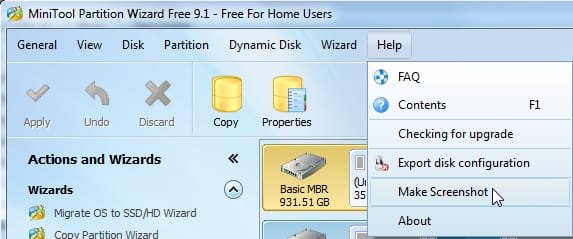
Might help if you post a screenshot. Either of Disk management window, or use partititon wizard. It can take a screenie like this:

pw-screenie.jpg
 

My Computers My Computers

  • At a glance

    7 X64i5 84002x8gb 3200mhz
    Computer type
    PC/Desktop
    OS
    7 X64
    CPU
    i5 8400
    Motherboard
    gigabyte b365m ds3h
    Memory
    2x8gb 3200mhz
    Hard Drives
    various
    PSU
    pure power 11 400w cm
    Case
    Coolermaster
    Cooling
    cryorig m9i
  • At a glance

    7x64g54008gb ddr4 2400
    Computer type
    PC/Desktop
    OS
    7x64
    CPU
    g5400
    Motherboard
    ga b365m ds3h
    Memory
    8gb ddr4 2400
    PSU
    xfx pro 450w
Link to official dell OEM Windows 7 pro ISO: Windows 7 recovery image download available with USB 3.1 and NVMe driver support | Dell US

Found this online Dell OEM Windows 7 ultimate ISO only difference is that it has 3.0 drivers on it: Update your browser to use Google Drive - Drive Help

*Windows 7 installed to the SSD as pro I think because windows 7 pro was still copied to a 10gb partition on the hdd when it was plugged in which explained why it saw the drive with the Windows 7 ultimate USB. For some reason though it installed win7 pro upon the reboot when completing setup.
*The Win7 ultimate only seems to install on the hdd for some reason. The Windows 7 pro will install onto the NVME and the HDD. Something is on the Win7Pro ISO it seems that is missing from the posted WIN7 ultimate even after trying to add the packages and drivers in DISM. Did notice when copying the boot.wim from the win7pro to the win7 ultimate that the win7Pro boot.wim was 10mb larger than what was on the Win7 ulimate boot.wim even after adding the files you posted.

Think we can find out why there is such a difference?
 
Last edited:

My Computer My Computer

At a glance

Windows 7 Ultimate x64
Computer type
PC/Desktop
OS
Windows 7 Ultimate x64
I'm not sure, but I read that to boot from M.2 you must be under UEFI.
I've have installed Win 7 64 on my M.2 drive, under UEFI, Safe boot disabled, CSM =UEFI and with all other drives detached. Once you get to where you put your name, launch Sysprep (Kari tutorial) and then attach your HDD.
 

My Computers My Computers

  • At a glance

    Windows 7 HP 64i5 6600K - 800MHz to 4200MHz4+4G GSkill DDR4 3000IG - Intel 530
    Computer type
    PC/Desktop
    Computer Manufacturer/Model Number
    custom build
    OS
    Windows 7 HP 64
    CPU
    i5 6600K - 800MHz to 4200MHz
    Motherboard
    GA-Z170-HD3P
    Memory
    4+4G GSkill DDR4 3000
    Graphics Card(s)
    IG - Intel 530
    Monitor(s) Displays
    Samsung 226BW
    Screen Resolution
    1680x1050
    Hard Drives
    (1) -1 SM951 – 128GB M.2 AHCI PCIe SSD drive for Windows 7 and Lubuntu
    (2) -1 WD SATA 3 - 1T for Data
    (3) -1 WD SATA 3 - 1T for backup
    PSU
    Thermaltake 450W TR2 gold
    Keyboard
    Old and good Chicony mechanical keyboard
    Mouse
    Logitech mX performance - 9 buttons (had to disable some)
    Internet Speed
    500Mb/s
    Browser
    Firefox 64
    Other Info
    TinyWall firewall
  • At a glance

    Windows 7 Proi7-4500U 800MHz to 3.0GHz(4+4)G DDR3 1600IG intel 4400 + NVIDIA GeForce GT 745M
    Computer type
    Laptop
    System Manufacturer/Model Number
    Asus Q550LF
    OS
    Windows 7 Pro
    CPU
    i7-4500U 800MHz to 3.0GHz
    Motherboard
    Asus Q550LF
    Memory
    (4+4)G DDR3 1600
    Graphics Card(s)
    IG intel 4400 + NVIDIA GeForce GT 745M
    Sound Card
    Realtek
    Monitor(s) Displays
    LG Display LP156WF4-SPH1
    Screen Resolution
    1920 x 1080
    Hard Drives
    BX500 120G SSD for Windows and programs +
    1T HDD for data
    Internet Speed
    500 Mb/s
    Browser
    Firefox
    Other Info
    TinyWall firewall

My Computers My Computers

  • At a glance

    7 X64i5 84002x8gb 3200mhz
    Computer type
    PC/Desktop
    OS
    7 X64
    CPU
    i5 8400
    Motherboard
    gigabyte b365m ds3h
    Memory
    2x8gb 3200mhz
    Hard Drives
    various
    PSU
    pure power 11 400w cm
    Case
    Coolermaster
    Cooling
    cryorig m9i
  • At a glance

    7x64g54008gb ddr4 2400
    Computer type
    PC/Desktop
    OS
    7x64
    CPU
    g5400
    Motherboard
    ga b365m ds3h
    Memory
    8gb ddr4 2400
    PSU
    xfx pro 450w
I'm not sure, but I read that to boot from M.2 you must be under UEFI.
I've have installed Win 7 64 on my M.2 drive, under UEFI, Safe boot disabled, CSM =UEFI and with all other drives detached. Once you get to where you put your name, launch Sysprep (Kari tutorial) and then attach your HDD.

This is the confusing part, all this new hardware doesnt help either that is new it seems to everyone.

Totally correct that to boot from .2. in UEFI it must be installed in UEFI. Also possible is booting from the M.2 in legacy which it is now but with win7pro, though the hdd does have win7ult on it. For whatever reason cant seem to install the ultimate version on the m.2 not sure why either in UEFI or legacy.

Is your win7 64 installation pro or ultimate or regular? Been working on trying to get ultimate installed. Should not be too much trouble then if it can be installed to set it up under proper UEFI. Whole problem seems to be getting it installed.

The dell Win7Pro seems to install fine on the M.2 any other version or iso seems to fail which isnt making any sense. not sure why it installs on the hdd and not the m.2 it cant even see the M.2 for some reason.
 

My Computer My Computer

At a glance

Windows 7 Ultimate x64
Computer type
PC/Desktop
OS
Windows 7 Ultimate x64
If it can't see your M.2 is because the M.2 drivers aren't on the installation disk.
 

My Computers My Computers

  • At a glance

    Windows 7 HP 64i5 6600K - 800MHz to 4200MHz4+4G GSkill DDR4 3000IG - Intel 530
    Computer type
    PC/Desktop
    Computer Manufacturer/Model Number
    custom build
    OS
    Windows 7 HP 64
    CPU
    i5 6600K - 800MHz to 4200MHz
    Motherboard
    GA-Z170-HD3P
    Memory
    4+4G GSkill DDR4 3000
    Graphics Card(s)
    IG - Intel 530
    Monitor(s) Displays
    Samsung 226BW
    Screen Resolution
    1680x1050
    Hard Drives
    (1) -1 SM951 – 128GB M.2 AHCI PCIe SSD drive for Windows 7 and Lubuntu
    (2) -1 WD SATA 3 - 1T for Data
    (3) -1 WD SATA 3 - 1T for backup
    PSU
    Thermaltake 450W TR2 gold
    Keyboard
    Old and good Chicony mechanical keyboard
    Mouse
    Logitech mX performance - 9 buttons (had to disable some)
    Internet Speed
    500Mb/s
    Browser
    Firefox 64
    Other Info
    TinyWall firewall
  • At a glance

    Windows 7 Proi7-4500U 800MHz to 3.0GHz(4+4)G DDR3 1600IG intel 4400 + NVIDIA GeForce GT 745M
    Computer type
    Laptop
    System Manufacturer/Model Number
    Asus Q550LF
    OS
    Windows 7 Pro
    CPU
    i7-4500U 800MHz to 3.0GHz
    Motherboard
    Asus Q550LF
    Memory
    (4+4)G DDR3 1600
    Graphics Card(s)
    IG intel 4400 + NVIDIA GeForce GT 745M
    Sound Card
    Realtek
    Monitor(s) Displays
    LG Display LP156WF4-SPH1
    Screen Resolution
    1920 x 1080
    Hard Drives
    BX500 120G SSD for Windows and programs +
    1T HDD for data
    Internet Speed
    500 Mb/s
    Browser
    Firefox
    Other Info
    TinyWall firewall
The pic you posted indicates missing SATA drivers.

Driver downloads here for your model:
Product support for XPS 8910

Seen that page before, must admit its a bit confusing. Looking it over in sections cant find anything about sata drivers though which has been the problem. Even googling the manufacturer which should be SK Hynix cant seem to find that driver on that page for the M.2 google or from the manufacturer which appears to be a chinese website even though the computer is from dell. Anyone heard of this drive to see if the drivers are listed anywhere? (picture below from hwinfo)

IMG_0919.jpg
 

My Computer My Computer

At a glance

Windows 7 Ultimate x64
Computer type
PC/Desktop
OS
Windows 7 Ultimate x64
If it can't see your M.2 is because the M.2 drivers aren't on the installation disk.

That is the weird part, the drivers appear to be on the Dell Win7Pro iso since it can see the drive, yet on the win7 ultimate ISO they are missing. What would be the correct driver that could possibly missing?
(Please see picture above it shows the M.2 drive installed in the 8910)
 

My Computer My Computer

At a glance

Windows 7 Ultimate x64
Computer type
PC/Desktop
OS
Windows 7 Ultimate x64
Set BIOS as UEFI on CSM, disable secure boot.
Detach the HDD.
Boot the installation disk as UEFI - Important
Put all drives SIW and I gave to you on a USB flash drive.
If your installation already has the USB3 drivers on it, and if the installation ask for a driver from CD/DVD, browse the USB3 drive for the correct missing driver.
 

My Computers My Computers

  • At a glance

    Windows 7 HP 64i5 6600K - 800MHz to 4200MHz4+4G GSkill DDR4 3000IG - Intel 530
    Computer type
    PC/Desktop
    Computer Manufacturer/Model Number
    custom build
    OS
    Windows 7 HP 64
    CPU
    i5 6600K - 800MHz to 4200MHz
    Motherboard
    GA-Z170-HD3P
    Memory
    4+4G GSkill DDR4 3000
    Graphics Card(s)
    IG - Intel 530
    Monitor(s) Displays
    Samsung 226BW
    Screen Resolution
    1680x1050
    Hard Drives
    (1) -1 SM951 – 128GB M.2 AHCI PCIe SSD drive for Windows 7 and Lubuntu
    (2) -1 WD SATA 3 - 1T for Data
    (3) -1 WD SATA 3 - 1T for backup
    PSU
    Thermaltake 450W TR2 gold
    Keyboard
    Old and good Chicony mechanical keyboard
    Mouse
    Logitech mX performance - 9 buttons (had to disable some)
    Internet Speed
    500Mb/s
    Browser
    Firefox 64
    Other Info
    TinyWall firewall
  • At a glance

    Windows 7 Proi7-4500U 800MHz to 3.0GHz(4+4)G DDR3 1600IG intel 4400 + NVIDIA GeForce GT 745M
    Computer type
    Laptop
    System Manufacturer/Model Number
    Asus Q550LF
    OS
    Windows 7 Pro
    CPU
    i7-4500U 800MHz to 3.0GHz
    Motherboard
    Asus Q550LF
    Memory
    (4+4)G DDR3 1600
    Graphics Card(s)
    IG intel 4400 + NVIDIA GeForce GT 745M
    Sound Card
    Realtek
    Monitor(s) Displays
    LG Display LP156WF4-SPH1
    Screen Resolution
    1920 x 1080
    Hard Drives
    BX500 120G SSD for Windows and programs +
    1T HDD for data
    Internet Speed
    500 Mb/s
    Browser
    Firefox
    Other Info
    TinyWall firewall
Set BIOS as UEFI on CSM, disable secure boot.
Detach the HDD.
Boot the installation disk as UEFI - Important
Put all drives SIW and I gave to you on a USB flash drive.
If your installation already has the USB3 drivers on it, and if the installation ask for a driver from CD/DVD, browse the USB3 drive for the correct missing driver.

The Ult ISO seems to have the usb 3.0 drivers but for some reason doesnt see the m.2 drive for installation. Cant figure out why the win7pro iso can see the drive but the win7ultimate iso does not see the m.2 drive. quite frustrating.
Thanks for the reply, here are some steps taken so far:
Have tried with HDD disconnected booting to UEFI legacy and for the win7ult the drive for some mysterious reason does not show up. Yet the same tests with the win7pro ISo show the drive in legacy boot and UEFI boot. Have not been able to figure out which NVME driver it requires which is present on the win7pro but seeming absent from the win7 ultimate.
 

My Computer My Computer

At a glance

Windows 7 Ultimate x64
Computer type
PC/Desktop
OS
Windows 7 Ultimate x64
If the win7pro ISo has the driver I think you can use the Boot.wim on the Win 7 Ult iso.
SIW can help you more than I.
 

My Computers My Computers

  • At a glance

    Windows 7 HP 64i5 6600K - 800MHz to 4200MHz4+4G GSkill DDR4 3000IG - Intel 530
    Computer type
    PC/Desktop
    Computer Manufacturer/Model Number
    custom build
    OS
    Windows 7 HP 64
    CPU
    i5 6600K - 800MHz to 4200MHz
    Motherboard
    GA-Z170-HD3P
    Memory
    4+4G GSkill DDR4 3000
    Graphics Card(s)
    IG - Intel 530
    Monitor(s) Displays
    Samsung 226BW
    Screen Resolution
    1680x1050
    Hard Drives
    (1) -1 SM951 – 128GB M.2 AHCI PCIe SSD drive for Windows 7 and Lubuntu
    (2) -1 WD SATA 3 - 1T for Data
    (3) -1 WD SATA 3 - 1T for backup
    PSU
    Thermaltake 450W TR2 gold
    Keyboard
    Old and good Chicony mechanical keyboard
    Mouse
    Logitech mX performance - 9 buttons (had to disable some)
    Internet Speed
    500Mb/s
    Browser
    Firefox 64
    Other Info
    TinyWall firewall
  • At a glance

    Windows 7 Proi7-4500U 800MHz to 3.0GHz(4+4)G DDR3 1600IG intel 4400 + NVIDIA GeForce GT 745M
    Computer type
    Laptop
    System Manufacturer/Model Number
    Asus Q550LF
    OS
    Windows 7 Pro
    CPU
    i7-4500U 800MHz to 3.0GHz
    Motherboard
    Asus Q550LF
    Memory
    (4+4)G DDR3 1600
    Graphics Card(s)
    IG intel 4400 + NVIDIA GeForce GT 745M
    Sound Card
    Realtek
    Monitor(s) Displays
    LG Display LP156WF4-SPH1
    Screen Resolution
    1920 x 1080
    Hard Drives
    BX500 120G SSD for Windows and programs +
    1T HDD for data
    Internet Speed
    500 Mb/s
    Browser
    Firefox
    Other Info
    TinyWall firewall
If the win7pro ISo has the driver I think you can use the Boot.wim on the Win 7 Ult iso.
SIW can help you more than I.

hmmmm is the suggestion to copy the boot.wim from win7 ult to the win7 pro?

*last attempt was copying the boot.wim from win7pro to win7ult which resulted in failure. can try though.
 

My Computer My Computer

At a glance

Windows 7 Ultimate x64
Computer type
PC/Desktop
OS
Windows 7 Ultimate x64
1) I still don't know what 7 pro ISO you are using. Just post the file name, something like:

987TR_5JJH2A00_W7SP1PRO64_EM(DL).iso


2)
*last attempt was copying the boot.wim from win7pro to win7ult which resulted in failure. can try though.

Could be several reasons, e.g. non matching setup based media.

For those who are interested, in the sources folder of the ISO, AND the sources folder of boot.wim ( and Winre.wim ) are a whole lot of files.

If you are using standard 7SP1 , they will be version 17514.

There is an update available which changes ( some) of them to a newer version.

The files in boot.wim \sources AND iso\sources must be the same version. Your Pro boot.wim may have the newer versions.
 

My Computers My Computers

  • At a glance

    7 X64i5 84002x8gb 3200mhz
    Computer type
    PC/Desktop
    OS
    7 X64
    CPU
    i5 8400
    Motherboard
    gigabyte b365m ds3h
    Memory
    2x8gb 3200mhz
    Hard Drives
    various
    PSU
    pure power 11 400w cm
    Case
    Coolermaster
    Cooling
    cryorig m9i
  • At a glance

    7x64g54008gb ddr4 2400
    Computer type
    PC/Desktop
    OS
    7x64
    CPU
    g5400
    Motherboard
    ga b365m ds3h
    Memory
    8gb ddr4 2400
    PSU
    xfx pro 450w
This is the 97th post and you still stuck.
I've had the same problem with my Skylake and found a solution by my own and in two days my computer was running with Win 7 on the M.2 drive and Users on the HDD (Kari tutorial).
And probably you're much clever than I am.
You're not thinking. You are waiting to someone to take you by the hand and find a solution. That's not gonna happen.
You have the computer and all the tools to make it work. You're the only one who can make it happen.
You have to read AND understand what you read.
SIW gave a big help. He gave you a lot of drivers and tools. And as you said that the Win 7 pro has the M.2 drive and the ultimate doesn't, what you have to do is to get the driver from the Win 7 pro and add to the Win 7 ultimate.
Where are they? Somewhere on the Install.wim index 3 and / or boot.wim index 2 of the Win 7 pro.
If you don't know what I'm talking about you didn't read and /or understand my tutorial.
 
Last edited:

My Computers My Computers

  • At a glance

    Windows 7 HP 64i5 6600K - 800MHz to 4200MHz4+4G GSkill DDR4 3000IG - Intel 530
    Computer type
    PC/Desktop
    Computer Manufacturer/Model Number
    custom build
    OS
    Windows 7 HP 64
    CPU
    i5 6600K - 800MHz to 4200MHz
    Motherboard
    GA-Z170-HD3P
    Memory
    4+4G GSkill DDR4 3000
    Graphics Card(s)
    IG - Intel 530
    Monitor(s) Displays
    Samsung 226BW
    Screen Resolution
    1680x1050
    Hard Drives
    (1) -1 SM951 – 128GB M.2 AHCI PCIe SSD drive for Windows 7 and Lubuntu
    (2) -1 WD SATA 3 - 1T for Data
    (3) -1 WD SATA 3 - 1T for backup
    PSU
    Thermaltake 450W TR2 gold
    Keyboard
    Old and good Chicony mechanical keyboard
    Mouse
    Logitech mX performance - 9 buttons (had to disable some)
    Internet Speed
    500Mb/s
    Browser
    Firefox 64
    Other Info
    TinyWall firewall
  • At a glance

    Windows 7 Proi7-4500U 800MHz to 3.0GHz(4+4)G DDR3 1600IG intel 4400 + NVIDIA GeForce GT 745M
    Computer type
    Laptop
    System Manufacturer/Model Number
    Asus Q550LF
    OS
    Windows 7 Pro
    CPU
    i7-4500U 800MHz to 3.0GHz
    Motherboard
    Asus Q550LF
    Memory
    (4+4)G DDR3 1600
    Graphics Card(s)
    IG intel 4400 + NVIDIA GeForce GT 745M
    Sound Card
    Realtek
    Monitor(s) Displays
    LG Display LP156WF4-SPH1
    Screen Resolution
    1920 x 1080
    Hard Drives
    BX500 120G SSD for Windows and programs +
    1T HDD for data
    Internet Speed
    500 Mb/s
    Browser
    Firefox
    Other Info
    TinyWall firewall
Well I`m glad someone said it ;)

We`re here to help people with Windows 7 problems, we are not a Help Desk.

I commend SIW for sticking with it. :)
 

My Computer My Computer

At a glance

Windows 10 Pro x64Intel Core i7 6700KGSkill TridentZ RGB 16GB 3600 16-16-16-36EVGA GTX 980 Ti SC x2
Computer type
PC/Desktop
Computer Manufacturer/Model Number
Skylake Special #666
OS
Windows 10 Pro x64
CPU
Intel Core i7 6700K
Motherboard
Asus Sabertooth Z170 Mark 1
Memory
GSkill TridentZ RGB 16GB 3600 16-16-16-36
Graphics Card(s)
EVGA GTX 980 Ti SC x2
Sound Card
Realtek High Definition
Monitor(s) Displays
AOC G2460PG
Screen Resolution
1920 x 1080 144Hz
Hard Drives
Samsung 860 Pro 256GB, Seagate Barracuda 4TB x2
PSU
EVGA 1000 P2, EVGA White Custom Braided Cables
Case
Corsair Vengeance C70 Gunmetal Black
Cooling
Corsair H100i v2, Corsair ML120 x2, Thermal Grizzly Kryonaut
Keyboard
Logitech G910 Orion Spectrum
Mouse
Logitech G700s
Internet Speed
Verizon Fios Quantum Gateway 75/75
Antivirus
Windows Defender, Malwarebytes Free 3.8.3
Browser
Chrome
Other Info
Corsair SP120 x4, LG Blu-ray Drive, Durabrand HT-395 100 Watt Dolby Digital Amp, Corsair H2100 Wireless 7.1 Headset
Back
Top