HP Laptop upgrade from Vista - 4 frustrating failures!!

What does it say in the Disk Mgmt for Windows 7 partition?

System, Active, Boot - end of story.
 
Was being dim and looking at graphic instead of reading the description above :confused:
 

My Computer My Computer

At a glance

Windows 7
Computer Manufacturer/Model Number
HP DV6-1063TX Entertainment PC
OS
Windows 7
Single boot W7, two unwanted partitions, and admin user

The score so far is that I have a single boot set up having restored the W7 system backup made with W7 Disk Management GUI.

I thought to start I would just remove the D partition and expand the Win7 partition into that. I used Partition Wizard. On reboot I had a new error 'autochk program missing - skipping autocheck' this went into an endles boot loop. Using install DVD for repair did not help, it could not make the repairs it said.

I used the Repair Console to re-install the Win7 Backup again. Fixed the NTLDR problem with the Repair Console booted into Windows no problem but still have theC & D partitions to remove or resize. (I wonder if I should use Disk Manager to do this so Win 7 knows what is going on?)

I enabled the Administrator account (temporarily) and decided to call it a day and give you guys a break. Pity our time zones are so far out!

So to summarise:
a) Single boot Win 7 is working from the F: partition

b) C and D partitions are still in place - I don't strictly need more than one partition anyway, originally all personal docs were in the User Account folders on C drive, it just seems easier to backup system and personal data separately.

c) I need to expand the Win7 partition as it is only 45Gb and will probably need more once the other software is all loaded

d) Administrator account is available ( I will disable this once everything is working)

Many thanks for all assistance, am going to take a break :)

Jon
 

My Computer My Computer

At a glance

Windows 7
Computer Manufacturer/Model Number
HP DV6-1063TX Entertainment PC
OS
Windows 7
You can always use Disk Mgmt to Extend F: into deleted Recov space. Safer.

So you might as well try to delete C: first, Resize F: over it, use Startup Repair to get it started and see if it bluescreens.

If so, try to do Repair Install to refresh activation,

or settle for Win7 on F: with Disk Mgmt extending it all the way to the right. You can put data or flower pots on C:

Or clean reinstall wiping whole disk with WIn7 DVD.

Good night!
 
Sorry , wasn't able to get back till now.

When you had the Windows not genuine - the first thing to try is a reboot - and if you can get in - reactivate in the System properties if necessary.

If you can't get back in after reboot - very likely there was a problem with the drive letters.

PW may have messed up mounted devices in the registry.

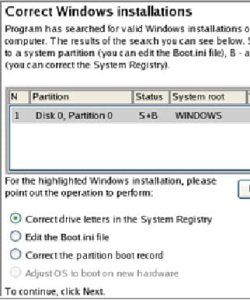
Easiest way to fix that is to boot the Paragon cd select NormalMode>Boot Corrector>Search for Windows installations>Correct drive letters in system registry.

Highlight the 7 partition and assign the original drive letter ( in this case, F ).


CORRECT-DRIVE-LETTERS-3-2009-12-31_003646.jpg

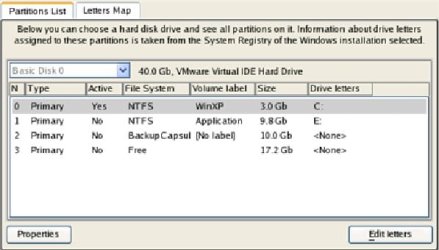
Click the Edit Letters button to correct an existing drive letter or assign a new one in the Windows System Registry.

CORRECT-DRIVE-LETTERS-4-2009-12-31_003755.jpg

Once you’ve assigned the appropriate drive letter, close the dialog, then click the Apply button. Confirm the operation.

Should then be fine.
 

My Computers My Computers

  • At a glance

    7 X64i5 84002x8gb 3200mhz
    Computer type
    PC/Desktop
    OS
    7 X64
    CPU
    i5 8400
    Motherboard
    gigabyte b365m ds3h
    Memory
    2x8gb 3200mhz
    Hard Drives
    various
    PSU
    pure power 11 400w cm
    Case
    Coolermaster
    Cooling
    cryorig m9i
  • At a glance

    7x64g54008gb ddr4 2400
    Computer type
    PC/Desktop
    OS
    7x64
    CPU
    g5400
    Motherboard
    ga b365m ds3h
    Memory
    8gb ddr4 2400
    PSU
    xfx pro 450w
SIW2 thanks for that, as noted above I am more or less back at the beginning with a system that boots but with Win 7 on the F partition, and two rather useless partitions C, the old vista one, and D the old HP recovery one.

Today I thought I would take it a step at a time and see if I can use W7 Disk Management to remove the D Partition first. I will then reboot and see how this works. Then I will see if W7 DM will expand the Win 7 partition to the empty space. Then reboot again and see what happens. Hopefully by using W7 DM everything will go OK. Then I can attempt the same trick with the C partition.

Jon
 

My Computer My Computer

At a glance

Windows 7
Computer Manufacturer/Model Number
HP DV6-1063TX Entertainment PC
OS
Windows 7
So far so good the redundant D (Recovery) partition is gone. Now to try the same trick to remove the C Partition.
 

My Computer My Computer

At a glance

Windows 7
Computer Manufacturer/Model Number
HP DV6-1063TX Entertainment PC
OS
Windows 7
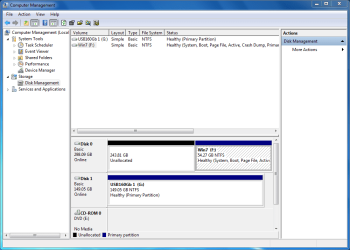
I have deleted the C partition successfully but W7 DM will not allow me to Extend the partition to include the unallocated space that was C.

Diskmap now looks as below.

I guess I will have to use Partition Wizard to expand the Win 7 drive

I think I will now backup the system again from W7 DM, so I can return to this state easily

Jon
 

Attachments

  • Diskmap 31dec091105.PNG
    Diskmap 31dec091105.PNG
    28.9 KB · Views: 10

My Computer My Computer

At a glance

Windows 7
Computer Manufacturer/Model Number
HP DV6-1063TX Entertainment PC
OS
Windows 7
Yes, it makes sense to image again now.

Windows Disk Management won't allow you to extend to the left - not surprised you couldn't.

You may be lucky with PW this time.

If you get the Not Genuine again , boot the BR10 free cd and do the boot corrector > correct drive letters etc
 

My Computers My Computers

  • At a glance

    7 X64i5 84002x8gb 3200mhz
    Computer type
    PC/Desktop
    OS
    7 X64
    CPU
    i5 8400
    Motherboard
    gigabyte b365m ds3h
    Memory
    2x8gb 3200mhz
    Hard Drives
    various
    PSU
    pure power 11 400w cm
    Case
    Coolermaster
    Cooling
    cryorig m9i
  • At a glance

    7x64g54008gb ddr4 2400
    Computer type
    PC/Desktop
    OS
    7x64
    CPU
    g5400
    Motherboard
    ga b365m ds3h
    Memory
    8gb ddr4 2400
    PSU
    xfx pro 450w
SIW2 what happened exactly that caused a Not Genuine bluescreen - it sounds like activation is involved.

If it was drive letter changing, how and what triggers it? Can you explain "mounted devices in registry?"

Once before when I got this bluescreen during similar operations in beta, I ran from Task Manager D:Setup.exe to Repair Install which reset the activation. Too much trouble here? There are also the slmgr commands to insert key and activate.

His problem with running those was needing elevated CMD I believe, so I found a workaround to elevate via gpedit.msc but he had already booted to clean install (later reimaged).

Thanks teach.
 
Ok thanks, just going to reboot with PW and see how it goes.
 

My Computer My Computer

At a glance

Windows 7
Computer Manufacturer/Model Number
HP DV6-1063TX Entertainment PC
OS
Windows 7
After running PW and expanding the Win7 partition when starting to reboot it goes into the starting windows screen and then says 'autochk program not found - skipping Autocheck' screen then goes black followed by a flash of BOS before going into the abnormal shutdown boot screen.

I booted into Paragon Rescue Express, it shows that the partition is not assigned to any letter, but does not let me set it to F.
 

My Computer My Computer

At a glance

Windows 7
Computer Manufacturer/Model Number
HP DV6-1063TX Entertainment PC
OS
Windows 7
Can you assign a letter with PW? It might since it was responsible for creating the new partition .

If the letter is wrong/missing, later in the boot process the registry paths will be invalid and things will not be found - as above.

Greg, have a look here - check out the dos devices - it is possible to rename them using regedit, - tho. using Paragon is much easier.

HKEY_LOCAL_MACHINE\SYSTEM\MountedDevices
 

My Computers My Computers

  • At a glance

    7 X64i5 84002x8gb 3200mhz
    Computer type
    PC/Desktop
    OS
    7 X64
    CPU
    i5 8400
    Motherboard
    gigabyte b365m ds3h
    Memory
    2x8gb 3200mhz
    Hard Drives
    various
    PSU
    pure power 11 400w cm
    Case
    Coolermaster
    Cooling
    cryorig m9i
  • At a glance

    7x64g54008gb ddr4 2400
    Computer type
    PC/Desktop
    OS
    7x64
    CPU
    g5400
    Motherboard
    ga b365m ds3h
    Memory
    8gb ddr4 2400
    PSU
    xfx pro 450w
Ok now I have the blue 'not genuine' screen again.
 

My Computer My Computer

At a glance

Windows 7
Computer Manufacturer/Model Number
HP DV6-1063TX Entertainment PC
OS
Windows 7
Sorry SIW2, yes it would allow me to assign C and everything from M onwards, I assigned C as it was going there anyway.
 

My Computer My Computer

At a glance

Windows 7
Computer Manufacturer/Model Number
HP DV6-1063TX Entertainment PC
OS
Windows 7
I booted into administrator and got the Not genuine screen but can run task manager and run processes with administrator privileges.

Am not sure whether to go Greg's route, or go back to Paragon rescue disk, I think using Install DVD repair option will say it cannot repair the fault but have not tried it.
 

My Computer My Computer

At a glance

Windows 7
Computer Manufacturer/Model Number
HP DV6-1063TX Entertainment PC
OS
Windows 7
Will Paragon let you assign F now?

It's possible it is already used.

You could try startup repair.

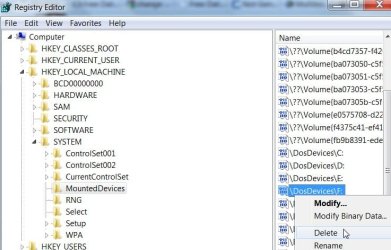
Or you could open regedit , go to HKEY_LOCAL_MACHINE\SYSTEM\MountedDevices and see if F is already listed under dos devices.

MOUNTED DEVICES-2009-12-31_043500.jpg
 

My Computers My Computers

  • At a glance

    7 X64i5 84002x8gb 3200mhz
    Computer type
    PC/Desktop
    OS
    7 X64
    CPU
    i5 8400
    Motherboard
    gigabyte b365m ds3h
    Memory
    2x8gb 3200mhz
    Hard Drives
    various
    PSU
    pure power 11 400w cm
    Case
    Coolermaster
    Cooling
    cryorig m9i
  • At a glance

    7x64g54008gb ddr4 2400
    Computer type
    PC/Desktop
    OS
    7x64
    CPU
    g5400
    Motherboard
    ga b365m ds3h
    Memory
    8gb ddr4 2400
    PSU
    xfx pro 450w
Ok just tried to run slmgr from command prompt - it says the VBscript engine not found so that route no good at the moment. Am going back to Paragon Rescue Kit
 

My Computer My Computer

At a glance

Windows 7
Computer Manufacturer/Model Number
HP DV6-1063TX Entertainment PC
OS
Windows 7
I booted into administrator and got the Not genuine screen but can run task manager and run processes with administrator privileges.

Am not sure whether to go Greg's route, or go back to Paragon rescue disk, I think using Install DVD repair option will say it cannot repair the fault but have not tried it.

Not a booted DVD repair, a repair install (Upgade over itself) run from Win7 to reinstall/refresh OS and activation.

Which is why you need to run it from the Task Manager to get around bluescreen, and as Admin using workaround I linked or your enabled Admin acct.

Run D:setup.exe if D; is your DVD drive.

Follow SIW2's method as he is my teacher
 
Changed the drive letter back to F and it booted into windows activation screen, and then :D into W7. Hooray!

Now I have one big F partition with Win 7, next question is can I change that to the more normal C with W7 DM GUI without causing any grief?
 

My Computer My Computer

At a glance

Windows 7
Computer Manufacturer/Model Number
HP DV6-1063TX Entertainment PC
OS
Windows 7
Back
Top