Solved Huge problem!

I did the request for information now. I didnt do them all. but if that okay with you?
 

My Computer

Computer type
PC/Desktop
Computer Manufacturer/Model Number
HP
OS
32 bit
CPU
Intel(R) Core(TM)2 CPU 6300 @ 1.86GHz
Motherboard
Intel(R) Core(TM)2 CPU 6300 @ 1.86GHz
Memory
2.00 GB
Graphics Card(s)
Intel(R) G965 Express Chipset Family
Sound Card
(1) High Definition Audio Device (2) USB Audio Device
If you could fill in the model number of the HP Desktop, then it will be ok.
Without the model number, members are hard pressed to find information specific to your machine.

Please add that information to this field: System Manufacturer/Model Number HP

The tool in the tutorial would have made it a little easier, but even that doesn't fill in the model number.

Thanks for filling in your System specs.

Are there any error msgs displayed when the freeze happens?
Look in the Event Viewer for error, critical, and warning msgs
In the Start Menu search box, type
Event Viewer
Event Viewer should be highlighted at the top of the results - you can just hit enter to launch it (you can also double click it)
Maximize the Event Viewer window and expand the three categories (don't worry about informational or audit entries)
Collapse the other two panes (Recently Viewed nodes and Log summary) to display the most information in the Summary pane
Drag the column headings to the right so that all of the text in the column entries is displayed (it should all fit in a maximized window). The most important columns are Event Type, Event ID, and Source.

Th event logs might give members something to chew on.

You can also try a few things while you wait:
Some of the steps are more than what is initially required (re-install Windows is after a lot of other things have been tried and failed to resolve the issue - that's why it is stated as "consider....")

Keep this side of your monitor informed as to what steps in which tutorial you have tried and the results. Some of this is wait-and-see, apply one change, see how your system behaves:
  • better? stop trying other things.
  • not better, try the next step in the tutorial or the next tutorial.
Take things slow and easy, one step at a time. Doing too much at once might not tell you which step solved the issue and it might get confusing even though the tutorials are well written step-by-step instructions.

If you're not sure about a step ask first so you understand what you're doing. Tutorials have some utilities or Windows references that are seldom used by the average user.

Bill
.

 

My Computer

Computer type
Laptop
Computer Manufacturer/Model Number
HP Pavilion dv6-6c10us
OS
x64 (6.3.9600) Win8.1 Pro & soon dual boot x64 (6.1.7601) Win7_SP1 HomePrem
CPU
AMD A6-3420M APU with Radeon(tm) HD Graphics
Motherboard
Hewlett-Packard 1805
Memory
6.00 GB
Graphics Card(s)
AMD Radeon(TM) HD 6520G
Sound Card
(1) AMD High Definition Audio Device (2) IDT High Definiti
Monitor(s) Displays
HP W2072a 20" LCD (1600 x 900) @ 60 Hz
Screen Resolution
1366 x 768 x 32 bits (4294967296 colors) @ 60 Hz
Hard Drives
ST640LM0 00 HM641JI SATA Disk Device
Keyboard
Logitech k520 wireless KB
Mouse
Logitech m320 wireless mouse (bundled with KB)
Internet Speed
15/5 | 54 MB Wireless 'n'
Antivirus
Realtime: Defender or Avast | On-demand: Malwarebytes, ESET
Browser
IE 11 on Win8, IE 10 on win 7
Other Info
Media: [Gimp, Audacity, VLC] || Comm: [WEmail 2012, Skype] || Productivity: [OpenOffice,| Textpad] || Utils: [Sysinternals, cCleaner, Speccy, Defraggler]

My Computer

Computer type
PC/Desktop
Computer Manufacturer/Model Number
HP
OS
32 bit
CPU
Intel(R) Core(TM)2 CPU 6300 @ 1.86GHz
Motherboard
Intel(R) Core(TM)2 CPU 6300 @ 1.86GHz
Memory
2.00 GB
Graphics Card(s)
Intel(R) G965 Express Chipset Family
Sound Card
(1) High Definition Audio Device (2) USB Audio Device
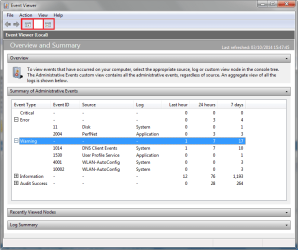
Ok, the event viewer screen shot does me no good - it only shows the levels, nothing else.

I forgot to tell you to close the left and right panes by clicking on the icons shown here:

Evt_SumryAdmin2.png

This image also gives you a better idea of what members need to see.

If you follow this tutorial, the images or attachments will be posted on SevenForums (SF)
See: http://www.sevenforums.com/tutorials/9733-screenshots-files-upload-post-seven-forums.html

Bill
.
 

My Computer

Computer type
Laptop
Computer Manufacturer/Model Number
HP Pavilion dv6-6c10us
OS
x64 (6.3.9600) Win8.1 Pro & soon dual boot x64 (6.1.7601) Win7_SP1 HomePrem
CPU
AMD A6-3420M APU with Radeon(tm) HD Graphics
Motherboard
Hewlett-Packard 1805
Memory
6.00 GB
Graphics Card(s)
AMD Radeon(TM) HD 6520G
Sound Card
(1) AMD High Definition Audio Device (2) IDT High Definiti
Monitor(s) Displays
HP W2072a 20" LCD (1600 x 900) @ 60 Hz
Screen Resolution
1366 x 768 x 32 bits (4294967296 colors) @ 60 Hz
Hard Drives
ST640LM0 00 HM641JI SATA Disk Device
Keyboard
Logitech k520 wireless KB
Mouse
Logitech m320 wireless mouse (bundled with KB)
Internet Speed
15/5 | 54 MB Wireless 'n'
Antivirus
Realtime: Defender or Avast | On-demand: Malwarebytes, ESET
Browser
IE 11 on Win8, IE 10 on win 7
Other Info
Media: [Gimp, Audacity, VLC] || Comm: [WEmail 2012, Skype] || Productivity: [OpenOffice,| Textpad] || Utils: [Sysinternals, cCleaner, Speccy, Defraggler]
Is this better now?
 

Attachments

  • 9bJBsvz.png
    9bJBsvz.png
    16 KB · Views: 4

My Computer

Computer type
PC/Desktop
Computer Manufacturer/Model Number
HP
OS
32 bit
CPU
Intel(R) Core(TM)2 CPU 6300 @ 1.86GHz
Motherboard
Intel(R) Core(TM)2 CPU 6300 @ 1.86GHz
Memory
2.00 GB
Graphics Card(s)
Intel(R) G965 Express Chipset Family
Sound Card
(1) High Definition Audio Device (2) USB Audio Device
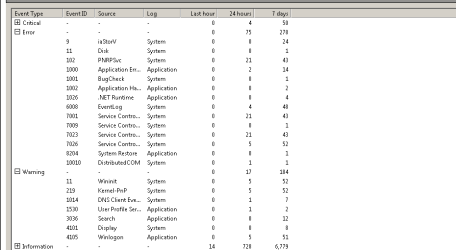
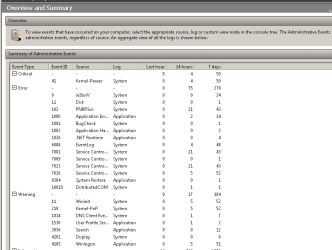
Thanks, that's much better.... except for one minor thing. You forgot to expand the Critical level and there are 50 errors in the past 7 days.

Please post a new screen shot that includes all three levels expanded
Critical
Error
Warning
I haven't looked too closely at what you already posted, the one thing that pops out is the 1001 Bugcheck.

I'll look up the other error codes after you post the new screen shot. I want to focus on the Critical errors first, then Error, then Warnings.


There's a way to let me see the actual events, that way you can post the exported event log and I won't have to ask you to look inside each one.

  1. Launch Event Viewer
    .
  2. Show the left pane again (the left icon I described before to close the pane)
    .
  3. Expand Windows Logs
    .
  4. Select / Highlight the Application log
    .
  5. Right click to show the alternate menu
    .
  6. Pick Save All Events As...
    The save dialog opens and allows you to specify a location and filename
    The default location should be your Documents folder
    .
  7. Use kunozApplication as the filename
    the file type is prefilled as .evtx (this is what you want)
Repeat the steps 4 - 7 above for the System log
Use kunozSystem as the filename

Navigate to your Documents folder (or the save location you specified)
Right click to show the alternate menu
Pick New.. Compressed (zipped) folder
Name the zip folder kuzonEvents
Select both of the saved event logs and drag/drop them into the zip folder
Attach kuzonEvents.zip to a new post on this thread.

I still want to see the expanded Critical screenshot. The critical events might be in the two you saved, but they could also be in a different event log. I won't know that until you post the screenshot.

Thanks,

Bill
.
 

My Computer

Computer type
Laptop
Computer Manufacturer/Model Number
HP Pavilion dv6-6c10us
OS
x64 (6.3.9600) Win8.1 Pro & soon dual boot x64 (6.1.7601) Win7_SP1 HomePrem
CPU
AMD A6-3420M APU with Radeon(tm) HD Graphics
Motherboard
Hewlett-Packard 1805
Memory
6.00 GB
Graphics Card(s)
AMD Radeon(TM) HD 6520G
Sound Card
(1) AMD High Definition Audio Device (2) IDT High Definiti
Monitor(s) Displays
HP W2072a 20" LCD (1600 x 900) @ 60 Hz
Screen Resolution
1366 x 768 x 32 bits (4294967296 colors) @ 60 Hz
Hard Drives
ST640LM0 00 HM641JI SATA Disk Device
Keyboard
Logitech k520 wireless KB
Mouse
Logitech m320 wireless mouse (bundled with KB)
Internet Speed
15/5 | 54 MB Wireless 'n'
Antivirus
Realtime: Defender or Avast | On-demand: Malwarebytes, ESET
Browser
IE 11 on Win8, IE 10 on win 7
Other Info
Media: [Gimp, Audacity, VLC] || Comm: [WEmail 2012, Skype] || Productivity: [OpenOffice,| Textpad] || Utils: [Sysinternals, cCleaner, Speccy, Defraggler]
Here are the picture for Warning, Error and Critical Lt3sZJ4.png

Also I didnt know how to attract zip file in here

kuzonEvents: http://puu.sh/7qIG1.zip
 

My Computer

Computer type
PC/Desktop
Computer Manufacturer/Model Number
HP
OS
32 bit
CPU
Intel(R) Core(TM)2 CPU 6300 @ 1.86GHz
Motherboard
Intel(R) Core(TM)2 CPU 6300 @ 1.86GHz
Memory
2.00 GB
Graphics Card(s)
Intel(R) G965 Express Chipset Family
Sound Card
(1) High Definition Audio Device (2) USB Audio Device
Thanks, I'll take a look at the stuff in the zip file

Also I didn't know how to attract zip file in here
Sure you did, I gave you the tutorial a few posts back. Maybe you thought that was just for screen shots, but it also describes attaching files. Here it is again:
See: http://www.sevenforums.com/tutorials/9733-screenshots-files-upload-post-seven-forums.html

Your method worked, so don't sweat the details... no need to repost it.

Bill
.
 

My Computer

Computer type
Laptop
Computer Manufacturer/Model Number
HP Pavilion dv6-6c10us
OS
x64 (6.3.9600) Win8.1 Pro & soon dual boot x64 (6.1.7601) Win7_SP1 HomePrem
CPU
AMD A6-3420M APU with Radeon(tm) HD Graphics
Motherboard
Hewlett-Packard 1805
Memory
6.00 GB
Graphics Card(s)
AMD Radeon(TM) HD 6520G
Sound Card
(1) AMD High Definition Audio Device (2) IDT High Definiti
Monitor(s) Displays
HP W2072a 20" LCD (1600 x 900) @ 60 Hz
Screen Resolution
1366 x 768 x 32 bits (4294967296 colors) @ 60 Hz
Hard Drives
ST640LM0 00 HM641JI SATA Disk Device
Keyboard
Logitech k520 wireless KB
Mouse
Logitech m320 wireless mouse (bundled with KB)
Internet Speed
15/5 | 54 MB Wireless 'n'
Antivirus
Realtime: Defender or Avast | On-demand: Malwarebytes, ESET
Browser
IE 11 on Win8, IE 10 on win 7
Other Info
Media: [Gimp, Audacity, VLC] || Comm: [WEmail 2012, Skype] || Productivity: [OpenOffice,| Textpad] || Utils: [Sysinternals, cCleaner, Speccy, Defraggler]
There are a number of things I see in your System event logs

First and foremost is that your system does not appear to be Win7 SP1
Are you getting any errors when you run Windows Update(WU)?

Please follow the instructions in this tutorial:
Windows Update Posting Instructions
You are asked to post the logs on your thread at the end of the tutorial (some folks miss that part)

Step 5. in that tutorial requests that you start another thread. :note: This step is more for people who post in an existing thread that is not their own.
You do not have to start a new thread, just post the CBS.zip file on this thread.


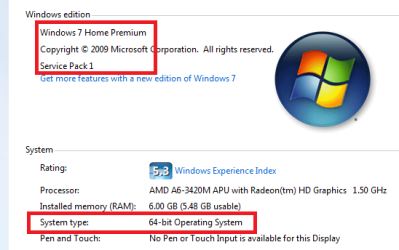
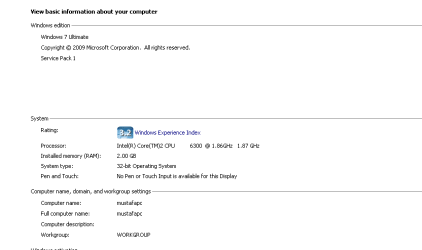
Please also post a screen shot of Computer -> properties to confirm Win7 release information.
Right click Computer
Select properties
>> post a screen shot of that window

Thanks

I've "highlighted" what I'd like to see in the example below
 

Attachments

  • SysProps.PNG
    SysProps.PNG
    47.2 KB · Views: 34

My Computer

Computer type
Laptop
Computer Manufacturer/Model Number
HP Pavilion dv6-6c10us
OS
x64 (6.3.9600) Win8.1 Pro & soon dual boot x64 (6.1.7601) Win7_SP1 HomePrem
CPU
AMD A6-3420M APU with Radeon(tm) HD Graphics
Motherboard
Hewlett-Packard 1805
Memory
6.00 GB
Graphics Card(s)
AMD Radeon(TM) HD 6520G
Sound Card
(1) AMD High Definition Audio Device (2) IDT High Definiti
Monitor(s) Displays
HP W2072a 20" LCD (1600 x 900) @ 60 Hz
Screen Resolution
1366 x 768 x 32 bits (4294967296 colors) @ 60 Hz
Hard Drives
ST640LM0 00 HM641JI SATA Disk Device
Keyboard
Logitech k520 wireless KB
Mouse
Logitech m320 wireless mouse (bundled with KB)
Internet Speed
15/5 | 54 MB Wireless 'n'
Antivirus
Realtime: Defender or Avast | On-demand: Malwarebytes, ESET
Browser
IE 11 on Win8, IE 10 on win 7
Other Info
Media: [Gimp, Audacity, VLC] || Comm: [WEmail 2012, Skype] || Productivity: [OpenOffice,| Textpad] || Utils: [Sysinternals, cCleaner, Speccy, Defraggler]
Giving up in this. i think there is people that know better about this than i do right now. I did what i could hope you get it fixed!
 

My Computer

Computer type
PC/Desktop
Computer Manufacturer/Model Number
Custom Built
OS
Windows 10 64Bit
CPU
Intel i7 6700K Cooled by Noctua NH-U14S
Motherboard
ASUS Z170 Pro Gaming
Memory
16GB 2133MHZ DDR4 Corsair
Graphics Card(s)
ASUS Direct CUII OC GTX 660
Sound Card
Supreme FX (On-Board)
Monitor(s) Displays
1: 24" Asus 144hz 2: 21.5" Benq 3: 20" Hp 2009m
Screen Resolution
1:1920x1080 2:1920x1080 3:1600:900
Hard Drives
Primary/OS: Samsung 850 EVO SSD 250GB
Secondary/Main: Seagate 1TB SSHD 3.5"
Media/Backups: WD Green 2TB HDD 3.5"
PSU
Corsair RM 650W
Case
Fractal Design R4
Cooling
2 140mm Noctua NF-A14 ULN, Noctua NH-U14S Cpu cooler
Keyboard
Corsair K70 RGB
Mouse
ROCCAT Kone XTD
Internet Speed
100 Mbit/s Download 100MBit/s Upload
Antivirus
F-Secure SAFE
Browser
Chrome, Firefox
Other Info
I hope hanging up your harddrives in rubber-bands for noise reasons isn't too harmful for the drives :S, but eh, rather silence than lasting drives.. :|
No, I am not getting any error from window update. I updated my windows, so it fine. But there still some optional updates.

fH36IbH.png

also

cbs file: http://puu.sh/7rsov.zip
 

My Computer

Computer type
PC/Desktop
Computer Manufacturer/Model Number
HP
OS
32 bit
CPU
Intel(R) Core(TM)2 CPU 6300 @ 1.86GHz
Motherboard
Intel(R) Core(TM)2 CPU 6300 @ 1.86GHz
Memory
2.00 GB
Graphics Card(s)
Intel(R) G965 Express Chipset Family
Sound Card
(1) High Definition Audio Device (2) USB Audio Device

My Computer

Computer type
Laptop
Computer Manufacturer/Model Number
HP Pavilion dv6-6c10us
OS
x64 (6.3.9600) Win8.1 Pro & soon dual boot x64 (6.1.7601) Win7_SP1 HomePrem
CPU
AMD A6-3420M APU with Radeon(tm) HD Graphics
Motherboard
Hewlett-Packard 1805
Memory
6.00 GB
Graphics Card(s)
AMD Radeon(TM) HD 6520G
Sound Card
(1) AMD High Definition Audio Device (2) IDT High Definiti
Monitor(s) Displays
HP W2072a 20" LCD (1600 x 900) @ 60 Hz
Screen Resolution
1366 x 768 x 32 bits (4294967296 colors) @ 60 Hz
Hard Drives
ST640LM0 00 HM641JI SATA Disk Device
Keyboard
Logitech k520 wireless KB
Mouse
Logitech m320 wireless mouse (bundled with KB)
Internet Speed
15/5 | 54 MB Wireless 'n'
Antivirus
Realtime: Defender or Avast | On-demand: Malwarebytes, ESET
Browser
IE 11 on Win8, IE 10 on win 7
Other Info
Media: [Gimp, Audacity, VLC] || Comm: [WEmail 2012, Skype] || Productivity: [OpenOffice,| Textpad] || Utils: [Sysinternals, cCleaner, Speccy, Defraggler]
A few notes from Speccy.

Control Panel -> Programs and Features
  • uninstall those auto updaters
  • If you don't use Chrome, uninstall it
  • If you don't use a Google app, uninstall it.
  • If you don't use SkypeclickToCall, uninstall it
  • Lightshot is not really needed. The snipping tool in Win7 does that and so does Ctrl-PrtSc (Ctrl-Alt-PrtSc for a window capture)
    >> suggest Lightshot is a duplicate/uneeded application and that it be uninstalled. Your choice of course.
  • Same goes for Puush
Scheduled Tasks: Leave only CCleanerSkipUAC


You're doing great, thanks for all of the feedback.

.....
You can also try a few things while you wait:
Some of the steps are more than what is initially required (re-install Windows is after a lot of other things have been tried and failed to resolve the issue - that's why it is stated as "consider....")

Keep this side of your monitor informed as to what steps in which tutorial you have tried and the results. Some of this is wait-and-see, apply one change, see how your system behaves:
  • better? stop trying other things.
  • not better, try the next step in the tutorial or the next tutorial.
Take things slow and easy, one step at a time. Doing too much at once might not tell you which step solved the issue and it might get confusing even though the tutorials are well written step-by-step instructions.

If you're not sure about a step ask first so you understand what you're doing. Tutorials have some utilities or Windows references that are seldom used by the average user.

I was about to suggest these tutorials, but after reviewing the thread, I already had. Did you get a chance to go through those? What steps did you perform, if any. I have a lot to read and analyze, bear with me.

Thanks,

Bill
.
 

My Computer

Computer type
Laptop
Computer Manufacturer/Model Number
HP Pavilion dv6-6c10us
OS
x64 (6.3.9600) Win8.1 Pro & soon dual boot x64 (6.1.7601) Win7_SP1 HomePrem
CPU
AMD A6-3420M APU with Radeon(tm) HD Graphics
Motherboard
Hewlett-Packard 1805
Memory
6.00 GB
Graphics Card(s)
AMD Radeon(TM) HD 6520G
Sound Card
(1) AMD High Definition Audio Device (2) IDT High Definiti
Monitor(s) Displays
HP W2072a 20" LCD (1600 x 900) @ 60 Hz
Screen Resolution
1366 x 768 x 32 bits (4294967296 colors) @ 60 Hz
Hard Drives
ST640LM0 00 HM641JI SATA Disk Device
Keyboard
Logitech k520 wireless KB
Mouse
Logitech m320 wireless mouse (bundled with KB)
Internet Speed
15/5 | 54 MB Wireless 'n'
Antivirus
Realtime: Defender or Avast | On-demand: Malwarebytes, ESET
Browser
IE 11 on Win8, IE 10 on win 7
Other Info
Media: [Gimp, Audacity, VLC] || Comm: [WEmail 2012, Skype] || Productivity: [OpenOffice,| Textpad] || Utils: [Sysinternals, cCleaner, Speccy, Defraggler]
I got the chance to go through troubleshooting for window 7. But not clean startup.
 

My Computer

Computer type
PC/Desktop
Computer Manufacturer/Model Number
HP
OS
32 bit
CPU
Intel(R) Core(TM)2 CPU 6300 @ 1.86GHz
Motherboard
Intel(R) Core(TM)2 CPU 6300 @ 1.86GHz
Memory
2.00 GB
Graphics Card(s)
Intel(R) G965 Express Chipset Family
Sound Card
(1) High Definition Audio Device (2) USB Audio Device
Ok, go ahead and follow the Clean Startup tutorial.

After that, see how you system performs.

Bill
.
 

My Computer

Computer type
Laptop
Computer Manufacturer/Model Number
HP Pavilion dv6-6c10us
OS
x64 (6.3.9600) Win8.1 Pro & soon dual boot x64 (6.1.7601) Win7_SP1 HomePrem
CPU
AMD A6-3420M APU with Radeon(tm) HD Graphics
Motherboard
Hewlett-Packard 1805
Memory
6.00 GB
Graphics Card(s)
AMD Radeon(TM) HD 6520G
Sound Card
(1) AMD High Definition Audio Device (2) IDT High Definiti
Monitor(s) Displays
HP W2072a 20" LCD (1600 x 900) @ 60 Hz
Screen Resolution
1366 x 768 x 32 bits (4294967296 colors) @ 60 Hz
Hard Drives
ST640LM0 00 HM641JI SATA Disk Device
Keyboard
Logitech k520 wireless KB
Mouse
Logitech m320 wireless mouse (bundled with KB)
Internet Speed
15/5 | 54 MB Wireless 'n'
Antivirus
Realtime: Defender or Avast | On-demand: Malwarebytes, ESET
Browser
IE 11 on Win8, IE 10 on win 7
Other Info
Media: [Gimp, Audacity, VLC] || Comm: [WEmail 2012, Skype] || Productivity: [OpenOffice,| Textpad] || Utils: [Sysinternals, cCleaner, Speccy, Defraggler]
I did the clean startup tutorial and sadly it didnt work..

But, yesterday, it was working quite well, but now it started to be bad again :/.
 

My Computer

Computer type
PC/Desktop
Computer Manufacturer/Model Number
HP
OS
32 bit
CPU
Intel(R) Core(TM)2 CPU 6300 @ 1.86GHz
Motherboard
Intel(R) Core(TM)2 CPU 6300 @ 1.86GHz
Memory
2.00 GB
Graphics Card(s)
Intel(R) G965 Express Chipset Family
Sound Card
(1) High Definition Audio Device (2) USB Audio Device
I did the clean startup tutorial and sadly it didnt work..

But, yesterday, it was working quite well, but now it started to be bad again :/.

Sorry to hear that.. Well i dont know. Your best bet is to see if the gpu does the same in another computer..
Also try reinstalling your old gpu and see if it works. If it does the same then its not the gpu's fault and you can move on from there
 

My Computer

Computer type
PC/Desktop
Computer Manufacturer/Model Number
Custom Built
OS
Windows 10 64Bit
CPU
Intel i7 6700K Cooled by Noctua NH-U14S
Motherboard
ASUS Z170 Pro Gaming
Memory
16GB 2133MHZ DDR4 Corsair
Graphics Card(s)
ASUS Direct CUII OC GTX 660
Sound Card
Supreme FX (On-Board)
Monitor(s) Displays
1: 24" Asus 144hz 2: 21.5" Benq 3: 20" Hp 2009m
Screen Resolution
1:1920x1080 2:1920x1080 3:1600:900
Hard Drives
Primary/OS: Samsung 850 EVO SSD 250GB
Secondary/Main: Seagate 1TB SSHD 3.5"
Media/Backups: WD Green 2TB HDD 3.5"
PSU
Corsair RM 650W
Case
Fractal Design R4
Cooling
2 140mm Noctua NF-A14 ULN, Noctua NH-U14S Cpu cooler
Keyboard
Corsair K70 RGB
Mouse
ROCCAT Kone XTD
Internet Speed
100 Mbit/s Download 100MBit/s Upload
Antivirus
F-Secure SAFE
Browser
Chrome, Firefox
Other Info
I hope hanging up your harddrives in rubber-bands for noise reasons isn't too harmful for the drives :S, but eh, rather silence than lasting drives.. :|
I did the clean startup tutorial and sadly it didnt work..

But, yesterday, it was working quite well, but now it started to be bad again :/.

There is no "it worked" or "did not work". The clean startup tutorial is a method to determine what might be causing the issue.

First you turn off all of the services that are not core MS, then you slowly turn those services back on and test. If your system behaves, you turn on more until the issues shows itself. Then you know which batch of services is responsible and you can narrow it down even further until you find the service(s) that cause the issue.

You'll need to improve the feedback you're giving if you want to get good advice going forward. Please provide what steps you completed in the tutorial and include the results of those steps. For example

I turned off all non MS services and the system behaved well yesterday
I turned on half of the non-MS services and the system started acting up again.​

Then a member can ask "Which services di you turn on?" or suggest that you turn those off and the others on and test with that.

Please tell me what services you turned off and which ones you turned back on.

The following will tell me what services are started, but not what you actually tried using the tutorial.

Try this:
In the Start menu search box type
services.msc

if the "gear" services is highlighted in the results, you can just hit enter. Other wise double click the "gear" services.

Save the service list
click on the Export List icon and save the list as
kunozSvcs
Then attach the file kunozSvcs.txt to a new post on this thread.
 

My Computer

Computer type
Laptop
Computer Manufacturer/Model Number
HP Pavilion dv6-6c10us
OS
x64 (6.3.9600) Win8.1 Pro & soon dual boot x64 (6.1.7601) Win7_SP1 HomePrem
CPU
AMD A6-3420M APU with Radeon(tm) HD Graphics
Motherboard
Hewlett-Packard 1805
Memory
6.00 GB
Graphics Card(s)
AMD Radeon(TM) HD 6520G
Sound Card
(1) AMD High Definition Audio Device (2) IDT High Definiti
Monitor(s) Displays
HP W2072a 20" LCD (1600 x 900) @ 60 Hz
Screen Resolution
1366 x 768 x 32 bits (4294967296 colors) @ 60 Hz
Hard Drives
ST640LM0 00 HM641JI SATA Disk Device
Keyboard
Logitech k520 wireless KB
Mouse
Logitech m320 wireless mouse (bundled with KB)
Internet Speed
15/5 | 54 MB Wireless 'n'
Antivirus
Realtime: Defender or Avast | On-demand: Malwarebytes, ESET
Browser
IE 11 on Win8, IE 10 on win 7
Other Info
Media: [Gimp, Audacity, VLC] || Comm: [WEmail 2012, Skype] || Productivity: [OpenOffice,| Textpad] || Utils: [Sysinternals, cCleaner, Speccy, Defraggler]
No no, i meant my system was working well for one day. Then next day it my system was acting up again. I tried to do the clean startup, by turning of all non MS service, and it still didnt work. Also I turned on non-MS service and it still didnt work. It only freeze when i am playing a game. When my computer freeze, i hear my hard drive making weird noise, and when it stop, the hard drive doesn't make sound.

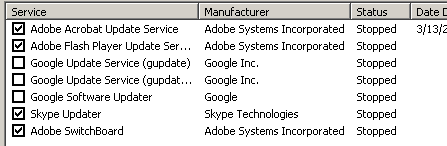
The service i turned off was rMoXK7X.png and turned back on.

KunozSvcs: http://puu.sh/7uXY4.csv

Sisrace: My computer is old, i don't know it has GPU on it.
 

My Computer

Computer type
PC/Desktop
Computer Manufacturer/Model Number
HP
OS
32 bit
CPU
Intel(R) Core(TM)2 CPU 6300 @ 1.86GHz
Motherboard
Intel(R) Core(TM)2 CPU 6300 @ 1.86GHz
Memory
2.00 GB
Graphics Card(s)
Intel(R) G965 Express Chipset Family
Sound Card
(1) High Definition Audio Device (2) USB Audio Device
Back
Top