Solved Huge rebot time

gabe22

New member
Local time
5:44 PM
Messages
146
Hi

My laptop Dell Studio XPS L502 i7 with following config:

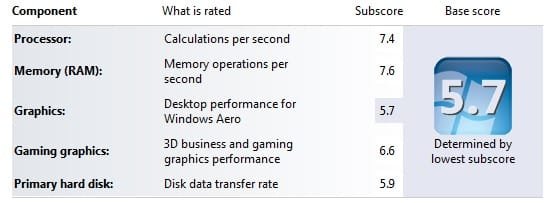
Windows 7 Home Premium 64b (WEI Rating: 5.7)
Ram 8GB
Nvidia GeForce GT 540M
WD HDD 500GB
WD Portable 1TB

And well thats about it.

Been using this system for like 3 years (With about all windows updates installed)

But recently my system takes way too long to reboot, normally it takes like 2min to get to windows login screen And then takes like another 2-3min to load up windows.

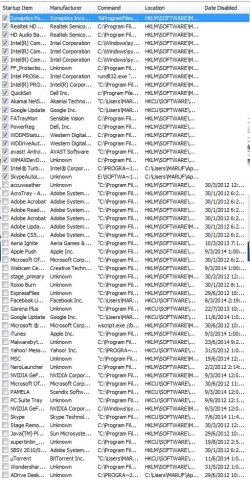
And I only have a few necessary softwares set to run at windows startup, mostly for my usb modem, portable hdd, system requiered stuff etc (please check screenshot) and only one script I added is a custom VB script to run a 2nd skype on windows startup.

Also I'm pretty sure my system isn't infected by any virus or malewares etc as I have latest avast free version and Malwarebytes(premium) but then again I could be, this is just my assumption based on the scan results but the way my system is performing if there is a virus at work, I wouldn't be surprised.

Anyhow I tried Googling and applying this and that solutions/tweaks and so far nothing worked, I would very much appreciate it if anyone can advise possible solution to make my windows faster.

** I don't know if the info I posed is enough, if you need more info about my system .. just ask!

Thanks in advance!
 

Attachments

  • msconfig.jpg
    msconfig.jpg
    65.3 KB · Views: 66
  • wei.jpg
    wei.jpg
    17.4 KB · Views: 68

My Computer

OS
Windows 7 Home Premium, Version 6.1 (Build 7601: Service Pack 1)
Did you intend to include a screenshot and inadvertently forget to?

It would help the diagnostic process if I could see a list of your startup processes.

Open MSConfig (you can do this by pressing the windows key and typing msconfig), navigate to the startup tab and post a screenshot of all the processes there.

Edit: Nevermind. I see the images now.
 
Last edited:

My Computer

Computer type
Laptop
Computer Manufacturer/Model Number
HP
OS
Dual Boot Win 8.1 x64; Win 7 SP1 x64
CPU
i7-3610QM @ 2.3 GHz
Motherboard
Hewlett-Packard 181C (U3E1)
Memory
8 GB Dual-Channel DDR3 @ 798MHz
Graphics Card(s)
Intel HD Graphics 4000
Hard Drives
Hitachi HTS547575A9E384 SCSI Disk Device;
WD Elements 1042 USB Device
Antivirus
Microsoft Security Essentials; Comodo Firewall w/ Defense +
There are two things that come to mind.

avast and Malwarebytes premium shouldn't be running at the same time, under optimal conditions.

Second, can you visit this page: Generate a List of Windows Startup Programs using the Command Line

Follow the steps and then post the startupapps.txt. The snapshot you've posted doesn't list all the processes.
 

My Computer

Computer type
Laptop
Computer Manufacturer/Model Number
HP
OS
Dual Boot Win 8.1 x64; Win 7 SP1 x64
CPU
i7-3610QM @ 2.3 GHz
Motherboard
Hewlett-Packard 181C (U3E1)
Memory
8 GB Dual-Channel DDR3 @ 798MHz
Graphics Card(s)
Intel HD Graphics 4000
Hard Drives
Hitachi HTS547575A9E384 SCSI Disk Device;
WD Elements 1042 USB Device
Antivirus
Microsoft Security Essentials; Comodo Firewall w/ Defense +
Hi and welcome to SevenForums,
The sad thing about your screen shot is it's incomplete and just a portion of what is listed :shock:
FF secure looks Unknown so what is it ?
Avast can very well slow down a system Malwarebytes shouldn't have any problems with it or starting together at startup but Avast it's self has become very bloated most users of Avast have switched to Panda to get away from the bloat,

Either way post the rest of the startup items and your Uninstall a program list that might also be a shocker ;)
Cheers.
 

My Computer

Computer type
PC/Desktop
Computer Manufacturer/Model Number
Custom assembled by me :}
OS
Win-7-Pro64bit 7-H-Prem-64bit
CPU
i7-5930K 2nd i9-9940x both water blocked VRM's too
Motherboard
ASUS SABERTOOTH X99 2nd ASUS x299 Apex
Memory
Trident-z 3200C14 2nd Trident-z 3600C16
Graphics Card(s)
EVGA 1080ti ftw3 2nd Titan Xp both water blocked
Sound Card
Built-in Realtek
Monitor(s) Displays
1-AOC G2460PG 24"G-Sync 144Hz/ 2nd 1-ASUS VG248QE 24" 144Hz
Screen Resolution
1920 x 1080 144Hz
Hard Drives
2-Samsung M.2 Evo & Evo Plus
2-Samsung 850 EVO 500GB SSD's/ 3-2.5 W.D. Black 1tb-&3-1tb/3-3.5 WD Black 1tb hdd's
PSU
EVGA SuperNOVA 1000-P2 2nd 1200-P2
Case
2-Corsair Obsidian Series 450D Black ATX Mid Tower
Cooling
Custom water loops
Keyboard
Logitech G710+/ 2nd Logitech G910
Mouse
2-RedDragon M901 Perdition 16400 dpi Gaming mouse = wired
Internet Speed
Comcast Ping 19ms 89.31mbps download speed 6.12mbps upload
Antivirus
Malwarebytes Pro/ Superantispyware Pro
Browser
FireFox & Pale moon
Other Info
2nd ASUS X299 Apex/Intel i9-9940x with Custom water loop/7H-Prem-x64/Corsair 450D case/Ram Trident-z 3600C16 4x8gb / Samsung970Evo plus 500gb SSD/Dual ssd EZ swap evo/PSU EVGA SuperNova 1200w-P2 80+Platinum/GPU Titan Xp /8-ML-140 on push-pull on 2-280GTX rads
"...avast and Malwarebytes premium shouldn't be running at the same time, under optimal conditions..." a previous poster
Avast free or Avast pay-for has stuff you can live without. Disable, turn off the following: Sandbox, SafeZone, Software Updater, Browser Cleaner, Grime Fighter, SecureLineVPN [unless you're paying for it], AccessAnywhere, Remote Assistance. These you can live without. Also, Avast AntiVirus and Malwarebytes Pro can run together if you keep things lean and green; such as disabling, turning off the abovementioned live-withouts.
 

My Computer

Computer type
PC/Desktop
Computer Manufacturer/Model Number
Antec desktop; Acer Aspire laptops
OS
Windows 7 Professional 64-bit
CPU
Desktop i5; Acers i5 & i7
Memory
desktop 16GB; 1 Acer 8GB & 1 Acer 16GB
Hard Drives
1TB split into 2 equal partitions [OS and data] usable by RJS
Internet Speed
AT&T DSL
Browser
FF, GChrome, msIE
Other Info
Windows 7 Firewall, Emsisoft AM/AV, MSE [scan-only], SpywareBlaster, Ruiware/BillP combine
Slow Boot - what's the problem?

Well I'll just mention that slow boot issues can often be solved using the Event Viewer method shown in the link in this post.

   Note

Important:

Don't forget to create the second custom view as shown under Figure C in the Tech Republic article.

You'll now repeat these steps and create another Custom View, and this time, you'll type 101-110 in the Includes/Excludes Event IDs box and name it Boot Degradation.


Use the Event ID's to look for problems.

101 Application took longer to start
102 Driver took a long time to initialize
103 Service took longer than expected to start up

Check the others too.

Suspect your AV and check for problem services.
 

My Computer

Computer type
Laptop
Computer Manufacturer/Model Number
ASUS
OS
Microsoft Windows 7 Home Premium 64-bit 7601 Multiprocessor Free Service Pack 1
CPU
AMD C-60 APU with Radeon(tm) HD Graphics
Motherboard
ASUSTeK COMPUTER INC. X501U
Memory
4.00 GB
Graphics Card(s)
AMD Radeon HD 6290 Graphics
Sound Card
(1) AMD High Definition Audio Device (2) Realtek High Defi
Screen Resolution
1366 x 768 x 32 bits (4294967296 colors) @ 60 Hz
Hard Drives
Hitachi HTS545050A7E380 SATA Disk Device
Antivirus
Comodo CIS & FW, SecureAplus App Whitelisting, Threatfire
Browser
Cyberfox 64bit, Opera 64bit, Airfox
Other Info
Spy-The-Spy, HitmanPro.Alert, Norton Connect Safe, MJRegWatcher, BitDefender TrafficLight, Voodoo Shield, Zemana AntiMalware
Hi PlatypusKnight & ThrashZone

Thank you both for your quick response.

@ PlatypusKnight, I tried what you suggested by it just displayed a black window for like a sec and then its gone, and no txt file in c drive, however I recreated the screenshot so it has all startup items listed, both active an inactive.

I assume a full log would help more as it would have all details including full names/file paths etc, if the image works then great, if not please advise how do I generate list of windows start up items, tried google search, but no luck, they suggest same command and it does nothing on my system.

"avast and Malwarebytes premium shouldn't be running at the same time, under optimal conditions."
* I don't know if they can cause performance issues but for the information, I don't have both running at the same time(only avast is set to run auto with startup), its just that I have both installed, as I've noticed sometimes avast is unable to detect some issues, but then Malwarebytes comes handy

@ ThrashZone,
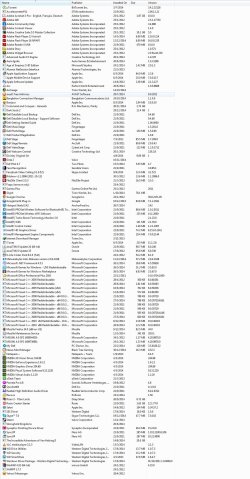
I added screenshot of my systems uninstall list .. full screenshot.

"FF secure looks Unknown so what is it ?"
* Its Free Fall Protection software that came with the laptop(from dell I assume) when I purchased it years back.

As for Avast, you're right on that but I have been using avast for years and honestly my pc is never been slower, like ever.

Anyhow thanks again guys .. will check back after work.

http://www.sevenforums.com/members/thrashzone.html
 

Attachments

  • uninstall.jpg
    uninstall.jpg
    338.2 KB · Views: 12
  • msconfig.jpg
    msconfig.jpg
    172.7 KB · Views: 4

My Computer

OS
Windows 7 Home Premium, Version 6.1 (Build 7601: Service Pack 1)
Avast free or Avast pay-for has stuff you can live without. Disable, turn off the following: Sandbox, SafeZone, Software Updater, Browser Cleaner, Grime Fighter, SecureLineVPN [unless you're paying for it], AccessAnywhere, Remote Assistance. These you can live without. Also, Avast AntiVirus and Malwarebytes Pro can run together if you keep things lean and green; such as disabling, turning off the abovementioned live-withouts.

Roland is absolutely right, however unless you messed with the settings lately, rather than have you fumble around with something you're already comfortable with. . . I'll just have you work with what you've got. I personally uninstall AVAST whenever I come across it, and I don't like it on my system --it's too sluggish--but to each his own.

I didn't see anything unusual in your program installs, except I notice that you installed Nexus Mod on the 30th and Dark Souls relatively recently. Did the problems start before or after that? I recognize FF Secure as a Dell program.

@ PlatypusKnight, I tried what you suggested by it just displayed a black window for like a sec and then its gone, and no txt file in c drive, however I recreated the screenshot so it has all startup items listed, both active an inactive.

I assume a full log would help more as it would have all details including full names/file paths etc, if the image works then great, if not please advise how do I generate list of windows start up items, tried google search, but no luck, they suggest same command and it does nothing on my system.

Don't worry about it. Microsoft hardened the OS recently, so that command would require you to run the CMD window as an administrator. Not a big deal. We can do the same thing using a program with a GUI and eliminate some other issues in the same stroke. Here's what I'm going to suggest:

Download and install two programs.

1. Startup Delayer (after install this will generate a startup log and this is easier than initiating you into Autoruns or something like that)

2. CCleaner

Download Startup Delayer Standard from here. Please watch out for any piggyback installs. Only install Startup Delayer, no toolbars, no Mcafee. Just Startup Delayer.

Download and install CCleaner from here. Choose the download from Piriform link.
CCleaner doesn't usually come with piggy-backs but same thing. Install no piggybacks. Just CCleaner.

I'd like you to Run CCleaner and ensure you check the following boxes:


  • Everything under Internet Explorer


  • Recycle Bin
  • Temporary Files
  • Memory Dumps
  • Chkdsk File Fragments


  • Old Prefetch Data.

On the [Applications] tab check every box under Chrome (in actuality you can just click the Chrome icon and it will check all the boxes underneath).

(You're going to lose all your web log-ons, but Chrome usually saves these to the cloud if you sign in. If you're already signed in, the best way to do this is uninstall Chrome before you run CCleaner. Then run CCleaner, and reinstall Chrome afterwards. You can use Comodo Dragon or Firefox to access the forums while we work through your issue.)

Uncheck ALL other items.


After this, I'd like you to restart your computer. Then install Startup Delayer.

I don't want this post to get too long, or for you to get confused, so let me know once you've gotten this far. Additionally, it's likely CCleaner will resolve your issue, without us having to parse your Startup logs, or use the method suggested by @Callender which will work, as it is very thorough, but is difficult for a beginner.
 

My Computer

Computer type
Laptop
Computer Manufacturer/Model Number
HP
OS
Dual Boot Win 8.1 x64; Win 7 SP1 x64
CPU
i7-3610QM @ 2.3 GHz
Motherboard
Hewlett-Packard 181C (U3E1)
Memory
8 GB Dual-Channel DDR3 @ 798MHz
Graphics Card(s)
Intel HD Graphics 4000
Hard Drives
Hitachi HTS547575A9E384 SCSI Disk Device;
WD Elements 1042 USB Device
Antivirus
Microsoft Security Essentials; Comodo Firewall w/ Defense +
I'll just say UTorrent is also relatively new about 30 days :/
 

My Computer

Computer type
PC/Desktop
Computer Manufacturer/Model Number
Custom assembled by me :}
OS
Win-7-Pro64bit 7-H-Prem-64bit
CPU
i7-5930K 2nd i9-9940x both water blocked VRM's too
Motherboard
ASUS SABERTOOTH X99 2nd ASUS x299 Apex
Memory
Trident-z 3200C14 2nd Trident-z 3600C16
Graphics Card(s)
EVGA 1080ti ftw3 2nd Titan Xp both water blocked
Sound Card
Built-in Realtek
Monitor(s) Displays
1-AOC G2460PG 24"G-Sync 144Hz/ 2nd 1-ASUS VG248QE 24" 144Hz
Screen Resolution
1920 x 1080 144Hz
Hard Drives
2-Samsung M.2 Evo & Evo Plus
2-Samsung 850 EVO 500GB SSD's/ 3-2.5 W.D. Black 1tb-&3-1tb/3-3.5 WD Black 1tb hdd's
PSU
EVGA SuperNOVA 1000-P2 2nd 1200-P2
Case
2-Corsair Obsidian Series 450D Black ATX Mid Tower
Cooling
Custom water loops
Keyboard
Logitech G710+/ 2nd Logitech G910
Mouse
2-RedDragon M901 Perdition 16400 dpi Gaming mouse = wired
Internet Speed
Comcast Ping 19ms 89.31mbps download speed 6.12mbps upload
Antivirus
Malwarebytes Pro/ Superantispyware Pro
Browser
FireFox & Pale moon
Other Info
2nd ASUS X299 Apex/Intel i9-9940x with Custom water loop/7H-Prem-x64/Corsair 450D case/Ram Trident-z 3600C16 4x8gb / Samsung970Evo plus 500gb SSD/Dual ssd EZ swap evo/PSU EVGA SuperNova 1200w-P2 80+Platinum/GPU Titan Xp /8-ML-140 on push-pull on 2-280GTX rads
Hi PlatypusKnight

First of all thank you for taking the time to write down such long post to help me, Thanks dude!
Now I did what you suggested, instaleld cccleaner and followed the steps and after restart it seems system is a bit faster but still its over 3min or so ..

Also I installed startup delayer, please advise.

@ Callender
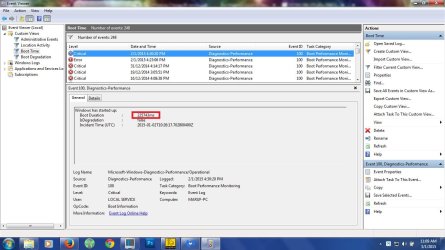
Thank you for your solution, I tried following the given steps and .. please check screenshots bellow:

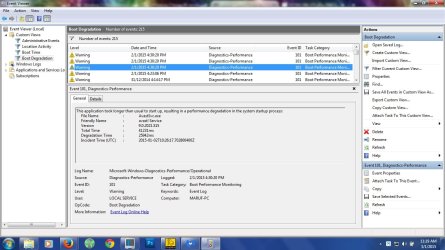
Here is the contents from boot time details section:

- EventData

BootTsVersion 2

BootStartTime 2015-01-02T10:26:17.702800400Z

BootEndTime 2015-01-02T10:30:16.782383000Z

SystemBootInstance 783

UserBootInstance 528

BootTime 225743

MainPathBootTime 111382

BootKernelInitTime 26

BootDriverInitTime 4322

BootDevicesInitTime 1623

BootPrefetchInitTime 0

BootPrefetchBytes 0

BootAutoChkTime 0

BootSmssInitTime 24366

BootCriticalServicesInitTime 5215

BootUserProfileProcessingTime 3500

BootMachineProfileProcessingTime 1448

BootExplorerInitTime 59157

BootNumStartupApps 20

BootPostBootTime 114361

BootIsRebootAfterInstall false

BootRootCauseStepImprovementBits 0

BootRootCauseGradualImprovementBits 0

BootRootCauseStepDegradationBits 4194304

BootRootCauseGradualDegradationBits 4194304

BootIsDegradation false

BootIsStepDegradation false

BootIsGradualDegradation false

BootImprovementDelta 0

BootDegradationDelta 0

BootIsRootCauseIdentified true

OSLoaderDuration 2407

BootPNPInitStartTimeMS 26

BootPNPInitDuration 4550

OtherKernelInitDuration 633

SystemPNPInitStartTimeMS 5062

SystemPNPInitDuration 1395

SessionInitStartTimeMS 6579

Session0InitDuration 14823

Session1InitDuration 665

SessionInitOtherDuration 8877

WinLogonStartTimeMS 30946

OtherLogonInitActivityDuration 16329

UserLogonWaitDuration 13337

Honestly I cant make heads or tails out of this, I do understand that it shows my systems boot time and the degradation shows individual programs etc times but I clearly have no clue how to fix something, please advise.

Also can you please advise how do i generate a full boot log with all files necessary to evaluate whats causing the issue and find possible fix?

Thanks!
 

Attachments

  • boot time.jpg
    boot time.jpg
    117.8 KB · Views: 1
  • degradation.jpg
    degradation.jpg
    119.7 KB · Views: 2

My Computer

OS
Windows 7 Home Premium, Version 6.1 (Build 7601: Service Pack 1)
Oh and also couple of things I should probably mention, I download lots of torrents my download/temp directory as of now is assigned to C(system) .. could this have an empact? although I think have sufficient space (228gb drive, 68gb free right now), could this be part of the issue?

Sometimes when I restart my system, it goes goes to shutting down windows screen and ... it just stays there ... for 5 even sometimes 10minutes .. no idea why though and interesting thing is ... even sometimes if I shut down windows right after starting, it still happens, I'm no techie but I assume theme issues are connected? or not? anyhow perhaps these info would help determining whats causing the issue.
 

My Computer

OS
Windows 7 Home Premium, Version 6.1 (Build 7601: Service Pack 1)
Just now i tried check disk on C Drive and it wouldn't let me so i scheduled and restarted the system and it wouldn't start at all .. tried restarting, system error recovery etc and nothing worked so i thought to run a system diagnostic test "WCMch Test" and it showed following error
Error 0123

Memory Integrity Test Failed

Error Code 2000-0123

after this system still wont start, anyhow after a few attempts it started, afterwards i googled about this error and it seems many dell users like me suffered from this issue, most results suggests its a hardware issue and to be specific its ether faulty ram or ram slot/faulty motherboard issue but the strange thing is when i ran the test it was displaying 8 cpu with their addresses and on all memory test cpu 2 failed so i'm wondering if this is actually a software issue or hardware and if hardware, is it the processor or ram or the motherboard?
 

My Computer

OS
Windows 7 Home Premium, Version 6.1 (Build 7601: Service Pack 1)
So your system won't start at all now?
 

My Computer

Computer type
Laptop
Computer Manufacturer/Model Number
HP
OS
Dual Boot Win 8.1 x64; Win 7 SP1 x64
CPU
i7-3610QM @ 2.3 GHz
Motherboard
Hewlett-Packard 181C (U3E1)
Memory
8 GB Dual-Channel DDR3 @ 798MHz
Graphics Card(s)
Intel HD Graphics 4000
Hard Drives
Hitachi HTS547575A9E384 SCSI Disk Device;
WD Elements 1042 USB Device
Antivirus
Microsoft Security Essentials; Comodo Firewall w/ Defense +
it wasn't but then somehow ... it started again(no idea how)
 

My Computer

OS
Windows 7 Home Premium, Version 6.1 (Build 7601: Service Pack 1)
From going over your screenshots it seems that Avast maybe at least one culprit (although those event viewer issues don't mean anything, they're calibrated for a much more powerful computer than either of us are ever likely to own). While it's true that Avast is causing Windows 7 to start slower than normal, that might be typical (and thus normal) for Avast. Avast may be doing precisely what it's supposed to be doing in other words but Event Viewer views it as degradation.

Can you just confirm for me that you ran CCleaner and followed the steps I outlined above?
 

My Computer

Computer type
Laptop
Computer Manufacturer/Model Number
HP
OS
Dual Boot Win 8.1 x64; Win 7 SP1 x64
CPU
i7-3610QM @ 2.3 GHz
Motherboard
Hewlett-Packard 181C (U3E1)
Memory
8 GB Dual-Channel DDR3 @ 798MHz
Graphics Card(s)
Intel HD Graphics 4000
Hard Drives
Hitachi HTS547575A9E384 SCSI Disk Device;
WD Elements 1042 USB Device
Antivirus
Microsoft Security Essentials; Comodo Firewall w/ Defense +
yes I did and it improved my systems reboot time a bit .. but its much slower, but to answer your question yes it works, total clean removed about 2.5gb contents, so I guess thats good.

but now i'm confused about the random "no boot stats" along with super slow reboot
 

My Computer

OS
Windows 7 Home Premium, Version 6.1 (Build 7601: Service Pack 1)
You download allot of torrents but it shows only being installed a month ago :/

Timing wise is there a relationship with your issue ?

Torrents are great way to pick up more than what you planned on ;)
 

My Computer

Computer type
PC/Desktop
Computer Manufacturer/Model Number
Custom assembled by me :}
OS
Win-7-Pro64bit 7-H-Prem-64bit
CPU
i7-5930K 2nd i9-9940x both water blocked VRM's too
Motherboard
ASUS SABERTOOTH X99 2nd ASUS x299 Apex
Memory
Trident-z 3200C14 2nd Trident-z 3600C16
Graphics Card(s)
EVGA 1080ti ftw3 2nd Titan Xp both water blocked
Sound Card
Built-in Realtek
Monitor(s) Displays
1-AOC G2460PG 24"G-Sync 144Hz/ 2nd 1-ASUS VG248QE 24" 144Hz
Screen Resolution
1920 x 1080 144Hz
Hard Drives
2-Samsung M.2 Evo & Evo Plus
2-Samsung 850 EVO 500GB SSD's/ 3-2.5 W.D. Black 1tb-&3-1tb/3-3.5 WD Black 1tb hdd's
PSU
EVGA SuperNOVA 1000-P2 2nd 1200-P2
Case
2-Corsair Obsidian Series 450D Black ATX Mid Tower
Cooling
Custom water loops
Keyboard
Logitech G710+/ 2nd Logitech G910
Mouse
2-RedDragon M901 Perdition 16400 dpi Gaming mouse = wired
Internet Speed
Comcast Ping 19ms 89.31mbps download speed 6.12mbps upload
Antivirus
Malwarebytes Pro/ Superantispyware Pro
Browser
FireFox & Pale moon
Other Info
2nd ASUS X299 Apex/Intel i9-9940x with Custom water loop/7H-Prem-x64/Corsair 450D case/Ram Trident-z 3600C16 4x8gb / Samsung970Evo plus 500gb SSD/Dual ssd EZ swap evo/PSU EVGA SuperNova 1200w-P2 80+Platinum/GPU Titan Xp /8-ML-140 on push-pull on 2-280GTX rads
Avast

Hi PlatypusKnight

First of all thank you for taking the time to write down such long post to help me, Thanks dude!
Now I did what you suggested, instaleld cccleaner and followed the steps and after restart it seems system is a bit faster but still its over 3min or so ..

Also I installed startup delayer, please advise.

@ Callender
Thank you for your solution, I tried following the given steps and .. please check screenshots bellow:

Here is the contents from boot time details section:

- EventData

BootTsVersion 2

BootStartTime 2015-01-02T10:26:17.702800400Z

BootEndTime 2015-01-02T10:30:16.782383000Z

SystemBootInstance 783

UserBootInstance 528

BootTime 225743

MainPathBootTime 111382

BootKernelInitTime 26

BootDriverInitTime 4322

BootDevicesInitTime 1623

BootPrefetchInitTime 0

BootPrefetchBytes 0

BootAutoChkTime 0

BootSmssInitTime 24366

BootCriticalServicesInitTime 5215

BootUserProfileProcessingTime 3500

BootMachineProfileProcessingTime 1448

BootExplorerInitTime 59157

BootNumStartupApps 20

BootPostBootTime 114361

BootIsRebootAfterInstall false

BootRootCauseStepImprovementBits 0

BootRootCauseGradualImprovementBits 0

BootRootCauseStepDegradationBits 4194304

BootRootCauseGradualDegradationBits 4194304

BootIsDegradation false

BootIsStepDegradation false

BootIsGradualDegradation false

BootImprovementDelta 0

BootDegradationDelta 0

BootIsRootCauseIdentified true

OSLoaderDuration 2407

BootPNPInitStartTimeMS 26

BootPNPInitDuration 4550

OtherKernelInitDuration 633

SystemPNPInitStartTimeMS 5062

SystemPNPInitDuration 1395

SessionInitStartTimeMS 6579

Session0InitDuration 14823

Session1InitDuration 665

SessionInitOtherDuration 8877

WinLogonStartTimeMS 30946

OtherLogonInitActivityDuration 16329

UserLogonWaitDuration 13337

Honestly I cant make heads or tails out of this, I do understand that it shows my systems boot time and the degradation shows individual programs etc times but I clearly have no clue how to fix something, please advise.

Also can you please advise how do i generate a full boot log with all files necessary to evaluate whats causing the issue and find possible fix?

Thanks!

Full boot log? I've never needed to do that so sorry but I'd only be guessing.

What happens on a cold boot rather than a reboot? Does the initial boot take a long time? If it doesn't - ignore anything I've written below!

Avast Service takes 41 seconds to load - that's quite long compared to security related services on my machine that take betwen 7 and 13 seconds to load.

In Boot Degradation check the Event ID column and look for anything with a higher value in milliseconds than Avast. Let us know if you find anything.

I'm no expert on Avast so proceed only with care and perhaps wait for advice from other members.

For test purposes only - switch off your router and do not connect to the internet without an Antivirus program running.

As far as I know you can click on the Avast icon in the system tray and choose to disable permanently.

Turn Off (Pause, Disable) Shields in Avast Antivirus 2015 | getavast.net - disable all shields permanently.

It should then be possible to stop the Avast service:

Start > Run then type:

services.msc

Press enter.

Scroll down the list and find the Avast service and right click then choose to stop the service. Then set it's startup type to disabled.

Reboot. Note the time taken.

Undo all of the above steps in reverse order to re-enable Avast and switch on your router. Then reboot.
 

My Computer

Computer type
Laptop
Computer Manufacturer/Model Number
ASUS
OS
Microsoft Windows 7 Home Premium 64-bit 7601 Multiprocessor Free Service Pack 1
CPU
AMD C-60 APU with Radeon(tm) HD Graphics
Motherboard
ASUSTeK COMPUTER INC. X501U
Memory
4.00 GB
Graphics Card(s)
AMD Radeon HD 6290 Graphics
Sound Card
(1) AMD High Definition Audio Device (2) Realtek High Defi
Screen Resolution
1366 x 768 x 32 bits (4294967296 colors) @ 60 Hz
Hard Drives
Hitachi HTS545050A7E380 SATA Disk Device
Antivirus
Comodo CIS & FW, SecureAplus App Whitelisting, Threatfire
Browser
Cyberfox 64bit, Opera 64bit, Airfox
Other Info
Spy-The-Spy, HitmanPro.Alert, Norton Connect Safe, MJRegWatcher, BitDefender TrafficLight, Voodoo Shield, Zemana AntiMalware
@ ThrashZone

"You download allot of torrents but it shows only being installed a month ago :/"
* That shouldn't be right because I installed utorrent like years ago or so ... I rarely uninstall it, perhaps the date you saw is its update date maybe?


Timing wise is there a relationship with your issue ?"
* I'm not absolutely sure but I think not, this issue is been happening for a while now (I didn't give it much thought cause usually I don't turn off the system unless some software or windows updates forces a restart.) but now with the memory issue, I would like to get this fixed or if its hardware related, then possibly find a solution to the issue.

"Torrents are great way to pick up more than what you planned on ;)"
I know that but I mostly download serials, only the mkv/avi etc files, I try not to download unnecessary files etc but then again it could be the issue, is there any way to determine?


@ Callender

"What happens on a cold boot rather than a reboot? Does the initial boot take a long time?"
It still takes about the same time with random "no-reboot" issue.

About your avast suggestion, I will do the suggested test but I may have another issue, I restarted my system about 3 times today after creating the new custom event viewers but when I click "Boot Time" or "Boot Degradation", it only displays events from yesterday evening, even though I restarted my system like 5/6 times since then ...
Is this an issue or could it be that windows generates these info after specific time period/day basis rather than boot/event basis?

Also any idea if this could be related to hardware, based on the error I found on my memory test+google search results with the given error code?

Thanks again for the help guys!
 

My Computer

OS
Windows 7 Home Premium, Version 6.1 (Build 7601: Service Pack 1)
Could just be Avast scanning these probably large files :/
Review Jacee’s instructions to run Adwcleaner here post #7,
Ignore the title of the thread,
http://www.sevenforums.com/system-security/316404-instant-savings-app.html
Screen shot of the download button to use for Adwcleaner
You can use these free tools to see if they find anything,
Manually Update them before running full scans,
Try not to use your computer while the scans are running, (one at a time of course).
See this tutorial on how to download and run Malwarebytes,
http://www.sevenforums.com/tutorials/338716-malwarebytes-anti-malware-free.html
Also use the Custom scan option not the Threat scan,

Please Do Not clean/ Delete or Remove Any detections before posting the scan results first before review especially Malwarebytes,
http://www.malwarebytes.org/products/malwarebytes_free
SAS is safe to remove anything it finds ;)
http://www.superantispyware.com/?tag=SUPERANTISPYWARE
This one is the longest up to 4 hours, the others are only about 45 minutes,
http://www.microsoft.com/security/scanner/en-us/default.aspx
 

My Computer

Computer type
PC/Desktop
Computer Manufacturer/Model Number
Custom assembled by me :}
OS
Win-7-Pro64bit 7-H-Prem-64bit
CPU
i7-5930K 2nd i9-9940x both water blocked VRM's too
Motherboard
ASUS SABERTOOTH X99 2nd ASUS x299 Apex
Memory
Trident-z 3200C14 2nd Trident-z 3600C16
Graphics Card(s)
EVGA 1080ti ftw3 2nd Titan Xp both water blocked
Sound Card
Built-in Realtek
Monitor(s) Displays
1-AOC G2460PG 24"G-Sync 144Hz/ 2nd 1-ASUS VG248QE 24" 144Hz
Screen Resolution
1920 x 1080 144Hz
Hard Drives
2-Samsung M.2 Evo & Evo Plus
2-Samsung 850 EVO 500GB SSD's/ 3-2.5 W.D. Black 1tb-&3-1tb/3-3.5 WD Black 1tb hdd's
PSU
EVGA SuperNOVA 1000-P2 2nd 1200-P2
Case
2-Corsair Obsidian Series 450D Black ATX Mid Tower
Cooling
Custom water loops
Keyboard
Logitech G710+/ 2nd Logitech G910
Mouse
2-RedDragon M901 Perdition 16400 dpi Gaming mouse = wired
Internet Speed
Comcast Ping 19ms 89.31mbps download speed 6.12mbps upload
Antivirus
Malwarebytes Pro/ Superantispyware Pro
Browser
FireFox & Pale moon
Other Info
2nd ASUS X299 Apex/Intel i9-9940x with Custom water loop/7H-Prem-x64/Corsair 450D case/Ram Trident-z 3600C16 4x8gb / Samsung970Evo plus 500gb SSD/Dual ssd EZ swap evo/PSU EVGA SuperNova 1200w-P2 80+Platinum/GPU Titan Xp /8-ML-140 on push-pull on 2-280GTX rads
Back
Top