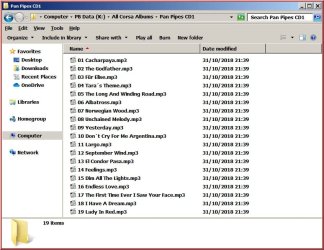
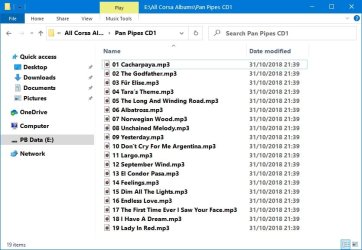
Roderunner Exterminator Guru Gold Member VIP Local time 11:59 PM Messages 2,362 Location Scotland Jun 1, 2020 #1 Hi folks, the attached images are from Win 7 & Win !0. How if possible can I get Win 10 to look more like Win 7 especially the status bar at the bottom of the image as in Win 7. My Computer Computer Manufacturer/Model NumberLook in my Signature.OSWin7 H.Prem. 32bit+SP1
Hi folks, the attached images are from Win 7 & Win !0. How if possible can I get Win 10 to look more like Win 7 especially the status bar at the bottom of the image as in Win 7.
I iko22 New member Pro User VIP Local time 11:59 PM Messages 2,031 Jun 1, 2020 #2 There are several customisations you can achieve with OldNew Explorer. How to Make Windows 10’s File Explorer Look Like Windows 7’s Windows Explorer | HowToGeek My Computer Computer typePC/DesktopOSWindows 7 x64, Vista x64, 8.1 smartphoneCPUIntel E8400 65W 64-bitMotherboardGigabyte EP45-UD3LRMemoryDDR2 2 x 2GB, 1GB x 2Graphics Card(s)XFX Radeon HD5750Sound CardAMD High Definition Audio; Realtek High Definition AudioMonitor(s) Displaysiiyama prolite X2377HDSScreen Resolution1920 x 1080Hard Drives500GB 7200 rpm Seagate ST3500413AS 16MB, 500GB 5400 rpm Toshiba MQ02ABF050H 32MB, 200GB 7200 rpm Seagate ST3200820AS 8MB, 2TB 7200 rpm Western Digital WD20EZRX 64MBPSUEnermax Liberty ModularCaseAntec P193 Midi TowerKeyboardMionix ZIBAL 60MouseRazer USB 2.0 Diamondback Mouse or Huion Graphics TabletBrowserInternet Explorer, Lunascape, Firefox, Opera, Avast Safezone
There are several customisations you can achieve with OldNew Explorer. How to Make Windows 10’s File Explorer Look Like Windows 7’s Windows Explorer | HowToGeek
Roderunner Exterminator Guru Gold Member VIP Thread Starter Local time 11:59 PM Messages 2,362 Location Scotland Jun 1, 2020 #3 Only read link data, wil use it later. My Computer Computer Manufacturer/Model NumberLook in my Signature.OSWin7 H.Prem. 32bit+SP1