
I want to delete my XP partition on a dual boot system

Lessthantito

New member
Local time
7:25 PM
Messages
8
I want to delete my XP partition and reclaim the space for my Win 7 partition that I already have installed and I want to move my 7 partition to the front of the drive. My PC started out with XP and I installed 7 in a separate partition, when I boot up 7 is the OS selected to boot.
http://farm5.static.flickr.com/4013/4480276175_78d683216c_b.jpg
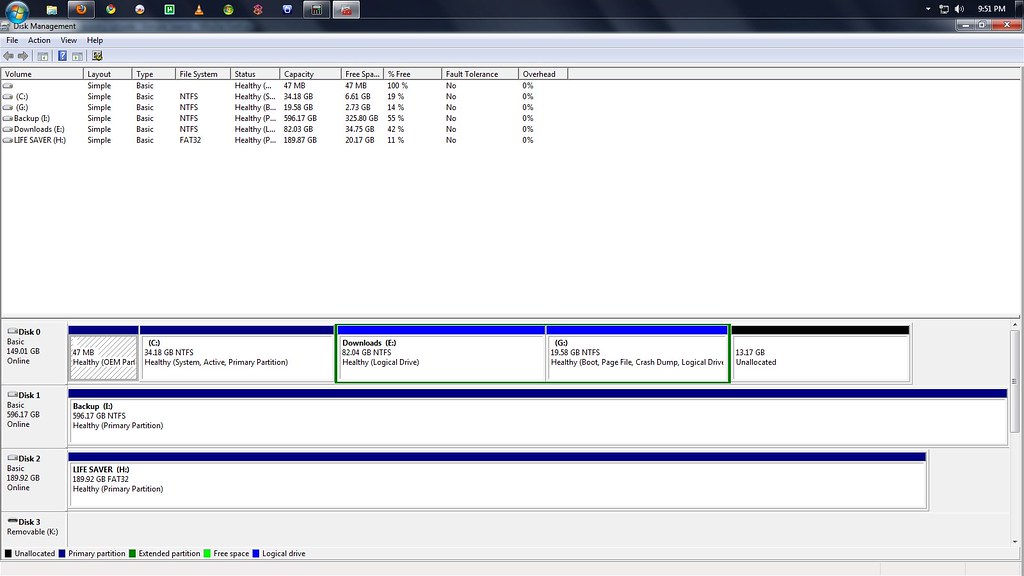
here is a screen shot of my drive broken down C:XP;E:Media;G:Win7;
I want to delete C: and move G: to the front
will I have to move any Boot info from the XP partition to the 7 part and if so what files do I need to copy I looked in the 7 root folder and I did not see any boot files/folders but I did on the XP part
 

My Computer My Computer

At a glance

Windows 7Pentium 4GBNvidia 7600 GS
Computer Manufacturer/Model Number
Dell
OS
Windows 7
CPU
Pentium 4
Memory
GB
Graphics Card(s)
Nvidia 7600 GS
Sound Card
Creative Audigy 2
Monitor(s) Displays
20" dell
Screen Resolution
1600x900
Hard Drives
WD 640 sata green drive
WD 250 sata
Use free Partition Wizard bootable CD. Back up your files and a Win7 Backup Image as copying operations can fail. You will also need your Win7 DVD or Repair CD.

Boot PW CD, allow files to (strangely) load , select 1 for Screen Res, rightclick C: to Delete, OK.

Next right click G: partition, select Modify>Set to Active, OK.

Again right click G: partition, select Copy, follow prompts to copy G: into the space where C: was, click OK. Verify G: is still marked Active. Apply all steps.

System MBR must be recovered into Win7 now by booting Win7 DVD Repair console or Repair CD, clicking through to Recovery Tools list to run Startup Repair up to 3 separate times with reboots as it will attempt to repair and finally write the MBR to Win7.

Others may suggest using imaging software to copy over the partition which is another option.
 
I want to delete my XP partition and reclaim the space for my Win 7 partition that I already have installed and I want to move my 7 partition to the front of the drive. My PC started out with XP and I installed 7 in a separate partition, when I boot up 7 is the OS selected to boot.
http://farm5.static.flickr.com/4013/4480276175_78d683216c_b.jpg
here is a screen shot of my drive broken down C:XP;E:Media;G:Win7;
I want to delete C: and move G: to the front
will I have to move any Boot info from the XP partition to the 7 part and if so what files do I need to copy I looked in the 7 root folder and I did not see any boot files/folders but I did on the XP part

Run DISKMGMT.MSC and using the snipping tool, take a snapshot of Disk Managment's dissplay. Then upload the pic in your next post. Before I make any suggestions, I need to be 100% sure of how your disk is presently partitioned.
 

My Computer My Computer

At a glance

MS Windows 7 Ultimate SP1 64-bitAMD A10-4600M6.00 GB Dual-Channel DDR3 @ 798MHz (11-11-12-28)AMD Radeon HD 7660G
Computer Manufacturer/Model Number
Toshiba Satellite S875D-S7239 laptop
OS
MS Windows 7 Ultimate SP1 64-bit
CPU
AMD A10-4600M
Motherboard
AMD Pumori (Socket FT1)
Memory
6.00 GB Dual-Channel DDR3 @ 798MHz (11-11-12-28)
Graphics Card(s)
AMD Radeon HD 7660G
Sound Card
High Definition Audio Device
Monitor(s) Displays
Generic PnP Monitor (1600x900@60Hz)
Screen Resolution
1600x900@60Hz
Hard Drives
SSD 119GB Corsair CSSD-V128GB2 ATA Device
Keyboard
Standard PS/2 Keyboard
Mouse
HP Wireless Optical Mobile Mouse Model FHA-3410
Internet Speed
What the local pub, local coffee shop offers.
Other Info
Optical Drive:MATSHITA BD-CMB UJ160B ATA Device


Also have an Asus ha1002xp netbook with Win 7 Ultimate installed.
Copy the BOOT folder and bootmgr to your 7 partition, before you move anything.
When you boot in 7, is the 7 partition C: ? (can be another letter if you installed from within XP)

Or , in win 7 run a cmd as admin and type bcdedit, screenshot of that would be fine.
 

My Computer My Computer

At a glance

WIN 7 x64
OS
WIN 7 x64
It isn't necessary to copy the boot files which will be for XP-Win7 dual boot.

Startup Repair is fully automated with all of the commands to recover the MBR into Win7 correctly, if run at least three separate times with reboots. The only way it wouldn't work is if the partition is not marked active.
 
<tito,

In case you don't see bootmgr, the reason is this is a system, hidden, read-only file in the root directory of the Win7 system partition.

the \boot directory is also directly under the root.
 

Attachments

  • bootmgr location.png
    bootmgr location.png
    9.2 KB · Views: 50

My Computer My Computer

At a glance

MS Windows 7 Ultimate SP1 64-bitAMD A10-4600M6.00 GB Dual-Channel DDR3 @ 798MHz (11-11-12-28)AMD Radeon HD 7660G
Computer Manufacturer/Model Number
Toshiba Satellite S875D-S7239 laptop
OS
MS Windows 7 Ultimate SP1 64-bit
CPU
AMD A10-4600M
Motherboard
AMD Pumori (Socket FT1)
Memory
6.00 GB Dual-Channel DDR3 @ 798MHz (11-11-12-28)
Graphics Card(s)
AMD Radeon HD 7660G
Sound Card
High Definition Audio Device
Monitor(s) Displays
Generic PnP Monitor (1600x900@60Hz)
Screen Resolution
1600x900@60Hz
Hard Drives
SSD 119GB Corsair CSSD-V128GB2 ATA Device
Keyboard
Standard PS/2 Keyboard
Mouse
HP Wireless Optical Mobile Mouse Model FHA-3410
Internet Speed
What the local pub, local coffee shop offers.
Other Info
Optical Drive:MATSHITA BD-CMB UJ160B ATA Device


Also have an Asus ha1002xp netbook with Win 7 Ultimate installed.
Do I need to change my file view options before I try and find DISKMGMT.MSC and can't I just printscreen to get a pic of the drive info?
 

My Computer My Computer

At a glance

Windows 7Pentium 4GBNvidia 7600 GS
Computer Manufacturer/Model Number
Dell
OS
Windows 7
CPU
Pentium 4
Memory
GB
Graphics Card(s)
Nvidia 7600 GS
Sound Card
Creative Audigy 2
Monitor(s) Displays
20" dell
Screen Resolution
1600x900
Hard Drives
WD 640 sata green drive
WD 250 sata
Nope, just type it into the start menu and press enter.
 

My Computer My Computer

At a glance

Windows 7 Professional x64Intel i7 2600K OC'd @ 4620 MHz16GB GSkill Sniper 2133 Mhz (4x4GB)EVGA GeForce GTX 480 SuperClocked+
Computer Manufacturer/Model Number
Custom
OS
Windows 7 Professional x64
CPU
Intel i7 2600K OC'd @ 4620 MHz
Motherboard
Asus P8Z68-V Pro
Memory
16GB GSkill Sniper 2133 Mhz (4x4GB)
Graphics Card(s)
EVGA GeForce GTX 480 SuperClocked+
Sound Card
Realtek High Definition Audio
Monitor(s) Displays
2x Acer S273HLbmii 27"
Screen Resolution
2 x 1920x1080
Hard Drives
64GB Crucial M4 SSD

Storage: Hitachi 1TB 5400RPM, Samsung 1.5TB 5400RPM
PSU
Corsair HW Series 750w (modular)
Case
Cooler Master HAF 932 Advanced Blue Edition
Cooling
CM Hyper 212+ CPU cooler, 3x 230mm + 1x 140mm case fans
Keyboard
Logitech MK320 (wireless)
Mouse
Logitech MK320 (wireless)
Internet Speed
30 Mb/s : 2 Mb/s
here is a screenshot of my partitions. Recently my XP has been crashing for no reason and I wanted to reinstall it but I don't want to format and all and then not be able to boot into Win7 because it's my main OS I only use XP for my Home surveillance setup my video card is incompatible with Win7

4501097295_bd2fa555d1_b.jpg
 

My Computer My Computer

At a glance

Windows 7Pentium 4GBNvidia 7600 GS
Computer Manufacturer/Model Number
Dell
OS
Windows 7
CPU
Pentium 4
Memory
GB
Graphics Card(s)
Nvidia 7600 GS
Sound Card
Creative Audigy 2
Monitor(s) Displays
20" dell
Screen Resolution
1600x900
Hard Drives
WD 640 sata green drive
WD 250 sata
The problem is that G: Windows 7 is Logical and will need to be converted to Primary before it can be marked active to recover the MBR into it from XP and copy it into first part of HD.

To achieve this, back up files, boot free Partition Wizard CD, select 1 for screen resolution, rightclick XP partition to Delete, OK. I would also rightclick OEM partition to Delete as well.

Next rightclick (extended) Logical partition to Modify>Convert to Primary, OK. Then rightclick Win7 partition to Modify>Set to Active, OK.

Next rightclick Win7>Copy to new Unallocated space in first part of HD, OK.

Confirm Copied first partition is now marked Active. Rightclick old Win7 partition>Modify>set to inactive, OK. Apply all steps.

Now boot Win7 DVD Repair console or Repair CD, click through to Recovery Tools list to run Startup Repair up to 3 separate times with reboots as Win7 will write the MBR to new first partition. After Win7 starts up, confirm performance and then you can delete old Win7.
 
where can I get Free Partition Wizard CD or ISO to burn to CD?
 

My Computer My Computer

At a glance

Windows 7Pentium 4GBNvidia 7600 GS
Computer Manufacturer/Model Number
Dell
OS
Windows 7
CPU
Pentium 4
Memory
GB
Graphics Card(s)
Nvidia 7600 GS
Sound Card
Creative Audigy 2
Monitor(s) Displays
20" dell
Screen Resolution
1600x900
Hard Drives
WD 640 sata green drive
WD 250 sata

My Computer My Computer

At a glance

Win7 Enterprise, Win7 x86 (Ult 7600), Win7 x6...AMD fx8350 4ghz, AMD-32 2400mhz, AMD-64 3200m...2gb, 4gb on the Ult 7600, 4gb on Technet RTM,...Draw my own Graphics, several nVidia cards
Computer type
PC/Desktop
Computer Manufacturer/Model Number
Built them myself, Science Experiments !
OS
Win7 Enterprise, Win7 x86 (Ult 7600), Win7 x64 Ult 7600, TechNet RTM on AMD x64 (2.8Ghz)
CPU
AMD fx8350 4ghz, AMD-32 2400mhz, AMD-64 3200mhz, AMDx64 2.8G
Motherboard
SIS 755, ECS-K8M890M-M (Ult 7600), GigaByte & others
Memory
2gb, 4gb on the Ult 7600, 4gb on Technet RTM, 32gb on FX8350
Graphics Card(s)
Draw my own Graphics, several nVidia cards
Sound Card
on motherboard
Monitor(s) Displays
19" flat scr, 28" I-Inc widescr,22" Emprex Widescr, 23" Acer
Screen Resolution
1280 x 1024, 1440 x 900, 1920 x 1080
Hard Drives
6 pata Ide HD's & 2 Sata HD's
added 80gb external on Ult 7600 computer,
numerous extra 1tb, 2TB, 3Tb SATA HD's
A collection of ext HD Docks w/ HDs
PSU
430w, 550w, 600w, 700, 800, etc
Case
All Generic Full Towers
Cooling
Open Air & a few fans, some w/ colored LEDs
Keyboard
Compaq & Dell recycled from GoodWill
Mouse
Made in China Optical Wired Mouse
Internet Speed
Fast Cable InterNet
Antivirus
AVG Free on 24 different Desktops, NO Problems!
Browser
IE 8 is preferred, but use FireFox sometimes
Other Info
Linksys Routers, switches, & Hubs
Too Many USB Flash Drives to count, Biggest is 64GB !
Eight computers in my home network.
Sixteen computers at my business network.
Linked via TeamViewer !
Lots of old used spare computer parts everywhere!

My Computer My Computer

At a glance

Windows 7 Professional x64Intel i7 2600K OC'd @ 4620 MHz16GB GSkill Sniper 2133 Mhz (4x4GB)EVGA GeForce GTX 480 SuperClocked+
Computer Manufacturer/Model Number
Custom
OS
Windows 7 Professional x64
CPU
Intel i7 2600K OC'd @ 4620 MHz
Motherboard
Asus P8Z68-V Pro
Memory
16GB GSkill Sniper 2133 Mhz (4x4GB)
Graphics Card(s)
EVGA GeForce GTX 480 SuperClocked+
Sound Card
Realtek High Definition Audio
Monitor(s) Displays
2x Acer S273HLbmii 27"
Screen Resolution
2 x 1920x1080
Hard Drives
64GB Crucial M4 SSD

Storage: Hitachi 1TB 5400RPM, Samsung 1.5TB 5400RPM
PSU
Corsair HW Series 750w (modular)
Case
Cooler Master HAF 932 Advanced Blue Edition
Cooling
CM Hyper 212+ CPU cooler, 3x 230mm + 1x 140mm case fans
Keyboard
Logitech MK320 (wireless)
Mouse
Logitech MK320 (wireless)
Internet Speed
30 Mb/s : 2 Mb/s
I got the ISO burned to disk and set everything up it all seems pretty straight forward thanks for the help I'm going to attempt to do this in the morning wish me luck
 

My Computer My Computer

At a glance

Windows 7Pentium 4GBNvidia 7600 GS
Computer Manufacturer/Model Number
Dell
OS
Windows 7
CPU
Pentium 4
Memory
GB
Graphics Card(s)
Nvidia 7600 GS
Sound Card
Creative Audigy 2
Monitor(s) Displays
20" dell
Screen Resolution
1600x900
Hard Drives
WD 640 sata green drive
WD 250 sata
Good luck. Remember that copying operations can fail so back up your files and a system image so you can easily start over.
 
Back
Top
