
iaStor.sys BSOD

upload your MSINFO32.nfo file.

  1. Click on the start button
  2. Type "msinfo32" (without quotes) in the search bar of the start menu, click the resulting link. It will open the System Information window.
  3. File>Save. In the "File Name" filed, put "MSINFO32" (without Quote), give the save location to desktop, and click the "save" button.
  4. Give the time for processing, it will save a .nfo file on your desktop.
  5. Zip it, and upload it following the instruction.
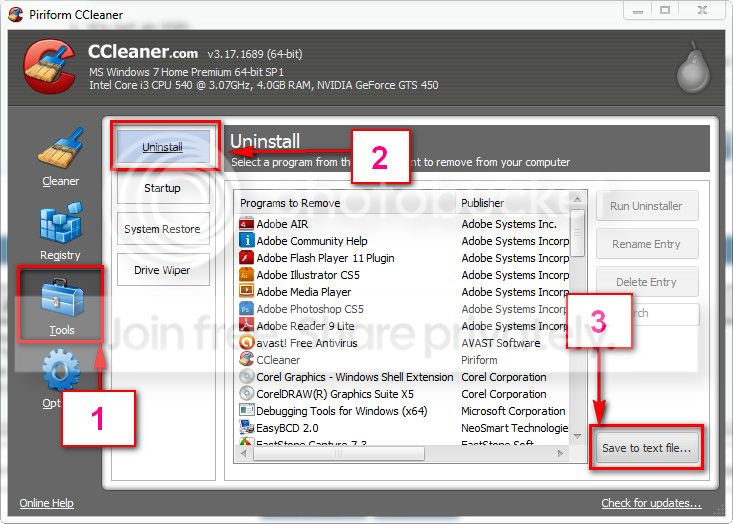
Download and install CCleaner. Then run it.
Go to "Tools" .... by default it will open the "uninstall" tab.
Click on save as text file. Save it on your desktop.
Upload the text file for us.
2012-11-02_224417.jpg
 

My Computer

Computer type
PC/Desktop
Computer Manufacturer/Model Number
Self Assembled
OS
Microsoft Windows 10 Pro Insider Preview 64-bit
CPU
Intel(R) Core(TM) i3-4130 CPU @ 3.40GHz
Motherboard
Gigabyte Technology Co., Ltd. B85M-D3H
Memory
Corsair Vengence 4GB x2 (8.00GB Dual-Channel DDR3 @ 798MHz)
Graphics Card(s)
2047MB GeForce GTS 450 (ZOTAC International)
Sound Card
Onboard (Realtek High Definition Audio)
Monitor(s) Displays
LG Flatron E2040T
Screen Resolution
1600x900
Hard Drives
Western Digital 1 TB
Seagate 500 GB
PSU
Corsair VS550
Case
Cooler Master K380
Cooling
Cooler Master Seidon 120V Plus
Keyboard
Logitech MK260r
Mouse
Logitech MK260r
Internet Speed
PMPL Broadband
Antivirus
Windows Defender + MBAM
Browser
Firefox
Other Info
Dell Studio 15" Laptop
Done.
 

My Computer

Computer Manufacturer/Model Number
Dell Inspiron 7720 Laptop
OS
Windows 7 64 bit
CPU
Intel(R) Core(TM) i7-3610QM CPU @ 2.30GHz
Motherboard
Dell Inc. 00MT1R
Memory
8.00 GB
Graphics Card(s)
NVIDIA GeForce GT 650M
Sound Card
(1) NVIDIA High Definition Audio (2) IDT High Definition A
Screen Resolution
1920 x 1080 x 32 bits (4294967296 colors) @ 59 Hz
From Install.txt.
Code:
Intel(R) Control Center    Intel Corporation    2/1/2013        1.2.1.1007
Intel(R) Management Engine Components    Intel Corporation    2/1/2013        8.0.1.1399
Intel(R) PROSet/Wireless for Bluetooth(R) + High Speed    Intel Corporation    1/31/2013    5.47 MB    15.3.0.0398
Intel(R) PROSet/Wireless Software for Bluetooth(R) Technology    Intel Corporation    8/3/2012    107 MB    2.0.0.0113
[COLOR=Red][B]Intel(R) Rapid Start Technology    Intel Corporation    8/8/2012        1.0.0.1014[/B][/COLOR]
Intel(R) Turbo Boost Technology Monitor 2.0    Intel    8/3/2012    13.2 MB    2.1.23.0
Intel(R) USB 3.0 eXtensible Host Controller Driver    Intel Corporation    2/1/2013        1.0.4.220
Intel® PROSet/Wireless WiFi Software    Intel Corporation    1/31/2013    193 MB    15.03.1000.1637
Intel® Trusted Connect Service Client    Intel Corporation    8/3/2012    10.6 MB    1.23.219.2
RST is present there.
 

My Computer

Computer type
PC/Desktop
Computer Manufacturer/Model Number
Self Assembled
OS
Microsoft Windows 10 Pro Insider Preview 64-bit
CPU
Intel(R) Core(TM) i3-4130 CPU @ 3.40GHz
Motherboard
Gigabyte Technology Co., Ltd. B85M-D3H
Memory
Corsair Vengence 4GB x2 (8.00GB Dual-Channel DDR3 @ 798MHz)
Graphics Card(s)
2047MB GeForce GTS 450 (ZOTAC International)
Sound Card
Onboard (Realtek High Definition Audio)
Monitor(s) Displays
LG Flatron E2040T
Screen Resolution
1600x900
Hard Drives
Western Digital 1 TB
Seagate 500 GB
PSU
Corsair VS550
Case
Cooler Master K380
Cooling
Cooler Master Seidon 120V Plus
Keyboard
Logitech MK260r
Mouse
Logitech MK260r
Internet Speed
PMPL Broadband
Antivirus
Windows Defender + MBAM
Browser
Firefox
Other Info
Dell Studio 15" Laptop
I swear I uninstalled that. Doing so again.
 

My Computer

Computer Manufacturer/Model Number
Dell Inspiron 7720 Laptop
OS
Windows 7 64 bit
CPU
Intel(R) Core(TM) i7-3610QM CPU @ 2.30GHz
Motherboard
Dell Inc. 00MT1R
Memory
8.00 GB
Graphics Card(s)
NVIDIA GeForce GT 650M
Sound Card
(1) NVIDIA High Definition Audio (2) IDT High Definition A
Screen Resolution
1920 x 1080 x 32 bits (4294967296 colors) @ 59 Hz
The BSOD just got so bad it forced a system restore and reset my computer at least as far as this morning before I started with everything. That's after I removed that stupid storage program, deleted every trace of iastor.sys I could find, and did every single scan of my computer I was told to with no results.

And the latest series of crashes were still citing iastor.sys as the source of the crashes.

This is getting so very frustrating :/

EDIT: Oh, great, now I also can't uninstall SuperAntiSpyware McAfee. Joy.
 
Last edited:

My Computer

Computer Manufacturer/Model Number
Dell Inspiron 7720 Laptop
OS
Windows 7 64 bit
CPU
Intel(R) Core(TM) i7-3610QM CPU @ 2.30GHz
Motherboard
Dell Inc. 00MT1R
Memory
8.00 GB
Graphics Card(s)
NVIDIA GeForce GT 650M
Sound Card
(1) NVIDIA High Definition Audio (2) IDT High Definition A
Screen Resolution
1920 x 1080 x 32 bits (4294967296 colors) @ 59 Hz

My Computer

Computer type
PC/Desktop
Computer Manufacturer/Model Number
Self Assembled
OS
Microsoft Windows 10 Pro Insider Preview 64-bit
CPU
Intel(R) Core(TM) i3-4130 CPU @ 3.40GHz
Motherboard
Gigabyte Technology Co., Ltd. B85M-D3H
Memory
Corsair Vengence 4GB x2 (8.00GB Dual-Channel DDR3 @ 798MHz)
Graphics Card(s)
2047MB GeForce GTS 450 (ZOTAC International)
Sound Card
Onboard (Realtek High Definition Audio)
Monitor(s) Displays
LG Flatron E2040T
Screen Resolution
1600x900
Hard Drives
Western Digital 1 TB
Seagate 500 GB
PSU
Corsair VS550
Case
Cooler Master K380
Cooling
Cooler Master Seidon 120V Plus
Keyboard
Logitech MK260r
Mouse
Logitech MK260r
Internet Speed
PMPL Broadband
Antivirus
Windows Defender + MBAM
Browser
Firefox
Other Info
Dell Studio 15" Laptop
I've seen a lot of issues from using Intel drivers after the v11.2.0.1006, from many system types, including my own two Dell systems.
You can install v11.0.0.1032, A00 from your Dell Support site link under 'Previous Drivers', or the Intel v11.0.0.1032 from the Intel Driver Site.

Use one of these two drivers even if you re-install.
 

My Computer

Computer type
PC/Desktop
Computer Manufacturer/Model Number
76~2.0
OS
Windows 7 Ult x64 - SP1/ Windows 8 Pro x64
CPU
Intel Core i5-3570K 4.6GHz
Motherboard
Gigabyte GA-Z77X UD3H, f18
Memory
8GB (2X4GB) DDR3 1600 Corsair Vengeance CL8 1.5v
Graphics Card(s)
Sapphire HD 7770 Vapor-X OC 1GB DDR5
Sound Card
Onboard VIA VT2021
Monitor(s) Displays
22" LCD Dell
Screen Resolution
1680x1050
Hard Drives
Samsung 840Pro 128GB SSD,
Seagate Barracuda 500GB SATA2 7200rpm 32MB cache, Seagate Barracuda 1TB SATA2 7200rpm 32MB cache,
PSU
Corsair HX650W
Case
Cooler Master Storm Scout
Cooling
Corsair H80 2x12cm Noctua NF P12 , 2x14cm case fans
Keyboard
Logitech Wave
Mouse
CM Sentinel
Internet Speed
Dismal
Antivirus
Avast
Browser
Opera Next
Other Info
Haswell laptop: HP Envy 17t-j, i7-4700MQ, GeForce 740M 2GB DDR3, 17.3" Full HD 1920x1080, 16GB RAM, Samsung 840 Pro 128GB, 1TB Hitachi 7200 HDD,
Desktop: eSATA ports,
External eSATA Seagate 500GB SATA2 7200rpm,
External WD USB 500GB
Back
Top