
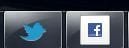
Okay. I had IE9 beta since release. So far VERY Impressed buy it. Only for the past few days i have been getting this problem.. Basically the Facebook logo does not appear correctly when i pin Facebook to my "Superbar". This is just for Facebook and does not apply for other pinable websites as shown in the picture, Twitter is working as it should.
Jumplist shortcuts are still working fine, the specific icons for each of the jumplist shortcuts are working correctly. I have tried doing a number of things;
-Waiting for it to blow over (recently twitter changed their icon and that took about a day for it to start appearing properly)
-Re/Uninstalling IE9
-Deleting ALL Browser information/History
Has anyone got any idea how to fix this? i have done some light searching around on the Internet for this but did not find anything. Thank you
Jumplist shortcuts are still working fine, the specific icons for each of the jumplist shortcuts are working correctly. I have tried doing a number of things;
-Waiting for it to blow over (recently twitter changed their icon and that took about a day for it to start appearing properly)
-Re/Uninstalling IE9
-Deleting ALL Browser information/History
Has anyone got any idea how to fix this? i have done some light searching around on the Internet for this but did not find anything. Thank you
Attachments
Last edited:
My Computer
- OS
- Windows 7



