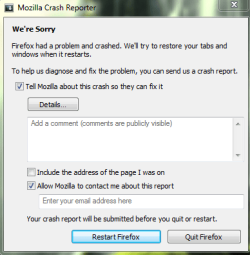
I'm having a problem with firefox

I can't get into Gmail using Fx34Beta2 because Google does not proved a valid certificate:

mail.google.com uses an invalid security certificate. The certificate is not trusted because the issuer certificate is unknown.
 

My Computer

Computer type
PC/Desktop
Computer Manufacturer/Model Number
Custom Build
OS
Win 10 Pro 64
CPU
Intel Core i7 960 @3.20 GHz
Motherboard
MSI MS7522
Memory
24.0 GB DDR3
Graphics Card(s)
EVGA GTX 750Ti
Monitor(s) Displays
LG E2341 23 Inch
Screen Resolution
1920x1080
Hard Drives
1TB Western Dgital 1002FAEX-00Y9A0
1TB Hitachi HDS721010CLA322
PSU
700 Watt
Case
Haf 912
Cooling
Fans
Keyboard
Logitech MK710
Mouse
Logitech M705
Internet Speed
Cable
Antivirus
AIS 2015 .10.0.2225
Browser
Firefox 49
Other Info
MalwareBytes Anti-Rootkit utility
since nobody saw my last post i am also having a problem with Firefox 33, YouTube continuously signs me out is there a fix for this issue
Your last post? Where?

Sean,
Please stay with your original thread, your situation is a different matter, and it is impolite to hijack another person's thread.

If you go back to your thread I'll give you something to go on.

crashhat, try ThrashZone's link to reset FF.

I can't get into Gmail using Fx34Beta2 because Google does not proved a valid certificate:

mail.google.com uses an invalid security certificate. The certificate is not trusted because the issuer certificate is unknown.
Your situation is a different matter.

If you have your own thread dealing with your problem, please post a link pointing to it here, and I will be glad to take a look and offer a solution, if you don't have a separate thread please create one in Browsers & Mail - Windows 7 Help Forums, post a link pointing to it here, and I will still take a look.
 

My Computer

Computer type
PC/Desktop
Computer Manufacturer/Model Number
Gateway DX4831-01e (Mid-Tower Desktop)
OS
Originally Win 7 Hm Prem x64 Ver 6.1.7600 Build 7601-SP1 | Upgraded to Windows 10 December 14, 2019
CPU
Intel i3 530 2.93GHz, 2933MHz 2 Cores 4 Logical Processors
Motherboard
Gateway H57M01 133 megahertz
Memory
6GB of 1,333MHz DDR3 SDRAM
Graphics Card(s)
32MB Intel Graphics Media Accelerator HD IGChip
Sound Card
Realtek High Definition Audio
Monitor(s) Displays
Gateway HX2000 20inch TFT active matrix TN
Screen Resolution
1600 x 900 x 59 hertz
Hard Drives
WDC WD10EADS-00M2B0 [HDD] (1000.20 GB) -- drive 0,
HL-DT-ST DVDRAM GH41N [CD-ROM dr]
Four card readers, and Four USB 2.0
PSU
300watts.
Case
Mid-Tower Desktop
Cooling
Stock from Gateway
Keyboard
Natural Ergonomic Keyboard 4000, see Other Info
Mouse
Orig. Gateway wore out now using Insignia USB wired optical
Internet Speed
Vz FIOS 10ms png 57.64Mbps down 65.53Mbps up Speedtest.org
Antivirus
Zamana Anti-logger with Anti-malware, MSE, Windows Firewall,
Browser
IE11.0.9600.19399-Upd ver11.0.135, Firefox 68.0.1 x64
Other Info
System Specs by Belarc.

BIOS: American Megatrends Inc. P01-A0 11/17/2009

Replaced the MS 'Natural' Standard PS/2 Enhanced 101-102 Keyboard with a new Natural Ergonomic Keyboard 4000 on August 1st 2014.

Canon Pixma MG3222 Printer.

Updated to IE11 on 12102015 | Fios Quantum Router g1100

Additional AV: SpywareBlaster, manual Mbam, SAS
FF isn't closing properly. I'll close FF then 5-10 seconds after a crash report pops up.
 

My Computer

Computer type
Laptop
Computer Manufacturer/Model Number
HP 15-f010wm TouchSmart notebook
OS
Microsoft Windows 8.1 with Bing 64-bit 9600 Multiprocessor Free
CPU
Intel(R) Celeron(R) CPU N2830 @ 2.16GHz
Motherboard
Hewlett-Packard 233F
Memory
4.00gb DDR3 SDRAM
Graphics Card(s)
intel HD graphics
Sound Card
Realtek High Definition Audio intel display audio
Screen Resolution
1366 x 768 x 59 Hz
Antivirus
Avast free & Malwarebytes anti malware (premium)
Browser
Firefox 34.0.5
I'll close FF then 5-10 seconds after a crash report FF pops up.
Do you mean after the report FF reopens?

  • Click on Help in the menu bar.

  • Click on Troubleshooting Information.

  • In the resulting Tab that opens, click on "Copy Text to Clipboard".

  • Open Notepad and paste.

  • Save Notepad file with name to Desktop and upload as attachment in your next post.
You may have to do a reset, the button for that is to the right on the Troubleshooting Tab/page.


But wait until I see the report.
 

My Computer

Computer type
PC/Desktop
Computer Manufacturer/Model Number
Gateway DX4831-01e (Mid-Tower Desktop)
OS
Originally Win 7 Hm Prem x64 Ver 6.1.7600 Build 7601-SP1 | Upgraded to Windows 10 December 14, 2019
CPU
Intel i3 530 2.93GHz, 2933MHz 2 Cores 4 Logical Processors
Motherboard
Gateway H57M01 133 megahertz
Memory
6GB of 1,333MHz DDR3 SDRAM
Graphics Card(s)
32MB Intel Graphics Media Accelerator HD IGChip
Sound Card
Realtek High Definition Audio
Monitor(s) Displays
Gateway HX2000 20inch TFT active matrix TN
Screen Resolution
1600 x 900 x 59 hertz
Hard Drives
WDC WD10EADS-00M2B0 [HDD] (1000.20 GB) -- drive 0,
HL-DT-ST DVDRAM GH41N [CD-ROM dr]
Four card readers, and Four USB 2.0
PSU
300watts.
Case
Mid-Tower Desktop
Cooling
Stock from Gateway
Keyboard
Natural Ergonomic Keyboard 4000, see Other Info
Mouse
Orig. Gateway wore out now using Insignia USB wired optical
Internet Speed
Vz FIOS 10ms png 57.64Mbps down 65.53Mbps up Speedtest.org
Antivirus
Zamana Anti-logger with Anti-malware, MSE, Windows Firewall,
Browser
IE11.0.9600.19399-Upd ver11.0.135, Firefox 68.0.1 x64
Other Info
System Specs by Belarc.

BIOS: American Megatrends Inc. P01-A0 11/17/2009

Replaced the MS 'Natural' Standard PS/2 Enhanced 101-102 Keyboard with a new Natural Ergonomic Keyboard 4000 on August 1st 2014.

Canon Pixma MG3222 Printer.

Updated to IE11 on 12102015 | Fios Quantum Router g1100

Additional AV: SpywareBlaster, manual Mbam, SAS
I'll close FF then 5-10 seconds after a crash report FF pops up.
Do you mean after the report FF reopens?

  • Click on Help in the menu bar.

  • Click on Troubleshooting Information.

  • In the resulting Tab that opens, click on "Copy Text to Clipboard".

  • Open Notepad and paste.

  • Save Notepad file with name to Desktop and upload as attachment in your next post.
You may have to do a reset, the button for that is to the right on the Troubleshooting Tab/page.


But wait until I see the report.

FF isn't reopening, I'll close FF then 5-10 seconds later I'll get this Capture 6.PNG


I'm seriously thinking about switching back to chrome because this is ridiculous.
 

My Computer

Computer type
Laptop
Computer Manufacturer/Model Number
HP 15-f010wm TouchSmart notebook
OS
Microsoft Windows 8.1 with Bing 64-bit 9600 Multiprocessor Free
CPU
Intel(R) Celeron(R) CPU N2830 @ 2.16GHz
Motherboard
Hewlett-Packard 233F
Memory
4.00gb DDR3 SDRAM
Graphics Card(s)
intel HD graphics
Sound Card
Realtek High Definition Audio intel display audio
Screen Resolution
1366 x 768 x 59 Hz
Antivirus
Avast free & Malwarebytes anti malware (premium)
Browser
Firefox 34.0.5
You failed to send me the Troubleshooting Information. :(

Your FF problem could be one of these:


Go over these to see if they jog your memory :
Firefox crashes - MozillaZine Knowledge Base
Firefox crashes - Crash when closing a tab or exiting Firefox

Do you have an Avast, Mbam toolbar or any other type of toolbar? Try disabling them.
 

My Computer

Computer type
PC/Desktop
Computer Manufacturer/Model Number
Gateway DX4831-01e (Mid-Tower Desktop)
OS
Originally Win 7 Hm Prem x64 Ver 6.1.7600 Build 7601-SP1 | Upgraded to Windows 10 December 14, 2019
CPU
Intel i3 530 2.93GHz, 2933MHz 2 Cores 4 Logical Processors
Motherboard
Gateway H57M01 133 megahertz
Memory
6GB of 1,333MHz DDR3 SDRAM
Graphics Card(s)
32MB Intel Graphics Media Accelerator HD IGChip
Sound Card
Realtek High Definition Audio
Monitor(s) Displays
Gateway HX2000 20inch TFT active matrix TN
Screen Resolution
1600 x 900 x 59 hertz
Hard Drives
WDC WD10EADS-00M2B0 [HDD] (1000.20 GB) -- drive 0,
HL-DT-ST DVDRAM GH41N [CD-ROM dr]
Four card readers, and Four USB 2.0
PSU
300watts.
Case
Mid-Tower Desktop
Cooling
Stock from Gateway
Keyboard
Natural Ergonomic Keyboard 4000, see Other Info
Mouse
Orig. Gateway wore out now using Insignia USB wired optical
Internet Speed
Vz FIOS 10ms png 57.64Mbps down 65.53Mbps up Speedtest.org
Antivirus
Zamana Anti-logger with Anti-malware, MSE, Windows Firewall,
Browser
IE11.0.9600.19399-Upd ver11.0.135, Firefox 68.0.1 x64
Other Info
System Specs by Belarc.

BIOS: American Megatrends Inc. P01-A0 11/17/2009

Replaced the MS 'Natural' Standard PS/2 Enhanced 101-102 Keyboard with a new Natural Ergonomic Keyboard 4000 on August 1st 2014.

Canon Pixma MG3222 Printer.

Updated to IE11 on 12102015 | Fios Quantum Router g1100

Additional AV: SpywareBlaster, manual Mbam, SAS

My Computer

Computer type
Laptop
Computer Manufacturer/Model Number
HP 15-f010wm TouchSmart notebook
OS
Microsoft Windows 8.1 with Bing 64-bit 9600 Multiprocessor Free
CPU
Intel(R) Celeron(R) CPU N2830 @ 2.16GHz
Motherboard
Hewlett-Packard 233F
Memory
4.00gb DDR3 SDRAM
Graphics Card(s)
intel HD graphics
Sound Card
Realtek High Definition Audio intel display audio
Screen Resolution
1366 x 768 x 59 Hz
Antivirus
Avast free & Malwarebytes anti malware (premium)
Browser
Firefox 34.0.5
Thank you for the report. I believe I see what the problem is.

Code:
Extensions
----------
Name: Advanced SystemCare Surfing Protection
Version: 1.0
Enabled: [B]true[/B]
ID: [email protected]
Do you now or at any time had Iobit Advanced SystemCare (ASC) installed on your machine?

If its now it will be in conflict with the Avast Free program you list in your system specs.

If its did have and you uninstalled it, not all of ASC was removed.

Going by your post in your other thread here at post #36 You still have ASC, ASC surf protection along with Avast installed.

Just to be clear. You still have these installed after you did the system recovery? If your answer is yes, then that's where your conflict lies. You can have one or the other, but not both, and personally I've seen too many problems running any Iobit software, and this is why:
Advanced SystemCare 6 installs ASC surfing Protection add-on for browsers like Firefox, Chrome and IE automatically without user permission.

Source: How to Disable or Remove Advanced SystemCare Surfing Protection Feature and Add-ons from Browsers | Techdows
First, use the IObit uninstaller listed in the post36 screenshot, if there's a list to uninstall everything check them all. When done, check to make sure ASC7, ASC surf protect, and the uninstaller are gone from the program list.

Then go to every browser you have and remove surf protect from their respective add-on/extension lists. I also see that you have CCleaner installed, run a registry check to make sure that any references to Iobit keys are removed.

This is important! :ar: Reboot your machine, then test FF to see if it crashes.

The report also shows that you have a secondary problem with your graphics drivers, but if cleaning up Iobit allows your machine and browsers to run okay you may not need this: Windows 7 compatibility for NVIDIA GeForce 6150se nForce 430 Motherboard model You'll find the driver if you click on the Free Download Required link, it's about a year newer.
Code:
Graphics
--------
Adapter Description: NVIDIA GeForce 6150SE nForce 430
Adapter Drivers: nvd3dumx,nvd3dum
Adapter RAM: 256
Device ID: 0x03d0
DirectWrite Enabled: false (6.2.9200.16492)
Driver Date: 4-1-2010
Driver Version: 8.17.11.9739
GPU #2 Active: false
[B]GPU Accelerated Windows: 0/1 Basic (OMTC) Blocked for your graphics card because of unresolved driver issues.[/B]
Vendor ID: 0x10de
WebGL Renderer: Google Inc. -- ANGLE (NVIDIA GeForce 6150SE nForce 430 Direct3D9Ex vs_3_0 ps_3_0)
windowLayerManagerRemote: true
AzureCanvasBackend: skia
AzureContentBackend: cairo
AzureFallbackCanvasBackend: cairo
AzureSkiaAccelerated: 0

 

My Computer

Computer type
PC/Desktop
Computer Manufacturer/Model Number
Gateway DX4831-01e (Mid-Tower Desktop)
OS
Originally Win 7 Hm Prem x64 Ver 6.1.7600 Build 7601-SP1 | Upgraded to Windows 10 December 14, 2019
CPU
Intel i3 530 2.93GHz, 2933MHz 2 Cores 4 Logical Processors
Motherboard
Gateway H57M01 133 megahertz
Memory
6GB of 1,333MHz DDR3 SDRAM
Graphics Card(s)
32MB Intel Graphics Media Accelerator HD IGChip
Sound Card
Realtek High Definition Audio
Monitor(s) Displays
Gateway HX2000 20inch TFT active matrix TN
Screen Resolution
1600 x 900 x 59 hertz
Hard Drives
WDC WD10EADS-00M2B0 [HDD] (1000.20 GB) -- drive 0,
HL-DT-ST DVDRAM GH41N [CD-ROM dr]
Four card readers, and Four USB 2.0
PSU
300watts.
Case
Mid-Tower Desktop
Cooling
Stock from Gateway
Keyboard
Natural Ergonomic Keyboard 4000, see Other Info
Mouse
Orig. Gateway wore out now using Insignia USB wired optical
Internet Speed
Vz FIOS 10ms png 57.64Mbps down 65.53Mbps up Speedtest.org
Antivirus
Zamana Anti-logger with Anti-malware, MSE, Windows Firewall,
Browser
IE11.0.9600.19399-Upd ver11.0.135, Firefox 68.0.1 x64
Other Info
System Specs by Belarc.

BIOS: American Megatrends Inc. P01-A0 11/17/2009

Replaced the MS 'Natural' Standard PS/2 Enhanced 101-102 Keyboard with a new Natural Ergonomic Keyboard 4000 on August 1st 2014.

Canon Pixma MG3222 Printer.

Updated to IE11 on 12102015 | Fios Quantum Router g1100

Additional AV: SpywareBlaster, manual Mbam, SAS
Thank you for the report. I believe I see what the problem is.

Code:
Extensions
----------
Name: Advanced SystemCare Surfing Protection
Version: 1.0
Enabled: [B]true[/B]
ID: [email protected]
Do you now or at any time had Iobit Advanced SystemCare (ASC) installed on your machine?

If its now it will be in conflict with the Avast Free program you list in your system specs.

If its did have and you uninstalled it, not all of ASC was removed.

Going by your post in your other thread here at post #36 You still have ASC, ASC surf protection along with Avast installed.

Just to be clear. You still have these installed after you did the system recovery? If your answer is yes, then that's where your conflict lies. You can have one or the other, but not both, and personally I've seen too many problems running any Iobit software, and this is why:
Advanced SystemCare 6 installs ASC surfing Protection add-on for browsers like Firefox, Chrome and IE automatically without user permission.

Source: How to Disable or Remove Advanced SystemCare Surfing Protection Feature and Add-ons from Browsers | Techdows
First, use the IObit uninstaller listed in the post36 screenshot, if there's a list to uninstall everything check them all. When done, check to make sure ASC7, ASC surf protect, and the uninstaller are gone from the program list.

Then go to every browser you have and remove surf protect from their respective add-on/extension lists. I also see that you have CCleaner installed, run a registry check to make sure that any references to Iobit keys are removed.

This is important! :ar: Reboot your machine, then test FF to see if it crashes.

The report also shows that you have a secondary problem with your graphics drivers, but if cleaning up Iobit allows your machine and browsers to run okay you may not need this: Windows 7 compatibility for NVIDIA GeForce 6150se nForce 430 Motherboard model You'll find the driver if you click on the Free Download Required link, it's about a year newer.
Code:
Graphics
--------
Adapter Description: NVIDIA GeForce 6150SE nForce 430
Adapter Drivers: nvd3dumx,nvd3dum
Adapter RAM: 256
Device ID: 0x03d0
DirectWrite Enabled: false (6.2.9200.16492)
Driver Date: 4-1-2010
Driver Version: 8.17.11.9739
GPU #2 Active: false
[B]GPU Accelerated Windows: 0/1 Basic (OMTC) Blocked for your graphics card because of unresolved driver issues.[/B]
Vendor ID: 0x10de
WebGL Renderer: Google Inc. -- ANGLE (NVIDIA GeForce 6150SE nForce 430 Direct3D9Ex vs_3_0 ps_3_0)
windowLayerManagerRemote: true
AzureCanvasBackend: skia
AzureContentBackend: cairo
AzureFallbackCanvasBackend: cairo
AzureSkiaAccelerated: 0

I've always had ASC, I've had ASC surfing protection since it first came out and I've never had a problem so why would I be having problems now?
 

My Computer

Computer type
Laptop
Computer Manufacturer/Model Number
HP 15-f010wm TouchSmart notebook
OS
Microsoft Windows 8.1 with Bing 64-bit 9600 Multiprocessor Free
CPU
Intel(R) Celeron(R) CPU N2830 @ 2.16GHz
Motherboard
Hewlett-Packard 233F
Memory
4.00gb DDR3 SDRAM
Graphics Card(s)
intel HD graphics
Sound Card
Realtek High Definition Audio intel display audio
Screen Resolution
1366 x 768 x 59 Hz
Antivirus
Avast free & Malwarebytes anti malware (premium)
Browser
Firefox 34.0.5
I don't know what to tell you, times change, Firefox has changed since you've been using ASC surfing protection since it first came out, both of them have changed.

If you do not want to at the very least try disabling surf protection to test if its the problem, well, then, I'm done helping you.
 

My Computer

Computer type
PC/Desktop
Computer Manufacturer/Model Number
Gateway DX4831-01e (Mid-Tower Desktop)
OS
Originally Win 7 Hm Prem x64 Ver 6.1.7600 Build 7601-SP1 | Upgraded to Windows 10 December 14, 2019
CPU
Intel i3 530 2.93GHz, 2933MHz 2 Cores 4 Logical Processors
Motherboard
Gateway H57M01 133 megahertz
Memory
6GB of 1,333MHz DDR3 SDRAM
Graphics Card(s)
32MB Intel Graphics Media Accelerator HD IGChip
Sound Card
Realtek High Definition Audio
Monitor(s) Displays
Gateway HX2000 20inch TFT active matrix TN
Screen Resolution
1600 x 900 x 59 hertz
Hard Drives
WDC WD10EADS-00M2B0 [HDD] (1000.20 GB) -- drive 0,
HL-DT-ST DVDRAM GH41N [CD-ROM dr]
Four card readers, and Four USB 2.0
PSU
300watts.
Case
Mid-Tower Desktop
Cooling
Stock from Gateway
Keyboard
Natural Ergonomic Keyboard 4000, see Other Info
Mouse
Orig. Gateway wore out now using Insignia USB wired optical
Internet Speed
Vz FIOS 10ms png 57.64Mbps down 65.53Mbps up Speedtest.org
Antivirus
Zamana Anti-logger with Anti-malware, MSE, Windows Firewall,
Browser
IE11.0.9600.19399-Upd ver11.0.135, Firefox 68.0.1 x64
Other Info
System Specs by Belarc.

BIOS: American Megatrends Inc. P01-A0 11/17/2009

Replaced the MS 'Natural' Standard PS/2 Enhanced 101-102 Keyboard with a new Natural Ergonomic Keyboard 4000 on August 1st 2014.

Canon Pixma MG3222 Printer.

Updated to IE11 on 12102015 | Fios Quantum Router g1100

Additional AV: SpywareBlaster, manual Mbam, SAS
I don't know what to tell you, times change, Firefox has changed since you've been using ASC surfing protection since it first came out, both of them have changed.

If you do not want to at the very least try disabling surf protection to test if its the problem, well, then, I'm done helping you.
So I went into ASC setting and disabled surfing protection and FF is still crashing. Could avast free 2015 have something to do with this? FF never crashed when I had AVG free 2014.

Update: I guess the HTTPS scanning that was part of avast 2015 was causing the problem.
 
Last edited:

My Computer

Computer type
Laptop
Computer Manufacturer/Model Number
HP 15-f010wm TouchSmart notebook
OS
Microsoft Windows 8.1 with Bing 64-bit 9600 Multiprocessor Free
CPU
Intel(R) Celeron(R) CPU N2830 @ 2.16GHz
Motherboard
Hewlett-Packard 233F
Memory
4.00gb DDR3 SDRAM
Graphics Card(s)
intel HD graphics
Sound Card
Realtek High Definition Audio intel display audio
Screen Resolution
1366 x 768 x 59 Hz
Antivirus
Avast free & Malwarebytes anti malware (premium)
Browser
Firefox 34.0.5
Thank you for doing the ASC test.

Update: I guess the HTTPS scanning that was part of avast 2015 was causing the problem.
Does this mean that you reverted back to avast 2014, and FF isn't crashing now or were you able to turn the avast scanner off and FF isn't crashing?


Just as having two real-time anti-virus programs running isn't good, it isn't good to have two scanners checking web sites at the same time, there's bound to be conflicts somewhere along the line.

There have been some problems with avast, see: A good read for Avast users...
 

My Computer

Computer type
PC/Desktop
Computer Manufacturer/Model Number
Gateway DX4831-01e (Mid-Tower Desktop)
OS
Originally Win 7 Hm Prem x64 Ver 6.1.7600 Build 7601-SP1 | Upgraded to Windows 10 December 14, 2019
CPU
Intel i3 530 2.93GHz, 2933MHz 2 Cores 4 Logical Processors
Motherboard
Gateway H57M01 133 megahertz
Memory
6GB of 1,333MHz DDR3 SDRAM
Graphics Card(s)
32MB Intel Graphics Media Accelerator HD IGChip
Sound Card
Realtek High Definition Audio
Monitor(s) Displays
Gateway HX2000 20inch TFT active matrix TN
Screen Resolution
1600 x 900 x 59 hertz
Hard Drives
WDC WD10EADS-00M2B0 [HDD] (1000.20 GB) -- drive 0,
HL-DT-ST DVDRAM GH41N [CD-ROM dr]
Four card readers, and Four USB 2.0
PSU
300watts.
Case
Mid-Tower Desktop
Cooling
Stock from Gateway
Keyboard
Natural Ergonomic Keyboard 4000, see Other Info
Mouse
Orig. Gateway wore out now using Insignia USB wired optical
Internet Speed
Vz FIOS 10ms png 57.64Mbps down 65.53Mbps up Speedtest.org
Antivirus
Zamana Anti-logger with Anti-malware, MSE, Windows Firewall,
Browser
IE11.0.9600.19399-Upd ver11.0.135, Firefox 68.0.1 x64
Other Info
System Specs by Belarc.

BIOS: American Megatrends Inc. P01-A0 11/17/2009

Replaced the MS 'Natural' Standard PS/2 Enhanced 101-102 Keyboard with a new Natural Ergonomic Keyboard 4000 on August 1st 2014.

Canon Pixma MG3222 Printer.

Updated to IE11 on 12102015 | Fios Quantum Router g1100

Additional AV: SpywareBlaster, manual Mbam, SAS
Thank you for doing the ASC test.

Update: I guess the HTTPS scanning that was part of avast 2015 was causing the problem.
Does this mean that you reverted back to avast 2014, and FF isn't crashing now or were you able to turn the avast scanner off and FF isn't crashing?


Just as having two real-time anti-virus programs running isn't good, it isn't good to have two scanners checking web sites at the same time, there's bound to be conflicts somewhere along the line.

There have been some problems with avast, see: A good read for Avast users...

After doing some research I found out that the HTTPS scanning that was part of avast 2015 was making FF crash so I disabled it and fixed the problem. I don't have 2 anti virus programs..or are you saying that malwarebytes is a anti virus program?
 

My Computer

Computer type
Laptop
Computer Manufacturer/Model Number
HP 15-f010wm TouchSmart notebook
OS
Microsoft Windows 8.1 with Bing 64-bit 9600 Multiprocessor Free
CPU
Intel(R) Celeron(R) CPU N2830 @ 2.16GHz
Motherboard
Hewlett-Packard 233F
Memory
4.00gb DDR3 SDRAM
Graphics Card(s)
intel HD graphics
Sound Card
Realtek High Definition Audio intel display audio
Screen Resolution
1366 x 768 x 59 Hz
Antivirus
Avast free & Malwarebytes anti malware (premium)
Browser
Firefox 34.0.5
I'm glad to see that you took it upon yourself to do some research.

are you saying that malwarebytes is a anti virus program?
No.

Malwarebytes' Anti-Malware (MBAM) is an application for computers running under the Microsoft Windows operating system that finds and removes malware.[4]

Source: Malwarebytes' Anti-Malware - Wikipedia, the free encyclopedia
However, MBAM is NOT an AV and is not a substitute for one. So, even MBAM PRO/Premium needs a robust, updated AV as a first line of defense. If there was a period of time when the computer ONLY ran MBAM, without an AV, then, yes, it would have been extremely vulnerable to malware during that time.

Source: https://forums.malwarebytes.org/ind...malware-bytes-and-avast-together/#entry810251
Maybe my statement seemed too broad; Having two anti-virus programs like avast, and, kaspersky, avira, mcafee, AVG, etc. is what I meant.
 

My Computer

Computer type
PC/Desktop
Computer Manufacturer/Model Number
Gateway DX4831-01e (Mid-Tower Desktop)
OS
Originally Win 7 Hm Prem x64 Ver 6.1.7600 Build 7601-SP1 | Upgraded to Windows 10 December 14, 2019
CPU
Intel i3 530 2.93GHz, 2933MHz 2 Cores 4 Logical Processors
Motherboard
Gateway H57M01 133 megahertz
Memory
6GB of 1,333MHz DDR3 SDRAM
Graphics Card(s)
32MB Intel Graphics Media Accelerator HD IGChip
Sound Card
Realtek High Definition Audio
Monitor(s) Displays
Gateway HX2000 20inch TFT active matrix TN
Screen Resolution
1600 x 900 x 59 hertz
Hard Drives
WDC WD10EADS-00M2B0 [HDD] (1000.20 GB) -- drive 0,
HL-DT-ST DVDRAM GH41N [CD-ROM dr]
Four card readers, and Four USB 2.0
PSU
300watts.
Case
Mid-Tower Desktop
Cooling
Stock from Gateway
Keyboard
Natural Ergonomic Keyboard 4000, see Other Info
Mouse
Orig. Gateway wore out now using Insignia USB wired optical
Internet Speed
Vz FIOS 10ms png 57.64Mbps down 65.53Mbps up Speedtest.org
Antivirus
Zamana Anti-logger with Anti-malware, MSE, Windows Firewall,
Browser
IE11.0.9600.19399-Upd ver11.0.135, Firefox 68.0.1 x64
Other Info
System Specs by Belarc.

BIOS: American Megatrends Inc. P01-A0 11/17/2009

Replaced the MS 'Natural' Standard PS/2 Enhanced 101-102 Keyboard with a new Natural Ergonomic Keyboard 4000 on August 1st 2014.

Canon Pixma MG3222 Printer.

Updated to IE11 on 12102015 | Fios Quantum Router g1100

Additional AV: SpywareBlaster, manual Mbam, SAS
Back
Top