Solved Install 64bit HomeP on SSD

My Computer My Computer

OS
Windows 7 Home Ultimate 64-Bit, Ubuntu 10.04 Lucid Lynx, Windows XP
CPU
Pentium i7 @fast
Memory
6GB DDR3 @fast
Graphics Card(s)
ATI Radeon HD 4600 Series (512mb) / ATI TV Wonder 650PCIe
Sound Card
Integrated
Monitor(s) Displays
32" VIZIO HDTV
Screen Resolution
1080p @super sharp
Hard Drives
Internal 500GB @7200rpm and not big enough cache
External 500GB @7200rpm and not big enough cache
Cooling
My apartment's AC / Chicago Winters
Keyboard
LG Bluetooth
Mouse
LG Bluetooth
Internet Speed
~21.50Mb/S Down, ~3.5Mb/S Up

My Computer My Computer

OS
Windows 7 Home Ultimate 64-Bit, Ubuntu 10.04 Lucid Lynx, Windows XP
CPU
Pentium i7 @fast
Memory
6GB DDR3 @fast
Graphics Card(s)
ATI Radeon HD 4600 Series (512mb) / ATI TV Wonder 650PCIe
Sound Card
Integrated
Monitor(s) Displays
32" VIZIO HDTV
Screen Resolution
1080p @super sharp
Hard Drives
Internal 500GB @7200rpm and not big enough cache
External 500GB @7200rpm and not big enough cache
Cooling
My apartment's AC / Chicago Winters
Keyboard
LG Bluetooth
Mouse
LG Bluetooth
Internet Speed
~21.50Mb/S Down, ~3.5Mb/S Up
Wonderful! Glad everything worked out for you. Good job.
 

My Computers My Computers

System One System Two

  • Computer type
    PC/Desktop
    Computer Manufacturer/Model Number
    ALWAYS UNDER CONSTRUCTION
    OS
    Windows 11 Pro
    CPU
    Ryzen 9 5900X
    Motherboard
    Asus X570 Crosshair Viii Hero
    Memory
    32GB G Skill DDR4-3600
    Graphics Card(s)
    EVGA RTX 3080 FTW 3 Ultra
    Sound Card
    On Board/Sennheiser PC37X Headset
    Monitor(s) Displays
    3 X Asus 27"
    Screen Resolution
    2560x1440
    Hard Drives
    2 X 1 TB NVME drives
    PSU
    EVGA 850
    Case
    Phanteks Eclipse P400A
    Cooling
    EVGA 280 AIO
    Keyboard
    Logitech G510s/ Logitech G13
    Mouse
    Logitech G502
    Internet Speed
    24/1
    Antivirus
    ESET/MBAM Pro/SAS Pro
    Browser
    Chrome/ Firefox/ Edge
  • Computer type
    Laptop
    System Manufacturer/Model Number
    Dell 16 Plus
    OS
    Windows 11 Pro
    CPU
    Intel Ultra 9 288V
    Memory
    32 GB LPDDR5X 8533
    Monitor(s) Displays
    16" Mini-LED HDR600 Touch 90 Hz
    Screen Resolution
    2560X1600
    Hard Drives
    1 TB NVME
Follow these steps to get a perfect Clean Reinstall - Factory OEM Windows 7.


Back up your User folders by dragging them to a special data partition on the HD, then after install rightclick on each to add it to the related Win7 Library - Include a Folder - Windows 7 Forums or create your own. This is the easiest way to link data to Win7.

For anyone who looks at this thread in the future, I would add the following suggestion if you want ALL of your user media files (docs, music, pictures, videos, etc.) on the second disk (i.e. not the disk that the OS is on):

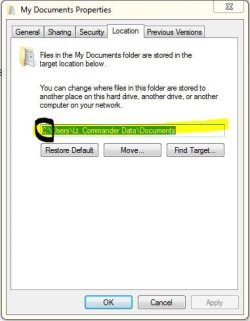
Since the disk that has the OS on it will also have a my docs, my pictures, etc, you can actually change the location of My Documents, My Music, My Pictures, My Videos to your new disk.

This is what I did. And THEN I added them to the library. this should save a lot of headache given that a lot of program auto save to, say, c:\...\downloads or c:\...\My docs, etc. If you change the location to your second disk f:\...\downloads, then you wont have to go around specifying .
 

Attachments

  • Capture.JPG
    Capture.JPG
    30.6 KB · Views: 7

My Computer My Computer

OS
Windows 7 Home Ultimate 64-Bit, Ubuntu 10.04 Lucid Lynx, Windows XP
CPU
Pentium i7 @fast
Memory
6GB DDR3 @fast
Graphics Card(s)
ATI Radeon HD 4600 Series (512mb) / ATI TV Wonder 650PCIe
Sound Card
Integrated
Monitor(s) Displays
32" VIZIO HDTV
Screen Resolution
1080p @super sharp
Hard Drives
Internal 500GB @7200rpm and not big enough cache
External 500GB @7200rpm and not big enough cache
Cooling
My apartment's AC / Chicago Winters
Keyboard
LG Bluetooth
Mouse
LG Bluetooth
Internet Speed
~21.50Mb/S Down, ~3.5Mb/S Up
There are some problems with moving the User folders to another partition or HD, mainly that Win7 backup imaging then views the second drive as a System drive (since it has System folders on it) and forces user to include it in backup image. I have also had unfixable permissioning issues trying to run installers from a second drive when Downloads folder is moved to it.

This is the reason that we now mostly recommend only copying the User folders to the second drive, then rightclicking each to link to Library - Include a Folder - Windows 7 Forums which accomplishes the same thing but leaves the actual System User shell folder on C.
 
There are some problems with moving the User folders to another partition or HD, mainly that the Win7 backup image then views the second drive as a System drive (since it has System folders on it) and forces user to include it in backup image. I have also had unfixable permissioning issues trying to run installers from a second drive when Downloads folder is moved to it.

This is the reason that we now mostly recommend only copying the User folders to the second drive, then rightclicking each to link to Library - Include a Folder - Windows 7 Forums which accomplishes the same thing but leaves the actual System User shell folder on C.

Interesting! I would not have thought there would be permissioning issues (and I've been doing a lot of reinstalling from the moved Downloads folder without any) but I had not thought of the backup issue! Good to know.
 

My Computer My Computer

OS
Windows 7 Home Ultimate 64-Bit, Ubuntu 10.04 Lucid Lynx, Windows XP
CPU
Pentium i7 @fast
Memory
6GB DDR3 @fast
Graphics Card(s)
ATI Radeon HD 4600 Series (512mb) / ATI TV Wonder 650PCIe
Sound Card
Integrated
Monitor(s) Displays
32" VIZIO HDTV
Screen Resolution
1080p @super sharp
Hard Drives
Internal 500GB @7200rpm and not big enough cache
External 500GB @7200rpm and not big enough cache
Cooling
My apartment's AC / Chicago Winters
Keyboard
LG Bluetooth
Mouse
LG Bluetooth
Internet Speed
~21.50Mb/S Down, ~3.5Mb/S Up
It's not so much that those issues can't be avoided when moving the System files - you can always use another backup utility - but that Libraries works so much easier once you get the shell User folders copied, or move them back in from a backup after reinstall. However many don't want to have to deal with Libraries so they miss how easy it works here even if this is all you use them for.
 
Last edited:
Follow these steps to get a perfect Clean Reinstall - Factory OEM Windows 7.


Back up your User folders by dragging them to a special data partition on the HD, then after install rightclick on each to add it to the related Win7 Library - Include a Folder - Windows 7 Forums or create your own. This is the easiest way to link data to Win7.

For anyone who looks at this thread in the future, I would add the following suggestion if you want ALL of your user media files (docs, music, pictures, videos, etc.) on the second disk (i.e. not the disk that the OS is on):

Since the disk that has the OS on it will also have a my docs, my pictures, etc, you can actually change the location of My Documents, My Music, My Pictures, My Videos to your new disk.

This is what I did. And THEN I added them to the library. this should save a lot of headache given that a lot of program auto save to, say, c:\...\downloads or c:\...\My docs, etc. If you change the location to your second disk f:\...\downloads, then you wont have to go around specifying .


Hi eduede,

Sorry for going a little off topic, even though I've been following this thread.
What screen capture program are you using and how do you make the notations in it ?
 

My Computer My Computer

Computer type
Laptop
Computer Manufacturer/Model Number
Lenovo Z710 #59400485
OS
Windows 8.1.1 64bit
CPU
i7-4700MQ
Memory
8.0GB PC3-12800 DDR3L SDRAM 1600 MHz
Graphics Card(s)
Intel® HD Graphics 4600
Sound Card
on-board
Monitor(s) Displays
17.3"
Screen Resolution
1920x1080
Hard Drives
1TB 5400 RPM;(OS,programs)


Hitachi, 1Tb external,(B'up)
PSU
4 Cell 41 Watt Hour Lithium-Ion
Case
Lenovo
Cooling
Air in, Air out.
Keyboard
Logitech - Y-UY95 - Illuminated
Mouse
M$ - Arc Touch
Internet Speed
59 Mb down / 25 Mb up
Antivirus
Defender
Browser
Firefox (newest)
Other Info
MBAM Pro, SAS Pro, Revo Pro.

Ext. HP 2311 Monitor
Hi eduede,

Sorry for going a little off topic, even though I've been following this thread.
What screen capture program are you using and how do you make the notations in it ?

Windows 7 Snipping Tool. Comes preloaded with Windows :) Nothin' fancy.
 

My Computer My Computer

OS
Windows 7 Home Ultimate 64-Bit, Ubuntu 10.04 Lucid Lynx, Windows XP
CPU
Pentium i7 @fast
Memory
6GB DDR3 @fast
Graphics Card(s)
ATI Radeon HD 4600 Series (512mb) / ATI TV Wonder 650PCIe
Sound Card
Integrated
Monitor(s) Displays
32" VIZIO HDTV
Screen Resolution
1080p @super sharp
Hard Drives
Internal 500GB @7200rpm and not big enough cache
External 500GB @7200rpm and not big enough cache
Cooling
My apartment's AC / Chicago Winters
Keyboard
LG Bluetooth
Mouse
LG Bluetooth
Internet Speed
~21.50Mb/S Down, ~3.5Mb/S Up
Hi,
Thank's for the quick reply. I'm such a noob at times, been searching for a program to do just what the snipping tool doe's and could not find one.

Now I wonder what else is in Win 7 I never saw before !
 

My Computer My Computer

Computer type
Laptop
Computer Manufacturer/Model Number
Lenovo Z710 #59400485
OS
Windows 8.1.1 64bit
CPU
i7-4700MQ
Memory
8.0GB PC3-12800 DDR3L SDRAM 1600 MHz
Graphics Card(s)
Intel® HD Graphics 4600
Sound Card
on-board
Monitor(s) Displays
17.3"
Screen Resolution
1920x1080
Hard Drives
1TB 5400 RPM;(OS,programs)


Hitachi, 1Tb external,(B'up)
PSU
4 Cell 41 Watt Hour Lithium-Ion
Case
Lenovo
Cooling
Air in, Air out.
Keyboard
Logitech - Y-UY95 - Illuminated
Mouse
M$ - Arc Touch
Internet Speed
59 Mb down / 25 Mb up
Antivirus
Defender
Browser
Firefox (newest)
Other Info
MBAM Pro, SAS Pro, Revo Pro.

Ext. HP 2311 Monitor
Back
Top