
Solved Intermittent problem resuming from sleep.

HAVOC

New member
Guru
VIP
Local time
12:11 AM
Messages
1,355
Location
Connecticut
I'll wake my computer from sleep (by pressing the space bar), sometimes to goes right to the log-in screen and sometimes it will hang. I thought it was due to having a virtual optical drive related to a program that creates .iso files. I did a reinstall with just Windows and motherboard drivers and the issue is still there. When it hangs, the right display will be on but nothing show on it, the left and center displays will be off. The only way to get it to turn on is to hold the power button in to shut it off and then turn it back on.

After that happens, I'll check Windows Logs under System and see one error about not being able to load a CDROM driver (I don't have an optical drive in my computer).

After looking on the internet, I think the process number that I found and is causing the error is "IAStorDataMgrSvc.exe"

I also have the newest NVidia drivers installed (388.71). I was thinking maybe it's video related because of the way the monitors act.

Here is the list of the latest motherboard drivers (is Intel Turbo Boost related to IAStorDataMgrSvc?).

edit: read the notes for that driver and it's not supported by my CPU (i7-5960X)
 

Attachments
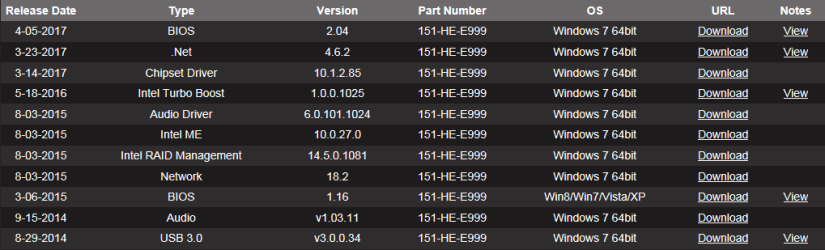
  • drivers.PNG
    drivers.PNG
    19.2 KB · Views: 2
Last edited:

My Computer

Computer type
PC/Desktop
Computer Manufacturer/Model Number
custom build
OS
Windows 7 Professional 64bit
CPU
Intel i7-5960X
Motherboard
EVGA X99 Classified
Memory
64GB Corsair Dominator 2400MHz
Graphics Card(s)
3 EVGA GTX980's
Sound Card
on board
Monitor(s) Displays
3 Dell E2715H 27"
Screen Resolution
1920x1080 (5760x1080)
Hard Drives
Samsung 950 Pro 1TB M.2 SSD,
Western Digital Black 2TB HDD's x5
Western Digital Black 1TB HDD's x3
PSU
Corsair AX1200i
Case
Corsair 750D
Cooling
Corsair H110i GT
Keyboard
Corsair K70
Mouse
Corsair M45
Internet Speed
250 down/10 up
Antivirus
Microsoft Security Essentials
Browser
IE 11, Google Chrome
If the computer does not wake from sleep or hibernate mode, restarting the computer, changing settings, or updating the software, BIOS and drivers might resolve the issue.

The genuine IAStorDataMgrSvc.exe file is a software component of Intel® Rapid Storage Technology (RST) by Intel Corporation. Make sure to install latest version of Intel® Rapid Storage Technology (RST).

View Event ID 1 and 42 for Wake and Sleep
"They are Event 1 and Event 42 (wake and sleep, respectively).
Open the Event Viewer and expand "Windows Logs" then click on the 'System' event log.
Right-click, and then choose "Filter Current Log".
Input the event id 1 and 42 number into input box above the "Task category" input box.
In the "Event sources" window, click the drop-down and put a check-mark beside "Power-Troubleshooter" and"Kernel-Power" and then click "OK.
You will see listing of wake & sleep events and look at the the "General" tab at the very bottom for each Event ID 1 for wake events the wake source will be shown it will be display at the "Wake Source: " entry.


Open Command Prompt as a administrator and type perfmon /report without any other parameters will generate the System Diagnostics report.


Windows 7's Reliability Monitor is a preconfigured tool that will allow you to track hardware and software problems and other changes to your computer. To use the reliability monitor on your Windows 7 machine, go into the Control Center and make sure “View by” is set to “Category”. Click on “System and Security” and then under “Action Center”, click on “Review your computer’s status and resolve issues”. Click on “Maintenance” to expand that section, and then click on the link to “View reliability history”.
 
Last edited:

My Computer

Computer type
PC/Desktop
Computer Manufacturer/Model Number
Custom Build
OS
Windows 10 Pro x64
CPU
Intel Core i5 6600
Motherboard
Gigabyte Technology Z170M-D3H-CF (U3E1)
Memory
Corsair Vengeance LPX 16GB 2666MHz DDR4
Graphics Card(s)
AMD Radeon R9 380 Series
Hard Drives
SSD
HDD
Antivirus
Eset Smart Security
Browser
Mozila Firefox
IRST - Intel Rapid Storage Technology isn't needed if you don't have a RAID array. IRST is a supervising and tuning program. When you install IRST it will also install the SATA (AHCI or RAID drivers).

If IRST is giving you some problems you can uninstall it. The needed drivers will remain on the computer.
 

My Computers

System One System Two

  • Computer type
    PC/Desktop
    Computer Manufacturer/Model Number
    custom build
    OS
    Windows 7 HP 64
    CPU
    i5 6600K - 800MHz to 4200MHz
    Motherboard
    GA-Z170-HD3P
    Memory
    4+4G GSkill DDR4 3000
    Graphics Card(s)
    IG - Intel 530
    Monitor(s) Displays
    Samsung 226BW
    Screen Resolution
    1680x1050
    Hard Drives
    (1) -1 SM951 – 128GB M.2 AHCI PCIe SSD drive for Windows 7 and Lubuntu
    (2) -1 WD SATA 3 - 1T for Data
    (3) -1 WD SATA 3 - 1T for backup
    PSU
    Thermaltake 450W TR2 gold
    Keyboard
    Old and good Chicony mechanical keyboard
    Mouse
    Logitech mX performance - 9 buttons (had to disable some)
    Internet Speed
    500Mb/s
    Browser
    Firefox 64
    Other Info
    TinyWall firewall
  • Computer type
    Laptop
    System Manufacturer/Model Number
    Asus Q550LF
    OS
    Windows 7 Pro
    CPU
    i7-4500U 800MHz to 3.0GHz
    Motherboard
    Asus Q550LF
    Memory
    (4+4)G DDR3 1600
    Graphics Card(s)
    IG intel 4400 + NVIDIA GeForce GT 745M
    Sound Card
    Realtek
    Monitor(s) Displays
    LG Display LP156WF4-SPH1
    Screen Resolution
    1920 x 1080
    Hard Drives
    BX500 120G SSD for Windows and programs +
    1T HDD for data
    Internet Speed
    500 Mb/s
    Browser
    Firefox
    Other Info
    TinyWall firewall
IRST - Intel Rapid Storage Technology isn't needed if you don't have a RAID array. IRST is a supervising and tuning program. When you install IRST it will also install the SATA (AHCI or RAID drivers).

If IRST is giving you some problems you can uninstall it. The needed drivers will remain on the computer.

I do not have a RAID array although my motherboard does support it. I did not install IRST during the reinstall.
 

My Computer

Computer type
PC/Desktop
Computer Manufacturer/Model Number
custom build
OS
Windows 7 Professional 64bit
CPU
Intel i7-5960X
Motherboard
EVGA X99 Classified
Memory
64GB Corsair Dominator 2400MHz
Graphics Card(s)
3 EVGA GTX980's
Sound Card
on board
Monitor(s) Displays
3 Dell E2715H 27"
Screen Resolution
1920x1080 (5760x1080)
Hard Drives
Samsung 950 Pro 1TB M.2 SSD,
Western Digital Black 2TB HDD's x5
Western Digital Black 1TB HDD's x3
PSU
Corsair AX1200i
Case
Corsair 750D
Cooling
Corsair H110i GT
Keyboard
Corsair K70
Mouse
Corsair M45
Internet Speed
250 down/10 up
Antivirus
Microsoft Security Essentials
Browser
IE 11, Google Chrome

My Computers

System One System Two

  • Computer type
    PC/Desktop
    Computer Manufacturer/Model Number
    custom build
    OS
    Windows 7 HP 64
    CPU
    i5 6600K - 800MHz to 4200MHz
    Motherboard
    GA-Z170-HD3P
    Memory
    4+4G GSkill DDR4 3000
    Graphics Card(s)
    IG - Intel 530
    Monitor(s) Displays
    Samsung 226BW
    Screen Resolution
    1680x1050
    Hard Drives
    (1) -1 SM951 – 128GB M.2 AHCI PCIe SSD drive for Windows 7 and Lubuntu
    (2) -1 WD SATA 3 - 1T for Data
    (3) -1 WD SATA 3 - 1T for backup
    PSU
    Thermaltake 450W TR2 gold
    Keyboard
    Old and good Chicony mechanical keyboard
    Mouse
    Logitech mX performance - 9 buttons (had to disable some)
    Internet Speed
    500Mb/s
    Browser
    Firefox 64
    Other Info
    TinyWall firewall
  • Computer type
    Laptop
    System Manufacturer/Model Number
    Asus Q550LF
    OS
    Windows 7 Pro
    CPU
    i7-4500U 800MHz to 3.0GHz
    Motherboard
    Asus Q550LF
    Memory
    (4+4)G DDR3 1600
    Graphics Card(s)
    IG intel 4400 + NVIDIA GeForce GT 745M
    Sound Card
    Realtek
    Monitor(s) Displays
    LG Display LP156WF4-SPH1
    Screen Resolution
    1920 x 1080
    Hard Drives
    BX500 120G SSD for Windows and programs +
    1T HDD for data
    Internet Speed
    500 Mb/s
    Browser
    Firefox
    Other Info
    TinyWall firewall

My Computer

Computer type
PC/Desktop
Computer Manufacturer/Model Number
custom build
OS
Windows 7 Professional 64bit
CPU
Intel i7-5960X
Motherboard
EVGA X99 Classified
Memory
64GB Corsair Dominator 2400MHz
Graphics Card(s)
3 EVGA GTX980's
Sound Card
on board
Monitor(s) Displays
3 Dell E2715H 27"
Screen Resolution
1920x1080 (5760x1080)
Hard Drives
Samsung 950 Pro 1TB M.2 SSD,
Western Digital Black 2TB HDD's x5
Western Digital Black 1TB HDD's x3
PSU
Corsair AX1200i
Case
Corsair 750D
Cooling
Corsair H110i GT
Keyboard
Corsair K70
Mouse
Corsair M45
Internet Speed
250 down/10 up
Antivirus
Microsoft Security Essentials
Browser
IE 11, Google Chrome
It hasn't happened the last couple restarts. I also didn't change anything. I'll see if it happens again this week.
 

My Computer

Computer type
PC/Desktop
Computer Manufacturer/Model Number
custom build
OS
Windows 7 Professional 64bit
CPU
Intel i7-5960X
Motherboard
EVGA X99 Classified
Memory
64GB Corsair Dominator 2400MHz
Graphics Card(s)
3 EVGA GTX980's
Sound Card
on board
Monitor(s) Displays
3 Dell E2715H 27"
Screen Resolution
1920x1080 (5760x1080)
Hard Drives
Samsung 950 Pro 1TB M.2 SSD,
Western Digital Black 2TB HDD's x5
Western Digital Black 1TB HDD's x3
PSU
Corsair AX1200i
Case
Corsair 750D
Cooling
Corsair H110i GT
Keyboard
Corsair K70
Mouse
Corsair M45
Internet Speed
250 down/10 up
Antivirus
Microsoft Security Essentials
Browser
IE 11, Google Chrome
I only say this in the most general terms, after 37+ years of working on computers running MS OS's.

Since invented by MS, Sleep and Hibernate have had issues (been buggy) which have spurred thousands of complaints on various forums. The worse is "my computer went to sleep and now I can't wake it up!".

Grrrr! For that very reason, and to preserve my own data and sanity, I disable both Sleep and Hibernate when I first set up a new install of any version of Windows. Life is just more enjoyable without something like Sleep or Hibernate messing with me.

I consider a computer like any other appliance in my house....when I'm not using it, or just not here, it's turned OFF. There is some housekeeping that Windows needs to do, that it can only do during a full and complete Shutdown. (like save the registry to the hard drive)

When I disable Hibernate, I also get rid of that HUGE Hiberfil.sys file in the root directory, which takes up a HUGE amount of space.

Some folks will complain about loosing so much disk space, yet they do nothing about the "Elephant in the Room".

Just a thought!;)

TechnoMage :cool:
 

My Computer

Computer type
PC/Desktop
Computer Manufacturer/Model Number
Various
OS
Win 7 Pro, SP1, x86, Win-11/Pro/64
CPU
AMD
Motherboard
Various
Memory
8GB Crucial
Graphics Card(s)
Various
Sound Card
OnBoard
Monitor(s) Displays
Acer 21.5"
Hard Drives
Crucial SSD, 500 GB
PSU
OEM
Case
SFF Slim Line Case
Cooling
OEM
Keyboard
eMachines
Mouse
Logitech Wireless
Internet Speed
varies
Antivirus
Windows Defender/Super Anti-Spyware
Browser
Firefox
TechnoMage2016 your thought are like mine.

I can't help you if you are using Sleep or Hibernation except suggesting using a different method.
Sleep and Hibernation gave me so many head aches, I gave up.

Shut down you computer properly when not in use.
Today's computers shutdown and startup so quickly, I really don't see any need for Sleep or Hibernation.

I wish I could give more help.

I hope my thought are not off subject.

Jack
 

My Computer

Computer type
PC/Desktop
Computer Manufacturer/Model Number
Home made Desktop
OS
Windows 10 Pro. 64/ version 1709 Windows 7 Pro/64
CPU
Intel i7-6800K @ 4.3
Motherboard
ASUS X-99 Deluxe II
Memory
Corsair Platinum 16 gig @2400
Graphics Card(s)
EVGA GTX 1070 OC
Monitor(s) Displays
Asus 27" LED LCD/VE278Q
Screen Resolution
1920-1080 or 1280-720 HDMI
Hard Drives
INTEL SSD 730-240 Gb Sata 3.0/
PSU
EVGA Platium 1200W
Case
Phanteks Luxe Tempered Glass 8 fans/ one radiator
Cooling
XSPC/ Water Cooled CPU
Keyboard
Das 4 Professional
Mouse
Logitech M705/MX Anywhere 2-S
Internet Speed
100 mbits
Antivirus
Microsoft Security Essentials/ Malwarebytes Premium 3.0/ SAS
Browser
I.E. 11 default/Firefox/ ISP Time Warner Cable/Spectrum
Other Info
LG BluRay Burner/
Sound system-KLipsch-THX/
Icy Dock ssd Hot Swap bays.
I've been using sleep for as long as I've been using computers. At this point it's because of habit and no other reason. I guess I could leave the computer on all day (when I'm home) and shut it off when I go to work or to bed. Maybe have a screensaver running when I step away from the computer for a bit?

To Technomage and LaybackBear, what are your power settings in the Control Panel?

on a side note, it's been waking up normally and I haven't changed anything
 

My Computer

Computer type
PC/Desktop
Computer Manufacturer/Model Number
custom build
OS
Windows 7 Professional 64bit
CPU
Intel i7-5960X
Motherboard
EVGA X99 Classified
Memory
64GB Corsair Dominator 2400MHz
Graphics Card(s)
3 EVGA GTX980's
Sound Card
on board
Monitor(s) Displays
3 Dell E2715H 27"
Screen Resolution
1920x1080 (5760x1080)
Hard Drives
Samsung 950 Pro 1TB M.2 SSD,
Western Digital Black 2TB HDD's x5
Western Digital Black 1TB HDD's x3
PSU
Corsair AX1200i
Case
Corsair 750D
Cooling
Corsair H110i GT
Keyboard
Corsair K70
Mouse
Corsair M45
Internet Speed
250 down/10 up
Antivirus
Microsoft Security Essentials
Browser
IE 11, Google Chrome
Most Sleep issues has something to do with Windows Drivers and BIOS settings (S settings).
My current computer (GA-Z170-HD3P) couldn't recover from sleep. After BIOS update and some drivers update it is working well.

I agree with Technomage and LaybackBear that you should always turn the computer off when not using and switch off on the Surge Protector.
 

My Computers

System One System Two

  • Computer type
    PC/Desktop
    Computer Manufacturer/Model Number
    custom build
    OS
    Windows 7 HP 64
    CPU
    i5 6600K - 800MHz to 4200MHz
    Motherboard
    GA-Z170-HD3P
    Memory
    4+4G GSkill DDR4 3000
    Graphics Card(s)
    IG - Intel 530
    Monitor(s) Displays
    Samsung 226BW
    Screen Resolution
    1680x1050
    Hard Drives
    (1) -1 SM951 – 128GB M.2 AHCI PCIe SSD drive for Windows 7 and Lubuntu
    (2) -1 WD SATA 3 - 1T for Data
    (3) -1 WD SATA 3 - 1T for backup
    PSU
    Thermaltake 450W TR2 gold
    Keyboard
    Old and good Chicony mechanical keyboard
    Mouse
    Logitech mX performance - 9 buttons (had to disable some)
    Internet Speed
    500Mb/s
    Browser
    Firefox 64
    Other Info
    TinyWall firewall
  • Computer type
    Laptop
    System Manufacturer/Model Number
    Asus Q550LF
    OS
    Windows 7 Pro
    CPU
    i7-4500U 800MHz to 3.0GHz
    Motherboard
    Asus Q550LF
    Memory
    (4+4)G DDR3 1600
    Graphics Card(s)
    IG intel 4400 + NVIDIA GeForce GT 745M
    Sound Card
    Realtek
    Monitor(s) Displays
    LG Display LP156WF4-SPH1
    Screen Resolution
    1920 x 1080
    Hard Drives
    BX500 120G SSD for Windows and programs +
    1T HDD for data
    Internet Speed
    500 Mb/s
    Browser
    Firefox
    Other Info
    TinyWall firewall
Update:
I have my racing simulator up and running. I shut the computer down last night. Turned it on this morning to check the firmware on the wheel.
Upon startup I was greeted with the same issue. The right display turns on (just a black screen) and the center/left displays don't do anything. I have to shut it off and turn it back on to get it to work. This is a brand new build. The only software installed is iRacing and the software for the Thrustmaster wheel. The video cards are the same ones (GTX 980's) that were giving me problems before. I haven't had this problem after switching my main computer to GTX 1080's so the issue has to be video card related.
 

My Computer

Computer type
PC/Desktop
Computer Manufacturer/Model Number
custom build
OS
Windows 7 Professional 64bit
CPU
Intel i7-5960X
Motherboard
EVGA X99 Classified
Memory
64GB Corsair Dominator 2400MHz
Graphics Card(s)
3 EVGA GTX980's
Sound Card
on board
Monitor(s) Displays
3 Dell E2715H 27"
Screen Resolution
1920x1080 (5760x1080)
Hard Drives
Samsung 950 Pro 1TB M.2 SSD,
Western Digital Black 2TB HDD's x5
Western Digital Black 1TB HDD's x3
PSU
Corsair AX1200i
Case
Corsair 750D
Cooling
Corsair H110i GT
Keyboard
Corsair K70
Mouse
Corsair M45
Internet Speed
250 down/10 up
Antivirus
Microsoft Security Essentials
Browser
IE 11, Google Chrome
I may have found out what the issue is. I turned the computer on yesterday to do some driving (testing) and the right display didn't turn on but the center and left ones did. I unplugged the DP cable from the back of the computer and plugged it back in, the display turned on. So then I began investigating and the DP cables weren't fully seating into the video card. There is a lock on the cable that you have to release before unplugging the cable and the cable would just pull out.

I unplugged everything, disassembled the computer and removed the motherboard. The case is a Corsair 350D. There is a little piece of metal that is bent over to add rigidity to the I/O area. The cables were hitting that so I kept bending it until it broke off. I covered the bare metal with a black Sharpie and reassembled the computer.

So far it's working as it should and I haven't had any issues with displays not turning on. I don't have my old case (Corsair 750D) anymore so I can't say for certain if that was the issue with my old setup.
 

My Computer

Computer type
PC/Desktop
Computer Manufacturer/Model Number
custom build
OS
Windows 7 Professional 64bit
CPU
Intel i7-5960X
Motherboard
EVGA X99 Classified
Memory
64GB Corsair Dominator 2400MHz
Graphics Card(s)
3 EVGA GTX980's
Sound Card
on board
Monitor(s) Displays
3 Dell E2715H 27"
Screen Resolution
1920x1080 (5760x1080)
Hard Drives
Samsung 950 Pro 1TB M.2 SSD,
Western Digital Black 2TB HDD's x5
Western Digital Black 1TB HDD's x3
PSU
Corsair AX1200i
Case
Corsair 750D
Cooling
Corsair H110i GT
Keyboard
Corsair K70
Mouse
Corsair M45
Internet Speed
250 down/10 up
Antivirus
Microsoft Security Essentials
Browser
IE 11, Google Chrome
Back
Top