
Internet Explorer 11 gone - but "is already installed on this system"
Hi,
I've been reading the previous threads about my problem, but I can't seem to find anything which fits my issues...
After Christmas when I got home from vacation, my system was acting weird. Apparently it had automatically installed some updates, and after that it's not the same. One thing which happened is that Internet Explorer (11) isn't starting at all. (When I clicked on it, nothing at all happened.)
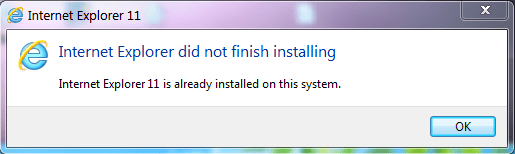
I followed some suggestions in this forum to uninstall it by going to the View Installed Updates and unistalled Internet Explorer 11 - so now that is gone. I then downloaded an installer from the Microsoft website (IE11-Windows6.1-x64-en-us.exe). But when I run it I get "Internet Explorer did not finish installing. Internet Explorer 11 is already installed on this system.":
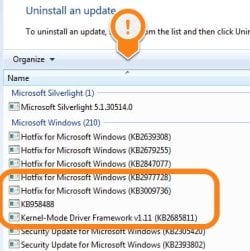
But when I check the installed Windows updates, there is nothing about Internet Explorer left... In the image below I have sorted all updates in alphabetical order to show that there is nothing starting with "I" left at all.
The links to Internet Explorer in the Start menu are gone altogether. I have no idea what to do next...
(I don't know if it's related, but all my Desktop Gadgets had also turned into small white squares. I have found a separate thread for this in this forum, but unfortunately it didn't fix anything.)
Hi,
I've been reading the previous threads about my problem, but I can't seem to find anything which fits my issues...
After Christmas when I got home from vacation, my system was acting weird. Apparently it had automatically installed some updates, and after that it's not the same. One thing which happened is that Internet Explorer (11) isn't starting at all. (When I clicked on it, nothing at all happened.)
I followed some suggestions in this forum to uninstall it by going to the View Installed Updates and unistalled Internet Explorer 11 - so now that is gone. I then downloaded an installer from the Microsoft website (IE11-Windows6.1-x64-en-us.exe). But when I run it I get "Internet Explorer did not finish installing. Internet Explorer 11 is already installed on this system.":
But when I check the installed Windows updates, there is nothing about Internet Explorer left... In the image below I have sorted all updates in alphabetical order to show that there is nothing starting with "I" left at all.
The links to Internet Explorer in the Start menu are gone altogether. I have no idea what to do next...
(I don't know if it's related, but all my Desktop Gadgets had also turned into small white squares. I have found a separate thread for this in this forum, but unfortunately it didn't fix anything.)
My Computer
At a glance
Windows 7 Ultimate 64 bit SP1Core i5 7508GB Dual-Channel DDR3 @ 668MHzATI AMD Radeon HD 5850
- Computer type
- PC/Desktop
- Computer Manufacturer/Model Number
- Custom build
- OS
- Windows 7 Ultimate 64 bit SP1
- CPU
- Core i5 750
- Motherboard
- ASUSTeK P7P55D-E (LGA1156)
- Memory
- 8GB Dual-Channel DDR3 @ 668MHz
- Graphics Card(s)
- ATI AMD Radeon HD 5850
- Monitor(s) Displays
- HP LP2465 + LG L2300B
- Screen Resolution
- 1920x1200 + 1920x1200
- Hard Drives
- 74GB INTEL SSDSA2M080G2GC ATA Device (SSD)
1397GB WD15EARS-32MVWB0 (SATA)
1863GB WD20EARS-00S8B1 (SATA)
931GB Seagate ST1000DM003-9YN162 (SATA)
2794GB Western Digital WD My Book (USB)
1863GB DW USB
1863GB WD USB
2784GB WD USB
1863GB WD USB
- Internet Speed
- 100Mbps/100Mbps
- Antivirus
- Avira


 Uploaded new CBS.


