Internet Explorer 11 gone - but "is already installed on this system"

Understood. :)
 

My Computer My Computer

At a glance

Windows 7 Ultimate 64 bit SP1Core i5 7508GB Dual-Channel DDR3 @ 668MHzATI AMD Radeon HD 5850
Computer type
PC/Desktop
Computer Manufacturer/Model Number
Custom build
OS
Windows 7 Ultimate 64 bit SP1
CPU
Core i5 750
Motherboard
ASUSTeK P7P55D-E (LGA1156)
Memory
8GB Dual-Channel DDR3 @ 668MHz
Graphics Card(s)
ATI AMD Radeon HD 5850
Monitor(s) Displays
HP LP2465 + LG L2300B
Screen Resolution
1920x1200 + 1920x1200
Hard Drives
74GB INTEL SSDSA2M080G2GC ATA Device (SSD)
1397GB WD15EARS-32MVWB0 (SATA)
1863GB WD20EARS-00S8B1 (SATA)
931GB Seagate ST1000DM003-9YN162 (SATA)
2794GB Western Digital WD My Book (USB)
1863GB DW USB
1863GB WD USB
2784GB WD USB
1863GB WD USB
Internet Speed
100Mbps/100Mbps
Antivirus
Avira
... you can also just tell MBAM to turn off the trial - no uninstall/reinstall required ;)
 

My Computer My Computer

At a glance

Win 7 x64 Home Premium (and x86 VirtualBox VM...i3 370M/i7 6500U8GB - finally :)/8GBit's an i3, dude!/dual Intel&nVidia
Computer type
Laptop
Computer Manufacturer/Model Number
Asus K52F or Lenovo B51-80
OS
Win 7 x64 Home Premium (and x86 VirtualBox VM)/Win10
CPU
i3 370M/i7 6500U
Motherboard
Asus/Lenovo
Memory
8GB - finally :)/8GB
Graphics Card(s)
it's an i3, dude!/dual Intel&nVidia
Sound Card
onboard
Monitor(s) Displays
15.6" built-in
Screen Resolution
1366x768/1920x1080
Hard Drives
750GB Seagate internal
Sundry external drives attached to other computers on the local network
1TB SSD on the Lenovo
PSU
n/a
Internet Speed
as much as I can get - usually on a dongle/phone, so <1MB/s
Antivirus
MSE/Defender
Browser
IE11/12/Edge/Chrome/FF(if I must)
... you can also just tell MBAM to turn off the trial - no uninstall/reinstall required ;)

Maybe this wasn't meant for me, but... what trial? :p:geek:
 

My Computer My Computer

At a glance

Windows 7 Ultimate 64 bit SP1Core i5 7508GB Dual-Channel DDR3 @ 668MHzATI AMD Radeon HD 5850
Computer type
PC/Desktop
Computer Manufacturer/Model Number
Custom build
OS
Windows 7 Ultimate 64 bit SP1
CPU
Core i5 750
Motherboard
ASUSTeK P7P55D-E (LGA1156)
Memory
8GB Dual-Channel DDR3 @ 668MHz
Graphics Card(s)
ATI AMD Radeon HD 5850
Monitor(s) Displays
HP LP2465 + LG L2300B
Screen Resolution
1920x1200 + 1920x1200
Hard Drives
74GB INTEL SSDSA2M080G2GC ATA Device (SSD)
1397GB WD15EARS-32MVWB0 (SATA)
1863GB WD20EARS-00S8B1 (SATA)
931GB Seagate ST1000DM003-9YN162 (SATA)
2794GB Western Digital WD My Book (USB)
1863GB DW USB
1863GB WD USB
2784GB WD USB
1863GB WD USB
Internet Speed
100Mbps/100Mbps
Antivirus
Avira
... you can also just tell MBAM to turn off the trial - no uninstall/reinstall required ;)

Maybe this wasn't meant for me, but... what trial? :p:geek:
It was meant for you. Noel pointed out that you don't need to uninstall Malwarebytes, as I indicated in an earlier post.

You just have to turn off the trial.

I'm always learning or forced to recall some things around here!

Thanks Noel!.

.....Malwarebytes scan here also:
Code:
Malwarebytes Anti-Malware
www.malwarebytes.org

Scan Date: 2015-02-06
Scan Time: 17:16:02
Logfile: Malwarebytes scan result 2015-02-06.txt
Administrator: Yes

Version: 2.00.4.1028
Malware Database: v2015.02.06.05
Rootkit Database: v2015.02.03.01
[B]License: [COLOR="Red"]Trial[/COLOR][/B]
Malware Protection: Enabled
Malicious Website Protection: Enabled
Self-protection: Disabled
.....

I really appreciate the help I'm getting here!

/Bengt
 

My Computer My Computer

At a glance

x64 (6.3.9600) Win8.1 Pro & soon dual boot x6...AMD A6-3420M APU with Radeon(tm) HD Graphics6.00 GBAMD Radeon(TM) HD 6520G
Computer type
Laptop
Computer Manufacturer/Model Number
HP Pavilion dv6-6c10us
OS
x64 (6.3.9600) Win8.1 Pro & soon dual boot x64 (6.1.7601) Win7_SP1 HomePrem
CPU
AMD A6-3420M APU with Radeon(tm) HD Graphics
Motherboard
Hewlett-Packard 1805
Memory
6.00 GB
Graphics Card(s)
AMD Radeon(TM) HD 6520G
Sound Card
(1) AMD High Definition Audio Device (2) IDT High Definiti
Monitor(s) Displays
HP W2072a 20" LCD (1600 x 900) @ 60 Hz
Screen Resolution
1366 x 768 x 32 bits (4294967296 colors) @ 60 Hz
Hard Drives
ST640LM0 00 HM641JI SATA Disk Device
Keyboard
Logitech k520 wireless KB
Mouse
Logitech m320 wireless mouse (bundled with KB)
Internet Speed
15/5 | 54 MB Wireless 'n'
Antivirus
Realtime: Defender or Avast | On-demand: Malwarebytes, ESET
Browser
IE 11 on Win8, IE 10 on win 7
Other Info
Media: [Gimp, Audacity, VLC] || Comm: [WEmail 2012, Skype] || Productivity: [OpenOffice,| Textpad] || Utils: [Sysinternals, cCleaner, Speccy, Defraggler]
Here are a few things... you might have already tried them or they might not work because of the issue. This is a dump of what I can think of after searching this issue again.

Turn off IE 11 in Program & Features -> Turn Windows features on or off
TurnOff-IE11.png


Try launching Control Panel -> Internet Options using the run command
WinKey+R and type inetcpl.cpl in the Run box
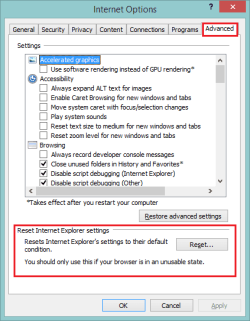
If you get the Inet Cpl launched, go to the advanced tab and press the [Reset...] button
Select the Delete personal settings check box
-> removes browsing history, search providers, Accelerators, home pages, Tracking Protection, and ActiveX Filtering data.
Reset-IE11.png


Attach the Windows\IE11_main.log

Install problems with Internet Explorer 11
MSDN said:
.....
Internet Explorer didn't finish installing

If Internet Explorer doesn't finish installing, it might mean that Windows Update wasn't able to install an associated update, that you have a previous, unsupported version of Internet Explorer installed, or that there's a problem with your copy of Internet Explorer. We recommend you try this:

To fix this issue
  1. Uninstall Internet Explorer:
    • In the Control Panel, open the Programs and Features box, scroll down to Internet Explorer 11, and then click Uninstall.
    • After the uninstall finishes, restart your computer.

  2. Run Windows Update, clicking Check for updates.

  3. Check the list for Internet Explorer 11. If it's included in the list of updates for download, exclude it before you update your computer. If you get an error during the Windows Update process,
    see Fix the problem with Microsoft Windows Update that is not working.

  4. Restart your computer, making sure all of your the updates are finished.

  5. Try to reinstall Internet Explorer 11 from either Windows Update (if you saw it in Step 3) or from the Download Internet Explorer 11 website.
If these steps didn't fix your problem, see Troubleshooting a failed installation of Internet Explorer 11.


Try a Command Prompt uninstall:
Launch ans elevatd command prompt and type (copy/paste is eaiser) the entire line below
FORFILES /P %WINDIR%\servicing\Packages /M Microsoft-Windows-InternetExplorer-*11.*.mum /c "cmd /c echo Uninstalling package @fname && start /w pkgmgr /up:@fname /norestart"​
The forum wrapped the line, just grab everything in the indented section above.

If you select the line and Ctrl+C to copy, right click the Command Prompt title bar and select edit-> paste
(Ctrl+V doesn't work :()

If that doesn't help try the same method for IE 10
FORFILES /P %WINDIR%\servicing\Packages /M Microsoft-Windows-InternetExplorer-*10.*.mum /c "cmd /c echo Uninstalling package @fname && start /w pkgmgr /up:@fname /norestart"​

If that doesn't help try the same method for IE 9
FORFILES /P %WINDIR%\servicing\Packages /M Microsoft-Windows-InternetExplorer-*9.*.mum /c "cmd /c echo Uninstalling package @fname && start /w pkgmgr /up:@fname /norestart"​

Well, that's today's brain dump... have a good weekend. I might post more, but if Noel posts something - his post takes precedence over mine. Do what Noel suggests first - I'm looking at this strictly from IE at the moment, Noel looks at things from a different perspective - his ways are often faster ;)

Bill
.
 
Last edited:

My Computer My Computer

At a glance

x64 (6.3.9600) Win8.1 Pro & soon dual boot x6...AMD A6-3420M APU with Radeon(tm) HD Graphics6.00 GBAMD Radeon(TM) HD 6520G
Computer type
Laptop
Computer Manufacturer/Model Number
HP Pavilion dv6-6c10us
OS
x64 (6.3.9600) Win8.1 Pro & soon dual boot x64 (6.1.7601) Win7_SP1 HomePrem
CPU
AMD A6-3420M APU with Radeon(tm) HD Graphics
Motherboard
Hewlett-Packard 1805
Memory
6.00 GB
Graphics Card(s)
AMD Radeon(TM) HD 6520G
Sound Card
(1) AMD High Definition Audio Device (2) IDT High Definiti
Monitor(s) Displays
HP W2072a 20" LCD (1600 x 900) @ 60 Hz
Screen Resolution
1366 x 768 x 32 bits (4294967296 colors) @ 60 Hz
Hard Drives
ST640LM0 00 HM641JI SATA Disk Device
Keyboard
Logitech k520 wireless KB
Mouse
Logitech m320 wireless mouse (bundled with KB)
Internet Speed
15/5 | 54 MB Wireless 'n'
Antivirus
Realtime: Defender or Avast | On-demand: Malwarebytes, ESET
Browser
IE 11 on Win8, IE 10 on win 7
Other Info
Media: [Gimp, Audacity, VLC] || Comm: [WEmail 2012, Skype] || Productivity: [OpenOffice,| Textpad] || Utils: [Sysinternals, cCleaner, Speccy, Defraggler]
... you can also just tell MBAM to turn off the trial - no uninstall/reinstall required ;)

Maybe this wasn't meant for me, but... what trial? :p:geek:
It was meant for you. Noel pointed out that you don't need to uninstall Malwarebytes, as I indicated in an earlier post.

You just have to turn off the trial.

I'm always learning or forced to recall some things around here!

Thanks Noel!.

.....Malwarebytes scan here also:
Code:
Malwarebytes Anti-Malware
www.malwarebytes.org

Scan Date: 2015-02-06
Scan Time: 17:16:02
Logfile: Malwarebytes scan result 2015-02-06.txt
Administrator: Yes

Version: 2.00.4.1028
Malware Database: v2015.02.06.05
Rootkit Database: v2015.02.03.01
[B]License: [COLOR=Red]Trial[/COLOR][/B]
Malware Protection: Enabled
Malicious Website Protection: Enabled
Self-protection: Disabled
.....
I really appreciate the help I'm getting here!

/Bengt

@bengta

Turn off the trial before the trial period expires and reverts to the free version.
If you don't, you may get popups that you can't control from the free version.
That's what happened to me, probably on a WTP (Win 10) OS where i played with the trial.
I did an mbam-clean / reinstall without trial, to fix the annoyance...
 

My Computer My Computer

At a glance

Multi-Boot W7_Pro_x64 W8.1_Pro_x64 W10_Pro_x6...AMD Athlon II x4 6206GB GSkill DDR2 800AMD 4670 GPU + AMD 4200 IGP
Computer type
PC/Desktop
Computer Manufacturer/Model Number
home built
OS
Multi-Boot W7_Pro_x64 W8.1_Pro_x64 W10_Pro_x64 +Linux_VMs +Chromium_VM
CPU
AMD Athlon II x4 620
Motherboard
Gigabyte GA-MA785G-UD3H
Memory
6GB GSkill DDR2 800
Graphics Card(s)
AMD 4670 GPU + AMD 4200 IGP
Sound Card
on board Realtek ALC889A
Monitor(s) Displays
RCA 40" LCD TV, Insignia 32" LCD TV, HP 15" LCD monitor
Screen Resolution
1680 x 1050
Hard Drives
OCZ Vertex 3 120GB,
Samsung F3 1TB (3),
Several others - WD, Seagate, Hitachi, ...
PSU
Corsair 500 W
Case
Rosewill mid tower
Cooling
CM 90mm rifle
Keyboard
Gyration wireless, Logitech wireless, Dell USB wired
Mouse
Gyration wireless, Logitech wireless, V7 USB wired
Internet Speed
Spectrum - 100Mbps D / 10Mbps U
Antivirus
Avast, MBAM3, EMET, WinPatrol
Browser
Pale Moon, Firefox, IE
Other Info
2 multi-boot PC's
Mainly HTPC/Office/Gen purpose (no gaming).
Trendnet USB KVM.
LG DVD burner/Blue Ray Player.
Tray system for removable SATA backup drives.

Not currently OCd, under-volted.
I use Hybrid sleep, rarely re-boot or shutdown.

Hauppauge HD-PVR, Avermedia PCIe TV Tuner, Hauppauge PCI TV Tuner.
@bengta

Turn off the trial before the trial period expires and reverts to the free version.
If you don't, you may get popups that you can't control from the free version.
That's what happened to me, probably on a WTP (Win 10) OS where i played with the trial.
I did an mbam-clean / reinstall without trial, to fix the annoyance...

The Trial can still be 'ended' successfully even after its expiry - I did it on one machine yesterday ;)
 

My Computer My Computer

At a glance

Win 7 x64 Home Premium (and x86 VirtualBox VM...i3 370M/i7 6500U8GB - finally :)/8GBit's an i3, dude!/dual Intel&nVidia
Computer type
Laptop
Computer Manufacturer/Model Number
Asus K52F or Lenovo B51-80
OS
Win 7 x64 Home Premium (and x86 VirtualBox VM)/Win10
CPU
i3 370M/i7 6500U
Motherboard
Asus/Lenovo
Memory
8GB - finally :)/8GB
Graphics Card(s)
it's an i3, dude!/dual Intel&nVidia
Sound Card
onboard
Monitor(s) Displays
15.6" built-in
Screen Resolution
1366x768/1920x1080
Hard Drives
750GB Seagate internal
Sundry external drives attached to other computers on the local network
1TB SSD on the Lenovo
PSU
n/a
Internet Speed
as much as I can get - usually on a dongle/phone, so <1MB/s
Antivirus
MSE/Defender
Browser
IE11/12/Edge/Chrome/FF(if I must)
Here are a few things... you might have already tried them or they might not work because of the issue. This is a dump of what I can think of after searching this issue again.

Turn off IE 11 in Program & Features -> Turn Windows features on or off

There is nothing about IE in that list.


Try launching Control Panel -> Internet Options using the run command
WinKey+R and type inetcpl.cpl in the Run box

"Windows cannot find inetcpl.cpl"


Attach the Windows\IE11_main.log

Code:
00:00.000: ====================================================================
00:00.000: Started: 2015/01/28 (Y/M/D) 22:39:48.645 (local)
00:00.000: Time Format in this log: MM:ss.mmm (minutes:seconds.milliseconds)
00:00.000: Command line: "E:\Users\Bengt\Downloads\IE11-Windows6.1-x64-en-us.exe" 
00:00.000: INFO:    Setup installer for Internet Explorer: 11.0.9600.16428
00:00.015: WARNING: Checking version for C:\Windows\SYSTEM32\ieframe.dll.  The file does not exist.
00:00.015: ERROR:   Couldn't get File Version Info size for System32\ieframe.dll
00:00.015: INFO:    Checking if iexplore.exe's current version is between 11.0.9600.0...
00:00.015: INFO:    ...and 11.1.0.0...
00:00.015: INFO:    Maximum version on which to run IEAK branding is: 11.1.0.0...
00:00.015: ERROR:   Internet Explorer version check failed.
00:04.118: INFO:    Setup exit code: 0x00009C4D (40013) - Another version of Internet Explorer 11 is already installed.
00:04.118: WARNING: Checking version for C:\Program Files (x86)\Internet Explorer\iexplore.exe.  The file does not exist.
00:04.134: WARNING: Checking version for C:\Windows\system32\mshtml.dll.  The file does not exist.
00:04.134: INFO:    Cleaning up temporary files in: C:\Windows\TEMP\IE1DC9B.tmp
00:04.134: INFO:    Unable to remove directory C:\Windows\TEMP\IE1DC9B.tmp, marking for deletion on reboot.
00:04.134: INFO:    Released Internet Explorer Installer Mutex
00:00.000: ====================================================================
00:00.000: Started: 2015/01/28 (Y/M/D) 22:48:42.699 (local)
00:00.000: Time Format in this log: MM:ss.mmm (minutes:seconds.milliseconds)
00:00.015: Command line: "E:\Users\Bengt\Downloads\IE11-Windows6.1-x64-en-us.exe" 
00:00.015: INFO:    Setup installer for Internet Explorer: 11.0.9600.16428
00:00.015: WARNING: Checking version for C:\Windows\SYSTEM32\ieframe.dll.  The file does not exist.
00:00.015: ERROR:   Couldn't get File Version Info size for System32\ieframe.dll
00:00.015: INFO:    Checking if iexplore.exe's current version is between 11.0.9600.0...
00:00.015: INFO:    ...and 11.1.0.0...
00:00.015: INFO:    Maximum version on which to run IEAK branding is: 11.1.0.0...
00:00.015: ERROR:   Internet Explorer version check failed.
00:03.634: INFO:    Setup exit code: 0x00009C4D (40013) - Another version of Internet Explorer 11 is already installed.
00:03.634: WARNING: Checking version for C:\Program Files (x86)\Internet Explorer\iexplore.exe.  The file does not exist.
00:03.634: WARNING: Checking version for C:\Windows\system32\mshtml.dll.  The file does not exist.
00:03.634: INFO:    Cleaning up temporary files in: C:\Windows\TEMP\IE1733.tmp
00:03.650: INFO:    Unable to remove directory C:\Windows\TEMP\IE1733.tmp, marking for deletion on reboot.
00:03.650: INFO:    Released Internet Explorer Installer Mutex
00:00.000: ====================================================================
00:00.015: Started: 2015/01/28 (Y/M/D) 22:56:28.912 (local)
00:00.015: Time Format in this log: MM:ss.mmm (minutes:seconds.milliseconds)
00:00.015: Command line: "E:\Users\Bengt\Downloads\IE11-Windows6.1.exe" 
00:00.015: INFO:    Setup installer for Internet Explorer: 11.0.9600.16428
00:00.015: WARNING: Checking version for C:\Windows\SYSTEM32\ieframe.dll.  The file does not exist.
00:00.015: ERROR:   Couldn't get File Version Info size for System32\ieframe.dll
00:00.015: INFO:    Checking if iexplore.exe's current version is between 11.0.9600.0...
00:00.015: INFO:    ...and 11.1.0.0...
00:00.015: INFO:    Maximum version on which to run IEAK branding is: 11.1.0.0...
00:00.015: ERROR:   Internet Explorer version check failed.
00:01.840: INFO:    Setup exit code: 0x00009C4D (40013) - Another version of Internet Explorer 11 is already installed.
00:01.840: WARNING: Checking version for C:\Program Files (x86)\Internet Explorer\iexplore.exe.  The file does not exist.
00:01.840: WARNING: Checking version for C:\Windows\system32\mshtml.dll.  The file does not exist.
00:01.840: INFO:    Cleaning up temporary files in: C:\Windows\TEMP\IE12445.tmp
00:01.856: INFO:    Unable to remove directory C:\Windows\TEMP\IE12445.tmp, marking for deletion on reboot.
00:01.856: INFO:    Released Internet Explorer Installer Mutex
00:00.000: ====================================================================
00:00.000: Started: 2015/01/28 (Y/M/D) 22:56:38.744 (local)
00:00.000: Time Format in this log: MM:ss.mmm (minutes:seconds.milliseconds)
00:00.000: Command line: "E:\Users\Bengt\Downloads\IE11-Windows6.1.exe" 
00:00.000: INFO:    Setup installer for Internet Explorer: 11.0.9600.16428
00:00.000: WARNING: Checking version for C:\Windows\SYSTEM32\ieframe.dll.  The file does not exist.
00:00.000: ERROR:   Couldn't get File Version Info size for System32\ieframe.dll
00:00.000: INFO:    Checking if iexplore.exe's current version is between 11.0.9600.0...
00:00.000: INFO:    ...and 11.1.0.0...
00:00.000: INFO:    Maximum version on which to run IEAK branding is: 11.1.0.0...
00:00.000: ERROR:   Internet Explorer version check failed.
00:02.387: INFO:    Setup exit code: 0x00009C4D (40013) - Another version of Internet Explorer 11 is already installed.
00:02.387: WARNING: Checking version for C:\Program Files (x86)\Internet Explorer\iexplore.exe.  The file does not exist.
00:02.387: WARNING: Checking version for C:\Windows\system32\mshtml.dll.  The file does not exist.
00:02.403: INFO:    Cleaning up temporary files in: C:\Windows\TEMP\IE14B16.tmp
00:02.403: INFO:    Unable to remove directory C:\Windows\TEMP\IE14B16.tmp, marking for deletion on reboot.
00:02.403: INFO:    Released Internet Explorer Installer Mutex
00:00.000: ====================================================================
00:00.000: Started: 2015/01/28 (Y/M/D) 22:57:15.662 (local)
00:00.016: Time Format in this log: MM:ss.mmm (minutes:seconds.milliseconds)
00:00.016: Command line: "E:\Users\Bengt\Downloads\IE11-Windows6.1-x64-en-us.exe" 
00:00.016: INFO:    Setup installer for Internet Explorer: 11.0.9600.16428
00:00.016: WARNING: Checking version for C:\Windows\SYSTEM32\ieframe.dll.  The file does not exist.
00:00.016: ERROR:   Couldn't get File Version Info size for System32\ieframe.dll
00:00.031: INFO:    Checking if iexplore.exe's current version is between 11.0.9600.0...
00:00.031: INFO:    ...and 11.1.0.0...
00:00.031: INFO:    Maximum version on which to run IEAK branding is: 11.1.0.0...
00:00.031: ERROR:   Internet Explorer version check failed.
00:01.576: INFO:    Setup exit code: 0x00009C4D (40013) - Another version of Internet Explorer 11 is already installed.
00:01.591: WARNING: Checking version for C:\Program Files (x86)\Internet Explorer\iexplore.exe.  The file does not exist.
00:01.591: WARNING: Checking version for C:\Windows\system32\mshtml.dll.  The file does not exist.
00:01.591: INFO:    Cleaning up temporary files in: C:\Windows\TEMP\IE1DC6C.tmp
00:01.591: INFO:    Unable to remove directory C:\Windows\TEMP\IE1DC6C.tmp, marking for deletion on reboot.
00:01.591: INFO:    Released Internet Explorer Installer Mutex
00:00.000: ====================================================================
00:00.000: Started: 2015/01/28 (Y/M/D) 23:12:23.569 (local)
00:00.000: Time Format in this log: MM:ss.mmm (minutes:seconds.milliseconds)
00:00.000: Command line: "E:\Users\Bengt\Downloads\IE11-Windows6.1-x64-en-us.exe" 
00:00.016: INFO:    Setup installer for Internet Explorer: 11.0.9600.16428
00:00.016: WARNING: Checking version for C:\Windows\SYSTEM32\ieframe.dll.  The file does not exist.
00:00.016: ERROR:   Couldn't get File Version Info size for System32\ieframe.dll
00:00.016: INFO:    Checking if iexplore.exe's current version is between 11.0.9600.0...
00:00.016: INFO:    ...and 11.1.0.0...
00:00.016: INFO:    Maximum version on which to run IEAK branding is: 11.1.0.0...
00:00.016: ERROR:   Internet Explorer version check failed.
00:01.950: INFO:    Setup exit code: 0x00009C4D (40013) - Another version of Internet Explorer 11 is already installed.
00:01.950: WARNING: Checking version for C:\Program Files (x86)\Internet Explorer\iexplore.exe.  The file does not exist.
00:01.950: WARNING: Checking version for C:\Windows\system32\mshtml.dll.  The file does not exist.
00:01.950: INFO:    Cleaning up temporary files in: C:\Windows\TEMP\IE1AF35.tmp
00:01.950: INFO:    Unable to remove directory C:\Windows\TEMP\IE1AF35.tmp, marking for deletion on reboot.
00:01.966: INFO:    Released Internet Explorer Installer Mutex
00:00.000: ====================================================================
00:00.000: Started: 2015/01/28 (Y/M/D) 23:29:47.288 (local)
00:00.000: Time Format in this log: MM:ss.mmm (minutes:seconds.milliseconds)
00:00.000: Command line: "E:\Users\Bengt\Downloads\IE11-Windows6.1-x64-en-us.exe" 
00:00.000: INFO:    Setup installer for Internet Explorer: 11.0.9600.16428
00:00.000: WARNING: Checking version for C:\Windows\SYSTEM32\ieframe.dll.  The file does not exist.
00:00.000: ERROR:   Couldn't get File Version Info size for System32\ieframe.dll
00:00.000: INFO:    Checking if iexplore.exe's current version is between 11.0.9600.0...
00:00.000: INFO:    ...and 11.1.0.0...
00:00.000: INFO:    Maximum version on which to run IEAK branding is: 11.1.0.0...
00:00.016: ERROR:   Internet Explorer version check failed.
66:50.567: INFO:    Setup exit code: 0x00009C4D (40013) - Another version of Internet Explorer 11 is already installed.
66:50.599: WARNING: Checking version for C:\Program Files (x86)\Internet Explorer\iexplore.exe.  The file does not exist.
66:50.599: WARNING: Checking version for C:\Windows\system32\mshtml.dll.  The file does not exist.
66:50.599: INFO:    Cleaning up temporary files in: C:\Windows\TEMP\IE1A269.tmp
66:50.614: INFO:    Unable to remove directory C:\Windows\TEMP\IE1A269.tmp, marking for deletion on reboot.
66:50.614: INFO:    Released Internet Explorer Installer Mutex
00:00.000: ====================================================================
00:00.000: Started: 2015/01/29 (Y/M/D) 18:10:56.453 (local)
00:00.015: Time Format in this log: MM:ss.mmm (minutes:seconds.milliseconds)
00:00.015: Command line: "E:\Downloads\IE11-Windows6.1-x64-en-us.exe" 
00:00.015: INFO:    Setup installer for Internet Explorer: 11.0.9600.16428
00:00.015: WARNING: Checking version for C:\Windows\SYSTEM32\ieframe.dll.  The file does not exist.
00:00.015: ERROR:   Couldn't get File Version Info size for System32\ieframe.dll
00:00.015: INFO:    Checking if iexplore.exe's current version is between 11.0.9600.0...
00:00.015: INFO:    ...and 11.1.0.0...
00:00.015: INFO:    Maximum version on which to run IEAK branding is: 11.1.0.0...
00:00.015: ERROR:   Internet Explorer version check failed.
00:01.107: INFO:    Setup exit code: 0x00009C4D (40013) - Another version of Internet Explorer 11 is already installed.
00:01.123: WARNING: Checking version for C:\Program Files (x86)\Internet Explorer\iexplore.exe.  The file does not exist.
00:01.123: WARNING: Checking version for C:\Windows\system32\mshtml.dll.  The file does not exist.
00:01.138: INFO:    Cleaning up temporary files in: C:\Windows\TEMP\IE138CB.tmp
00:01.138: INFO:    Unable to remove directory C:\Windows\TEMP\IE138CB.tmp, marking for deletion on reboot.
00:01.138: INFO:    Released Internet Explorer Installer Mutex
00:00.000: ====================================================================
00:00.000: Started: 2015/02/12 (Y/M/D) 17:26:03.798 (local)
00:00.000: Time Format in this log: MM:ss.mmm (minutes:seconds.milliseconds)
00:00.000: Command line: "E:\Users\Bengt\Downloads\IE11-Windows6.1-x64-en-us.exe" 
00:00.016: INFO:    Setup installer for Internet Explorer: 11.0.9600.16428
00:00.016: WARNING: Checking version for C:\Windows\SYSTEM32\ieframe.dll.  The file does not exist.
00:00.016: ERROR:   Couldn't get File Version Info size for System32\ieframe.dll
00:00.016: INFO:    Checking if iexplore.exe's current version is between 11.0.9600.0...
00:00.016: INFO:    ...and 11.1.0.0...
00:00.016: INFO:    Maximum version on which to run IEAK branding is: 11.1.0.0...
00:00.016: ERROR:   Internet Explorer version check failed.
00:06.209: INFO:    Setup exit code: 0x00009C4D (40013) - Another version of Internet Explorer 11 is already installed.
00:06.209: WARNING: Checking version for C:\Program Files (x86)\Internet Explorer\iexplore.exe.  The file does not exist.
00:06.209: WARNING: Checking version for C:\Windows\system32\mshtml.dll.  The file does not exist.
00:06.209: INFO:    Cleaning up temporary files in: C:\Windows\TEMP\IE1EBD4.tmp
00:06.225: INFO:    Unable to remove directory C:\Windows\TEMP\IE1EBD4.tmp, marking for deletion on reboot.
00:06.225: INFO:    Released Internet Explorer Installer Mutex


Try a Command Prompt uninstall:
Launch ans elevatd command prompt and type (copy/paste is eaiser) the entire line below
FORFILES /P %WINDIR%\servicing\Packages /M Microsoft-Windows-InternetExplorer-*11.*.mum /c "cmd /c echo Uninstalling package @fname && start /w pkgmgr /up:@fname /norestart"​
...

If that doesn't help try the same method for IE 10
FORFILES /P %WINDIR%\servicing\Packages /M Microsoft-Windows-InternetExplorer-*10.*.mum /c "cmd /c echo Uninstalling package @fname && start /w pkgmgr /up:@fname /norestart"​
If that doesn't help try the same method for IE 9
FORFILES /P %WINDIR%\servicing\Packages /M Microsoft-Windows-InternetExplorer-*9.*.mum /c "cmd /c echo Uninstalling package @fname && start /w pkgmgr /up:@fname /norestart"​
Code:
Microsoft Windows [Version 6.1.7601]
Copyright (c) 2009 Microsoft Corporation.  All rights reserved.

C:\Users\Bengt>FORFILES /P %WINDIR%\servicing\Packages /M Microsoft-Windows-Inte
rnetExplorer-*11.*.mum /c "cmd /c echo Uninstalling package @fname && start /w p
kgmgr /up:@fname /norestart"
ERROR: Files of type "Microsoft-Windows-InternetExplorer-*11.*.mum" not found.

C:\Users\Bengt>FORFILES /P %WINDIR%\servicing\Packages /M Microsoft-Windows-Inte
rnetExplorer-*10.*.mum /c "cmd /c echo Uninstalling package @fname && start /w p
kgmgr /up:@fname /norestart"
ERROR: Files of type "Microsoft-Windows-InternetExplorer-*10.*.mum" not found.

C:\Users\Bengt>FORFILES /P %WINDIR%\servicing\Packages /M Microsoft-Windows-Inte
rnetExplorer-*9.*.mum /c "cmd /c echo Uninstalling package @fname && start /w pk
gmgr /up:@fname /norestart"
ERROR: Files of type "Microsoft-Windows-InternetExplorer-*9.*.mum" not found.

C:\Users\Bengt>

Lots of homework. But nothing of it worked. At least we're eliminating more and more possibilities :)

Oh, and I have turned off the MBAM Trial!
 

My Computer My Computer

At a glance

Windows 7 Ultimate 64 bit SP1Core i5 7508GB Dual-Channel DDR3 @ 668MHzATI AMD Radeon HD 5850
Computer type
PC/Desktop
Computer Manufacturer/Model Number
Custom build
OS
Windows 7 Ultimate 64 bit SP1
CPU
Core i5 750
Motherboard
ASUSTeK P7P55D-E (LGA1156)
Memory
8GB Dual-Channel DDR3 @ 668MHz
Graphics Card(s)
ATI AMD Radeon HD 5850
Monitor(s) Displays
HP LP2465 + LG L2300B
Screen Resolution
1920x1200 + 1920x1200
Hard Drives
74GB INTEL SSDSA2M080G2GC ATA Device (SSD)
1397GB WD15EARS-32MVWB0 (SATA)
1863GB WD20EARS-00S8B1 (SATA)
931GB Seagate ST1000DM003-9YN162 (SATA)
2794GB Western Digital WD My Book (USB)
1863GB DW USB
1863GB WD USB
2784GB WD USB
1863GB WD USB
Internet Speed
100Mbps/100Mbps
Antivirus
Avira
Ok, thanks....

IE is really fubar on your system.....

Try this then:
If you have the retail disc you originally installed Windows - use that.
If you don't have the disc, but have the key, visit:Follow the instructions to create install media for your edition and language (x64 Ultimate, Swedish)

Using whichever install media, follow this tutorial to do a repair install.
Read the tutorial and ask any questions first. Basically you're telling windows that you're upgrading to the same version on your machine. The install should 'replace' files for the OS, but won't affect 3rd applications, device drivers, or user files.

Note that MS changed the media download this month. I'll test the new process after writing this post - it looks stratight forward enough - enter the product key and the language. You still need the Windows 7 USB/DVD Download Tool to put the media to disc or flash drive (I recommend a disc).
 

My Computer My Computer

At a glance

x64 (6.3.9600) Win8.1 Pro & soon dual boot x6...AMD A6-3420M APU with Radeon(tm) HD Graphics6.00 GBAMD Radeon(TM) HD 6520G
Computer type
Laptop
Computer Manufacturer/Model Number
HP Pavilion dv6-6c10us
OS
x64 (6.3.9600) Win8.1 Pro & soon dual boot x64 (6.1.7601) Win7_SP1 HomePrem
CPU
AMD A6-3420M APU with Radeon(tm) HD Graphics
Motherboard
Hewlett-Packard 1805
Memory
6.00 GB
Graphics Card(s)
AMD Radeon(TM) HD 6520G
Sound Card
(1) AMD High Definition Audio Device (2) IDT High Definiti
Monitor(s) Displays
HP W2072a 20" LCD (1600 x 900) @ 60 Hz
Screen Resolution
1366 x 768 x 32 bits (4294967296 colors) @ 60 Hz
Hard Drives
ST640LM0 00 HM641JI SATA Disk Device
Keyboard
Logitech k520 wireless KB
Mouse
Logitech m320 wireless mouse (bundled with KB)
Internet Speed
15/5 | 54 MB Wireless 'n'
Antivirus
Realtime: Defender or Avast | On-demand: Malwarebytes, ESET
Browser
IE 11 on Win8, IE 10 on win 7
Other Info
Media: [Gimp, Audacity, VLC] || Comm: [WEmail 2012, Skype] || Productivity: [OpenOffice,| Textpad] || Utils: [Sysinternals, cCleaner, Speccy, Defraggler]
Using whichever install media, follow this tutorial to do a repair install.
Read the tutorial and ask any questions first.

I have the original disc for Windows 7 Ultimate 64 bit! So I will be able to use that. But which tutorial are you referring to?
 
Last edited:

My Computer My Computer

At a glance

Windows 7 Ultimate 64 bit SP1Core i5 7508GB Dual-Channel DDR3 @ 668MHzATI AMD Radeon HD 5850
Computer type
PC/Desktop
Computer Manufacturer/Model Number
Custom build
OS
Windows 7 Ultimate 64 bit SP1
CPU
Core i5 750
Motherboard
ASUSTeK P7P55D-E (LGA1156)
Memory
8GB Dual-Channel DDR3 @ 668MHz
Graphics Card(s)
ATI AMD Radeon HD 5850
Monitor(s) Displays
HP LP2465 + LG L2300B
Screen Resolution
1920x1200 + 1920x1200
Hard Drives
74GB INTEL SSDSA2M080G2GC ATA Device (SSD)
1397GB WD15EARS-32MVWB0 (SATA)
1863GB WD20EARS-00S8B1 (SATA)
931GB Seagate ST1000DM003-9YN162 (SATA)
2794GB Western Digital WD My Book (USB)
1863GB DW USB
1863GB WD USB
2784GB WD USB
1863GB WD USB
Internet Speed
100Mbps/100Mbps
Antivirus
Avira
Using whichever install media, follow this tutorial to do a repair install. Read the tutorial and ask any questions first.
I have the original disc for Windows 7 Ultimate 64 bit! So I will be able to use that. But which tutorial are you referring to?
Sorry, I did it again!

:ar: http://www.sevenforums.com/tutorials/3413-repair-install.html

If your disc is NOT Win7 SP1 - you should create new media from here, you'll need your key to download the ISO:
Microsoft Software Recovery

If your disc is Win7 SP1, go ahead and use that. Using Win7 SP1 media saves you a lot of updates.

Hopefully, this will correct the IE update issue. If not ... I'll bring out the sledge hammer. I prefer to use Windows tools whenever possible.

Bill
.
 

My Computer My Computer

At a glance

x64 (6.3.9600) Win8.1 Pro & soon dual boot x6...AMD A6-3420M APU with Radeon(tm) HD Graphics6.00 GBAMD Radeon(TM) HD 6520G
Computer type
Laptop
Computer Manufacturer/Model Number
HP Pavilion dv6-6c10us
OS
x64 (6.3.9600) Win8.1 Pro & soon dual boot x64 (6.1.7601) Win7_SP1 HomePrem
CPU
AMD A6-3420M APU with Radeon(tm) HD Graphics
Motherboard
Hewlett-Packard 1805
Memory
6.00 GB
Graphics Card(s)
AMD Radeon(TM) HD 6520G
Sound Card
(1) AMD High Definition Audio Device (2) IDT High Definiti
Monitor(s) Displays
HP W2072a 20" LCD (1600 x 900) @ 60 Hz
Screen Resolution
1366 x 768 x 32 bits (4294967296 colors) @ 60 Hz
Hard Drives
ST640LM0 00 HM641JI SATA Disk Device
Keyboard
Logitech k520 wireless KB
Mouse
Logitech m320 wireless mouse (bundled with KB)
Internet Speed
15/5 | 54 MB Wireless 'n'
Antivirus
Realtime: Defender or Avast | On-demand: Malwarebytes, ESET
Browser
IE 11 on Win8, IE 10 on win 7
Other Info
Media: [Gimp, Audacity, VLC] || Comm: [WEmail 2012, Skype] || Productivity: [OpenOffice,| Textpad] || Utils: [Sysinternals, cCleaner, Speccy, Defraggler]
Using whichever install media, follow this tutorial to do a repair install. Read the tutorial and ask any questions first.
I have the original disc for Windows 7 Ultimate 64 bit! So I will be able to use that. But which tutorial are you referring to?
Sorry, I did it again!

:ar: http://www.sevenforums.com/tutorials/3413-repair-install.html
Hehe. Good, then I wasn't crazy after all. ;-)

My disc is NOT SP1, but... it seems to be an OEM disc, so the product code doesn't work for downloading. Can I still use my original media to do the repair? I hope so - otherwise I guess I'm kind of scr*w*d? ;)
I don't mind downloading a gazillion updates...
 

My Computer My Computer

At a glance

Windows 7 Ultimate 64 bit SP1Core i5 7508GB Dual-Channel DDR3 @ 668MHzATI AMD Radeon HD 5850
Computer type
PC/Desktop
Computer Manufacturer/Model Number
Custom build
OS
Windows 7 Ultimate 64 bit SP1
CPU
Core i5 750
Motherboard
ASUSTeK P7P55D-E (LGA1156)
Memory
8GB Dual-Channel DDR3 @ 668MHz
Graphics Card(s)
ATI AMD Radeon HD 5850
Monitor(s) Displays
HP LP2465 + LG L2300B
Screen Resolution
1920x1200 + 1920x1200
Hard Drives
74GB INTEL SSDSA2M080G2GC ATA Device (SSD)
1397GB WD15EARS-32MVWB0 (SATA)
1863GB WD20EARS-00S8B1 (SATA)
931GB Seagate ST1000DM003-9YN162 (SATA)
2794GB Western Digital WD My Book (USB)
1863GB DW USB
1863GB WD USB
2784GB WD USB
1863GB WD USB
Internet Speed
100Mbps/100Mbps
Antivirus
Avira
  1. Make an image of your system as it is now (Control Panel -> backup -> create system image ... on the left pane)

  2. Backup up your personal data. The Repair Install should not touch your data, but - just in case
    That way, you can get back to where you are if this doesn't work.

  3. The original disc will work for a repair install. It will just cause the machine to do more updating to get current.
    :ar: Your COA that came with the disc should work for the download. If you can find the packaging with the key, use that to download.
    My HP COA works, but you're correct, the OEM key you see in System Information, Belarc, or Speccy will not allow you to download the ISO - only the COA key.

  4. I suggest configuring Windows Update (WU) to check for updates, but let me decide.
    ... I think you already have it configured that way ... not sure.

  5. Download Win7 SP1 (x64) to install after the Repair install.
    Download Windows 7 and Windows Server 2008 R2 Service Pack 1 (KB976932) from Official Microsoft Download Center
    • 7601.17514.101119-1850_Update_Sp_Wave1-GRMSP1.1_DVD.iso
      Burn to disc (has all bit depths and symbols I think)
      - or -
    • windows6.1-KB976932-X64.exe
      Run from inside Windows

  6. Download .NET 4.5.2 offline installer
    Download Microsoft .NET Framework 4.5.2 (Offline Installer) for Windows Vista SP2, Windows 7 SP1, Windows 8, Windows 8.1, Windows Server 2008 SP2, Windows Server 2008 R2 SP1, Windows Server 2012 and Windows Server 2012 R2 from Official Microsoft Down
    Install .NET 4.5.2 after SP1 is on your system. The 4.5.2 version really trims down the .NET updates offered in Windows update.

  7. Download IE 11 offline installer
    Download Internet Explorer 11 for Windows 7 from Official Microsoft Download Center
    Pick: Internet Explorer 11 (64-Bit)
    The IT Professionals and Developers versions have Bing and MSN - I suggest that you don't pick those versions

    If IE 11 still won't install - you might as well stop here and restore the image you made before you started the Repair Install.

    If IE 11 DOES install ...
    1. Run WU manually and selectively. Always Check for updates before installing any - this gives Windows the chance to double check the current status. Sort the updates by name
      • Select and install Windows Security updates first (only Windows, not .NET, you'll do .NET updates last)
        :ar: Some updates take longer than others (.NET does extra binding and the Malicious file checker actually scans your system when installed)

      • Then select Windows regular updates - always checking and selecting only a group of updates (security, regular, then malicious file checker, then .NET)

      • Continue running WU until nothing lese is offered and your system is fully up-to-date!
        Change Windows Update to automatic updates if you choose to run it that way.

This seems like overkill, but I'm at a loss to fix this without resorting to registry edits that I'm uncertain if they would fix the issue. Saving those uncertainties for a last ditch effort. The Repair Install (aka Upgrade in place) should reset WU and IE - I hope!

Bill
.
 

My Computer My Computer

At a glance

x64 (6.3.9600) Win8.1 Pro & soon dual boot x6...AMD A6-3420M APU with Radeon(tm) HD Graphics6.00 GBAMD Radeon(TM) HD 6520G
Computer type
Laptop
Computer Manufacturer/Model Number
HP Pavilion dv6-6c10us
OS
x64 (6.3.9600) Win8.1 Pro & soon dual boot x64 (6.1.7601) Win7_SP1 HomePrem
CPU
AMD A6-3420M APU with Radeon(tm) HD Graphics
Motherboard
Hewlett-Packard 1805
Memory
6.00 GB
Graphics Card(s)
AMD Radeon(TM) HD 6520G
Sound Card
(1) AMD High Definition Audio Device (2) IDT High Definiti
Monitor(s) Displays
HP W2072a 20" LCD (1600 x 900) @ 60 Hz
Screen Resolution
1366 x 768 x 32 bits (4294967296 colors) @ 60 Hz
Hard Drives
ST640LM0 00 HM641JI SATA Disk Device
Keyboard
Logitech k520 wireless KB
Mouse
Logitech m320 wireless mouse (bundled with KB)
Internet Speed
15/5 | 54 MB Wireless 'n'
Antivirus
Realtime: Defender or Avast | On-demand: Malwarebytes, ESET
Browser
IE 11 on Win8, IE 10 on win 7
Other Info
Media: [Gimp, Audacity, VLC] || Comm: [WEmail 2012, Skype] || Productivity: [OpenOffice,| Textpad] || Utils: [Sysinternals, cCleaner, Speccy, Defraggler]
OK, you asked me to ask you any questions before I start, so here goes. :) I assume I should start the repair procedure at point 3?

I checked the procedure - what happens with all my installed programs? Will they be like uninstalled?

Cheers!
 

My Computer My Computer

At a glance

Windows 7 Ultimate 64 bit SP1Core i5 7508GB Dual-Channel DDR3 @ 668MHzATI AMD Radeon HD 5850
Computer type
PC/Desktop
Computer Manufacturer/Model Number
Custom build
OS
Windows 7 Ultimate 64 bit SP1
CPU
Core i5 750
Motherboard
ASUSTeK P7P55D-E (LGA1156)
Memory
8GB Dual-Channel DDR3 @ 668MHz
Graphics Card(s)
ATI AMD Radeon HD 5850
Monitor(s) Displays
HP LP2465 + LG L2300B
Screen Resolution
1920x1200 + 1920x1200
Hard Drives
74GB INTEL SSDSA2M080G2GC ATA Device (SSD)
1397GB WD15EARS-32MVWB0 (SATA)
1863GB WD20EARS-00S8B1 (SATA)
931GB Seagate ST1000DM003-9YN162 (SATA)
2794GB Western Digital WD My Book (USB)
1863GB DW USB
1863GB WD USB
2784GB WD USB
1863GB WD USB
Internet Speed
100Mbps/100Mbps
Antivirus
Avira
I have the original disc for Windows 7 Ultimate 64 bit! So I will be able to use that. But which tutorial are you referring to?
Sorry, I did it again!

:ar: http://www.sevenforums.com/tutorials/3413-repair-install.html
Hehe. Good, then I wasn't crazy after all. ;-)

My disc is NOT SP1, but... it seems to be an OEM disc, so the product code doesn't work for downloading. Can I still use my original media to do the repair? I hope so - otherwise I guess I'm kind of scr*w*d? ;)
I don't mind downloading a gazillion updates...

OK, you asked me to ask you any questions before I start, so here goes. :) I assume I should start the repair procedure at point 3?

I checked the procedure - what happens with all my installed programs? Will they be like uninstalled?

Cheers!
I'm glad you asked!

I must be too busy and I keep missing key information - please accept my apologies.

You say that you cannot download the SP1 ISO because MS says your key is an OEM key. After your question I read the tutorial again and was going to say "Read the colored boxes" but when I read the colored boxes, I discovered that you CANNOT use an OEM disc to do a Repair Install!

Hurdles! Curses, foiled again!

So, this means I have to figure out the best way to tell Windows to forget about IE 11. I want to be careful because IE has tentacles into Windows. Give me a few days to think and test - it might be really easy, but I'd rather be more certain.

Thanks - the Repair Install is off the table.

Bill
.
 

My Computer My Computer

At a glance

x64 (6.3.9600) Win8.1 Pro & soon dual boot x6...AMD A6-3420M APU with Radeon(tm) HD Graphics6.00 GBAMD Radeon(TM) HD 6520G
Computer type
Laptop
Computer Manufacturer/Model Number
HP Pavilion dv6-6c10us
OS
x64 (6.3.9600) Win8.1 Pro & soon dual boot x64 (6.1.7601) Win7_SP1 HomePrem
CPU
AMD A6-3420M APU with Radeon(tm) HD Graphics
Motherboard
Hewlett-Packard 1805
Memory
6.00 GB
Graphics Card(s)
AMD Radeon(TM) HD 6520G
Sound Card
(1) AMD High Definition Audio Device (2) IDT High Definiti
Monitor(s) Displays
HP W2072a 20" LCD (1600 x 900) @ 60 Hz
Screen Resolution
1366 x 768 x 32 bits (4294967296 colors) @ 60 Hz
Hard Drives
ST640LM0 00 HM641JI SATA Disk Device
Keyboard
Logitech k520 wireless KB
Mouse
Logitech m320 wireless mouse (bundled with KB)
Internet Speed
15/5 | 54 MB Wireless 'n'
Antivirus
Realtime: Defender or Avast | On-demand: Malwarebytes, ESET
Browser
IE 11 on Win8, IE 10 on win 7
Other Info
Media: [Gimp, Audacity, VLC] || Comm: [WEmail 2012, Skype] || Productivity: [OpenOffice,| Textpad] || Utils: [Sysinternals, cCleaner, Speccy, Defraggler]
I must be too busy and I keep missing key information - please accept my apologies.
Haha, no apologies necessary! I'm so happy that you are onto this interesting challenge with me. And you are writing very pedagogic (is that a word in English?) instructions. I like you, and your help! :)

You say that you cannot download the SP1 ISO because MS says your key is an OEM key. After your question I read the tutorial again and was going to say "Read the colored boxes" but when I read the colored boxes, I discovered that you CANNOT use an OEM disc to do a Repair Install!

Hurdles! Curses, foiled again!

So, this means I have to figure out the best way to tell Windows to forget about IE 11. I want to be careful because IE has tentacles into Windows. Give me a few days to think and test - it might be really easy, but I'd rather be more certain.

Thanks - the Repair Install is off the table.
Phew. I was a bit worried, since the computer is working quite well and I didn't look forward to having to reinstall lots of programs. Funny thing - I tried to uninstall the remnants of Avira Antivirus yesterday from the Programs and Features, but it refused, saying that it requires at least Inernet Explorer 6... :)

The weirdest thing is that I didn't do anything particular to make this happen to start with. So - please feel free to put on your thinking hat. I'm also fairly sure there should be some fairly simple solution to make Windows to stop thinking that it already has IE 11 installed, when it actually doesn't.

I'll be looking forward to hearing from you again!
Cheers,
Bengt
 

My Computer My Computer

At a glance

Windows 7 Ultimate 64 bit SP1Core i5 7508GB Dual-Channel DDR3 @ 668MHzATI AMD Radeon HD 5850
Computer type
PC/Desktop
Computer Manufacturer/Model Number
Custom build
OS
Windows 7 Ultimate 64 bit SP1
CPU
Core i5 750
Motherboard
ASUSTeK P7P55D-E (LGA1156)
Memory
8GB Dual-Channel DDR3 @ 668MHz
Graphics Card(s)
ATI AMD Radeon HD 5850
Monitor(s) Displays
HP LP2465 + LG L2300B
Screen Resolution
1920x1200 + 1920x1200
Hard Drives
74GB INTEL SSDSA2M080G2GC ATA Device (SSD)
1397GB WD15EARS-32MVWB0 (SATA)
1863GB WD20EARS-00S8B1 (SATA)
931GB Seagate ST1000DM003-9YN162 (SATA)
2794GB Western Digital WD My Book (USB)
1863GB DW USB
1863GB WD USB
2784GB WD USB
1863GB WD USB
Internet Speed
100Mbps/100Mbps
Antivirus
Avira
Hi there!

I came across a few interesting things while I was taking a break form looking at the IE11 registry entries.
Try this first:
Copy the line below and paste it into an elevated Power Shell (PS).

Get-WindowsOptionalFeature -Online | where {$_.FeatureName -match "Internet"}

Note: PS C:\windows\system32> is the prompt you see when the PS is launched with elevated rights.

Close the PS window when the command finishes,
then look in Control Panel -> Programs and Features -> Turn Windows features on or off

Is Internet Explorer 11 an option?
No? that didn't work either!

If IE11 is an option - is it selected?
No? Select it and exit Program and Features and restart you machine.
Yes? restart your machine.

Launch an elevated Command Prompt and enter the following commands:
## signify notations, they are not commands ;)

cd \
dir /s /a iexplor*.*
## was any iexplorer.exe listed?
## If you want me to look at the output, run the same command but redirect the output to a file
## then attach Downloads\ieDirList.txt in to a post.​

cd \
dir /s /a iexplor*.* > %USERPROFILE%\Downloads\ieDirList.txt
## %USERPROFILE% is a variable that points to your user folder (i.e. C:\USers\Dad)​

exit​

If you have any IE after running the DISM command, try uninstalling it using Control Panel -> Programs and Features. I think it's best if you rollback IE to IE8 (uninstall all higher versions - restarting between each uninstall)

IF you can get to IE8, run SFC and SURT before trying to install IE11 using a fresh offline installer download (no Bing, no MSN - also referenced as IT professional and developer versions)
I can give you the link again, but one step at a time...

You don't have to do any more in this post unless you still do NOT have Internet explorer.

STOP here if you have an Inherent Explorer (IE 11, IE 10, or IE9) that you can uninstall.​

If IE is still problematic, try running this batch file: View attachment IE11rollback.bat
The IE11rollback batch file executes the following command 5 times:
FORFILES /P %WINDIR%\servicing\Packages /M Microsoft-Windows-InternetExplorer-*11.*.mum /c "cmd /c echo Uninstalling package @fname && start /w pkgmgr /up:@fname /norestart"​

The interesting part is that the suggestion was to run the command twice, but one person stated it took five times.

Launch an elevated Command Prompt and run the batch file in the Command window.
Restart your machine.

I'll see how far that takes you. I have the same batch file for IE10 and IE 9 waiting in the wings.

Bill
.

 

My Computer My Computer

At a glance

x64 (6.3.9600) Win8.1 Pro & soon dual boot x6...AMD A6-3420M APU with Radeon(tm) HD Graphics6.00 GBAMD Radeon(TM) HD 6520G
Computer type
Laptop
Computer Manufacturer/Model Number
HP Pavilion dv6-6c10us
OS
x64 (6.3.9600) Win8.1 Pro & soon dual boot x64 (6.1.7601) Win7_SP1 HomePrem
CPU
AMD A6-3420M APU with Radeon(tm) HD Graphics
Motherboard
Hewlett-Packard 1805
Memory
6.00 GB
Graphics Card(s)
AMD Radeon(TM) HD 6520G
Sound Card
(1) AMD High Definition Audio Device (2) IDT High Definiti
Monitor(s) Displays
HP W2072a 20" LCD (1600 x 900) @ 60 Hz
Screen Resolution
1366 x 768 x 32 bits (4294967296 colors) @ 60 Hz
Hard Drives
ST640LM0 00 HM641JI SATA Disk Device
Keyboard
Logitech k520 wireless KB
Mouse
Logitech m320 wireless mouse (bundled with KB)
Internet Speed
15/5 | 54 MB Wireless 'n'
Antivirus
Realtime: Defender or Avast | On-demand: Malwarebytes, ESET
Browser
IE 11 on Win8, IE 10 on win 7
Other Info
Media: [Gimp, Audacity, VLC] || Comm: [WEmail 2012, Skype] || Productivity: [OpenOffice,| Textpad] || Utils: [Sysinternals, cCleaner, Speccy, Defraggler]
Hi!
Hm, I must have missed the notification that there was a new post in this thread. Sorry about that!

Thanks for the tip. Alas, the first command you want me to enter doesn't work :(

Windows PowerShell
Copyright (C) 2009 Microsoft Corporation. All rights reserved.

PS C:\Users\Bengt> Get-WindowsOptionalFeature -Online | where {$_.FeatureName -match "Internet"}
The term 'Get-WindowsOptionalFeature' is not recognized as the name of a cmdlet, function, script file, or operable pro
gram. Check the spelling of the name, or if a path was included, verify that the path is correct and try again.
At line:1 char:27
+ Get-WindowsOptionalFeature <<<< -Online | where {$_.FeatureName -match "Internet"}
+ CategoryInfo : ObjectNotFound: (Get-WindowsOptionalFeature:String) [], CommandNotFoundException
+ FullyQualifiedErrorId : CommandNotFoundException


So, I'm not sure how to proceed from there...
Yes, I ran it using a Powershell started with "Run as Administrator". I also tried running the script from C:\Windows\system32, but there was no improvement...

[Update:] According to this page, "get-windowsoptionalfeature is only applicable to Windows 8 & Server 2012."
[Update 2] The theory mentioned above seems to be confirmed on this page: https://technet.microsoft.com/en-us/library/hh852173.aspx
[Update 3] On this page however, I found a similar command(?): dism /online /get-features /format:table

The output from it was
Code:
PS C:\windows\system32> dism /online /get-features /format:table

Deployment Image Servicing and Management tool
Version: 6.1.7600.16385

Image Version: 6.1.7601.18489

Features listing for package : Microsoft-Windows-Foundation-Package~31bf3856ad364e35~amd64~~6.1.7601.17514


------------------------------------------- | --------
Feature Name                                | State
------------------------------------------- | --------
OEMHelpCustomization                        | Disabled
CorporationHelpCustomization                | Disabled
SimpleTCP                                   | Disabled
SNMP                                        | Disabled
WMISnmpProvider                             | Disabled
TelnetServer                                | Disabled
TelnetClient                                | Enabled
WindowsGadgetPlatform                       | Disabled
InboxGames                                  | Disabled
More Games                                  | Disabled
Solitaire                                   | Disabled
SpiderSolitaire                             | Disabled
Hearts                                      | Disabled
FreeCell                                    | Disabled
Minesweeper                                 | Disabled
PurblePlace                                 | Disabled
Chess                                       | Disabled
Shanghai                                    | Disabled
Internet Games                              | Disabled
Internet Checkers                           | Disabled
Internet Backgammon                         | Disabled
Internet Spades                             | Disabled
IIS-WebServerRole                           | Enabled
IIS-WebServer                               | Enabled
IIS-CommonHttpFeatures                      | Disabled
IIS-HttpErrors                              | Disabled
IIS-HttpRedirect                            | Disabled
IIS-ApplicationDevelopment                  | Enabled
IIS-Security                                | Enabled
IIS-URLAuthorization                        | Disabled
IIS-RequestFiltering                        | Enabled
IIS-NetFxExtensibility                      | Enabled
IIS-HealthAndDiagnostics                    | Disabled
IIS-HttpLogging                             | Disabled
IIS-LoggingLibraries                        | Disabled
IIS-RequestMonitor                          | Disabled
IIS-HttpTracing                             | Disabled
IIS-IPSecurity                              | Disabled
IIS-Performance                             | Disabled
IIS-HttpCompressionDynamic                  | Disabled
IIS-WebServerManagementTools                | Disabled
IIS-ManagementScriptingTools                | Disabled
IIS-IIS6ManagementCompatibility             | Disabled
IIS-Metabase                                | Disabled
WAS-WindowsActivationService                | Enabled
WAS-ProcessModel                            | Enabled
WAS-NetFxEnvironment                        | Enabled
WAS-ConfigurationAPI                        | Enabled
IIS-HostableWebCore                         | Disabled
IIS-ISAPIExtensions                         | Disabled
IIS-ISAPIFilter                             | Disabled
IIS-StaticContent                           | Disabled
IIS-DefaultDocument                         | Disabled
IIS-DirectoryBrowsing                       | Disabled
IIS-WebDAV                                  | Disabled
IIS-ASPNET                                  | Disabled
IIS-ASP                                     | Disabled
IIS-CGI                                     | Disabled
IIS-ServerSideIncludes                      | Disabled
IIS-CustomLogging                           | Disabled
IIS-BasicAuthentication                     | Disabled
IIS-HttpCompressionStatic                   | Disabled
IIS-ManagementConsole                       | Disabled
IIS-ManagementService                       | Disabled
IIS-WMICompatibility                        | Disabled
IIS-LegacyScripts                           | Disabled
IIS-LegacySnapIn                            | Disabled
IIS-FTPServer                               | Disabled
IIS-FTPSvc                                  | Disabled
IIS-FTPExtensibility                        | Disabled
IIS-WindowsAuthentication                   | Disabled
IIS-DigestAuthentication                    | Disabled
IIS-ClientCertificateMappingAuthentication  | Disabled
IIS-IISCertificateMappingAuthentication     | Disabled
IIS-ODBCLogging                             | Disabled
MediaPlayback                               | Enabled
WindowsMediaPlayer                          | Enabled
MediaCenter                                 | Enabled
OpticalMediaDisc                            | Enabled
NetFx3                                      | Enabled
WCF-HTTP-Activation                         | Enabled
WCF-NonHTTP-Activation                      | Enabled
RasRip                                      | Disabled
MSMQ-Container                              | Disabled
MSMQ-Server                                 | Disabled
MSMQ-Triggers                               | Disabled
MSMQ-ADIntegration                          | Disabled
MSMQ-HTTP                                   | Disabled
MSMQ-Multicast                              | Disabled
MSMQ-DCOMProxy                              | Disabled
TabletPCOC                                  | Disabled
ServicesForNFS-ClientOnly                   | Enabled
ClientForNFS-Infrastructure                 | Enabled
NFS-Administration                          | Enabled
SUA                                         | Disabled
Printing-Foundation-Features                | Enabled
Printing-Foundation-LPRPortMonitor          | Disabled
Printing-Foundation-LPDPrintService         | Disabled
Printing-Foundation-InternetPrinting-Client | Enabled
FaxServicesClientPackage                    | Enabled
ScanManagementConsole                       | Disabled
Xps-Foundation-Xps-Viewer                   | Disabled
TFTP                                        | Disabled
MSRDC-Infrastructure                        | Enabled
Printing-XPSServices-Features               | Disabled
Indexing-Service-Package                    | Disabled
TIFFIFilter                                 | Disabled
SearchEngine-Client-Package                 | Enabled

The operation completed successfully.
But no IE was still showing in the Turn Windows features on or off Control Panel item after running it...

Continuing down your post, you asked me to issue a DIR command. The output of it was

Code:
C:\>dir /s /a iexplor*.*
 Volume in drive C has no label.
 Volume Serial Number is F222-8506

 Directory of C:\Windows\tracing

2015-01-28  18:49            76 071 iexplore_RASAPI32.LOG
               1 File(s)         76 071 bytes

     Total Files Listed:
               1 File(s)         76 071 bytes
               0 Dir(s)  19 671 158 784 bytes free

C:\>

If you have any IE after running the DISM command, try uninstalling it using Control Panel -> Programs and Features. I think it's best if you rollback IE to IE8 (uninstall all higher versions - restarting between each uninstall)
Funny that you mention a DISM command here, but I find no trace of it earlier in the post?

To further follow your advice, I also ran the mentioned .bat file a number of times from an elevated Command Prompt as well as directly clicking the downloaded file. Every time I got this message though:

Code:
Make sure that Winodws Update (WU) is NOT set to automatic updates.
Set WU: Check for updates but let me decide ....
If necesary, change WU settings and then press any key to continue

          --------------------
uninstall Internet Explorer 11 packages - multiple (5) executions
          --------------------

ERROR: Files of type "Microsoft-Windows-InternetExplorer-*11.*.mum" not found.
C:\Users\Bengt\Desktop>

Cheers,
Bengt
 
Last edited:

My Computer My Computer

At a glance

Windows 7 Ultimate 64 bit SP1Core i5 7508GB Dual-Channel DDR3 @ 668MHzATI AMD Radeon HD 5850
Computer type
PC/Desktop
Computer Manufacturer/Model Number
Custom build
OS
Windows 7 Ultimate 64 bit SP1
CPU
Core i5 750
Motherboard
ASUSTeK P7P55D-E (LGA1156)
Memory
8GB Dual-Channel DDR3 @ 668MHz
Graphics Card(s)
ATI AMD Radeon HD 5850
Monitor(s) Displays
HP LP2465 + LG L2300B
Screen Resolution
1920x1200 + 1920x1200
Hard Drives
74GB INTEL SSDSA2M080G2GC ATA Device (SSD)
1397GB WD15EARS-32MVWB0 (SATA)
1863GB WD20EARS-00S8B1 (SATA)
931GB Seagate ST1000DM003-9YN162 (SATA)
2794GB Western Digital WD My Book (USB)
1863GB DW USB
1863GB WD USB
2784GB WD USB
1863GB WD USB
Internet Speed
100Mbps/100Mbps
Antivirus
Avira
Thanks, and once again, I headed you off in the wrong direction with PS.

Good job figuring out that the cmdlet was Win8.1 and higher only. The 'substitute' command listed things but yep - no IE found there.

Ok twice ... there was no DISM command - I caught that one but the reference should have been to the PS command - again, my apologies.

It looks as though there is no IE 11 on your system - and even more specifically - no IE at all (dir listing)

Try this next - run these two batch files, one for IE 10 & one for IE 9.
Run the IE10 rollback, restart and repeat

See what WU gives you - post if any IE is offered but don't install (you might have to go through the 'uninstall' process again if it fails).

I'll post both batch files, but please only run the IE 10 rollback until you determine if the IE 9 is necessary (if the IE10 rollback gets IE offered, you can go from there - but slowly).

View attachment IE10rollback.bat

View attachment IE9rollback.bat

Note: be very careful researching some things on your own. It's great to find substitutes, but they might not be what you really want to do. PS and DISM are powerful utilities and can affect the system at the base level. If I screw up and you try to figure out what I meant - ask about what you find first. I'll apologize and let you know if it's a good idea or a bad one ;)

Don't worry about delayed posts - that's the nature of a forum. It's not real time and people miss stuff ... no sweat.

If the rollback doesn't get IE resolved, I want to go back to what Noel posted and see if there is something else. If not, I guess the only things left are
1) Lie to Windows and tell it that IE8 is installed
2) See if a Repair Install fixes it.
This is a fairly non-invasive repair, you will have to run WU until updated, but your data and applications (some app exceptions) are intact - just Windows gets updated.

I have to go back over this thread - I think you ruled out a Repair Install due to an OEM disc (and MS changed the ISO download).
That would leave you with faking out Windows to think IE8 is installed. This might take a few attempts, I'll be conservative since IE is tied into Windows too tightly.

Thanks for hanging in there,

Bill
.
 

My Computer My Computer

At a glance

x64 (6.3.9600) Win8.1 Pro & soon dual boot x6...AMD A6-3420M APU with Radeon(tm) HD Graphics6.00 GBAMD Radeon(TM) HD 6520G
Computer type
Laptop
Computer Manufacturer/Model Number
HP Pavilion dv6-6c10us
OS
x64 (6.3.9600) Win8.1 Pro & soon dual boot x64 (6.1.7601) Win7_SP1 HomePrem
CPU
AMD A6-3420M APU with Radeon(tm) HD Graphics
Motherboard
Hewlett-Packard 1805
Memory
6.00 GB
Graphics Card(s)
AMD Radeon(TM) HD 6520G
Sound Card
(1) AMD High Definition Audio Device (2) IDT High Definiti
Monitor(s) Displays
HP W2072a 20" LCD (1600 x 900) @ 60 Hz
Screen Resolution
1366 x 768 x 32 bits (4294967296 colors) @ 60 Hz
Hard Drives
ST640LM0 00 HM641JI SATA Disk Device
Keyboard
Logitech k520 wireless KB
Mouse
Logitech m320 wireless mouse (bundled with KB)
Internet Speed
15/5 | 54 MB Wireless 'n'
Antivirus
Realtime: Defender or Avast | On-demand: Malwarebytes, ESET
Browser
IE 11 on Win8, IE 10 on win 7
Other Info
Media: [Gimp, Audacity, VLC] || Comm: [WEmail 2012, Skype] || Productivity: [OpenOffice,| Textpad] || Utils: [Sysinternals, cCleaner, Speccy, Defraggler]
Hi,
This will be a short and easy answer... Neither BAT file gave any useful answers. Only two errors saying that "Files of type ... .mum" not found - for each bat file.

Code:
Make sure that Winodws Update (WU) is NOT set to automatic updates.
Set WU: Check for updates but let me decide ....
If necesary, change WU settings and then press any key to continue

          --------------------
uninstall Internet Explorer 9 packages - multiple (2) executions
          --------------------

Press any key to continue . . .
ERROR: Files of type "Microsoft-Windows-InternetExplorer-*9.*.mum" not found.
C:\Users\Bengt\Desktop>

And yes, no Repair Install due to the OEM license and disc. But faking IE8 sounds like a good idea!

Cheers,
Bengt
 
Last edited:

My Computer My Computer

At a glance

Windows 7 Ultimate 64 bit SP1Core i5 7508GB Dual-Channel DDR3 @ 668MHzATI AMD Radeon HD 5850
Computer type
PC/Desktop
Computer Manufacturer/Model Number
Custom build
OS
Windows 7 Ultimate 64 bit SP1
CPU
Core i5 750
Motherboard
ASUSTeK P7P55D-E (LGA1156)
Memory
8GB Dual-Channel DDR3 @ 668MHz
Graphics Card(s)
ATI AMD Radeon HD 5850
Monitor(s) Displays
HP LP2465 + LG L2300B
Screen Resolution
1920x1200 + 1920x1200
Hard Drives
74GB INTEL SSDSA2M080G2GC ATA Device (SSD)
1397GB WD15EARS-32MVWB0 (SATA)
1863GB WD20EARS-00S8B1 (SATA)
931GB Seagate ST1000DM003-9YN162 (SATA)
2794GB Western Digital WD My Book (USB)
1863GB DW USB
1863GB WD USB
2784GB WD USB
1863GB WD USB
Internet Speed
100Mbps/100Mbps
Antivirus
Avira
Back
Top