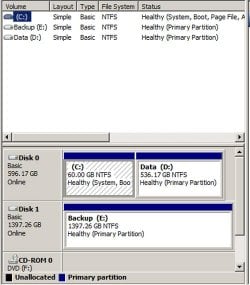
Is my C partition and F partition combined?

whs,
I can agree with you regarding Vista.

I have been very pleasantly surprised and pleased with the the performance and capabilities of Backup And Restore in Windows 7 which incidentally, I have used extensively and tested all features thereof extensively.

There are many fine third-party products available to accomplish backup and restore.
Karl, why not just use a simple "Copy to Folder ..." function. It is simple, you know what you are doing and it is fast.
I tried to backup only my Documents folder (4.4GBs) from the SSD to an internal HDD with the Win7 backup function. After 10 minutes it was still not even half done and I cancelled it. In contrast, it takes less than 4 minutes to image my whole OS (about 18GB) with Macrium from and to the same disks. So it is not my system that's holding things up.
And now I have the damn backup definition file sitting somewhere and I have no clue how to delete it. Maybe you know where it's at.
 

My Computer My Computer

At a glance

Vista, Windows7, Mint Mate, Zorin, Windows 8from 1.6GHz Duo to i7
Computer Manufacturer/Model Number
HP, Dell, Gateway, Toshiba - 4 laptops and 2 desktops
OS
Vista, Windows7, Mint Mate, Zorin, Windows 8
CPU
from 1.6GHz Duo to i7
Monitor(s) Displays
2x HP w2207
Hard Drives
5x HDD, 7x SSD, 12x Externals
Keyboard
with trackball - no mices
Mouse
Trackball mice
Internet Speed
DSL 6000
Sorry for the confusion.

First, I meant that logging into my Admin account requires a password. When I start up my computer and want to access this Admin account I'm on right now I must first sign in. Is that understandable?

Second, I know that an OS is needed to access the files on L. What I was confused about is are the files on L, (they are not installed), tied in any way to this Admin account? Would I be able to take the external hard drive L and transport it to my brother's PC and access the files that are on L from his PC?

Third, I made a system image of C and I have it stored on an external hard drive. It's really big so I can't make anymore backups at this moment. I have to make room. I did make a backup of my documents using Windows 7 Backup and Restore option, however, I also took the advice WHS and stored my documents, pictures, etc, onto my USB device.

Is there anymore information that is needed? I'm still a bit confused about that L drive.
 

My Computer My Computer

At a glance

Windows 7 Home Premium x64Intel Core i5-4690k8GBEVGA GeForce GTX 970
Computer type
PC/Desktop
Computer Manufacturer/Model Number
Custom build
OS
Windows 7 Home Premium x64
CPU
Intel Core i5-4690k
Motherboard
Gigabyte H97 SATA Express M.2 SSD UEFI DualBIOS DDR3 1600 LG
Memory
8GB
Graphics Card(s)
EVGA GeForce GTX 970
Monitor(s) Displays
2
Hard Drives
2:
- Samsung 850 EVO 250GB 2.5-Inch SATA III Internal SSD (MZ-75E250B/AM)
- Crucial MX300 275GB SATA 2.5 Inch Internal Solid State Drive - CT275MX300SSD1
PSU
Corsair 650x
Case
C70
Cooling
4 Fans
Internet Speed
Comcast Cable 22mbs
Antivirus
Microsoft Security Essentials
Browser
Chrome
Your L drive does not require a password to be accessed from another OS. You could even take a live Linux CD or USB stick and run the L drive with that - if the worst case ever happens which we do not hope.

Just out of curiousity, have you ever looked at the backup files that Backup/Restore created?
 

My Computer My Computer

At a glance

Vista, Windows7, Mint Mate, Zorin, Windows 8from 1.6GHz Duo to i7
Computer Manufacturer/Model Number
HP, Dell, Gateway, Toshiba - 4 laptops and 2 desktops
OS
Vista, Windows7, Mint Mate, Zorin, Windows 8
CPU
from 1.6GHz Duo to i7
Monitor(s) Displays
2x HP w2207
Hard Drives
5x HDD, 7x SSD, 12x Externals
Keyboard
with trackball - no mices
Mouse
Trackball mice
Internet Speed
DSL 6000
I can't answer your question about taking the external drive to another PC because I don't know if that thing about the administrative account will foul you up. My guess would be that you can get around it somehow, but I can't confirm that.

My PC is set up without logins or passwords. I am the only user of the PC.

There are numerous programs other than Windows Backup and Restore that can be used to backup just your personal files, without an image. You can set them to run on a schedule, back up only certain folders, back up only certain types of files, omit particular folders, etc. You retain complete control. Some of these are free and some have a modest cost.

Alternatively, you can just manually copy as WHS has suggested.

You might find the programs are handier and quicker, but a manual copy will certainly work easily enough, particularly if you have all of your personal files in a single folder tree, such as somewhere under C:\Users.
 

My Computer My Computer

At a glance

Windows 7 Home Premium SP1, 64-bitIntel Skylake i5-6600K, not overclocked8 GB HyperX DDR4-2666 (2 x 4 GB)none; graphics are integrated on CPU
Computer type
PC/Desktop
Computer Manufacturer/Model Number
Ignatz Special; 4 speed manual gearbox; factory air conditioning; one of one
OS
Windows 7 Home Premium SP1, 64-bit
CPU
Intel Skylake i5-6600K, not overclocked
Motherboard
AsRock Z170M Extreme 4, micro ATX
Memory
8 GB HyperX DDR4-2666 (2 x 4 GB)
Graphics Card(s)
none; graphics are integrated on CPU
Sound Card
onboard: Realtek ALC1150; external: USB Behringer UF0-202
Monitor(s) Displays
Dell S2340M 23 inch IPS
Screen Resolution
1600 x 900
Hard Drives
System: Crucial MX100 series SSD, 128 GB;
Data: Samsung Spinpoint 103SJ, 1 TB;
Backup: WD Caviar Green WD30EZRX-00D8PB0, 3 TB
PSU
Rosewill SilentNight 500 watt fanless, semi-modular
Case
Antec Solo II
Cooling
Noctua NH-U12S; Noctua F12 intake, Noctua S12A exhaust
Keyboard
Microsoft 200 6JH-00001 USB
Mouse
Dell or Microsoft optical wired; USB
Antivirus
Microsoft Security Essentials and Malwarebytes Premium
Browser
Pale Moon
Other Info
All fans PWM; speeds at idle: CPU circa 500 rpm; intake circa 600 rpm; exhaust circa 600 rpm; CPU temps 27 idle and 47 C load in a warm room (27 C/81 F) when running Intel Extreme Tuning Utility stress test.
Your L drive does not require a password to be accessed from another OS. You could even take a live Linux CD or USB stick and run the L drive with that - if the worst case ever happens which we do not hope.

Just out of curiousity, have you ever looked at the backup files that Backup/Restore created?

Awesome!! So that means I could take L out and basically give it to my brother and he'd be able to access the files?

I backed up the most important data I had. I wish I could back it all up but I don't have enough room. If I could just back up "My Documents" which has all of my gamesaves, word Documents, etc, etc, then that's all my important stuff right there. But I can't pick & choose with Macrium unless I buy it.

Yes, I looked at the files in the backup and it seems as though everything is there.

I understand. I backed up the most important data I had. I wish I could back it all up but I don't have enough room. If I could just back up "My Documents" which has all of my gamesaves, word Documents, etc, etc, then that's all my important stuff right there. But I can't pick & choose with Macrium unless I buy it.

Edit: Ignatzatsonic said that he doesn't know if the admin account could foul me up. Do you think this is true? Would my brother not be able to access my files on L because of the admin thing?

I can't answer your question about taking the external drive to another PC because I don't know if that thing about the administrative account will foul you up. My guess would be that you can get around it somehow, but I can't confirm that.

My PC is set up without logins or passwords. I am the only user of the PC.

What do you mean without "logins" and passwords? I thought there were only passwords. I'm am the only user of my PC as well but I have a password on it for security reasons. But I think WHS suggested I take it off as it could do more harm then good so I may remove it if he wants me to.
 

My Computer My Computer

At a glance

Windows 7 Home Premium x64Intel Core i5-4690k8GBEVGA GeForce GTX 970
Computer type
PC/Desktop
Computer Manufacturer/Model Number
Custom build
OS
Windows 7 Home Premium x64
CPU
Intel Core i5-4690k
Motherboard
Gigabyte H97 SATA Express M.2 SSD UEFI DualBIOS DDR3 1600 LG
Memory
8GB
Graphics Card(s)
EVGA GeForce GTX 970
Monitor(s) Displays
2
Hard Drives
2:
- Samsung 850 EVO 250GB 2.5-Inch SATA III Internal SSD (MZ-75E250B/AM)
- Crucial MX300 275GB SATA 2.5 Inch Internal Solid State Drive - CT275MX300SSD1
PSU
Corsair 650x
Case
C70
Cooling
4 Fans
Internet Speed
Comcast Cable 22mbs
Antivirus
Microsoft Security Essentials
Browser
Chrome
Talker:

If WHS is right about you being able to connect the external L to another PC and access your files at will, my guess would be that your brother could access them as well. But as I said, I don't know and I will yield to others on that.

When I installed Windows 7, I came to a choice about setting up a password. I went right on by it without entering a password. When I boot my PC, it goes directly to a desktop and is fully functional without any interaction from me. That's all I meant.

I'm sure you will get different opinions on whether or not that is insane and a security risk. It's just a choice I have made. My understanding is that it isn't difficult to bypass the typical password requirement.

An alternative is to encrypt particular folders.
 

My Computer My Computer

At a glance

Windows 7 Home Premium SP1, 64-bitIntel Skylake i5-6600K, not overclocked8 GB HyperX DDR4-2666 (2 x 4 GB)none; graphics are integrated on CPU
Computer type
PC/Desktop
Computer Manufacturer/Model Number
Ignatz Special; 4 speed manual gearbox; factory air conditioning; one of one
OS
Windows 7 Home Premium SP1, 64-bit
CPU
Intel Skylake i5-6600K, not overclocked
Motherboard
AsRock Z170M Extreme 4, micro ATX
Memory
8 GB HyperX DDR4-2666 (2 x 4 GB)
Graphics Card(s)
none; graphics are integrated on CPU
Sound Card
onboard: Realtek ALC1150; external: USB Behringer UF0-202
Monitor(s) Displays
Dell S2340M 23 inch IPS
Screen Resolution
1600 x 900
Hard Drives
System: Crucial MX100 series SSD, 128 GB;
Data: Samsung Spinpoint 103SJ, 1 TB;
Backup: WD Caviar Green WD30EZRX-00D8PB0, 3 TB
PSU
Rosewill SilentNight 500 watt fanless, semi-modular
Case
Antec Solo II
Cooling
Noctua NH-U12S; Noctua F12 intake, Noctua S12A exhaust
Keyboard
Microsoft 200 6JH-00001 USB
Mouse
Dell or Microsoft optical wired; USB
Antivirus
Microsoft Security Essentials and Malwarebytes Premium
Browser
Pale Moon
Other Info
All fans PWM; speeds at idle: CPU circa 500 rpm; intake circa 600 rpm; exhaust circa 600 rpm; CPU temps 27 idle and 47 C load in a warm room (27 C/81 F) when running Intel Extreme Tuning Utility stress test.
I removed my password. I didn't think it was necessary I just had it on for what could happen. But I know what you mean about it being easily bypassed.

Okay, I have an important question here. I kinda already asked this question and I asked my brother as well and here I found out he was confused and thought I meant something else. So I'm going to re-ask the question here again. I will try to word it correctly.

Here goes: In C there is a folder named Users, in Users is another folder named after my PC, and then in that folder is "My Documents", "My Pictures", "App Data", "Downloads", etc, etc, etc.

Now. I transferred "My Documents" from C:>Users>(PCName) and put it on the L drive. (Not the word documents files but rather the actual folder called "My Documents".)

Let's say, for sake of example, that the hard drive containing my OS died.

Would I be able to take the drive L over to my brother's computer and access "My Documents" from his computer? Or is "My Documents" tied to this Admin user account?
 

My Computer My Computer

At a glance

Windows 7 Home Premium x64Intel Core i5-4690k8GBEVGA GeForce GTX 970
Computer type
PC/Desktop
Computer Manufacturer/Model Number
Custom build
OS
Windows 7 Home Premium x64
CPU
Intel Core i5-4690k
Motherboard
Gigabyte H97 SATA Express M.2 SSD UEFI DualBIOS DDR3 1600 LG
Memory
8GB
Graphics Card(s)
EVGA GeForce GTX 970
Monitor(s) Displays
2
Hard Drives
2:
- Samsung 850 EVO 250GB 2.5-Inch SATA III Internal SSD (MZ-75E250B/AM)
- Crucial MX300 275GB SATA 2.5 Inch Internal Solid State Drive - CT275MX300SSD1
PSU
Corsair 650x
Case
C70
Cooling
4 Fans
Internet Speed
Comcast Cable 22mbs
Antivirus
Microsoft Security Essentials
Browser
Chrome
Based on WHS's comment, I would certainly think you could access My Documents from L when connected to another PC.

Rather than wonder, try it and tell us the results. You certainly shouldn't take our word for something as important as your backup strategy.
 

My Computer My Computer

At a glance

Windows 7 Home Premium SP1, 64-bitIntel Skylake i5-6600K, not overclocked8 GB HyperX DDR4-2666 (2 x 4 GB)none; graphics are integrated on CPU
Computer type
PC/Desktop
Computer Manufacturer/Model Number
Ignatz Special; 4 speed manual gearbox; factory air conditioning; one of one
OS
Windows 7 Home Premium SP1, 64-bit
CPU
Intel Skylake i5-6600K, not overclocked
Motherboard
AsRock Z170M Extreme 4, micro ATX
Memory
8 GB HyperX DDR4-2666 (2 x 4 GB)
Graphics Card(s)
none; graphics are integrated on CPU
Sound Card
onboard: Realtek ALC1150; external: USB Behringer UF0-202
Monitor(s) Displays
Dell S2340M 23 inch IPS
Screen Resolution
1600 x 900
Hard Drives
System: Crucial MX100 series SSD, 128 GB;
Data: Samsung Spinpoint 103SJ, 1 TB;
Backup: WD Caviar Green WD30EZRX-00D8PB0, 3 TB
PSU
Rosewill SilentNight 500 watt fanless, semi-modular
Case
Antec Solo II
Cooling
Noctua NH-U12S; Noctua F12 intake, Noctua S12A exhaust
Keyboard
Microsoft 200 6JH-00001 USB
Mouse
Dell or Microsoft optical wired; USB
Antivirus
Microsoft Security Essentials and Malwarebytes Premium
Browser
Pale Moon
Other Info
All fans PWM; speeds at idle: CPU circa 500 rpm; intake circa 600 rpm; exhaust circa 600 rpm; CPU temps 27 idle and 47 C load in a warm room (27 C/81 F) when running Intel Extreme Tuning Utility stress test.
I'm afraid to take it out and try it. What if when I take it out and then put it back in it won't work? Then I would lose all my information for just a test.

Is this a possibility?
 

My Computer My Computer

At a glance

Windows 7 Home Premium x64Intel Core i5-4690k8GBEVGA GeForce GTX 970
Computer type
PC/Desktop
Computer Manufacturer/Model Number
Custom build
OS
Windows 7 Home Premium x64
CPU
Intel Core i5-4690k
Motherboard
Gigabyte H97 SATA Express M.2 SSD UEFI DualBIOS DDR3 1600 LG
Memory
8GB
Graphics Card(s)
EVGA GeForce GTX 970
Monitor(s) Displays
2
Hard Drives
2:
- Samsung 850 EVO 250GB 2.5-Inch SATA III Internal SSD (MZ-75E250B/AM)
- Crucial MX300 275GB SATA 2.5 Inch Internal Solid State Drive - CT275MX300SSD1
PSU
Corsair 650x
Case
C70
Cooling
4 Fans
Internet Speed
Comcast Cable 22mbs
Antivirus
Microsoft Security Essentials
Browser
Chrome
If that is a possibility, you are better off find that out now rather than later.

Assuming you have your original data on C or D, I would copy stuff to L and go to brother's PC and find out what happens. Why wonder?
 

My Computer My Computer

At a glance

Windows 7 Home Premium SP1, 64-bitIntel Skylake i5-6600K, not overclocked8 GB HyperX DDR4-2666 (2 x 4 GB)none; graphics are integrated on CPU
Computer type
PC/Desktop
Computer Manufacturer/Model Number
Ignatz Special; 4 speed manual gearbox; factory air conditioning; one of one
OS
Windows 7 Home Premium SP1, 64-bit
CPU
Intel Skylake i5-6600K, not overclocked
Motherboard
AsRock Z170M Extreme 4, micro ATX
Memory
8 GB HyperX DDR4-2666 (2 x 4 GB)
Graphics Card(s)
none; graphics are integrated on CPU
Sound Card
onboard: Realtek ALC1150; external: USB Behringer UF0-202
Monitor(s) Displays
Dell S2340M 23 inch IPS
Screen Resolution
1600 x 900
Hard Drives
System: Crucial MX100 series SSD, 128 GB;
Data: Samsung Spinpoint 103SJ, 1 TB;
Backup: WD Caviar Green WD30EZRX-00D8PB0, 3 TB
PSU
Rosewill SilentNight 500 watt fanless, semi-modular
Case
Antec Solo II
Cooling
Noctua NH-U12S; Noctua F12 intake, Noctua S12A exhaust
Keyboard
Microsoft 200 6JH-00001 USB
Mouse
Dell or Microsoft optical wired; USB
Antivirus
Microsoft Security Essentials and Malwarebytes Premium
Browser
Pale Moon
Other Info
All fans PWM; speeds at idle: CPU circa 500 rpm; intake circa 600 rpm; exhaust circa 600 rpm; CPU temps 27 idle and 47 C load in a warm room (27 C/81 F) when running Intel Extreme Tuning Utility stress test.
Simple answer is " YES. Don't get confused with the admin account. The worst that could happen is that the other system coughs because of permissions. But that is easily fixed. We'll deal with that if it ever comes to that case (which is very unlikely).

BTW: How did you transfer Documents to L ??
 

My Computer My Computer

At a glance

Vista, Windows7, Mint Mate, Zorin, Windows 8from 1.6GHz Duo to i7
Computer Manufacturer/Model Number
HP, Dell, Gateway, Toshiba - 4 laptops and 2 desktops
OS
Vista, Windows7, Mint Mate, Zorin, Windows 8
CPU
from 1.6GHz Duo to i7
Monitor(s) Displays
2x HP w2207
Hard Drives
5x HDD, 7x SSD, 12x Externals
Keyboard
with trackball - no mices
Mouse
Trackball mice
Internet Speed
DSL 6000
Talker:

You said:

transferred "My Documents".

Do you mean move or copy?

I certainly wouldn't move.

But I would copy.
 

My Computer My Computer

At a glance

Windows 7 Home Premium SP1, 64-bitIntel Skylake i5-6600K, not overclocked8 GB HyperX DDR4-2666 (2 x 4 GB)none; graphics are integrated on CPU
Computer type
PC/Desktop
Computer Manufacturer/Model Number
Ignatz Special; 4 speed manual gearbox; factory air conditioning; one of one
OS
Windows 7 Home Premium SP1, 64-bit
CPU
Intel Skylake i5-6600K, not overclocked
Motherboard
AsRock Z170M Extreme 4, micro ATX
Memory
8 GB HyperX DDR4-2666 (2 x 4 GB)
Graphics Card(s)
none; graphics are integrated on CPU
Sound Card
onboard: Realtek ALC1150; external: USB Behringer UF0-202
Monitor(s) Displays
Dell S2340M 23 inch IPS
Screen Resolution
1600 x 900
Hard Drives
System: Crucial MX100 series SSD, 128 GB;
Data: Samsung Spinpoint 103SJ, 1 TB;
Backup: WD Caviar Green WD30EZRX-00D8PB0, 3 TB
PSU
Rosewill SilentNight 500 watt fanless, semi-modular
Case
Antec Solo II
Cooling
Noctua NH-U12S; Noctua F12 intake, Noctua S12A exhaust
Keyboard
Microsoft 200 6JH-00001 USB
Mouse
Dell or Microsoft optical wired; USB
Antivirus
Microsoft Security Essentials and Malwarebytes Premium
Browser
Pale Moon
Other Info
All fans PWM; speeds at idle: CPU circa 500 rpm; intake circa 600 rpm; exhaust circa 600 rpm; CPU temps 27 idle and 47 C load in a warm room (27 C/81 F) when running Intel Extreme Tuning Utility stress test.
Simple answer is " YES. Don't get confused with the admin account. The worst that could happen is that the other system coughs because of permissions. But that is easily fixed. We'll deal with that if it ever comes to that case (which is very unlikely).

BTW: How did you transfer Documents to L ??

Yay!! Thank you for answering. So if anything ever happens to my OS then I'll still be able to access "My Documents" through my brother's PC.

I transferred "My Documents" by going to C>Users>Name and then right-clicked on the folder I wanted to transfer and clicked Properties. In Properties I clicked on the "Location" tab and changed the location to L. My C drive was too full to hold "My Documents".

If that is a possibility, you are better off find that out now rather than later.

Assuming you have your original data on C or D, I would copy stuff to L and go to brother's PC and find out what happens. Why wonder?

Well, I actually don't have the original data on C, F or B, I have it on L.

WHS said that it can be transferred and will work on my brother's PC although there might be some issues with permissions but that can be easily fixed.

Talker:

You said:

transferred "My Documents".

Do you mean move or copy?

I certainly wouldn't move.

But I would copy.

I moved. Is that bad? I had no more room on C.
 

My Computer My Computer

At a glance

Windows 7 Home Premium x64Intel Core i5-4690k8GBEVGA GeForce GTX 970
Computer type
PC/Desktop
Computer Manufacturer/Model Number
Custom build
OS
Windows 7 Home Premium x64
CPU
Intel Core i5-4690k
Motherboard
Gigabyte H97 SATA Express M.2 SSD UEFI DualBIOS DDR3 1600 LG
Memory
8GB
Graphics Card(s)
EVGA GeForce GTX 970
Monitor(s) Displays
2
Hard Drives
2:
- Samsung 850 EVO 250GB 2.5-Inch SATA III Internal SSD (MZ-75E250B/AM)
- Crucial MX300 275GB SATA 2.5 Inch Internal Solid State Drive - CT275MX300SSD1
PSU
Corsair 650x
Case
C70
Cooling
4 Fans
Internet Speed
Comcast Cable 22mbs
Antivirus
Microsoft Security Essentials
Browser
Chrome
The point is to have multiple copies of your data.

Either you do or you don't.

If I was running short of space on my primary hard drive, I'd get a bigger hard drive.

Or maybe compress my existing drive.

I would NOT want to have my primary copy of my data on an external drive. They are slow compared to internal drives. As I understand it, you now have NOTHING in My Documents on C?

I hope you have more than one copy of whatever is in My Documents---either in an image, a USB drive, or wherever. If you don't, well you clearly don't have a backup.
 

My Computer My Computer

At a glance

Windows 7 Home Premium SP1, 64-bitIntel Skylake i5-6600K, not overclocked8 GB HyperX DDR4-2666 (2 x 4 GB)none; graphics are integrated on CPU
Computer type
PC/Desktop
Computer Manufacturer/Model Number
Ignatz Special; 4 speed manual gearbox; factory air conditioning; one of one
OS
Windows 7 Home Premium SP1, 64-bit
CPU
Intel Skylake i5-6600K, not overclocked
Motherboard
AsRock Z170M Extreme 4, micro ATX
Memory
8 GB HyperX DDR4-2666 (2 x 4 GB)
Graphics Card(s)
none; graphics are integrated on CPU
Sound Card
onboard: Realtek ALC1150; external: USB Behringer UF0-202
Monitor(s) Displays
Dell S2340M 23 inch IPS
Screen Resolution
1600 x 900
Hard Drives
System: Crucial MX100 series SSD, 128 GB;
Data: Samsung Spinpoint 103SJ, 1 TB;
Backup: WD Caviar Green WD30EZRX-00D8PB0, 3 TB
PSU
Rosewill SilentNight 500 watt fanless, semi-modular
Case
Antec Solo II
Cooling
Noctua NH-U12S; Noctua F12 intake, Noctua S12A exhaust
Keyboard
Microsoft 200 6JH-00001 USB
Mouse
Dell or Microsoft optical wired; USB
Antivirus
Microsoft Security Essentials and Malwarebytes Premium
Browser
Pale Moon
Other Info
All fans PWM; speeds at idle: CPU circa 500 rpm; intake circa 600 rpm; exhaust circa 600 rpm; CPU temps 27 idle and 47 C load in a warm room (27 C/81 F) when running Intel Extreme Tuning Utility stress test.
The point is to have multiple copies of your data.

Either you do or you don't.

If I was running short of space on my primary hard drive, I'd get a bigger hard drive.

Or maybe compress my existing drive.

I would NOT want to have my primary copy of my data on an external drive. They are slow compared to internal drives. As I understand it, you now have NOTHING in My Documents on C?

I hope you have more than one copy of whatever is in My Documents---either in an image, a USB drive, or wherever. If you don't, well you clearly don't have a backup.

I have my primary data - My Documents - stored on the internal drive which is L. But I don't know how to fix that at this point. I've got 22GB left on C and My Documents is 21GB and it will grow.

I actually don't have a My Documents folder in C because it was moved to L. I made a copy of it using Windows 7 Backup and Restore and stored it on my F drive which is a partition of the C drive which has my OS installed on it. I also copied the most important of my data from My Documents and put it on my USB device.

PS: I know my setup of storing images/backups and such is not the best but I'm saving for a bigger hard drive to save images to. I cannot go out and just buy another hard drive at this time.

Other then buying another hard drive for the images I know of nothing more I can do. I'm kinda stuck between a rock and a hard place. Unless you have some suggestions?

HUGE EDIT: I just noticed something...I've been calling L an external hard drive and I don't know why. It's internal...as it's in the computer. I'm very sorry about this!! When I'm worried and scared I mess up. Big time.
 

My Computer My Computer

At a glance

Windows 7 Home Premium x64Intel Core i5-4690k8GBEVGA GeForce GTX 970
Computer type
PC/Desktop
Computer Manufacturer/Model Number
Custom build
OS
Windows 7 Home Premium x64
CPU
Intel Core i5-4690k
Motherboard
Gigabyte H97 SATA Express M.2 SSD UEFI DualBIOS DDR3 1600 LG
Memory
8GB
Graphics Card(s)
EVGA GeForce GTX 970
Monitor(s) Displays
2
Hard Drives
2:
- Samsung 850 EVO 250GB 2.5-Inch SATA III Internal SSD (MZ-75E250B/AM)
- Crucial MX300 275GB SATA 2.5 Inch Internal Solid State Drive - CT275MX300SSD1
PSU
Corsair 650x
Case
C70
Cooling
4 Fans
Internet Speed
Comcast Cable 22mbs
Antivirus
Microsoft Security Essentials
Browser
Chrome
You can put several internal drives in most PCs. Some people have a half dozen or more. They are cheaper than external because they don't have that external housing. They respond much more quickly because they are connected to an internal circuit rather than USB or whatever you may be using.

A high quality internal 320 GB drive is about 50 bucks. A high quality 1 TB drive is about 100 bucks.

Can you post a picture of your Disk Management so we can get a look at your drive map? Apparently you have ONE internal drive, but it is divided into at least TWO partitions? I didn't know you had an F.

Have you considered compression on the C drive? It will save you space.

If I were in your shoes, I would not use Windows Backup and Restore to put a copy of My Documents on F. I would make the copy with a simple drag and drop with the mouse. Why involve Backup and Restore when plenty of people on these forums have had issues with it. That's just my 2 cents.
 

My Computer My Computer

At a glance

Windows 7 Home Premium SP1, 64-bitIntel Skylake i5-6600K, not overclocked8 GB HyperX DDR4-2666 (2 x 4 GB)none; graphics are integrated on CPU
Computer type
PC/Desktop
Computer Manufacturer/Model Number
Ignatz Special; 4 speed manual gearbox; factory air conditioning; one of one
OS
Windows 7 Home Premium SP1, 64-bit
CPU
Intel Skylake i5-6600K, not overclocked
Motherboard
AsRock Z170M Extreme 4, micro ATX
Memory
8 GB HyperX DDR4-2666 (2 x 4 GB)
Graphics Card(s)
none; graphics are integrated on CPU
Sound Card
onboard: Realtek ALC1150; external: USB Behringer UF0-202
Monitor(s) Displays
Dell S2340M 23 inch IPS
Screen Resolution
1600 x 900
Hard Drives
System: Crucial MX100 series SSD, 128 GB;
Data: Samsung Spinpoint 103SJ, 1 TB;
Backup: WD Caviar Green WD30EZRX-00D8PB0, 3 TB
PSU
Rosewill SilentNight 500 watt fanless, semi-modular
Case
Antec Solo II
Cooling
Noctua NH-U12S; Noctua F12 intake, Noctua S12A exhaust
Keyboard
Microsoft 200 6JH-00001 USB
Mouse
Dell or Microsoft optical wired; USB
Antivirus
Microsoft Security Essentials and Malwarebytes Premium
Browser
Pale Moon
Other Info
All fans PWM; speeds at idle: CPU circa 500 rpm; intake circa 600 rpm; exhaust circa 600 rpm; CPU temps 27 idle and 47 C load in a warm room (27 C/81 F) when running Intel Extreme Tuning Utility stress test.
Talker:

Just saw your red edit.

Post a screenshot of what you see in Disk Management so we can see once and for all if you are making efficient use of your available hard drives.


Here is mine, you access it through control panel/administrative services/computer management.
 

Attachments

  • Untitled-1.jpg
    Untitled-1.jpg
    42.2 KB · Views: 5

My Computer My Computer

At a glance

Windows 7 Home Premium SP1, 64-bitIntel Skylake i5-6600K, not overclocked8 GB HyperX DDR4-2666 (2 x 4 GB)none; graphics are integrated on CPU
Computer type
PC/Desktop
Computer Manufacturer/Model Number
Ignatz Special; 4 speed manual gearbox; factory air conditioning; one of one
OS
Windows 7 Home Premium SP1, 64-bit
CPU
Intel Skylake i5-6600K, not overclocked
Motherboard
AsRock Z170M Extreme 4, micro ATX
Memory
8 GB HyperX DDR4-2666 (2 x 4 GB)
Graphics Card(s)
none; graphics are integrated on CPU
Sound Card
onboard: Realtek ALC1150; external: USB Behringer UF0-202
Monitor(s) Displays
Dell S2340M 23 inch IPS
Screen Resolution
1600 x 900
Hard Drives
System: Crucial MX100 series SSD, 128 GB;
Data: Samsung Spinpoint 103SJ, 1 TB;
Backup: WD Caviar Green WD30EZRX-00D8PB0, 3 TB
PSU
Rosewill SilentNight 500 watt fanless, semi-modular
Case
Antec Solo II
Cooling
Noctua NH-U12S; Noctua F12 intake, Noctua S12A exhaust
Keyboard
Microsoft 200 6JH-00001 USB
Mouse
Dell or Microsoft optical wired; USB
Antivirus
Microsoft Security Essentials and Malwarebytes Premium
Browser
Pale Moon
Other Info
All fans PWM; speeds at idle: CPU circa 500 rpm; intake circa 600 rpm; exhaust circa 600 rpm; CPU temps 27 idle and 47 C load in a warm room (27 C/81 F) when running Intel Extreme Tuning Utility stress test.
Okay. I hope this is good enough. Here's my Disk Management:

2eutn6b.png


I know that Windows Backup and Restore is not fully reliable. WHS told me all about that. That's why I'm saving up for a 1 TB or 1.5 TB, depending on the price, and buy from Newegg. With that TB I'll store my backups.
 

My Computer My Computer

At a glance

Windows 7 Home Premium x64Intel Core i5-4690k8GBEVGA GeForce GTX 970
Computer type
PC/Desktop
Computer Manufacturer/Model Number
Custom build
OS
Windows 7 Home Premium x64
CPU
Intel Core i5-4690k
Motherboard
Gigabyte H97 SATA Express M.2 SSD UEFI DualBIOS DDR3 1600 LG
Memory
8GB
Graphics Card(s)
EVGA GeForce GTX 970
Monitor(s) Displays
2
Hard Drives
2:
- Samsung 850 EVO 250GB 2.5-Inch SATA III Internal SSD (MZ-75E250B/AM)
- Crucial MX300 275GB SATA 2.5 Inch Internal Solid State Drive - CT275MX300SSD1
PSU
Corsair 650x
Case
C70
Cooling
4 Fans
Internet Speed
Comcast Cable 22mbs
Antivirus
Microsoft Security Essentials
Browser
Chrome
Assuming all drives are internal and that all of your personal data is backed up outside of an image, I would probably leave it alone and suffer till you get another HD.

I'm guessing you are heavily into gaming and that accounts for the large amount of space used on C. I don't game and use only 20 GB on C.


You have 125 GB free on F, so I assume you could put the 21 GB My Documents there if you wanted to. But I don't see any particular reason not to use L or B once you decide it can't stay on C. There might be a minor difference in performance one way or another depending on the details of the drives. If My Documents is mostly a bunch of text files, I'd leave it on L.

If you do all of your gaming installs on C, it may grow to hundreds of GB in the future?

Compression of C is an option, but I don't know how that would affect drive performance, if at all.
 

My Computer My Computer

At a glance

Windows 7 Home Premium SP1, 64-bitIntel Skylake i5-6600K, not overclocked8 GB HyperX DDR4-2666 (2 x 4 GB)none; graphics are integrated on CPU
Computer type
PC/Desktop
Computer Manufacturer/Model Number
Ignatz Special; 4 speed manual gearbox; factory air conditioning; one of one
OS
Windows 7 Home Premium SP1, 64-bit
CPU
Intel Skylake i5-6600K, not overclocked
Motherboard
AsRock Z170M Extreme 4, micro ATX
Memory
8 GB HyperX DDR4-2666 (2 x 4 GB)
Graphics Card(s)
none; graphics are integrated on CPU
Sound Card
onboard: Realtek ALC1150; external: USB Behringer UF0-202
Monitor(s) Displays
Dell S2340M 23 inch IPS
Screen Resolution
1600 x 900
Hard Drives
System: Crucial MX100 series SSD, 128 GB;
Data: Samsung Spinpoint 103SJ, 1 TB;
Backup: WD Caviar Green WD30EZRX-00D8PB0, 3 TB
PSU
Rosewill SilentNight 500 watt fanless, semi-modular
Case
Antec Solo II
Cooling
Noctua NH-U12S; Noctua F12 intake, Noctua S12A exhaust
Keyboard
Microsoft 200 6JH-00001 USB
Mouse
Dell or Microsoft optical wired; USB
Antivirus
Microsoft Security Essentials and Malwarebytes Premium
Browser
Pale Moon
Other Info
All fans PWM; speeds at idle: CPU circa 500 rpm; intake circa 600 rpm; exhaust circa 600 rpm; CPU temps 27 idle and 47 C load in a warm room (27 C/81 F) when running Intel Extreme Tuning Utility stress test.
Thanks for replying. In C I have mostly just programs. A lot of them. But it's only 100GB.

F is where my games/pictures/videos are. And, yes, I'm heavily involved in gaming. Got tons of games installed. At least 85 but could be more. :p

You're right, I could store My Documents on F. But the reason I didn't was because I like to be organized and wanted to install my games on F. And installing the games that are out these days can take up quite a lot of space.

But that's not the only reason. All of my gamesaves on saved in My Documents and I wanted "breathing room" for My Documents and decided it would be best to put it on L because L is not that full. Plus, I've got my Word Documents and emails saved in My Documents.

Also, if the C/F drive ever dies. Then I'll still have My Documents provided L is still working. And according to WHS I will be able to access My Documents from another computer.

So, basically, if I move My Documents to F then when I install/play a game not only does it install on F but the gamesave is saved on F.
 

My Computer My Computer

At a glance

Windows 7 Home Premium x64Intel Core i5-4690k8GBEVGA GeForce GTX 970
Computer type
PC/Desktop
Computer Manufacturer/Model Number
Custom build
OS
Windows 7 Home Premium x64
CPU
Intel Core i5-4690k
Motherboard
Gigabyte H97 SATA Express M.2 SSD UEFI DualBIOS DDR3 1600 LG
Memory
8GB
Graphics Card(s)
EVGA GeForce GTX 970
Monitor(s) Displays
2
Hard Drives
2:
- Samsung 850 EVO 250GB 2.5-Inch SATA III Internal SSD (MZ-75E250B/AM)
- Crucial MX300 275GB SATA 2.5 Inch Internal Solid State Drive - CT275MX300SSD1
PSU
Corsair 650x
Case
C70
Cooling
4 Fans
Internet Speed
Comcast Cable 22mbs
Antivirus
Microsoft Security Essentials
Browser
Chrome
Back
Top