Latest Intel Chipset Device Software

What is the difference between the RTM and the GP version in regards to this situation? I was under the impression that the RTM is the final version?

You mean abt Windows 7?
This thread isn't about that but i'll answer the question.
RTM means the finalization of a product, and GA is a step to its
massive use...
GA means General Availability(which is today) and it means that customers
can buy Windows 7 from today(receiving the RTM version)
Hope i made it clear for you.
 

My Computer

Computer type
PC/Desktop
Computer Manufacturer/Model Number
Custom
OS
Windows 7 SP1 x64
CPU
Intel E8400 3.0 GHz
Motherboard
Gigabyte EP45-DS3R
Memory
4x1 Trascend DDR2 800 Mhz
Graphics Card(s)
Gainward 8800GT 512 Mb
Sound Card
Realtek HD Audio 889A
Monitor(s) Displays
LG L204WS
Screen Resolution
1680x1050
Hard Drives
Intel 520 Series 120Gb SSD (System)
Western Digital 6400AAKS 640Gb (Data)
PSU
Cooler Master 650W
Case
Cooler Master Centurion 532
Cooling
2x 12 cm fans
Keyboard
Logitech Wave
Mouse
Logitech G5
Internet Speed
10 Mbit Cable Flat
Antivirus
NOD32 Smart Security
Browser
Google Chrome
someone help me please

hi all

i have a hold mainboard in desktop and i can't find graphical drivers for windows 7 ultimate to it

the mainboard is a SOLTEK SL-B8A
the chipset is a intel 845GE series

someone can help me please?
 

My Computer

Computer Manufacturer/Model Number
Asus F8P
OS
Windows Vista
CPU
Intel(R) Core(TM)2 Duo T8300 2,40GHz
Motherboard
Asus F8000P Series Notebook
Memory
2,00 GB
Graphics Card(s)
ATI Mobility Radeon HD 2400 (Asus) 256 MB
Sound Card
Realtek ALC660 @ Intel 82801HBM ICH8M
Monitor(s) Displays
Chi Mei N141I3-L02
Screen Resolution
1280 x 800
Hard Drives
Seagate 250 GB - in Laptop System and Data
Maxtor 3.5'' 160GB - in Desktop Only for Data
TOSHIBA USB 3.5" 1TB - External Only for
Data
Internet Speed
Up - 8 MB/s / Down - 1MB/s

My Computer

Computer Manufacturer/Model Number
HP Pavillion dv-7 1005 Tx
OS
Win 8 Release candidate 8400
CPU
[email protected]
Memory
4 gigs
Graphics Card(s)
Nvidia 9600M
Sound Card
HD built-in
Monitor(s) Displays
17" Wxga
Screen Resolution
1440x900
Cooling
none
Internet Speed
45Mb down 5Mb up
Hi
I just moved from vista ultimate 64 OEM to retail Windows 7 ultimate 64 bit.
Following the install of the OS I tried to install the latest IMSM downloaded from Intel but got the messahe that the best one is already present.

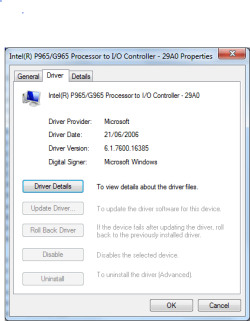
My chip set shows the following:

Capture.PNG


Would some one mind telling me the correct latest Intel Chipset driver?

Mine is Dell desk top Dimention 9200
 

My Computer

Computer Manufacturer/Model Number
Dell
OS
Windows 7 Ultimate 64bit
CPU
Intel viiv Duo core 6400 @ 2.13
Memory
6GB
Graphics Card(s)
Nvidis GX2 1GB v7.15.10.9746 [Dell's 14359 Driver]
Sound Card
Creative Sound Blaster
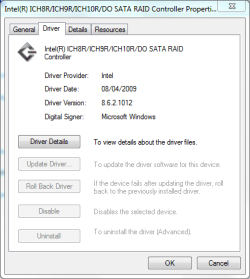
This what I find under: storage controllers

Capture 2.PNG


Your help will be greatly appreciated.
Regards
 

My Computer

Computer Manufacturer/Model Number
Dell
OS
Windows 7 Ultimate 64bit
CPU
Intel viiv Duo core 6400 @ 2.13
Memory
6GB
Graphics Card(s)
Nvidis GX2 1GB v7.15.10.9746 [Dell's 14359 Driver]
Sound Card
Creative Sound Blaster
This what I find under: storage controllers

View attachment 32640


Your help will be greatly appreciated.
Regards
the installer performs only an update when it needs to. i have the w7 Pro RTM and it installed only once the full package from intel so dont worry
 

My Computer

Computer Manufacturer/Model Number
dv5 1199ew
OS
W7
Other Info
+Rep if I have helped
Any idea why 1020 is not showing up on intels website?
 

My Computer

OS
Windows 7
CPU
i5
Motherboard
Gigabyte P55-UD3R
Memory
4gb
Graphics Card(s)
8800GTS 512
Sound Card
Auzentech Prelude 7.1
Monitor(s) Displays
HP w2207
Keyboard
G15
Mouse
G5
Any idea why 1020 is not showing up on intels website?

because they are only for desktop board's and not for Chipsets
(thats why 1020 doesn't work for alot of people)


Please use the ones i posted in the start of this thread.
 
Last edited:

My Computer

Computer type
PC/Desktop
Computer Manufacturer/Model Number
Custom
OS
Windows 7 SP1 x64
CPU
Intel E8400 3.0 GHz
Motherboard
Gigabyte EP45-DS3R
Memory
4x1 Trascend DDR2 800 Mhz
Graphics Card(s)
Gainward 8800GT 512 Mb
Sound Card
Realtek HD Audio 889A
Monitor(s) Displays
LG L204WS
Screen Resolution
1680x1050
Hard Drives
Intel 520 Series 120Gb SSD (System)
Western Digital 6400AAKS 640Gb (Data)
PSU
Cooler Master 650W
Case
Cooler Master Centurion 532
Cooling
2x 12 cm fans
Keyboard
Logitech Wave
Mouse
Logitech G5
Internet Speed
10 Mbit Cable Flat
Antivirus
NOD32 Smart Security
Browser
Google Chrome
Apologies for asking this again, I just found this part of the forum and it seems to be the one to post my query.

I have recently upgraded to Windows 7 from Vista, both 32bit, and seem to have lost the Hdmi option as well as the 720p resolution. Only resolution available is 1024x768, over VGA, if I use any other resolution it results in a blue screen and displays a "unknown format"? If I try using Hdmi, windows will not start and the display does not work.

I use a 32" LCD TV with 1366x768 max resolution and Intel G965 Express Chipset with driver version 8.15.10.1825 which is stated as the latest compatible with my system. Can I uninstall the driver and use Windows 7 built in one, if there is one? Or is there a better driver from Intel that I can use?

A desperate computerophobe would be thankful for any help :D
 

My Computer

OS
Win7 32bit
Apologies for asking this again, I just found this part of the forum and it seems to be the one to post my query.

I have recently upgraded to Windows 7 from Vista, both 32bit, and seem to have lost the Hdmi option as well as the 720p resolution. Only resolution available is 1024x768, over VGA, if I use any other resolution it results in a blue screen and displays a "unknown format"? If I try using Hdmi, windows will not start and the display does not work.

I use a 32" LCD TV with 1366x768 max resolution and Intel G965 Express Chipset with driver version 8.15.10.1825 which is stated as the latest compatible with my system. Can I uninstall the driver and use Windows 7 built in one, if there is one? Or is there a better driver from Intel that I can use?

A desperate computerophobe would be thankful for any help :D
http://downloadcenter.intel.com/SearchResult.aspx?lang=eng&keyword="G965"

You *almost* had the latest drivers...use the above

Redefine the search if you have x64 and choose Windows 7 x64

Lets update your chipset as a bonus...
INF Update Utility - Primarily for Intel® 5, 4, 3, 900 Series Chipsets

When the installer is done downloading...Shift+Right-Click the installer and choose "Open a command prompt here"

When the black window opens...type the name of the installer + <Space Bar> + -overall

ex. C:\Users\Chris\Desktop\<Name of Intel Driver> -overall

Let it finish...don't restart...

Do it again BUT replace -overall with overide

Let it finish...restart
 

My Computer

Computer Manufacturer/Model Number
Compal JFT02 (Custom Build Laptop)
OS
Windows 7 Home Premium x64 - Mac OS X 10.6.4 x64
CPU
Intel Core 2 Duo T9300 2.5 GHz
Motherboard
JFT02
Memory
4GB Kingston DDR2-800
Graphics Card(s)
NVIDIA Geforce 8600M GT (512MB Model)
Sound Card
Realtek HD Audio
Monitor(s) Displays
WUXGA Standard Laptop Display
Screen Resolution
1680*1050
Hard Drives
Toshiba 320GB 5400RPM Laptop HD
PSU
Standard Laptop Power Supply
Case
Standard Laptop Case
Cooling
Standard Laptop Cooling
Keyboard
Standard Laptop 105 Key-Keyboard
Mouse
Synaptics Touchpad
Internet Speed
Verizion Online DSL 3360/864 kbs (dl/up)
Hello, since I installed Windows 7 I cannot install Intel Chipset driver even after downloading windows 7 32bit driver from Intel website.

My motherboard chipset is i915PM/GM, here is the error I get.

Inteli915Win7.jpg


Any ideas how to resolve this issue?

Many thanks

Regards

Jehanzeb
 

My Computer

Computer Manufacturer/Model Number
Sony VGN-A517B
OS
Windows 7 Professional 32bit
CPU
Intel Pentium M 1.73
Motherboard
VGN-A51B Intel i915PM/GM
Memory
2GB DDR2
Graphics Card(s)
ATi Mobility Radeon X600
Sound Card
Onboard
Monitor(s) Displays
17 inch Wide
Hard Drives
320GB 7200RPM 2.5" West Dig with Free fall sensor
Apologies for asking this again, I just found this part of the forum and it seems to be the one to post my query.

I have recently upgraded to Windows 7 from Vista, both 32bit, and seem to have lost the Hdmi option as well as the 720p resolution. Only resolution available is 1024x768, over VGA, if I use any other resolution it results in a blue screen and displays a "unknown format"? If I try using Hdmi, windows will not start and the display does not work.

I use a 32" LCD TV with 1366x768 max resolution and Intel G965 Express Chipset with driver version 8.15.10.1825 which is stated as the latest compatible with my system. Can I uninstall the driver and use Windows 7 built in one, if there is one? Or is there a better driver from Intel that I can use?

A desperate computerophobe would be thankful for any help :D
http://downloadcenter.intel.com/SearchResult.aspx?lang=eng&keyword="G965"

You *almost* had the latest drivers...use the above

Redefine the search if you have x64 and choose Windows 7 x64

Lets update your chipset as a bonus...
INF Update Utility - Primarily for Intel® 5, 4, 3, 900 Series Chipsets

When the installer is done downloading...Shift+Right-Click the installer and choose "Open a command prompt here"

When the black window opens...type the name of the installer + <Space Bar> + -overall

ex. C:\Users\Chris\Desktop\<Name of Intel Driver> -overall

Let it finish...don't restart...

Do it again BUT replace -overall with overide

Let it finish...restart

Thanks for your help, I did all that and it still won't let me change the resolution. I can see the desired resolution in the dropdown menu, but if I choose the 720p it results in the blue screen and "unknown format".
I tried installing the Vista drivers, but I get the same result as Jehanzeb above "this computer does not meet the minimum requirements...".
 

My Computer

OS
Win7 32bit
Any idea why 1020 is not showing up on intels website?

because they are only for desktop board's and not for Chipsets
(thats why 1020 doesn't work for alot of people)


Please use the ones i posted in the start of this thread.

Desktop boards? Would 1020 be what I want to run with i5 / P55 mb?
 

My Computer

OS
Windows 7
CPU
i5
Motherboard
Gigabyte P55-UD3R
Memory
4gb
Graphics Card(s)
8800GTS 512
Sound Card
Auzentech Prelude 7.1
Monitor(s) Displays
HP w2207
Keyboard
G15
Mouse
G5
I downloaded the Intel Chip set driver from the ASUS (motherboard) website.

After rebooting the PC I no longer had sound from the front port head phone.

I tried a system restore- no luck.
Luckily I had imaged the PC first.

Do I need a intel chip set driver?
What is its purpose?
What now?
 

My Computer

OS
Windows 7
I downloaded the Intel Chip set driver from the ASUS (motherboard) website.

After rebooting the PC I no longer had sound from the front port head phone.

I tried a system restore- no luck.
Luckily I had imaged the PC first.

Do I need a intel chip set driver?
What is its purpose?
What now?
The chipset handles all of the PCI devices as well as the USB and ACPI components (I think)

It is an integral part of the system so updating it is advised. In your case I would update the chipset and the sound drivers on your computer...

If you would like me to find them...post your MOBO and your sound card here as well as your arch (x86, x64)
 

My Computer

Computer Manufacturer/Model Number
Compal JFT02 (Custom Build Laptop)
OS
Windows 7 Home Premium x64 - Mac OS X 10.6.4 x64
CPU
Intel Core 2 Duo T9300 2.5 GHz
Motherboard
JFT02
Memory
4GB Kingston DDR2-800
Graphics Card(s)
NVIDIA Geforce 8600M GT (512MB Model)
Sound Card
Realtek HD Audio
Monitor(s) Displays
WUXGA Standard Laptop Display
Screen Resolution
1680*1050
Hard Drives
Toshiba 320GB 5400RPM Laptop HD
PSU
Standard Laptop Power Supply
Case
Standard Laptop Case
Cooling
Standard Laptop Cooling
Keyboard
Standard Laptop 105 Key-Keyboard
Mouse
Synaptics Touchpad
Internet Speed
Verizion Online DSL 3360/864 kbs (dl/up)
ASUS P6T, i7 X58/DDR3.
64 Bit
"Sound Card" is built in (but per ASUS is Realtek HD Audio)

Anything would be helpful & much appreciated.

Oh - in Device Mgr I see no yellow yield signs/question marks. So would not that be a good sign that no issues with the USB or ACPI components?

Also I still have a copy of the Windows.Old folder - would the the Chip set version be in there somewheres?
 

My Computer

OS
Windows 7
ASUS P6T, i7 X58/DDR3.
64 Bit
"Sound Card" is built in (but per ASUS is Realtek HD Audio)

Anything would be helpful & much appreciated.

Oh - in Device Mgr I see no yellow yield signs/question marks. So would not that be a good sign that no issues with the USB or ACPI components?

Also I still have a copy of the Windows.Old folder - would the the Chip set version be in there somewheres?
Alrighty then...let me get on that for you...

First...chipset: INF Update Utility - Primarily for Intel® 5, 4, 3, 900 Series Chipsets

Run as an administrator...

Now for the sound driver: Realtek
 

My Computer

Computer Manufacturer/Model Number
Compal JFT02 (Custom Build Laptop)
OS
Windows 7 Home Premium x64 - Mac OS X 10.6.4 x64
CPU
Intel Core 2 Duo T9300 2.5 GHz
Motherboard
JFT02
Memory
4GB Kingston DDR2-800
Graphics Card(s)
NVIDIA Geforce 8600M GT (512MB Model)
Sound Card
Realtek HD Audio
Monitor(s) Displays
WUXGA Standard Laptop Display
Screen Resolution
1680*1050
Hard Drives
Toshiba 320GB 5400RPM Laptop HD
PSU
Standard Laptop Power Supply
Case
Standard Laptop Case
Cooling
Standard Laptop Cooling
Keyboard
Standard Laptop 105 Key-Keyboard
Mouse
Synaptics Touchpad
Internet Speed
Verizion Online DSL 3360/864 kbs (dl/up)
Stupid Question of the day.

What is the difference between the two:

Mobile Intel 4 Series Express Chipset Family

Mobile Intel 45 Express Chipset Series Processor To DRAM Controller-2A40

I am showing both of these in the DM.
 

My Computer

Computer type
Laptop
Computer Manufacturer/Model Number
Panasonic Toughbook CF54
OS
W7 Pro
CPU
Intel Core i-5300U
Motherboard
America MegaTrends
Memory
16Gb DDR3
Graphics Card(s)
Intel HD Graphics 5500
Sound Card
SoundMax
Monitor(s) Displays
DFP W/CircularPolarization 1000 Nit Touch
Screen Resolution
1920X1080
Hard Drives
Samsung SSD 850 Pro 512Gb
PSU
N/A
Case
Magnesium
Cooling
Passive
Keyboard
Emissive
Internet Speed
U-Verse Extreme 21MBPS,
Antivirus
MSE, Malwarebytes Professional
Stupid Question of the day.

What is the difference between the two:

Mobile Intel 4 Series Express Chipset Family

Mobile Intel 45 Express Chipset Series Processor To DRAM Controller-2A40

I am showing both of these in the DM.

Mobile Intel 4 Series Express Chipset Family is a chipset type.

Mobile Intel 45 Express Chipset Series Processor To DRAM Controller-2A40
is a memory chipset controler.
 

My Computer

Computer type
PC/Desktop
Computer Manufacturer/Model Number
Custom
OS
Windows 7 SP1 x64
CPU
Intel E8400 3.0 GHz
Motherboard
Gigabyte EP45-DS3R
Memory
4x1 Trascend DDR2 800 Mhz
Graphics Card(s)
Gainward 8800GT 512 Mb
Sound Card
Realtek HD Audio 889A
Monitor(s) Displays
LG L204WS
Screen Resolution
1680x1050
Hard Drives
Intel 520 Series 120Gb SSD (System)
Western Digital 6400AAKS 640Gb (Data)
PSU
Cooler Master 650W
Case
Cooler Master Centurion 532
Cooling
2x 12 cm fans
Keyboard
Logitech Wave
Mouse
Logitech G5
Internet Speed
10 Mbit Cable Flat
Antivirus
NOD32 Smart Security
Browser
Google Chrome
Thanks, just didn't want to mess with the wrong one!
 

My Computer

Computer type
Laptop
Computer Manufacturer/Model Number
Panasonic Toughbook CF54
OS
W7 Pro
CPU
Intel Core i-5300U
Motherboard
America MegaTrends
Memory
16Gb DDR3
Graphics Card(s)
Intel HD Graphics 5500
Sound Card
SoundMax
Monitor(s) Displays
DFP W/CircularPolarization 1000 Nit Touch
Screen Resolution
1920X1080
Hard Drives
Samsung SSD 850 Pro 512Gb
PSU
N/A
Case
Magnesium
Cooling
Passive
Keyboard
Emissive
Internet Speed
U-Verse Extreme 21MBPS,
Antivirus
MSE, Malwarebytes Professional
Back
Top