Latest Internet Explorer 9 Release

There is one website that I usually visit a lot but it is not displaying correctly with IE9. When I scroll the screen messes up and shows grey boxes. I have tried compatibility view already and it did nothing. Any suggestions? Thanks
 

My Computer My Computer

Computer Manufacturer/Model Number
HP
OS
Windows 7
Did anyone notice a 2px border in windows explorer after installing IE9b?

I don't have it in mine. You might see if toggling the Windows Explorer Menu bar on and off may correct it.
 

My Computer My Computer

Computer type
PC/Desktop
Computer Manufacturer/Model Number
Self built custom
OS
64-bit Windows 11 Pro for Workstations
CPU
Intel i7-8700K OC'd to 5 GHz
Motherboard
ASUS ROG Maximus XI Formula Z390
Memory
64 GB (4x16GB) G.SKILL TridentZ RGB DDR4 3600 MHz
Graphics Card(s)
ASUS ROG-STRIX-GTX1080TI-O11G-GAMING
Sound Card
Integrated
Monitor(s) Displays
2 x Samsung Odyssey G7 27"
Screen Resolution
2560x1440
Hard Drives
1TB Samsung 990 PRO M.2,
4TB Samsung 990 PRO PRO M.2,
TerraMaster F8 SSD Plus NAS
PSU
Seasonic Prime Titanium 850W
Case
Thermaltake Core P3
Cooling
Corsair Hydro H115i
Keyboard
Logitech wireless K800
Mouse
Logitech MX Master 4
Internet Speed
2 Gb/s Download and 100 Mb/s Upload
Antivirus
Malwarebyte Anti-Malware Premium
Browser
Google Chrome
Other Info
Logitech Z625 speaker system,
Logitech BRIO 4K Pro webcam,
HP Color LaserJet Pro MFP M477fdn,
APC SMART-UPS RT 1000 XL - SURT1000XLI,
Galaxy S23 Plus phone
touch wood there nothing wrong with mine i like the lay out
 

My Computer My Computer

Computer Manufacturer/Model Number
acer aspire x3950
OS
windows 7 home prem 64 bit
CPU
i3 530
Memory
4 gig ddr 3
Graphics Card(s)
onboard i only play game using onlive cloud gaming
Sound Card
onboard
Monitor(s) Displays
i-inc 19 wide screen
Hard Drives
640 gig
PSU
250
Case
small form
Cooling
fan
Keyboard
logitech
Mouse
motor mouse
Internet Speed
50 meg
Other Info
Firefox nightly 64bit
So far it seems to be running extremely well. I am using the 64 bit version with new flash installed :). Does anyone know how to change the default "save" directory the download manager uses .. I do not want saves going to my C drive downloads directory.
 

My Computer My Computer

Computer Manufacturer/Model Number
Own Build
OS
Windows 7 7600 SP1 64 Bit dual boot Windows 8 CP
CPU
i7-2600k currently running @ 4.8 ghz
Motherboard
GA-Z68X-UD5-B3
Memory
8 gig Corsair Dominator 1600 DDR3
Graphics Card(s)
Gigabyte GTX 680
Sound Card
Onboard
Monitor(s) Displays
Dell Ultrasharp U3011
Screen Resolution
2560 x 1600
Hard Drives
1 x 256gb Crucial M4 SSD
2 x 1tb Western Digital Caviar Black
1 x 2tb Western Digital Caviar Green
1 x 2Tb Samsung Story USB 3
1 Ready NAS NV+ with 4x2Tb Drives
PSU
Enermax MAXREVO 1350 Watts
Case
Antec Lanboy Air Case with NZXT Sentry LXE Controller
Cooling
Antec Kuhler 920 with 120 mm Noctua NF-P12 PWM fans
Keyboard
Roccat Isku
Mouse
Roccat Kova Plus
Internet Speed
12000 kbs
Other Info
Brother 6490CW Multifunction Printer
Brother 2170W Laser Printer
Fritz Box 7390 Modem / Router
Logitech Webcam 500
Logitech G25 Racing Wheel
XBox 360 Controller
Logitech Z4 Speakers
WD TV Live
So far it seems to be running extremely well. I am using the 64 bit version with new flash installed :). Does anyone know how to change the default "save" directory the download manager uses .. I do not want saves going to my C drive downloads directory.

Use the gear to view downloads, then options, set it to what you like.
 

Attachments

  • downloads.JPG
    downloads.JPG
    29.7 KB · Views: 0

My Computer My Computer

Computer type
PC/Desktop
Computer Manufacturer/Model Number
Self Built
OS
Win 10 Pro x64
CPU
Intel I5-2500K @3.3GHz
Motherboard
Asrock P67 Extreme4
Memory
16GB G.Skill Ripjaws X (4x4GB)
Graphics Card(s)
EVGA GeForce 750 Ti SC 2GB
Sound Card
ASUS Xonar DG 5.1 Channels 24-bit 96KHz PCI Interface Sound
Monitor(s) Displays
auria eq2367
Screen Resolution
1920 x 1080
Hard Drives
250GB Samsung 850 EVO SSD
1TB WD Blue
1TB Hitachi
PSU
SeaSonic X 650W 80 Plus Gold
Case
Corsair Obsidian 750D
Cooling
Corsair H60, Three 140mm case fans
Keyboard
Logitech Wireless Keyboard K520
Mouse
Logitech Wireless Mouse M310
Internet Speed
Wave Broadband ~ 100 dn 5 up
Antivirus
Windows Defender, Malwarebytes Premium
Browser
Edge, IE11, Chrome
Other Info
Laptop specs: HP g7-1365dx /
CPU: AMD A6-3420M APU with Radeon(tm) HD Graphics /
RAM: Crucial 8Gb (2x4Gb) /
SSD: Crucial M4-CT128M4SSD2 ATA Device/ FW 000F /
GFX: AMD Radeon HD 6520G /
OS: Windows 10 Pro x64
Runescape crashes IE9B on login. Login screen runs normally, also with the animated ingame background.

Any help?
 

My Computer My Computer

OS
Windows 7 Pro

My Computer My Computer

Computer type
PC/Desktop
Computer Manufacturer/Model Number
Custom Build
OS
Windows 10 Pro x64, Arch Linux
CPU
Intel Core 2 Quad Q8200 OC'd 3.08GHz
Motherboard
Asus Rampage formula LGA775
Memory
8GB DDR2 900Mhz
Graphics Card(s)
MSI GT730 2GB GDDR5 (Kepler)
Sound Card
Supreme FX2
Monitor(s) Displays
Samsung LS22F350 LED
Screen Resolution
1080P
Hard Drives
Kingston SSDNow UV400 120GB, 500GB Hitachi, 2TB Samsung, 500GB Seagate FreeAgent, 640GB Samsung, 160GB Toshiba (Arch)
PSU
AeroCool 500W Bronze
Cooling
Cooler Master V6 + 3X fans
Keyboard
Prolink keyboard
Mouse
Logitech M705
Internet Speed
1MiB/s
Browser
Chrome Beta
I'm using it right now and I absolutely love it. IE9 + Adobe Flash x64 = Pure Awesomeness! The UI also looks really clean to me. Unlike most others, I actually had no problem with the leaked screenshots. My favorites from IE8 also imported automatically, which made things easy. I intend to use this as my main browser until the final version comes out.
 

My Computer My Computer

Computer Manufacturer/Model Number
Dell Inspiron 14R N4110
OS
Windows 7 Home Premium x64
CPU
Intel Core i5-2410M Quad Core CPU @ 2.30 GHz
Memory
8 GB Shared Channel DDR3 Memory
Graphics Card(s)
Intel HD Graphics 3000, AMD Radeon HD 6470M
Sound Card
Intel Display Audio, Realtek High Definition Audio
Monitor(s) Displays
14" HD 720p LED Display
Screen Resolution
1366x768
Hard Drives
500 GB 5400 RPM SATA Hard Drive
Mouse
Microsoft USB IntelliMouse Explorer 3.0
derekimo;960337 Use the gear to view downloads said:
Thanks - just what I was looking for also.
 

My Computer My Computer

Computer Manufacturer/Model Number
24c Built
OS
Win7 x64 Ult
CPU
Intel i7-950
Motherboard
ASUS PT6
Memory
12 GB DDR3
Graphics Card(s)
NVIDIA 9800GT+
Sound Card
none
Monitor(s) Displays
2 Samsung SyncMaster 2343bwx
Screen Resolution
2048X1152
Hard Drives
1st-4 OCZ Vertex Turbos 32GB RAID 0
2nd-2 WD 640GB RAID 1
PSU
Thermaltake Toughpower XT W0229RU 750W
Case
Antec 900
Cooling
case fans
Keyboard
Logitech cordless
Mouse
Logitech cordless
Internet Speed
up to 15 MB/s
its been worth waiting for
 

My Computer My Computer

Computer Manufacturer/Model Number
acer aspire x3950
OS
windows 7 home prem 64 bit
CPU
i3 530
Memory
4 gig ddr 3
Graphics Card(s)
onboard i only play game using onlive cloud gaming
Sound Card
onboard
Monitor(s) Displays
i-inc 19 wide screen
Hard Drives
640 gig
PSU
250
Case
small form
Cooling
fan
Keyboard
logitech
Mouse
motor mouse
Internet Speed
50 meg
Other Info
Firefox nightly 64bit
Well here's my experience so far:

Importing doesn't work properly, I've had to export html then import, otherwise it only imports the standard FF links, nothing else. So far I'm not the only one to experience this, plus another bug; The "All Cpu Meter v3.2" Gadget will not work, the IE9 update must have made some other changes to the system. No big deal, my G15 will hold me over until one or the other gets patched.

Otherwise I really like it, although, it does still take a few moments to load the UI at launch, just like IE8 did, for me. Although the FF beta's have done the same thing, but only when first launched. Once in memory they both launch perfectly. Firefox still tends to stutter occassionally when accellerating lots of content.

I haven't done much benchmarking other than what Microsoft has set up, they both get good performance numbers, but IE9 always "feels" better, very fluid like, never a stutter. It's obvious there's more being accelerated in IE9, which they've been saying would make IE9 better.. I'm not sure about that, but they're both beta's, and I like them both a lot.

I'm not certain which one I'll be using when they're both final, but so far IE9 most certainly has the edge. It just doesn't bog down, no matter how much I throw at it, and that's most important for me, responsiveness and nice acceleration.
Just having web pages not bog down and get choppy due to lots of content is a very big deal to me, by far the biggest impact on how I browse the web; whichever browser does best with regards to that I'll stick with. I hope to be able to use IE9 x64 by default when it's final, otherwise would be extremely frustrating.

Edit: In Soviet Russia, web browser accellerates you!
 

My Computer My Computer

Computer Manufacturer/Model Number
HPE-112y Custom + Custom Build
OS
HP Win7 Pro x64 | Custom Win7 Pro x64
CPU
HP PhII X4 965 Black Ed. 3.4Ghz | PhII X6 1100T 3.3/3.7
Motherboard
OEM HP | ASUS Crosshair IV Extreme 890FX
Memory
8GB DDR3 1333 OC Black Edition x2
Graphics Card(s)
HP XFX Radeon HD4890 1GB | AMD Radeon HD 6990
Sound Card
Realtek 7.1 Digital HDMI x2
Monitor(s) Displays
HP 20" 1680x1050 LCD | Samsung 23" 2ms 1920x1200 LED
Screen Resolution
1680x1050 + 1920x1200 & HDTV for Gaming/TV
Hard Drives
1TB WD "Green" 5,400 RPM SCSI W/ AMD RAID/Xpert
Custom 2x 128GB OCZ Enyo SSD
PSU
Thermaltake Black Widow 850watt Modular x2
Case
HP HPE- 112y OEM Modded | Custom Xclio A380S
Cooling
HP Antec120mm | Custom Antec 360mm/250mm/200mm/120mm
Keyboard
HP G15 | G19
Mouse
G500 x2
Internet Speed
15mb down, 2mb up
Other Info
2x DVD-RAM | 2x BD-ROM
I agree it definitely feels better, as you said more fluid. I have just uninstalled Firefox!
 

My Computer My Computer

Computer Manufacturer/Model Number
Self build
OS
Windows 7 Ultimate x64
CPU
AMD Phenom II x4
Motherboard
Gigabyte 880
Memory
8GB
Graphics Card(s)
NVIDIA GeForce HD
Sound Card
Realtek HD Audio
Screen Resolution
1920 x 1080
Hard Drives
2 x 1TB
PSU
Thermalake 550w
Case
XCase
Internet Speed
8MB
Well I have not uninstalled my FF but I am going to be using this IE9 beta as long as It keeps working for me, Like how It takes you to the windows update That's pretty neat.
 

My Computer My Computer

Computer Manufacturer/Model Number
Packard Bell/I Media B2619UK
OS
Window's 7 Home Premium 32 Bit
CPU
Intel(R)Celeron(R)[email protected],2203Mhz,2 Core(S)2 Logic..
Motherboard
Denver 10
Memory
2GB/DDR2
Graphics Card(s)
nVidia Geforce 7050/Nforce 610i
Sound Card
Microsoft High Def Audio Device
Monitor(s) Displays
Dell 15 In
Screen Resolution
1024X768X60 Hertz
Hard Drives
Specifications
Capacity 160 GB
Speed 7200 rpm
Disk Buffer 8 MB
Brand HGST
Type HDT721016SLA380
Family Deskstar 7K1000.B
Form Factor 3.5"
IDE Interface SATA 3Gb/s
Keyboard
Standard Ps/2
Mouse
Mirosoft Ps/2
Internet Speed
4.1Mbps

My Computer My Computer

Computer type
PC/Desktop
Computer Manufacturer/Model Number
Self Built
OS
Win 10 Pro x64
CPU
Intel I5-2500K @3.3GHz
Motherboard
Asrock P67 Extreme4
Memory
16GB G.Skill Ripjaws X (4x4GB)
Graphics Card(s)
EVGA GeForce 750 Ti SC 2GB
Sound Card
ASUS Xonar DG 5.1 Channels 24-bit 96KHz PCI Interface Sound
Monitor(s) Displays
auria eq2367
Screen Resolution
1920 x 1080
Hard Drives
250GB Samsung 850 EVO SSD
1TB WD Blue
1TB Hitachi
PSU
SeaSonic X 650W 80 Plus Gold
Case
Corsair Obsidian 750D
Cooling
Corsair H60, Three 140mm case fans
Keyboard
Logitech Wireless Keyboard K520
Mouse
Logitech Wireless Mouse M310
Internet Speed
Wave Broadband ~ 100 dn 5 up
Antivirus
Windows Defender, Malwarebytes Premium
Browser
Edge, IE11, Chrome
Other Info
Laptop specs: HP g7-1365dx /
CPU: AMD A6-3420M APU with Radeon(tm) HD Graphics /
RAM: Crucial 8Gb (2x4Gb) /
SSD: Crucial M4-CT128M4SSD2 ATA Device/ FW 000F /
GFX: AMD Radeon HD 6520G /
OS: Windows 10 Pro x64
Well here's my experience so far:

Importing doesn't work properly, I've had to export html then import, otherwise it only imports the standard FF links, nothing else. So far I'm not the only one to experience this, plus another bug; The "All Cpu Meter v3.2" Gadget will not work, the IE9 update must have made some other changes to the system. No big deal, my G15 will hold me over until one or the other gets patched.

Otherwise I really like it, although, it does still take a few moments to load the UI at launch, just like IE8 did, for me. Although the FF beta's have done the same thing, but only when first launched. Once in memory they both launch perfectly. Firefox still tends to stutter occassionally when accellerating lots of content.

I haven't done much benchmarking other than what Microsoft has set up, they both get good performance numbers, but IE9 always "feels" better, very fluid like, never a stutter. It's obvious there's more being accelerated in IE9, which they've been saying would make IE9 better.. I'm not sure about that, but they're both beta's, and I like them both a lot.

I'm not certain which one I'll be using when they're both final, but so far IE9 most certainly has the edge. It just doesn't bog down, no matter how much I throw at it, and that's most important for me, responsiveness and nice acceleration.
Just having web pages not bog down and get choppy due to lots of content is a very big deal to me, by far the biggest impact on how I browse the web; whichever browser does best with regards to that I'll stick with. I hope to be able to use IE9 x64 by default when it's final, otherwise would be extremely frustrating.

Edit: In Soviet Russia, web browser accelerates you!

I will confirm this, "All CPU Meter" isn't compatible. Also, the browser starts faster and the speed of it is greater than Firefox 3.6.9. So far it's beautiful.

Excellent "In Soviet Russia" quote!
 

My Computer My Computer

Computer Manufacturer/Model Number
Custom
OS
Windows 8 Professional 64-bit
CPU
Intel Core i3-2100
Motherboard
ASRock Intel Z68M/USB3
Memory
4GB
Graphics Card(s)
GeForece GTX 550 Ti
Screen Resolution
1680 x 1050
PSU
750w
Opera and IE9 Beta : Same page opened at the same time; look almost same; Opera is more faster as expected :p ;But IE9 has significantly improved its speed than previous versions.
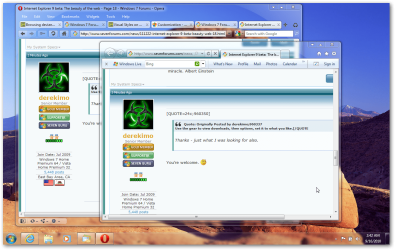
P.S: The Back forward buttons looks a bit odd, or its only me?
 

Attachments

  • sshot-2.png
    sshot-2.png
    184.3 KB · Views: 3

My Computer My Computer

Computer Manufacturer/Model Number
COMPAQ Presario Laptop
OS
Windows 7 Ultimate 64 bit, Mac OS X 10.6
CPU
Intel Pentium Dual Core @2.0GHz
Motherboard
Compaq Generic
Memory
12GB
Graphics Card(s)
NVIDIA Graphics For Mobile 512MB VRAM
Sound Card
IDT High definition Audio
Monitor(s) Displays
Laptop LCD Display
Screen Resolution
1280*800 Bright View Widescreen
Hard Drives
500 GB Primary Master@7200rpm + 1 TB External HDD
Cooling
Direct ; generic fan
Keyboard
Generic Laptop Keyboard
Mouse
Touch Pad
Internet Speed
3.1 Mbps wireless Broadband
Other Info
Generic Dock
Opera and IE9 Beta : Same page opened at the same time; look almost same; Opera is more faster as expected :p ;But IE9 has significantly improved its speed than previous versions.
I know that guy. :p
 

My Computer My Computer

Computer type
PC/Desktop
Computer Manufacturer/Model Number
Self Built
OS
Win 10 Pro x64
CPU
Intel I5-2500K @3.3GHz
Motherboard
Asrock P67 Extreme4
Memory
16GB G.Skill Ripjaws X (4x4GB)
Graphics Card(s)
EVGA GeForce 750 Ti SC 2GB
Sound Card
ASUS Xonar DG 5.1 Channels 24-bit 96KHz PCI Interface Sound
Monitor(s) Displays
auria eq2367
Screen Resolution
1920 x 1080
Hard Drives
250GB Samsung 850 EVO SSD
1TB WD Blue
1TB Hitachi
PSU
SeaSonic X 650W 80 Plus Gold
Case
Corsair Obsidian 750D
Cooling
Corsair H60, Three 140mm case fans
Keyboard
Logitech Wireless Keyboard K520
Mouse
Logitech Wireless Mouse M310
Internet Speed
Wave Broadband ~ 100 dn 5 up
Antivirus
Windows Defender, Malwarebytes Premium
Browser
Edge, IE11, Chrome
Other Info
Laptop specs: HP g7-1365dx /
CPU: AMD A6-3420M APU with Radeon(tm) HD Graphics /
RAM: Crucial 8Gb (2x4Gb) /
SSD: Crucial M4-CT128M4SSD2 ATA Device/ FW 000F /
GFX: AMD Radeon HD 6520G /
OS: Windows 10 Pro x64
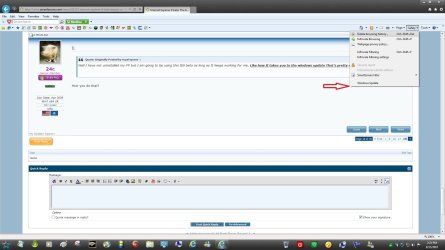
Well I have not uninstalled my FF but I am going to be using this IE9 beta as long as It keeps working for me, Like how It takes you to the windows update That's pretty neat.

How you do that?
 

My Computer My Computer

Computer Manufacturer/Model Number
24c Built
OS
Win7 x64 Ult
CPU
Intel i7-950
Motherboard
ASUS PT6
Memory
12 GB DDR3
Graphics Card(s)
NVIDIA 9800GT+
Sound Card
none
Monitor(s) Displays
2 Samsung SyncMaster 2343bwx
Screen Resolution
2048X1152
Hard Drives
1st-4 OCZ Vertex Turbos 32GB RAID 0
2nd-2 WD 640GB RAID 1
PSU
Thermaltake Toughpower XT W0229RU 750W
Case
Antec 900
Cooling
case fans
Keyboard
Logitech cordless
Mouse
Logitech cordless
Internet Speed
up to 15 MB/s
I'm having trouble getting it to install on my x64. I'm retrying it right now. I hope it works;)

Edit:I got it now. I think my internet connection was the issue.
 

My Computer My Computer

Computer Manufacturer/Model Number
hp Pavilion dv7-6187cl
OS
Windows 7 Ultimate x64 Signature Edition
CPU
Intel Core i7 TurboBoost to 2.9Ghz
Memory
8GB
Graphics Card(s)
ATI Radeon HD 6770M
Sound Card
BeatsAudio with subwoofer
Monitor(s) Displays
17.3" 1080p Matte (upgraded)
Screen Resolution
1080p
Hard Drives
2x 640GB
Keyboard
Microsoft wireless keyboard 3000
Mouse
Microsoft wireless mouse 6000
Internet Speed
~~~FAST~~~~~~~~`
Other Info
1GB readyboost in my SD slot, fingerprint reader

Attachments

  • Untitled.jpg
    Untitled.jpg
    145.6 KB · Views: 3

My Computer My Computer

Computer type
PC/Desktop
Computer Manufacturer/Model Number
Self Built
OS
Win 10 Pro x64
CPU
Intel I5-2500K @3.3GHz
Motherboard
Asrock P67 Extreme4
Memory
16GB G.Skill Ripjaws X (4x4GB)
Graphics Card(s)
EVGA GeForce 750 Ti SC 2GB
Sound Card
ASUS Xonar DG 5.1 Channels 24-bit 96KHz PCI Interface Sound
Monitor(s) Displays
auria eq2367
Screen Resolution
1920 x 1080
Hard Drives
250GB Samsung 850 EVO SSD
1TB WD Blue
1TB Hitachi
PSU
SeaSonic X 650W 80 Plus Gold
Case
Corsair Obsidian 750D
Cooling
Corsair H60, Three 140mm case fans
Keyboard
Logitech Wireless Keyboard K520
Mouse
Logitech Wireless Mouse M310
Internet Speed
Wave Broadband ~ 100 dn 5 up
Antivirus
Windows Defender, Malwarebytes Premium
Browser
Edge, IE11, Chrome
Other Info
Laptop specs: HP g7-1365dx /
CPU: AMD A6-3420M APU with Radeon(tm) HD Graphics /
RAM: Crucial 8Gb (2x4Gb) /
SSD: Crucial M4-CT128M4SSD2 ATA Device/ FW 000F /
GFX: AMD Radeon HD 6520G /
OS: Windows 10 Pro x64
Back
Top