Libraries Folder - Add or Remove from Navigation Pane

How to Add or Remove "Libraries" Folder from the Navigation Pane in Windows 7

   Information
Libraries let you access and arrange items from one or more folders quickly without moving them from their original location. Libraries themselves don't store your files or folders. Instead, they point to different locations on a hard disk or external drive attached to your computer. This gives you easy access to a category of files no matter where they are stored. For instance, if you have music files on your hard disk and on an external drive, you can access all of your music files from within the "Music" library.


For more information about Windows 7 Libraries see:
This will show you how to add or remove the Libraries folder and all Library folders in the Windows Explorer Navigation Pane in Windows 7.

   Note
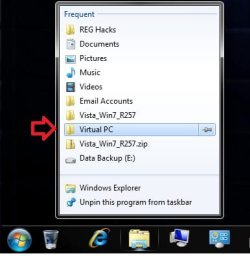
When Libraries is removed from the Navigation Pane, the pinned Windows Explorer icon on the taskbar will still open to the Libaries location by default unless you change the default open to target location for the pinned Windows Explorer taskbar icon.
Taskbar_Windows_Explorer.jpg
   Tip
The default Libaries folders are located at the hidden locations below.

For all users
C:\Users\Public\Libraries

For current user only
C:\Users\(user-name)\AppData\Roaming\Microsoft\Windows\Libraries

   Warning

  • You can only do this while logged into an administrator account.
  • This will affect all user account's on the computer.

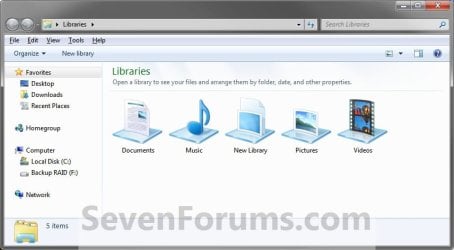
EXAMPLE: Libraries in Navigation Pane
NOTE: This is the Libraries group added (default) (left screenshot below) and removed (right screenshot below) from the Navigation Pane. Default.jpg
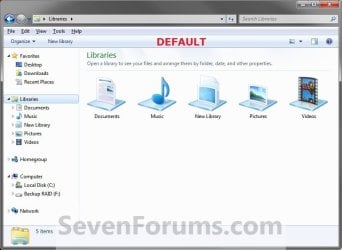
Libraries_Removed.jpg

Here's How: 1. Open the Start Menu and type regedit.exe in the search line, then press enter.

2. If prompted by UAC, then click on Yes.

3. In Regedit, go to the location below: (See screenshot below step 4)
Code:
HKEY_CLASSES_ROOT\CLSID\{031E4825-7B94-4dc3-B131-E946B44C8DD5}\ShellFolder
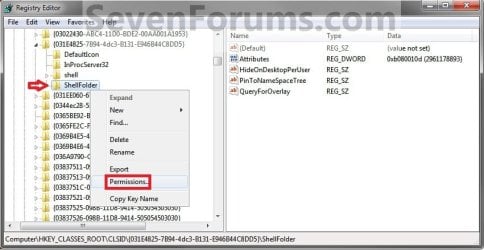
4. In the left pane of regedit, right click on the ShellFolder key and click on Permissions. (See screenshot below) Step1.jpg
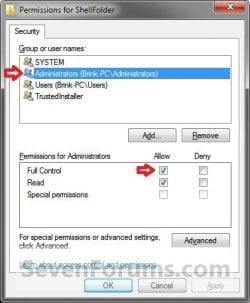
5. At the top, select the Administrators group. At the bottom, check the Allow box to the right of Full Control and click on OK. (See screenshot below) Step2.jpg
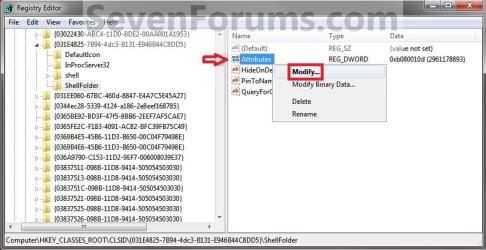
6. In the right pane of regedit, right click on Attributes and click on Modify. (See screenshot below) Step3.jpg
7. To Add All Libraries Back to the Navigation Pane
NOTE: This is the default setting. A) Type in b080010d and click on OK. (see screenshot below) Step4B.jpg
B) Go to step 9.
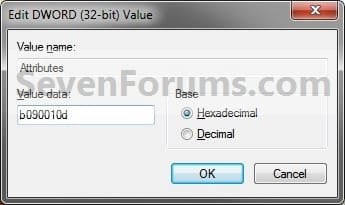
8. To Remove All Libraries from the Navigation Pane A) Type in b090010d and click on OK. (see screenshot below) Step4A.jpg
9. If you have 64-bit Windows 7 Installed
   Note

To also add or remove Libraries from the "Open" and "Save as" type windows as well in 64-bit Windows 7, you will also need to do this step.

If you have a 32-bit Windows 7 installed, then skip this step since doing steps 1 to 7/8 will add or remove Libraries from the "Open" and "Save as" type windows as well.
A) In Regedit, go to the location below:

Code:
HKEY_LOCAL_MACHINE\SOFTWARE\Wow6432Node\Classes\CLSID\{031E4825-7B94-4dc3-B131-E946B44C8DD5}\ShellFolder
B) Repeat steps 4 to 7/8 above.
10. Close regedit.

11. Log off and log on, or restart the computer to apply.


   Tip
If you removed Libraries, then you may also would like to use the tutorial below to have the user folders in the Start Menu to open to your C:\Users\(user-name) location instead of it's library folder location.

How to Make Windows 7 Start Menu User Folder Buttons Open to Users Instead of Libraries Location


That's it,
Shawn


Related Tutorials

 
Last edited:
Keks,

Try deleting the library entries that you want to delete in the desktop.ini file and save it, then delete the libraries themselves in that "C:\Users\David\AppData\Roaming\Microsoft\Windows\Libraries" folder.
 

My Computer

Computer type
PC/Desktop
Computer Manufacturer/Model Number
Self built custom
OS
64-bit Windows 11 Pro for Workstations
CPU
Intel i7-8700K OC'd to 5 GHz
Motherboard
ASUS ROG Maximus XI Formula Z390
Memory
64 GB (4x16GB) G.SKILL TridentZ RGB DDR4 3600 MHz
Graphics Card(s)
ASUS ROG-STRIX-GTX1080TI-O11G-GAMING
Sound Card
Integrated
Monitor(s) Displays
2 x Samsung Odyssey G7 27"
Screen Resolution
2560x1440
Hard Drives
1TB Samsung 990 PRO M.2,
4TB Samsung 990 PRO PRO M.2,
TerraMaster F8 SSD Plus NAS
PSU
Seasonic Prime Titanium 850W
Case
Thermaltake Core P3
Cooling
Corsair Hydro H115i
Keyboard
Logitech wireless K800
Mouse
Logitech MX Master 4
Internet Speed
2 Gb/s Download and 100 Mb/s Upload
Antivirus
Malwarebyte Anti-Malware Premium
Browser
Google Chrome
Other Info
Logitech Z625 speaker system,
Logitech BRIO 4K Pro webcam,
HP Color LaserJet Pro MFP M477fdn,
APC SMART-UPS RT 1000 XL - SURT1000XLI,
Galaxy S23 Plus phone
I removed the entries from the desktop.ini file, saved it and deleted the default libraries as you told me - but they reappeard, unfortunately. I am starting to think that it might be impossible to get rid of them...

What about the registry? Perhaps removing some entries there could have the desired effect.
 

My Computer

OS
Windows 7 Professional x64
CPU
AMD Phenom II X4 @3,6Ghz
Motherboard
Gigabyte P35 DS4
Memory
8GB DDR2-900
Graphics Card(s)
Nvidia GTX275
Sound Card
Creative X-fi Xtreme Music
Monitor(s) Displays
Samsung 2443BW + Benq FP91E
Screen Resolution
1920x1200 + 1280x1024
Hard Drives
Mtron Mobi 32Gb SSD
PSU
Enermax Pro82+ 525W
Case
Lian Li G70B
Cooling
Water
Keyboard
Logitech G15
Mouse
Logitech G5
Internet Speed
30Mbit/s
Hmm, might be something with your user profile.

As a test, create a new administrator account and see how deleting them works in that user account.
 

My Computer

Computer type
PC/Desktop
Computer Manufacturer/Model Number
Self built custom
OS
64-bit Windows 11 Pro for Workstations
CPU
Intel i7-8700K OC'd to 5 GHz
Motherboard
ASUS ROG Maximus XI Formula Z390
Memory
64 GB (4x16GB) G.SKILL TridentZ RGB DDR4 3600 MHz
Graphics Card(s)
ASUS ROG-STRIX-GTX1080TI-O11G-GAMING
Sound Card
Integrated
Monitor(s) Displays
2 x Samsung Odyssey G7 27"
Screen Resolution
2560x1440
Hard Drives
1TB Samsung 990 PRO M.2,
4TB Samsung 990 PRO PRO M.2,
TerraMaster F8 SSD Plus NAS
PSU
Seasonic Prime Titanium 850W
Case
Thermaltake Core P3
Cooling
Corsair Hydro H115i
Keyboard
Logitech wireless K800
Mouse
Logitech MX Master 4
Internet Speed
2 Gb/s Download and 100 Mb/s Upload
Antivirus
Malwarebyte Anti-Malware Premium
Browser
Google Chrome
Other Info
Logitech Z625 speaker system,
Logitech BRIO 4K Pro webcam,
HP Color LaserJet Pro MFP M477fdn,
APC SMART-UPS RT 1000 XL - SURT1000XLI,
Galaxy S23 Plus phone
It was worth a shot - but as it turns out my user profile is not to blame. I created a new administrator account and tested it but it did not make any difference - the default libraries returned on that test account as well...

Edit: I am not really familiar with the relationship between the registry and the Windows Explorer/shell/etc. but I was searching the registry for the CLSID ({c51b83e5-9edd-4250-b45a-da672ee3c70e}) of the libraries which I got from this list here (http://www.sevenforums.com/tutorials/110919-clsid-key-list-windows-7-a.html) and noticed the "restorelibraries" entry. I am aware of the fact that it is possible to restore the default libraries just like restoring many other standard settings, but it seems to me that this restore-command is somehow executed automatically. Maybe preventing that is the right approach here?
 

My Computer

OS
Windows 7 Professional x64
CPU
AMD Phenom II X4 @3,6Ghz
Motherboard
Gigabyte P35 DS4
Memory
8GB DDR2-900
Graphics Card(s)
Nvidia GTX275
Sound Card
Creative X-fi Xtreme Music
Monitor(s) Displays
Samsung 2443BW + Benq FP91E
Screen Resolution
1920x1200 + 1280x1024
Hard Drives
Mtron Mobi 32Gb SSD
PSU
Enermax Pro82+ 525W
Case
Lian Li G70B
Cooling
Water
Keyboard
Logitech G15
Mouse
Logitech G5
Internet Speed
30Mbit/s
I wouldn't recommend to delete the CLSID key.

I must admit that I'm not sure why they will not stay deleted for you and they do for me unless you have something set to save directly into these libraries.

It may be worth a try to run the sfc /scannow command.
 

My Computer

Computer type
PC/Desktop
Computer Manufacturer/Model Number
Self built custom
OS
64-bit Windows 11 Pro for Workstations
CPU
Intel i7-8700K OC'd to 5 GHz
Motherboard
ASUS ROG Maximus XI Formula Z390
Memory
64 GB (4x16GB) G.SKILL TridentZ RGB DDR4 3600 MHz
Graphics Card(s)
ASUS ROG-STRIX-GTX1080TI-O11G-GAMING
Sound Card
Integrated
Monitor(s) Displays
2 x Samsung Odyssey G7 27"
Screen Resolution
2560x1440
Hard Drives
1TB Samsung 990 PRO M.2,
4TB Samsung 990 PRO PRO M.2,
TerraMaster F8 SSD Plus NAS
PSU
Seasonic Prime Titanium 850W
Case
Thermaltake Core P3
Cooling
Corsair Hydro H115i
Keyboard
Logitech wireless K800
Mouse
Logitech MX Master 4
Internet Speed
2 Gb/s Download and 100 Mb/s Upload
Antivirus
Malwarebyte Anti-Malware Premium
Browser
Google Chrome
Other Info
Logitech Z625 speaker system,
Logitech BRIO 4K Pro webcam,
HP Color LaserJet Pro MFP M477fdn,
APC SMART-UPS RT 1000 XL - SURT1000XLI,
Galaxy S23 Plus phone
"Windows Resource Protection did not find any integrity violations."
 

My Computer

OS
Windows 7 Professional x64
CPU
AMD Phenom II X4 @3,6Ghz
Motherboard
Gigabyte P35 DS4
Memory
8GB DDR2-900
Graphics Card(s)
Nvidia GTX275
Sound Card
Creative X-fi Xtreme Music
Monitor(s) Displays
Samsung 2443BW + Benq FP91E
Screen Resolution
1920x1200 + 1280x1024
Hard Drives
Mtron Mobi 32Gb SSD
PSU
Enermax Pro82+ 525W
Case
Lian Li G70B
Cooling
Water
Keyboard
Logitech G15
Mouse
Logitech G5
Internet Speed
30Mbit/s
Other than reinstalling Windows 7, I'm not sure what else to suggest. :(
 

My Computer

Computer type
PC/Desktop
Computer Manufacturer/Model Number
Self built custom
OS
64-bit Windows 11 Pro for Workstations
CPU
Intel i7-8700K OC'd to 5 GHz
Motherboard
ASUS ROG Maximus XI Formula Z390
Memory
64 GB (4x16GB) G.SKILL TridentZ RGB DDR4 3600 MHz
Graphics Card(s)
ASUS ROG-STRIX-GTX1080TI-O11G-GAMING
Sound Card
Integrated
Monitor(s) Displays
2 x Samsung Odyssey G7 27"
Screen Resolution
2560x1440
Hard Drives
1TB Samsung 990 PRO M.2,
4TB Samsung 990 PRO PRO M.2,
TerraMaster F8 SSD Plus NAS
PSU
Seasonic Prime Titanium 850W
Case
Thermaltake Core P3
Cooling
Corsair Hydro H115i
Keyboard
Logitech wireless K800
Mouse
Logitech MX Master 4
Internet Speed
2 Gb/s Download and 100 Mb/s Upload
Antivirus
Malwarebyte Anti-Malware Premium
Browser
Google Chrome
Other Info
Logitech Z625 speaker system,
Logitech BRIO 4K Pro webcam,
HP Color LaserJet Pro MFP M477fdn,
APC SMART-UPS RT 1000 XL - SURT1000XLI,
Galaxy S23 Plus phone
Ironically I did a clean re-install of Windows only a few days ago.

But I think this issue is not really such a big problem - so I will have a look into the registry (but I will not delete any CLSID; I also have a backup).

If I find the reason for this odd behavior, I will post it here, of course. Thank you for your help. I will probably visit this site regularly from now on.
 

My Computer

OS
Windows 7 Professional x64
CPU
AMD Phenom II X4 @3,6Ghz
Motherboard
Gigabyte P35 DS4
Memory
8GB DDR2-900
Graphics Card(s)
Nvidia GTX275
Sound Card
Creative X-fi Xtreme Music
Monitor(s) Displays
Samsung 2443BW + Benq FP91E
Screen Resolution
1920x1200 + 1280x1024
Hard Drives
Mtron Mobi 32Gb SSD
PSU
Enermax Pro82+ 525W
Case
Lian Li G70B
Cooling
Water
Keyboard
Logitech G15
Mouse
Logitech G5
Internet Speed
30Mbit/s
Well, I have to admit that it was pretty stupid not to think of that earlier:

I simply used the default libraries now (renamed them + chose my own locations) which seems to work so far. After that I removed the redundant libraries so that no room is wasted in the navigation pane now... :)
 

My Computer

OS
Windows 7 Professional x64
CPU
AMD Phenom II X4 @3,6Ghz
Motherboard
Gigabyte P35 DS4
Memory
8GB DDR2-900
Graphics Card(s)
Nvidia GTX275
Sound Card
Creative X-fi Xtreme Music
Monitor(s) Displays
Samsung 2443BW + Benq FP91E
Screen Resolution
1920x1200 + 1280x1024
Hard Drives
Mtron Mobi 32Gb SSD
PSU
Enermax Pro82+ 525W
Case
Lian Li G70B
Cooling
Water
Keyboard
Logitech G15
Mouse
Logitech G5
Internet Speed
30Mbit/s
That's great news Keks. Thank you for posting back with your solution. :)
 

My Computer

Computer type
PC/Desktop
Computer Manufacturer/Model Number
Self built custom
OS
64-bit Windows 11 Pro for Workstations
CPU
Intel i7-8700K OC'd to 5 GHz
Motherboard
ASUS ROG Maximus XI Formula Z390
Memory
64 GB (4x16GB) G.SKILL TridentZ RGB DDR4 3600 MHz
Graphics Card(s)
ASUS ROG-STRIX-GTX1080TI-O11G-GAMING
Sound Card
Integrated
Monitor(s) Displays
2 x Samsung Odyssey G7 27"
Screen Resolution
2560x1440
Hard Drives
1TB Samsung 990 PRO M.2,
4TB Samsung 990 PRO PRO M.2,
TerraMaster F8 SSD Plus NAS
PSU
Seasonic Prime Titanium 850W
Case
Thermaltake Core P3
Cooling
Corsair Hydro H115i
Keyboard
Logitech wireless K800
Mouse
Logitech MX Master 4
Internet Speed
2 Gb/s Download and 100 Mb/s Upload
Antivirus
Malwarebyte Anti-Malware Premium
Browser
Google Chrome
Other Info
Logitech Z625 speaker system,
Logitech BRIO 4K Pro webcam,
HP Color LaserJet Pro MFP M477fdn,
APC SMART-UPS RT 1000 XL - SURT1000XLI,
Galaxy S23 Plus phone
removing libraries, totally.

Hello,

I found a few sites showing how to remove libraries from the navigation pane. But your tutorial was the only one I came across that showed how to remove libraries from the 'save as' windows. So thanks for that.

However, libraries still persist - when I enter explorer through a jumplist shortcut. Is there a way of removing them for there, also?

Carl
 

My Computer

OS
ultimate x64
Hello Carl,

What was the jumplist shortcut of?

Was it a Windows Explorer shortcut or a shortcut that opens in Windows Explorer?

Once I know what you are clicking on exactly, I'll be happy to see what I can do to track it down for this as well. :)
 

My Computer

Computer type
PC/Desktop
Computer Manufacturer/Model Number
Self built custom
OS
64-bit Windows 11 Pro for Workstations
CPU
Intel i7-8700K OC'd to 5 GHz
Motherboard
ASUS ROG Maximus XI Formula Z390
Memory
64 GB (4x16GB) G.SKILL TridentZ RGB DDR4 3600 MHz
Graphics Card(s)
ASUS ROG-STRIX-GTX1080TI-O11G-GAMING
Sound Card
Integrated
Monitor(s) Displays
2 x Samsung Odyssey G7 27"
Screen Resolution
2560x1440
Hard Drives
1TB Samsung 990 PRO M.2,
4TB Samsung 990 PRO PRO M.2,
TerraMaster F8 SSD Plus NAS
PSU
Seasonic Prime Titanium 850W
Case
Thermaltake Core P3
Cooling
Corsair Hydro H115i
Keyboard
Logitech wireless K800
Mouse
Logitech MX Master 4
Internet Speed
2 Gb/s Download and 100 Mb/s Upload
Antivirus
Malwarebyte Anti-Malware Premium
Browser
Google Chrome
Other Info
Logitech Z625 speaker system,
Logitech BRIO 4K Pro webcam,
HP Color LaserJet Pro MFP M477fdn,
APC SMART-UPS RT 1000 XL - SURT1000XLI,
Galaxy S23 Plus phone
I have explorer pinned to my taskbar, and the shortcuts in question are to folders. Hope that helps.

Carl
 

My Computer

OS
ultimate x64
I've realised what the problem was. I hadn't used your method of disabling libraries, I'd used a reg script from here. Included in the download is a script simply to hide the libraries icon, which is what I'd opted for. The reason this option is offered is because the authors solution for completely disabling libraries causes start up menu links, My Documents, My Music etc, to disappear. So before I employed your method, I thought I'd run the script which the author provides to restore the original settings. Unfortunately, the script broke the search function in the start menu, ass well as causing the lesser issue of rendering my favourites in the navigation pane, inaccessible. So, I checked the scripts, copied the relevant registry keys from a restored image of my OS, which I created a few weeks ago, imported the keys into the damaged registry, which rectified the situation. Then I used the simple method of altering that one single value, as advocated by yourself, to disable libraries.

So, please forgive me for having wasted your time.

The only thing bugging me now is why, when I open the download folder, is the navigation panel scrolled down part way, whereas in every other folder the panel is scrolled neatly to the top?

Carl
 

My Computer

OS
ultimate x64
Carl,

Do you mean that Libraries still displays in the Navigation Pane when you open a folder from within a jump list in the default Windows Explorer icon on the taskbar like below? On mine it's gone. Did you restart the computer after doing the tutorial to fully apply?

Jump_List_Folder.jpgOpened_Folder.jpg

If not, then you could you post a screenshot to help?
 

My Computer

Computer type
PC/Desktop
Computer Manufacturer/Model Number
Self built custom
OS
64-bit Windows 11 Pro for Workstations
CPU
Intel i7-8700K OC'd to 5 GHz
Motherboard
ASUS ROG Maximus XI Formula Z390
Memory
64 GB (4x16GB) G.SKILL TridentZ RGB DDR4 3600 MHz
Graphics Card(s)
ASUS ROG-STRIX-GTX1080TI-O11G-GAMING
Sound Card
Integrated
Monitor(s) Displays
2 x Samsung Odyssey G7 27"
Screen Resolution
2560x1440
Hard Drives
1TB Samsung 990 PRO M.2,
4TB Samsung 990 PRO PRO M.2,
TerraMaster F8 SSD Plus NAS
PSU
Seasonic Prime Titanium 850W
Case
Thermaltake Core P3
Cooling
Corsair Hydro H115i
Keyboard
Logitech wireless K800
Mouse
Logitech MX Master 4
Internet Speed
2 Gb/s Download and 100 Mb/s Upload
Antivirus
Malwarebyte Anti-Malware Premium
Browser
Google Chrome
Other Info
Logitech Z625 speaker system,
Logitech BRIO 4K Pro webcam,
HP Color LaserJet Pro MFP M477fdn,
APC SMART-UPS RT 1000 XL - SURT1000XLI,
Galaxy S23 Plus phone
Brink,

No, it works fine now. As I say, I realised belatedly that I was using a different reg hack than the one provided by you. Having employed your method, libraries is now firmly subdued in all windows, I'm happy to say.

Carl
 

My Computer

OS
ultimate x64
That's great news Carl. I'm happy to hear that you got it subdued now. :)
 

My Computer

Computer type
PC/Desktop
Computer Manufacturer/Model Number
Self built custom
OS
64-bit Windows 11 Pro for Workstations
CPU
Intel i7-8700K OC'd to 5 GHz
Motherboard
ASUS ROG Maximus XI Formula Z390
Memory
64 GB (4x16GB) G.SKILL TridentZ RGB DDR4 3600 MHz
Graphics Card(s)
ASUS ROG-STRIX-GTX1080TI-O11G-GAMING
Sound Card
Integrated
Monitor(s) Displays
2 x Samsung Odyssey G7 27"
Screen Resolution
2560x1440
Hard Drives
1TB Samsung 990 PRO M.2,
4TB Samsung 990 PRO PRO M.2,
TerraMaster F8 SSD Plus NAS
PSU
Seasonic Prime Titanium 850W
Case
Thermaltake Core P3
Cooling
Corsair Hydro H115i
Keyboard
Logitech wireless K800
Mouse
Logitech MX Master 4
Internet Speed
2 Gb/s Download and 100 Mb/s Upload
Antivirus
Malwarebyte Anti-Malware Premium
Browser
Google Chrome
Other Info
Logitech Z625 speaker system,
Logitech BRIO 4K Pro webcam,
HP Color LaserJet Pro MFP M477fdn,
APC SMART-UPS RT 1000 XL - SURT1000XLI,
Galaxy S23 Plus phone
Thanks mate, Libraries are the bane of my existence and this is great. :party:
 

My Computer

Computer Manufacturer/Model Number
* BFK Customs *
OS
W 7 64-bit Ultimate
CPU
Intel Q9550 Yorkfield
Motherboard
ASUS P5Q Pro
Memory
8GB Dominator 8500C5D
Graphics Card(s)
ATI : XFX 5870
Sound Card
Realtek HD Audio 7-1
Monitor(s) Displays
1x 47" LCD HDMI & 3x 26" LCD HDMI
Screen Resolution
1920x1080P & 1920x1200
Hard Drives
1x 80GB Intel X25-M G2 SSD : 1x 500GB & 1x 640GB WD Caviar Black(s)
PSU
Corsair 620HX
Case
Cooler Master RC-690
Cooling
Tuniq Tower 120, 2x 140mm and 3x 120mm case fans
Keyboard
Microsoft 500
Mouse
Razer Diamondback 3G
Internet Speed
14 Mb/s
Other Info
1x Koutech 3Gb/s SATA HDD Hot Swap Rack
You're welcome Ted. :)
 

My Computer

Computer type
PC/Desktop
Computer Manufacturer/Model Number
Self built custom
OS
64-bit Windows 11 Pro for Workstations
CPU
Intel i7-8700K OC'd to 5 GHz
Motherboard
ASUS ROG Maximus XI Formula Z390
Memory
64 GB (4x16GB) G.SKILL TridentZ RGB DDR4 3600 MHz
Graphics Card(s)
ASUS ROG-STRIX-GTX1080TI-O11G-GAMING
Sound Card
Integrated
Monitor(s) Displays
2 x Samsung Odyssey G7 27"
Screen Resolution
2560x1440
Hard Drives
1TB Samsung 990 PRO M.2,
4TB Samsung 990 PRO PRO M.2,
TerraMaster F8 SSD Plus NAS
PSU
Seasonic Prime Titanium 850W
Case
Thermaltake Core P3
Cooling
Corsair Hydro H115i
Keyboard
Logitech wireless K800
Mouse
Logitech MX Master 4
Internet Speed
2 Gb/s Download and 100 Mb/s Upload
Antivirus
Malwarebyte Anti-Malware Premium
Browser
Google Chrome
Other Info
Logitech Z625 speaker system,
Logitech BRIO 4K Pro webcam,
HP Color LaserJet Pro MFP M477fdn,
APC SMART-UPS RT 1000 XL - SURT1000XLI,
Galaxy S23 Plus phone
Back
Top