
Libraries Folder - Add or Remove from Navigation Pane

How to Add or Remove "Libraries" Folder from the Navigation Pane in Windows 7

   Information
Libraries let you access and arrange items from one or more folders quickly without moving them from their original location. Libraries themselves don't store your files or folders. Instead, they point to different locations on a hard disk or external drive attached to your computer. This gives you easy access to a category of files no matter where they are stored. For instance, if you have music files on your hard disk and on an external drive, you can access all of your music files from within the "Music" library.


For more information about Windows 7 Libraries see:
This will show you how to add or remove the Libraries folder and all Library folders in the Windows Explorer Navigation Pane in Windows 7.

   Note
When Libraries is removed from the Navigation Pane, the pinned Windows Explorer icon on the taskbar will still open to the Libaries location by default unless you change the default open to target location for the pinned Windows Explorer taskbar icon.
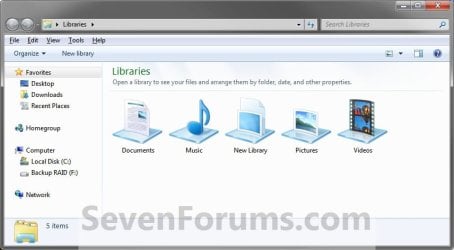
Taskbar_Windows_Explorer.jpg
   Tip
The default Libaries folders are located at the hidden locations below.

For all users
C:\Users\Public\Libraries

For current user only
C:\Users\(user-name)\AppData\Roaming\Microsoft\Windows\Libraries

   Warning

  • You can only do this while logged into an administrator account.
  • This will affect all user account's on the computer.

EXAMPLE: Libraries in Navigation Pane
NOTE: This is the Libraries group added (default) (left screenshot below) and removed (right screenshot below) from the Navigation Pane. Default.jpg
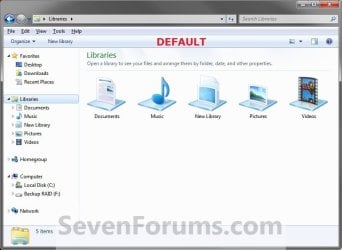
Libraries_Removed.jpg

Here's How: 1. Open the Start Menu and type regedit.exe in the search line, then press enter.

2. If prompted by UAC, then click on Yes.

3. In Regedit, go to the location below: (See screenshot below step 4)
Code:
HKEY_CLASSES_ROOT\CLSID\{031E4825-7B94-4dc3-B131-E946B44C8DD5}\ShellFolder
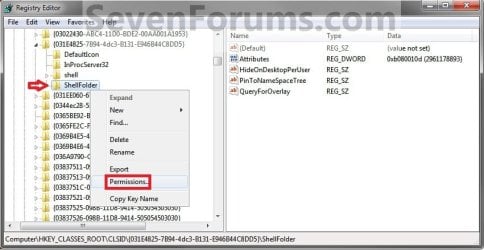
4. In the left pane of regedit, right click on the ShellFolder key and click on Permissions. (See screenshot below) Step1.jpg
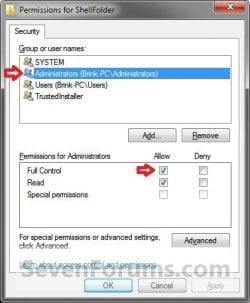
5. At the top, select the Administrators group. At the bottom, check the Allow box to the right of Full Control and click on OK. (See screenshot below) Step2.jpg
6. In the right pane of regedit, right click on Attributes and click on Modify. (See screenshot below) Step3.jpg
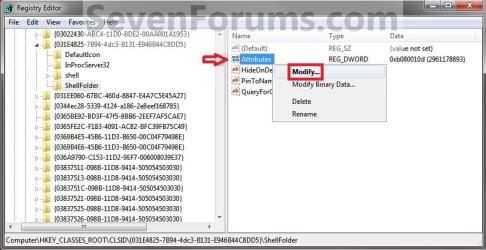
7. To Add All Libraries Back to the Navigation Pane
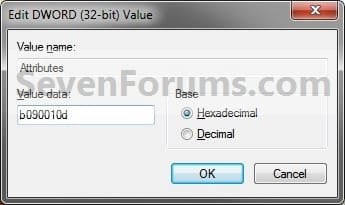
NOTE: This is the default setting. A) Type in b080010d and click on OK. (see screenshot below) Step4B.jpg
B) Go to step 9.
8. To Remove All Libraries from the Navigation Pane A) Type in b090010d and click on OK. (see screenshot below) Step4A.jpg
9. If you have 64-bit Windows 7 Installed
   Note

To also add or remove Libraries from the "Open" and "Save as" type windows as well in 64-bit Windows 7, you will also need to do this step.

If you have a 32-bit Windows 7 installed, then skip this step since doing steps 1 to 7/8 will add or remove Libraries from the "Open" and "Save as" type windows as well.
A) In Regedit, go to the location below:

Code:
HKEY_LOCAL_MACHINE\SOFTWARE\Wow6432Node\Classes\CLSID\{031E4825-7B94-4dc3-B131-E946B44C8DD5}\ShellFolder
B) Repeat steps 4 to 7/8 above.
10. Close regedit.

11. Log off and log on, or restart the computer to apply.


   Tip
If you removed Libraries, then you may also would like to use the tutorial below to have the user folders in the Start Menu to open to your C:\Users\(user-name) location instead of it's library folder location.

How to Make Windows 7 Start Menu User Folder Buttons Open to Users Instead of Libraries Location


That's it,
Shawn


Related Tutorials

 
Last edited:

My Computer

Computer type
PC/Desktop
Computer Manufacturer/Model Number
Self built custom
OS
64-bit Windows 11 Pro for Workstations
CPU
Intel i7-8700K OC'd to 5 GHz
Motherboard
ASUS ROG Maximus XI Formula Z390
Memory
64 GB (4x16GB) G.SKILL TridentZ RGB DDR4 3600 MHz
Graphics Card(s)
ASUS ROG-STRIX-GTX1080TI-O11G-GAMING
Sound Card
Integrated
Monitor(s) Displays
2 x Samsung Odyssey G7 27"
Screen Resolution
2560x1440
Hard Drives
1TB Samsung 990 PRO M.2,
4TB Samsung 990 PRO PRO M.2,
TerraMaster F8 SSD Plus NAS
PSU
Seasonic Prime Titanium 850W
Case
Thermaltake Core P3
Cooling
Corsair Hydro H115i
Keyboard
Logitech wireless K800
Mouse
Logitech MX Master 4
Internet Speed
2 Gb/s Download and 100 Mb/s Upload
Antivirus
Malwarebyte Anti-Malware Premium
Browser
Google Chrome
Other Info
Logitech Z625 speaker system,
Logitech BRIO 4K Pro webcam,
HP Color LaserJet Pro MFP M477fdn,
APC SMART-UPS RT 1000 XL - SURT1000XLI,
Galaxy S23 Plus phone
Brink
I want to get rid of Libraries in Win7. I see a lot of stuff about using RegEdit and was wondering... Isn't there a simple REG file for doing this rather than all this puttering around?
 

My Computer

Computer Manufacturer/Model Number
eMachine ET1331G-03W
OS
Windows 7 Home Premie 64 bit
CPU
AMD Athion II
Motherboard
I assume so
Memory
6 Gb
Graphics Card(s)
Nvidia
Sound Card
Yes
Monitor(s) Displays
Envision
Screen Resolution
using 1024 X 768
Hard Drives
750 Gb internal, 500 Gb external. misc. USB jump drives
PSU
PSA, UAL, Pan Am, Delta. Dodge Diesel. '54 HD K model
Case
black plastic and tin
Cooling
by fan
Keyboard
yeah.... has lots of keys too!
Mouse
Three button
Internet Speed
Beats me.... but faster than hell
Other Info
Can be E/M'ed at: [email protected]
Hello Jim, and congrats on your first post. :)

The method in this tutorial basically only turns off showing libraries in the navigation pane. This way there's no harm no foul, and easy to turn back on later if wanted. It essentially would be the same as removing libraries since you wouldn't see them when turned off. The only downside is that you have to set permissions the first time to be able to change the registry values, but it's really easier than it looks.

I wouldn't recommend to use the other methods on the internet that complete delete the registry entries for all libraries. That would have the possibility of causing an issue if anything should reference a library. There's a good chance of that since most programs save to a library by default.
 

My Computer

Computer type
PC/Desktop
Computer Manufacturer/Model Number
Self built custom
OS
64-bit Windows 11 Pro for Workstations
CPU
Intel i7-8700K OC'd to 5 GHz
Motherboard
ASUS ROG Maximus XI Formula Z390
Memory
64 GB (4x16GB) G.SKILL TridentZ RGB DDR4 3600 MHz
Graphics Card(s)
ASUS ROG-STRIX-GTX1080TI-O11G-GAMING
Sound Card
Integrated
Monitor(s) Displays
2 x Samsung Odyssey G7 27"
Screen Resolution
2560x1440
Hard Drives
1TB Samsung 990 PRO M.2,
4TB Samsung 990 PRO PRO M.2,
TerraMaster F8 SSD Plus NAS
PSU
Seasonic Prime Titanium 850W
Case
Thermaltake Core P3
Cooling
Corsair Hydro H115i
Keyboard
Logitech wireless K800
Mouse
Logitech MX Master 4
Internet Speed
2 Gb/s Download and 100 Mb/s Upload
Antivirus
Malwarebyte Anti-Malware Premium
Browser
Google Chrome
Other Info
Logitech Z625 speaker system,
Logitech BRIO 4K Pro webcam,
HP Color LaserJet Pro MFP M477fdn,
APC SMART-UPS RT 1000 XL - SURT1000XLI,
Galaxy S23 Plus phone
Hey I'm having trouble with this.

I got to the part where you change the attribute value to 080010d, the attribute already had that value, I hit ok and then I restarted the PC, the Libraries folder was still not there.

Also the hidden folders are grayed out, this never used to be the case. I think I accidentally made the folders that are normally hidden, hidden. I then made them unhidden which caused all these issues.
 

My Computer

Computer type
PC/Desktop
OS
windows 7 professional x64

My Computer

Computer type
PC/Desktop
Computer Manufacturer/Model Number
Self built custom
OS
64-bit Windows 11 Pro for Workstations
CPU
Intel i7-8700K OC'd to 5 GHz
Motherboard
ASUS ROG Maximus XI Formula Z390
Memory
64 GB (4x16GB) G.SKILL TridentZ RGB DDR4 3600 MHz
Graphics Card(s)
ASUS ROG-STRIX-GTX1080TI-O11G-GAMING
Sound Card
Integrated
Monitor(s) Displays
2 x Samsung Odyssey G7 27"
Screen Resolution
2560x1440
Hard Drives
1TB Samsung 990 PRO M.2,
4TB Samsung 990 PRO PRO M.2,
TerraMaster F8 SSD Plus NAS
PSU
Seasonic Prime Titanium 850W
Case
Thermaltake Core P3
Cooling
Corsair Hydro H115i
Keyboard
Logitech wireless K800
Mouse
Logitech MX Master 4
Internet Speed
2 Gb/s Download and 100 Mb/s Upload
Antivirus
Malwarebyte Anti-Malware Premium
Browser
Google Chrome
Other Info
Logitech Z625 speaker system,
Logitech BRIO 4K Pro webcam,
HP Color LaserJet Pro MFP M477fdn,
APC SMART-UPS RT 1000 XL - SURT1000XLI,
Galaxy S23 Plus phone
Hey Brink,

I have done it in both registry locations, which is the annoying bit.

So I'm stumped
 

My Computer

Computer type
PC/Desktop
OS
windows 7 professional x64
If you like, you could also do a system restore using a restore point dated before Libraries went AWOL to hopefully restore it.
 

My Computer

Computer type
PC/Desktop
Computer Manufacturer/Model Number
Self built custom
OS
64-bit Windows 11 Pro for Workstations
CPU
Intel i7-8700K OC'd to 5 GHz
Motherboard
ASUS ROG Maximus XI Formula Z390
Memory
64 GB (4x16GB) G.SKILL TridentZ RGB DDR4 3600 MHz
Graphics Card(s)
ASUS ROG-STRIX-GTX1080TI-O11G-GAMING
Sound Card
Integrated
Monitor(s) Displays
2 x Samsung Odyssey G7 27"
Screen Resolution
2560x1440
Hard Drives
1TB Samsung 990 PRO M.2,
4TB Samsung 990 PRO PRO M.2,
TerraMaster F8 SSD Plus NAS
PSU
Seasonic Prime Titanium 850W
Case
Thermaltake Core P3
Cooling
Corsair Hydro H115i
Keyboard
Logitech wireless K800
Mouse
Logitech MX Master 4
Internet Speed
2 Gb/s Download and 100 Mb/s Upload
Antivirus
Malwarebyte Anti-Malware Premium
Browser
Google Chrome
Other Info
Logitech Z625 speaker system,
Logitech BRIO 4K Pro webcam,
HP Color LaserJet Pro MFP M477fdn,
APC SMART-UPS RT 1000 XL - SURT1000XLI,
Galaxy S23 Plus phone
Yeah that was my last resort :cry:, just wanted to know if there was an easier solution. Thanks Brink.:D
 

My Computer

Computer type
PC/Desktop
OS
windows 7 professional x64
The method in the tutorial works fine, but not always if some other method may have been used to remove it than what was in the tutorial. :(
 

My Computer

Computer type
PC/Desktop
Computer Manufacturer/Model Number
Self built custom
OS
64-bit Windows 11 Pro for Workstations
CPU
Intel i7-8700K OC'd to 5 GHz
Motherboard
ASUS ROG Maximus XI Formula Z390
Memory
64 GB (4x16GB) G.SKILL TridentZ RGB DDR4 3600 MHz
Graphics Card(s)
ASUS ROG-STRIX-GTX1080TI-O11G-GAMING
Sound Card
Integrated
Monitor(s) Displays
2 x Samsung Odyssey G7 27"
Screen Resolution
2560x1440
Hard Drives
1TB Samsung 990 PRO M.2,
4TB Samsung 990 PRO PRO M.2,
TerraMaster F8 SSD Plus NAS
PSU
Seasonic Prime Titanium 850W
Case
Thermaltake Core P3
Cooling
Corsair Hydro H115i
Keyboard
Logitech wireless K800
Mouse
Logitech MX Master 4
Internet Speed
2 Gb/s Download and 100 Mb/s Upload
Antivirus
Malwarebyte Anti-Malware Premium
Browser
Google Chrome
Other Info
Logitech Z625 speaker system,
Logitech BRIO 4K Pro webcam,
HP Color LaserJet Pro MFP M477fdn,
APC SMART-UPS RT 1000 XL - SURT1000XLI,
Galaxy S23 Plus phone
Works great, but...

The registry changed worked for me, but I've noticed that when going to save a document the libraries still appear when going to save files (as) from programs like Office (2010 standard), or "printing" with XPS document writer, but it does not show when going to save (as) with WordPad, or Notepad.
 

My Computer

Computer type
PC/Desktop
Computer Manufacturer/Model Number
Custom
OS
PA
CPU
Sandy Bridge i7-2600k @ 3.4 (3.8 OC)
Motherboard
ASRock Z68 Pro GEN3
Memory
G.SKILL DDR3 2133 ( 2 x 4 GB modules)
Graphics Card(s)
GeForce GTX 760 2GB 256-bit GDDR5
Hard Drives
Crucial RealSSD C300 128GB
Hitachi GST Deskstar 7K1000 1TB 7200RPM
Hello Dangmedcalf, and welcome to Seven Forums. :)

Yeah, unfortunately some programs may still show them in their "save as" type dialogs.

Did you use step 9 (if you have 64-bit Windows), and restart the computer afterwards?
 

My Computer

Computer type
PC/Desktop
Computer Manufacturer/Model Number
Self built custom
OS
64-bit Windows 11 Pro for Workstations
CPU
Intel i7-8700K OC'd to 5 GHz
Motherboard
ASUS ROG Maximus XI Formula Z390
Memory
64 GB (4x16GB) G.SKILL TridentZ RGB DDR4 3600 MHz
Graphics Card(s)
ASUS ROG-STRIX-GTX1080TI-O11G-GAMING
Sound Card
Integrated
Monitor(s) Displays
2 x Samsung Odyssey G7 27"
Screen Resolution
2560x1440
Hard Drives
1TB Samsung 990 PRO M.2,
4TB Samsung 990 PRO PRO M.2,
TerraMaster F8 SSD Plus NAS
PSU
Seasonic Prime Titanium 850W
Case
Thermaltake Core P3
Cooling
Corsair Hydro H115i
Keyboard
Logitech wireless K800
Mouse
Logitech MX Master 4
Internet Speed
2 Gb/s Download and 100 Mb/s Upload
Antivirus
Malwarebyte Anti-Malware Premium
Browser
Google Chrome
Other Info
Logitech Z625 speaker system,
Logitech BRIO 4K Pro webcam,
HP Color LaserJet Pro MFP M477fdn,
APC SMART-UPS RT 1000 XL - SURT1000XLI,
Galaxy S23 Plus phone
Well I apologize, it did work for Windows 7. I was looking at this thread and the Windows 8 one as well and meant to post on that one. My W8 machine still shows the libraries when I go to save as, but that's because I didn't do step 8 of option 4. Thanks for the work you do. :)
 

My Computer

Computer type
PC/Desktop
Computer Manufacturer/Model Number
Custom
OS
PA
CPU
Sandy Bridge i7-2600k @ 3.4 (3.8 OC)
Motherboard
ASRock Z68 Pro GEN3
Memory
G.SKILL DDR3 2133 ( 2 x 4 GB modules)
Graphics Card(s)
GeForce GTX 760 2GB 256-bit GDDR5
Hard Drives
Crucial RealSSD C300 128GB
Hitachi GST Deskstar 7K1000 1TB 7200RPM
Great news. I'm happy to hear that you got it sorted. :)
 

My Computer

Computer type
PC/Desktop
Computer Manufacturer/Model Number
Self built custom
OS
64-bit Windows 11 Pro for Workstations
CPU
Intel i7-8700K OC'd to 5 GHz
Motherboard
ASUS ROG Maximus XI Formula Z390
Memory
64 GB (4x16GB) G.SKILL TridentZ RGB DDR4 3600 MHz
Graphics Card(s)
ASUS ROG-STRIX-GTX1080TI-O11G-GAMING
Sound Card
Integrated
Monitor(s) Displays
2 x Samsung Odyssey G7 27"
Screen Resolution
2560x1440
Hard Drives
1TB Samsung 990 PRO M.2,
4TB Samsung 990 PRO PRO M.2,
TerraMaster F8 SSD Plus NAS
PSU
Seasonic Prime Titanium 850W
Case
Thermaltake Core P3
Cooling
Corsair Hydro H115i
Keyboard
Logitech wireless K800
Mouse
Logitech MX Master 4
Internet Speed
2 Gb/s Download and 100 Mb/s Upload
Antivirus
Malwarebyte Anti-Malware Premium
Browser
Google Chrome
Other Info
Logitech Z625 speaker system,
Logitech BRIO 4K Pro webcam,
HP Color LaserJet Pro MFP M477fdn,
APC SMART-UPS RT 1000 XL - SURT1000XLI,
Galaxy S23 Plus phone
I performed these procedures to remove libraries from everywhere. They worked perfectly. But later I discovered that Firefox could no longer download anything, even from email. Chrome still works, but I want Firefox, so undid all the changes. I just mention this to remind folks that there can be unintended consequences to doing this. Cheers!
 

My Computer

Computer Manufacturer/Model Number
white box
OS
Windows 7 x64
Hello Gnored, and welcome to Seven Forums. :)

Are you sure that this is the tutorial that you used to remove your Libraries with? This tutorial should not affect anything other than Libraries to either show or hide in the navigation pane.

You mentioned using .reg files in your original post to remove Libraries, but this tutorial doesn't have any .reg files. It sounds like you used some other method from another site that deletes the registry entries for Libraries instead.


Either way, I think you may have had Firefox set to download to a library location by default. When you removed Libraries using whatever method you used, it sounds like it prevented Firefox from being able to save to that location.

If you like, change the default download location in Firefox to a location other than a library to see if that may help.

http://www.sevenforums.com/tutorials/154852-firefox-change-default-download-save-location.html
 

My Computer

Computer type
PC/Desktop
Computer Manufacturer/Model Number
Self built custom
OS
64-bit Windows 11 Pro for Workstations
CPU
Intel i7-8700K OC'd to 5 GHz
Motherboard
ASUS ROG Maximus XI Formula Z390
Memory
64 GB (4x16GB) G.SKILL TridentZ RGB DDR4 3600 MHz
Graphics Card(s)
ASUS ROG-STRIX-GTX1080TI-O11G-GAMING
Sound Card
Integrated
Monitor(s) Displays
2 x Samsung Odyssey G7 27"
Screen Resolution
2560x1440
Hard Drives
1TB Samsung 990 PRO M.2,
4TB Samsung 990 PRO PRO M.2,
TerraMaster F8 SSD Plus NAS
PSU
Seasonic Prime Titanium 850W
Case
Thermaltake Core P3
Cooling
Corsair Hydro H115i
Keyboard
Logitech wireless K800
Mouse
Logitech MX Master 4
Internet Speed
2 Gb/s Download and 100 Mb/s Upload
Antivirus
Malwarebyte Anti-Malware Premium
Browser
Google Chrome
Other Info
Logitech Z625 speaker system,
Logitech BRIO 4K Pro webcam,
HP Color LaserJet Pro MFP M477fdn,
APC SMART-UPS RT 1000 XL - SURT1000XLI,
Galaxy S23 Plus phone
Well, no, I didn't say anything about reg files. I simply edited some keys to make the libraries "disappear." And no, I had Firefox set to ask on download. I even tried setting a download location. But touch the dl button, and FF crashes. Hmmm. I did do this tutorial, but I did two others on the list (I think to prevent them from showing up in save to dialog boxes) at the same so possibly it was another of these. Sorry. I'd just hoped to add a word of cautionary advice. I just restored my machine to an earlier restore point and all was well. Trouble is, restore wouldn't work either, but doing it in safe mode got it done. Sigh. There are wheels within wheels within wheels ...
 

My Computer

Computer Manufacturer/Model Number
white box
OS
Windows 7 x64
No worries Gnored. I was just trying to see what may have caused this to happen to you since it didn't for me. That's all. :)
 

My Computer

Computer type
PC/Desktop
Computer Manufacturer/Model Number
Self built custom
OS
64-bit Windows 11 Pro for Workstations
CPU
Intel i7-8700K OC'd to 5 GHz
Motherboard
ASUS ROG Maximus XI Formula Z390
Memory
64 GB (4x16GB) G.SKILL TridentZ RGB DDR4 3600 MHz
Graphics Card(s)
ASUS ROG-STRIX-GTX1080TI-O11G-GAMING
Sound Card
Integrated
Monitor(s) Displays
2 x Samsung Odyssey G7 27"
Screen Resolution
2560x1440
Hard Drives
1TB Samsung 990 PRO M.2,
4TB Samsung 990 PRO PRO M.2,
TerraMaster F8 SSD Plus NAS
PSU
Seasonic Prime Titanium 850W
Case
Thermaltake Core P3
Cooling
Corsair Hydro H115i
Keyboard
Logitech wireless K800
Mouse
Logitech MX Master 4
Internet Speed
2 Gb/s Download and 100 Mb/s Upload
Antivirus
Malwarebyte Anti-Malware Premium
Browser
Google Chrome
Other Info
Logitech Z625 speaker system,
Logitech BRIO 4K Pro webcam,
HP Color LaserJet Pro MFP M477fdn,
APC SMART-UPS RT 1000 XL - SURT1000XLI,
Galaxy S23 Plus phone
Shawn, Thank you, thank you, thank you!

I recently returned a refurbished Lenovo laptop to the store I bought it from almost a year ago after multiple physical problems with it. The customer service manager agreed that it was truly a Lemon and refunded my cost IN FULL, including the year's extended warranty I had purchased!

During the past year, I grew to hate Windows 8 with a passion. Just couldn't get used to an operating system that is obviously designed for customers who want to play 99% of the time and work 1%. I had done my homework and replaced the Lemon Lenovo with a new Toshiba S55, with Windows 7 Pro.

I'm certainly not the type of user who can make technical fixes with ease. I wanted to get rid of libraries and found your step-by-step how-to here. With patience and following your directions very carefully, I managed to edit the registry without blowing up the computer and got rid of those totally worthless libraries.

So THANK YOU for your wonderful help here. As far as I'm concerned, YOU DA MAN!
 

My Computer

Computer type
Laptop
Computer Manufacturer/Model Number
Toshiba
OS
Windows 7 Pro 64 bit
Memory
1TB
Hard Drives
1
Antivirus
Eset Nod 32
Browser
Firefox,Google
Hello Gkaywood, and welcome to Seven Forums.

I'm happy to hear that it was able to help. :)
 

My Computer

Computer type
PC/Desktop
Computer Manufacturer/Model Number
Self built custom
OS
64-bit Windows 11 Pro for Workstations
CPU
Intel i7-8700K OC'd to 5 GHz
Motherboard
ASUS ROG Maximus XI Formula Z390
Memory
64 GB (4x16GB) G.SKILL TridentZ RGB DDR4 3600 MHz
Graphics Card(s)
ASUS ROG-STRIX-GTX1080TI-O11G-GAMING
Sound Card
Integrated
Monitor(s) Displays
2 x Samsung Odyssey G7 27"
Screen Resolution
2560x1440
Hard Drives
1TB Samsung 990 PRO M.2,
4TB Samsung 990 PRO PRO M.2,
TerraMaster F8 SSD Plus NAS
PSU
Seasonic Prime Titanium 850W
Case
Thermaltake Core P3
Cooling
Corsair Hydro H115i
Keyboard
Logitech wireless K800
Mouse
Logitech MX Master 4
Internet Speed
2 Gb/s Download and 100 Mb/s Upload
Antivirus
Malwarebyte Anti-Malware Premium
Browser
Google Chrome
Other Info
Logitech Z625 speaker system,
Logitech BRIO 4K Pro webcam,
HP Color LaserJet Pro MFP M477fdn,
APC SMART-UPS RT 1000 XL - SURT1000XLI,
Galaxy S23 Plus phone
Libraries page Still Showing

Hmmmm...having a bit of a problem here. I thought I had done all the steps successfully in this process but I still got a screen that is titled Libraries when I clicked on the Windows Explorer icon on the taskbar, even though there are no icons to libraries showing, since I deleted them all. So I did it again, rebooted, and got the same results.

I'm running Win 7 Pro.

What am I missing?
 

My Computer

Computer type
Laptop
Computer Manufacturer/Model Number
Toshiba
OS
Windows 7 Pro 64 bit
Memory
1TB
Hard Drives
1
Antivirus
Eset Nod 32
Browser
Firefox,Google
Back
Top