Libraries Folder - Add or Remove from Navigation Pane

How to Add or Remove "Libraries" Folder from the Navigation Pane in Windows 7

   Information
Libraries let you access and arrange items from one or more folders quickly without moving them from their original location. Libraries themselves don't store your files or folders. Instead, they point to different locations on a hard disk or external drive attached to your computer. This gives you easy access to a category of files no matter where they are stored. For instance, if you have music files on your hard disk and on an external drive, you can access all of your music files from within the "Music" library.


For more information about Windows 7 Libraries see:
This will show you how to add or remove the Libraries folder and all Library folders in the Windows Explorer Navigation Pane in Windows 7.

   Note
When Libraries is removed from the Navigation Pane, the pinned Windows Explorer icon on the taskbar will still open to the Libaries location by default unless you change the default open to target location for the pinned Windows Explorer taskbar icon.
Taskbar_Windows_Explorer.jpg
   Tip
The default Libaries folders are located at the hidden locations below.

For all users
C:\Users\Public\Libraries

For current user only
C:\Users\(user-name)\AppData\Roaming\Microsoft\Windows\Libraries

   Warning

  • You can only do this while logged into an administrator account.
  • This will affect all user account's on the computer.

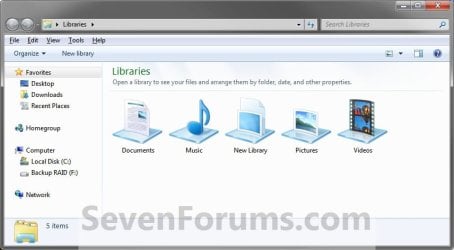
EXAMPLE: Libraries in Navigation Pane
NOTE: This is the Libraries group added (default) (left screenshot below) and removed (right screenshot below) from the Navigation Pane. Default.jpg
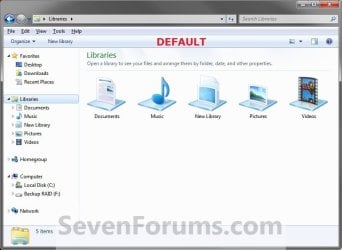
Libraries_Removed.jpg

Here's How: 1. Open the Start Menu and type regedit.exe in the search line, then press enter.

2. If prompted by UAC, then click on Yes.

3. In Regedit, go to the location below: (See screenshot below step 4)
Code:
HKEY_CLASSES_ROOT\CLSID\{031E4825-7B94-4dc3-B131-E946B44C8DD5}\ShellFolder
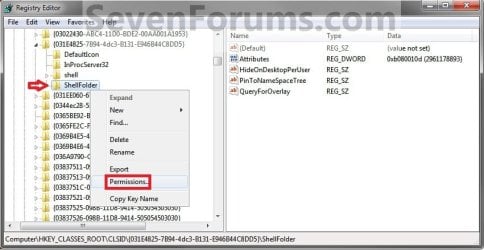
4. In the left pane of regedit, right click on the ShellFolder key and click on Permissions. (See screenshot below) Step1.jpg
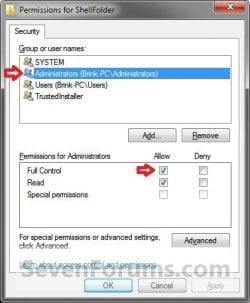
5. At the top, select the Administrators group. At the bottom, check the Allow box to the right of Full Control and click on OK. (See screenshot below) Step2.jpg
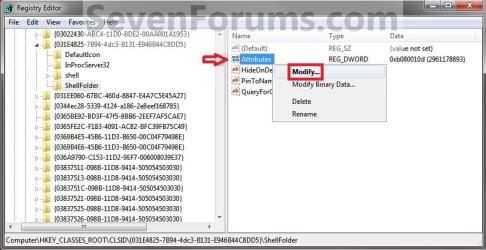
6. In the right pane of regedit, right click on Attributes and click on Modify. (See screenshot below) Step3.jpg
7. To Add All Libraries Back to the Navigation Pane
NOTE: This is the default setting. A) Type in b080010d and click on OK. (see screenshot below) Step4B.jpg
B) Go to step 9.
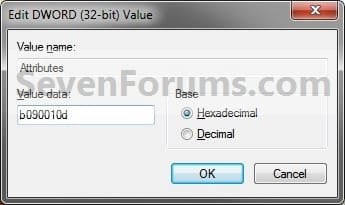
8. To Remove All Libraries from the Navigation Pane A) Type in b090010d and click on OK. (see screenshot below) Step4A.jpg
9. If you have 64-bit Windows 7 Installed
   Note

To also add or remove Libraries from the "Open" and "Save as" type windows as well in 64-bit Windows 7, you will also need to do this step.

If you have a 32-bit Windows 7 installed, then skip this step since doing steps 1 to 7/8 will add or remove Libraries from the "Open" and "Save as" type windows as well.
A) In Regedit, go to the location below:

Code:
HKEY_LOCAL_MACHINE\SOFTWARE\Wow6432Node\Classes\CLSID\{031E4825-7B94-4dc3-B131-E946B44C8DD5}\ShellFolder
B) Repeat steps 4 to 7/8 above.
10. Close regedit.

11. Log off and log on, or restart the computer to apply.


   Tip
If you removed Libraries, then you may also would like to use the tutorial below to have the user folders in the Start Menu to open to your C:\Users\(user-name) location instead of it's library folder location.

How to Make Windows 7 Start Menu User Folder Buttons Open to Users Instead of Libraries Location


That's it,
Shawn


Related Tutorials

 
Last edited:
You're welcome. I hope they do as well. Please let us know how it went. :)
 

My Computer

Computer type
PC/Desktop
Computer Manufacturer/Model Number
Self built custom
OS
64-bit Windows 11 Pro for Workstations
CPU
Intel i7-8700K OC'd to 5 GHz
Motherboard
ASUS ROG Maximus XI Formula Z390
Memory
64 GB (4x16GB) G.SKILL TridentZ RGB DDR4 3600 MHz
Graphics Card(s)
ASUS ROG-STRIX-GTX1080TI-O11G-GAMING
Sound Card
Integrated
Monitor(s) Displays
2 x Samsung Odyssey G7 27"
Screen Resolution
2560x1440
Hard Drives
1TB Samsung 990 PRO M.2,
4TB Samsung 990 PRO PRO M.2,
TerraMaster F8 SSD Plus NAS
PSU
Seasonic Prime Titanium 850W
Case
Thermaltake Core P3
Cooling
Corsair Hydro H115i
Keyboard
Logitech wireless K800
Mouse
Logitech MX Master 4
Internet Speed
2 Gb/s Download and 100 Mb/s Upload
Antivirus
Malwarebyte Anti-Malware Premium
Browser
Google Chrome
Other Info
Logitech Z625 speaker system,
Logitech BRIO 4K Pro webcam,
HP Color LaserJet Pro MFP M477fdn,
APC SMART-UPS RT 1000 XL - SURT1000XLI,
Galaxy S23 Plus phone
So far as I can tell, all seems well after applying the registry fix. Reading through the list of registry entrys which were going to be modified, I was led to wonder if perhaps my original hack, which removed the libraries, could have been responsible for crippling Windows Media Player 12. I losts ITS library and playlists and could never get it to even allow me to create a new library, let alone playlists.However when I installed WMP 11 for Windows 7 not only could I rebuild a library, but the original playlist reappeared. Now of course I have no way of reinstalling WMP 12 to find out.
 

My Computer

OS
Windows 7RC
John,

A repair install would restore WMP 12 without losing everything. I would uninstall WMP 11 first though.
 

My Computer

Computer type
PC/Desktop
Computer Manufacturer/Model Number
Self built custom
OS
64-bit Windows 11 Pro for Workstations
CPU
Intel i7-8700K OC'd to 5 GHz
Motherboard
ASUS ROG Maximus XI Formula Z390
Memory
64 GB (4x16GB) G.SKILL TridentZ RGB DDR4 3600 MHz
Graphics Card(s)
ASUS ROG-STRIX-GTX1080TI-O11G-GAMING
Sound Card
Integrated
Monitor(s) Displays
2 x Samsung Odyssey G7 27"
Screen Resolution
2560x1440
Hard Drives
1TB Samsung 990 PRO M.2,
4TB Samsung 990 PRO PRO M.2,
TerraMaster F8 SSD Plus NAS
PSU
Seasonic Prime Titanium 850W
Case
Thermaltake Core P3
Cooling
Corsair Hydro H115i
Keyboard
Logitech wireless K800
Mouse
Logitech MX Master 4
Internet Speed
2 Gb/s Download and 100 Mb/s Upload
Antivirus
Malwarebyte Anti-Malware Premium
Browser
Google Chrome
Other Info
Logitech Z625 speaker system,
Logitech BRIO 4K Pro webcam,
HP Color LaserJet Pro MFP M477fdn,
APC SMART-UPS RT 1000 XL - SURT1000XLI,
Galaxy S23 Plus phone
Actually I tried that. Wndows went through the entire process rebooted and calmly informed me the repair install had failed and my computer would be restored to its orginal condition. Which it proceeded to do. The whole process took a couple hours and I was back exactly where I started. Next step, and I'm not sure I care that much, is to format and reinstall windows 7. Since this was an upgrade from and OEM Vista install I'm not sure what I'd run in to with licenseing. Actually it was a clean install because I upgraded from Vista Home Premium to Windows 7 Professional, but now all the Vista files are deleted from my computer. Except those I copied for the WinMail Hack. So, WOULD I have a problem?
 

My Computer

OS
Windows 7RC
John,

I do not know what type (OEM or retail (full or upgrade)) of Windows 7 your have, but not many people had trouble doing so. Expecially since you say you did a clean install with it before.

You could try a custom install instead to have your current installation placed into a C:\Windows.old folder to make copying file back into your new clean Windows 7 installation easier. Afterwards, you can just delete the Windows.old folder when done with it.
 

My Computer

Computer type
PC/Desktop
Computer Manufacturer/Model Number
Self built custom
OS
64-bit Windows 11 Pro for Workstations
CPU
Intel i7-8700K OC'd to 5 GHz
Motherboard
ASUS ROG Maximus XI Formula Z390
Memory
64 GB (4x16GB) G.SKILL TridentZ RGB DDR4 3600 MHz
Graphics Card(s)
ASUS ROG-STRIX-GTX1080TI-O11G-GAMING
Sound Card
Integrated
Monitor(s) Displays
2 x Samsung Odyssey G7 27"
Screen Resolution
2560x1440
Hard Drives
1TB Samsung 990 PRO M.2,
4TB Samsung 990 PRO PRO M.2,
TerraMaster F8 SSD Plus NAS
PSU
Seasonic Prime Titanium 850W
Case
Thermaltake Core P3
Cooling
Corsair Hydro H115i
Keyboard
Logitech wireless K800
Mouse
Logitech MX Master 4
Internet Speed
2 Gb/s Download and 100 Mb/s Upload
Antivirus
Malwarebyte Anti-Malware Premium
Browser
Google Chrome
Other Info
Logitech Z625 speaker system,
Logitech BRIO 4K Pro webcam,
HP Color LaserJet Pro MFP M477fdn,
APC SMART-UPS RT 1000 XL - SURT1000XLI,
Galaxy S23 Plus phone
Remove "Libraries" Icon From Desktop

The app worked fine. Thank you!
 

My Computer

Computer Manufacturer/Model Number
Dell Inspiron 1750
OS
Windows 7 Home Premium
CPU
Intel Duo P 7350
Motherboard
Dell
Memory
4 GB
Graphics Card(s)
Intel 4 Series Express
Sound Card
IDT CODEC
Monitor(s) Displays
Dell flatscreen
Hard Drives
134 GB
PSU
Rechargeable battery
Case
Laptop
Cooling
Dell standard
John,

I do not know what type (OEM or retail (full or upgrade)) of Windows 7 your have, but not many people had trouble doing so. Expecially since you say you did a clean install with it before.

You could try a custom install instead to have your current installation placed into a C:\Windows.old folder to make copying file back into your new clean Windows 7 installation easier. Afterwards, you can just delete the Windows.old folder when done with it.

I'm pretty sure I don't have, and can't get, enough free disk space on "C" to accomodate the "windows-old" directory. Right now on a 35 gig drive I have only 9.75 gigs available. I could probably eke out another 3-5 gigs with uninstalls and deletions of update files, but thats all.My Windows 7 upgrade disk is the retail upgrade provided through a student discount. The custon install you described is the one I used originally. I assumed that was why Windows 7 knew which drivers were appropriate for my hardware. I guess one option is to create a disk image of what I have, format and reinstall. Then If I run into trouble I can always put back what I have. Sounds like a huge amount of work just to get back WMP 12. Wish there was an easier way is all.
 
Last edited by a moderator:

My Computer

OS
Windows 7RC
Hi,
I don't know if you continue to answer to this thread
still, I will ask my question
My wish is not to remove library from panel but just change this default option
I mean on opening explorer,to be able to set another default than Libraries
if it is possible of course
thank you

Edit : Sorry,I just found
shift+right clik on explorer icon,then properties and change the target
to :

http://www.sevenforums.com/tutorials/2863-windows-explorer-taskbar-icon-change-open-target.html
 
Last edited by a moderator:

My Computer

Computer Manufacturer/Model Number
Home made Pc
OS
Windows 7 Ultimate x64
CPU
I7 930
Motherboard
Gigabyte Ga-X58A-UD3R
Memory
OCZ 3x2 12800 memory set
Graphics Card(s)
gigabyte GTX 460 OC 1Go
Sound Card
on Board
Monitor(s) Displays
Ilyama 24' 1920x1080
Hard Drives
OCZ Vertex 2 60 G0
2x Samsung F3 1To
PSU
Cooler Master Silent Pro Gold 600 W
Case
Cooler Master 692 II Advanced
Cooling
Noctua NH-D14
Hello Pepito,

Not that I am aware of. However, you can drag a item into the Favorites area in the Notification Pane to be able to easily use it as a shortcut there.

Hope this helps,
Shawn
 

My Computer

Computer type
PC/Desktop
Computer Manufacturer/Model Number
Self built custom
OS
64-bit Windows 11 Pro for Workstations
CPU
Intel i7-8700K OC'd to 5 GHz
Motherboard
ASUS ROG Maximus XI Formula Z390
Memory
64 GB (4x16GB) G.SKILL TridentZ RGB DDR4 3600 MHz
Graphics Card(s)
ASUS ROG-STRIX-GTX1080TI-O11G-GAMING
Sound Card
Integrated
Monitor(s) Displays
2 x Samsung Odyssey G7 27"
Screen Resolution
2560x1440
Hard Drives
1TB Samsung 990 PRO M.2,
4TB Samsung 990 PRO PRO M.2,
TerraMaster F8 SSD Plus NAS
PSU
Seasonic Prime Titanium 850W
Case
Thermaltake Core P3
Cooling
Corsair Hydro H115i
Keyboard
Logitech wireless K800
Mouse
Logitech MX Master 4
Internet Speed
2 Gb/s Download and 100 Mb/s Upload
Antivirus
Malwarebyte Anti-Malware Premium
Browser
Google Chrome
Other Info
Logitech Z625 speaker system,
Logitech BRIO 4K Pro webcam,
HP Color LaserJet Pro MFP M477fdn,
APC SMART-UPS RT 1000 XL - SURT1000XLI,
Galaxy S23 Plus phone
Hello Shawn,
I did found the trick and posted it on Edit if this can help
sorry for the disturb
 

My Computer

Computer Manufacturer/Model Number
Home made Pc
OS
Windows 7 Ultimate x64
CPU
I7 930
Motherboard
Gigabyte Ga-X58A-UD3R
Memory
OCZ 3x2 12800 memory set
Graphics Card(s)
gigabyte GTX 460 OC 1Go
Sound Card
on Board
Monitor(s) Displays
Ilyama 24' 1920x1080
Hard Drives
OCZ Vertex 2 60 G0
2x Samsung F3 1To
PSU
Cooler Master Silent Pro Gold 600 W
Case
Cooler Master 692 II Advanced
Cooling
Noctua NH-D14

My Computer

Computer type
PC/Desktop
Computer Manufacturer/Model Number
Self built custom
OS
64-bit Windows 11 Pro for Workstations
CPU
Intel i7-8700K OC'd to 5 GHz
Motherboard
ASUS ROG Maximus XI Formula Z390
Memory
64 GB (4x16GB) G.SKILL TridentZ RGB DDR4 3600 MHz
Graphics Card(s)
ASUS ROG-STRIX-GTX1080TI-O11G-GAMING
Sound Card
Integrated
Monitor(s) Displays
2 x Samsung Odyssey G7 27"
Screen Resolution
2560x1440
Hard Drives
1TB Samsung 990 PRO M.2,
4TB Samsung 990 PRO PRO M.2,
TerraMaster F8 SSD Plus NAS
PSU
Seasonic Prime Titanium 850W
Case
Thermaltake Core P3
Cooling
Corsair Hydro H115i
Keyboard
Logitech wireless K800
Mouse
Logitech MX Master 4
Internet Speed
2 Gb/s Download and 100 Mb/s Upload
Antivirus
Malwarebyte Anti-Malware Premium
Browser
Google Chrome
Other Info
Logitech Z625 speaker system,
Logitech BRIO 4K Pro webcam,
HP Color LaserJet Pro MFP M477fdn,
APC SMART-UPS RT 1000 XL - SURT1000XLI,
Galaxy S23 Plus phone
thanx man helpful
 

My Computer

OS
Windows 7 Ultimate x64
CPU
intel core 2quad CPU Q8300
Memory
4GB
Graphics Card(s)
9500GT Nvidia
Monitor(s) Displays
21in + 19in
Screen Resolution
1680x1050 + 1440x900
Hard Drives
320GB
320GB
500GB
PSU
Fataliy 500watts
Cooling
Air Cooling = 8x 120mm Blue fans
You're most welcome Fatezoom. Thank you. :)
 

My Computer

Computer type
PC/Desktop
Computer Manufacturer/Model Number
Self built custom
OS
64-bit Windows 11 Pro for Workstations
CPU
Intel i7-8700K OC'd to 5 GHz
Motherboard
ASUS ROG Maximus XI Formula Z390
Memory
64 GB (4x16GB) G.SKILL TridentZ RGB DDR4 3600 MHz
Graphics Card(s)
ASUS ROG-STRIX-GTX1080TI-O11G-GAMING
Sound Card
Integrated
Monitor(s) Displays
2 x Samsung Odyssey G7 27"
Screen Resolution
2560x1440
Hard Drives
1TB Samsung 990 PRO M.2,
4TB Samsung 990 PRO PRO M.2,
TerraMaster F8 SSD Plus NAS
PSU
Seasonic Prime Titanium 850W
Case
Thermaltake Core P3
Cooling
Corsair Hydro H115i
Keyboard
Logitech wireless K800
Mouse
Logitech MX Master 4
Internet Speed
2 Gb/s Download and 100 Mb/s Upload
Antivirus
Malwarebyte Anti-Malware Premium
Browser
Google Chrome
Other Info
Logitech Z625 speaker system,
Logitech BRIO 4K Pro webcam,
HP Color LaserJet Pro MFP M477fdn,
APC SMART-UPS RT 1000 XL - SURT1000XLI,
Galaxy S23 Plus phone
Removing the default libraries

First of all, thanks very much. I have already applied a few of your solutions from other tutorials in order to clean up the navigation pane (homegroup, user folder, etc.) and after quite some time spent searching the internet for solutions like these I am really grateful I found your forum, since it seems to be one of the rarer places with answers to more specific questions... ^^

Now I wonder if it is possible only to remove the default library icons (Music, Video, Pictures) permanently - I tried deleting those default libraries but they keep coming back - damn zombies :D

What is even stanger: on a different computer of mine I could simply delete them and they did not reappear...

I tried several "ideas" like not cleaning the recycle bin or removing the included locations first - but, of course, this was futile.

Maybe someone here has got an idea on how to get rid of the Pictures, Music and Video library :)
 

My Computer

OS
Windows 7 Professional x64
CPU
AMD Phenom II X4 @3,6Ghz
Motherboard
Gigabyte P35 DS4
Memory
8GB DDR2-900
Graphics Card(s)
Nvidia GTX275
Sound Card
Creative X-fi Xtreme Music
Monitor(s) Displays
Samsung 2443BW + Benq FP91E
Screen Resolution
1920x1200 + 1280x1024
Hard Drives
Mtron Mobi 32Gb SSD
PSU
Enermax Pro82+ 525W
Case
Lian Li G70B
Cooling
Water
Keyboard
Logitech G15
Mouse
Logitech G5
Internet Speed
30Mbit/s
Last edited:

My Computer

Computer type
PC/Desktop
Computer Manufacturer/Model Number
Self built custom
OS
64-bit Windows 11 Pro for Workstations
CPU
Intel i7-8700K OC'd to 5 GHz
Motherboard
ASUS ROG Maximus XI Formula Z390
Memory
64 GB (4x16GB) G.SKILL TridentZ RGB DDR4 3600 MHz
Graphics Card(s)
ASUS ROG-STRIX-GTX1080TI-O11G-GAMING
Sound Card
Integrated
Monitor(s) Displays
2 x Samsung Odyssey G7 27"
Screen Resolution
2560x1440
Hard Drives
1TB Samsung 990 PRO M.2,
4TB Samsung 990 PRO PRO M.2,
TerraMaster F8 SSD Plus NAS
PSU
Seasonic Prime Titanium 850W
Case
Thermaltake Core P3
Cooling
Corsair Hydro H115i
Keyboard
Logitech wireless K800
Mouse
Logitech MX Master 4
Internet Speed
2 Gb/s Download and 100 Mb/s Upload
Antivirus
Malwarebyte Anti-Malware Premium
Browser
Google Chrome
Other Info
Logitech Z625 speaker system,
Logitech BRIO 4K Pro webcam,
HP Color LaserJet Pro MFP M477fdn,
APC SMART-UPS RT 1000 XL - SURT1000XLI,
Galaxy S23 Plus phone
Thank you for the very quick reply.

Unfortunately, the option "Shown in navigation pane" in the properties page of all my libraries (not just the default ones as it seems) are "greyed out" (I hope that is correct in English), so that I am not able to "uncheck" this option...

It seems that I cannot use the 1st method from your mentioned tutorial because my context / right click menu does not contain the "Don't show in Navigation Pane" option. But I am quite sure that this option just uses the same mechanism - so it is only a different approach on the surface.
 

My Computer

OS
Windows 7 Professional x64
CPU
AMD Phenom II X4 @3,6Ghz
Motherboard
Gigabyte P35 DS4
Memory
8GB DDR2-900
Graphics Card(s)
Nvidia GTX275
Sound Card
Creative X-fi Xtreme Music
Monitor(s) Displays
Samsung 2443BW + Benq FP91E
Screen Resolution
1920x1200 + 1280x1024
Hard Drives
Mtron Mobi 32Gb SSD
PSU
Enermax Pro82+ 525W
Case
Lian Li G70B
Cooling
Water
Keyboard
Logitech G15
Mouse
Logitech G5
Internet Speed
30Mbit/s
Keks,

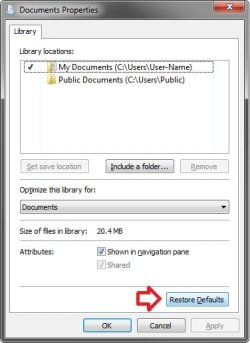
You might see if clicking on the Restore Defaults button and Apply below for each library may allow you to uncheck "Show in navigation pane" afterwards.

Defaults.jpg
 

My Computer

Computer type
PC/Desktop
Computer Manufacturer/Model Number
Self built custom
OS
64-bit Windows 11 Pro for Workstations
CPU
Intel i7-8700K OC'd to 5 GHz
Motherboard
ASUS ROG Maximus XI Formula Z390
Memory
64 GB (4x16GB) G.SKILL TridentZ RGB DDR4 3600 MHz
Graphics Card(s)
ASUS ROG-STRIX-GTX1080TI-O11G-GAMING
Sound Card
Integrated
Monitor(s) Displays
2 x Samsung Odyssey G7 27"
Screen Resolution
2560x1440
Hard Drives
1TB Samsung 990 PRO M.2,
4TB Samsung 990 PRO PRO M.2,
TerraMaster F8 SSD Plus NAS
PSU
Seasonic Prime Titanium 850W
Case
Thermaltake Core P3
Cooling
Corsair Hydro H115i
Keyboard
Logitech wireless K800
Mouse
Logitech MX Master 4
Internet Speed
2 Gb/s Download and 100 Mb/s Upload
Antivirus
Malwarebyte Anti-Malware Premium
Browser
Google Chrome
Other Info
Logitech Z625 speaker system,
Logitech BRIO 4K Pro webcam,
HP Color LaserJet Pro MFP M477fdn,
APC SMART-UPS RT 1000 XL - SURT1000XLI,
Galaxy S23 Plus phone
That did not work. Is it maybe possible to change the setting via the "attrib" command or something similiar?

By the way - I actually feel bad for bothering you with this minor problem...
 

My Computer

OS
Windows 7 Professional x64
CPU
AMD Phenom II X4 @3,6Ghz
Motherboard
Gigabyte P35 DS4
Memory
8GB DDR2-900
Graphics Card(s)
Nvidia GTX275
Sound Card
Creative X-fi Xtreme Music
Monitor(s) Displays
Samsung 2443BW + Benq FP91E
Screen Resolution
1920x1200 + 1280x1024
Hard Drives
Mtron Mobi 32Gb SSD
PSU
Enermax Pro82+ 525W
Case
Lian Li G70B
Cooling
Water
Keyboard
Logitech G15
Mouse
Logitech G5
Internet Speed
30Mbit/s
It's no problem Keks.

Go to the hidden Libraries folder location below to see if you may be able to delete the ones you do no want to see from here and not have them return.

C:\Users\(User-Name)\AppData\Roaming\Microsoft\Windows\Libraries

If you wanted to remove all Libraries completely from the navigation pane, then did you try the tutorial on the first page here to do so?
 

My Computer

Computer type
PC/Desktop
Computer Manufacturer/Model Number
Self built custom
OS
64-bit Windows 11 Pro for Workstations
CPU
Intel i7-8700K OC'd to 5 GHz
Motherboard
ASUS ROG Maximus XI Formula Z390
Memory
64 GB (4x16GB) G.SKILL TridentZ RGB DDR4 3600 MHz
Graphics Card(s)
ASUS ROG-STRIX-GTX1080TI-O11G-GAMING
Sound Card
Integrated
Monitor(s) Displays
2 x Samsung Odyssey G7 27"
Screen Resolution
2560x1440
Hard Drives
1TB Samsung 990 PRO M.2,
4TB Samsung 990 PRO PRO M.2,
TerraMaster F8 SSD Plus NAS
PSU
Seasonic Prime Titanium 850W
Case
Thermaltake Core P3
Cooling
Corsair Hydro H115i
Keyboard
Logitech wireless K800
Mouse
Logitech MX Master 4
Internet Speed
2 Gb/s Download and 100 Mb/s Upload
Antivirus
Malwarebyte Anti-Malware Premium
Browser
Google Chrome
Other Info
Logitech Z625 speaker system,
Logitech BRIO 4K Pro webcam,
HP Color LaserJet Pro MFP M477fdn,
APC SMART-UPS RT 1000 XL - SURT1000XLI,
Galaxy S23 Plus phone
If you wanted to remove all Libraries completely from the navigation pane, then did you try the tutorial on the first page here to do so?

You are not mistaken - I would like to remove the 3 default libraries but keep my own.


I already thought those damn standard libraries were gone forever but they just reappeared (without reboot). Microsoft must really want users to keep these libraries :D


I really appreciate your detailed explanations - this way the next person who finds this thread can also easily benefit from the (hopefully soon) achieved solution here...


EDIT: the content of my "desktop.ini" in "C:\Users\David\AppData\Roaming\Microsoft\Windows\Libraries"
Code:
[LocalizedFileNames]
Documents.library-ms=@@%SystemRoot%\system32\shell32.dll,-34575
Pictures.library-ms=@@%SystemRoot%\system32\shell32.dll,-34595
Videos.library-ms=@@%SystemRoot%\system32\shell32.dll,-34620
Music.library-ms=@@%SystemRoot%\system32\shell32.dll,-34584

Maybe this is somehow helpful.
 

My Computer

OS
Windows 7 Professional x64
CPU
AMD Phenom II X4 @3,6Ghz
Motherboard
Gigabyte P35 DS4
Memory
8GB DDR2-900
Graphics Card(s)
Nvidia GTX275
Sound Card
Creative X-fi Xtreme Music
Monitor(s) Displays
Samsung 2443BW + Benq FP91E
Screen Resolution
1920x1200 + 1280x1024
Hard Drives
Mtron Mobi 32Gb SSD
PSU
Enermax Pro82+ 525W
Case
Lian Li G70B
Cooling
Water
Keyboard
Logitech G15
Mouse
Logitech G5
Internet Speed
30Mbit/s
Back
Top