Linksys WRT160nv3 issues!! HELP!

garris99

New member
Local time
3:29 AM
Messages
10
Location
Hamilton, OH.
I have Time Warner's Road Runner cable. I am using their leased modem, Toshiba PCX2600. I was using a Netgear wireless router for a long time. I didn't have many problems with it, except for the range. I decided to upgrade to Linksys WRT160nv3, and so far, I think I've made a big mistake. When I first got the router, I was using Windows Vista 32 Bit Home Edition, and it seemed to work fine for me. I now have Windows 7 Ultimate 64 Bit and I am having some crazy issues with my internet connection. I rarely turn my computer off, so the only power setting I have enabled is for my monitor to turn off after 20 minutes.

Anyhow, this is my problem; at first I thought it was an "idle" issue. I work 3rd shift, and when I came home to hop onto the computer, I noticed a yellow icon sitting ontop of my internet icon. When I moved my mouse over to the icon and let it hover over it, it said no internet access, however, my internal network was still alive. In other words, I couldn't sign into anything that required an internet connection, I couldn't browse pages, but I could still stream movies to my ps3, or my xbox 360 just fine through WMP. I could also pull up pictures and music from my wife's laptop, and my ps3 and even my xbox 360. I thought this was some fluke thing, so I decided to unplug my router and my cable modem, and just power cycle it. Doing this fixed the problem temporarily. Not but a few minutes later, I was playing World of Warcraft and I got disconnected from it as well. I ALT/TABBED immediately, and the same icon appeared on the internet icon again. Now I knew there was a problem. I really do not know what is causing this, but I've done some of my own troubleshooting.

1. Powered down the pc, and rebooted the cable modem and the wireless router
2. Flashed/reflashed the wireless router
3. Restored factory default settings on the wireless router
4. Ran the setup/wizard installation cd that came with the wireless router
5. Rebooted the cable modem by itself
6. Rebooted the wireless router by itself

I had my own theories at first because of certain things that worked temporarily and others that didn't. At first, I thought it was the cable modem, because by unplugging it, and plugging it back in, it would fix itself for a short amount of time. Then I thought it was the wireless router that was the culprit, because I removed it from the picture completely and ran a wired connection to the cable modem and all was well for a short amount of time. It would make more sense if it was my cable modem, because it's 5 years old and the wireless router is only a few months old. Any help in this matter would be greatly appreciated. It's probably the wrong place to be posting this, but there's bound to be a networking guru somewhere on here.

Ryan
 

My Computer

Computer Manufacturer/Model Number
Dell XPS 420
OS
Windows 7 Ultimate 64 Bit
CPU
Intel Core 2 Quad Q6600
Motherboard
N/A
Memory
3gb
Graphics Card(s)
Sapphire Radeon X1600 Pro
Sound Card
SigmaTel High Definition Audio CODEC 64 Bit
Monitor(s) Displays
N/A
Hard Drives
N/A
PSU
N/A
Case
N/A
Cooling
N/A
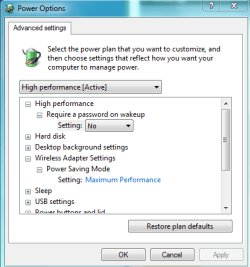
Have you gone into the power options settings and turned off the network sleep and hybernate functions which have been known to take you offline with certain network adaptors. Certain windows 7 network drivers lack the functionality required to recover from sleep or hybernate modes.

After turning off those functions it's sometimes required that you reinstall the network driver to get it working properly again.
 

Attachments

  • power plan network adaptor settings.PNG
    power plan network adaptor settings.PNG
    13.3 KB · Views: 6

My Computer

Computer type
PC/Desktop
Computer Manufacturer/Model Number
Home built
OS
Windows 7 Ult, Windows 8.1 Pro,
CPU
Q9650-4.275GHz, E8600 4.5GHz, E6750-3.8GHz
Motherboard
Evga 780i FTW
Memory
G.Skill PC2 9600 1200Mhz 5 5 5 15 2T
Graphics Card(s)
GTX480
Sound Card
Asus Xonar D2
Monitor(s) Displays
HannsG
Screen Resolution
1680X1050
Hard Drives
GSkill Phoenix Pro 120GB SSD
PSU
ThermalTake Toughpower 1000Watt modular
Case
ThermalTake XaserV
Cooling
Xigmatek S1283
Keyboard
Logitech G15
Mouse
Logitech G9
Internet Speed
T1
Yes, I've done that. I've also attempted to repair the network adapter, but doing that doesn't work either. The power option I have enabled is High Performance which has the networking adapter always on. I should say that the computer I am using is a desktop computer, no wireless adapter. I am wired to the router. My wife is connected wirelessly through her laptop.
 

My Computer

Computer Manufacturer/Model Number
Dell XPS 420
OS
Windows 7 Ultimate 64 Bit
CPU
Intel Core 2 Quad Q6600
Motherboard
N/A
Memory
3gb
Graphics Card(s)
Sapphire Radeon X1600 Pro
Sound Card
SigmaTel High Definition Audio CODEC 64 Bit
Monitor(s) Displays
N/A
Hard Drives
N/A
PSU
N/A
Case
N/A
Cooling
N/A
1. Powered down the pc, and rebooted the cable modem and the wireless router
2. Flashed/reflashed the wireless router
3. Restored factory default settings on the wireless router
4. Ran the setup/wizard installation cd that came with the wireless router
5. Rebooted the cable modem by itself
6. Rebooted the wireless router by itself
7. Attmepted to adjust power options in case sleep or hybernate was causing the issue

OK one more item added to the list of things tried. It does sound like a driver problem though.
 

My Computer

Computer type
PC/Desktop
Computer Manufacturer/Model Number
Home built
OS
Windows 7 Ult, Windows 8.1 Pro,
CPU
Q9650-4.275GHz, E8600 4.5GHz, E6750-3.8GHz
Motherboard
Evga 780i FTW
Memory
G.Skill PC2 9600 1200Mhz 5 5 5 15 2T
Graphics Card(s)
GTX480
Sound Card
Asus Xonar D2
Monitor(s) Displays
HannsG
Screen Resolution
1680X1050
Hard Drives
GSkill Phoenix Pro 120GB SSD
PSU
ThermalTake Toughpower 1000Watt modular
Case
ThermalTake XaserV
Cooling
Xigmatek S1283
Keyboard
Logitech G15
Mouse
Logitech G9
Internet Speed
T1
I don't know about the driver issue though, because if that were the case then my wife would be able to access the internet just fine on her laptop. This issue happens on her laptop as well. Sometimes she will notice it before me, and will come upstairs to unplug the modem, and then plug it back in. Something I did notice though, when this error does occur, all of the lights on the modem, and router appear to be running normally. I just don't have internet access. One other thing I tried was to log into the router's setup page, and change the channel from 1, to 11. So far, no problems, but this issue is a very intermittent thing. It can happen multiple times in a row, or hours apart.
 

My Computer

Computer Manufacturer/Model Number
Dell XPS 420
OS
Windows 7 Ultimate 64 Bit
CPU
Intel Core 2 Quad Q6600
Motherboard
N/A
Memory
3gb
Graphics Card(s)
Sapphire Radeon X1600 Pro
Sound Card
SigmaTel High Definition Audio CODEC 64 Bit
Monitor(s) Displays
N/A
Hard Drives
N/A
PSU
N/A
Case
N/A
Cooling
N/A
I don't know about the driver issue though, because if that were the case then my wife would be able to access the internet just fine on her laptop. This issue happens on her laptop as well. Sometimes she will notice it before me, and will come upstairs to unplug the modem, and then plug it back in. Something I did notice though, when this error does occur, all of the lights on the modem, and router appear to be running normally. I just don't have internet access. One other thing I tried was to log into the router's setup page, and change the channel from 1, to 11. So far, no problems, but this issue is a very intermittent thing. It can happen multiple times in a row, or hours apart.

Ok, in that case we should make sure that you are using a channel that isn't being used by anyone else in your area. Channel crosover problems seem to be worse with Windows 7.

Try this wireless channel sniffer from Xirrus, it's easy to figure out how it works. Just pick a channel that isn't in use in your area. The little radar shows you how far you are from other routers. Very useful piece of free software, you need to reboot your machine after installing this. Let me know if it helps.
Xirrus: The Leader in High Performance Wi-Fi - Advanced IT Wi-Fi Networking Tools
 

My Computer

Computer type
PC/Desktop
Computer Manufacturer/Model Number
Home built
OS
Windows 7 Ult, Windows 8.1 Pro,
CPU
Q9650-4.275GHz, E8600 4.5GHz, E6750-3.8GHz
Motherboard
Evga 780i FTW
Memory
G.Skill PC2 9600 1200Mhz 5 5 5 15 2T
Graphics Card(s)
GTX480
Sound Card
Asus Xonar D2
Monitor(s) Displays
HannsG
Screen Resolution
1680X1050
Hard Drives
GSkill Phoenix Pro 120GB SSD
PSU
ThermalTake Toughpower 1000Watt modular
Case
ThermalTake XaserV
Cooling
Xigmatek S1283
Keyboard
Logitech G15
Mouse
Logitech G9
Internet Speed
T1
I would need to install this onto my wife's laptop, right? Since my desktop does not have any wireless capability.
 

My Computer

Computer Manufacturer/Model Number
Dell XPS 420
OS
Windows 7 Ultimate 64 Bit
CPU
Intel Core 2 Quad Q6600
Motherboard
N/A
Memory
3gb
Graphics Card(s)
Sapphire Radeon X1600 Pro
Sound Card
SigmaTel High Definition Audio CODEC 64 Bit
Monitor(s) Displays
N/A
Hard Drives
N/A
PSU
N/A
Case
N/A
Cooling
N/A
Yes it will only work on machines with a wireless adaptor installed. Is this problem only occuring with your wired connection?

If so you should do an ipconfig /all when the connection is down so we can determine if the default gateway and or the IP is still intact.
 

My Computer

Computer type
PC/Desktop
Computer Manufacturer/Model Number
Home built
OS
Windows 7 Ult, Windows 8.1 Pro,
CPU
Q9650-4.275GHz, E8600 4.5GHz, E6750-3.8GHz
Motherboard
Evga 780i FTW
Memory
G.Skill PC2 9600 1200Mhz 5 5 5 15 2T
Graphics Card(s)
GTX480
Sound Card
Asus Xonar D2
Monitor(s) Displays
HannsG
Screen Resolution
1680X1050
Hard Drives
GSkill Phoenix Pro 120GB SSD
PSU
ThermalTake Toughpower 1000Watt modular
Case
ThermalTake XaserV
Cooling
Xigmatek S1283
Keyboard
Logitech G15
Mouse
Logitech G9
Internet Speed
T1
Yes it will only work on machines with a wireless adaptor installed. Is this problem only occuring with your wired connection?

If so you should do an ipconfig /all when the connection is down so we can determine if the default gateway and or the IP is still intact.

It is happening on both machines. If I do the ipconfig/all, how do I get the results to you?
 

My Computer

Computer Manufacturer/Model Number
Dell XPS 420
OS
Windows 7 Ultimate 64 Bit
CPU
Intel Core 2 Quad Q6600
Motherboard
N/A
Memory
3gb
Graphics Card(s)
Sapphire Radeon X1600 Pro
Sound Card
SigmaTel High Definition Audio CODEC 64 Bit
Monitor(s) Displays
N/A
Hard Drives
N/A
PSU
N/A
Case
N/A
Cooling
N/A
You can use the snipping tool to post the screen shot here.

Type ipconfig /all "notice the space after ipconfig" then hit enter, into the command prompt then take a screen shot using the snipping tool. But this will mostly help if you do it when the connection goes down.
 
Last edited:

My Computer

Computer type
PC/Desktop
Computer Manufacturer/Model Number
Home built
OS
Windows 7 Ult, Windows 8.1 Pro,
CPU
Q9650-4.275GHz, E8600 4.5GHz, E6750-3.8GHz
Motherboard
Evga 780i FTW
Memory
G.Skill PC2 9600 1200Mhz 5 5 5 15 2T
Graphics Card(s)
GTX480
Sound Card
Asus Xonar D2
Monitor(s) Displays
HannsG
Screen Resolution
1680X1050
Hard Drives
GSkill Phoenix Pro 120GB SSD
PSU
ThermalTake Toughpower 1000Watt modular
Case
ThermalTake XaserV
Cooling
Xigmatek S1283
Keyboard
Logitech G15
Mouse
Logitech G9
Internet Speed
T1
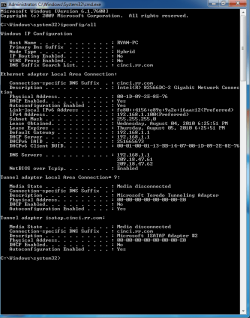
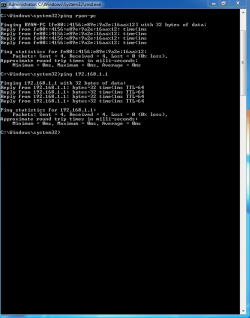
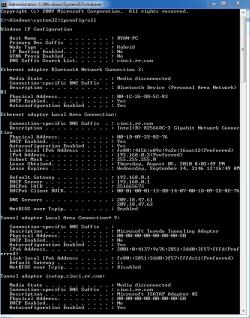
An update on what has been going on. The problem persists, and I was able to get a couple of screenshots using the snipping tool.

1. Screenshot of the ipconfig /all I performed when I lost my connection to the internet. This is with the Linksys WRT160nv3 wireless router in the mix.

2. Screenshot of the ping I performed on my computer and the Linksys WRT160nv3.

3. Newest screenshot of the ipconfig /all I performed when I lost my connection earlier tonight with the Netgear RP614v2 wired router.

It seems like this is being narrowed down to the cable modem.
 

Attachments

  • Ipconfig.PNG
    Ipconfig.PNG
    20.1 KB · Views: 24
  • Ping.PNG
    Ping.PNG
    14.6 KB · Views: 15
  • Ipconfig2.PNG
    Ipconfig2.PNG
    20.1 KB · Views: 16

My Computer

Computer Manufacturer/Model Number
Dell XPS 420
OS
Windows 7 Ultimate 64 Bit
CPU
Intel Core 2 Quad Q6600
Motherboard
N/A
Memory
3gb
Graphics Card(s)
Sapphire Radeon X1600 Pro
Sound Card
SigmaTel High Definition Audio CODEC 64 Bit
Monitor(s) Displays
N/A
Hard Drives
N/A
PSU
N/A
Case
N/A
Cooling
N/A
Back
Top