Linux is trying to kill me. Really.

Prisoner

New member
Guru
Local time
3:30 PM
Messages
794
Location
Ohio, US
For the past half a year, I've been infrequently been trying to install multiple "flavors" of Linux.

First try was on my XP system. Tried installing Ubuntu, had an ISO straight from the site and settings were perfect for my system. Burned it to a CD at optimal settings, slowest speed possible. Booted from the CD, tried it out with the Live CD or whatever it's called, and loved it. I wanted it on my hard drive, right then and there, until I tried some of the included programs and found they were all missing... Got rid of the disc, didn't try again.

Second Try, about a month later, I got Fedora. Burned to disc and used a USB creator (so if the CD was messing it up, I had a USB to try as well). Tried installing, Partition Manager decided to go commando on my XP partition. Wiped the hard drive, put XP back on, then upgraded to 7 shortly after. It took me approx. 5 days to get everything back in working order, and it didn't help that I was missing drivers that I couldn't find online. Had to do a hunt all over the place to get them back. So by this time, my not-so computer inclined self was very tired of Ubuntu.

Third Try, about 5 hours ago, I heard about Wubi. Tried it, seemed awesome. Installed the Ubuntu Netbook Remix. Installed perfectly, no troubles at all. Partition Manager actually worked on this one! Woo! Then it rebooted. For 10 minutes, the boot screen did nothing but show error messages that I could not understand at all. Finally, it pulled up the login screen, I logged in, and started doing the basic setup. Change the clock, set up weather, get my apps running, etc, etc. It told me that my hard drive is failing (odd, as my hard drive was running Ubuntu and is now running 7). I tried getting some help, it told me that the help files are unavailable. It didn't let me do anything else. So I tried rebooting, and it loaded to the boot screen, did the same 10 minute routine, showed the login screen, and then promptly went away before I could do anything, and gave me a recovery console.

Tried installing the Desktop version, same thing.

Linux hates me. At least it didn't delete Windows this time. I know some of this is probably user error, but still. Come on. An automated installer should do the trick.
(is about to try again)
 

My Computer

Computer type
PC/Desktop
Computer Manufacturer/Model Number
Custom built
OS
Windows 8 Pro 64-bit
CPU
Intel Core i7 950 @4.4GHz
Motherboard
EVGA 131-GT-E767
Memory
12GB DDR3 1333MHz @1400 (9-9-9-24)
Graphics Card(s)
2x AMD Radeon HD 6770
Sound Card
Sound Blaster Audigy
Monitor(s) Displays
Acer S231HL + Acer E19T5W
Screen Resolution
1920x1080 + 1440x900
Hard Drives
128GB Samsung 840 Pro
1TB Seagate Barracuda 7200RPM 64mb
500GB Seagate Barracuda 7200RPM 16mb
PSU
Corsair GS800
Case
Custom-made
Cooling
CM Hyper212+, lots of fans
Keyboard
NMB RT8255C+
Mouse
Func MS-3
Internet Speed
30/1.5
Antivirus
Microsoft Security Essentials/Spybot SD/Malwarebytes
Browser
Google Chrome
Other Info
Onkyo TX-27 receiver & two Realistic Optimus T100s.
The very BEST thing that I can suggest for playing around with Linux n general or trying out various distros and various install configurations is to get "Virtual Box". It's free and it's INSANELY fast to setup Distro X, Y or Z. Play with it and if you don't like it blow it away and it makes ZERO changes to your main system's partitioning.


Installing is generally a lot easier because the harddware set is fixed. I get sound and video right out of the install with no futzing around far more often under virtual box than doing a native install.

You can also with a little extra work install tools to allow you to drag and drop files between windows and Linux and of course have your windows and linux programs both running at the same time. It's truly amazing :D

There are a few limitations for power rusing linux but for the most part you can do what you want to.

[Edit] Noticed the developer tag, I do ALL my deelopment on Linux using virtual machines, using WIndows as the host os. Being able to backup and checkpoint build machine configs and have 6 distros installed and startable at a moments notice is a godsend [/edit]
 

My Computer

Computer Manufacturer/Model Number
Scratch built
OS
Windows 7 x64 Ultimate
CPU
i7 960
Motherboard
Asus P6X58D
Memory
12 Gig Corsair Dominator
Graphics Card(s)
Nvidia 480
Sound Card
Maudio Delta 44 + breakout box
Monitor(s) Displays
Dell UltraSharp U2410 24in and Samsung 21 dual monitors
Screen Resolution
1920x1200 and 1280x1024
Hard Drives
Primary: Intel X-25M G2 160G SSD
Secondary: Segate baracuda 1.0 TB
HDs in AHCI mode.
PSU
Corasair TX850
Case
Cooler Master HAF
Cooling
Corsair H50
Keyboard
Logitech G15 + N52 game pad
Mouse
Logitech MX518
Internet Speed
15kbs down 4.5kbps up
Other Info
WEI 7.6
CPU & RAM 7.6
Graphics 7.9
Hard disk 7.7
+1 for the vitual Box approach. I had no problem using it in vBox. Only drawback is a relatively small screen window (about 14" on a 22" screen).
Another option is this. I use that too. It's nice for playing around, but not for serious work.
 

My Computer

Computer Manufacturer/Model Number
HP, Dell, Gateway, Toshiba - 4 laptops and 2 desktops
OS
Vista, Windows7, Mint Mate, Zorin, Windows 8
CPU
from 1.6GHz Duo to i7
Monitor(s) Displays
2x HP w2207
Hard Drives
5x HDD, 7x SSD, 12x Externals
Keyboard
with trackball - no mices
Mouse
Trackball mice
Internet Speed
DSL 6000
If you install the additional tools you can resize the screen to anything you want (including full screen) and the linux desktop will resize to match :)

[Edit] Ugh actually I just rememebered that the very latest kernel update 2.6.31 actually breaks a lot of virtual machines :( dunno if VB is afected but I think it might be. If you install latest ubuntu or FC12, don;t update the kernel :/ [/edit]

Nothing great goes unpunished :D
 

My Computer

Computer Manufacturer/Model Number
Scratch built
OS
Windows 7 x64 Ultimate
CPU
i7 960
Motherboard
Asus P6X58D
Memory
12 Gig Corsair Dominator
Graphics Card(s)
Nvidia 480
Sound Card
Maudio Delta 44 + breakout box
Monitor(s) Displays
Dell UltraSharp U2410 24in and Samsung 21 dual monitors
Screen Resolution
1920x1200 and 1280x1024
Hard Drives
Primary: Intel X-25M G2 160G SSD
Secondary: Segate baracuda 1.0 TB
HDs in AHCI mode.
PSU
Corasair TX850
Case
Cooler Master HAF
Cooling
Corsair H50
Keyboard
Logitech G15 + N52 game pad
Mouse
Logitech MX518
Internet Speed
15kbs down 4.5kbps up
Other Info
WEI 7.6
CPU & RAM 7.6
Graphics 7.9
Hard disk 7.7
If you install the additional tools you can resize the screen to anything you want (including full screen) and the linux desktop will resize to match :)
That's good to know. I am not sure whether those tools were around 1 year ago when I used it. But next time, I will give it a try. Thanks for the tip.
 

My Computer

Computer Manufacturer/Model Number
HP, Dell, Gateway, Toshiba - 4 laptops and 2 desktops
OS
Vista, Windows7, Mint Mate, Zorin, Windows 8
CPU
from 1.6GHz Duo to i7
Monitor(s) Displays
2x HP w2207
Hard Drives
5x HDD, 7x SSD, 12x Externals
Keyboard
with trackball - no mices
Mouse
Trackball mice
Internet Speed
DSL 6000
Actually the tools for virtual box have been getting better somewhat recently, stability is better than it was too. VMWare is more mature but virtual Box is really free for personal use and at home I prefer it. At work I use VMWare because that's what they have.
 

My Computer

Computer Manufacturer/Model Number
Scratch built
OS
Windows 7 x64 Ultimate
CPU
i7 960
Motherboard
Asus P6X58D
Memory
12 Gig Corsair Dominator
Graphics Card(s)
Nvidia 480
Sound Card
Maudio Delta 44 + breakout box
Monitor(s) Displays
Dell UltraSharp U2410 24in and Samsung 21 dual monitors
Screen Resolution
1920x1200 and 1280x1024
Hard Drives
Primary: Intel X-25M G2 160G SSD
Secondary: Segate baracuda 1.0 TB
HDs in AHCI mode.
PSU
Corasair TX850
Case
Cooler Master HAF
Cooling
Corsair H50
Keyboard
Logitech G15 + N52 game pad
Mouse
Logitech MX518
Internet Speed
15kbs down 4.5kbps up
Other Info
WEI 7.6
CPU & RAM 7.6
Graphics 7.9
Hard disk 7.7
I tried VirtualBox a while ago, limited to maybe a half or a quarter of my system resources, which are extremely low for my case. :(
 

My Computer

Computer type
PC/Desktop
Computer Manufacturer/Model Number
Custom built
OS
Windows 8 Pro 64-bit
CPU
Intel Core i7 950 @4.4GHz
Motherboard
EVGA 131-GT-E767
Memory
12GB DDR3 1333MHz @1400 (9-9-9-24)
Graphics Card(s)
2x AMD Radeon HD 6770
Sound Card
Sound Blaster Audigy
Monitor(s) Displays
Acer S231HL + Acer E19T5W
Screen Resolution
1920x1080 + 1440x900
Hard Drives
128GB Samsung 840 Pro
1TB Seagate Barracuda 7200RPM 64mb
500GB Seagate Barracuda 7200RPM 16mb
PSU
Corsair GS800
Case
Custom-made
Cooling
CM Hyper212+, lots of fans
Keyboard
NMB RT8255C+
Mouse
Func MS-3
Internet Speed
30/1.5
Antivirus
Microsoft Security Essentials/Spybot SD/Malwarebytes
Browser
Google Chrome
Other Info
Onkyo TX-27 receiver & two Realistic Optimus T100s.
Ah, that's too bad, Yeah you can sort of get away with maybe 52 meg but really 1-1.5 gig is requred for smooth operation, atleast for development. And of course you need that left over for windows too...
 

My Computer

Computer Manufacturer/Model Number
Scratch built
OS
Windows 7 x64 Ultimate
CPU
i7 960
Motherboard
Asus P6X58D
Memory
12 Gig Corsair Dominator
Graphics Card(s)
Nvidia 480
Sound Card
Maudio Delta 44 + breakout box
Monitor(s) Displays
Dell UltraSharp U2410 24in and Samsung 21 dual monitors
Screen Resolution
1920x1200 and 1280x1024
Hard Drives
Primary: Intel X-25M G2 160G SSD
Secondary: Segate baracuda 1.0 TB
HDs in AHCI mode.
PSU
Corasair TX850
Case
Cooler Master HAF
Cooling
Corsair H50
Keyboard
Logitech G15 + N52 game pad
Mouse
Logitech MX518
Internet Speed
15kbs down 4.5kbps up
Other Info
WEI 7.6
CPU & RAM 7.6
Graphics 7.9
Hard disk 7.7
Another downside to VM distros is that you miss out on the 'eye candy' . While some of can be pointless, others like the spinning cube for example can be quite useful.

Welcome to the world of Linux - where nothing is ever really 'simple' :p

(Long term Windows usage = complacency and Linux frustration ;) )
 

My Computer

Computer type
PC/Desktop
Computer Manufacturer/Model Number
Systems by SmartEyeball
OS
8 Pro x64
CPU
i7 3770K 4.6GHz
Motherboard
ASUS P8Z77 WS
Memory
16GB G.Skill Trident X 2666mhz
Graphics Card(s)
x2 EVGA 780 Ti Superclocked SLI
Sound Card
SB X-FI Surround 5.1 PRO USB / ATH-AD900 Headphones
Monitor(s) Displays
x3 Dell U2410 / 58" Samsung
Screen Resolution
5760*1200/ 1920*1200
Hard Drives
2x Intel 520 240GB (RAID 0) * 2x WD Caviar Blacks 2TB (RAID 0) * 2TB WD Caviar Black * Sony Optirac DVD
PSU
Silverstone Strider Evolution 1200W
Case
Thermaltake Level 10 GT Snow Edition
Cooling
Noctua NH-D14
Keyboard
Topre Realforce // Ducky Shine MX Black // Filco Ninja TKL
Mouse
Thermaltake Theron (Highly Recommended) + Razer Imperator
Antivirus
MSE
Browser
IE, FF, WaterFox
Other Info
GT Extreme V2 Sim Racing Cockpit + 40" LCD and K/B Mouse stand ▼
Fanatec CSR Elite Wheel + Clubsport V1 Pedals + CSR shifter/7G-H ▼Saitek X52 Pro ▼ TrackIR 5 Pro
Buttkicker v2 Seat Rumbler with Dedicated 5.1 and Sub Woofer attached to frame ▼
=
Bloody Big Grin
I personally just woke up and am going back to sleep but I feel like I should post first.

Linux can be unstable and unpredictable. I suggest you wait until the 18th and try the Ubuntu 10.04 Beta 1 (which will have a WUBI version) and see if thats any different. Things that failed to work for me properly in 9.10 worked fine in the 10.04 Alpha 3.

I was the same way at first to. Toyed around with Linux here and there, Zidane got me into it and taught me things about it.

Anyways, just wait and try Beta 1. Then get back to me. :)
 

My Computer

Computer Manufacturer/Model Number
Custom | Whitebox
OS
Windows 7 Ultimate, OS X 10.7, Ubuntu 11.04
CPU
Intel E6750 @ 3.80GHz
Motherboard
Gigabyte GA-EP45-UD3L (Revision 1.1)
Memory
2x2GB & 2x1GB (6GB) OCZ Reaper 1066MHz @ 1080MHz
Graphics Card(s)
EVGA nVidia GTX 260 896mb (216 Core) FTW Edition
Sound Card
Realtek ALC888
Monitor(s) Displays
21" VIZIO TV
Screen Resolution
1680x1050 @ 60Hz
Hard Drives
Western Digital WD6401AALS - 640GB
Hitachi HDP725016GLA380 - 160GB
PSU
Corsair 750W
Case
NZXT Nemesis Elite
Cooling
Thermaltake SpinQ
Keyboard
Logitech Wireless S520
Mouse
Logitech Wireless S520 - Microsoft Wireless Arc Mouse
Internet Speed
Download: 20mbps, Upload: 3mbps
I like to try the latest Fedora and Suse distributions every year or so and see how far their developement is progressing.

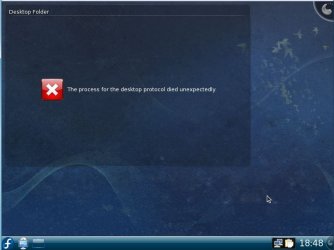
Last time I tried fedora I got this and I akin it to "Linux use on the Desktop has died" and amongst a hundred other apt package issues, subsequently formatted the drive completey, Ill try again next year.

rofl.JPG
 

My Computer

Computer type
PC/Desktop
Computer Manufacturer/Model Number
Custom built
OS
Windows 8 Pro 64-bit
CPU
Intel Core i7 950 @4.4GHz
Motherboard
EVGA 131-GT-E767
Memory
12GB DDR3 1333MHz @1400 (9-9-9-24)
Graphics Card(s)
2x AMD Radeon HD 6770
Sound Card
Sound Blaster Audigy
Monitor(s) Displays
Acer S231HL + Acer E19T5W
Screen Resolution
1920x1080 + 1440x900
Hard Drives
128GB Samsung 840 Pro
1TB Seagate Barracuda 7200RPM 64mb
500GB Seagate Barracuda 7200RPM 16mb
PSU
Corsair GS800
Case
Custom-made
Cooling
CM Hyper212+, lots of fans
Keyboard
NMB RT8255C+
Mouse
Func MS-3
Internet Speed
30/1.5
Antivirus
Microsoft Security Essentials/Spybot SD/Malwarebytes
Browser
Google Chrome
Other Info
Onkyo TX-27 receiver & two Realistic Optimus T100s.
I would try Mandriva. I used its predecessor, Mandrake 9.1. It ran great on my Pentium III 550 Mhz PC with 128 MB ram. Of course you need a newer distro for drivers but I would guess Mandriva still has the same lean attitude Mandrake had.

It's really better if you have broadband. You select the packages you want and they come up installed when you boot into X the first time. At least they do with Mandrake or Mandriva "One CD" setup discs. If your internet is slow you might prefer a 3 CD set so that you have enough to get going. You're a developer so you should really bite the bullet cuz you ain't seen such free development stuff as in Linux. On my old 486 16 Mhz PC I was building CORBA servers from free downloaded code!! Your grandchildren would grow old before you could mess with all the development stuff you can get for it for nothing!

Mandrake used apt-get package tool so I'd assume Mandriva either uses that or the next generation of the same tool. Around that time packages started to become standardized and installs were much less of a headache than I suffered in the old Slackware 3.0 days. It became typical for an install to go smoothly and work correctly on the first shot. Unlike Windows, once you got something to work it was usually bullet proof after that. With a UPS and a journaling file system, you were nearly indestructible. Unstable? Are you kidding! I couldn't hard lock my PC once the 2.x kernels came out. Even if X hung I could always hotkey out to a terminal session and kill X, then just start it up again.

3daffame.gif
 

My Computer

Computer Manufacturer/Model Number
HP Media Center
OS
Windows 7 32 bit
CPU
AMD 5200+ dual core
Memory
2 GB
Graphics Card(s)
NVidia GeForce 6150SE 128 MB
Monitor(s) Displays
CRT
Screen Resolution
1280x1024
Hard Drives
500 GB Sata internal :

SIIG USB 3.0 docking stations w/WD Caviar Black 6 Gb/s drives
Keyboard
PS/2
Mouse
PS/2 Wheel Mouse
Other Info
SIIG USB 3.0 PCIexpress card.
I agree with those recommending VirtualBox, download here.

Here are two Linux distro's, Mandriva 2010 and GOS, running at the same time on Windows 7 desktop:

2xLinux_on_VirtualBox.png

Can't complain!

Kari
 

My Computer

Computer type
Laptop
Computer Manufacturer/Model Number
HP ENVY 17-1150eg
OS
Windows 10 Pro x64 EN-GB
CPU
1.6 GHz Intel Core i7-720QM Processor
Memory
6 GB
Graphics Card(s)
ATI Mobility Radeon HD 5850 Graphics
Sound Card
Beats sound system with integrated subwoofer
Monitor(s) Displays
17" laptop display, 22" LED and 32" Full HD TV through HDMI
Screen Resolution
1600*900 (1), 1920*1080 (2&3)
Hard Drives
Internal: 2 x 500 GB SATA Hard Disk Drive 7200 rpm
External: 2TB for backups, 3TB USB3 network drive for media
Cooling
As Envy runs a bit warm, I have it on a Cooler Master pad
Keyboard
Logitech diNovo Media Desktop Laser (bluetooth)
Mouse
Logitech Performance Mouse MX
Internet Speed
50/10 Mbps VDSL
Antivirus
Windows Defender 4.3.9431.0
Browser
Maxthon 3.5.2., IE11
I agree with those recommending VirtualBox, download here.

Here are two Linux distro's, Mandriva 2010 and GOS, running at the same time on Windows 7 desktop:

View attachment 60715

Can't complain!

Kari

If I read the OP's specs right, he has 1/2 GB and you have 4. He should just slice off some HD, make a swap partition and a linux boot partition and go at it.
 

My Computer

Computer Manufacturer/Model Number
HP Media Center
OS
Windows 7 32 bit
CPU
AMD 5200+ dual core
Memory
2 GB
Graphics Card(s)
NVidia GeForce 6150SE 128 MB
Monitor(s) Displays
CRT
Screen Resolution
1280x1024
Hard Drives
500 GB Sata internal :

SIIG USB 3.0 docking stations w/WD Caviar Black 6 Gb/s drives
Keyboard
PS/2
Mouse
PS/2 Wheel Mouse
Other Info
SIIG USB 3.0 PCIexpress card.
That's true. I missed that, with that RAM dual boot could be better.
 

My Computer

Computer type
Laptop
Computer Manufacturer/Model Number
HP ENVY 17-1150eg
OS
Windows 10 Pro x64 EN-GB
CPU
1.6 GHz Intel Core i7-720QM Processor
Memory
6 GB
Graphics Card(s)
ATI Mobility Radeon HD 5850 Graphics
Sound Card
Beats sound system with integrated subwoofer
Monitor(s) Displays
17" laptop display, 22" LED and 32" Full HD TV through HDMI
Screen Resolution
1600*900 (1), 1920*1080 (2&3)
Hard Drives
Internal: 2 x 500 GB SATA Hard Disk Drive 7200 rpm
External: 2TB for backups, 3TB USB3 network drive for media
Cooling
As Envy runs a bit warm, I have it on a Cooler Master pad
Keyboard
Logitech diNovo Media Desktop Laser (bluetooth)
Mouse
Logitech Performance Mouse MX
Internet Speed
50/10 Mbps VDSL
Antivirus
Windows Defender 4.3.9431.0
Browser
Maxthon 3.5.2., IE11
512MB on 7? That would be one step from going backwards. As for Linux I use it on an old laptop for downloading and a little bit of C programming. I prefer 7, just because its well, 7. GCC works reasonably well too. I can't be bothered with virtualization - 7 has a permanent exclamation mark offline due to the network adaptor, assuming that the program works properly, USB and all.
 

My Computer

Computer Manufacturer/Model Number
Sony Vaio Z46GDU
OS
Windows 7 Ultimate x86-64
CPU
[email protected] 1066MHz FSB
Motherboard
Sony branded
Memory
6GB DDR3 1066MHz
Graphics Card(s)
9300M GS 256MB Dedicated (Speed) + Intel4500MHD (Stamina)
Sound Card
Realtek HD Audio
Monitor(s) Displays
13.1' WXGA
Screen Resolution
1600x900
Hard Drives
320GB 7200RPM w/ 16MB cache
Internet Speed
1MB/s
Hi there
with the latest release of VMWARE PLAYER (3.0) you get 3-D support -- hence decent graphics and its FREE. It can also create VM's as well.

So if you want all those fancy Linux desktop effects such as rotating cubes etc etc I'd go for vmware's vmware player.

The main problem with running a Virtual machine is that you won't be able to run DVD or TV cards on them so no Video streaming apps. Audio is fine of course.

You probably won't be able to play some intensive games that make serious use of video hardware either -- but for non gamers using a Virtual machine is exactly the RIGHT way to test all this software out --and eventually if you can get hold of a spare machine you can convert your VM to a Physical machine and run it on real hardware too.

(I'm currently typing this on a full blown W7 X-64 Virtual Machine with fully enabled AERO effects on a X-64 bit SUSE 11.2 HOST system -- no probs whatsoever and it runs at near enough native speed too).

For the curious -- I'm doing it this way round since I need to test a number of features in IE8 that have been giving some problems when accessing a SAP JAVA J2EE server which is accessed via a host Portal.

Cheers
jimbo
 

My Computer

Computer type
PC/Desktop
Computer Manufacturer/Model Number
Custom built, several laptops HP/ASUS
OS
Linux CENTOS 7 / various Windows OS'es and servers
CPU
Intel i7 Intel i5
Memory
8GB, 16GB
Graphics Card(s)
On Motherboard
Sound Card
Realtek HD audio
Monitor(s) Displays
Apple Cinema display, Samsung LCD
Screen Resolution
1920 X 1080
Hard Drives
4 X 1TB SATA
Mouse
Toshiba wireless laser
Internet Speed
> 20MB up
When it comes to Linux, I recommend Linuxmint.
 

My Computer

Computer Manufacturer/Model Number
Samsung NP530U4B-S02IN
OS
Windows® 8 Pro (64-bit)
CPU
Intel® Core™ i5 Processor 2467M (1.60GHz, 3MB L3 Cache)
Motherboard
Samsung Electronics
Memory
6GB DDR3 System Memory at 1,333MHz (on BD 4GB + 2GB x 1)
Graphics Card(s)
AMD Radeon™ HD7550M 1GB DDR3 (Ext. Graphic)
Sound Card
Realtek High Definition Audio
Monitor(s) Displays
35.56cm (14.0) SuperBright 300nit HD LED Display
Screen Resolution
1366x768
Hard Drives
1TB S-ATA II Hard Drive (5400RPM) with ExpressCache 16GB SSD
Internet Speed
sucks
Antivirus
Microsoft Security Essentials
Browser
Google Chrome (Sync enabled)
512MB on 7? That would be one step from going backwards.

Hey! 7 runs perfectly fine on my 512 mb system! xD

Well, I'll see if I can try VirtualBox again, I'm getting a RAM upgrade soon, 2 gigs.. so I think I should be able to run it somewhat decently.
 

My Computer

Computer type
PC/Desktop
Computer Manufacturer/Model Number
Custom built
OS
Windows 8 Pro 64-bit
CPU
Intel Core i7 950 @4.4GHz
Motherboard
EVGA 131-GT-E767
Memory
12GB DDR3 1333MHz @1400 (9-9-9-24)
Graphics Card(s)
2x AMD Radeon HD 6770
Sound Card
Sound Blaster Audigy
Monitor(s) Displays
Acer S231HL + Acer E19T5W
Screen Resolution
1920x1080 + 1440x900
Hard Drives
128GB Samsung 840 Pro
1TB Seagate Barracuda 7200RPM 64mb
500GB Seagate Barracuda 7200RPM 16mb
PSU
Corsair GS800
Case
Custom-made
Cooling
CM Hyper212+, lots of fans
Keyboard
NMB RT8255C+
Mouse
Func MS-3
Internet Speed
30/1.5
Antivirus
Microsoft Security Essentials/Spybot SD/Malwarebytes
Browser
Google Chrome
Other Info
Onkyo TX-27 receiver & two Realistic Optimus T100s.
Back
Top