Solved Login screen flickers after W7 updates - tablet

TorchMan

New member
Local time
5:33 PM
Messages
8
UPDATE 11th November 2015:

The update responsible for this error was identified:
KB 3097877 https://support.microsoft.com/en-us/kb/3097877

You'll need to run in Elevated Command Prompt following command to uninstall this update
Code:
wusa /uninstall /quiet /forcerestart /kb:3097877
-------------------------------------------------------------------------------------------------
Hello,

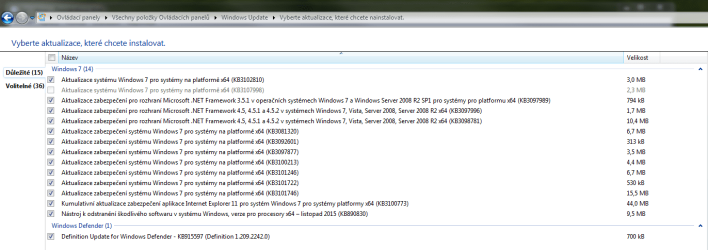
today afer installing latest Windows 7 Important updates I'm now having problem.

Just when Windows restarted to finish installing the updates, when it was somewhere around the part Step 3 of 3 , configuring updates, I mindlessly without looking on the screen pressed Ctrl+Alt+Del and tried to type my password (bad habit from my work), and as soon as I did that, the login screen remained blue (displaying the native blue W7 wallpaper) without displaying the account picture and password bar and sudennly started to flicker in constant frequency.

I tried to pull out my Wacom Intuos 3 tablet from USB port and the flickering halted, so I can proceed with typing the password. I'm not sure, if I caused this problem by pressing Ctrl+Alt+Del while the updates were still going on, or some of the updates is making this problem, because right after this incident I reverted Windows with System restore tool into previous state few days back, when I installed a new program, and the system went through login screen with connected Wacom tablet without this issue.

I suspected this update (kb/3107998 - Remove Lenovo USB Blocker) was causing this problem, so I hidden it in Windows update list, and repeated the whole update process again, but with the same result. The screen flickers again.

I've performed also Clean start (in msconfig disabling all startup programs and non-MS services) with same result.

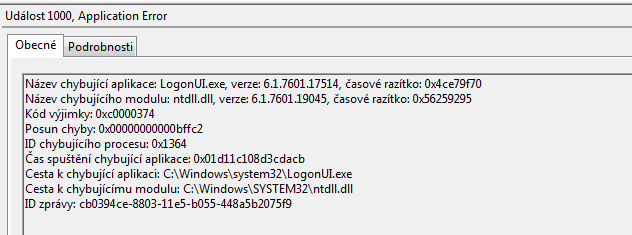
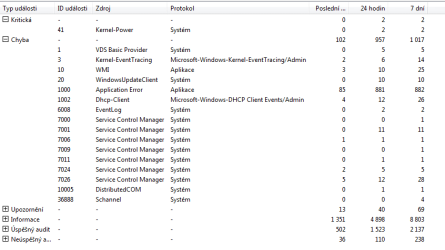
I've went through Event log and I've found large number of Aplication error logs: here is just the latest:

It seems, that it might be connected with Tablet input panel as well, since when I connect the tablet back into PC, the screen starts to flicker again (probably, as the Tablet PC input panel wants to show up)

May I ask you guys, if you can help me get rid of this issue?

kr,
 

Attachments
  • Selected_November_updates_no_optional.PNG
    Selected_November_updates_no_optional.PNG
    30.4 KB · Views: 4
  • November_Event log_App_error.PNG
    November_Event log_App_error.PNG
    7.2 KB · Views: 92
  • November_Event_log_snip.PNG
    November_Event_log_snip.PNG
    11.1 KB · Views: 3
Last edited:

My Computer My Computer

OS
Windows 7 x64 ENG
CPU
Intel Core2Quad Q6600
Memory
A-Data 2x1 GB
Graphics Card(s)
Asus GeForce 8600 GTS
Sound Card
Sound Blaster X-Fi XtremeGamer Fatal1ty Professional Series
Screen Resolution
1680x1050, 1280x1024
I have the same problem. . After update .. I cant do not hing no more.. only state at the screen :(
 

My Computer My Computer

Computer type
PC/Desktop
OS
Nederland
Same Problem, HP 9100 AIO

We have 40 HP 9100 AIOs running W7 SP1 x86. Four have these symptoms (cannot login after pressing ctrl alt del).

I can access one via RDP, but cannot access the computer directly. Trying to use the onscreen keyboard yielded the same results. Working on a work around, will contact MS and may have to restore to an earlier point.

All PCs were working fine yesterday and last night two restore points were created. The following patches were installed:

KB3107998
KB3101246
KB3092601
KB3101746
KB3101722
KB3097877
KB3081320
KB3100213
KB3102810

will update when more info comes available
 

My Computer My Computer

Computer type
PC/Desktop
Computer Manufacturer/Model Number
HP 9100
OS
W7 x86 & x64, Server 2008R2 x64
We're getting reports from a customer (only one so far) who is experiencing this too since today. We've removed the individual updates from a computer that were installed today; the following one seems to be responsible:

KB 3097877
https://support.microsoft.com/en-us/kb/3097877

Try to remove this update, either in Safe Mode or via RDP (doesn't seem to be affected by the bug), and please report back if it helped. If you want to script the removal, use the following command:

Code:
wusa /uninstall /quiet /forcerestart /kb:3097877

I can also upload our opsi package if anyone is interested.
 

My Computer My Computer

Computer type
PC/Desktop
OS
~60000 computers with everything from Windows XP to Windows 10
I am having this exact problem. I am able to Remote Desktop Connection in, but Safe Mode does not work. I will try the code you have here.
 

My Computer My Computer

Computer type
PC/Desktop
Computer Manufacturer/Model Number
Dell
OS
Windows 7 Ultimate
CPU
i7
This worked 100% thank you!!

we're getting reports from a customer (only one so far) who is experiencing this too since today. We've removed the individual updates from a computer that were installed today; the following one seems to be responsible:

kb 3097877
https://support.microsoft.com/en-us/kb/3097877

try to remove this update, either in safe mode or via rdp (doesn't seem to be affected by the bug), and please report back if it helped. If you want to script the removal, use the following command:

Code:
wusa /uninstall /quiet /forcerestart /kb:3097877

i can also upload our opsi package if anyone is interested.
 

My Computer My Computer

Computer type
PC/Desktop
Computer Manufacturer/Model Number
Dell
OS
Windows 7 Ultimate
CPU
i7
Is there a way I can access command prompt to try and type in the removal of the update that is causing this... I am having the same problem and REALLY need to get my laptop turned on... can anyone help in trying to remove this last update with me please?
 

My Computer My Computer

Computer type
PC/Desktop
OS
7
Same issue on 5 pcs. RDP is not enabled and can't enabled remotely using the connect to another and enable remote registry etc
 

My Computer My Computer

Computer type
PC/Desktop
OS
64 bit Pro
Couldn't get a GPO startup script to work properly so we ended up using PsExec on the active directory to run Martin's script. the link to PsExec: https://technet.microsoft.com/en-us/sysinternals/psexec.aspx?tduid=%2818d1a1771ca3cd603403f0f734c25154%29%28256380%29%282459594%29%28TnL5HPStwNw-oQEyJXJj8pdExJNlOsVSIA%29%28%29

We hope to get a good startup script working soon. Until then, hopefully all of you will be able to add the firewall exceptions (port 445) via Group Policy management.

the PSExec script in cmd prompt: psexec \\(pc domain name) cmd

then martin's script: wusa /uninstall /quiet /forcerestart /kb:3097877
 

My Computer My Computer

Computer type
PC/Desktop
Computer Manufacturer/Model Number
HP 9100
OS
W7 x86 & x64, Server 2008R2 x64
Hi guys,

thank you so much for posting the solution here. Martin's solution worked 100% for me too. I had just to unplug the tablet from USB port again, login into Desktop and run Martin's command in command line.

For you guys, who can't login into desktop I would suggest booting into Safe Mode (hold F8 during PC start) , select either Safe Mode , or Safe Mode with Command Promt. You might also try to booting up from Windows installation disk, or running System Recovery feature on your notebook and reverting to previous System Restore point.

find more in here:
http://www.sevenforums.com/tutorials/682-command-prompt-startup.html


What do you guys think, how Microsoft will solve this issue? It looks like massive problem, on Technet is currently quite lots of threads dealing this problem.

Till some patch will arrive, do you have any suggestion, how to secure our computers without having this update installed?
 

My Computer My Computer

OS
Windows 7 x64 ENG
CPU
Intel Core2Quad Q6600
Memory
A-Data 2x1 GB
Graphics Card(s)
Asus GeForce 8600 GTS
Sound Card
Sound Blaster X-Fi XtremeGamer Fatal1ty Professional Series
Screen Resolution
1680x1050, 1280x1024
As I said yesterday, the script worked perfectly... but then this morning, I tried to log in, and the same thing happened again... Am I going to have to do this EVERY DAY until they get this squared away?
 

My Computer My Computer

Computer type
PC/Desktop
Computer Manufacturer/Model Number
Dell
OS
Windows 7 Ultimate
CPU
i7
Additional Info on KB3097877

In searching more about this issue, most system admins confirm that the logon problems mainly affect systems with touch screens enabled. If you can disable touchscreens via bios or unplug usb powered touchscreens, you may be able to log on and uninstall kb3097877. In our environment, 40 of our HP 9100 w7 x86 have touchscreens. All were affected. Our 45 or so misc. Dell boxes with win7 x64 were unaffected as far as we can tell. We run outlook 2007, which hasn't yet crashed, but I'll keep you updated if things change.

I suggest either disabling your touchscreen (if possible) or use system restore to go back to an earlier date. As for my environment, I modified the group policy of the affected machines using server 2008r2 group policy management, opened the required ports, tunneled to the pc using psexec.exe and uninstalled using the script described above. Don't try to call windows about the issue. I was on the phone for 20 minutes last night, pleading with them to pass along feedback that kb3097877 was buggy. All they kept repeating to me (in very broken english) was to restart the computer. Incompetent!

According to many news sources, kb3097877 has been re-issued with the bugs removed. I may test it on a few machines to confirm. Good luck!
 

My Computer My Computer

Computer type
PC/Desktop
Computer Manufacturer/Model Number
HP 9100
OS
W7 x86 & x64, Server 2008R2 x64
Jared: Yes, your computers will try to re-install KB3097877 if your settings allow windows update to download and install updates everyday. To skirt this, we "hid" the update. You'll need administrator privileges to do this if UAC is active.

From Control Panel\System and Security\Windows Update, click on the "important update is available" link, right click on kb3097877 and hide it. Next day, problem solved.

Again, Microsoft re-issued kb3097877, so this may be a moot point.

As I said yesterday, the script worked perfectly... but then this morning, I tried to log in, and the same thing happened again... Am I going to have to do this EVERY DAY until they get this squared away?
 

My Computer My Computer

Computer type
PC/Desktop
Computer Manufacturer/Model Number
HP 9100
OS
W7 x86 & x64, Server 2008R2 x64
Thank you.

Interestingly, this is not a machine that has ever had a touch screen device. It is a 5 year old desktop.
 

My Computer My Computer

Computer type
PC/Desktop
Computer Manufacturer/Model Number
Dell
OS
Windows 7 Ultimate
CPU
i7
I have tried the "wusa" command but am told it's not recognised as an internal or external command. I am in UK. Does the USA part of command imply only available in USA? I've also tried restoring to several previous restore points but in every case it teaches the "Restoring files " screen an didn't finish. Any suggestions great fully received
 

My Computer My Computer

Computer type
PC/Desktop
Computer Manufacturer/Model Number
Sony
OS
windows 7 home premium
Antivirus
MS Security Essentials
Browser
IE
Hmm, perhaps I've jumped to conclusions. I heard chatter that touch screen PCs were affected, and all of ours were, but maybe it was a coincidence. If you learn anything else about this fiasco, please let me know! I'd love finish this little project and move on to the things that actually contribute to revenue today.
 

My Computer My Computer

Computer type
PC/Desktop
Computer Manufacturer/Model Number
HP 9100
OS
W7 x86 & x64, Server 2008R2 x64
in command prompt as administrator, try to copy and paste this: %SYSTEMROOT%\system32\wusa.exe /uninstall /quiet /forcerestart /kb:3097877

Are you logging on through a terminal? I haven't tried to use the pre-boot cmd prompt.

I have tried the "wusa" command but am told it's not recognised as an internal or external command. I am in UK. Does the USA part of command imply only available in USA? I've also tried restoring to several previous restore points but in every case it teaches the "Restoring files " screen an didn't finish. Any suggestions great fully received
 

My Computer My Computer

Computer type
PC/Desktop
Computer Manufacturer/Model Number
HP 9100
OS
W7 x86 & x64, Server 2008R2 x64
I've now tried %SYSTEMROOT suggestion but am told "X:\windows\system32\wusa.exe is not recognised as an internal or external command, operable program or batch file". I'm not terribly technical but am mystified by reference to an X drive. Any other ideas gratefully received. A side effect of the update which i didn't previously mention is that the icon for Ease of Access now appears on login screen. I have never seen this before & don't need its functionality. Could this be significant? Mine is a touch screen.
 

My Computer My Computer

Computer type
PC/Desktop
Computer Manufacturer/Model Number
Sony
OS
windows 7 home premium
Antivirus
MS Security Essentials
Browser
IE
Confirmed MS Update Affecting only touch screens

I can confirm that the only 3 computers with touch screens, out of the 50 total in our offices, have all been affected by this update since yesterday.
Same result, flashing on the Win 7 log in screen, after update has been applied and OS is restarted. Booting in Safe Mode did not work.

It seems as though CLASSPNP.SYS was affected some how, because that is where the boot up seemed to hang, when debugging.


I took a different approach to fix the issue (this assumes you have system restore enabled):

1. Boot from Win 7 USB key.
2. Did a system restore and rolled back the OS, previous to the update.
3. Restart and let the restore roll back.
4. Blocked the update from re-installing.

All 3 machines are back in working condition. :cool:


Brad
 

My Computer My Computer

Computer type
PC/Desktop
OS
Win 7 Ultimate N 64b
Amazing that MSFT pushes an update like this that FUBARs select systems...
 

My Computer My Computer

Computer type
PC/Desktop
Computer Manufacturer/Model Number
Dell
OS
Windows 7 Ultimate
CPU
i7
Back
Top