Looking for help repairing my windows 7 os currently wont start up.

merlin3d

New member
Local time
10:44 AM
Messages
10
Well I'm typing this from my phone because iapparently messed up both of my laptops and can't access windows 7 from my new laptop. I was working on a older laptop that had vista installed on it however it wouldn't load so I tried to download a vista is loader appear off the net and try and install it to the hd with vista on it however to my surprise it was installed on my main hd I didn't realize so I turned it off it installthe hd into the old laptop nothing happened I then tried to load my new laptop to see what went wrong when right after the loading screen it pops up the vista loader. And doesn't recognize 7 even being on there. I tried to load the recovery. However the only availible options is system restore which didn't work. And the full restore isn't availible how can I fix this through cmd prompt I don't have a recovery Cd cause its a Hp laptop and the recovery part is a seperate partition. I tried using ubuntu to remove the boot loader but it doesn't work am I completely screwed or is there hope?
 

My Computer My Computer

At a glance

windows 7 home x64x64
OS
windows 7 home x64x64
We're not able to help anyone using an illegal activation crack, so you need to clarify quickly what you mean by using a "Vista loader" since you have a machine which apparently came with preinstalled Windows and should have a legal license signified by the COA sticker affixed to bottom.
 
It was a faulty version of vista and wouldn't start up the one that's preinstalled I was just trying to get it to start. I just want my windows to load on both pcs but mostly just the one with windows 7 cause its my main laptop now and the old one I was fixing up to sell to an employee of mine
 

My Computer My Computer

At a glance

windows 7 home x64x64
OS
windows 7 home x64x64
How exactly were you trying to start up Vista using a Vista loader? Explain fully so that we understand and the Mods don't ban you outright.

Are these both preinstalled Windows?

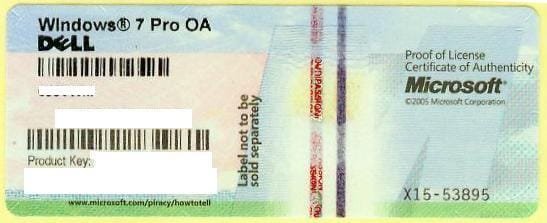
What is the exact wording of the Windows version printed on each COA sticker?
1270558000_86224332_1-Pictures-of--Buying-Windows-7-Prof-COA-Sticker-Only-100pcs-up-Needed.jpg

Boot into System Recovery Options to run Startup Repair repeatedly, report back results.
 
I was using a loader from paragon partition manager. My pc with win7 windows 7 home prem oa hp
And my vista pc says windows vista home premium bmact hp. I think it says bmact not sure its worn bad in that spot its a four year old laptop its the Hp pavilion dv9657cl
The one with windows 7 is a hp2000-239wm
I just thought like a noob that a loader would force the messed up vista to load but it messed up my new laptop instead
 

My Computer My Computer

At a glance

windows 7 home x64x64
OS
windows 7 home x64x64
Why Did you not make the OEM manufacturer's Recovery Disks?

   Information
We always assume you have made your Recovery Disks using the OEM manufacturer's Recovery Media Creator app the first day you had your new PC.
& made the Startup Repair CD.
startup repair disc-create
 

My Computer My Computer

At a glance

ME/XP/Vista/Win7
OS
ME/XP/Vista/Win7
It won't let me choose startup repair its greyed out as a choice only option is Microsoft restore point thing
 

My Computer My Computer

At a glance

windows 7 home x64x64
OS
windows 7 home x64x64
Because I wasn't thinking I just got it for christmas
 

My Computer My Computer

At a glance

windows 7 home x64x64
OS
windows 7 home x64x64
Thanks for clarifying that. Loader is a loaded word here as there is zero tolerance for piracy.

System Restore is a viable option if it will run from System Recovery Options. You can try it now although if it fails you'll need to start at the top working through these steps to try to get each OS booting again: Windows 7 fails to boot. Report back on each step, skipping none.

Is the Product Key readable on each COA sticker in case you get to the bottom of the list and are forced to reinstall?
 
Yes the only part that was unreadable was that one spot where it was partially rubbed away from being in my lap so much
 

My Computer My Computer

At a glance

windows 7 home x64x64
OS
windows 7 home x64x64
Well you see it won't go to the part to start in safe mode it doesn't get past the bios screen
 

My Computer My Computer

At a glance

windows 7 home x64x64
OS
windows 7 home x64x64
Is there a way to do it from cmd prompt in the recovery wizard? Maybe with bootmgr or something or bootcfg
 

My Computer My Computer

At a glance

windows 7 home x64x64
OS
windows 7 home x64x64
You may need to follow the steps given to first check for infection since the OS may not repair until it's cleaned up. Then run Startup Repair which automates System File Checker, bootrec and bootsect commands, System Restore, etc.

You can run those tests manually as given in the steps if Startup Repair fails to run them.

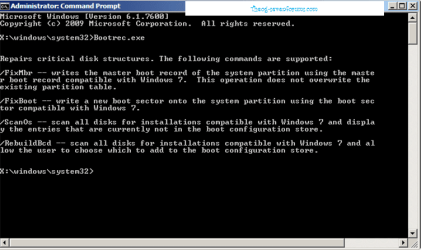
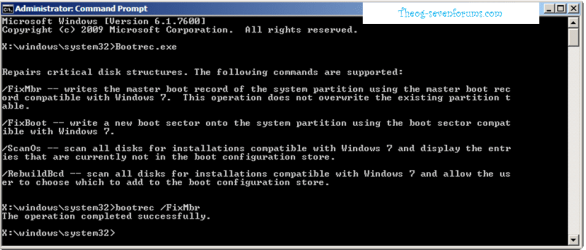
You can also run bootrec.exe /fixmbr and bootrec.exe /fixboot if an Installation fails to appear for Repair.
 
Ok. Ill try those recovery discs just have to get to a pc that has a working copy of windows to burn them
 

My Computer My Computer

At a glance

windows 7 home x64x64
OS
windows 7 home x64x64
Is there a way to do it from cmd prompt in the recovery wizard? Maybe with bootmgr or something or bootcfg

Do Startup Repair first.

   Information
Boot up using the Startup Repair CD or Windows 7 DVD. (not the OEM manufacturer's Recovery Disk) If you have a Netbook, you will need a CD/DVD drive.
NOTE: Make sure no USB drives are plugged in.
Do not use a USB Pendrive for Startup Repair.
startup repair disc-create


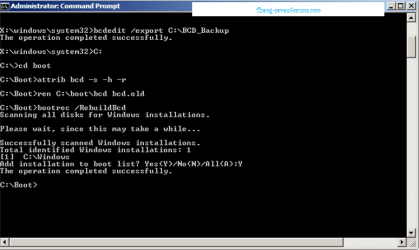
Use the Rebuild BCD in this tutorial:
How to use the Bootrec.exe tool in the Windows Recovery Environment to troubleshoot and repair startup issues in Windows

Startup Repair 4.PNG Startup Repair 5.PNG

Restore MBR.

Startup Repair 6.PNG
 

My Computer My Computer

At a glance

ME/XP/Vista/Win7
OS
ME/XP/Vista/Win7
Hmmm I tried the way from bootrec but when I try to add the windows os to the bcd it says
The system cannot find the path specified wth
 

My Computer My Computer

At a glance

windows 7 home x64x64
OS
windows 7 home x64x64
You can retrieve your keys if you can`t read them with Tuneup Utilities.
 

My Computer My Computer

At a glance

Windows 10 Pro x64Intel Core i7 6700KGSkill TridentZ RGB 16GB 3600 16-16-16-36EVGA GTX 980 Ti SC x2
Computer type
PC/Desktop
Computer Manufacturer/Model Number
Skylake Special #666
OS
Windows 10 Pro x64
CPU
Intel Core i7 6700K
Motherboard
Asus Sabertooth Z170 Mark 1
Memory
GSkill TridentZ RGB 16GB 3600 16-16-16-36
Graphics Card(s)
EVGA GTX 980 Ti SC x2
Sound Card
Realtek High Definition
Monitor(s) Displays
AOC G2460PG
Screen Resolution
1920 x 1080 144Hz
Hard Drives
Samsung 860 Pro 256GB, Seagate Barracuda 4TB x2
PSU
EVGA 1000 P2, EVGA White Custom Braided Cables
Case
Corsair Vengeance C70 Gunmetal Black
Cooling
Corsair H100i v2, Corsair ML120 x2, Thermal Grizzly Kryonaut
Keyboard
Logitech G910 Orion Spectrum
Mouse
Logitech G700s
Internet Speed
Verizon Fios Quantum Gateway 75/75
Antivirus
Windows Defender, Malwarebytes Free 3.8.3
Browser
Chrome
Other Info
Corsair SP120 x4, LG Blu-ray Drive, Durabrand HT-395 100 Watt Dolby Digital Amp, Corsair H2100 Wireless 7.1 Headset
Back
Top