Looking for solutions to several small Windows 7 Annoyances

ions

New member
Local time
5:59 AM
Messages
5
Hello Windows 7 Expert.

Below are my Windows 7 annoyances which I am sure must have a solution. I did not experience these annoyances under XP. I have lived with these annoyances for a while but am now looking for a solution.

1) In most Folders I want the files to be sorted Alpha Numerically. There is one Folder specifically I want sorted by Modified date. When I sort this specific Folder by Modified Date all other Folders are now sorted by modified date. How can I set sorts to be specific for each folder and not globally.

2) When I delete a file in a folder it doesn't disappear unless I hit the refresh button. This happens consistently when I navigate to the folder by right clicking a desktop shortcut and selecting Open File Location. If I open a folder regularly and delete files they do disappear immediately.

3) When I have a file on my desktop and I modify it Windows 7 changes it's position on the desktop to some default position. I would like the file to remain in the same location on the desktop after I have modified it.

4) I often do presentations and when I hoop up to some projectors my icons on my desktop get scrambled. Next time I restart my computer all my icons remain scrambled. To resolve this I always save a System Restore Point before a presentation. After the presentation I run the System Restore. I have noticed that the icons on my desktop are not always in the same positions as the original Restore Point. It's fairly close, like 90%, but not 100%. Why?

5) Sometimes when I open a specific email in Outlook it's not maximized and other times it is. This appears to be random behavior. Happens sometimes with other programs other than Outlook too I think. It forces an extra Maximize click and me wondering why it didn't open maximized this time.

6) Not sure if this is Windows 7 or Outlook issue. Ever since I started using Windows 7 instead of XP all my embedded images in sent emails are distorted (much lower quality) than the original embedded image. When I check old sent emails in XP the images are crystal clear. I would like my embedded images to appear the same quality when they are sent.

Thank you for the advice and recommended solutions.
 

My Computer My Computer

At a glance

Windows 7 64Bit Proffessional
Computer type
Laptop
Computer Manufacturer/Model Number
Dell
OS
Windows 7 64Bit Proffessional
The folder sort issue in #1 is probably due to the issues discussed/demonstrated in this post/thread:
http://www.sevenforums.com/general-...l-programs-programs-features.html#post2494172

The repeated use of System Restore is probably the cause of several of your other items. The System Restore process is far from perfect and (in my opinion) should only be used in emergencies. Use a tool like Desktop Restore to put you desktop objects (shortcuts, files, folders) back in place.

Maybe other forum members have suggestions for your other items/annoyances.
 

My Computer My Computer

At a glance

W7 Pro SP1 64biti78GBIntel HD Graphics
Computer type
Laptop
Computer Manufacturer/Model Number
Employer provided Dell Latitude
OS
W7 Pro SP1 64bit
CPU
i7
Memory
8GB
Graphics Card(s)
Intel HD Graphics
Hard Drives
crappy SSD
Antivirus
Employer mandated Symantec Endpoint Protection
Browser
Pale Moon 64bit, IE11 64bit & Chrome 64bit

My Computer My Computer

At a glance

Vista, Windows7, Mint Mate, Zorin, Windows 8from 1.6GHz Duo to i7
Computer Manufacturer/Model Number
HP, Dell, Gateway, Toshiba - 4 laptops and 2 desktops
OS
Vista, Windows7, Mint Mate, Zorin, Windows 8
CPU
from 1.6GHz Duo to i7
Monitor(s) Displays
2x HP w2207
Hard Drives
5x HDD, 7x SSD, 12x Externals
Keyboard
with trackball - no mices
Mouse
Trackball mice
Internet Speed
DSL 6000
Sure they belong on the desktop. It is background pictures that do not belong on desktops :-)

I'm just joking with you. That info/video is a good addition to this thread... but now I'll ramble on a bit:

I find that some people use the desktop as a temporary work space; others, not so much. I have items on my desktop that only stay there for a few minutes while I work on them. Then they are moved off to a file server.

That Desktop tool bar method is horribly slow when you have lots of objects on the desktop. It takes much too long between first clicking on the Desktop tool bar and finally clicking on the desired object. Since I'm on a laptop (without a mouse), hovering over several nested folders/menus in the Desktop tool bar is not ideal.

I do use the Desktop tool bar at times. I've used it for many years - long before W7. However, my desktop objects are neatly arranged by theme (e.g. things related to networking are in the lower right corner. Things that I stream several times each day are in the upper right corner. Very temporary objects go in the middle.) I use each desktop object frequently enough to want them on the desktop. It is - of course - a matter of preference.


I do keep lots of shortcuts in about a dozen folders and sub-folders on the desktop - but many of those shortcuts get changed/updated quite often (think m3u8 streams). It is much easier to update those shortcuts using a Windows Explorer GUI than the Desktop tool bar menu.
 

My Computer My Computer

At a glance

W7 Pro SP1 64biti78GBIntel HD Graphics
Computer type
Laptop
Computer Manufacturer/Model Number
Employer provided Dell Latitude
OS
W7 Pro SP1 64bit
CPU
i7
Memory
8GB
Graphics Card(s)
Intel HD Graphics
Hard Drives
crappy SSD
Antivirus
Employer mandated Symantec Endpoint Protection
Browser
Pale Moon 64bit, IE11 64bit & Chrome 64bit

I disagree. MS actually intended the desktop to be used for program icons (although I prefer to have my program icons on the taskbar in the Qucklaunch menu or notification tray).

I have many icons (actually, mostly icons for shortcuts) for documents and folders on my desktop and they almost always stay put. One way that usually ensures that they stay put, once you arrange them the way you want, is to right click on an empty spot on the desktop, then left click on Refresh. Repeat anytime you make a change to the desktop. I've been doing that for years and rarely have a problem.

I generally avoid keeping any actual files or folders on the desktop (I don't want them cluttering up my C: drive). Instead, I put the file or folder in an appropriate folder elsewhere on my computer and create a shortcut to go on my desktop. The easy way to do that is to go to the location where you stashed the file or folder, right click on the file or folder, click on Send To, then click on Desktop. That will create a shortcut on your desktop that you can then relocate wherever you want. After relocating the shortcut, be sure to Refresh the desktop again.
 

My Computer My Computer

At a glance

Win 7 Ultimate 64 bitIntel i7-3930KKingston HyperX Genesis 32GB Kit (8x4GB Modul...MSI R7850 Twin Frozr 2GD5/OC Radeon HD 7850 2...
Computer type
PC/Desktop
Computer Manufacturer/Model Number
Custom Build
OS
Win 7 Ultimate 64 bit
CPU
Intel i7-3930K
Motherboard
ASUS P9X79 WS
Memory
Kingston HyperX Genesis 32GB Kit (8x4GB Modules) 1600MHz DDR
Graphics Card(s)
MSI R7850 Twin Frozr 2GD5/OC Radeon HD 7850 2GB 256-bit GDDR
Sound Card
Asus Xonar Essence STX
Monitor(s) Displays
3x Asus VG248QE 24", Vizio 32" TV
Screen Resolution
1920 x 1080, ?
Hard Drives
Samsung 128GB 840 Pro SSD (1),
Samsung 4TB 850 EVO SSDs (4)
Samsung 4TB 850 EVO SSDs (16) external backup drives used in 2.5" hot swap bays in the computer.
PSU
Corsair HX750w
Case
Antec Two Hundred v2 (modified)
Cooling
Cooler Master GeminII S524 120mm (fan replaced with a 140mm)
Keyboard
Logitech G510s
Mouse
Logitech M525 (two in use)
Internet Speed
=< 32Mbps down, 8Mbps up
Antivirus
AVAST!, MBAM, SAS, Spybot S&D (all but MBAM free) Glary Util
Browser
IE11
Other Info
LSI 9211-8i HBA card (8 SATA III ports), 2.5" & 3.5" Hot Swap Bays, HooToo HT-CR001 PCI-E to USB 3.0 Internal Hub + 6 Slot Card Reader, and LG Model CH12LS28 BD-ROM Optical Drive. Also, ScanSnap S1500 ADF duplexing scanner, Canon 9000F flat bed scanner, Corsair SP2500 2.1 speakers, Samsung CLP 415nw laser color printer, Cyberpower PP2200SW UPS
Hello Windows 7 Expert.

Below are my Windows 7 annoyances which I am sure must have a solution. I did not experience these annoyances under XP. I have lived with these annoyances for a while but am now looking for a solution.

1) In most Folders I want the files to be sorted Alpha Numerically. There is one Folder specifically I want sorted by Modified date. When I sort this specific Folder by Modified Date all other Folders are now sorted by modified date. How can I set sorts to be specific for each folder and not globally...

I had the exact same problem. It was caused by accessing my folders and files through the shortcuts on the Start Menu; in other words, clicking on the Windows Orb (or hitting the Windows key), then clicking on Documents, Music, or Photos. Unlike it was in XP, those shortcuts are actually to Libraries and any changes made to sorting will be made to everything in the Library. I just hid those libraries and made shortcuts on my desktop by goning into Computer, navigating to the appropriate folder, and creating the shortcut as outlined in my previous post. The shortcut can then be dragged to where ever you want, such as the Taskbar, the Quick Launch Menu on the Taskbar (that is what I did), or the Start Menu (it will appear in the left column with programs but it can be rearranged).

There is a tutorial here somewhere for replacing the existing Library shortcuts on the right hand side of the Start Menu with ones that bypass the Libraries and go directly to the appropriate folders.

Re. System Restore: I never could get that to work properly in Win 7 (actually, not at all) and I much prefer an imaging program called Macrium Reflect (Macrium Reflect Free for the free version). An image is like a photo negative of a drive. It can be used to restore that drive to the state it was in at the time the image was made, very similar to what System Restore is supposed to do. I have found Macrium Reflect to be 100% reliable as long as I verified images after creating them.

To best utilize imaging, your System Files (OS and Programs) should be on their own drive or partition ( C: ) and data on separate drives or partitions.
 
Last edited:

My Computer My Computer

At a glance

Win 7 Ultimate 64 bitIntel i7-3930KKingston HyperX Genesis 32GB Kit (8x4GB Modul...MSI R7850 Twin Frozr 2GD5/OC Radeon HD 7850 2...
Computer type
PC/Desktop
Computer Manufacturer/Model Number
Custom Build
OS
Win 7 Ultimate 64 bit
CPU
Intel i7-3930K
Motherboard
ASUS P9X79 WS
Memory
Kingston HyperX Genesis 32GB Kit (8x4GB Modules) 1600MHz DDR
Graphics Card(s)
MSI R7850 Twin Frozr 2GD5/OC Radeon HD 7850 2GB 256-bit GDDR
Sound Card
Asus Xonar Essence STX
Monitor(s) Displays
3x Asus VG248QE 24", Vizio 32" TV
Screen Resolution
1920 x 1080, ?
Hard Drives
Samsung 128GB 840 Pro SSD (1),
Samsung 4TB 850 EVO SSDs (4)
Samsung 4TB 850 EVO SSDs (16) external backup drives used in 2.5" hot swap bays in the computer.
PSU
Corsair HX750w
Case
Antec Two Hundred v2 (modified)
Cooling
Cooler Master GeminII S524 120mm (fan replaced with a 140mm)
Keyboard
Logitech G510s
Mouse
Logitech M525 (two in use)
Internet Speed
=< 32Mbps down, 8Mbps up
Antivirus
AVAST!, MBAM, SAS, Spybot S&D (all but MBAM free) Glary Util
Browser
IE11
Other Info
LSI 9211-8i HBA card (8 SATA III ports), 2.5" & 3.5" Hot Swap Bays, HooToo HT-CR001 PCI-E to USB 3.0 Internal Hub + 6 Slot Card Reader, and LG Model CH12LS28 BD-ROM Optical Drive. Also, ScanSnap S1500 ADF duplexing scanner, Canon 9000F flat bed scanner, Corsair SP2500 2.1 speakers, Samsung CLP 415nw laser color printer, Cyberpower PP2200SW UPS
The repeated use of System Restore is probably the cause of several of your other items. The System Restore process is far from perfect and (in my opinion) should only be used in emergencies.
I wasn't aware of this. I thought System Restore was pretty solid. Thanks for the Heads up.

Use a tool like Desktop Restore to put you desktop objects (shortcuts, files, folders) back in place.
Thanks for the suggestions.

One way that usually ensures that they stay put, once you arrange them the way you want, is to right click on an empty spot on the desktop, then left click on Refresh.
This worked. Thank you.

It was caused by accessing my folders and files through the shortcuts on the Start Menu;
This problem occurs for me even when I access the folder through Explorer.

I much prefer an imaging program called Macrium Reflect (Macrium Reflect Free for the free version)
I image my HD every night with Acronis. Haven't had to use it yet though.

At this point items 3) and 4) are resolved.

Am I to assume that you are not experiencing issues 1), 2) and 5) and these are possibly caused by System Restore?

Thanks for your feedback.
 

My Computer My Computer

At a glance

Windows 7 64Bit Proffessional
Computer type
Laptop
Computer Manufacturer/Model Number
Dell
OS
Windows 7 64Bit Proffessional
I explained how to deal with #1 in my post #6. If I wasn't clear enough (it happens more than I care to admit), let me know and I'll try to clarify it.

I never have a problem with #2.

I get #5 once in a blue moon in other programs; I haven't used Outlook since XP (and only used it then because I had to at work and don't recall the problem from way back then since I retired from that job over 12 years ago). I don't know why it happens but it happens so rarely, I just don't worry about it.

My only issue with System Restore is it never worked for me in Win 7 (it worked fine for me in XP). Others report it works for them but almost always admit occasionally it doesn't work. I have no idea why that is but, since I've never had Macrium Reflect fail me, I just use it and don't worry about it. I seriously doubt System Restore has anything to do with any of your problems.
 

My Computer My Computer

At a glance

Win 7 Ultimate 64 bitIntel i7-3930KKingston HyperX Genesis 32GB Kit (8x4GB Modul...MSI R7850 Twin Frozr 2GD5/OC Radeon HD 7850 2...
Computer type
PC/Desktop
Computer Manufacturer/Model Number
Custom Build
OS
Win 7 Ultimate 64 bit
CPU
Intel i7-3930K
Motherboard
ASUS P9X79 WS
Memory
Kingston HyperX Genesis 32GB Kit (8x4GB Modules) 1600MHz DDR
Graphics Card(s)
MSI R7850 Twin Frozr 2GD5/OC Radeon HD 7850 2GB 256-bit GDDR
Sound Card
Asus Xonar Essence STX
Monitor(s) Displays
3x Asus VG248QE 24", Vizio 32" TV
Screen Resolution
1920 x 1080, ?
Hard Drives
Samsung 128GB 840 Pro SSD (1),
Samsung 4TB 850 EVO SSDs (4)
Samsung 4TB 850 EVO SSDs (16) external backup drives used in 2.5" hot swap bays in the computer.
PSU
Corsair HX750w
Case
Antec Two Hundred v2 (modified)
Cooling
Cooler Master GeminII S524 120mm (fan replaced with a 140mm)
Keyboard
Logitech G510s
Mouse
Logitech M525 (two in use)
Internet Speed
=< 32Mbps down, 8Mbps up
Antivirus
AVAST!, MBAM, SAS, Spybot S&D (all but MBAM free) Glary Util
Browser
IE11
Other Info
LSI 9211-8i HBA card (8 SATA III ports), 2.5" & 3.5" Hot Swap Bays, HooToo HT-CR001 PCI-E to USB 3.0 Internal Hub + 6 Slot Card Reader, and LG Model CH12LS28 BD-ROM Optical Drive. Also, ScanSnap S1500 ADF duplexing scanner, Canon 9000F flat bed scanner, Corsair SP2500 2.1 speakers, Samsung CLP 415nw laser color printer, Cyberpower PP2200SW UPS
Lady Fitzgerald,
I could be wrong, but I think that ions is saying that he does not access files by "clicking on Documents, Music, or Photos". I don't get to files that way either and yet I've seen the issue in #1.


ions,
In post #2, I link to an old post that shows why issue #1 happens. That old post has a fix. Did you try that fix and it failed?

Here is the link to the old post again:
http://www.sevenforums.com/general-...l-programs-programs-features.html#post2494172

and here is one way to fix issue #1:
http://www.sevenforums.com/tutorials/15692-folder-view-settings-reset-all-default.html
 

My Computer My Computer

At a glance

W7 Pro SP1 64biti78GBIntel HD Graphics
Computer type
Laptop
Computer Manufacturer/Model Number
Employer provided Dell Latitude
OS
W7 Pro SP1 64bit
CPU
i7
Memory
8GB
Graphics Card(s)
Intel HD Graphics
Hard Drives
crappy SSD
Antivirus
Employer mandated Symantec Endpoint Protection
Browser
Pale Moon 64bit, IE11 64bit & Chrome 64bit
Folder Template

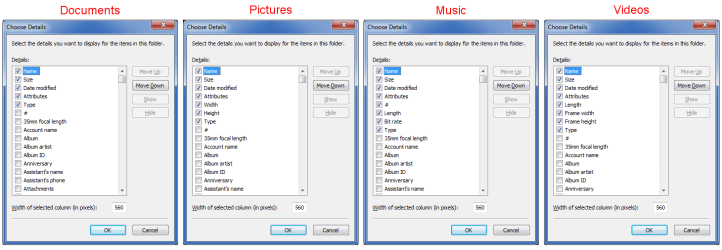
For issue 1, try setting a Folder Template for:

  • The folders you wish to sort by Name
  • The folders you wish to sort by Date
What I do is to set up my standard view options (Details view, choose columns and set widths) and then apply those to the General Folder Template.
Folder Templates 2016 02.png
I then create modified versions of the General Folder Template for the Documents, Music, Pictures* and Video Folder Templates.
For the Pictures Folder Template, after I have set the basic values I change the View to "Large Icons".
I can still "Sort by" and/or "Group by" the columns I chose when I set up the Details view.

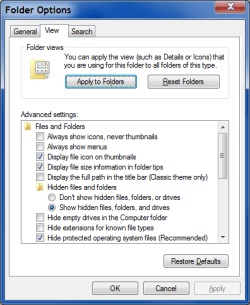
After setting each Folder Template, I click the "Apply to Folders" button in the View tab of the Folder Options window.
Windows Explorer Folder Options.png
Tutorials
http://www.sevenforums.com/tutorials/41198-folder-view-set-default-all-folders.html
http://www.sevenforums.com/tutorials/15699-folder-template-default.html
http://www.sevenforums.com/tutorials/11356-folder-view-apply-folders.html
 

My Computer My Computer

At a glance

W7 Ultimate SP1, LM19.2 MATE, W10 Home 1703, ...AMD Phenom II x6 1100T, 3.3 GHz12GB DDR3 1333 G-Skill (4GB x 2), G-Skill (2G...NVIDIA GeForce GTX 660
Computer type
PC/Desktop
Computer Manufacturer/Model Number
n/a
OS
W7 Ultimate SP1, LM19.2 MATE, W10 Home 1703, W10 Pro 1703 VM, #All 64 bit
CPU
AMD Phenom II x6 1100T, 3.3 GHz
Motherboard
ASUS M4A88T-M/USB3 (AM3)
Memory
12GB DDR3 1333 G-Skill (4GB x 2), G-Skill (2GB x 2)
Graphics Card(s)
NVIDIA GeForce GTX 660
Sound Card
Realtek?
Monitor(s) Displays
Samsung S23B350
Screen Resolution
1920x1080
Hard Drives
WD Green 2TB (SATA), WD Green 3TB (SATA), WD Blue 4TB (SATA), WD Blue 6TB (SATA)
PSU
Cooler Master
Case
Antec GX300 Tower
Cooling
3x Antec TRICOOL 120mm Fans
Mouse
Wired Optical
Internet Speed
DSL
Antivirus
Avast
Browser
Pale Moon (64 bit)
Other Info
2018-12-27 Upgraded HDDs
2015-12-10 Upgraded case, graphics card, storage
2015-08-15 Upgraded motherboard & RAM
2015-07-15 Upgraded LM17.1 to LM17.2
Thank you for the Responses. I haven't had a chance to try the suggestions for Issue #1 but I will.

A few minutes ago I was working in MS Word and when I returned to my desktop all the Icons were huge. I must of CTRL + Scroll on the desktop without my awareness. When I Ctrl+Scroll back to smaller icons all my desktop icons were out of position.

Is there a setting that will disable the Ctrl+Scroll on the desktop only which will prevent making the icons larger / smaller. I do not want this to happen again in the future to my desktop. I often use Ctrl+Scroll in Word and in my Browser so I just want to disable it on the desktop.

Thank you.
 

My Computer My Computer

At a glance

Windows 7 64Bit Proffessional
Computer type
Laptop
Computer Manufacturer/Model Number
Dell
OS
Windows 7 64Bit Proffessional
Back
Top