Losing Vista, Dual boot W7 and Linux on seperate drives. Help Sought.

Mark Win7 partition Active, unplug Vista HD and swap its cable to Win7 making sure it remains first to boot in BIOS setup (after DVD drive). Unplug the backup drive or mark it Inactive or it will interfere: Partition - Mark as Active

Boot Win7 DVD Repair console or Repair CD, click through to Recovery Tools list to run Startup repair up to 3 separate times with reboots to write the System MBR to Win7 partition and make it boot independently.

Next, plug back in Vista HD, boot DVD again to wipe the HD using Diskpart, or use free Partition Wizard bootable CD to wipe only the Vista partition. Install Linux with Win7 HD unplugged. SSD - HDD Optimize for Windows Reinstallation
Partition Wizard

Boot preferred HD by setting it first HD to boot in BIOS setup. Boot other HD using one-time BIOS Boot Menu key whch on Giga boards is usually F12. This keeps the HD's independent to come and go as you please, and won't allow GRUB to corrupt Win7 boot as it frequently does.

Those Linux partitions you deleted needed to be wiped if they had GRUB or they might interfere with Win7 recovering System MBR - try it to see.
 
Well. I was a bit concerned when I actually clicked the install button, convinced that I'd chosen the wrong drive and was about to wipe my install plus all my pics and media.
Fortunately I seem to have chosen correctly. I'm sat in Linux now. I've got my W7 drive mounted and I'm playing tunes and typing this. Just need to partition this drive and make some backup space.
I'm going to mainly use 7 and this is for fun but more as a safety measure in case I screw up W7.
So-MTI and BFK- Thank you both for your invaluable help and support.

Cheers, John
 

My Computer My Computer

At a glance

Windows 7 Home Premium 64 biti7 [email protected]2x4GB Corsair Vegeance DDR3XFX GTX 260 Black Edition
Computer Manufacturer/Model Number
The Monolith. 3.1
OS
Windows 7 Home Premium 64 bit
CPU
i7 [email protected]
Motherboard
Gigabyte Z77-D3H
Memory
2x4GB Corsair Vegeance DDR3
Graphics Card(s)
XFX GTX 260 Black Edition
Sound Card
none-through large stereo hi fi
Monitor(s) Displays
Croosover 27MDP LED IPS Dell 2408 WFP
Screen Resolution
2560x1440 1920x1200
Hard Drives
1x Samsung 840Pro 128GB SSD
1x Samsung Spinpoint F1 1TB
PSU
Corsair AX 850 Watt
Case
Cooler Master ACTS 840
Cooling
Be Quiet! Dark Rock Pro
Keyboard
Enermax Aurora
Mouse
Logitech Ballmouse
Internet Speed
20MBPS
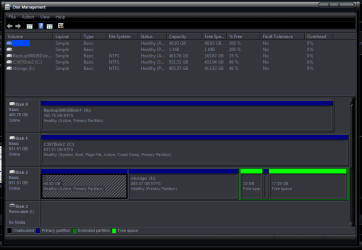
Just thought I'd post a pic of my new Disk Management structure. The Linux install is on the beginning and end of Disk 0.
As you can see I've partioned most of the drive for back up and storage.
Greg. Unfortunately I have ended up with a GRUB choice that then takes me to the Windows loader. Seems to work ok at the moment. Thanks for your post, John:)
 

Attachments

  • newdiskstructure.PNG
    newdiskstructure.PNG
    21.5 KB · Views: 8

My Computer My Computer

At a glance

Windows 7 Home Premium 64 biti7 [email protected]2x4GB Corsair Vegeance DDR3XFX GTX 260 Black Edition
Computer Manufacturer/Model Number
The Monolith. 3.1
OS
Windows 7 Home Premium 64 bit
CPU
i7 [email protected]
Motherboard
Gigabyte Z77-D3H
Memory
2x4GB Corsair Vegeance DDR3
Graphics Card(s)
XFX GTX 260 Black Edition
Sound Card
none-through large stereo hi fi
Monitor(s) Displays
Croosover 27MDP LED IPS Dell 2408 WFP
Screen Resolution
2560x1440 1920x1200
Hard Drives
1x Samsung 840Pro 128GB SSD
1x Samsung Spinpoint F1 1TB
PSU
Corsair AX 850 Watt
Case
Cooler Master ACTS 840
Cooling
Be Quiet! Dark Rock Pro
Keyboard
Enermax Aurora
Mouse
Logitech Ballmouse
Internet Speed
20MBPS
Hello John,


Glad to see you got it all sorted and running and thanks for the update.
 

My Computer My Computer

At a glance

W 7 64-bit UltimateIntel Q9550 Yorkfield8GB Dominator 8500C5DATI : XFX 5870
Computer Manufacturer/Model Number
* BFK Customs *
OS
W 7 64-bit Ultimate
CPU
Intel Q9550 Yorkfield
Motherboard
ASUS P5Q Pro
Memory
8GB Dominator 8500C5D
Graphics Card(s)
ATI : XFX 5870
Sound Card
Realtek HD Audio 7-1
Monitor(s) Displays
1x 47" LCD HDMI & 3x 26" LCD HDMI
Screen Resolution
1920x1080P & 1920x1200
Hard Drives
1x 80GB Intel X25-M G2 SSD : 1x 500GB & 1x 640GB WD Caviar Black(s)
PSU
Corsair 620HX
Case
Cooler Master RC-690
Cooling
Tuniq Tower 120, 2x 140mm and 3x 120mm case fans
Keyboard
Microsoft 500
Mouse
Razer Diamondback 3G
Internet Speed
14 Mb/s
Other Info
1x Koutech 3Gb/s SATA HDD Hot Swap Rack
You can use free Partition Wizard bootable CD to delete the free space mess at the end of DISK0. There appears to be a primary sliver partition in the middle of it. Just delete all three and create a new data partition there, formatted Logical I would suggest.
 
You can use free Partition Wizard bootable CD to delete the free space mess at the end of DISK0. There appears to be a primary sliver partition in the middle of it. Just delete all three and create a new data partition there, formatted Logical I would suggest.
Disk 0 is where the OP installed linux, I don't think he really wants to do that.
 
Thanks for your continuing support guys. I think you're referring to the mess at the end of Disk 2.
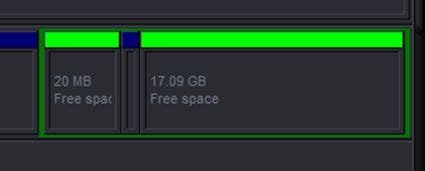
Disk 0 is a 500GB backup drive, Disk 1 is all Windows 7 and Disk 2 has the Linux Mint install at the front end followed by a large data partition then two Free Space Partitions at the end (20MB and 17GB)
I'll enclose a snip.
These were originally the Linux swap partition. I'm not sure how I've done this but I used GParted to create the NTFS storage partition (885GB) as Partition Wizard wouldn't let me and I seem to have ended up with these 2 and I'm not sure whether Linux swap is still in there.
What would you recommend?

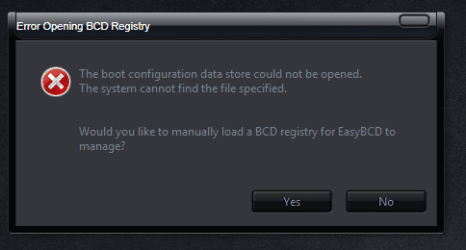
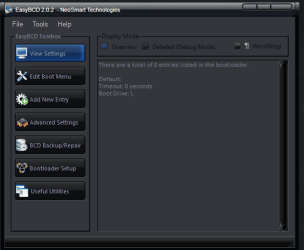
Also I have another issue. When I open EasyBCD I get this (see snip) and if I carry on I find no boot entries in EasyBCD (see snip)
It suggests I manually load a BCD registry and if I click yes opens my documents.
I'm assuming this is to do with the messy GRUB which I have to go through to get to W7, but I'm unsure how to proceed.

Thanks again, John:)
 

Attachments

  • DiskMan20.9.10.PNG
    DiskMan20.9.10.PNG
    22.6 KB · Views: 9
  • EasyBCD20.9.10.PNG
    EasyBCD20.9.10.PNG
    15.5 KB · Views: 2
  • EasyBCD2.20.9.10.PNG
    EasyBCD2.20.9.10.PNG
    17.7 KB · Views: 2

My Computer My Computer

At a glance

Windows 7 Home Premium 64 biti7 [email protected]2x4GB Corsair Vegeance DDR3XFX GTX 260 Black Edition
Computer Manufacturer/Model Number
The Monolith. 3.1
OS
Windows 7 Home Premium 64 bit
CPU
i7 [email protected]
Motherboard
Gigabyte Z77-D3H
Memory
2x4GB Corsair Vegeance DDR3
Graphics Card(s)
XFX GTX 260 Black Edition
Sound Card
none-through large stereo hi fi
Monitor(s) Displays
Croosover 27MDP LED IPS Dell 2408 WFP
Screen Resolution
2560x1440 1920x1200
Hard Drives
1x Samsung 840Pro 128GB SSD
1x Samsung Spinpoint F1 1TB
PSU
Corsair AX 850 Watt
Case
Cooler Master ACTS 840
Cooling
Be Quiet! Dark Rock Pro
Keyboard
Enermax Aurora
Mouse
Logitech Ballmouse
Internet Speed
20MBPS
hello again:
if it's booting okay, don't mess it up with easyBCD.. there are many ways to clean up GRUB, and even set windows 7 as the default OS choice. I found this tutorial to be very helpful.

Also, windows doesn't recognize ext or swapfile file systems (or any other file systems not used by windows for that matter), so there aren't any partition utilities or boot configuration utilities that work from inside windows that won't render your system unbootable.

if you're absolutely determined to get rid of GRUB, you'll have to erase your linux install first and run a windows startup repair to get windows to boot, and while I'm sure someone here would know another way do dual boot windows and linux. I don't.. other than by removing other HDDs during OS installs and then using the one time boot menu to choose between HDDs at each start up
 
The easiest way to do away with boot issues between Windows and Linux is to use the BIOS one time boot menu to select which OS to boot at system startup.

If you have 2 separate Hard Disk Drives (HDD) and have one or the other installed to one HDD and you want to install the other; disconnect the HDD with the first OS installed on it and leave the HDD you want to install the second OS to connected.

Install the OS to the connected HDD and when complete and the system is booting good, power down and reconnect the second HDD with the first OS on it.

This way the OSs will boot independently of each other and there will be no boot conflicts between the 2 separate OSs to have to sort later.

If I remember correctly the hot-key for the one time boot menu for a Gigabyte mobo is F13 at boot.

Hello again John, I posted this back at post #20.


If you want to remove these 3 partitions, as the 2 extendeds are free space and the primary is only 1MB it would seem you have nothing there and you could remove them to recover the space back into the E: partition.

Windows disk management will do that all on its own, the extendeds have to be deleted in disk management again so they will be made unallocated space, then delete the little 1MB primary and you should have a block of unallocated space that E: can be extended into.

FreeSpace.JPG
 

My Computer My Computer

At a glance

W 7 64-bit UltimateIntel Q9550 Yorkfield8GB Dominator 8500C5DATI : XFX 5870
Computer Manufacturer/Model Number
* BFK Customs *
OS
W 7 64-bit Ultimate
CPU
Intel Q9550 Yorkfield
Motherboard
ASUS P5Q Pro
Memory
8GB Dominator 8500C5D
Graphics Card(s)
ATI : XFX 5870
Sound Card
Realtek HD Audio 7-1
Monitor(s) Displays
1x 47" LCD HDMI & 3x 26" LCD HDMI
Screen Resolution
1920x1080P & 1920x1200
Hard Drives
1x 80GB Intel X25-M G2 SSD : 1x 500GB & 1x 640GB WD Caviar Black(s)
PSU
Corsair 620HX
Case
Cooler Master RC-690
Cooling
Tuniq Tower 120, 2x 140mm and 3x 120mm case fans
Keyboard
Microsoft 500
Mouse
Razer Diamondback 3G
Internet Speed
14 Mb/s
Other Info
1x Koutech 3Gb/s SATA HDD Hot Swap Rack
If you want to remove these 3 partitions, as the 2 extendeds are free space and the primary is only 1MB it would seem you have nothing there and you could remove them to recover the space back into the E: partition.
:doh:again... that's where linux is installed ..windows doesn't recognize the ext file systems that linux uses and sees it as free space

if you remove those three partitions, it will erase linux, GRUB & render the system unbootable again
 
Thanks for your continuing support guys. I think you're referring to the mess at the end of Disk 2.
Disk 0 is a 500GB backup drive, Disk 1 is all Windows 7 and Disk 2 has the Linux Mint install at the front end followed by a large data partition then two Free Space Partitions at the end (20MB and 17GB)
I'll enclose a snip.
These were originally the Linux swap partition. I'm not sure how I've done this but I used GParted to create the NTFS storage partition (885GB) as Partition Wizard wouldn't let me and I seem to have ended up with these 2 and I'm not sure whether Linux swap is still in there.
What would you recommend?

Also I have another issue. When I open EasyBCD I get this (see snip) and if I carry on I find no boot entries in EasyBCD (see snip)
It suggests I manually load a BCD registry and if I click yes opens my documents.
I'm assuming this is to do with the messy GRUB which I have to go through to get to W7, but I'm unsure how to proceed.

Thanks again, John:)


He said above that Linux is on "Disk 2, partition 1" correct, so how could Linux be in 2 places at the same time; and doing the startup repairs are no big deal at all as W_7 on Disk 1 is already "Systen, Active" ;)

Startup Repair - Run 3 Separate Times

Linux.jpg
 

My Computer My Computer

At a glance

W 7 64-bit UltimateIntel Q9550 Yorkfield8GB Dominator 8500C5DATI : XFX 5870
Computer Manufacturer/Model Number
* BFK Customs *
OS
W 7 64-bit Ultimate
CPU
Intel Q9550 Yorkfield
Motherboard
ASUS P5Q Pro
Memory
8GB Dominator 8500C5D
Graphics Card(s)
ATI : XFX 5870
Sound Card
Realtek HD Audio 7-1
Monitor(s) Displays
1x 47" LCD HDMI & 3x 26" LCD HDMI
Screen Resolution
1920x1080P & 1920x1200
Hard Drives
1x 80GB Intel X25-M G2 SSD : 1x 500GB & 1x 640GB WD Caviar Black(s)
PSU
Corsair 620HX
Case
Cooler Master RC-690
Cooling
Tuniq Tower 120, 2x 140mm and 3x 120mm case fans
Keyboard
Microsoft 500
Mouse
Razer Diamondback 3G
Internet Speed
14 Mb/s
Other Info
1x Koutech 3Gb/s SATA HDD Hot Swap Rack
Linux can't be installed to an ntfs partition. it will always show up as partitioned free space.
 
Linux sounds like a big PITA, I don't know why so many fool with it.


So you're saying it can't be installed to where he says it is?
 

My Computer My Computer

At a glance

W 7 64-bit UltimateIntel Q9550 Yorkfield8GB Dominator 8500C5DATI : XFX 5870
Computer Manufacturer/Model Number
* BFK Customs *
OS
W 7 64-bit Ultimate
CPU
Intel Q9550 Yorkfield
Motherboard
ASUS P5Q Pro
Memory
8GB Dominator 8500C5D
Graphics Card(s)
ATI : XFX 5870
Sound Card
Realtek HD Audio 7-1
Monitor(s) Displays
1x 47" LCD HDMI & 3x 26" LCD HDMI
Screen Resolution
1920x1080P & 1920x1200
Hard Drives
1x 80GB Intel X25-M G2 SSD : 1x 500GB & 1x 640GB WD Caviar Black(s)
PSU
Corsair 620HX
Case
Cooler Master RC-690
Cooling
Tuniq Tower 120, 2x 140mm and 3x 120mm case fans
Keyboard
Microsoft 500
Mouse
Razer Diamondback 3G
Internet Speed
14 Mb/s
Other Info
1x Koutech 3Gb/s SATA HDD Hot Swap Rack
Yes. I think those two free space partitions are where my Linux swap is installed. Linux always has two partitions and, as MTI says Windows can't see it.
I think that one of those two empty partition are where my Swap is. One of them is probably unnecessary as the Swap partition is normally tiny. So Linux is at the front of the drive and the Swap partition is on the end. I must have messed up somewhere to make it so big and make two of them.
As you can see I've formatted the middle, large, section as NTFS so that's Windows storage.
I think MTI is right. I'm stuck with GRUB but that's no big deal as it will allow me to boot into Windows.
I was a bit worried when EasyBCD couldn't show me a boot config but thinking about it, it makes sense. I'm now booting through GRUB.
I think I'll boot into Linux and see if I can clean it up from there.

As for the reason for messing with it. Well it's very attractive and very fast and pretty much impregnable. Also I can read and write to my Windows partition so, for example, I can listen to my music or movies in Linux.
It never need get any bigger because everything I do in it can be stored in Windows.
Most of all I can get online with it if I mess up my Windows install. This has helped me out before when I had Ubuntu installed. I made a mess and was able to get on SF for help.

Thanks to you both once again for your time, John:D
 

My Computer My Computer

At a glance

Windows 7 Home Premium 64 biti7 [email protected]2x4GB Corsair Vegeance DDR3XFX GTX 260 Black Edition
Computer Manufacturer/Model Number
The Monolith. 3.1
OS
Windows 7 Home Premium 64 bit
CPU
i7 [email protected]
Motherboard
Gigabyte Z77-D3H
Memory
2x4GB Corsair Vegeance DDR3
Graphics Card(s)
XFX GTX 260 Black Edition
Sound Card
none-through large stereo hi fi
Monitor(s) Displays
Croosover 27MDP LED IPS Dell 2408 WFP
Screen Resolution
2560x1440 1920x1200
Hard Drives
1x Samsung 840Pro 128GB SSD
1x Samsung Spinpoint F1 1TB
PSU
Corsair AX 850 Watt
Case
Cooler Master ACTS 840
Cooling
Be Quiet! Dark Rock Pro
Keyboard
Enermax Aurora
Mouse
Logitech Ballmouse
Internet Speed
20MBPS
Hello again John.


As has been said "if it ain't broke, don't fix it" eh! ;)
 

My Computer My Computer

At a glance

W 7 64-bit UltimateIntel Q9550 Yorkfield8GB Dominator 8500C5DATI : XFX 5870
Computer Manufacturer/Model Number
* BFK Customs *
OS
W 7 64-bit Ultimate
CPU
Intel Q9550 Yorkfield
Motherboard
ASUS P5Q Pro
Memory
8GB Dominator 8500C5D
Graphics Card(s)
ATI : XFX 5870
Sound Card
Realtek HD Audio 7-1
Monitor(s) Displays
1x 47" LCD HDMI & 3x 26" LCD HDMI
Screen Resolution
1920x1080P & 1920x1200
Hard Drives
1x 80GB Intel X25-M G2 SSD : 1x 500GB & 1x 640GB WD Caviar Black(s)
PSU
Corsair 620HX
Case
Cooler Master RC-690
Cooling
Tuniq Tower 120, 2x 140mm and 3x 120mm case fans
Keyboard
Microsoft 500
Mouse
Razer Diamondback 3G
Internet Speed
14 Mb/s
Other Info
1x Koutech 3Gb/s SATA HDD Hot Swap Rack
Linux sounds like a big PITA, I don't know why so many fool with it.

And really amazing they want to dual boot it after Win7, which is easily the best OS ever and could hardly be improved upon.

Maybe someone will clue us as to why, besides just dumping the daily dose of Linux/Ubuntu cases here at the WIn7 forum. :huh:
 
there are all kinds of good uses for linux... especially if you love windows... such as a linux based system with VMware that has VHDs of every currently used version of windows (all running simultaneously).. in order to provide remote assistance to anyone without having to reboot, which is what I'm going to do with the system in my specs when I'm not gaming, once I have the overclock settings figured out
or web developing, where you want to test your scripts on several operating systems simultaneously with the same machine.. or check out the tutorial I just made.. you'd have to be blind to not see how useful that would be
 
Back
Top