
Solved Lost USB space after linux.

Messerschmitt

New member
Member
Local time
7:02 AM
Messages
45
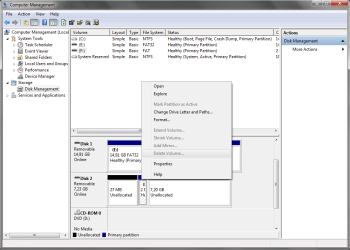
Hello. I have a 8GB kingston and after having linux on it, I now only have 2 mb free. I formatted it but still only have 2 mb free. I went into Computer Management, but I cannot delete the 2mb partition, to gather together the unallocated space and format it.

Please see the screenshot. The delete partition is greyed out. Any options out there so I can regain my 8GB?

Thank you.
 

Attachments
  • kingston.png
    kingston.png
    31.2 KB · Views: 1

My Computer

OS
windows 7
Since Linux uses a different drive formatting from Windows you probably will need to either find someone with a Linux machine to reformat it/delete the partition on it or boot to a GPARTED [partitioning program] CD and try reformatting or repartitioning. Windows won't be involved when working from the CD. You could also download a version of Linux LiveCD or LiveDVD, create the disc from the .iso file using your burning program, boot to it and run Linux, it's only a little slower than running an installed version but can do most of the same things.
 

My Computer

Computer type
PC/Desktop
Computer Manufacturer/Model Number
Customs, Dell, Gateway, HP, Toshiba, Acer, ASUS
OS
Windows 7 Ultimate 64-bit, Windows 8.1 64-bit, Mac OS X 10.10, Linux Mint 17, Windows 10 Pro TP
Keyboard
Microsoft
Mouse
Microsoft
Try formatting your drive with HP USB Disk Storage format Tool v2.2.3 HP USB Disk Storage Format Tool Download - Softpedia

Plugout all other USB drives except your problem 8GB pen drive. Right-click on the HPUSBDisk.exe and Run as administrator.

Check your correct pen drive is shown, choose the File system, Clear the check mark against the Quick Format ( so that a Full format will be done) and Start.

Let me know whether it resolved your problem.
 

My Computer

OS
Windows 7 Home Premium 32 bit

It says I do not have permission

Try formatting your drive with HP USB Disk Storage format Tool v2.2.3 HP USB Disk Storage Format Tool Download - Softpedia

Plugout all other USB drives except your problem 8GB pen drive. Right-click on the HPUSBDisk.exe and Run as administrator.

Check your correct pen drive is shown, choose the File system, Clear the check mark against the Quick Format ( so that a Full format will be done) and Start.

Let me know whether it resolved your problem.

Thanks, I think this is working
 

My Computer

OS
windows 7
,,,,,,,
Try formatting your drive with HP USB Disk Storage format Tool v2.2.3 HP USB Disk Storage Format Tool Download - Softpedia

Plugout all other USB drives except your problem 8GB pen drive. Right-click on the HPUSBDisk.exe and Run as administrator.

Check your correct pen drive is shown, choose the File system, Clear the check mark against the Quick Format ( so that a Full format will be done) and Start.

Let me know whether it resolved your problem.

Thanks, I think this is working

Glad it worked (even though you may still be "think"ing ;)) .
 

My Computer

OS
Windows 7 Home Premium 32 bit
It was still formatting in the process :)

But yea, I managed to get it formatted. It sees now all 7.2GB. Cheers!
 

My Computer

OS
windows 7
A foregone conclusion. Once it starts without spitting out an error message, it will complete the task. :party:
 

My Computer

OS
Windows 7 Home Premium 32 bit
Back
Top